
View Android Development course details at
www.edureka.co/android-development-certification-course
For Queries:
Post on Twitter @edurekaIN: #askEdureka
Post on Facebook /edurekaIN
For more details please contact us:
US : 1800 275 9730 (toll free)
INDIA : +91 88808 62004
Email Us : webinars@edureka.co
Android 6.0 Marshmallow : Everything you
need to know !
Slide 2
www.edureka.co/front-end-web-development
www.edureka.co/android-development-certification-course
Objectives
At the end of this module, you will be able to :
→ Implement Data Binding
→ Understand Android Percent Layout in Android Marshmallow
→ Learn about Android M Runtime Permissions
→ Implement App Linking in Android M
→ Understand Direct Share feature in Android M
Slide 3 www.edureka.co/android-development-certification-course
Data Binding
 Data binding becomes part of the developer’s tool set in Android Marshmallow
 The Data Binding library provides a mechanism for linking the data which will be displayed
within our layouts to some kind of back-end data source
 Data Binding Library is used to write declarative layouts and minimize the glue code necessary
to bind your application logic and layouts
 To set up your application to use data binding, add data binding to the class path of your top-
level build.gradle file
Slide 4 www.edureka.co/android-development-certification-course
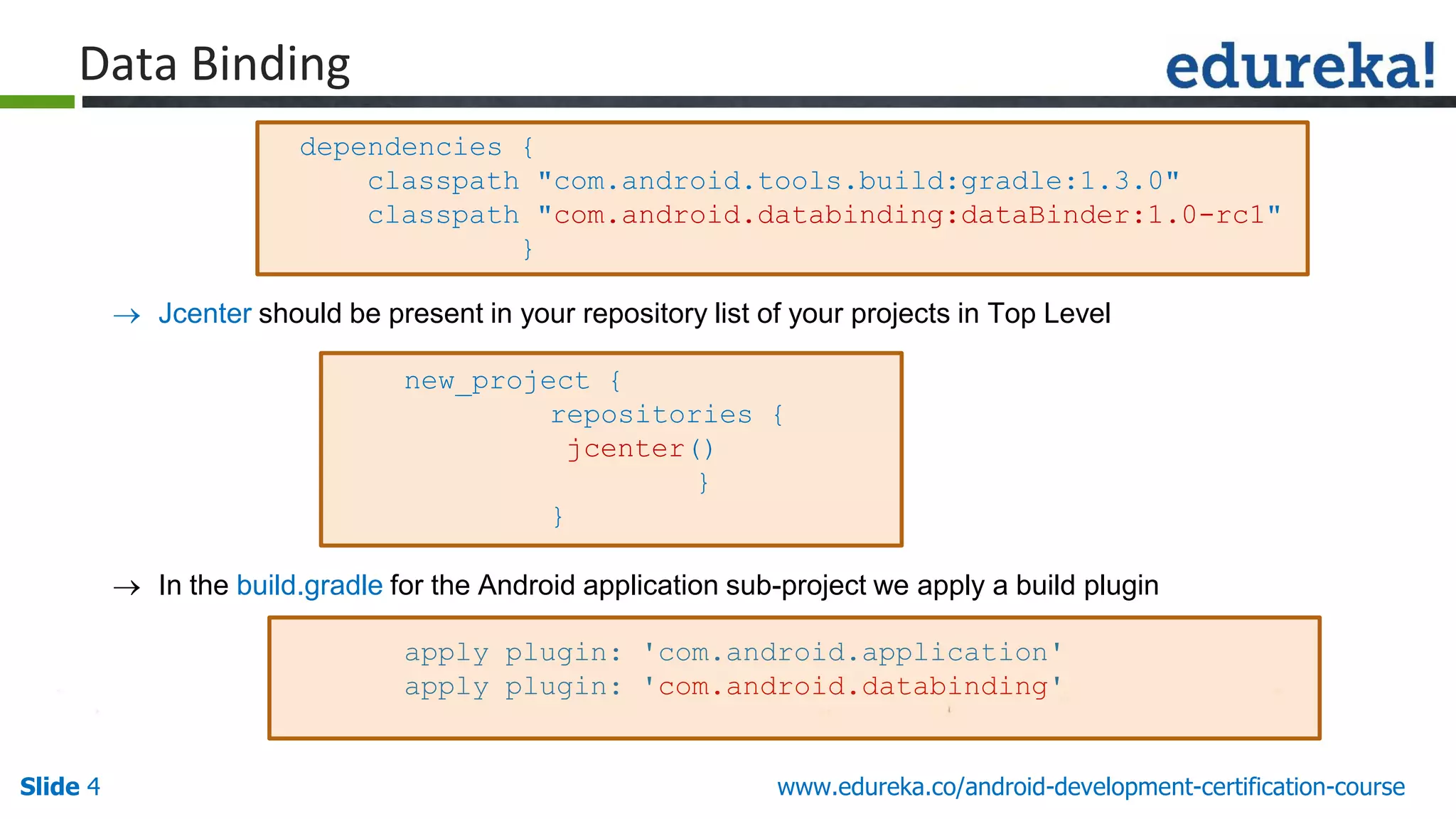
 Jcenter should be present in your repository list of your projects in Top Level
new_project {
repositories {
jcenter()
}
}
 In the build.gradle for the Android application sub-project we apply a build plugin
apply plugin: 'com.android.application'
apply plugin: 'com.android.databinding'
dependencies {
classpath "com.android.tools.build:gradle:1.3.0"
classpath "com.android.databinding:dataBinder:1.0-rc1"
}
Data Binding
Slide 5 www.edureka.co/android-development-certification-course
 Once the data binding is added , create a POJO for the binding.
 Update the layout file by adding some meta-data/markup
 Update the activity to declare the data binding
Demo
Data Binding
Slide 6 www.edureka.co/android-development-certification-course
Android Percent Layout
 There are problems with RelativeLayout and FrameLayout since you cannot set Child View's
dimension in percentage
 There are times where a particular layout requires us to divide space between components
proportionally, but the parent layout is not a LinearLayout
 It is not a problem anymore as in Marshmallow, Android team launched many Support Library to
help developer fighting with fragmentation. One of those is Percent Support Library which add an
capability to set RelativeLayout's and FrameLayout's dimension in %
Problem
Solution
Slide 7 www.edureka.co/android-development-certification-course
 First we need to include the percent support library in build.gradle file
compile 'com.android.support:percent:23.0.0‘
 Now you can switch to android.support.percent.PercentRelativeLayout and
android.support.percent.PercentFrameLayout
Android Percent Layout
Demo
Slide 8Slide 8Slide 8 www.edureka.co/android-development-certification-course
Runtime Permission
 Android 6.0 Marshmallow introduces one of the largest changes to the permissions model with
the addition of runtime permissions
 It replaces the existing install time permissions model when you target API 23 and the app is
running on an Android 6.0+ device
 Features :
» Ability to control when and with what context you’ll ask for permissions
» Google Play will not be required to accept a list of permissions before installing your app
» App updates will not be blocked until the user accepts the new permissions
Slide 9Slide 9Slide 9 www.edureka.co/android-development-certification-course
App Linking
 In Android M, when a user clicks on a website link , instead of asking the user to choose how to
handle the link he/she directly goes to the website's official app
 For example, if a twitter link is there in your inbox and you clicked on it, you used to get a prompt
asking if you want to open the link in your browser or within the Twitter app, which is installed on
your phone, now you will be directly re-directed to the twitter app, provided twitter app is there
on your device.
Slide 10Slide 10Slide 10 www.edureka.co/android-development-certification-course
 To enable your app to handle links, use intent filters in your app manifest to declare the URI
patterns to be handled by your app
 To enable link handling verification for your app, set the android:autoVerify attribute to true on
at least one of the web URI intent filters in your app manifest
App Linking
Slide 11Slide 11Slide 11 www.edureka.co/android-development-certification-course
 Test you App linking feature by confirming the list of associated hosts that the system should
verify for your app
 Confirm that the Digital Asset Links JSON file is properly hosted and defined by using the Digital
Asset Links API
 Testing a web URI intent
 Check the current system settings for link handling
Test App Linking
Slide 12 www.edureka.co/android-development-certification-course
Direct Share
 Direct Share is a new feature in Marshmallow that provides APIs for allowing users to share
content to other sources such as contacts and social networks
 Google calls it as a dummy messaging app
 Also allows users to share to specific targets, and demonstrates this by adding contacts
directly in the chooser dialog
 Example - if you frequently send your significant pictures via Hangouts, Android M will
recognize this habit and offer a single button to let you share directly with them
Slide 13 www.edureka.co/android-development-certification-course
 To enable Direct Share, apps need to implement a Service extending ChooserTargetService.
Override the method onGetChooserTargets() and return a list of Direct Share options
 In your AndroidManifest.xml, add a meta-data tag in your Activity that receives the Intent.
Specify android:name as android.service.chooser.chooser_target_service, and point the
android:value to the Service
Direct Share
Demo
Questions
Slide 14 www.edureka.co/android-development-certification-course
Android 6.0 Marshmallow - Everything you need to know !

Android 6.0 Marshmallow - Everything you need to know !

  • 1.
    View Android Developmentcourse details at www.edureka.co/android-development-certification-course For Queries: Post on Twitter @edurekaIN: #askEdureka Post on Facebook /edurekaIN For more details please contact us: US : 1800 275 9730 (toll free) INDIA : +91 88808 62004 Email Us : webinars@edureka.co Android 6.0 Marshmallow : Everything you need to know !
  • 2.
    Slide 2 www.edureka.co/front-end-web-development www.edureka.co/android-development-certification-course Objectives At theend of this module, you will be able to : → Implement Data Binding → Understand Android Percent Layout in Android Marshmallow → Learn about Android M Runtime Permissions → Implement App Linking in Android M → Understand Direct Share feature in Android M
  • 3.
    Slide 3 www.edureka.co/android-development-certification-course DataBinding  Data binding becomes part of the developer’s tool set in Android Marshmallow  The Data Binding library provides a mechanism for linking the data which will be displayed within our layouts to some kind of back-end data source  Data Binding Library is used to write declarative layouts and minimize the glue code necessary to bind your application logic and layouts  To set up your application to use data binding, add data binding to the class path of your top- level build.gradle file
  • 4.
    Slide 4 www.edureka.co/android-development-certification-course Jcenter should be present in your repository list of your projects in Top Level new_project { repositories { jcenter() } }  In the build.gradle for the Android application sub-project we apply a build plugin apply plugin: 'com.android.application' apply plugin: 'com.android.databinding' dependencies { classpath "com.android.tools.build:gradle:1.3.0" classpath "com.android.databinding:dataBinder:1.0-rc1" } Data Binding
  • 5.
    Slide 5 www.edureka.co/android-development-certification-course Once the data binding is added , create a POJO for the binding.  Update the layout file by adding some meta-data/markup  Update the activity to declare the data binding Demo Data Binding
  • 6.
    Slide 6 www.edureka.co/android-development-certification-course AndroidPercent Layout  There are problems with RelativeLayout and FrameLayout since you cannot set Child View's dimension in percentage  There are times where a particular layout requires us to divide space between components proportionally, but the parent layout is not a LinearLayout  It is not a problem anymore as in Marshmallow, Android team launched many Support Library to help developer fighting with fragmentation. One of those is Percent Support Library which add an capability to set RelativeLayout's and FrameLayout's dimension in % Problem Solution
  • 7.
    Slide 7 www.edureka.co/android-development-certification-course First we need to include the percent support library in build.gradle file compile 'com.android.support:percent:23.0.0‘  Now you can switch to android.support.percent.PercentRelativeLayout and android.support.percent.PercentFrameLayout Android Percent Layout Demo
  • 8.
    Slide 8Slide 8Slide8 www.edureka.co/android-development-certification-course Runtime Permission  Android 6.0 Marshmallow introduces one of the largest changes to the permissions model with the addition of runtime permissions  It replaces the existing install time permissions model when you target API 23 and the app is running on an Android 6.0+ device  Features : » Ability to control when and with what context you’ll ask for permissions » Google Play will not be required to accept a list of permissions before installing your app » App updates will not be blocked until the user accepts the new permissions
  • 9.
    Slide 9Slide 9Slide9 www.edureka.co/android-development-certification-course App Linking  In Android M, when a user clicks on a website link , instead of asking the user to choose how to handle the link he/she directly goes to the website's official app  For example, if a twitter link is there in your inbox and you clicked on it, you used to get a prompt asking if you want to open the link in your browser or within the Twitter app, which is installed on your phone, now you will be directly re-directed to the twitter app, provided twitter app is there on your device.
  • 10.
    Slide 10Slide 10Slide10 www.edureka.co/android-development-certification-course  To enable your app to handle links, use intent filters in your app manifest to declare the URI patterns to be handled by your app  To enable link handling verification for your app, set the android:autoVerify attribute to true on at least one of the web URI intent filters in your app manifest App Linking
  • 11.
    Slide 11Slide 11Slide11 www.edureka.co/android-development-certification-course  Test you App linking feature by confirming the list of associated hosts that the system should verify for your app  Confirm that the Digital Asset Links JSON file is properly hosted and defined by using the Digital Asset Links API  Testing a web URI intent  Check the current system settings for link handling Test App Linking
  • 12.
    Slide 12 www.edureka.co/android-development-certification-course DirectShare  Direct Share is a new feature in Marshmallow that provides APIs for allowing users to share content to other sources such as contacts and social networks  Google calls it as a dummy messaging app  Also allows users to share to specific targets, and demonstrates this by adding contacts directly in the chooser dialog  Example - if you frequently send your significant pictures via Hangouts, Android M will recognize this habit and offer a single button to let you share directly with them
  • 13.
    Slide 13 www.edureka.co/android-development-certification-course To enable Direct Share, apps need to implement a Service extending ChooserTargetService. Override the method onGetChooserTargets() and return a list of Direct Share options  In your AndroidManifest.xml, add a meta-data tag in your Activity that receives the Intent. Specify android:name as android.service.chooser.chooser_target_service, and point the android:value to the Service Direct Share Demo
  • 14.