Subject: Logic Design and Computer
Organization/ Computer Architecture
Topic Name: Computer Organization
By:
Dr. Sangeeta Shekhawat
Co-Convener Institute Innovation Council
https://www.amity.edu/jaipur/iic/iic-committee.html
E-Cell Amity University Member
http://65.1.43.184:8080/team.php
Objective
The primary goal of this course is to introduce undergraduates to
the concept of different layers as it pertains to computer systems
from a tech perspective.
Outcome
Understand how fundamental memory cell types work and use ICs
to implement sequential logic functions also explain the roles and
layout of the various CPU building blocks.
Prerequisites
Basic Digital Logic Gates, Combinational and Sequential Logic
Gates Designing
INTRODUCTION
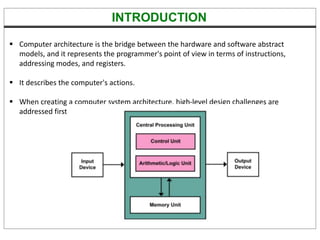
 Computer architecture is the bridge between the hardware and software abstract
models, and it represents the programmer's point of view in terms of instructions,
addressing modes, and registers.
 It describes the computer's actions.
 When creating a computer system architecture, high-level design challenges are
addressed first.
THE BASIC COMPUTER
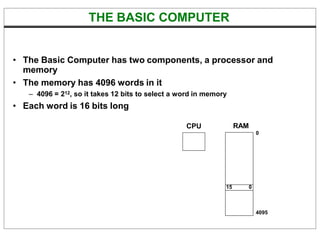
• The Basic Computer has two components, a processor and
memory
• The memory has 4096 words in it
– 4096 = 212, so it takes 12 bits to select a word in memory
• Each word is 16 bits long
CPU RAM
0
4095
15 0
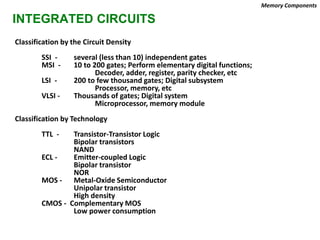
INTEGRATED CIRCUITS
Classification by the Circuit Density
SSI - several (less than 10) independent gates
MSI - 10 to 200 gates; Perform elementary digital functions;
Decoder, adder, register, parity checker, etc
LSI - 200 to few thousand gates; Digital subsystem
Processor, memory, etc
VLSI - Thousands of gates; Digital system
Microprocessor, memory module
Classification by Technology
TTL - Transistor-Transistor Logic
Bipolar transistors
NAND
ECL - Emitter-coupled Logic
Bipolar transistor
NOR
MOS - Metal-Oxide Semiconductor
Unipolar transistor
High density
CMOS - Complementary MOS
Low power consumption
Memory Components
Logic Gates
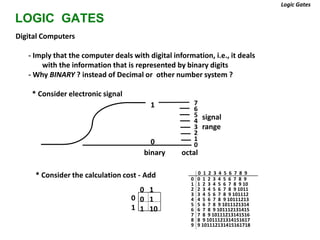
LOGIC GATES
Digital Computers
- Imply that the computer deals with digital information, i.e., it deals
with the information that is represented by binary digits
- Why BINARY ? instead of Decimal or other number system ?
* Consider electronic signal
signal
range
0 1 2 3 4 5 6 7 8 9
0 0 1 2 3 4 5 6 7 8 9
1 1 2 3 4 5 6 7 8 9 10
2 2 3 4 5 6 7 8 9 1011
3 3 4 5 6 7 8 9 101112
4 4 5 6 7 8 9 10111213
5 5 6 7 8 9 1011121314
6 6 7 8 9 101112131415
7 7 8 9 10111213141516
8 8 9 1011121314151617
9 9 101112131415161718
0
1 7
6
5
4
3
2
1
0
binary octal
0 1
0 1
1 10
0
1
* Consider the calculation cost - Add
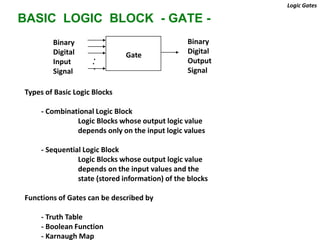
BASIC LOGIC BLOCK - GATE -
Types of Basic Logic Blocks
- Combinational Logic Block
Logic Blocks whose output logic value
depends only on the input logic values
- Sequential Logic Block
Logic Blocks whose output logic value
depends on the input values and the
state (stored information) of the blocks
Functions of Gates can be described by
- Truth Table
- Boolean Function
- Karnaugh Map
Logic Gates
Gate
.
.
.
Binary
Digital
Input
Signal
Binary
Digital
Output
Signal
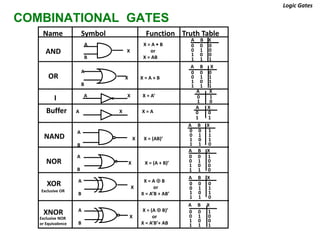
COMBINATIONAL GATES
A
X X = (A + B)’
B
Name Symbol Function Truth Table
Logic Gates
AND
A X = A • B
X or
B X = AB
0 0 0
0 1 0
1 0 0
1 1 1
0 0 0
0 1 1
1 0 1
1 1 1
OR
A
X X = A + B
B
I A X X = A’ 0 1
1 0
Buffer A X X = A
A X
0 0
1 1
NAND
A
X X = (AB)’
B
0 0 1
0 1 1
1 0 1
1 1 0
NOR
0 0 1
0 1 0
1 0 0
1 1 0
XOR
Exclusive OR
A X = A  B
X or
B X = A’B + AB’
0 0 0
0 1 1
1 0 1
1 1 0
A X = (A  B)’
X or
B X = A’B’+ AB
0 0 1
0 1 0
1 0 0
1 1 1
XNOR
Exclusive NOR
or Equivalence
A B X
A B X
A X
A B X
A B X
A B X
A B X
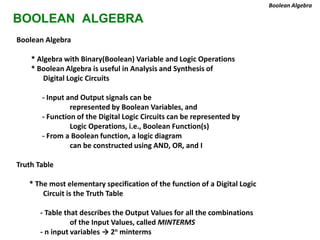
BOOLEAN ALGEBRA
Boolean Algebra
* Algebra with Binary(Boolean) Variable and Logic Operations
* Boolean Algebra is useful in Analysis and Synthesis of
Digital Logic Circuits
- Input and Output signals can be
represented by Boolean Variables, and
- Function of the Digital Logic Circuits can be represented by
Logic Operations, i.e., Boolean Function(s)
- From a Boolean function, a logic diagram
can be constructed using AND, OR, and I
Truth Table
* The most elementary specification of the function of a Digital Logic
Circuit is the Truth Table
- Table that describes the Output Values for all the combinations
of the Input Values, called MINTERMS
- n input variables → 2n minterms
Boolean Algebra
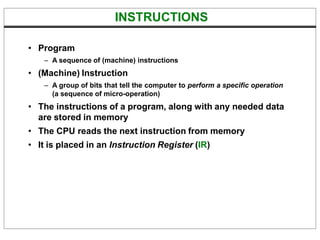
INSTRUCTIONS
• Program
– A sequence of (machine) instructions
• (Machine) Instruction
– A group of bits that tell the computer to perform a specific operation
(a sequence of micro-operation)
• The instructions of a program, along with any needed data
are stored in memory
• The CPU reads the next instruction from memory
• It is placed in an Instruction Register (IR)
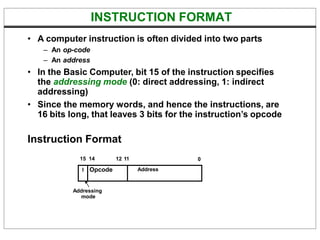
INSTRUCTION FORMAT
• A computer instruction is often divided into two parts
– An op-code
– An address
• In the Basic Computer, bit 15 of the instruction specifies
the addressing mode (0: direct addressing, 1: indirect
addressing)
• Since the memory words, and hence the instructions, are
16 bits long, that leaves 3 bits for the instruction’s opcode
Instruction Format
15 14 0
I Opcode Address
12 11
Addressing
mode
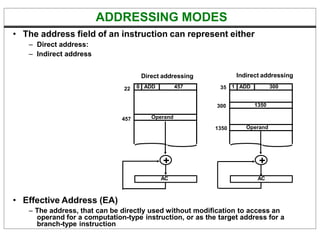
ADDRESSING MODES
• The address field of an instruction can represent either
– Direct address:
– Indirect address
• Effective Address (EA)
– The address, that can be directly used without modification to access an
operand for a computation-type instruction, or as the target address for a
branch-type instruction
22 0 ADD 457
Operand
457
35
300
1 ADD 300
1350
Operand
1350
+
AC
+
AC
Direct addressing Indirect addressing
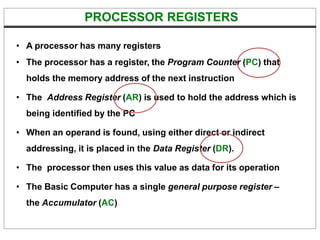
PROCESSOR REGISTERS
• A processor has many registers
• The processor has a register, the Program Counter (PC) that
holds the memory address of the next instruction
• The Address Register (AR) is used to hold the address which is
being identified by the PC
• When an operand is found, using either direct or indirect
addressing, it is placed in the Data Register (DR).
• The processor then uses this value as data for its operation
• The Basic Computer has a single general purpose register –
the Accumulator (AC)
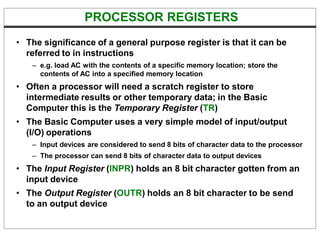
PROCESSOR REGISTERS
• The significance of a general purpose register is that it can be
referred to in instructions
– e.g. load AC with the contents of a specific memory location; store the
contents of AC into a specified memory location
• Often a processor will need a scratch register to store
intermediate results or other temporary data; in the Basic
Computer this is the Temporary Register (TR)
• The Basic Computer uses a very simple model of input/output
(I/O) operations
– Input devices are considered to send 8 bits of character data to the processor
– The processor can send 8 bits of character data to output devices
• The Input Register (INPR) holds an 8 bit character gotten from an
input device
• The Output Register (OUTR) holds an 8 bit character to be send
to an output device
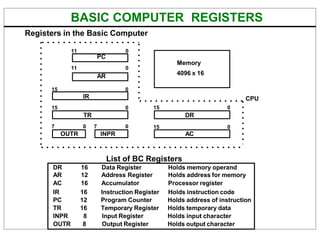
BASIC COMPUTER REGISTERS
Registers in the Basic Computer
11 0
PC
Memory
11 0
AR 4096 x 16
15 0
IR CPU
15 0 15 0
TR DR
7 0 7 0 15 0
OUTR INPR AC
List of BC Registers
DR 16 Data Register Holds memory operand
AR 12 Address Register Holds address for memory
AC 16 Accumulator Processor register
IR 16 Instruction Register Holds instruction code
PC 12 Program Counter Holds address of instruction
TR 16 Temporary Register Holds temporary data
INPR 8 Input Register Holds input character
OUTR 8 Output Register Holds output character
COMMON BUS SYSTEM
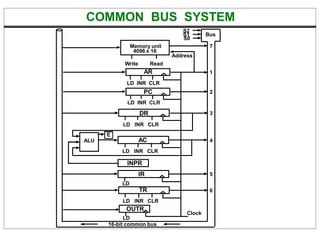
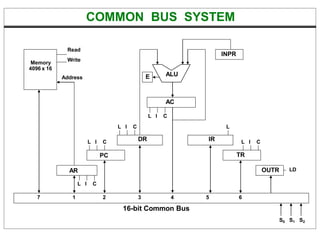
• The registers in the Basic Computer are connected using a
bus
• This gives a savings in circuitry over complete
connections between registers
COMMON BUS SYSTEM
S2
S0
S1 Bus
LD INR CLR
Address
Memory unit
4096 x 16
Write Read
AR
LD INR CLR
PC
DR
LD INR CLR
LD INR CLR
AC
ALU
E
INPR
IR
LD
LD INR CLR
TR
OUTR
Clock
LD
16-bit common bus
7
1
2
3
4
5
6
COMMON BUS SYSTEM
AR
PC
DR
L I C
L I C
L I C
AC
L I C
ALU
E
IR
L
TR
L I C
OUTR LD
INPR
Memory
4096 x 16
Address
Read
Write
16-bit Common Bus
7 1 2 3 4 5 6
S0 S1 S2
COMMON BUS SYSTEM
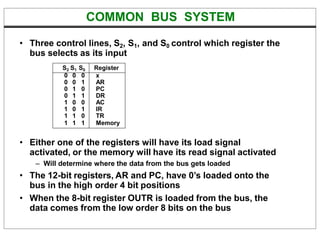
• Three control lines, S2, S1, and S0 control which register the
bus selects as its input
• Either one of the registers will have its load signal
activated, or the memory will have its read signal activated
– Will determine where the data from the bus gets loaded
• The 12-bit registers, AR and PC, have 0’s loaded onto the
bus in the high order 4 bit positions
• When the 8-bit register OUTR is loaded from the bus, the
data comes from the low order 8 bits on the bus
S2 S1 S0 Register
0 0 0 x
0 0 1 AR
0 1 0 PC
0 1 1 DR
1 0 0 AC
1 0 1 IR
1 1 0 TR
1 1 1 Memory
BASIC COMPUTER INSTRUCTIONS
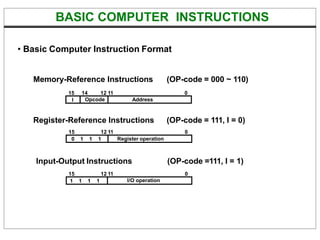
I Opcode Address
• Basic Computer Instruction Format
Memory-Reference Instructions (OP-code = 000 ~ 110)
15 14 12 11 0
Register-Reference Instructions
15 12 11
(OP-code = 111, I = 0)
0
0 1 1 1 Register operation
Input-Output Instructions
15 12 11
(OP-code =111, I = 1)
0
1 1 1 1 I/O operation
MEMORY REFERENCE INSTRUCTIONS
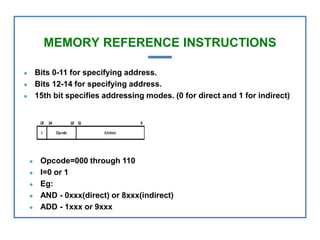
● Bits 0-11 for specifying address.
● Bits 12-14 for specifying address.
● 15th bit specifies addressing modes. (0 for direct and 1 for indirect)
● Opcode=000 through 110
● I=0 or 1
● Eg:
● AND - 0xxx(direct) or 8xxx(indirect)
● ADD - 1xxx or 9xxx
REGISTER REFERENCE INSTRUCTIONS
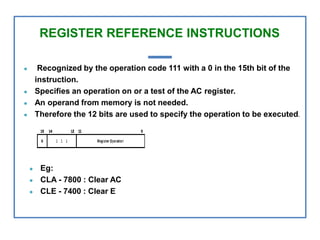
● Recognized by the operation code 111 with a 0 in the 15th bit of the
instruction.
● Specifies an operation on or a test of the AC register.
● An operand from memory is not needed.
● Therefore the 12 bits are used to specify the operation to be executed.
● Eg:
● CLA - 7800 : Clear AC
● CLE - 7400 : Clear E
I/O INSTRUCTIONS
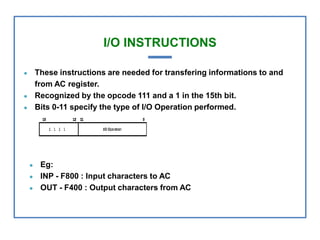
● These instructions are needed for transfering informations to and
from AC register.
● Recognized by the opcode 111 and a 1 in the 15th bit.
● Bits 0-11 specify the type of I/O Operation performed.
● Eg:
● INP - F800 : Input characters to AC
● OUT - F400 : Output characters from AC
BASIC COMPUTER INSTRUCTIONS
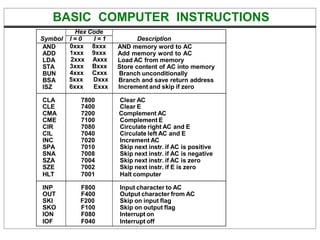
Symbol
Hex Code
Description
I = 0 I = 1
AND
ADD
LDA
STA
BUN
BSA
ISZ
0xxx 8xxx
1xxx 9xxx
2xxx Axxx
3xxx Bxxx
4xxx Cxxx
5xxx Dxxx
6xxx Exxx
AND memory word to AC
Add memory word to AC
Load AC from memory
Store content of AC into memory
Branch unconditionally
Branch and save return address
Increment and skip if zero
CLA 7800 Clear AC
CLE 7400 Clear E
CMA 7200 Complement AC
CME 7100 Complement E
CIR 7080 Circulate right AC and E
CIL 7040 Circulate left AC and E
INC 7020 Increment AC
SPA 7010 Skip next instr. if AC is positive
SNA 7008 Skip next instr. if AC is negative
SZA 7004 Skip next instr. if AC is zero
SZE 7002 Skip next instr. if E is zero
HLT 7001 Halt computer
INP F800 Input character to AC
OUT F400 Output character from AC
SKI F200 Skip on input flag
SKO F100 Skip on output flag
ION F080 Interrupt on
IOF F040 Interrupt off
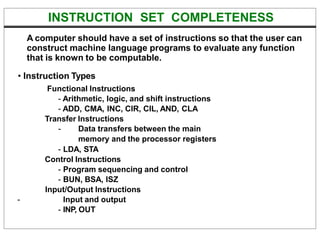
INSTRUCTION SET COMPLETENESS
A computer should have a set of instructions so that the user can
construct machine language programs to evaluate any function
that is known to be computable.
• Instruction Types
Functional Instructions
- Arithmetic, logic, and shift instructions
- ADD, CMA, INC, CIR, CIL, AND, CLA
Transfer Instructions
- Data transfers between the main
memory and the processor registers
- LDA, STA
Control Instructions
- Program sequencing and control
- BUN, BSA, ISZ
Input/Output Instructions
- Input and output
- INP, OUT
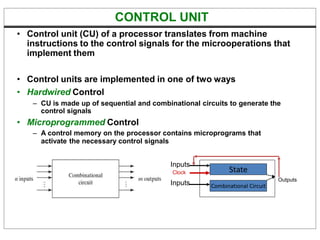
CONTROL UNIT
• Control unit (CU) of a processor translates from machine
instructions to the control signals for the microoperations that
implement them
• Control units are implemented in one of two ways
• Hardwired Control
– CU is made up of sequential and combinational circuits to generate the
control signals
• Microprogrammed Control
– A control memory on the processor contains microprograms that
activate the necessary control signals
State
Combinational Circuit
Clock
Inputs
Outputs
Inputs
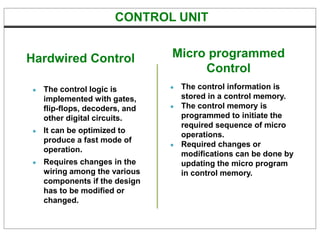
● The control logic is
implemented with gates,
flip-flops, decoders, and
other digital circuits.
● It can be optimized to
produce a fast mode of
operation.
● Requires changes in the
wiring among the various
components if the design
has to be modified or
changed.
● The control information is
stored in a control memory.
● The control memory is
programmed to initiate the
required sequence of micro
operations.
● Required changes or
modifications can be done by
updating the micro program
in control memory.
Hardwired Control Micro programmed
Control
CONTROL UNIT
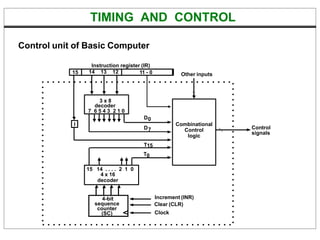
TIMING AND CONTROL
Control unit of Basic Computer
Instruction register (IR)
15 14 13 12 11 - 0
3 x 8
decoder
7 6 5 4 3 2 1 0
I
D0
15 14 . . . . 2 1 0
4 x 16
decoder
4-bit
sequence
counter
(SC)
Increment (INR)
Clear (CLR)
Clock
Other inputs
Control
signals
D7
T15
T0
Combinational
Control
logic
TIMING SIGNALS
C l o c k
T 0
T 1
T 2
T 3
T 4
D 3
C L R
S C
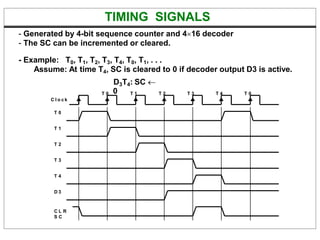
- Generated by 4-bit sequence counter and 416 decoder
- The SC can be incremented or cleared.
- Example: T0, T1, T2, T3, T4, T0, T1, . . .
Assume: At time T4, SC is cleared to 0 if decoder output D3 is active.
D3T4: SC 
T 0 0 T 1 T 2 T 3 T 4 T 0
DETERMINE THE TYPE OF INSTRUCTION
= 0 (direct)
D'7IT3:
D'7I'T3:
D7I'T3:
D7IT3:
AR  M[AR]
Nothing
Execute a register-reference instr.
Execute an input-output instr.
Start
SC  
AR  PC
T0
IR  M[AR], PC  PC + 1
T1
Decode Opcode in IR(12-14),
AR  IR(0-11), I  IR(15)
T2
D7
(Register or I/O) = 1 = 0 (Memory-reference)
I
I
Execute
register-reference
instruction
SC  0
Execute
input-output
instruction
SC  0
AR  M[AR] Nothing
(I/O) = 1 = 0 (register) (indirect) = 1
T3 T3 T3 T3
Execute
memory-reference
instruction
SC  0
T4
Memory
Fetch
Decode
Execute
Fetch
Decode
S2 S1 S0 Register
0 0 0 x
0 0 1 AR
0 1 0 PC
0 1 1 DR
1 0 0 AC
1 0 1 IR
1 1 0 TR
1 1 1 Memory
14, 13 ,12
Instruction register (IR)
15 14 13 12 11 - 0
INSTRUCTION CYCLE
• In Basic Computer, a machine instruction is executed in the
following cycle:
1. Fetch an instruction from memory
2. Decode the instruction
3. Read the effective address from memory if the instruction has an
indirect address
4. Execute the instruction
• After an instruction is executed, the cycle starts again at
step 1, for the next instruction
• Note: Every different processor has its own (different)
instruction cycle
FETCH and DECODE
• Fetch and Decode T0: AR  PC (S0S1S2=010, T0=1)
T1: IR  M [AR], PC  PC + 1 (S0S1S2=111, T1=1)
T2: D0, . . . , D7  Decode IR(12-14),AR  IR(0-11), I  IR(15)
S2
S1
S0
Bus
7
Memory
unit
Address
Read
AR
LD
PC
INR
IR
LD Clock
1
2
5
Common bus
T1
T0
S2 S1 S0 Register
0 0 0 x
0 0 1 AR
0 1 0 PC
0 1 1 DR
1 0 0 AC
1 0 1 IR
1 1 0 TR
1 1 1 Memory
Instruction register (IR)
15 14 13 12 11 - 0
REGISTER REFERENCE INSTRUCTIONS
Register Reference Instructions are identified when
- D7 = 1, I = 0
- Register Ref. Instr. is specified in b0 ~ b11 of IR
- Execution starts with timing signal T3
r = D7 IT3 => Register Reference Instruction
Bi = IR(i) , i=0,1,2,...,11
MEMORY REFERENCE INSTRUCTIONS
DR  M[AR]
AC  AC  DR, SC  0
Read operand
AND with AC
D0T4:
D0T5:
ADD to AC
D1T4:
D1T5:
DR  M[AR]
AC  AC + DR, E  Cout, SC  0
Read operand
Add to AC and store carry in E
- The effective address of the instruction is in AR and was placed there during
timing signal T2 when I = 0, or during timing signal T3 when I = 1
- Memory cycle is assumed to be short enough to complete in a CPU cycle
- The execution of MR instruction starts with T4
AND to AC
Symbol
Operation
Decoder
Symbolic Description
AND
ADD
LDA
STA
BUN
BSA
ISZ
D0
D1
D2
D3
D4
D5
D6
AC  AC  M[AR]
AC  AC + M[AR], E  Cout
AC  M[AR]
M[AR]  AC
PC  AR
M[AR]  PC, PC  AR + 1
M[AR]  M[AR] + 1, if M[AR] + 1 = 0 then PC  PC+1
MEMORY REFERENCE INSTRUCTIONS
Memory, PC after execution
20
PC = 21
AR = 135
136
0 BSA 135
Next instruction
Subroutine
1 BUN 135
20
21
135
PC = 136
0 BSA 135
Next instruction
21
Subroutine
1 BUN 135
Memory Memory
LDA: Load to AC
D2T4: DR  M[AR]
D2T5: AC  DR, SC  0
STA: Store AC
D3T4: M[AR]  AC, SC  0
BUN: Branch Unconditionally
D4T4: PC  AR, SC  0
BSA: Branch and Save Return Address
M[AR]  PC, PC  AR + 1
Memory, PC, AR at time T4
MEMORY REFERENCE INSTRUCTIONS
BSA:
D5T4: M[AR]  PC, AR  AR + 1
D5T5: PC  AR, SC  0
ISZ: Increment and Skip-if-Zero
D6T4: DR  M[AR]
D6T5: DR  DR + 1
D6T4: M[AR]  DR, if (DR = 0) then (PC  PC + 1), SC  0
FLOWCHART FOR MEMORY REFERENCE INSTRUCTIONS
DR  M[AR] DR  M[AR] DR  M[AR] M[AR]  AC
SC  0
AND STA
AC  AC + DR
E  Cout
SC  0
AC  DR
SC  0
D0T4
Memory-reference instruction
ADD LDA
D1T4 D2T4 D3T4
D0T5 D1T5 D2T5
PC  AR
SC  0
M[AR]  PC
AR  AR + 1
DR  M[AR]
BUN BSA ISZ
D4T4 D5T4 D6T4
DR  DR + 1
D5T5 D6T5
PC  AR
SC  0
M[AR]  DR
If (DR = 0)
then (PC  PC + 1)
SC  0
D6T6
AC  AC DR
SC  0
INPUT-OUTPUT AND INTERRUPT
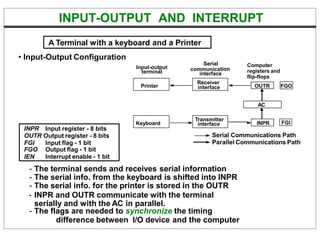
• Input-Output Configuration
INPR Input register - 8 bits
OUTR Output register - 8 bits
FGI Input flag - 1 bit
FGO Output flag - 1 bit
IEN Interrupt enable - 1 bit
- The terminal sends and receives serial information
- The serial info. from the keyboard is shifted into INPR
- The serial info. for the printer is stored in the OUTR
- INPR and OUTR communicate with the terminal
serially and with the AC in parallel.
- The flags are needed to synchronize the timing
difference between I/O device and the computer
A Terminal with a keyboard and a Printer
Input-output
terminal communica
Serial
tion
interface
Computer
registers and
flip-flops
Printer
Keyboard
Receiver
interface
Transmitter
interface
FGO
OUTR
AC
INPR FGI
Serial Communications Path
Parallel Communications Path
FURTHER QUESTIONS ON INTERRUPT
How can the CPU recognize the device
requesting an interrupt ?
Since different devices are likely to require
different interrupt service routines, how can
the CPU obtain the starting address of the
appropriate routine in each case ?
Should any device be allowed to interrupt the
CPU while another interrupt is being serviced ?
How can the situation be handled when two or
more interrupt requests occur simultaneously ?

Ch5_MorrisMano.pptx

  • 1.
    Subject: Logic Designand Computer Organization/ Computer Architecture Topic Name: Computer Organization By: Dr. Sangeeta Shekhawat Co-Convener Institute Innovation Council https://www.amity.edu/jaipur/iic/iic-committee.html E-Cell Amity University Member http://65.1.43.184:8080/team.php
  • 2.
    Objective The primary goalof this course is to introduce undergraduates to the concept of different layers as it pertains to computer systems from a tech perspective. Outcome Understand how fundamental memory cell types work and use ICs to implement sequential logic functions also explain the roles and layout of the various CPU building blocks. Prerequisites Basic Digital Logic Gates, Combinational and Sequential Logic Gates Designing
  • 3.
    INTRODUCTION  Computer architectureis the bridge between the hardware and software abstract models, and it represents the programmer's point of view in terms of instructions, addressing modes, and registers.  It describes the computer's actions.  When creating a computer system architecture, high-level design challenges are addressed first.
  • 4.
    THE BASIC COMPUTER •The Basic Computer has two components, a processor and memory • The memory has 4096 words in it – 4096 = 212, so it takes 12 bits to select a word in memory • Each word is 16 bits long CPU RAM 0 4095 15 0
  • 5.
    INTEGRATED CIRCUITS Classification bythe Circuit Density SSI - several (less than 10) independent gates MSI - 10 to 200 gates; Perform elementary digital functions; Decoder, adder, register, parity checker, etc LSI - 200 to few thousand gates; Digital subsystem Processor, memory, etc VLSI - Thousands of gates; Digital system Microprocessor, memory module Classification by Technology TTL - Transistor-Transistor Logic Bipolar transistors NAND ECL - Emitter-coupled Logic Bipolar transistor NOR MOS - Metal-Oxide Semiconductor Unipolar transistor High density CMOS - Complementary MOS Low power consumption Memory Components
  • 6.
    Logic Gates LOGIC GATES DigitalComputers - Imply that the computer deals with digital information, i.e., it deals with the information that is represented by binary digits - Why BINARY ? instead of Decimal or other number system ? * Consider electronic signal signal range 0 1 2 3 4 5 6 7 8 9 0 0 1 2 3 4 5 6 7 8 9 1 1 2 3 4 5 6 7 8 9 10 2 2 3 4 5 6 7 8 9 1011 3 3 4 5 6 7 8 9 101112 4 4 5 6 7 8 9 10111213 5 5 6 7 8 9 1011121314 6 6 7 8 9 101112131415 7 7 8 9 10111213141516 8 8 9 1011121314151617 9 9 101112131415161718 0 1 7 6 5 4 3 2 1 0 binary octal 0 1 0 1 1 10 0 1 * Consider the calculation cost - Add
  • 7.
    BASIC LOGIC BLOCK- GATE - Types of Basic Logic Blocks - Combinational Logic Block Logic Blocks whose output logic value depends only on the input logic values - Sequential Logic Block Logic Blocks whose output logic value depends on the input values and the state (stored information) of the blocks Functions of Gates can be described by - Truth Table - Boolean Function - Karnaugh Map Logic Gates Gate . . . Binary Digital Input Signal Binary Digital Output Signal
  • 8.
    COMBINATIONAL GATES A X X= (A + B)’ B Name Symbol Function Truth Table Logic Gates AND A X = A • B X or B X = AB 0 0 0 0 1 0 1 0 0 1 1 1 0 0 0 0 1 1 1 0 1 1 1 1 OR A X X = A + B B I A X X = A’ 0 1 1 0 Buffer A X X = A A X 0 0 1 1 NAND A X X = (AB)’ B 0 0 1 0 1 1 1 0 1 1 1 0 NOR 0 0 1 0 1 0 1 0 0 1 1 0 XOR Exclusive OR A X = A  B X or B X = A’B + AB’ 0 0 0 0 1 1 1 0 1 1 1 0 A X = (A  B)’ X or B X = A’B’+ AB 0 0 1 0 1 0 1 0 0 1 1 1 XNOR Exclusive NOR or Equivalence A B X A B X A X A B X A B X A B X A B X
  • 9.
    BOOLEAN ALGEBRA Boolean Algebra *Algebra with Binary(Boolean) Variable and Logic Operations * Boolean Algebra is useful in Analysis and Synthesis of Digital Logic Circuits - Input and Output signals can be represented by Boolean Variables, and - Function of the Digital Logic Circuits can be represented by Logic Operations, i.e., Boolean Function(s) - From a Boolean function, a logic diagram can be constructed using AND, OR, and I Truth Table * The most elementary specification of the function of a Digital Logic Circuit is the Truth Table - Table that describes the Output Values for all the combinations of the Input Values, called MINTERMS - n input variables → 2n minterms Boolean Algebra
  • 10.
    INSTRUCTIONS • Program – Asequence of (machine) instructions • (Machine) Instruction – A group of bits that tell the computer to perform a specific operation (a sequence of micro-operation) • The instructions of a program, along with any needed data are stored in memory • The CPU reads the next instruction from memory • It is placed in an Instruction Register (IR)
  • 11.
    INSTRUCTION FORMAT • Acomputer instruction is often divided into two parts – An op-code – An address • In the Basic Computer, bit 15 of the instruction specifies the addressing mode (0: direct addressing, 1: indirect addressing) • Since the memory words, and hence the instructions, are 16 bits long, that leaves 3 bits for the instruction’s opcode Instruction Format 15 14 0 I Opcode Address 12 11 Addressing mode
  • 12.
    ADDRESSING MODES • Theaddress field of an instruction can represent either – Direct address: – Indirect address • Effective Address (EA) – The address, that can be directly used without modification to access an operand for a computation-type instruction, or as the target address for a branch-type instruction 22 0 ADD 457 Operand 457 35 300 1 ADD 300 1350 Operand 1350 + AC + AC Direct addressing Indirect addressing
  • 13.
    PROCESSOR REGISTERS • Aprocessor has many registers • The processor has a register, the Program Counter (PC) that holds the memory address of the next instruction • The Address Register (AR) is used to hold the address which is being identified by the PC • When an operand is found, using either direct or indirect addressing, it is placed in the Data Register (DR). • The processor then uses this value as data for its operation • The Basic Computer has a single general purpose register – the Accumulator (AC)
  • 14.
    PROCESSOR REGISTERS • Thesignificance of a general purpose register is that it can be referred to in instructions – e.g. load AC with the contents of a specific memory location; store the contents of AC into a specified memory location • Often a processor will need a scratch register to store intermediate results or other temporary data; in the Basic Computer this is the Temporary Register (TR) • The Basic Computer uses a very simple model of input/output (I/O) operations – Input devices are considered to send 8 bits of character data to the processor – The processor can send 8 bits of character data to output devices • The Input Register (INPR) holds an 8 bit character gotten from an input device • The Output Register (OUTR) holds an 8 bit character to be send to an output device
  • 15.
    BASIC COMPUTER REGISTERS Registersin the Basic Computer 11 0 PC Memory 11 0 AR 4096 x 16 15 0 IR CPU 15 0 15 0 TR DR 7 0 7 0 15 0 OUTR INPR AC List of BC Registers DR 16 Data Register Holds memory operand AR 12 Address Register Holds address for memory AC 16 Accumulator Processor register IR 16 Instruction Register Holds instruction code PC 12 Program Counter Holds address of instruction TR 16 Temporary Register Holds temporary data INPR 8 Input Register Holds input character OUTR 8 Output Register Holds output character
  • 16.
    COMMON BUS SYSTEM •The registers in the Basic Computer are connected using a bus • This gives a savings in circuitry over complete connections between registers
  • 17.
    COMMON BUS SYSTEM S2 S0 S1Bus LD INR CLR Address Memory unit 4096 x 16 Write Read AR LD INR CLR PC DR LD INR CLR LD INR CLR AC ALU E INPR IR LD LD INR CLR TR OUTR Clock LD 16-bit common bus 7 1 2 3 4 5 6
  • 18.
    COMMON BUS SYSTEM AR PC DR LI C L I C L I C AC L I C ALU E IR L TR L I C OUTR LD INPR Memory 4096 x 16 Address Read Write 16-bit Common Bus 7 1 2 3 4 5 6 S0 S1 S2
  • 19.
    COMMON BUS SYSTEM •Three control lines, S2, S1, and S0 control which register the bus selects as its input • Either one of the registers will have its load signal activated, or the memory will have its read signal activated – Will determine where the data from the bus gets loaded • The 12-bit registers, AR and PC, have 0’s loaded onto the bus in the high order 4 bit positions • When the 8-bit register OUTR is loaded from the bus, the data comes from the low order 8 bits on the bus S2 S1 S0 Register 0 0 0 x 0 0 1 AR 0 1 0 PC 0 1 1 DR 1 0 0 AC 1 0 1 IR 1 1 0 TR 1 1 1 Memory
  • 20.
    BASIC COMPUTER INSTRUCTIONS IOpcode Address • Basic Computer Instruction Format Memory-Reference Instructions (OP-code = 000 ~ 110) 15 14 12 11 0 Register-Reference Instructions 15 12 11 (OP-code = 111, I = 0) 0 0 1 1 1 Register operation Input-Output Instructions 15 12 11 (OP-code =111, I = 1) 0 1 1 1 1 I/O operation
  • 21.
    MEMORY REFERENCE INSTRUCTIONS ●Bits 0-11 for specifying address. ● Bits 12-14 for specifying address. ● 15th bit specifies addressing modes. (0 for direct and 1 for indirect) ● Opcode=000 through 110 ● I=0 or 1 ● Eg: ● AND - 0xxx(direct) or 8xxx(indirect) ● ADD - 1xxx or 9xxx
  • 22.
    REGISTER REFERENCE INSTRUCTIONS ●Recognized by the operation code 111 with a 0 in the 15th bit of the instruction. ● Specifies an operation on or a test of the AC register. ● An operand from memory is not needed. ● Therefore the 12 bits are used to specify the operation to be executed. ● Eg: ● CLA - 7800 : Clear AC ● CLE - 7400 : Clear E
  • 23.
    I/O INSTRUCTIONS ● Theseinstructions are needed for transfering informations to and from AC register. ● Recognized by the opcode 111 and a 1 in the 15th bit. ● Bits 0-11 specify the type of I/O Operation performed. ● Eg: ● INP - F800 : Input characters to AC ● OUT - F400 : Output characters from AC
  • 24.
    BASIC COMPUTER INSTRUCTIONS Symbol HexCode Description I = 0 I = 1 AND ADD LDA STA BUN BSA ISZ 0xxx 8xxx 1xxx 9xxx 2xxx Axxx 3xxx Bxxx 4xxx Cxxx 5xxx Dxxx 6xxx Exxx AND memory word to AC Add memory word to AC Load AC from memory Store content of AC into memory Branch unconditionally Branch and save return address Increment and skip if zero CLA 7800 Clear AC CLE 7400 Clear E CMA 7200 Complement AC CME 7100 Complement E CIR 7080 Circulate right AC and E CIL 7040 Circulate left AC and E INC 7020 Increment AC SPA 7010 Skip next instr. if AC is positive SNA 7008 Skip next instr. if AC is negative SZA 7004 Skip next instr. if AC is zero SZE 7002 Skip next instr. if E is zero HLT 7001 Halt computer INP F800 Input character to AC OUT F400 Output character from AC SKI F200 Skip on input flag SKO F100 Skip on output flag ION F080 Interrupt on IOF F040 Interrupt off
  • 25.
    INSTRUCTION SET COMPLETENESS Acomputer should have a set of instructions so that the user can construct machine language programs to evaluate any function that is known to be computable. • Instruction Types Functional Instructions - Arithmetic, logic, and shift instructions - ADD, CMA, INC, CIR, CIL, AND, CLA Transfer Instructions - Data transfers between the main memory and the processor registers - LDA, STA Control Instructions - Program sequencing and control - BUN, BSA, ISZ Input/Output Instructions - Input and output - INP, OUT
  • 26.
    CONTROL UNIT • Controlunit (CU) of a processor translates from machine instructions to the control signals for the microoperations that implement them • Control units are implemented in one of two ways • Hardwired Control – CU is made up of sequential and combinational circuits to generate the control signals • Microprogrammed Control – A control memory on the processor contains microprograms that activate the necessary control signals State Combinational Circuit Clock Inputs Outputs Inputs
  • 27.
    ● The controllogic is implemented with gates, flip-flops, decoders, and other digital circuits. ● It can be optimized to produce a fast mode of operation. ● Requires changes in the wiring among the various components if the design has to be modified or changed. ● The control information is stored in a control memory. ● The control memory is programmed to initiate the required sequence of micro operations. ● Required changes or modifications can be done by updating the micro program in control memory. Hardwired Control Micro programmed Control CONTROL UNIT
  • 28.
    TIMING AND CONTROL Controlunit of Basic Computer Instruction register (IR) 15 14 13 12 11 - 0 3 x 8 decoder 7 6 5 4 3 2 1 0 I D0 15 14 . . . . 2 1 0 4 x 16 decoder 4-bit sequence counter (SC) Increment (INR) Clear (CLR) Clock Other inputs Control signals D7 T15 T0 Combinational Control logic
  • 29.
    TIMING SIGNALS C lo c k T 0 T 1 T 2 T 3 T 4 D 3 C L R S C - Generated by 4-bit sequence counter and 416 decoder - The SC can be incremented or cleared. - Example: T0, T1, T2, T3, T4, T0, T1, . . . Assume: At time T4, SC is cleared to 0 if decoder output D3 is active. D3T4: SC  T 0 0 T 1 T 2 T 3 T 4 T 0
  • 30.
    DETERMINE THE TYPEOF INSTRUCTION = 0 (direct) D'7IT3: D'7I'T3: D7I'T3: D7IT3: AR  M[AR] Nothing Execute a register-reference instr. Execute an input-output instr. Start SC   AR  PC T0 IR  M[AR], PC  PC + 1 T1 Decode Opcode in IR(12-14), AR  IR(0-11), I  IR(15) T2 D7 (Register or I/O) = 1 = 0 (Memory-reference) I I Execute register-reference instruction SC  0 Execute input-output instruction SC  0 AR  M[AR] Nothing (I/O) = 1 = 0 (register) (indirect) = 1 T3 T3 T3 T3 Execute memory-reference instruction SC  0 T4 Memory Fetch Decode Execute Fetch Decode S2 S1 S0 Register 0 0 0 x 0 0 1 AR 0 1 0 PC 0 1 1 DR 1 0 0 AC 1 0 1 IR 1 1 0 TR 1 1 1 Memory 14, 13 ,12 Instruction register (IR) 15 14 13 12 11 - 0
  • 31.
    INSTRUCTION CYCLE • InBasic Computer, a machine instruction is executed in the following cycle: 1. Fetch an instruction from memory 2. Decode the instruction 3. Read the effective address from memory if the instruction has an indirect address 4. Execute the instruction • After an instruction is executed, the cycle starts again at step 1, for the next instruction • Note: Every different processor has its own (different) instruction cycle
  • 32.
    FETCH and DECODE •Fetch and Decode T0: AR  PC (S0S1S2=010, T0=1) T1: IR  M [AR], PC  PC + 1 (S0S1S2=111, T1=1) T2: D0, . . . , D7  Decode IR(12-14),AR  IR(0-11), I  IR(15) S2 S1 S0 Bus 7 Memory unit Address Read AR LD PC INR IR LD Clock 1 2 5 Common bus T1 T0 S2 S1 S0 Register 0 0 0 x 0 0 1 AR 0 1 0 PC 0 1 1 DR 1 0 0 AC 1 0 1 IR 1 1 0 TR 1 1 1 Memory Instruction register (IR) 15 14 13 12 11 - 0
  • 33.
    REGISTER REFERENCE INSTRUCTIONS RegisterReference Instructions are identified when - D7 = 1, I = 0 - Register Ref. Instr. is specified in b0 ~ b11 of IR - Execution starts with timing signal T3 r = D7 IT3 => Register Reference Instruction Bi = IR(i) , i=0,1,2,...,11
  • 34.
    MEMORY REFERENCE INSTRUCTIONS DR M[AR] AC  AC  DR, SC  0 Read operand AND with AC D0T4: D0T5: ADD to AC D1T4: D1T5: DR  M[AR] AC  AC + DR, E  Cout, SC  0 Read operand Add to AC and store carry in E - The effective address of the instruction is in AR and was placed there during timing signal T2 when I = 0, or during timing signal T3 when I = 1 - Memory cycle is assumed to be short enough to complete in a CPU cycle - The execution of MR instruction starts with T4 AND to AC Symbol Operation Decoder Symbolic Description AND ADD LDA STA BUN BSA ISZ D0 D1 D2 D3 D4 D5 D6 AC  AC  M[AR] AC  AC + M[AR], E  Cout AC  M[AR] M[AR]  AC PC  AR M[AR]  PC, PC  AR + 1 M[AR]  M[AR] + 1, if M[AR] + 1 = 0 then PC  PC+1
  • 35.
    MEMORY REFERENCE INSTRUCTIONS Memory,PC after execution 20 PC = 21 AR = 135 136 0 BSA 135 Next instruction Subroutine 1 BUN 135 20 21 135 PC = 136 0 BSA 135 Next instruction 21 Subroutine 1 BUN 135 Memory Memory LDA: Load to AC D2T4: DR  M[AR] D2T5: AC  DR, SC  0 STA: Store AC D3T4: M[AR]  AC, SC  0 BUN: Branch Unconditionally D4T4: PC  AR, SC  0 BSA: Branch and Save Return Address M[AR]  PC, PC  AR + 1 Memory, PC, AR at time T4
  • 36.
    MEMORY REFERENCE INSTRUCTIONS BSA: D5T4:M[AR]  PC, AR  AR + 1 D5T5: PC  AR, SC  0 ISZ: Increment and Skip-if-Zero D6T4: DR  M[AR] D6T5: DR  DR + 1 D6T4: M[AR]  DR, if (DR = 0) then (PC  PC + 1), SC  0
  • 37.
    FLOWCHART FOR MEMORYREFERENCE INSTRUCTIONS DR  M[AR] DR  M[AR] DR  M[AR] M[AR]  AC SC  0 AND STA AC  AC + DR E  Cout SC  0 AC  DR SC  0 D0T4 Memory-reference instruction ADD LDA D1T4 D2T4 D3T4 D0T5 D1T5 D2T5 PC  AR SC  0 M[AR]  PC AR  AR + 1 DR  M[AR] BUN BSA ISZ D4T4 D5T4 D6T4 DR  DR + 1 D5T5 D6T5 PC  AR SC  0 M[AR]  DR If (DR = 0) then (PC  PC + 1) SC  0 D6T6 AC  AC DR SC  0
  • 38.
    INPUT-OUTPUT AND INTERRUPT •Input-Output Configuration INPR Input register - 8 bits OUTR Output register - 8 bits FGI Input flag - 1 bit FGO Output flag - 1 bit IEN Interrupt enable - 1 bit - The terminal sends and receives serial information - The serial info. from the keyboard is shifted into INPR - The serial info. for the printer is stored in the OUTR - INPR and OUTR communicate with the terminal serially and with the AC in parallel. - The flags are needed to synchronize the timing difference between I/O device and the computer A Terminal with a keyboard and a Printer Input-output terminal communica Serial tion interface Computer registers and flip-flops Printer Keyboard Receiver interface Transmitter interface FGO OUTR AC INPR FGI Serial Communications Path Parallel Communications Path
  • 39.
    FURTHER QUESTIONS ONINTERRUPT How can the CPU recognize the device requesting an interrupt ? Since different devices are likely to require different interrupt service routines, how can the CPU obtain the starting address of the appropriate routine in each case ? Should any device be allowed to interrupt the CPU while another interrupt is being serviced ? How can the situation be handled when two or more interrupt requests occur simultaneously ?

Editor's Notes

  • #4 Every different processor type has its own design (different registers, buses, microoperations, machine instructions, etc) Modern processor is a very complex device It contains Many registers Multiple arithmetic units, for both integer and floating point calculations The ability to pipeline several consecutive instructions to speed execution Etc. However, to understand how processors work, we will start with a simplified processor model This is similar to what real processors were like ~25 years ago M. Morris Mano introduces a simple processor model he calls the Basic Computer We will use this to introduce processor organization and the relationship of the RTL model to the higher level computer processor
  • #11 Control circuitry in control unit then translates the instruction into the sequence of microoperations necessary to implement it
  • #12 In the Basic Computer, since the memory contains 4096 (= 212) words, we needs 12 bit to specify which memory address this instruction will use