Data
• A collectionof unorganized facts or figures gathered from one or
more sources
Data consists of text, numbers, symbols, sounds, and images that
the computer can manipulate.
Types of Data
• Numeric
• Alphabetic
• Alphanumeric
3.
Sources of Data
❖InternalSources – consist of individuals and
departments located within the organization
❖External Sources – generators and distributors of data
located outside the organization.
4.
What is dataprocessing?
❑Data processing is any process that uses a computer program
to enter data and summarize, analyze or otherwise convert data
into usable information.
❑The process may be automated and run on a computer.
5.
TYPES OF DATAPROCESSING
Manual System -All operations from data gathering to
output preparations are performed by man without the aid of
any single machine
Mechanical / key-driven System - Bulk of work are
performed by man with some assistance from machines (e.g.:
typewriter, calculator, adding machines, etc.)
Electronic Data Processing - Majority of operation
makes use of computers to get the required output.
DATA PROCESSING CYCLE
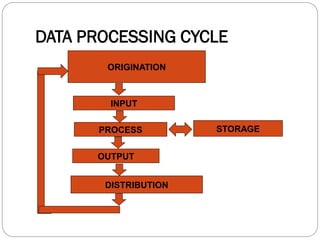
ORIGINATION – the process of collecting the original or initial
data; a SOURCE DOCUMENT (the original recording of data) is
created
INPUT - the preparation of initial data for processing
PROCESS – changing of data usually combining with other data
to produce information
STORAGE – keeping the processed data for future use or for
further processing
OUTPUT – the generated results of the preceding steps
DISTRIBUTION – the giving away of the output data to
interested parties; a REPORT DOCUMENT (recording of output
data) is generated
8.
What is Information?
❑Informationare data arranged in ordered and useful form.
❑They are meaningful data.
❑They are knowledge that has come about as a result of
processing data.
9.
Why Information isNeeded?
There is a need of information because it serves as the
basis for decision making for good performance as well as
successful attainment of goals.
10.
Desired Properties ofInformation
❖Accuracy – ratio of correct information to total amount
of information produced over a period of time.
❖Timeliness – immediate response time of the
information system such that information has not lost its
freshness and value
❖Conciseness – extent of getting or exacting those items
of information that are needed
❖Completeness – integrating of facts available at
scattered points to suit the needs of the user
❖Relevancy – property of information that meets the
needs of the user at a certain period of time
11.
What is acomputer?
▪ A general-purpose digital electronic device that aids or helps
man in data processing.
▪ Is a device that performs four functions:
• It inputs data (getting information into the machine);
• It process data (performing prescribed mathematical
and logical operations on the information at high speed)
• It stores data (holding the information before and after
processing), and
• It outputs data (sending the results out to the user via
some display method).
12.
COMPUTER CHARACTERISTICS
Itis a machine.
It is electronic.
It is automatic
It can store and recall information
13.
COMPUTER CAPABILITIES
Itcan perform mathematical and logical operations
It can process data at a very fast speed with almost perfect
accuracy
It can store a great amount and variety of information
It can handle volumes of repetitive tasks accurately over long
period of time
It can communicate with its operators and other machines
14.
COMPUTER LIMITATIONS
Itcan only carry out those operations that a person
has programmed or instructed it to perform.
It can detect, but generally cannot correct, a wrong
instruction by itself
It is subject to occasional breakdown or malfunction
15.
Functional Organization Of
Computers
Input - part of the computer where facts or data are received
Arithmetic logic - all calculations and comparisons are
performed
Control unit - selects, interprets and execute the program
instructions to maintain order and direct the operation of the
entire installation.
Output - takes information in machine - coded form and
convert it typically into a form that can be used by human or
as machine.
16.
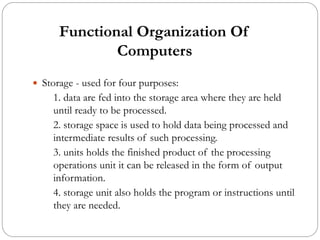
Functional Organization Of
Computers
Storage - used for four purposes:
1. data are fed into the storage area where they are held
until ready to be processed.
2. storage space is used to hold data being processed and
intermediate results of such processing.
3. units holds the finished product of the processing
operations unit it can be released in the form of output
information.
4. storage unit also holds the program or instructions until
they are needed.
17.
1001 1100 10101000
(Buffer Data)
0001001100101001001
P
e
r
f
o
r
m
T
r
a
n
s
l
a
t
i
o
n
Output Unit
00001
00101
00111
01000
Control Unit
Buffer | Save | Retrieve Compute |
Translate | Forward
Buffer | Save | Retrieve Compute |
Translate | Forward
Buffer | Save | Retrieve Compute |
Translate | Forward
Buffer | Save | Retrieve Compute |
Translate | Forward
0001001100101001001
Input Unit
Input Data via
Keyboard
Buffer | Save | Retrieve Compute |
Translate | Forward
O
u
t
p
u
t
D
a
t
a
1001
1010
1100
1000
Memory
1 0 0 1 1 1 0 0 1 0 1 0 1 0 0 0
Arithmetic Logic Unit
1001 -> A
1010 -> B
1100 -> C
1001 -> D
B
u
f
f
e
r
D
a
t
a
1001 1100 1010 1000 A B C D
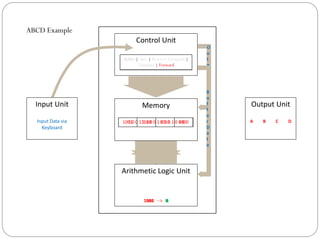
ABCD Example
18.
B
u
f
f
e
r
D
a
t
a
1000
(Buffer Data)
010110100011
Output Unit
(GetData)
1010
0101
0011
Control Unit
Buffer | Save | Retrieve Compute |
Translate | Forward
Buffer | Save | Retrieve Compute |
Translate | Forward
Buffer | Save | Retrieve Compute |
Translate | Forward
Buffer | Save | Retrieve Compute |
Translate | Forward
010110100011
Input Unit
Input Data via
keyboard:
5 + 3
Buffer | Save | Retrieve Compute |
Translate | Forward
O
u
t
p
u
t
D
a
t
a
(Buffer Data)
1000
Memory
0101 0011 1010
Arithmetic Logic Unit
0101 -> 5
1010 -> +
0011 -> 3
0101
+ 0011
1000 -> 8
0101 0011 1010 1000 8
P
e
r
f
o
r
m
C
o
m
p
u
t
a
t
i
o
n
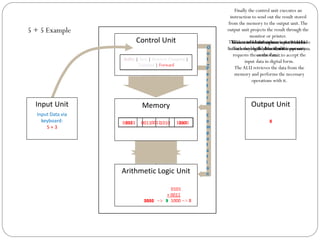
5 + 5 Example
As data is fed through an input terminal
such as your keyboard, the input unit
requests the control unit to accept the
input data in digital form.
The control unit initiates a command to
buffer or store the data into the memory…
The control unit instructs theALU to
initiate the logical & arithmetic operations
on the data…
The ALU retrieves the data from the
memory and performs the necessary
operations with it.
The control unit then instructs theALU to
buffer the result.
Finally the control unit executes an
instruction to send out the result stored
from the memory to the output unit.The
output unit projects the result through the
monitor or printer.
19.
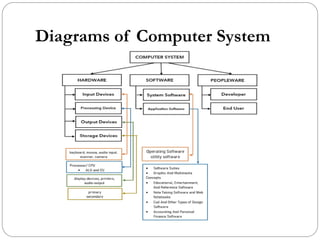
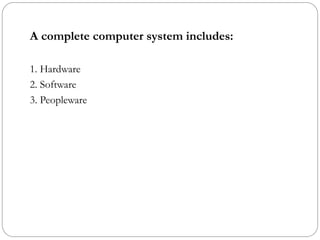
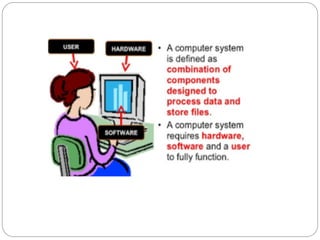
What is acomputer system?
▪ Electronic device/machine used to process data to come up
with information.
▪ A system of devices including input and output devices,
memory, and processing hardware used to process data.
▪ A programmable, multi use machine that accepts data-raw
facts and figures- and processes, or manipulates it into
information so we can use, such as summaries or totals.
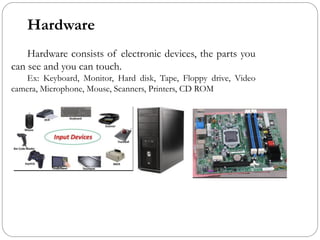
Hardware
Hardware consists ofelectronic devices, the parts you
can see and you can touch.
Ex: Keyboard, Monitor, Hard disk, Tape, Floppy drive, Video
camera, Microphone, Mouse, Scanners, Printers, CD ROM
24.
Software
Software, also knownas programs, consists of organized sets of
instructions for controlling the computer or sequence of instructions
or commands that tells the Computer to do specific task is called
software. (Sets of interrelated instruction)
Programs are electronic instructions that tell the computer how
to accomplish certain tasks. . When a computer is using a particular
program, it is said to be running or executing the program. The
Operating system tells the computer how to interact with the user and
how to use the hardware devices attached to the computer.
25.
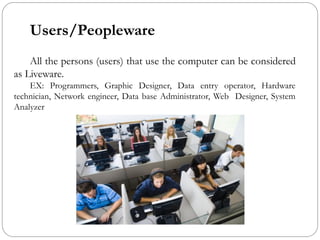
Users/Peopleware
All the persons(users) that use the computer can be considered
as Liveware.
EX: Programmers, Graphic Designer, Data entry operator, Hardware
technician, Network engineer, Data base Administrator, Web Designer, System
Analyzer