Operating System 28
Fundamentals of Scheduling
Prof Neeraj Bhargava
Vaibhav Khanna
Department of Computer Science
School of Engineering and Systems Sciences
Maharshi Dayanand Saraswati University Ajmer
CPU Scheduling
• The objective of multiprogramming is to have
some process running at all times to maximize
CPU utilization.
• The objective of time-sharing system is to switch
the CPU among processes so frequently that
users can interact with each program while it is
running.
• For a uniprocessor system, there will never be
more than one running process.
• If there are more processes, the rest will have to
wait until the CPU is free and can be rescheduled.
Basic Concepts
• Maximum CPU
utilization obtained with
multiprogramming
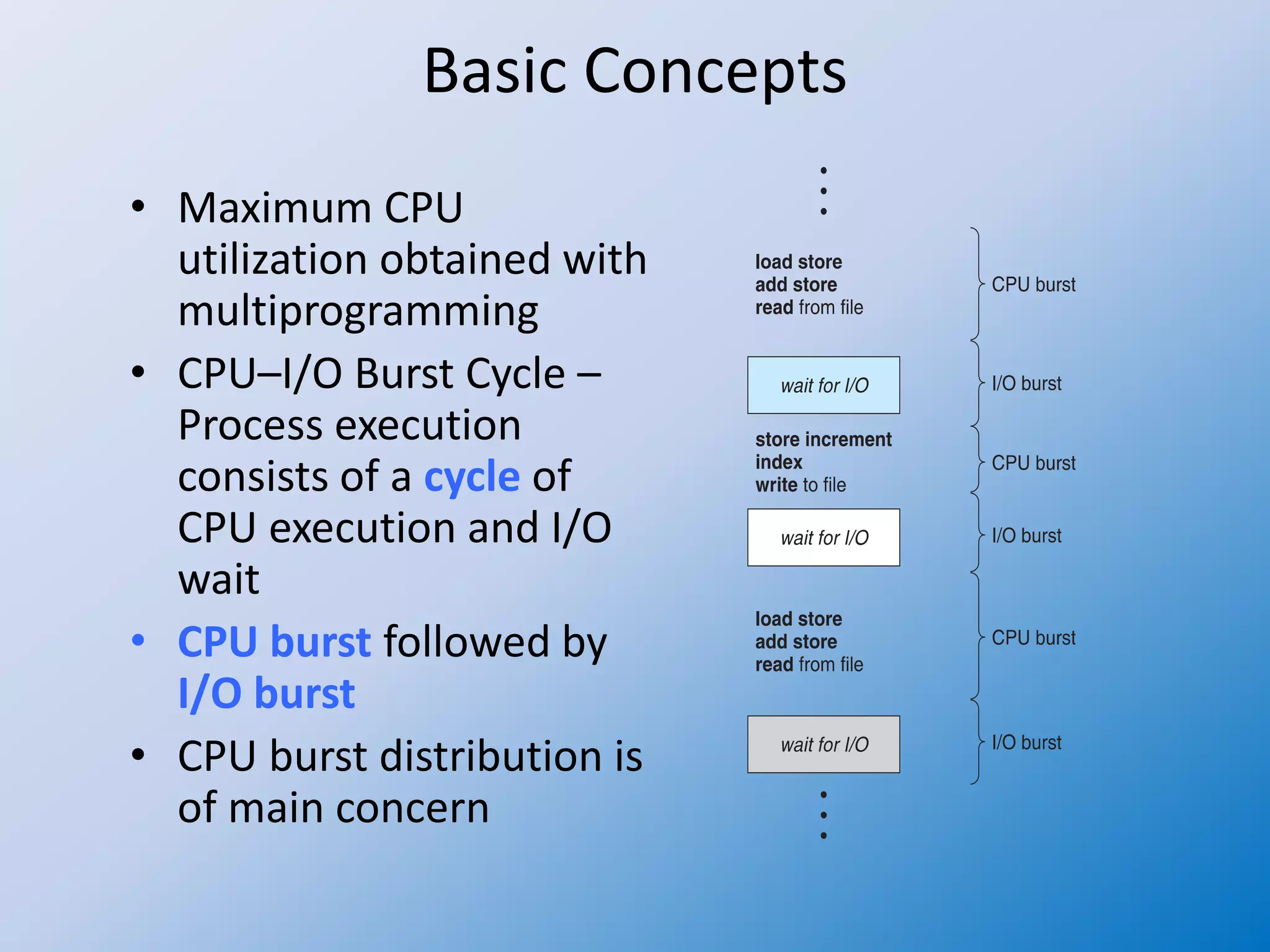
• CPU–I/O Burst Cycle –
Process execution
consists of a cycle of
CPU execution and I/O
wait
• CPU burst followed by
I/O burst
• CPU burst distribution is
of main concern
CPU Scheduler
 Short-term scheduler selects from among the processes
in ready queue, and allocates the CPU to one of them
 Queue may be ordered in various ways
 CPU scheduling decisions may take place when a process:
1. Switches from running to waiting state
2. Switches from running to ready state
3. Switches from waiting to ready
4. Terminates
 Scheduling under 1 and 4 is nonpreemptive
 All other scheduling is preemptive
 Consider access to shared data
 Consider preemption while in kernel mode
 Consider interrupts occurring during crucial OS activities
Dispatcher
• Dispatcher module gives control of the
CPU to the process selected by the
short-term scheduler; this involves:
– switching context
– switching to user mode
– jumping to the proper location in the user
program to restart that program
• Dispatch latency – time it takes for the
dispatcher to stop one process and start
another running
Scheduling Criteria
• CPU utilization – keep the CPU as busy as
possible
• Throughput – # of processes that
complete their execution per time unit
• Turnaround time – amount of time to
execute a particular process
• Waiting time – amount of time a process
has been waiting in the ready queue
• Response time – amount of time it takes
from when a request was submitted until
the first response is produced, not output
(for time-sharing environment)
Scheduling Algorithm Optimization Criteria
• Max CPU utilization
• Max throughput
• Min turnaround time
• Min waiting time
• Min response time
Scheduling Queues
• As processes enter the system, they are put into a job
queue.
• This queue consists of all processes in the system.
• The processes that are residing in main memory and
are ready and waiting to execute are kept on a list
called the ready queue.
• This queue is generally stored as a linked list.
• A ready-queue header will contain pointers to the first
and last PCBs in the list.
• Each PCB has a pointer field that points to the next
process in the ready queue.
Scheduling Queues
• There are also other queues in the system.
• When a process is allocated the CPU, it executes for a while
and eventually quits, is interrupted, or waits for the
occurrence of a particular event, such as the completion of
an I/O request.
• In the case of an I/O request, such a request may be to a
dedicated tape drive, or to a shared device, such as a disk.
• Since there are many processes in the system, the disk may
be busy with the I/O request of some other process.
• The process therefore may have to wait for the disk. The list
of processes waiting for a particular I/O device is called a
device queue.
• Each device has its own device queue.
Scheduling of Processes
• A new process is initially put in the ready queue. It
waits in the ready queue until it is selected for
execution (or dispatched) and is given the CPU.
• Once the process is allocated the CPU it starts
executing.
• While it is executing, one of several events could occur:
– The process could issue an I/O request, and then be placed
in an I/O queue
– The process could create a new child-process and wait for
its termination
– The process could be removed forcibly from the CPU, as a
result of an interrupt, and be put back in the ready queue
Scheduling of Processes
• In the first two cases, the process eventually switches from the
waiting state to the ready state, and is then put back in the ready
queue.
• A process continues this cycle until it terminates, at which time it is
removed from all queues and has its PCB and resources
deallocated.
• A process migrates between the various scheduling queues
throughout its lifetime.
• The operating system must select, for scheduling purposes,
processes from these queues in some fashion.
• The selection process is carried out by the appropriate scheduler.
• Scheduler is a mechanism (usually a component software of
operating system) that carries out the scheduling activities.
Assignment
• Explain the Functioning of CPU Scheduler
• Explain Scheduling Criteria and Scheduling
Algorithm Optimization Criteria
• Discuss the Scheduling Queue Mechanism.

Operating system 28 fundamental of scheduling

  • 1.
    Operating System 28 Fundamentalsof Scheduling Prof Neeraj Bhargava Vaibhav Khanna Department of Computer Science School of Engineering and Systems Sciences Maharshi Dayanand Saraswati University Ajmer
  • 2.
    CPU Scheduling • Theobjective of multiprogramming is to have some process running at all times to maximize CPU utilization. • The objective of time-sharing system is to switch the CPU among processes so frequently that users can interact with each program while it is running. • For a uniprocessor system, there will never be more than one running process. • If there are more processes, the rest will have to wait until the CPU is free and can be rescheduled.
  • 3.
    Basic Concepts • MaximumCPU utilization obtained with multiprogramming • CPU–I/O Burst Cycle – Process execution consists of a cycle of CPU execution and I/O wait • CPU burst followed by I/O burst • CPU burst distribution is of main concern
  • 4.
    CPU Scheduler  Short-termscheduler selects from among the processes in ready queue, and allocates the CPU to one of them  Queue may be ordered in various ways  CPU scheduling decisions may take place when a process: 1. Switches from running to waiting state 2. Switches from running to ready state 3. Switches from waiting to ready 4. Terminates  Scheduling under 1 and 4 is nonpreemptive  All other scheduling is preemptive  Consider access to shared data  Consider preemption while in kernel mode  Consider interrupts occurring during crucial OS activities
  • 5.
    Dispatcher • Dispatcher modulegives control of the CPU to the process selected by the short-term scheduler; this involves: – switching context – switching to user mode – jumping to the proper location in the user program to restart that program • Dispatch latency – time it takes for the dispatcher to stop one process and start another running
  • 6.
    Scheduling Criteria • CPUutilization – keep the CPU as busy as possible • Throughput – # of processes that complete their execution per time unit • Turnaround time – amount of time to execute a particular process • Waiting time – amount of time a process has been waiting in the ready queue • Response time – amount of time it takes from when a request was submitted until the first response is produced, not output (for time-sharing environment)
  • 7.
    Scheduling Algorithm OptimizationCriteria • Max CPU utilization • Max throughput • Min turnaround time • Min waiting time • Min response time
  • 8.
    Scheduling Queues • Asprocesses enter the system, they are put into a job queue. • This queue consists of all processes in the system. • The processes that are residing in main memory and are ready and waiting to execute are kept on a list called the ready queue. • This queue is generally stored as a linked list. • A ready-queue header will contain pointers to the first and last PCBs in the list. • Each PCB has a pointer field that points to the next process in the ready queue.
  • 9.
    Scheduling Queues • Thereare also other queues in the system. • When a process is allocated the CPU, it executes for a while and eventually quits, is interrupted, or waits for the occurrence of a particular event, such as the completion of an I/O request. • In the case of an I/O request, such a request may be to a dedicated tape drive, or to a shared device, such as a disk. • Since there are many processes in the system, the disk may be busy with the I/O request of some other process. • The process therefore may have to wait for the disk. The list of processes waiting for a particular I/O device is called a device queue. • Each device has its own device queue.
  • 10.
    Scheduling of Processes •A new process is initially put in the ready queue. It waits in the ready queue until it is selected for execution (or dispatched) and is given the CPU. • Once the process is allocated the CPU it starts executing. • While it is executing, one of several events could occur: – The process could issue an I/O request, and then be placed in an I/O queue – The process could create a new child-process and wait for its termination – The process could be removed forcibly from the CPU, as a result of an interrupt, and be put back in the ready queue
  • 11.
    Scheduling of Processes •In the first two cases, the process eventually switches from the waiting state to the ready state, and is then put back in the ready queue. • A process continues this cycle until it terminates, at which time it is removed from all queues and has its PCB and resources deallocated. • A process migrates between the various scheduling queues throughout its lifetime. • The operating system must select, for scheduling purposes, processes from these queues in some fashion. • The selection process is carried out by the appropriate scheduler. • Scheduler is a mechanism (usually a component software of operating system) that carries out the scheduling activities.
  • 12.
    Assignment • Explain theFunctioning of CPU Scheduler • Explain Scheduling Criteria and Scheduling Algorithm Optimization Criteria • Discuss the Scheduling Queue Mechanism.