Operating System 01
Introduction
Prof Neeraj Bhargava
Vaibhav Khanna
Department of Computer Science
School of Engineering and Systems Sciences
Maharshi Dayanand Saraswati University Ajmer
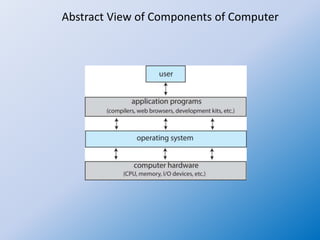
Computer System Structure
• Computer system can be divided into four
components:
– Hardware – provides basic computing resources
• CPU, memory, I/O devices
– Operating system
• Controls and coordinates use of hardware among various
applications and users
– Application programs – define the ways in which the
system resources are used to solve the computing
problems of the users
• Word processors, compilers, web browsers, database
systems, video games
– Users
• People, machines, other computers
System Software:
The Hardware-Software Connection
• System software: Class of software that
includes the operating system and utility
programs
• Handles low-level details and hundreds of
other tasks behind the scenes
• User does not need to be concerned about
details
3
What the Operating System Does
• Every computer depends on an operating
system to:
– Keep hardware running efficiently
– Maintains file system
– Supports multitasking
– Manages virtual memory
• Operating system runs continuously when
computer is on
4
Utility Programs
• Serve as tools for doing system maintenance and
repairs not handled by operating system
• Utilities make it easier for users to:
– Copy files between storage devices
– Repair damaged data files
– Translate files so different programs can read them
– Guard against viruses and other harmful programs
– Compress files so they take up less space
5
6
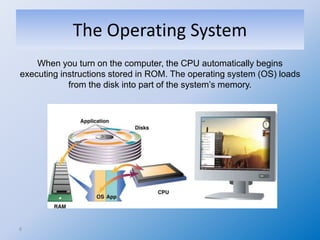
The Operating System
When you turn on the computer, the CPU automatically begins
executing instructions stored in ROM. The operating system (OS) loads
from the disk into part of the system’s memory.
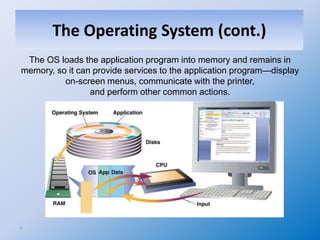
The Operating System (cont.)
7
The OS loads the application program into memory and remains in
memory, so it can provide services to the application program—display
on-screen menus, communicate with the printer,
and perform other common actions.
The Operating System (cont.)
UNIX and Linux
• UNIX: Command-line, character-based OS
– Internet is populated with computers running
UNIX
– OS of choice for workstations and mainframes in
research and academic settings
– Favored by many who require an industrial-
strength, multiuser OS
• Linux, a UNIX clone, is distributed and
supported free
8
Copyright © 2012 Pearson Education, Inc. publishing as Prentice Hall
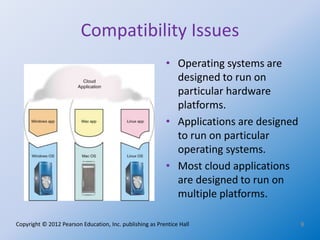
Compatibility Issues
9
• Operating systems are
designed to run on
particular hardware
platforms.
• Applications are designed
to run on particular
operating systems.
• Most cloud applications
are designed to run on
multiple platforms.
Abstract View of Components of Computer
Assignment
1. Discuss the Abstract View of Structure and Components of
Computer System

Operating system 01 introduction

  • 1.
    Operating System 01 Introduction ProfNeeraj Bhargava Vaibhav Khanna Department of Computer Science School of Engineering and Systems Sciences Maharshi Dayanand Saraswati University Ajmer
  • 2.
    Computer System Structure •Computer system can be divided into four components: – Hardware – provides basic computing resources • CPU, memory, I/O devices – Operating system • Controls and coordinates use of hardware among various applications and users – Application programs – define the ways in which the system resources are used to solve the computing problems of the users • Word processors, compilers, web browsers, database systems, video games – Users • People, machines, other computers
  • 3.
    System Software: The Hardware-SoftwareConnection • System software: Class of software that includes the operating system and utility programs • Handles low-level details and hundreds of other tasks behind the scenes • User does not need to be concerned about details 3
  • 4.
    What the OperatingSystem Does • Every computer depends on an operating system to: – Keep hardware running efficiently – Maintains file system – Supports multitasking – Manages virtual memory • Operating system runs continuously when computer is on 4
  • 5.
    Utility Programs • Serveas tools for doing system maintenance and repairs not handled by operating system • Utilities make it easier for users to: – Copy files between storage devices – Repair damaged data files – Translate files so different programs can read them – Guard against viruses and other harmful programs – Compress files so they take up less space 5
  • 6.
    6 The Operating System Whenyou turn on the computer, the CPU automatically begins executing instructions stored in ROM. The operating system (OS) loads from the disk into part of the system’s memory.
  • 7.
    The Operating System(cont.) 7 The OS loads the application program into memory and remains in memory, so it can provide services to the application program—display on-screen menus, communicate with the printer, and perform other common actions. The Operating System (cont.)
  • 8.
    UNIX and Linux •UNIX: Command-line, character-based OS – Internet is populated with computers running UNIX – OS of choice for workstations and mainframes in research and academic settings – Favored by many who require an industrial- strength, multiuser OS • Linux, a UNIX clone, is distributed and supported free 8
  • 9.
    Copyright © 2012Pearson Education, Inc. publishing as Prentice Hall Compatibility Issues 9 • Operating systems are designed to run on particular hardware platforms. • Applications are designed to run on particular operating systems. • Most cloud applications are designed to run on multiple platforms.
  • 10.
    Abstract View ofComponents of Computer
  • 11.
    Assignment 1. Discuss theAbstract View of Structure and Components of Computer System