Copyright © 2006 by The McGraw-Hill Companies, Inc. All rights reserved.
McGraw-Hill Technology Education
Introduction to
Computer Administration
Operating System Basics
• Operating System
• Operating System Objectives
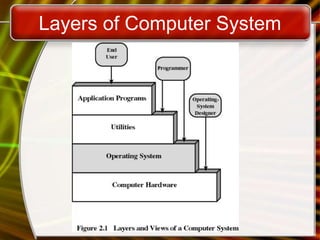
• Layers of Computer Systems
• Services Provided by the Operating
System
• Functions of Operating Systems
• Types of Operating Systems
• Enhancing an OS
Operating System
• A program that controls the execution of
application programs
• An interface between applications and
hardware
Operating System Objectives
• Convenience
– Makes the computer more convenient to
use
• Efficiency
– Allows computer system resources to be
used in an efficient manner
• Ability to evolve
– Permit effective development, testing, and
introduction of new system functions
without interfering with service
Layers of Computer System
Services Provided by
the Operating System
• Program development
– Editors and debuggers
• Program execution
• Access to I/O devices
• Controlled access to files
• System access
Services Provided by
the Operating System
• Error detection and response
– internal and external hardware errors
• memory error
• device failure
– software errors
• arithmetic overflow
• access forbidden memory locations
– operating system cannot grant request of
application
Services Provided by
the Operating System
• Accounting
– collect statistics
– monitor performance
– used to anticipate future enhancements
– used for billing users
Copyright © 2006 by The McGraw-Hill Companies, Inc. All rights reserved.
McGraw-Hill Technology Education
Operating System
Basics
Ref Book: Chapter # 7:
Introduction to Computers , Peter Norton
McGraw-Hill.
www.mhhe.com/peternorton
7A-10
Functions of Operating Systems
• Provide a user interface
• Run programs
• Manage hardware devices
• Organized file storage
Providing a User Interface
• User interface
– How a user interacts with a computer
– Require different skill sets
Providing a User Interface
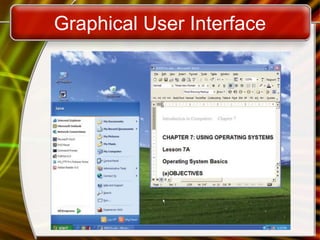
• Graphical user interface (GUI)
– Most common interface
• Windows, OS X, Gnome, KDE
– Uses a mouse to control objects
– Uses a desktop metaphor
– Shortcuts open programs or documents
– Open documents have additional objects
– Task switching
– Dialog boxes allow directed input
Graphical User Interface
Providing a User Interface
• Command line interfaces
– Older interface
• DOS, Linux, UNIX
– User types commands at a prompt
– User must remember all commands
– Included in all GUIs
Command Line Interface
Running Programs
• Many different applications supported
• System call
– Provides consistent access to OS features
• Share information between programs
– Copy and paste
– Object Linking and Embedding
Managing Hardware
• Programs need to access hardware
• Interrupts
– CPU is stopped
– Hardware device is accessed
• Device drivers control the hardware
Organizing Files and Folders
• Organized storage
• Long file names
• Folders can be created and nested
• All storage devices work consistently
Types of Operating Systems
• Real-time operating system
– Very fast small OS
– Built into a device
– Respond quickly to user input
– MP3 players, Medical devices
Types of Operating Systems
• Single user/Single tasking OS
– One user works on the system
– Performs one task at a time
– MS-DOS and Palm OS
– Take up little space on disk
– Run on inexpensive computers
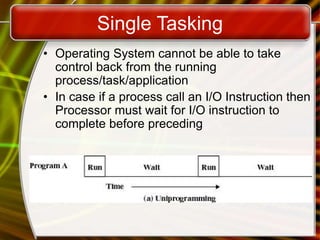
Single Tasking
• Operating System cannot be able to take
control back from the running
process/task/application
• In case if a process call an I/O Instruction then
Processor must wait for I/O instruction to
complete before preceding
Types of Operating Systems
• Single user/Multitasking OS
– User performs many tasks at once
– Most common form of OS
– Windows XP and OS X
– Require expensive computers
– Tend to be complex
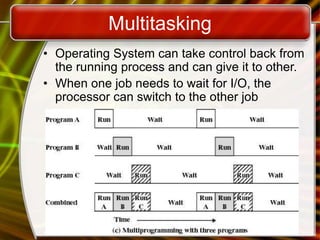
Multitasking
• Operating System can take control back from
the running process and can give it to other.
• When one job needs to wait for I/O, the
processor can switch to the other job
Types of Operating Systems
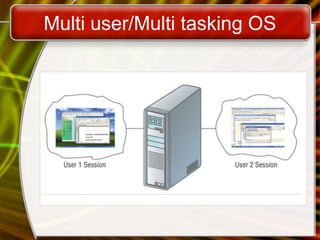
• Multi user/Multitasking OS
– Many users connect to one computer
– Each user has a unique session
– UNIX, Linux, and VMS
– Maintenance can be easy
– Requires a powerful computer
Multi user/Multi tasking OS
Enhancing an OS
• Utilities
– Provide services not included with OS
– Goes beyond the four functions
– Firewall, anti-virus and compression
– Prices vary
Enhancing an OS
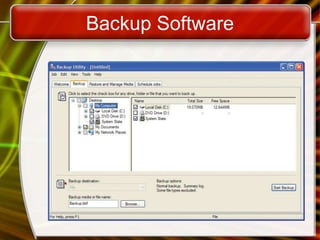
• Backup software
– Archives files onto removable media
– Ensures data integrity
– Most OS include a backup package
– Many third party packages exist
Backup Software
Enhancing an OS
• Anti-virus software
– Crucial utility
– Finds, blocks and removes viruses
– Must be updated regularly
– McAfee and Norton Anti-Virus
Enhancing an OS
• Firewall
– Crucial utility
– Protects your computer from intruders
– Makes computer invisible to hackers
– Zone Labs is a home firewall
– Cisco sells hardware firewalls
Enhancing an OS
• Intrusion detection
– Often part of a firewall package
– Announces attempts to breach security
– Snort is a Linux based package
Enhancing an OS
• Screen savers
– Crucial utility for command line systems
• Prevents burn in
– Merely fun for GUI systems
– Screen saver decorates idle screens
Copyright © 2006 by The McGraw-Hill Companies, Inc. All rights reserved.
McGraw-Hill Technology Education
Reference Book:
Introduction to Computers , Peter Norton
McGraw-Hill.
www.mhhe.com/peternorton

Operating System Basics.ppt

  • 1.
    Copyright © 2006by The McGraw-Hill Companies, Inc. All rights reserved. McGraw-Hill Technology Education Introduction to Computer Administration
  • 2.
    Operating System Basics •Operating System • Operating System Objectives • Layers of Computer Systems • Services Provided by the Operating System • Functions of Operating Systems • Types of Operating Systems • Enhancing an OS
  • 3.
    Operating System • Aprogram that controls the execution of application programs • An interface between applications and hardware
  • 4.
    Operating System Objectives •Convenience – Makes the computer more convenient to use • Efficiency – Allows computer system resources to be used in an efficient manner • Ability to evolve – Permit effective development, testing, and introduction of new system functions without interfering with service
  • 5.
  • 6.
    Services Provided by theOperating System • Program development – Editors and debuggers • Program execution • Access to I/O devices • Controlled access to files • System access
  • 7.
    Services Provided by theOperating System • Error detection and response – internal and external hardware errors • memory error • device failure – software errors • arithmetic overflow • access forbidden memory locations – operating system cannot grant request of application
  • 8.
    Services Provided by theOperating System • Accounting – collect statistics – monitor performance – used to anticipate future enhancements – used for billing users
  • 9.
    Copyright © 2006by The McGraw-Hill Companies, Inc. All rights reserved. McGraw-Hill Technology Education Operating System Basics Ref Book: Chapter # 7: Introduction to Computers , Peter Norton McGraw-Hill. www.mhhe.com/peternorton
  • 10.
    7A-10 Functions of OperatingSystems • Provide a user interface • Run programs • Manage hardware devices • Organized file storage
  • 11.
    Providing a UserInterface • User interface – How a user interacts with a computer – Require different skill sets
  • 12.
    Providing a UserInterface • Graphical user interface (GUI) – Most common interface • Windows, OS X, Gnome, KDE – Uses a mouse to control objects – Uses a desktop metaphor – Shortcuts open programs or documents – Open documents have additional objects – Task switching – Dialog boxes allow directed input
  • 13.
  • 14.
    Providing a UserInterface • Command line interfaces – Older interface • DOS, Linux, UNIX – User types commands at a prompt – User must remember all commands – Included in all GUIs
  • 15.
  • 16.
    Running Programs • Manydifferent applications supported • System call – Provides consistent access to OS features • Share information between programs – Copy and paste – Object Linking and Embedding
  • 17.
    Managing Hardware • Programsneed to access hardware • Interrupts – CPU is stopped – Hardware device is accessed • Device drivers control the hardware
  • 18.
    Organizing Files andFolders • Organized storage • Long file names • Folders can be created and nested • All storage devices work consistently
  • 19.
    Types of OperatingSystems • Real-time operating system – Very fast small OS – Built into a device – Respond quickly to user input – MP3 players, Medical devices
  • 20.
    Types of OperatingSystems • Single user/Single tasking OS – One user works on the system – Performs one task at a time – MS-DOS and Palm OS – Take up little space on disk – Run on inexpensive computers
  • 21.
    Single Tasking • OperatingSystem cannot be able to take control back from the running process/task/application • In case if a process call an I/O Instruction then Processor must wait for I/O instruction to complete before preceding
  • 22.
    Types of OperatingSystems • Single user/Multitasking OS – User performs many tasks at once – Most common form of OS – Windows XP and OS X – Require expensive computers – Tend to be complex
  • 23.
    Multitasking • Operating Systemcan take control back from the running process and can give it to other. • When one job needs to wait for I/O, the processor can switch to the other job
  • 24.
    Types of OperatingSystems • Multi user/Multitasking OS – Many users connect to one computer – Each user has a unique session – UNIX, Linux, and VMS – Maintenance can be easy – Requires a powerful computer
  • 25.
  • 26.
    Enhancing an OS •Utilities – Provide services not included with OS – Goes beyond the four functions – Firewall, anti-virus and compression – Prices vary
  • 27.
    Enhancing an OS •Backup software – Archives files onto removable media – Ensures data integrity – Most OS include a backup package – Many third party packages exist
  • 28.
  • 29.
    Enhancing an OS •Anti-virus software – Crucial utility – Finds, blocks and removes viruses – Must be updated regularly – McAfee and Norton Anti-Virus
  • 30.
    Enhancing an OS •Firewall – Crucial utility – Protects your computer from intruders – Makes computer invisible to hackers – Zone Labs is a home firewall – Cisco sells hardware firewalls
  • 31.
    Enhancing an OS •Intrusion detection – Often part of a firewall package – Announces attempts to breach security – Snort is a Linux based package
  • 32.
    Enhancing an OS •Screen savers – Crucial utility for command line systems • Prevents burn in – Merely fun for GUI systems – Screen saver decorates idle screens
  • 33.
    Copyright © 2006by The McGraw-Hill Companies, Inc. All rights reserved. McGraw-Hill Technology Education Reference Book: Introduction to Computers , Peter Norton McGraw-Hill. www.mhhe.com/peternorton