
Make the impossible possible with
XPages
Frank van der Linden
Agenda

•   Introduction
•   Basic examples
•   Intermediate examples
•   Advanced examples
•   Q&A
Who is Frank van der Linden
• I live in Utrecht in the Netherlands.
• My role is XPages/Domino/Web
  developer at e-office since 2000.
  So I started with Lotus Notes 4.5.x.
• I develop XPages application since
  the introduction of XPages in Lotus
  Notes 8.5.0.
• In my spare time I do a lot of
  running and then I mean a lot.
• And I am married and have 2
  daughters
And he works at e-office
• Celebrated in 2011 it’s 20ste
  anniversary
• First Lotus Business Partner in
  the Netherlands
• E-office is IBM Premier Business
  Partner, Microsoft Gold Partner
  and RIM Alliance Elite partner
Agenda

•   Introduction
•   Basic examples
•   Intermediate examples
•   Advanced examples
•   Q&A
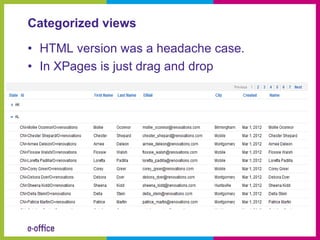
Categorized views

• HTML version was a headache case.
• In XPages is just drag and drop
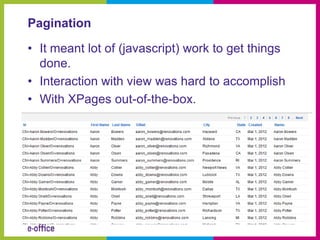
Pagination

• It meant lot of (javascript) work to get things
  done.
• Interaction with view was hard to accomplish
• With XPages out-of-the-box.
Partial Refresh

• Partial Refresh was possible, but with lots of
  Javascript
• In XPages is easy as pie to refresh parts of
  the pages
Custom Controls, Subforms 2.0

• Subforms can only be used one time on form
• Custom Controls are able to exist multiple
  times on a XPages
• By using custom properties, Custom Controls
  can be fully customized
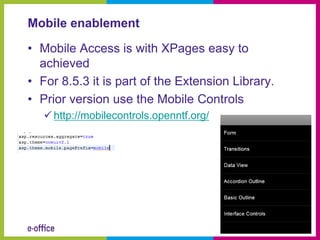
Mobile enablement

• Mobile Access is with XPages easy to
  achieved
• For 8.5.3 it is part of the Extension Library.
• Prior version use the Mobile Controls
    http://mobilecontrols.openntf.org/
Agenda

•   Introduction
•   Basic examples
•   Intermediate examples
•   Advanced examples
•   Q&A
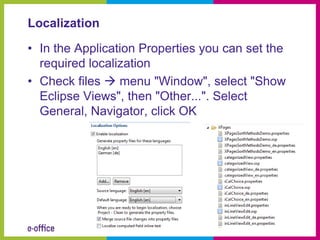
Localization

• In the Application Properties you can set the
  required localization
• Check files  menu "Window", select "Show
  Eclipse Views", then "Other...". Select
  General, Navigator, click OK
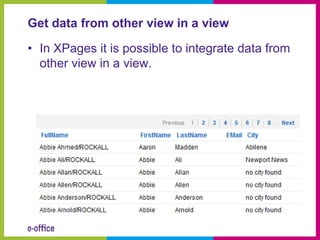
Get data from other view in a view

• In XPages it is possible to integrate data from
  other view in a view.
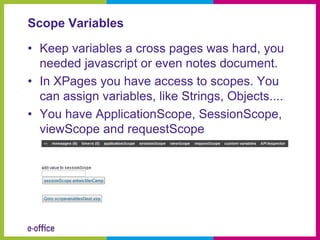
Scope Variables

• Keep variables a cross pages was hard, you
  needed javascript or even notes document.
• In XPages you have access to scopes. You
  can assign variables, like Strings, Objects....
• You have ApplicationScope, SessionScope,
  viewScope and requestScope
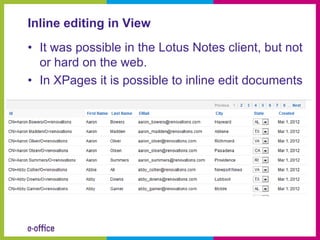
Inline editing in View
• It was possible in the Lotus Notes client, but not
  or hard on the web.
• In XPages it is possible to inline edit documents
Agenda

•   Introduction
•   Basic examples
•   Intermediate examples
•   Advanced examples
•   Q&A
Searchresults dynamically sortable

• Credits to Tommy Valand
   http://dontpanic82.blogspot.com/2010/01/xpages-
    three-ways-to-build-search.html
Extension Library or Domino Upgrade Pack

• In XPages you get access to a toolbox of
  easy to use components
• Go get it at OpenNTF
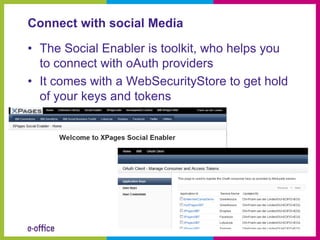
Connect with social Media

• The Social Enabler is toolkit, who helps you
  to connect with oAuth providers
• It comes with a WebSecurityStore to get hold
  of your keys and tokens
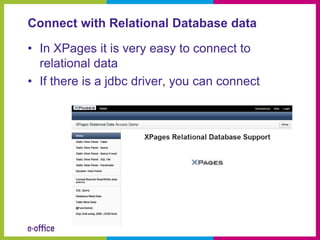
Connect with Relational Database data

• In XPages it is very easy to connect to
  relational data
• If there is a jdbc driver, you can connect
Questions??
How to reach me

• Twitter: @flinden68
• Blog: http://www.domino-weblog.nl/
• E-mail: fli@e-office.com

Entwickler camp2012 make the impossible possible with x_pages

  • 1.
    Make the impossiblepossible with XPages Frank van der Linden
  • 2.
    Agenda • Introduction • Basic examples • Intermediate examples • Advanced examples • Q&A
  • 3.
    Who is Frankvan der Linden • I live in Utrecht in the Netherlands. • My role is XPages/Domino/Web developer at e-office since 2000. So I started with Lotus Notes 4.5.x. • I develop XPages application since the introduction of XPages in Lotus Notes 8.5.0. • In my spare time I do a lot of running and then I mean a lot. • And I am married and have 2 daughters
  • 4.
    And he worksat e-office • Celebrated in 2011 it’s 20ste anniversary • First Lotus Business Partner in the Netherlands • E-office is IBM Premier Business Partner, Microsoft Gold Partner and RIM Alliance Elite partner
  • 5.
    Agenda • Introduction • Basic examples • Intermediate examples • Advanced examples • Q&A
  • 6.
    Categorized views • HTMLversion was a headache case. • In XPages is just drag and drop
  • 7.
    Pagination • It meantlot of (javascript) work to get things done. • Interaction with view was hard to accomplish • With XPages out-of-the-box.
  • 8.
    Partial Refresh • PartialRefresh was possible, but with lots of Javascript • In XPages is easy as pie to refresh parts of the pages
  • 9.
    Custom Controls, Subforms2.0 • Subforms can only be used one time on form • Custom Controls are able to exist multiple times on a XPages • By using custom properties, Custom Controls can be fully customized
  • 10.
    Mobile enablement • MobileAccess is with XPages easy to achieved • For 8.5.3 it is part of the Extension Library. • Prior version use the Mobile Controls  http://mobilecontrols.openntf.org/
  • 11.
    Agenda • Introduction • Basic examples • Intermediate examples • Advanced examples • Q&A
  • 12.
    Localization • In theApplication Properties you can set the required localization • Check files  menu "Window", select "Show Eclipse Views", then "Other...". Select General, Navigator, click OK
  • 13.
    Get data fromother view in a view • In XPages it is possible to integrate data from other view in a view.
  • 14.
    Scope Variables • Keepvariables a cross pages was hard, you needed javascript or even notes document. • In XPages you have access to scopes. You can assign variables, like Strings, Objects.... • You have ApplicationScope, SessionScope, viewScope and requestScope
  • 15.
    Inline editing inView • It was possible in the Lotus Notes client, but not or hard on the web. • In XPages it is possible to inline edit documents
  • 16.
    Agenda • Introduction • Basic examples • Intermediate examples • Advanced examples • Q&A
  • 17.
    Searchresults dynamically sortable •Credits to Tommy Valand  http://dontpanic82.blogspot.com/2010/01/xpages- three-ways-to-build-search.html
  • 18.
    Extension Library orDomino Upgrade Pack • In XPages you get access to a toolbox of easy to use components • Go get it at OpenNTF
  • 19.
    Connect with socialMedia • The Social Enabler is toolkit, who helps you to connect with oAuth providers • It comes with a WebSecurityStore to get hold of your keys and tokens
  • 20.
    Connect with RelationalDatabase data • In XPages it is very easy to connect to relational data • If there is a jdbc driver, you can connect
  • 21.
  • 22.
    How to reachme • Twitter: @flinden68 • Blog: http://www.domino-weblog.nl/ • E-mail: fli@e-office.com