OOP PROJECT
BY
Hussnain Khan
Sannan Ahmed Gulzar
Gathering the required information.
considering the rules which had given by Teacher
Source – Net : Red bus.in/APS-RTC
Review-1
Project Submission



 PC with core 2 duo or more processor.
 512 MB RAM or above.
180 GB Hard Disk or above.
Operating system : Windows 7 (or) 10.
Dev c++
Microsoft word and PowerPoint
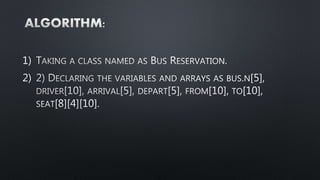
1)
2)
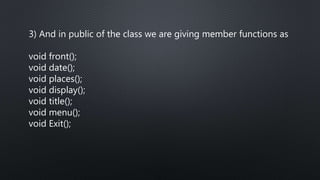
3) And in public of the class we are giving member functions as
void front();
void date();
void places();
void display();
void title();
void menu();
void Exit();
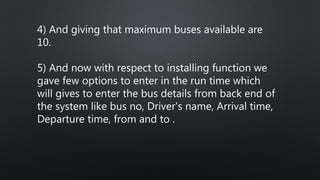
4) And giving that maximum buses available are
10.
5) And now with respect to installing function we
gave few options to enter in the run time which
will gives to enter the bus details from back end of
the system like bus no, Driver's name, Arrival time,
Departure time, from and to .
6) And now with respect to allotment function we can allot
seats for customer according to their preferable seat
numbers.
7)And the empty function shows that the seats are empty
in the bus.
8) And the show function shows that the how many seats
available in the given bus. And which seats are already
reserved in the bus
9) This bus reservation system is only made for the bus system of
Islamabad like we have only stations available in Islamabad like
“I-8_MARKZ"; //THERE ARE DEFINED BUS STANDS
“I-10_MARKZ";
“KARACHI_COMPANY";
“G-10_MARKZ";
“F-11_MARKZ";
“G-11_MARKZ";
“CENTURUS_MALL";
"SHAHEEN_CHOWK";
"JINNAH_SUPPER";
"SUPER_MARKET";
And respective sectors of Islamabad
OUT PUT:
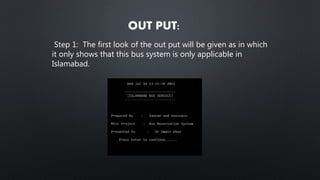
Step 1: The first look of the out put will be given as in which
it only shows that this bus system is only applicable in
Islamabad.
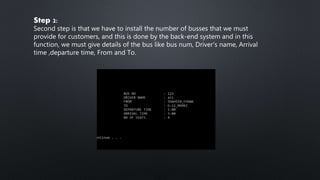
Step 2:
Second step is that we have to install the number of busses that we must
provide for customers, and this is done by the back-end system and in this
function, we must give details of the bus like bus num, Driver's name, Arrival
time ,departure time, From and To.
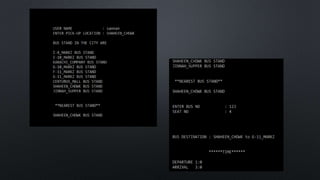
Step: 3
After installing the bus, we have to sign out the
admin and now the user had to select the bus for his
respective travel the system shows the areas he go
for in the busses available the user has to select the
area and the system shows the user about the bus
and its departure and arrival time.
If the seat is not available or it is already book so the
system give a message of sorry, and user must select
another seat which are available for him.
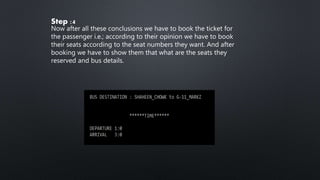
Step :4
Now after all these conclusions we have to book the ticket for
the passenger i.e.; according to their opinion we have to book
their seats according to the seat numbers they want. And after
booking we have to show them that what are the seats they
reserved and bus details.
THANK
YOU

Online bus reservation system

  • 1.
  • 2.
    Gathering the requiredinformation. considering the rules which had given by Teacher Source – Net : Red bus.in/APS-RTC Review-1 Project Submission
  • 3.
  • 4.
  • 5.
     PC withcore 2 duo or more processor.  512 MB RAM or above. 180 GB Hard Disk or above.
  • 6.
    Operating system :Windows 7 (or) 10. Dev c++ Microsoft word and PowerPoint
  • 7.
  • 8.
    3) And inpublic of the class we are giving member functions as void front(); void date(); void places(); void display(); void title(); void menu(); void Exit();
  • 9.
    4) And givingthat maximum buses available are 10. 5) And now with respect to installing function we gave few options to enter in the run time which will gives to enter the bus details from back end of the system like bus no, Driver's name, Arrival time, Departure time, from and to .
  • 10.
    6) And nowwith respect to allotment function we can allot seats for customer according to their preferable seat numbers. 7)And the empty function shows that the seats are empty in the bus. 8) And the show function shows that the how many seats available in the given bus. And which seats are already reserved in the bus
  • 11.
    9) This busreservation system is only made for the bus system of Islamabad like we have only stations available in Islamabad like “I-8_MARKZ"; //THERE ARE DEFINED BUS STANDS “I-10_MARKZ"; “KARACHI_COMPANY"; “G-10_MARKZ"; “F-11_MARKZ"; “G-11_MARKZ"; “CENTURUS_MALL"; "SHAHEEN_CHOWK"; "JINNAH_SUPPER"; "SUPER_MARKET"; And respective sectors of Islamabad
  • 12.
    OUT PUT: Step 1:The first look of the out put will be given as in which it only shows that this bus system is only applicable in Islamabad.
  • 13.
    Step 2: Second stepis that we have to install the number of busses that we must provide for customers, and this is done by the back-end system and in this function, we must give details of the bus like bus num, Driver's name, Arrival time ,departure time, From and To.
  • 14.
    Step: 3 After installingthe bus, we have to sign out the admin and now the user had to select the bus for his respective travel the system shows the areas he go for in the busses available the user has to select the area and the system shows the user about the bus and its departure and arrival time. If the seat is not available or it is already book so the system give a message of sorry, and user must select another seat which are available for him.
  • 16.
    Step :4 Now afterall these conclusions we have to book the ticket for the passenger i.e.; according to their opinion we have to book their seats according to the seat numbers they want. And after booking we have to show them that what are the seats they reserved and bus details.
  • 17.