version 2.2.2                                                                                              1

OMNISCAN                        TM


Batch Scanning and Indexing Solution

OmniScan is a powerful, production-grade document capture solution,
designed specifically to meet the demand of both centralized as well as
distributed high-volume document capture. OmniScan enables scanning of
different types of documents with minimal human intervention.

OmniScan simplifies the cumbersome and time consuming processes of
image cleanup, document categorization and indexing. It provides image
assisted data entry, manual and automatic indexing and automatic data
extraction using OCR, MICR, Barcode Recognition, etc.

Key Features                                            Insert-before and insert-after features
                                                        ?
Powerful Document Scanning Support                      ? option
                                                        Rescanning
? paper documents
Scanning of                                             ? from one document to another
                                                        Move pages
High Volume scanning through powerful GUI-based
?
template                                                Complete Information Management
Scan multiple records into batches for auto/manual
?                                                       ? document separation and classification
                                                         Automatic
processing                                              ? organization of documents into folders
                                                         Automatic
Scan additional pages into existing documents
?                                                       ? of meta data with documents and
                                                         Association
? unwanted pages
Deletion of                                              records for easy indexing and retrieval
Scanning different document types with different
?
scanning properties. For e.g., while scanning an        Data Entry form
application form can be scanned in color at 100 DPI     ?Form design for data entry in user defined fields
and supporting documents in Black & White at 200        ? values for a particular field as Pick List
                                                         Predefined
DPI.                                                    ?Default value for a field
? separation based on fix pages, blank
Document                                                ? read-only fields
                                                         Setting of
page, barcode and standard form recognition             ?Custom code to populate data in fields
? page removal
Auto blank                                              ?Image scrolling on field traversal
? Duplex scanning support
Simplex and
Parallel scanning and export to increase productivity
?                                                       Automatic Data Capture & Simplified Export
                                                        ?Zoning feature for automatic data extraction while
Powerful Imaging Facility                                scanning
? all standard image operations such as
 Performs                                               ? form recognition for document
                                                         Automatic
 deskew, despeckle, rotate, invert, etc.                 separation
? zoom-in, zoom-out and zoom
 Facilities of                                          ?Direct Export to Document Management System
 percentage                                              (DMS)
? traverse to next/previous page/record or
 Facility to                                            ? creation, document filing & indexing
                                                         Auto folder
 specific page for viewing multipage documents          ? Cropping like signature and photograph
                                                         Auto Image
? automatic image-cleanup
 Performs                                               ?Convert image to Black & White after cropping

Easy Document Verification                              Newgen Document Capture Solution
?Image assisted document verification                   OmniScan
?Page-by-page verification of documents                 Increased automation and digitization leads to a


                        Solutions for Business Process & Content Management
2
steady increase in volume of documents being                  workers within a capture workflow. Simultaneous
managed in various industries. These business                 processing of activities within a capture work-step
documents may exist in different forms such as paper,         improves the turnaround time. Some of the
e-mails, forms, or office documents. Therefore,               prominent features are:
businesses are always on the lookout for efficient,
cost-effective, distributed and scalable document             Allows multiple users to participate in each step of
                                                              ?
capture solutions that can extract important                  the capture workflow simultaneously
information from various types of incoming                    Allows user assignment to each stage of a route to
                                                              ?
documents and feed it to other enterprise                     process scanned documents
applications that drive their business.                       ? routing a defined batch of documents
                                                              Facilitates
                                                              from one stage to the next, enabling a production
The time lost in searching for the right information is       indexing & validation environment and faster
an opportunity cost to the organization in terms of a         processing time
lost business deal or poor customer servicing. This is        Allows parallel processing of activities by the users
                                                              ?
reason enough for organizations to invest in an               within the defined capture workflow
effective document capturing solution to scan and             ? defining exception stages so that when a
                                                              Helps in
convert information from the documents into a more            problem is encountered at a particular stage, user
reliable and easily retrievable form.                         can raise an exception and corrective actions can
                                                              be taken before moving forward in the capture
Capture Workflow                                              workflow
OmniScan is empowered by a capture workflow,
which maps the entire process of document                     Steps in Capture Workflow
capturing, quality enhancement and delivery of                ? Scanning: OmniScan helps in scanning
                                                              Complex
documents and retrieved information to other                      different types of documents with different
business systems like a Document Management                       scanning properties. For example, an
System (DMS).                                                     application form may be scanned in color as it may
                                                                  contain a photograph, while other documents may
It enables multiple users to be assigned at a capture             be scanned in black and white. Different sections
work-step for processing of single or multiple                    of your documents can also be scanned in different
documents. OmniScan allows different activities to be             Dots per Inch (DPI) and image types to optimize
performed on the document like scanning, indexing,                the storage requirements.
verification, etc., amongst different specialized

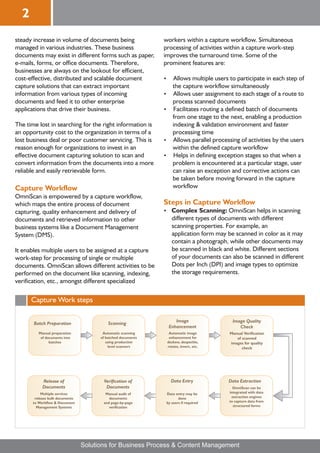
      Capture Work steps

                                                                   Image                 Image Quality
       Batch Preparation                   Scanning
                                                                Enhancement                 Check
          Manual preparation            Automatic scanning      Automatic image        Manual Verification
           of documents into           of batched documents     enhancement for           of scanned
                batches                   using production     deskew, despeckle,      images for quality
                                           level scanners      rotate, invert, etc.          check


            Release of                  Verification of          Data Entry            Data Extraction
            Documents                    Documents                                       OmniScan can be
            Multiple services            Manual audit of       Data entry may be       integrated with data
        release bulk documents             documents                  done              extraction engines
       to Workflow & Document           and page-by-page       by users if required    to capture data from
         Management Systems                verification                                  structured forms


                                 Solutions for Business Process & Content Management
3
Image Enhancement: After scanning, OmniScan
?
  subjects the documents to a rigorous, fully
  automated image enhancement process which
  includes despeckling, deskewing, unwanted border
  removal, and many more such functions.

Classification: Since a business may deal with
?
  different types of documents, OmniScan helps in
  defining criteria for document classification for
  different documents. This enables the system to
  recognize the contents of a document and to
  automatically classify it as a specific document type.

Data Extraction: User-defined set of indices can
?
  be associated with the scanned images. It also
  supports OCR, barcode extraction, MICR & Image
  assisted data entry.

? Documents and the extracted
Release:
  information can be automatically released into
  Newgen's Document Management System -
  OmniDocs. Using ready to deploy adapters,
  documents can be released to other business
  applications and Document Management Systems.


Minimum System Requirements
Client
Hardware:
PIV, 2 GB RAM, 20 GB HDD, Scanner TWAIN
Compliant

Software:
Windows 7, Windows Vista, Windows XP


                OmniScan can easily be configured and grows
                with customer requirements, from a standalone
                 desktop system to a high performance forms
               processing solution for hundreds or thousands of
                              documents per day

                         Solutions for Business Process & Content Management
About Newgen
Newgen Software Technologies Limited is the market leader
in Business Process Management (BPM) and Enterprise
Content management (ECM), with a global footprint of 850
installations in over 40 countries with large, mission-critical
solutions deployed at the world's leading Banks, Insurance
firms, BPO’s, Healthcare Organizations, Government,
Telecom Companies & Shared Service Centers.

Newgen Software has been positioned in the Magic Quadrant
for Business Process Management (BPM) and Enterprise
Content Management (ECM). The company has been
recognized by distinguished analyst firms like Frost and
Sullivan as A 'Hot Company to Watch for' in their global ECM
Market report, 2009 and by IDC in its exclusive report
“Newgen Software: Global Leader in Business Process
Management and Document Management Solutions”.
Newgen is a winner of prestigious awards, such as the CNBC-
TV18, “Emerging India Award 2008”.

With HSBC and SAP investment, Newgen is one of the rare
product companies to have backing of both leading financial
and technology companies of the world. Newgen’s Quality
Systems are certified against ISO 9001:2008 and Information
Security Standard, ISO 27001:2005. Newgen has been
assessed at CMMi Level3.


CORPORATE OFFICE                     UAE                                   US
New Delhi                            Regional Office                       Newgen Software Inc.
Newgen Software Technologies Ltd.    Newgen Software Technologies          1364 Beverly Road, Suite 300
A-6, Satsang Vihar Marg,             Suite No. 314, Building @ 3           McLean, VA 22101
Qutab Institutional Area,            P O Box 500297, Dubai Internet City   Tel: +1-703-439-0703
New Delhi - 110 067 INDIA            Dubai, UAE                            Email: usa@newgensoft.com
Tel: +91-11-4077 0100, 2696 3571     Tel: +97144541365
Fax: +91-11-2685 6936
Email: corpmktg@newgensoft.com       Registered Office
                                     Newgen Software Technologies
                                     Y 1 – 46, P O Box 120586              www.newgensoft.com
                                     SAIF ZONE Sharjah, UAE                http://blog.newgensoft.com
                                     Tel: +971 65571040


                                    Solutions for Business Process & Content Management

OmniScan - Enterprise Batch Scanning Indexing Solution

  • 1.
    version 2.2.2 1 OMNISCAN TM Batch Scanning and Indexing Solution OmniScan is a powerful, production-grade document capture solution, designed specifically to meet the demand of both centralized as well as distributed high-volume document capture. OmniScan enables scanning of different types of documents with minimal human intervention. OmniScan simplifies the cumbersome and time consuming processes of image cleanup, document categorization and indexing. It provides image assisted data entry, manual and automatic indexing and automatic data extraction using OCR, MICR, Barcode Recognition, etc. Key Features Insert-before and insert-after features ? Powerful Document Scanning Support ? option Rescanning ? paper documents Scanning of ? from one document to another Move pages High Volume scanning through powerful GUI-based ? template Complete Information Management Scan multiple records into batches for auto/manual ? ? document separation and classification Automatic processing ? organization of documents into folders Automatic Scan additional pages into existing documents ? ? of meta data with documents and Association ? unwanted pages Deletion of records for easy indexing and retrieval Scanning different document types with different ? scanning properties. For e.g., while scanning an Data Entry form application form can be scanned in color at 100 DPI ?Form design for data entry in user defined fields and supporting documents in Black & White at 200 ? values for a particular field as Pick List Predefined DPI. ?Default value for a field ? separation based on fix pages, blank Document ? read-only fields Setting of page, barcode and standard form recognition ?Custom code to populate data in fields ? page removal Auto blank ?Image scrolling on field traversal ? Duplex scanning support Simplex and Parallel scanning and export to increase productivity ? Automatic Data Capture & Simplified Export ?Zoning feature for automatic data extraction while Powerful Imaging Facility scanning ? all standard image operations such as Performs ? form recognition for document Automatic deskew, despeckle, rotate, invert, etc. separation ? zoom-in, zoom-out and zoom Facilities of ?Direct Export to Document Management System percentage (DMS) ? traverse to next/previous page/record or Facility to ? creation, document filing & indexing Auto folder specific page for viewing multipage documents ? Cropping like signature and photograph Auto Image ? automatic image-cleanup Performs ?Convert image to Black & White after cropping Easy Document Verification Newgen Document Capture Solution ?Image assisted document verification OmniScan ?Page-by-page verification of documents Increased automation and digitization leads to a Solutions for Business Process & Content Management
  • 2.
    2 steady increase involume of documents being workers within a capture workflow. Simultaneous managed in various industries. These business processing of activities within a capture work-step documents may exist in different forms such as paper, improves the turnaround time. Some of the e-mails, forms, or office documents. Therefore, prominent features are: businesses are always on the lookout for efficient, cost-effective, distributed and scalable document Allows multiple users to participate in each step of ? capture solutions that can extract important the capture workflow simultaneously information from various types of incoming Allows user assignment to each stage of a route to ? documents and feed it to other enterprise process scanned documents applications that drive their business. ? routing a defined batch of documents Facilitates from one stage to the next, enabling a production The time lost in searching for the right information is indexing & validation environment and faster an opportunity cost to the organization in terms of a processing time lost business deal or poor customer servicing. This is Allows parallel processing of activities by the users ? reason enough for organizations to invest in an within the defined capture workflow effective document capturing solution to scan and ? defining exception stages so that when a Helps in convert information from the documents into a more problem is encountered at a particular stage, user reliable and easily retrievable form. can raise an exception and corrective actions can be taken before moving forward in the capture Capture Workflow workflow OmniScan is empowered by a capture workflow, which maps the entire process of document Steps in Capture Workflow capturing, quality enhancement and delivery of ? Scanning: OmniScan helps in scanning Complex documents and retrieved information to other different types of documents with different business systems like a Document Management scanning properties. For example, an System (DMS). application form may be scanned in color as it may contain a photograph, while other documents may It enables multiple users to be assigned at a capture be scanned in black and white. Different sections work-step for processing of single or multiple of your documents can also be scanned in different documents. OmniScan allows different activities to be Dots per Inch (DPI) and image types to optimize performed on the document like scanning, indexing, the storage requirements. verification, etc., amongst different specialized Capture Work steps Image Image Quality Batch Preparation Scanning Enhancement Check Manual preparation Automatic scanning Automatic image Manual Verification of documents into of batched documents enhancement for of scanned batches using production deskew, despeckle, images for quality level scanners rotate, invert, etc. check Release of Verification of Data Entry Data Extraction Documents Documents OmniScan can be Multiple services Manual audit of Data entry may be integrated with data release bulk documents documents done extraction engines to Workflow & Document and page-by-page by users if required to capture data from Management Systems verification structured forms Solutions for Business Process & Content Management
  • 3.
    3 Image Enhancement: Afterscanning, OmniScan ? subjects the documents to a rigorous, fully automated image enhancement process which includes despeckling, deskewing, unwanted border removal, and many more such functions. Classification: Since a business may deal with ? different types of documents, OmniScan helps in defining criteria for document classification for different documents. This enables the system to recognize the contents of a document and to automatically classify it as a specific document type. Data Extraction: User-defined set of indices can ? be associated with the scanned images. It also supports OCR, barcode extraction, MICR & Image assisted data entry. ? Documents and the extracted Release: information can be automatically released into Newgen's Document Management System - OmniDocs. Using ready to deploy adapters, documents can be released to other business applications and Document Management Systems. Minimum System Requirements Client Hardware: PIV, 2 GB RAM, 20 GB HDD, Scanner TWAIN Compliant Software: Windows 7, Windows Vista, Windows XP OmniScan can easily be configured and grows with customer requirements, from a standalone desktop system to a high performance forms processing solution for hundreds or thousands of documents per day Solutions for Business Process & Content Management
  • 4.
    About Newgen Newgen SoftwareTechnologies Limited is the market leader in Business Process Management (BPM) and Enterprise Content management (ECM), with a global footprint of 850 installations in over 40 countries with large, mission-critical solutions deployed at the world's leading Banks, Insurance firms, BPO’s, Healthcare Organizations, Government, Telecom Companies & Shared Service Centers. Newgen Software has been positioned in the Magic Quadrant for Business Process Management (BPM) and Enterprise Content Management (ECM). The company has been recognized by distinguished analyst firms like Frost and Sullivan as A 'Hot Company to Watch for' in their global ECM Market report, 2009 and by IDC in its exclusive report “Newgen Software: Global Leader in Business Process Management and Document Management Solutions”. Newgen is a winner of prestigious awards, such as the CNBC- TV18, “Emerging India Award 2008”. With HSBC and SAP investment, Newgen is one of the rare product companies to have backing of both leading financial and technology companies of the world. Newgen’s Quality Systems are certified against ISO 9001:2008 and Information Security Standard, ISO 27001:2005. Newgen has been assessed at CMMi Level3. CORPORATE OFFICE UAE US New Delhi Regional Office Newgen Software Inc. Newgen Software Technologies Ltd. Newgen Software Technologies 1364 Beverly Road, Suite 300 A-6, Satsang Vihar Marg, Suite No. 314, Building @ 3 McLean, VA 22101 Qutab Institutional Area, P O Box 500297, Dubai Internet City Tel: +1-703-439-0703 New Delhi - 110 067 INDIA Dubai, UAE Email: usa@newgensoft.com Tel: +91-11-4077 0100, 2696 3571 Tel: +97144541365 Fax: +91-11-2685 6936 Email: corpmktg@newgensoft.com Registered Office Newgen Software Technologies Y 1 – 46, P O Box 120586 www.newgensoft.com SAIF ZONE Sharjah, UAE http://blog.newgensoft.com Tel: +971 65571040 Solutions for Business Process & Content Management