Intelligent Document Scanning
Powering Paper Processing
DocuSolve Scanning Solutions
Intelligent Document Scanning
Powering Paper Processing
What is Document Capture?
Intelligent Document Scanning
Powering Paper Processing
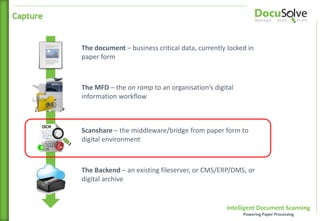
The document – business critical data, currently locked in
paper form
The MFD – the on ramp to an organisation’s digital
information workflow
Scanshare – the middleware/bridge from paper form to
digital environment
The Backend – an existing fileserver, or CMS/ERP/DMS, or
digital archive
Capture
Intelligent Document Scanning
Powering Paper Processing
It’s document capture middleware
The bridge between paper and electronic document
workflows
Platform agnostic – it doesn’t lock you in to a specific
document system now, or in the future
Integrates into your existing document and records
management solutions, or server file structure
Its job is to scan data, attach metadata, perform
transformations and deliver to a document system or
defined file storage
It converts files to a searchable format and can
extract data from areas (or zones) to automatically
drive business processes and workflows
Capture (cont)
Intelligent Document Scanning
Powering Paper Processing
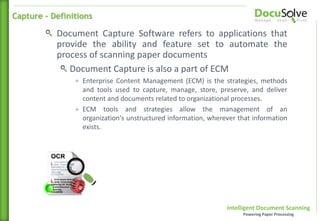
Document Capture Software refers to applications that
provide the ability and feature set to automate the
process of scanning paper documents
Document Capture is also a part of ECM
+ Enterprise Content Management (ECM) is the strategies, methods
and tools used to capture, manage, store, preserve, and deliver
content and documents related to organizational processes.
+ ECM tools and strategies allow the management of an
organization's unstructured information, wherever that information
exists.
Capture - Definitions
Intelligent Document Scanning
Powering Paper Processing
A Tour of Scanshare Capture
Intelligent Document Scanning
Powering Paper Processing
Scanshare Capture Essentials
Easy to set up, low cost
Connectors to several popular storage services
Great for simple scan-to-searchable format applications
Scanshare Capture Enterprise
Many more options to configure, much more capability
Huge array of customisation, recognition, integration and
connection possibilities
* The multifunctional client is identical between versions for seamless upgrade; providing end-user continuity
Capture Products
Intelligent Document Scanning
Powering Paper Processing
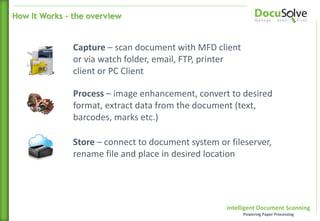
Capture – scan document with MFD client
or via watch folder, email, FTP, printer
client or PC Client
Process – image enhancement, convert to desired
format, extract data from the document (text,
barcodes, marks etc.)
Store – connect to document system or fileserver,
rename file and place in desired location
How It Works – the overview
Intelligent Document Scanning
Powering Paper Processing
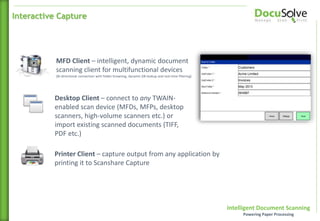
MFD Client – intelligent, dynamic document
scanning client for multifunctional devices
(Bi-directional connection with folder browsing, dynamic DB lookup and real-time filtering)
Desktop Client – connect to any TWAIN-
enabled scan device (MFDs, MFPs, desktop
scanners, high-volume scanners etc.) or
import existing scanned documents (TIFF,
PDF etc.)
Printer Client – capture output from any application by
printing it to Scanshare Capture
Interactive Capture
Intelligent Document Scanning
Powering Paper Processing
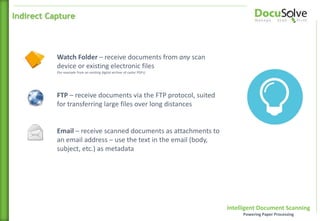
Watch Folder – receive documents from any scan
device or existing electronic files
(for example from an existing digital archive of raster PDFs)
Indirect Capture
Email – receive scanned documents as attachments to
an email address – use the text in the email (body,
subject, etc.) as metadata
FTP – receive documents via the FTP protocol, suited
for transferring large files over long distances
Intelligent Document Scanning
Powering Paper Processing
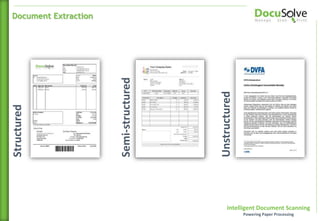
Structured
Semi-structured
Unstructured
Document Extraction
Intelligent Document Scanning
Powering Paper Processing
Capture settings
Resolution
Auto/paper size
Simplex/duplex
Questions
Types
Required
Dynamic
Picklists and lookups
DB lookup
Display/return values
Static/Typed/Selected
Capture
Intelligent Document Scanning
Powering Paper Processing
OMR – (optical marks recognition) read an
area of the document to analyse the areas
which have been marked (useful for exam
papers or for checking documents for
signatures/form completion)
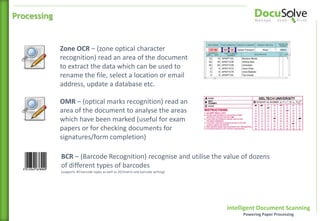
Zone OCR – (zone optical character
recognition) read an area of the document
to extract the data which can be used to
rename the file, select a location or email
address, update a database etc.
Processing
BCR – (Barcode Recognition) recognise and utilise the value of dozens
of different types of barcodes
(supports 40 barcode types as well as 2D/matrix and barcode writing)
Intelligent Document Scanning
Powering Paper Processing
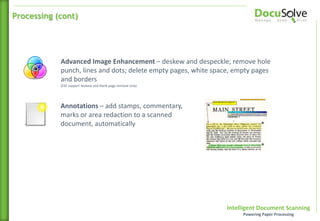
Annotations – add stamps, commentary,
marks or area redaction to a scanned
document, automatically
Advanced Image Enhancement – deskew and despeckle; remove hole
punch, lines and dots; delete empty pages, white space, empty pages
and borders
(CSE support deskew and blank page removal only)
Processing (cont)
Intelligent Document Scanning
Powering Paper Processing
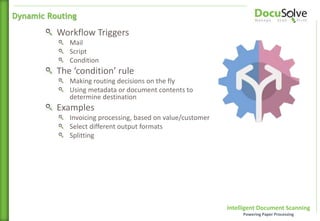
Workflow Triggers
Mail
Script
Condition
The ‘condition’ rule
Making routing decisions on the fly
Using metadata or document contents to
determine destination
Examples
Invoicing processing, based on value/customer
Select different output formats
Splitting
Dynamic Routing
Intelligent Document Scanning
Powering Paper Processing
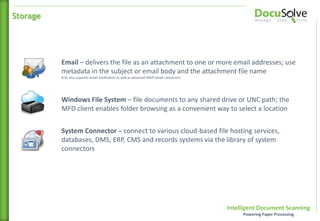
Email – delivers the file as an attachment to one or more email addresses; use
metadata in the subject or email body and the attachment file name
(CSS also supports email notification as well as advanced MAPI email connector)
Windows File System – file documents to any shared drive or UNC path; the
MFD client enables folder browsing as a convenient way to select a location
System Connector – connect to various cloud-based file hosting services,
databases, DMS, ERP, CMS and records systems via the library of system
connectors
Storage
Intelligent Document Scanning
Powering Paper Processing
Why is Scanning Important?
Intelligent Document Scanning
Powering Paper Processing
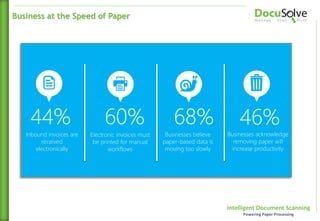
44%
Inbound invoices are
received
electronically
60%
Electronic invoices must
be printed for manual
workflows
68%
Businesses believe
paper-based data is
moving too slowly
46%
Businesses acknowledge
removing paper will
increase productivity
Business at the Speed of Paper
Intelligent Document Scanning
Powering Paper Processing
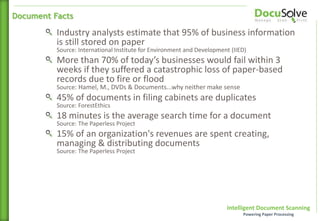
Industry analysts estimate that 95% of business information
is still stored on paper
Source: International Institute for Environment and Development (IIED)
More than 70% of today’s businesses would fail within 3
weeks if they suffered a catastrophic loss of paper-based
records due to fire or flood
Source: Hamel, M., DVDs & Documents...why neither make sense
45% of documents in filing cabinets are duplicates
Source: ForestEthics
18 minutes is the average search time for a document
Source: The Paperless Project
15% of an organization's revenues are spent creating,
managing & distributing documents
Source: The Paperless Project
Document Facts
Intelligent Document Scanning
Powering Paper Processing
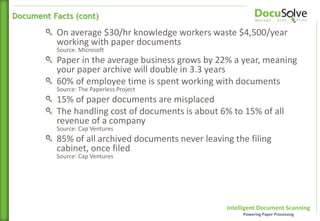
On average $30/hr knowledge workers waste $4,500/year
working with paper documents
Source: Microsoft
Paper in the average business grows by 22% a year, meaning
your paper archive will double in 3.3 years
60% of employee time is spent working with documents
Source: The Paperless Project
15% of paper documents are misplaced
The handling cost of documents is about 6% to 15% of all
revenue of a company
Source: Cap Ventures
85% of all archived documents never leaving the filing
cabinet, once filed
Source: Cap Ventures
Document Facts (cont)
Intelligent Document Scanning
Powering Paper Processing
When an employee leaves a company 70% of his knowledge
walks out the door with them
Source: The Paperless Project
Electronic-only filing would halve the storage space needed
for paper in 5 years, a saving of nearly 8% in overall office
costs
Source: AIIM
The average daily web user prints 28 pages daily
Source: Gartner and HP
For every $1 that a company spends to create a final
document, $10 is spent to manage the creation process
Source: Microsoft
45% of printed documents are discarded in the same day
Source: Xerox
Document Facts (cont)
Intelligent Document Scanning
Powering Paper Processing
$20 on average to file a paper document
Source: PricewaterhouseCoopers
$120 on average searching for a misfiled document
working with paper documents
Source: PricewaterhouseCoopers
$220 on average to recreate a lost document
Source: PricewaterhouseCoopers
60% of all companies still process, store and retrieve
documents manually
Source: Gartner
Document Handling Costs
Intelligent Document Scanning
Powering Paper Processing
Proven increased productivity
Accurate and uniformed storing/naming convention
Turn Cost centres into Profit Centres
Easy-to-use
Immediate Return of Investment (ROI)
What a Document Workflow System Does
A document workflow system is a workflow solution that makes doing
business a whole lot easier
Technically speaking, a document workflow solution is a tool to
streamline document processing and archiving
Basically, it provides cutting-edge precision to fit the various needs of
any business environment and for businesses and organizations of any
size
Source: Netlocity
Proven Deliverables
Intelligent Document Scanning
Powering Paper Processing
Document Workflows ~
example document workflows
Intelligent Document Scanning
Powering Paper Processing
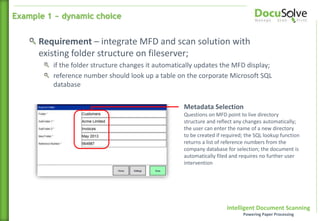
Requirement – integrate MFD and scan solution with
existing folder structure on fileserver;
if the folder structure changes it automatically updates the MFD display;
reference number should look up a table on the corporate Microsoft SQL
database
Metadata Selection
Questions on MFD point to live directory
structure and reflect any changes automatically;
the user can enter the name of a new directory
to be created if required; the SQL lookup function
returns a list of reference numbers from the
company database for selection; the document is
automatically filed and requires no further user
intervention
Example 1 ~ dynamic choice
Intelligent Document Scanning
Powering Paper Processing
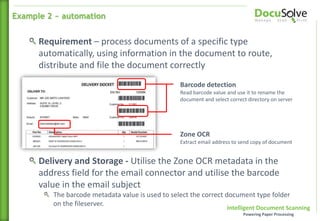
Barcode detection
Read barcode value and use it to rename the
document and select correct directory on server
Zone OCR
Extract email address to send copy of document
Requirement – process documents of a specific type
automatically, using information in the document to route,
distribute and file the document correctly
Delivery and Storage - Utilise the Zone OCR metadata in the
address field for the email connector and utilise the barcode
value in the email subject
The barcode metadata value is used to select the correct document type folder
on the fileserver.
Example 2 ~ automation
Intelligent Document Scanning
Powering Paper Processing
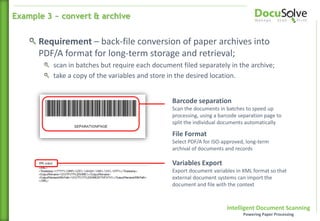
Barcode separation
Scan the documents in batches to speed up
processing, using a barcode separation page to
split the individual documents automatically
File Format
Select PDF/A for ISO-approved, long-term
archival of documents and records
Requirement – back-file conversion of paper archives into
PDF/A format for long-term storage and retrieval;
scan in batches but require each document filed separately in the archive;
take a copy of the variables and store in the desired location.
Variables Export
Export document variables in XML format so that
external document systems can import the
document and file with the context
Example 3 ~ convert & archive
Intelligent Document Scanning
Powering Paper Processing
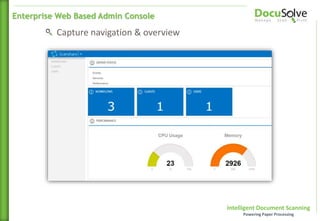
Capture navigation & overview
Enterprise Web Based Admin Console
Intelligent Document Scanning
Powering Paper Processing
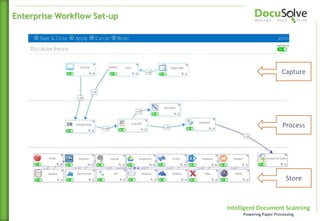
Enterprise Workflow Set-up
Capture
Process
Store
Intelligent Document Scanning
Powering Paper Processing
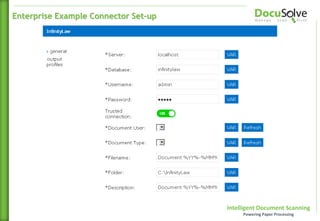
Enterprise Example Connector Set-up
Intelligent Document Scanning
Powering Paper Processing
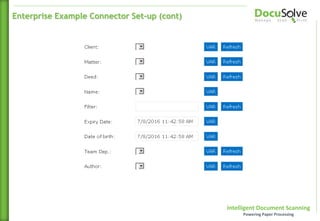
Enterprise Example Connector Set-up (cont)
Intelligent Document Scanning
Powering Paper Processing
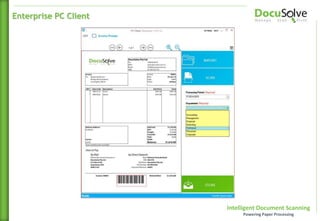
Enterprise PC Client
Intelligent Document Scanning
Powering Paper Processing
The Future is Here…
Intelligent Document Scanning
Powering Paper Processing
Q&A Discussion Period

DocuSolve Scanning Solutions

  • 1.
    Intelligent Document Scanning PoweringPaper Processing DocuSolve Scanning Solutions
  • 2.
    Intelligent Document Scanning PoweringPaper Processing What is Document Capture?
  • 3.
    Intelligent Document Scanning PoweringPaper Processing The document – business critical data, currently locked in paper form The MFD – the on ramp to an organisation’s digital information workflow Scanshare – the middleware/bridge from paper form to digital environment The Backend – an existing fileserver, or CMS/ERP/DMS, or digital archive Capture
  • 4.
    Intelligent Document Scanning PoweringPaper Processing It’s document capture middleware The bridge between paper and electronic document workflows Platform agnostic – it doesn’t lock you in to a specific document system now, or in the future Integrates into your existing document and records management solutions, or server file structure Its job is to scan data, attach metadata, perform transformations and deliver to a document system or defined file storage It converts files to a searchable format and can extract data from areas (or zones) to automatically drive business processes and workflows Capture (cont)
  • 5.
    Intelligent Document Scanning PoweringPaper Processing Document Capture Software refers to applications that provide the ability and feature set to automate the process of scanning paper documents Document Capture is also a part of ECM + Enterprise Content Management (ECM) is the strategies, methods and tools used to capture, manage, store, preserve, and deliver content and documents related to organizational processes. + ECM tools and strategies allow the management of an organization's unstructured information, wherever that information exists. Capture - Definitions
  • 6.
    Intelligent Document Scanning PoweringPaper Processing A Tour of Scanshare Capture
  • 7.
    Intelligent Document Scanning PoweringPaper Processing Scanshare Capture Essentials Easy to set up, low cost Connectors to several popular storage services Great for simple scan-to-searchable format applications Scanshare Capture Enterprise Many more options to configure, much more capability Huge array of customisation, recognition, integration and connection possibilities * The multifunctional client is identical between versions for seamless upgrade; providing end-user continuity Capture Products
  • 8.
    Intelligent Document Scanning PoweringPaper Processing Capture – scan document with MFD client or via watch folder, email, FTP, printer client or PC Client Process – image enhancement, convert to desired format, extract data from the document (text, barcodes, marks etc.) Store – connect to document system or fileserver, rename file and place in desired location How It Works – the overview
  • 9.
    Intelligent Document Scanning PoweringPaper Processing MFD Client – intelligent, dynamic document scanning client for multifunctional devices (Bi-directional connection with folder browsing, dynamic DB lookup and real-time filtering) Desktop Client – connect to any TWAIN- enabled scan device (MFDs, MFPs, desktop scanners, high-volume scanners etc.) or import existing scanned documents (TIFF, PDF etc.) Printer Client – capture output from any application by printing it to Scanshare Capture Interactive Capture
  • 10.
    Intelligent Document Scanning PoweringPaper Processing Watch Folder – receive documents from any scan device or existing electronic files (for example from an existing digital archive of raster PDFs) Indirect Capture Email – receive scanned documents as attachments to an email address – use the text in the email (body, subject, etc.) as metadata FTP – receive documents via the FTP protocol, suited for transferring large files over long distances
  • 11.
    Intelligent Document Scanning PoweringPaper Processing Structured Semi-structured Unstructured Document Extraction
  • 12.
    Intelligent Document Scanning PoweringPaper Processing Capture settings Resolution Auto/paper size Simplex/duplex Questions Types Required Dynamic Picklists and lookups DB lookup Display/return values Static/Typed/Selected Capture
  • 13.
    Intelligent Document Scanning PoweringPaper Processing OMR – (optical marks recognition) read an area of the document to analyse the areas which have been marked (useful for exam papers or for checking documents for signatures/form completion) Zone OCR – (zone optical character recognition) read an area of the document to extract the data which can be used to rename the file, select a location or email address, update a database etc. Processing BCR – (Barcode Recognition) recognise and utilise the value of dozens of different types of barcodes (supports 40 barcode types as well as 2D/matrix and barcode writing)
  • 14.
    Intelligent Document Scanning PoweringPaper Processing Annotations – add stamps, commentary, marks or area redaction to a scanned document, automatically Advanced Image Enhancement – deskew and despeckle; remove hole punch, lines and dots; delete empty pages, white space, empty pages and borders (CSE support deskew and blank page removal only) Processing (cont)
  • 15.
    Intelligent Document Scanning PoweringPaper Processing Workflow Triggers Mail Script Condition The ‘condition’ rule Making routing decisions on the fly Using metadata or document contents to determine destination Examples Invoicing processing, based on value/customer Select different output formats Splitting Dynamic Routing
  • 16.
    Intelligent Document Scanning PoweringPaper Processing Email – delivers the file as an attachment to one or more email addresses; use metadata in the subject or email body and the attachment file name (CSS also supports email notification as well as advanced MAPI email connector) Windows File System – file documents to any shared drive or UNC path; the MFD client enables folder browsing as a convenient way to select a location System Connector – connect to various cloud-based file hosting services, databases, DMS, ERP, CMS and records systems via the library of system connectors Storage
  • 17.
    Intelligent Document Scanning PoweringPaper Processing Why is Scanning Important?
  • 18.
    Intelligent Document Scanning PoweringPaper Processing 44% Inbound invoices are received electronically 60% Electronic invoices must be printed for manual workflows 68% Businesses believe paper-based data is moving too slowly 46% Businesses acknowledge removing paper will increase productivity Business at the Speed of Paper
  • 19.
    Intelligent Document Scanning PoweringPaper Processing Industry analysts estimate that 95% of business information is still stored on paper Source: International Institute for Environment and Development (IIED) More than 70% of today’s businesses would fail within 3 weeks if they suffered a catastrophic loss of paper-based records due to fire or flood Source: Hamel, M., DVDs & Documents...why neither make sense 45% of documents in filing cabinets are duplicates Source: ForestEthics 18 minutes is the average search time for a document Source: The Paperless Project 15% of an organization's revenues are spent creating, managing & distributing documents Source: The Paperless Project Document Facts
  • 20.
    Intelligent Document Scanning PoweringPaper Processing On average $30/hr knowledge workers waste $4,500/year working with paper documents Source: Microsoft Paper in the average business grows by 22% a year, meaning your paper archive will double in 3.3 years 60% of employee time is spent working with documents Source: The Paperless Project 15% of paper documents are misplaced The handling cost of documents is about 6% to 15% of all revenue of a company Source: Cap Ventures 85% of all archived documents never leaving the filing cabinet, once filed Source: Cap Ventures Document Facts (cont)
  • 21.
    Intelligent Document Scanning PoweringPaper Processing When an employee leaves a company 70% of his knowledge walks out the door with them Source: The Paperless Project Electronic-only filing would halve the storage space needed for paper in 5 years, a saving of nearly 8% in overall office costs Source: AIIM The average daily web user prints 28 pages daily Source: Gartner and HP For every $1 that a company spends to create a final document, $10 is spent to manage the creation process Source: Microsoft 45% of printed documents are discarded in the same day Source: Xerox Document Facts (cont)
  • 22.
    Intelligent Document Scanning PoweringPaper Processing $20 on average to file a paper document Source: PricewaterhouseCoopers $120 on average searching for a misfiled document working with paper documents Source: PricewaterhouseCoopers $220 on average to recreate a lost document Source: PricewaterhouseCoopers 60% of all companies still process, store and retrieve documents manually Source: Gartner Document Handling Costs
  • 23.
    Intelligent Document Scanning PoweringPaper Processing Proven increased productivity Accurate and uniformed storing/naming convention Turn Cost centres into Profit Centres Easy-to-use Immediate Return of Investment (ROI) What a Document Workflow System Does A document workflow system is a workflow solution that makes doing business a whole lot easier Technically speaking, a document workflow solution is a tool to streamline document processing and archiving Basically, it provides cutting-edge precision to fit the various needs of any business environment and for businesses and organizations of any size Source: Netlocity Proven Deliverables
  • 24.
    Intelligent Document Scanning PoweringPaper Processing Document Workflows ~ example document workflows
  • 25.
    Intelligent Document Scanning PoweringPaper Processing Requirement – integrate MFD and scan solution with existing folder structure on fileserver; if the folder structure changes it automatically updates the MFD display; reference number should look up a table on the corporate Microsoft SQL database Metadata Selection Questions on MFD point to live directory structure and reflect any changes automatically; the user can enter the name of a new directory to be created if required; the SQL lookup function returns a list of reference numbers from the company database for selection; the document is automatically filed and requires no further user intervention Example 1 ~ dynamic choice
  • 26.
    Intelligent Document Scanning PoweringPaper Processing Barcode detection Read barcode value and use it to rename the document and select correct directory on server Zone OCR Extract email address to send copy of document Requirement – process documents of a specific type automatically, using information in the document to route, distribute and file the document correctly Delivery and Storage - Utilise the Zone OCR metadata in the address field for the email connector and utilise the barcode value in the email subject The barcode metadata value is used to select the correct document type folder on the fileserver. Example 2 ~ automation
  • 27.
    Intelligent Document Scanning PoweringPaper Processing Barcode separation Scan the documents in batches to speed up processing, using a barcode separation page to split the individual documents automatically File Format Select PDF/A for ISO-approved, long-term archival of documents and records Requirement – back-file conversion of paper archives into PDF/A format for long-term storage and retrieval; scan in batches but require each document filed separately in the archive; take a copy of the variables and store in the desired location. Variables Export Export document variables in XML format so that external document systems can import the document and file with the context Example 3 ~ convert & archive
  • 28.
    Intelligent Document Scanning PoweringPaper Processing Capture navigation & overview Enterprise Web Based Admin Console
  • 29.
    Intelligent Document Scanning PoweringPaper Processing Enterprise Workflow Set-up Capture Process Store
  • 30.
    Intelligent Document Scanning PoweringPaper Processing Enterprise Example Connector Set-up
  • 31.
    Intelligent Document Scanning PoweringPaper Processing Enterprise Example Connector Set-up (cont)
  • 32.
    Intelligent Document Scanning PoweringPaper Processing Enterprise PC Client
  • 33.
    Intelligent Document Scanning PoweringPaper Processing The Future is Here…
  • 34.
    Intelligent Document Scanning PoweringPaper Processing Q&A Discussion Period

Editor's Notes

  • #34 This is not a guessing game. We can see exactly what life looks like simply by taking a look overseas. MPS is dead in Europe. Do you know why? Victim of own success. Rebranding of MPS to MDS/MS/MBS GFC hit hard in 2008 no new biz – MPS tie up. Kit from finance companies We needed greater wallet share with the customers we had. Solutions was the answer to both generating incremental revenue, whilst locking in these customer with value propositions which would see us through to the eventual end of austerity and the chance again to sell hardware. Over the last 7 years the evolution hasn’t stopped. 70% of the HW is sold this way – it’s no longer a compelling reason to sell HW. MPS matured in AUS/NZ Let me show you what a copier salesperson has to go through in Europe to get a deal.