Deep-dive into
Virtualization
-Jubin Aghara
Primary needs of any Organization
(IT Infrastructure)
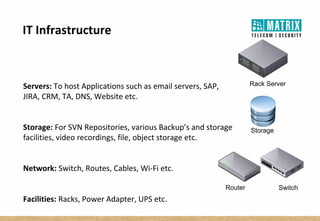
Servers: To host Applications such as email servers, SAP,
JIRA, CRM, TA, DNS, Website etc.
Storage: For SVN Repositories, various Backup’s and storage
facilities, video recordings, file, object storage etc.
Network: Switch, Routes, Cables, Wi-Fi etc.
Facilities: Racks, Power Adapter, UPS etc.
Storage
Rack Server
Router Switch
IT Infrastructure
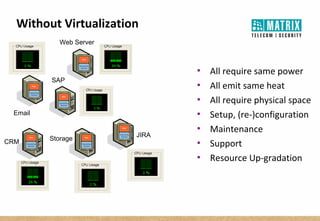
 All require same power
 All emit same heat
 All require physical space
 Setup, (re-)configuration
 Maintenance
 Support
 Resource Up-gradation
Email
Web Server
JIRA
CRM Storage
Without Virtualization
SAP
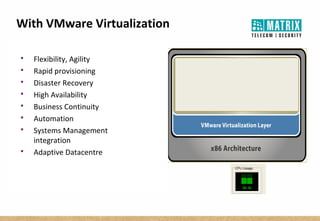
 Flexibility, Agility
 Rapid provisioning
 Disaster Recovery
 High Availability
 Business Continuity
 Automation
 Systems Management
integration
 Adaptive Datacentre
With VMware Virtualization
Benefits & Key features of Virtualization
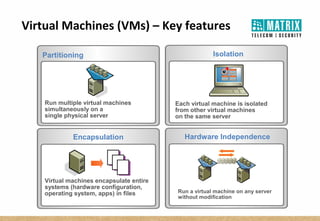
Virtual Machines (VMs) – Key features
Hardware Independence
Run a virtual machine on any server
without modification
Partitioning Isolation
Each virtual machine is isolated
from other virtual machines
on the same server
Encapsulation
Virtual machines encapsulate entire
systems (hardware configuration,
operating system, apps) in files
………
…. ..
……
………
…. ..
……
………
…. ..
……
Run multiple virtual machines
simultaneously on a
single physical server
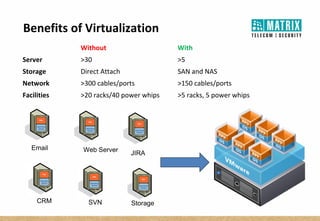
Benefits of Virtualization
Without With
Server >30 >5
Storage Direct Attach SAN and NAS
Network >300 cables/ports >150 cables/ports
Facilities >20 racks/40 power whips >5 racks, 5 power whips
Email Web Server
JIRA
CRM SVN Storage
Virtual Machines (VMs)
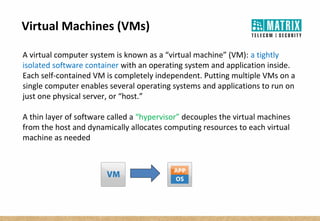
A virtual computer system is known as a “virtual machine” (VM): a tightly
isolated software container with an operating system and application inside.
Each self-contained VM is completely independent. Putting multiple VMs on a
single computer enables several operating systems and applications to run on
just one physical server, or “host.”
A thin layer of software called a “hypervisor” decouples the virtual machines
from the host and dynamically allocates computing resources to each virtual
machine as needed
Host, Cluster and Resource Pool
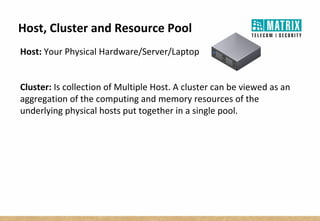
Host: Your Physical Hardware/Server/Laptop
Cluster: Is collection of Multiple Host. A cluster can be viewed as an
aggregation of the computing and memory resources of the
underlying physical hosts put together in a single pool.
Host, Cluster and Resource Pool
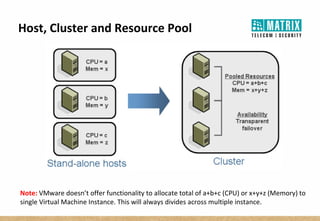
Note: VMware doesn’t offer functionality to allocate total of a+b+c (CPU) or x+y+z (Memory) to
single Virtual Machine Instance. This will always divides across multiple instance.
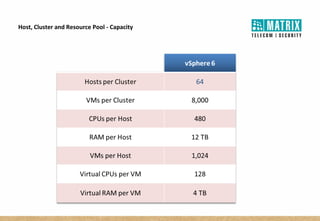
Host, Cluster and Resource Pool - Capacity
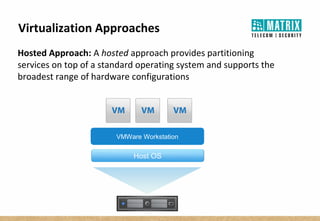
Virtualization Approaches
Hosted Approach: A hosted approach provides partitioning
services on top of a standard operating system and supports the
broadest range of hardware configurations
Host OS
VMWare Workstation
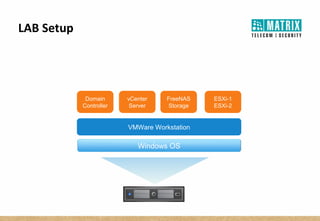
LAB Setup
Windows OS
VMWare Workstation
Domain
Controller
vCenter
Server
FreeNAS
Storage
ESXi-1
ESXi-2
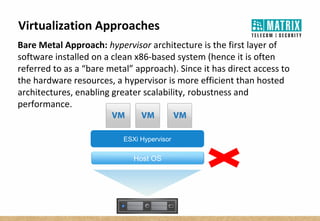
Virtualization Approaches
Bare Metal Approach: hypervisor architecture is the first layer of
software installed on a clean x86-based system (hence it is often
referred to as a “bare metal” approach). Since it has direct access to
the hardware resources, a hypervisor is more efficient than hosted
architectures, enabling greater scalability, robustness and
performance.
Host OS
ESXi Hypervisor
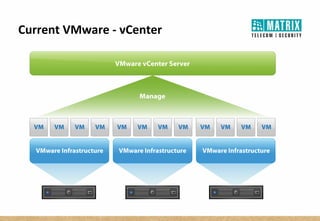
Current VMware - vCenter
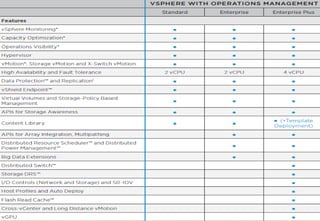
Licensing
Licensing
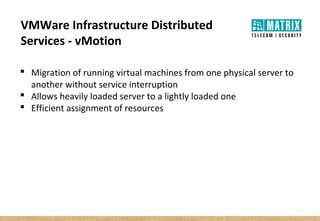
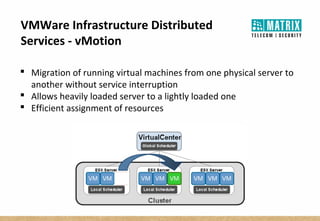
VMWare Infrastructure Distributed
Services - vMotion
 Migration of running virtual machines from one physical server to
another without service interruption
 Allows heavily loaded server to a lightly loaded one
 Efficient assignment of resources
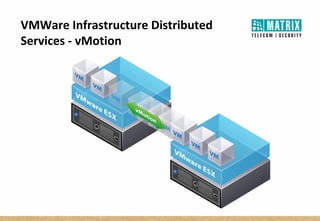
VMWare Infrastructure Distributed
Services - vMotion
 Migration of running virtual machines from one physical server to
another without service interruption
 Allows heavily loaded server to a lightly loaded one
 Efficient assignment of resources
VMWare Infrastructure Distributed
Services - vMotion
VMWare Infrastructure Distributed
Services – HA (High-Availability)
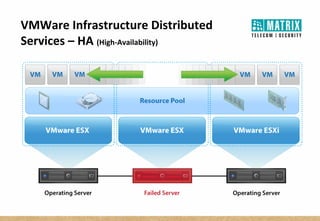
HA monitors all physical hosts in a cluster and detects host failures
An agent placed on each physical host maintains a heartbeat with the
other hosts in the resource pool, and loss of a heartbeat initiates the
process of restarting all affected virtual machines on other hosts
VMWare Infrastructure Distributed
Services – HA (High-Availability)
THANKS!

Introduction to VMware

  • 1.
  • 2.
    Primary needs ofany Organization (IT Infrastructure)
  • 3.
    Servers: To hostApplications such as email servers, SAP, JIRA, CRM, TA, DNS, Website etc. Storage: For SVN Repositories, various Backup’s and storage facilities, video recordings, file, object storage etc. Network: Switch, Routes, Cables, Wi-Fi etc. Facilities: Racks, Power Adapter, UPS etc. Storage Rack Server Router Switch IT Infrastructure
  • 4.
     All requiresame power  All emit same heat  All require physical space  Setup, (re-)configuration  Maintenance  Support  Resource Up-gradation Email Web Server JIRA CRM Storage Without Virtualization SAP
  • 5.
     Flexibility, Agility Rapid provisioning  Disaster Recovery  High Availability  Business Continuity  Automation  Systems Management integration  Adaptive Datacentre With VMware Virtualization
  • 6.
    Benefits & Keyfeatures of Virtualization
  • 7.
    Virtual Machines (VMs)– Key features Hardware Independence Run a virtual machine on any server without modification Partitioning Isolation Each virtual machine is isolated from other virtual machines on the same server Encapsulation Virtual machines encapsulate entire systems (hardware configuration, operating system, apps) in files ……… …. .. …… ……… …. .. …… ……… …. .. …… Run multiple virtual machines simultaneously on a single physical server
  • 8.
    Benefits of Virtualization WithoutWith Server >30 >5 Storage Direct Attach SAN and NAS Network >300 cables/ports >150 cables/ports Facilities >20 racks/40 power whips >5 racks, 5 power whips Email Web Server JIRA CRM SVN Storage
  • 9.
    Virtual Machines (VMs) Avirtual computer system is known as a “virtual machine” (VM): a tightly isolated software container with an operating system and application inside. Each self-contained VM is completely independent. Putting multiple VMs on a single computer enables several operating systems and applications to run on just one physical server, or “host.” A thin layer of software called a “hypervisor” decouples the virtual machines from the host and dynamically allocates computing resources to each virtual machine as needed
  • 10.
    Host, Cluster andResource Pool Host: Your Physical Hardware/Server/Laptop Cluster: Is collection of Multiple Host. A cluster can be viewed as an aggregation of the computing and memory resources of the underlying physical hosts put together in a single pool.
  • 11.
    Host, Cluster andResource Pool Note: VMware doesn’t offer functionality to allocate total of a+b+c (CPU) or x+y+z (Memory) to single Virtual Machine Instance. This will always divides across multiple instance.
  • 12.
    Host, Cluster andResource Pool - Capacity
  • 13.
    Virtualization Approaches Hosted Approach:A hosted approach provides partitioning services on top of a standard operating system and supports the broadest range of hardware configurations Host OS VMWare Workstation
  • 14.
    LAB Setup Windows OS VMWareWorkstation Domain Controller vCenter Server FreeNAS Storage ESXi-1 ESXi-2
  • 15.
    Virtualization Approaches Bare MetalApproach: hypervisor architecture is the first layer of software installed on a clean x86-based system (hence it is often referred to as a “bare metal” approach). Since it has direct access to the hardware resources, a hypervisor is more efficient than hosted architectures, enabling greater scalability, robustness and performance. Host OS ESXi Hypervisor
  • 16.
  • 17.
  • 18.
  • 19.
    VMWare Infrastructure Distributed Services- vMotion  Migration of running virtual machines from one physical server to another without service interruption  Allows heavily loaded server to a lightly loaded one  Efficient assignment of resources
  • 20.
    VMWare Infrastructure Distributed Services- vMotion  Migration of running virtual machines from one physical server to another without service interruption  Allows heavily loaded server to a lightly loaded one  Efficient assignment of resources
  • 21.
  • 22.
    VMWare Infrastructure Distributed Services– HA (High-Availability) HA monitors all physical hosts in a cluster and detects host failures An agent placed on each physical host maintains a heartbeat with the other hosts in the resource pool, and loss of a heartbeat initiates the process of restarting all affected virtual machines on other hosts
  • 23.
  • 24.