Network Simulator
using inetmanet for OMNeT++ 4.2.2
AODV as an Ad-Hoc Routing Protocol
November 14, 2012
Ahmed A. Nour, Ahmed ElSaher, Ehab ElShafei, Tarek Mohamed
Nile University – CIT623 – Security in Wireless Ad-Hoc Networks
2/20
Introduction to OMNeT++ 4.2.2 (1/3)
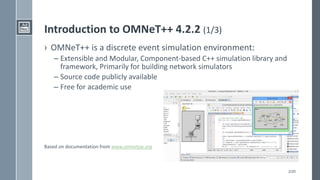
› OMNeT++ is a discrete event simulation environment:
– Extensible and Modular, Component-based C++ simulation library and
framework, Primarily for building network simulators
– Source code publicly available
– Free for academic use
Based on documentation from www.omnetpp.org
3/20
Introduction to OMNeT++ 4.2.2 (2/3)
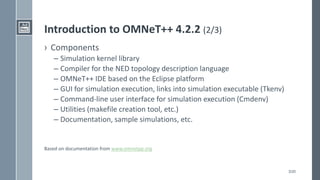
› Components
– Simulation kernel library
– Compiler for the NED topology description language
– OMNeT++ IDE based on the Eclipse platform
– GUI for simulation execution, links into simulation executable (Tkenv)
– Command-line user interface for simulation execution (Cmdenv)
– Utilities (makefile creation tool, etc.)
– Documentation, sample simulations, etc.
Based on documentation from www.omnetpp.org
4/20
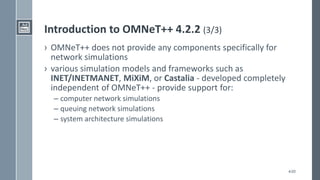
Introduction to OMNeT++ 4.2.2 (3/3)
› OMNeT++ does not provide any components specifically for
network simulations
› various simulation models and frameworks such as
INET/INETMANET, MiXiM, or Castalia - developed completely
independent of OMNeT++ - provide support for:
– computer network simulations
– queuing network simulations
– system architecture simulations
5/20
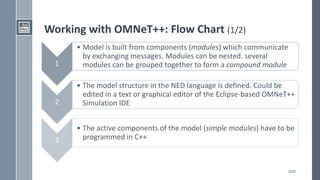
Working with OMNeT++: Flow Chart (1/2)
1
• Model is built from components (modules) which communicate
by exchanging messages. Modules can be nested. several
modules can be grouped together to form a compound module
2
• The model structure in the NED language is defined. Could be
edited in a text or graphical editor of the Eclipse-based OMNeT++
Simulation IDE
3
• The active components of the model (simple modules) have to be
programmed in C++
6/20
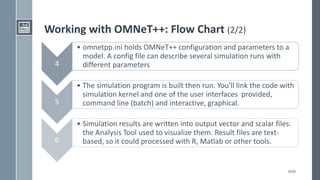
Working with OMNeT++: Flow Chart (2/2)
4
• omnetpp.ini holds OMNeT++ configuration and parameters to a
model. A config file can describe several simulation runs with
different parameters
5
• The simulation program is built then run. You'll link the code with
simulation kernel and one of the user interfaces provided,
command line (batch) and interactive, graphical.
6
• Simulation results are written into output vector and scalar files.
the Analysis Tool used to visualize them. Result files are text-
based, so it could processed with R, Matlab or other tools.
7/20
Build OMNeT++ Project (1/2)
› Download inetmanet https://github.com/aarizaq/inetmanet-2.0
- needed for the Ad-Hoc networks
› Import projects to OmNetpp
– Create "projects" folder under "c:omnetpp"
– Extract the downloaded files to the created folder using winrar
– Import the projects using [File -> Import -> General -> Exist projects into
workspace]
– Build the projects using [Project -> Build all]
– try to run samples projects - under "examples" folder - to be sure that
previous steps are done
8/20
Build OMNeT++ Project (2/2)
› Create new Project
– choose inetmanet as a reference in the new project properties
– be sure that inetmanet project is opened
› Create new empty network description file (.ned)
– in [Design] mode add [network]
– if we're going to use regular device add it to the network
– to create a new device based on existing - to add extra functions - one
add another ned file, in design mode add compound module
› Create an initialization file (.ini)
– use Wizard of Adhoc Mobility wireless network
– edit the parameters
9/20
AODV Network Simulator (1/4)
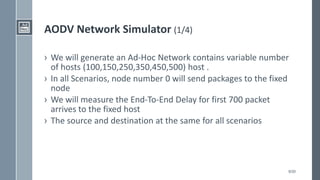
› We will generate an Ad-Hoc Network contains variable number
of hosts (100,150,250,350,450,500) host .
› In all Scenarios, node number 0 will send packages to the fixed
node
› We will measure the End-To-End Delay for first 700 packet
arrives to the fixed host
› The source and destination at the same for all scenarios
10/20
AODV Network Simulator (2/4)
› Network Description file (ned)
– Add reference to network components
› import inet.nodes.inet.AdhocHost;
› import inet.networklayer.autorouting.ipv4.IPv4NetworkConfigurator;
› import inet.world.radio.ChannelControl;
– Network Parameters
› int numHosts; // in our presentation will be (100,150,250,350,450,500)
› int numFixHosts;//in our presenatation will be 1
› connections allowunconnected:
– components Parameters (submodules)
› fixhost[numFixHosts]: AdhocHost
› host[numHosts]: AdhocHost
› channelControl: ChannelControl
› configurator: IPv4NetworkConfigurator
– interface hosts='*' address='145.236.x.x' netmask='255.255.0.0'
11/20
AODV Network Simulator (3/4)
› Initialization file (ini)
› [General]
› network = test3
› description = "Aodv Simple test“
› **.routingProtocol = "AODVUU“
› *.numFixHosts = 1
› *.numHosts = 3
› **.arp.globalARP = true
12/20
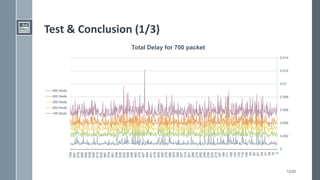
Test & Conclusion (1/3)
0
0.002
0.004
0.006
0.008
0.01
0.012
0.014
2
15
28
41
54
67
80
93
106
119
132
145
158
171
184
197
210
223
236
249
262
275
288
301
314
327
340
353
366
379
392
405
418
431
444
457
470
483
496
509
522
535
548
561
574
587
600
613
626
639
652
665
678
691
704
500 Node
450 Node
350 Node
250 Node
100 Node
Total Delay for 700 packet
13/20
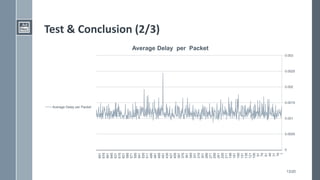
Test & Conclusion (2/3)
0
0.0005
0.001
0.0015
0.002
0.0025
0.003
1
16
31
46
61
76
91
106
121
136
151
166
181
196
211
226
241
256
271
286
301
316
331
346
361
376
391
406
421
436
451
466
481
496
511
526
541
556
571
586
601
616
631
646
661
676
691
Average Delay per Packet
14/20
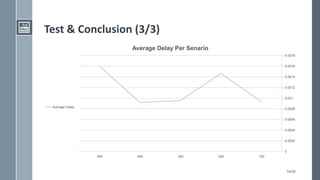
Test & Conclusion (3/3)
0
0.0002
0.0004
0.0006
0.0008
0.001
0.0012
0.0014
0.0016
0.0018
100250350450500
Average Delay Per Senario
Average Delay

Omnet++

  • 1.
    Network Simulator using inetmanetfor OMNeT++ 4.2.2 AODV as an Ad-Hoc Routing Protocol November 14, 2012 Ahmed A. Nour, Ahmed ElSaher, Ehab ElShafei, Tarek Mohamed Nile University – CIT623 – Security in Wireless Ad-Hoc Networks
  • 2.
    2/20 Introduction to OMNeT++4.2.2 (1/3) › OMNeT++ is a discrete event simulation environment: – Extensible and Modular, Component-based C++ simulation library and framework, Primarily for building network simulators – Source code publicly available – Free for academic use Based on documentation from www.omnetpp.org
  • 3.
    3/20 Introduction to OMNeT++4.2.2 (2/3) › Components – Simulation kernel library – Compiler for the NED topology description language – OMNeT++ IDE based on the Eclipse platform – GUI for simulation execution, links into simulation executable (Tkenv) – Command-line user interface for simulation execution (Cmdenv) – Utilities (makefile creation tool, etc.) – Documentation, sample simulations, etc. Based on documentation from www.omnetpp.org
  • 4.
    4/20 Introduction to OMNeT++4.2.2 (3/3) › OMNeT++ does not provide any components specifically for network simulations › various simulation models and frameworks such as INET/INETMANET, MiXiM, or Castalia - developed completely independent of OMNeT++ - provide support for: – computer network simulations – queuing network simulations – system architecture simulations
  • 5.
    5/20 Working with OMNeT++:Flow Chart (1/2) 1 • Model is built from components (modules) which communicate by exchanging messages. Modules can be nested. several modules can be grouped together to form a compound module 2 • The model structure in the NED language is defined. Could be edited in a text or graphical editor of the Eclipse-based OMNeT++ Simulation IDE 3 • The active components of the model (simple modules) have to be programmed in C++
  • 6.
    6/20 Working with OMNeT++:Flow Chart (2/2) 4 • omnetpp.ini holds OMNeT++ configuration and parameters to a model. A config file can describe several simulation runs with different parameters 5 • The simulation program is built then run. You'll link the code with simulation kernel and one of the user interfaces provided, command line (batch) and interactive, graphical. 6 • Simulation results are written into output vector and scalar files. the Analysis Tool used to visualize them. Result files are text- based, so it could processed with R, Matlab or other tools.
  • 7.
    7/20 Build OMNeT++ Project(1/2) › Download inetmanet https://github.com/aarizaq/inetmanet-2.0 - needed for the Ad-Hoc networks › Import projects to OmNetpp – Create "projects" folder under "c:omnetpp" – Extract the downloaded files to the created folder using winrar – Import the projects using [File -> Import -> General -> Exist projects into workspace] – Build the projects using [Project -> Build all] – try to run samples projects - under "examples" folder - to be sure that previous steps are done
  • 8.
    8/20 Build OMNeT++ Project(2/2) › Create new Project – choose inetmanet as a reference in the new project properties – be sure that inetmanet project is opened › Create new empty network description file (.ned) – in [Design] mode add [network] – if we're going to use regular device add it to the network – to create a new device based on existing - to add extra functions - one add another ned file, in design mode add compound module › Create an initialization file (.ini) – use Wizard of Adhoc Mobility wireless network – edit the parameters
  • 9.
    9/20 AODV Network Simulator(1/4) › We will generate an Ad-Hoc Network contains variable number of hosts (100,150,250,350,450,500) host . › In all Scenarios, node number 0 will send packages to the fixed node › We will measure the End-To-End Delay for first 700 packet arrives to the fixed host › The source and destination at the same for all scenarios
  • 10.
    10/20 AODV Network Simulator(2/4) › Network Description file (ned) – Add reference to network components › import inet.nodes.inet.AdhocHost; › import inet.networklayer.autorouting.ipv4.IPv4NetworkConfigurator; › import inet.world.radio.ChannelControl; – Network Parameters › int numHosts; // in our presentation will be (100,150,250,350,450,500) › int numFixHosts;//in our presenatation will be 1 › connections allowunconnected: – components Parameters (submodules) › fixhost[numFixHosts]: AdhocHost › host[numHosts]: AdhocHost › channelControl: ChannelControl › configurator: IPv4NetworkConfigurator – interface hosts='*' address='145.236.x.x' netmask='255.255.0.0'
  • 11.
    11/20 AODV Network Simulator(3/4) › Initialization file (ini) › [General] › network = test3 › description = "Aodv Simple test“ › **.routingProtocol = "AODVUU“ › *.numFixHosts = 1 › *.numHosts = 3 › **.arp.globalARP = true
  • 12.
    12/20 Test & Conclusion(1/3) 0 0.002 0.004 0.006 0.008 0.01 0.012 0.014 2 15 28 41 54 67 80 93 106 119 132 145 158 171 184 197 210 223 236 249 262 275 288 301 314 327 340 353 366 379 392 405 418 431 444 457 470 483 496 509 522 535 548 561 574 587 600 613 626 639 652 665 678 691 704 500 Node 450 Node 350 Node 250 Node 100 Node Total Delay for 700 packet
  • 13.
    13/20 Test & Conclusion(2/3) 0 0.0005 0.001 0.0015 0.002 0.0025 0.003 1 16 31 46 61 76 91 106 121 136 151 166 181 196 211 226 241 256 271 286 301 316 331 346 361 376 391 406 421 436 451 466 481 496 511 526 541 556 571 586 601 616 631 646 661 676 691 Average Delay per Packet Average Delay per Packet
  • 14.
    14/20 Test & Conclusion(3/3) 0 0.0002 0.0004 0.0006 0.0008 0.001 0.0012 0.0014 0.0016 0.0018 100250350450500 Average Delay Per Senario Average Delay