By
Mohammed Amer Al-Batati
 https://omnetgroup.wordpress.com/

              2012
“MiXiM is an OMNeT++ modeling framework created for
  mobile and fixed wireless networks (wireless sensor
  networks, body area networks, ad-hoc networks,
  vehicular networks, etc.). It offers detailed models of
  radio wave propagation, interference estimation, radio
  transceiver power consumption and wireless MAC
  protocols (e.g. Zigbee).”
“The INET Framework is an open-source communication
  networks simulation package for the OMNeT++ simulation
  environment. The INET Framework contains models for
  several wired and wireless networking protocols, including
  UDP, TCP, SCTP, IP, IPv6, Ethernet, PPP, 802.11, MPLS, OSPF
  , and many others. “
“Mixnet was a project contained in MiXiM's "inet" folder
  which provides all modules, examples and documentation
  concerning using MiXiM and INET together in the same
  network.”


“Since MiXiM concentrates on providing very detailed models
  of wireless network interface cards it does not provide very
  sophisticated upper layers (network layer, application
  layer, etc.). Fortunately these are the layers for which the
  INET framework provides a lot of very detailed modules. So
  the idea of Mixnet was to bring INET and MiXiM together to
  be able to use the wireless NICs from MiXiM together with
  the upper network stack from INET.”
 This tutorial shows how to install Mixnet using
  OMNet version 4.1 under windows platform, to do so
  you need the following:
1. OMNeT++, version 4.1, can be found here.
2. MiXiM version 2.1 archive containing two projects:
    MiXiM and Mixnet, can be found here.
3. The "inet4mixnet“, which is INET but has been
    made compatible with MiXiM by removing all
    wireless related modules. It can be found here
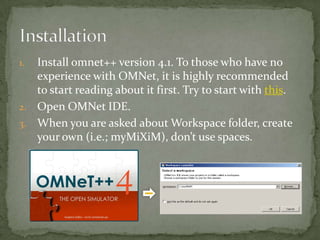
1. Install omnet++ version 4.1. To those who have no
   experience with OMNet, it is highly recommended
   to start reading about it first. Try to start with this.
2. Open OMNet IDE.
3. When you are asked about Workspace folder, create
   your own (i.e.; myMiXiM), don’t use spaces.
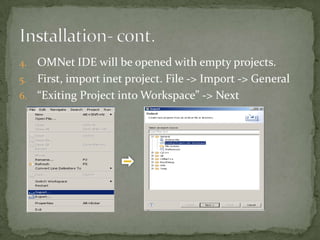
4. OMNet IDE will be opened with empty projects.
5. First, import inet project. File -> Import -> General
6. “Exiting Project into Workspace” -> Next
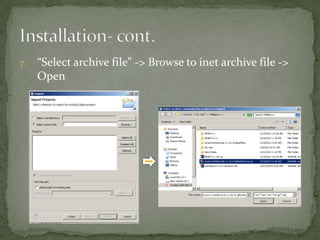
7.   “Select archive file” -> Browse to inet archive file ->
     Open
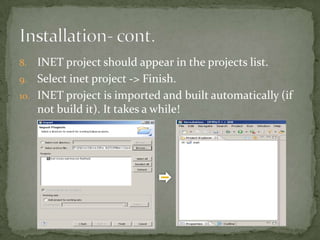
8.  INET project should appear in the projects list.
9. Select inet project -> Finish.
10. INET project is imported and built automatically (if
    not build it). It takes a while!
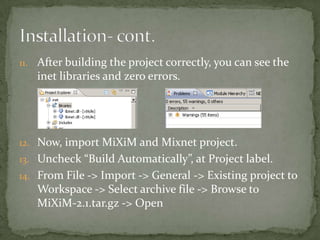
11. After building the project correctly, you can see the
   inet libraries and zero errors.


12. Now, import MiXiM and Mixnet project.
13. Uncheck “Build Automatically”, at Project label.
14. From File -> Import -> General -> Existing project to
   Workspace -> Select archive file -> Browse to
   MiXiM-2.1.tar.gz -> Open
14. Select both “MiXiM (MiXiM)” and “Mixnet (inet)”.
15. Select Finish.
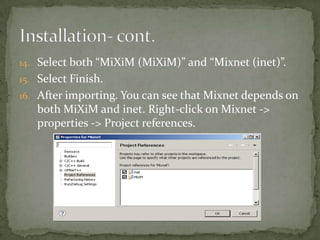
16. After importing. You can see that Mixnet depends on
   both MiXiM and inet. Right-click on Mixnet ->
   properties -> Project references.
17. Build all projects from Project -> Build All.
18. After building the projects. You can see all project
    libraries with no errors.
19. Good Luck! We have done with installation.
 About OMNet
   Tictoc tutorial
   OMNet Manual
   OMNetGroup tutorials


 About MiXiM and Mixnet
   MiXiM Sourceforge page
I would like to thank Eng. Suleiman Zubair (PhD Student)
  for his feedback, suggestions, and comments.

Tutorial 1 installing mixim and mixnet

  • 1.
    By Mohammed Amer Al-Batati https://omnetgroup.wordpress.com/ 2012
  • 2.
    “MiXiM is anOMNeT++ modeling framework created for mobile and fixed wireless networks (wireless sensor networks, body area networks, ad-hoc networks, vehicular networks, etc.). It offers detailed models of radio wave propagation, interference estimation, radio transceiver power consumption and wireless MAC protocols (e.g. Zigbee).”
  • 3.
    “The INET Frameworkis an open-source communication networks simulation package for the OMNeT++ simulation environment. The INET Framework contains models for several wired and wireless networking protocols, including UDP, TCP, SCTP, IP, IPv6, Ethernet, PPP, 802.11, MPLS, OSPF , and many others. “
  • 4.
    “Mixnet was aproject contained in MiXiM's "inet" folder which provides all modules, examples and documentation concerning using MiXiM and INET together in the same network.” “Since MiXiM concentrates on providing very detailed models of wireless network interface cards it does not provide very sophisticated upper layers (network layer, application layer, etc.). Fortunately these are the layers for which the INET framework provides a lot of very detailed modules. So the idea of Mixnet was to bring INET and MiXiM together to be able to use the wireless NICs from MiXiM together with the upper network stack from INET.”
  • 5.
     This tutorialshows how to install Mixnet using OMNet version 4.1 under windows platform, to do so you need the following: 1. OMNeT++, version 4.1, can be found here. 2. MiXiM version 2.1 archive containing two projects: MiXiM and Mixnet, can be found here. 3. The "inet4mixnet“, which is INET but has been made compatible with MiXiM by removing all wireless related modules. It can be found here
  • 6.
    1. Install omnet++version 4.1. To those who have no experience with OMNet, it is highly recommended to start reading about it first. Try to start with this. 2. Open OMNet IDE. 3. When you are asked about Workspace folder, create your own (i.e.; myMiXiM), don’t use spaces.
  • 7.
    4. OMNet IDEwill be opened with empty projects. 5. First, import inet project. File -> Import -> General 6. “Exiting Project into Workspace” -> Next
  • 8.
    7. “Select archive file” -> Browse to inet archive file -> Open
  • 9.
    8. INETproject should appear in the projects list. 9. Select inet project -> Finish. 10. INET project is imported and built automatically (if not build it). It takes a while!
  • 10.
    11. After buildingthe project correctly, you can see the inet libraries and zero errors. 12. Now, import MiXiM and Mixnet project. 13. Uncheck “Build Automatically”, at Project label. 14. From File -> Import -> General -> Existing project to Workspace -> Select archive file -> Browse to MiXiM-2.1.tar.gz -> Open
  • 11.
    14. Select both“MiXiM (MiXiM)” and “Mixnet (inet)”. 15. Select Finish. 16. After importing. You can see that Mixnet depends on both MiXiM and inet. Right-click on Mixnet -> properties -> Project references.
  • 12.
    17. Build allprojects from Project -> Build All. 18. After building the projects. You can see all project libraries with no errors. 19. Good Luck! We have done with installation.
  • 13.
     About OMNet  Tictoc tutorial  OMNet Manual  OMNetGroup tutorials  About MiXiM and Mixnet  MiXiM Sourceforge page
  • 14.
    I would liketo thank Eng. Suleiman Zubair (PhD Student) for his feedback, suggestions, and comments.