OBJECT STORAGE
KASSI NABIL
TABLE OF CONTENTS
 STORAGE TYPES
 BLOCK STORAGE
 FILE STORAGE
 OBJECT STORAGE
 WHAT IS AN OBJECT?
 WHAT IS A METADATA ?
 PROTECTION STORED DATA
 ERASURE CODING
 USE CASES
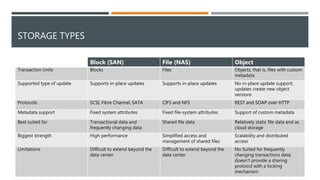
STORAGE TYPES
Block (SAN) File (NAS) Object
Transaction Units Blocks Files Objects, that is, files with custom
metadata
Supported type of update Supports in-place updates Supports in-place updates No in-place update support;
updates create new object
versions
Protocols SCSI, Fibre Channel, SATA CIFS and NFS REST and SOAP over HTTP
Metadata support Fixed system attributes Fixed file-system attributes Support of custom metadata
Best suited for Transactional data and
frequently changing data
Shared file data Relatively static file data and as
cloud storage
Biggest strength High performance Simplified access and
management of shared files
Scalability and distributed
access
Limitations Difficult to extend beyond the
data center
Difficult to extend beyond the
data center
No Suited for frequently
changing transactions data;
doesn’t provide a sharing
protocol with a locking
mechanism
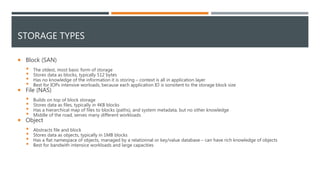
STORAGE TYPES
 Block (SAN)
 The oldest, most basic form of storage
 Stores data as blocks, typically 512 bytes
 Has no knowledge of the information it is storing – context is all in application layer
 Best for IOPs intensive worloads, because each application IO is sonsitent to the storage block size
 File (NAS)
 Builds on top of block storage
 Stores data as files, typically in 4KB blocks
 Has a hierarchical map of files to blocks (paths), and system metadata, but no other knowledge
 Middle of the road, serves many different workloads
 Object
 Abstracts file and block
 Stores data as objects, typically in 1MB blocks
 Has a flat namespace of objects, managed by a relationnal or key/value database – can have rich knowledge of objects
 Best for bandwith intensice workloads and large capacities
STORAGE TYPES
BLOCK STORAGE
 Block storage is an unformatted, POSIX-compliant storage device presented to
the host operating system
 The most common examples of Block Storage are SAN, iSCSI, and local disks (be
they JBOD or RAID).
 A Block Storage volume is attached directly to an operating system, and
interactions generally happen within the parameters of a filesystem, although it
is also possible to have a block device that is accessed directly at the bit-level.
 Appropriate for use as the primary storage for file systems, databases, or for any
applications yhat require fine granular updates
FILE STORAGE
 The most common example of File Storage is a NAS (generally using CIFS or
NFS).
 File Storage involves the use of a network file system that acts as an abstraction
layer between the OS and the underlying filesystem on the NAS device. The OS
still sees the storage as a local filesystem, but it is not actually interacting
directly with the filesystem on which the storage resides. Instead, its commands
are interpreted by the network filesystem, and translated to commands of the
underlying filesystem.
 This is convenient, because it allows different operating systems that may or
may not support the actual underlying filesystem to interact with it in a uniform
manner, which is very valuable when multiple machines need to be able to
access the same content on a remote server. In this same vein, features like file
locking (to prevent inconsistent states when multiple servers are writing to the
same file) and access control are almost universal in the File Storage world
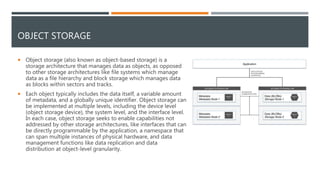
OBJECT STORAGE
 Object storage (also known as object-based storage) is a
storage architecture that manages data as objects, as opposed
to other storage architectures like file systems which manage
data as a file hierarchy and block storage which manages data
as blocks within sectors and tracks.
 Each object typically includes the data itself, a variable amount
of metadata, and a globally unique identifier. Object storage can
be implemented at multiple levels, including the device level
(object storage device), the system level, and the interface level.
In each case, object storage seeks to enable capabilities not
addressed by other storage architectures, like interfaces that can
be directly programmable by the application, a namespace that
can span multiple instances of physical hardware, and data
management functions like data replication and data
distribution at object-level granularity.
OBJECT STORAGE
Specifications :
 API-level access vs. filesystem-level
 Flat structure vs. hierarchical structure
 Scalable metadata
 Scalable platform
 Durable data storage
 Low-cost data storage
OBJECT STORAGE
Benefit :
 Scalable capacity (many PB easily)
 Scalable performance (environment-level
performance scales in a linear manner)
 Durable
 Low cost
 Simplified management
 Single Access Point
 No volumes to manage/resize/etc.
Inconvénients :
 No random access to files
 POSIX utilities do not work directly with
object-storage (it is not a filesystem)
 Integration may require modification of
application and workflow logic
 Typically, lower performance on a per-
object basis than block storage
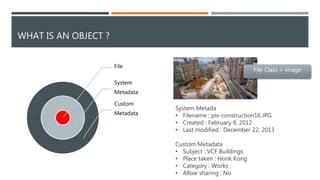
System Metada
• Filename : pix-construction16.JPG
• Created : February 9, 2012
• Last modified : December 22, 2013
Custom Metadata
• Subject : VCF Buildings
• Place taken : Honk Kong
• Category : Works
• Allow sharing : No
WHAT IS AN OBJECT ?
File
System
Metadata
Custom
Metadata
File Class = image
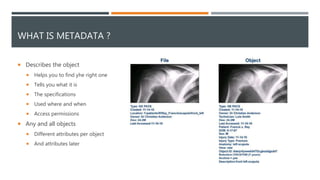
WHAT IS METADATA ?
 Describes the object
 Helps you to find yhe right one
 Tells you what it is
 The specifications
 Used where and when
 Access permissions
 Any and all objects
 Different attributes per object
 And attributes later
WHAT IS METADATA ?
 Metadata lives with the object
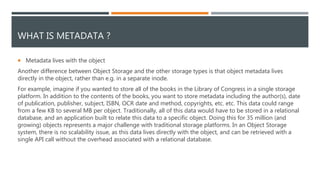
Another difference between Object Storage and the other storage types is that object metadata lives
directly in the object, rather than e.g. in a separate inode.
For example, imagine if you wanted to store all of the books in the Library of Congress in a single storage
platform. In addition to the contents of the books, you want to store metadata including the author(s), date
of publication, publisher, subject, ISBN, OCR date and method, copyrights, etc. etc. This data could range
from a few KB to several MB per object. Traditionally, all of this data would have to be stored in a relational
database, and an application built to relate this data to a specific object. Doing this for 35 million (and
growing) objects represents a major challenge with traditional storage platforms. In an Object Storage
system, there is no scalability issue, as this data lives directly with the object, and can be retrieved with a
single API call without the overhead associated with a relational database.
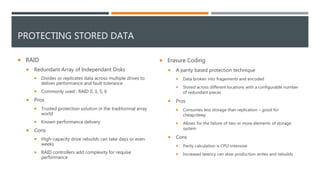
PROTECTING STORED DATA
 RAID
 Redundant Array of Independant Disks
 Divides or replicates data across multiple drives to
deliver performance and fault tolerance
 Commonly used : RAID 0, 1, 5, 6
 Pros
 Trusted protection solution in the traditionnal array
world
 Known performance delivery
 Cons
 High-capacity drive rebuilds can take days or even
weeks
 RAID controllers add complexity for requise
performance
 Erasure Coding
 A parity based protection technique
 Data broken into fragements and encoded
 Stored across different locations with a configurable number
of redundant pieces
 Pros
 Consumes less storage than replication – good for
cheap/deep
 Allows for the failure of two or more elements of storage
system
 Cons
 Parity calculation is CPU-intensive
 Increased latency can slow production writes and rebuilds
ERASURE CODING
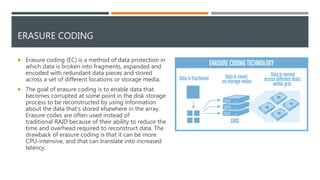
 Erasure coding (EC) is a method of data protection in
which data is broken into fragments, expanded and
encoded with redundant data pieces and stored
across a set of different locations or storage media.
 The goal of erasure coding is to enable data that
becomes corrupted at some point in the disk storage
process to be reconstructed by using information
about the data that's stored elsewhere in the array.
Erasure codes are often used instead of
traditional RAID because of their ability to reduce the
time and overhead required to reconstruct data. The
drawback of erasure coding is that it can be more
CPU-intensive, and that can translate into increased
latency.
ERASURE CODING
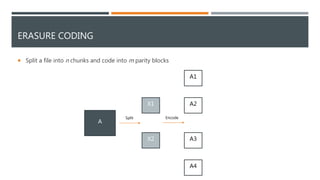
A
X1
X2
A2
A3
A1
A4
Split Encode
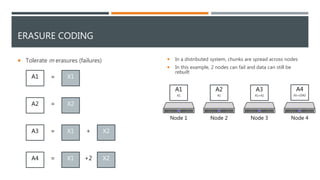
 Split a file into n chunks and code into m parity blocks
ERASURE CODING
X1
X2
X2
X2
A2
 Tolerate m erasures (failures)
A1
A3
A4
X1
X1
=
=
=
=
+
+2
 In a distributed system, chunks are spread across nodes
 In this example, 2 nodes can fail and data can still be
rebuilt
A1
X1
A2
X1
A3
X1+X2
A4
X1+(2)X2
Node 1 Node 2 Node 3 Node 4
ERASURE CODING
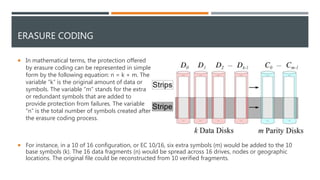
 In mathematical terms, the protection offered
by erasure coding can be represented in simple
form by the following equation: n = k + m. The
variable “k” is the original amount of data or
symbols. The variable “m” stands for the extra
or redundant symbols that are added to
provide protection from failures. The variable
“n” is the total number of symbols created after
the erasure coding process.
 For instance, in a 10 of 16 configuration, or EC 10/16, six extra symbols (m) would be added to the 10
base symbols (k). The 16 data fragments (n) would be spread across 16 drives, nodes or geographic
locations. The original file could be reconstructed from 10 verified fragments.
USE CASES
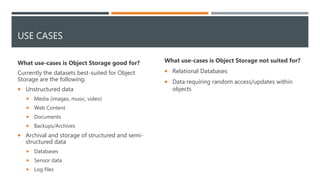
What use-cases is Object Storage good for?
Currently the datasets best-suited for Object
Storage are the following:
 Unstructured data
 Media (images, music, video)
 Web Content
 Documents
 Backups/Archives
 Archival and storage of structured and semi-
structured data
 Databases
 Sensor data
 Log files
What use-cases is Object Storage not suited for?
 Relational Databases
 Data requiring random access/updates within
objects

What is Object storage ?

  • 1.
  • 2.
    TABLE OF CONTENTS STORAGE TYPES  BLOCK STORAGE  FILE STORAGE  OBJECT STORAGE  WHAT IS AN OBJECT?  WHAT IS A METADATA ?  PROTECTION STORED DATA  ERASURE CODING  USE CASES
  • 3.
    STORAGE TYPES Block (SAN)File (NAS) Object Transaction Units Blocks Files Objects, that is, files with custom metadata Supported type of update Supports in-place updates Supports in-place updates No in-place update support; updates create new object versions Protocols SCSI, Fibre Channel, SATA CIFS and NFS REST and SOAP over HTTP Metadata support Fixed system attributes Fixed file-system attributes Support of custom metadata Best suited for Transactional data and frequently changing data Shared file data Relatively static file data and as cloud storage Biggest strength High performance Simplified access and management of shared files Scalability and distributed access Limitations Difficult to extend beyond the data center Difficult to extend beyond the data center No Suited for frequently changing transactions data; doesn’t provide a sharing protocol with a locking mechanism
  • 4.
    STORAGE TYPES  Block(SAN)  The oldest, most basic form of storage  Stores data as blocks, typically 512 bytes  Has no knowledge of the information it is storing – context is all in application layer  Best for IOPs intensive worloads, because each application IO is sonsitent to the storage block size  File (NAS)  Builds on top of block storage  Stores data as files, typically in 4KB blocks  Has a hierarchical map of files to blocks (paths), and system metadata, but no other knowledge  Middle of the road, serves many different workloads  Object  Abstracts file and block  Stores data as objects, typically in 1MB blocks  Has a flat namespace of objects, managed by a relationnal or key/value database – can have rich knowledge of objects  Best for bandwith intensice workloads and large capacities
  • 5.
  • 6.
    BLOCK STORAGE  Blockstorage is an unformatted, POSIX-compliant storage device presented to the host operating system  The most common examples of Block Storage are SAN, iSCSI, and local disks (be they JBOD or RAID).  A Block Storage volume is attached directly to an operating system, and interactions generally happen within the parameters of a filesystem, although it is also possible to have a block device that is accessed directly at the bit-level.  Appropriate for use as the primary storage for file systems, databases, or for any applications yhat require fine granular updates
  • 7.
    FILE STORAGE  Themost common example of File Storage is a NAS (generally using CIFS or NFS).  File Storage involves the use of a network file system that acts as an abstraction layer between the OS and the underlying filesystem on the NAS device. The OS still sees the storage as a local filesystem, but it is not actually interacting directly with the filesystem on which the storage resides. Instead, its commands are interpreted by the network filesystem, and translated to commands of the underlying filesystem.  This is convenient, because it allows different operating systems that may or may not support the actual underlying filesystem to interact with it in a uniform manner, which is very valuable when multiple machines need to be able to access the same content on a remote server. In this same vein, features like file locking (to prevent inconsistent states when multiple servers are writing to the same file) and access control are almost universal in the File Storage world
  • 8.
    OBJECT STORAGE  Objectstorage (also known as object-based storage) is a storage architecture that manages data as objects, as opposed to other storage architectures like file systems which manage data as a file hierarchy and block storage which manages data as blocks within sectors and tracks.  Each object typically includes the data itself, a variable amount of metadata, and a globally unique identifier. Object storage can be implemented at multiple levels, including the device level (object storage device), the system level, and the interface level. In each case, object storage seeks to enable capabilities not addressed by other storage architectures, like interfaces that can be directly programmable by the application, a namespace that can span multiple instances of physical hardware, and data management functions like data replication and data distribution at object-level granularity.
  • 9.
    OBJECT STORAGE Specifications : API-level access vs. filesystem-level  Flat structure vs. hierarchical structure  Scalable metadata  Scalable platform  Durable data storage  Low-cost data storage
  • 10.
    OBJECT STORAGE Benefit : Scalable capacity (many PB easily)  Scalable performance (environment-level performance scales in a linear manner)  Durable  Low cost  Simplified management  Single Access Point  No volumes to manage/resize/etc. Inconvénients :  No random access to files  POSIX utilities do not work directly with object-storage (it is not a filesystem)  Integration may require modification of application and workflow logic  Typically, lower performance on a per- object basis than block storage
  • 11.
    System Metada • Filename: pix-construction16.JPG • Created : February 9, 2012 • Last modified : December 22, 2013 Custom Metadata • Subject : VCF Buildings • Place taken : Honk Kong • Category : Works • Allow sharing : No WHAT IS AN OBJECT ? File System Metadata Custom Metadata File Class = image
  • 12.
    WHAT IS METADATA?  Describes the object  Helps you to find yhe right one  Tells you what it is  The specifications  Used where and when  Access permissions  Any and all objects  Different attributes per object  And attributes later
  • 13.
    WHAT IS METADATA?  Metadata lives with the object Another difference between Object Storage and the other storage types is that object metadata lives directly in the object, rather than e.g. in a separate inode. For example, imagine if you wanted to store all of the books in the Library of Congress in a single storage platform. In addition to the contents of the books, you want to store metadata including the author(s), date of publication, publisher, subject, ISBN, OCR date and method, copyrights, etc. etc. This data could range from a few KB to several MB per object. Traditionally, all of this data would have to be stored in a relational database, and an application built to relate this data to a specific object. Doing this for 35 million (and growing) objects represents a major challenge with traditional storage platforms. In an Object Storage system, there is no scalability issue, as this data lives directly with the object, and can be retrieved with a single API call without the overhead associated with a relational database.
  • 14.
    PROTECTING STORED DATA RAID  Redundant Array of Independant Disks  Divides or replicates data across multiple drives to deliver performance and fault tolerance  Commonly used : RAID 0, 1, 5, 6  Pros  Trusted protection solution in the traditionnal array world  Known performance delivery  Cons  High-capacity drive rebuilds can take days or even weeks  RAID controllers add complexity for requise performance  Erasure Coding  A parity based protection technique  Data broken into fragements and encoded  Stored across different locations with a configurable number of redundant pieces  Pros  Consumes less storage than replication – good for cheap/deep  Allows for the failure of two or more elements of storage system  Cons  Parity calculation is CPU-intensive  Increased latency can slow production writes and rebuilds
  • 15.
    ERASURE CODING  Erasurecoding (EC) is a method of data protection in which data is broken into fragments, expanded and encoded with redundant data pieces and stored across a set of different locations or storage media.  The goal of erasure coding is to enable data that becomes corrupted at some point in the disk storage process to be reconstructed by using information about the data that's stored elsewhere in the array. Erasure codes are often used instead of traditional RAID because of their ability to reduce the time and overhead required to reconstruct data. The drawback of erasure coding is that it can be more CPU-intensive, and that can translate into increased latency.
  • 16.
    ERASURE CODING A X1 X2 A2 A3 A1 A4 Split Encode Split a file into n chunks and code into m parity blocks
  • 17.
    ERASURE CODING X1 X2 X2 X2 A2  Toleratem erasures (failures) A1 A3 A4 X1 X1 = = = = + +2  In a distributed system, chunks are spread across nodes  In this example, 2 nodes can fail and data can still be rebuilt A1 X1 A2 X1 A3 X1+X2 A4 X1+(2)X2 Node 1 Node 2 Node 3 Node 4
  • 18.
    ERASURE CODING  Inmathematical terms, the protection offered by erasure coding can be represented in simple form by the following equation: n = k + m. The variable “k” is the original amount of data or symbols. The variable “m” stands for the extra or redundant symbols that are added to provide protection from failures. The variable “n” is the total number of symbols created after the erasure coding process.  For instance, in a 10 of 16 configuration, or EC 10/16, six extra symbols (m) would be added to the 10 base symbols (k). The 16 data fragments (n) would be spread across 16 drives, nodes or geographic locations. The original file could be reconstructed from 10 verified fragments.
  • 19.
    USE CASES What use-casesis Object Storage good for? Currently the datasets best-suited for Object Storage are the following:  Unstructured data  Media (images, music, video)  Web Content  Documents  Backups/Archives  Archival and storage of structured and semi- structured data  Databases  Sensor data  Log files What use-cases is Object Storage not suited for?  Relational Databases  Data requiring random access/updates within objects