
TITLE
SUBTITLE
DATE
Cloudian Inc. | Presenter
Object Storage Overview
January 30, 2015
Cloudian Inc. | Simone Morellato, Technical and
Solutions Marketing Director
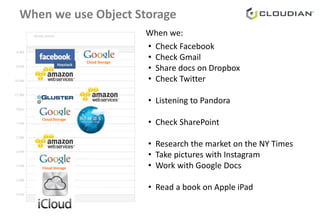
• Check Facebook
• Check Gmail
• Share docs on Dropbox
• Check Twitter
• Listening to Pandora
• Check SharePoint
• Research the market on the NY Times
• Take pictures with Instagram
• Work with Google Docs
• Read a book on Apple iPad
Haystack
Cloud Storage
Cloud Storage
Cloud Storage
When we use Object Storage
When we:
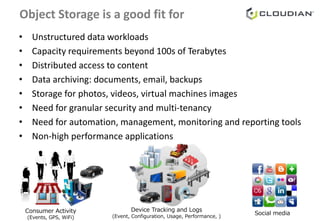
Object Storage is a good fit for
• Unstructured data workloads
• Capacity requirements beyond 100s of Terabytes
• Distributed access to content
• Data archiving: documents, email, backups
• Storage for photos, videos, virtual machines images
• Need for granular security and multi-tenancy
• Need for automation, management, monitoring and reporting tools
• Non-high performance applications
Consumer Activity
(Events, GPS, WiFi)
Social media
Device Tracking and Logs
(Event, Configuration, Usage, Performance, )
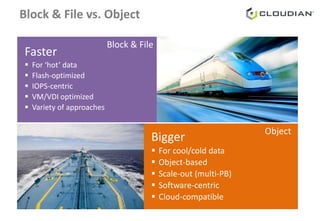
Block & File vs. Object
Bigger
 For cool/cold data
 Object-based
 Scale-out (multi-PB)
 Software-centric
 Cloud-compatible
Faster
 For ‘hot’ data
 Flash-optimized
 IOPS-centric
 VM/VDI optimized
 Variety of approaches
Block & File
Object
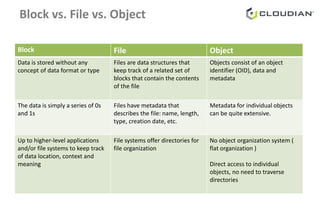
Block vs. File vs. Object
Block File Object
Data is stored without any
concept of data format or type
Files are data structures that
keep track of a related set of
blocks that contain the contents
of the file
Objects consist of an object
identifier (OID), data and
metadata
The data is simply a series of 0s
and 1s
Files have metadata that
describes the file: name, length,
type, creation date, etc.
Metadata for individual objects
can be quite extensive.
Up to higher-level applications
and/or file systems to keep track
of data location, context and
meaning
File systems offer directories for
file organization
No object organization system (
flat organization )
Direct access to individual
objects, no need to traverse
directories
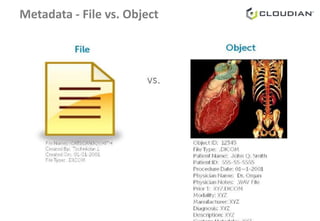
Metadata - File vs. Object
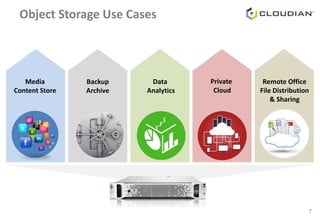
Object Storage Use Cases
7
Media
Content Store
Data
Analytics
Private
Cloud
Remote Office
File Distribution
& Sharing
Backup
Archive
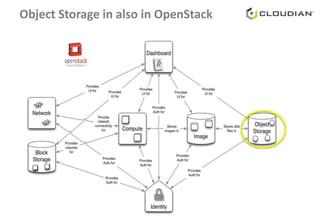
Object Storage in also in OpenStack
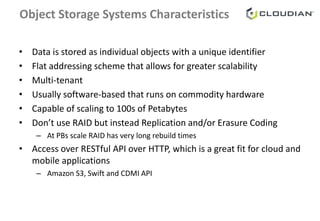
Object Storage Systems Characteristics
• Data is stored as individual objects with a unique identifier
• Flat addressing scheme that allows for greater scalability
• Multi-tenant
• Usually software-based that runs on commodity hardware
• Capable of scaling to 100s of Petabytes
• Don’t use RAID but instead Replication and/or Erasure Coding
– At PBs scale RAID has very long rebuild times
• Access over RESTful API over HTTP, which is a great fit for cloud and
mobile applications
– Amazon S3, Swift and CDMI API
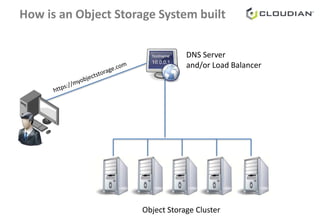
How is an Object Storage System built
DNS Server
and/or Load Balancer
Object Storage Cluster
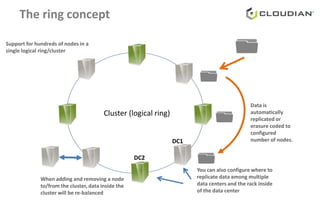
The ring concept
Cluster (logical ring)
Data is
automatically
replicated or
erasure coded to
configured
number of nodes.
You can also configure where to
replicate data among multiple
data centers and the rack inside
of the data center
DC1
DC2
When adding and removing a node
to/from the cluster, data inside the
cluster will be re-balanced
Support for hundreds of nodes in a
single logical ring/cluster
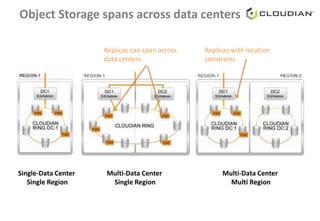
Multi-Data Center
Single Region
Multi-Data Center
Multi Region
Single-Data Center
Single Region
Replicas can span across
data centers
Replicas with location
constrains
Object Storage spans across data centers
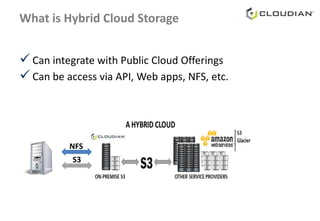
What is Hybrid Cloud Storage
 Can integrate with Public Cloud Offerings
 Can be access via API, Web apps, NFS, etc.
S3
NFS
Learn more
● Visit our website and request free trial or use our online
demo system: http://www.cloudian.com/
● Ask us for a demo
● Follow us on Twitter: @CloudianStorage
● Like us on Facebook:
https://www.facebook.com/cloudian.cloudstorage
THANK YOU www.cloudian.com

Object Storage Overview

  • 1.
    TITLE SUBTITLE DATE Cloudian Inc. |Presenter Object Storage Overview January 30, 2015 Cloudian Inc. | Simone Morellato, Technical and Solutions Marketing Director
  • 2.
    • Check Facebook •Check Gmail • Share docs on Dropbox • Check Twitter • Listening to Pandora • Check SharePoint • Research the market on the NY Times • Take pictures with Instagram • Work with Google Docs • Read a book on Apple iPad Haystack Cloud Storage Cloud Storage Cloud Storage When we use Object Storage When we:
  • 3.
    Object Storage isa good fit for • Unstructured data workloads • Capacity requirements beyond 100s of Terabytes • Distributed access to content • Data archiving: documents, email, backups • Storage for photos, videos, virtual machines images • Need for granular security and multi-tenancy • Need for automation, management, monitoring and reporting tools • Non-high performance applications Consumer Activity (Events, GPS, WiFi) Social media Device Tracking and Logs (Event, Configuration, Usage, Performance, )
  • 4.
    Block & Filevs. Object Bigger  For cool/cold data  Object-based  Scale-out (multi-PB)  Software-centric  Cloud-compatible Faster  For ‘hot’ data  Flash-optimized  IOPS-centric  VM/VDI optimized  Variety of approaches Block & File Object
  • 5.
    Block vs. Filevs. Object Block File Object Data is stored without any concept of data format or type Files are data structures that keep track of a related set of blocks that contain the contents of the file Objects consist of an object identifier (OID), data and metadata The data is simply a series of 0s and 1s Files have metadata that describes the file: name, length, type, creation date, etc. Metadata for individual objects can be quite extensive. Up to higher-level applications and/or file systems to keep track of data location, context and meaning File systems offer directories for file organization No object organization system ( flat organization ) Direct access to individual objects, no need to traverse directories
  • 6.
    Metadata - Filevs. Object
  • 7.
    Object Storage UseCases 7 Media Content Store Data Analytics Private Cloud Remote Office File Distribution & Sharing Backup Archive
  • 8.
    Object Storage inalso in OpenStack
  • 9.
    Object Storage SystemsCharacteristics • Data is stored as individual objects with a unique identifier • Flat addressing scheme that allows for greater scalability • Multi-tenant • Usually software-based that runs on commodity hardware • Capable of scaling to 100s of Petabytes • Don’t use RAID but instead Replication and/or Erasure Coding – At PBs scale RAID has very long rebuild times • Access over RESTful API over HTTP, which is a great fit for cloud and mobile applications – Amazon S3, Swift and CDMI API
  • 10.
    How is anObject Storage System built DNS Server and/or Load Balancer Object Storage Cluster
  • 11.
    The ring concept Cluster(logical ring) Data is automatically replicated or erasure coded to configured number of nodes. You can also configure where to replicate data among multiple data centers and the rack inside of the data center DC1 DC2 When adding and removing a node to/from the cluster, data inside the cluster will be re-balanced Support for hundreds of nodes in a single logical ring/cluster
  • 12.
    Multi-Data Center Single Region Multi-DataCenter Multi Region Single-Data Center Single Region Replicas can span across data centers Replicas with location constrains Object Storage spans across data centers
  • 13.
    What is HybridCloud Storage  Can integrate with Public Cloud Offerings  Can be access via API, Web apps, NFS, etc. S3 NFS
  • 14.
    Learn more ● Visitour website and request free trial or use our online demo system: http://www.cloudian.com/ ● Ask us for a demo ● Follow us on Twitter: @CloudianStorage ● Like us on Facebook: https://www.facebook.com/cloudian.cloudstorage
  • 15.

Editor's Notes

  • #7 The metadata present in Object Storage gives users the context a nd content information they need to properly manage and access unstructured data. They can easily search for data without knowing specific filenames, dates or traditional file designations. They can also use the metadata to apply policies for routing, re tention and deletion as well as automate storage management . For example, with the MRI scan, a storage policy can be set to look at the metadata associated with it , track the patient’s name and then determine if the patient is currently admitted to the ho spital. If the patient is not, the MRI scan can be sent to archival storage. On the other hand, if the MRI o bject is for a current patient who is admitted for ongoing treatment, the object can be routed to near - line storage so that it can be immediately retrieved the next time the patient visits the hospital. As another example , if a sto rage manager comes across an MP3 file and the metadata indicates that the data contained within it is an employee’s personal music file, the storage policy will know to m anage it diffe rently than if the MP3 file was the recording of something important to the company or institution (e.g. a physician’s recorded notes) .