Object Oriented Programming: 13
Input Stream /Extraction Operator
Prof Neeraj Bhargava
Vaibhav Khanna
Department of Computer Science
School of Engineering and Systems Sciences
Maharshi Dayanand Saraswati University Ajmer
2
I/O Streams and Standard I/O Devices
• I/O: sequence of bytes (stream of bytes) from
source to destination
– Bytes are usually characters, unless program
requires other types of information
• Stream: sequence of characters from source
to destination
• Input stream: sequence of characters from an
input device to the computer
• Output stream: sequence of characters from
the computer to an output device
3
I/O Streams and Standard I/O Devices
(continued)
• Use iostream header file to extract
(receive) data from keyboard and send output
to the screen
– Contains definitions of two data types:
• istream - input stream
• ostream - output stream
– Has two variables:
• cin - stands for common input
• cout - stands for common output
4
I/O Streams and Standard I/O Devices
(continued)
• To use cin and cout, the preprocessor
directive#include <iostream> must be
used
• Variable declaration is similar to:
– istream cin;
– ostream cout;
• Input stream variables: type istream
• Output stream variables: type ostream
5
cin and the Extraction Operator >>
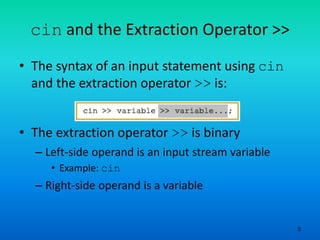
• The syntax of an input statement using cin
and the extraction operator >> is:
• The extraction operator >> is binary
– Left-side operand is an input stream variable
• Example: cin
– Right-side operand is a variable
6
cin and the Extraction Operator >>
(continued)
• No difference between a single cin with
multiple variables and multiple cin
statements with one variable
• When scanning, >> skips all whitespace
– Blanks and certain nonprintable characters
• >> distinguishes between character 2 and
number 2 by the right-side operand of >>
– If type char or int (or double), the 2 is
treated as a character or as a number 2
7
cin and the Extraction Operator >>
(continued)
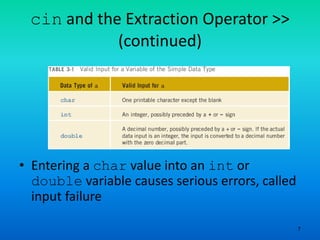
• Entering a char value into an int or
double variable causes serious errors, called
input failure
8
cin and the Extraction Operator >>
(continued)
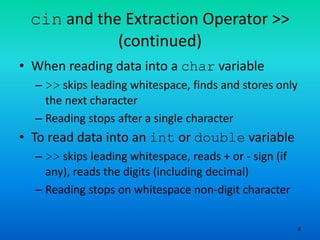
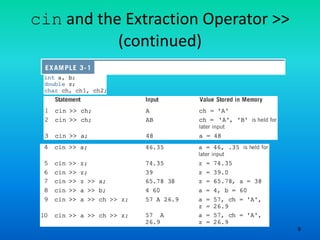
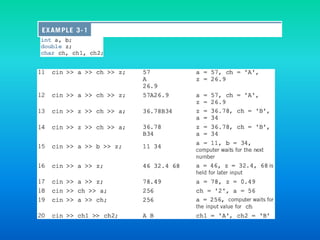
• When reading data into a char variable
– >> skips leading whitespace, finds and stores only
the next character
– Reading stops after a single character
• To read data into an int or double variable
– >> skips leading whitespace, reads + or - sign (if
any), reads the digits (including decimal)
– Reading stops on whitespace non-digit character
9
cin and the Extraction Operator >>
(continued)
11
Using Predefined Functions in a
Program
• Function (subprogram): set of instructions
– When activated, it accomplishes a task
• main executes when a program is run
• Other functions execute only when called
• C++ includes a wealth of functions
– Predefined functions are organized as a collection
of libraries called header files
12
Using Predefined Functions in a
Program (continued)
• Header file may contain several functions
• To use a predefined function, you need the
name of the appropriate header file
– You also need to know:
• Function name
• Number of parameters required
• Type of each parameter
• What the function is going to do
13
Using Predefined Functions in a
Program (continued)
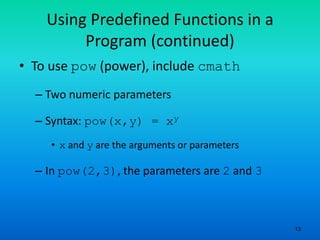
• To use pow (power), include cmath
– Two numeric parameters
– Syntax: pow(x,y) = xy
• x and y are the arguments or parameters
– In pow(2,3), the parameters are 2 and 3
15
Using Predefined Functions in a
Program (continued)
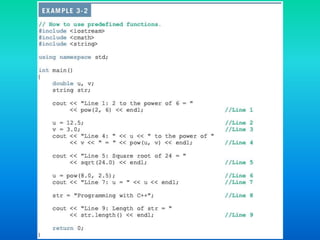
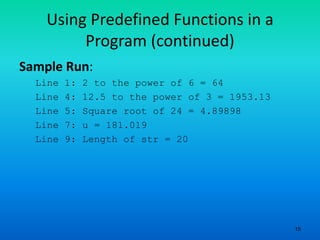
Sample Run:
Line 1: 2 to the power of 6 = 64
Line 4: 12.5 to the power of 3 = 1953.13
Line 5: Square root of 24 = 4.89898
Line 7: u = 181.019
Line 9: Length of str = 20
16
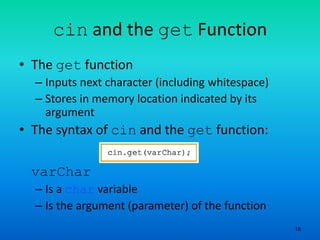
cin and the get Function
• The get function
– Inputs next character (including whitespace)
– Stores in memory location indicated by its
argument
• The syntax of cin and the get function:
varChar
– Is a char variable
– Is the argument (parameter) of the function
17
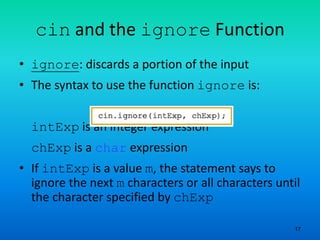
cin and the ignore Function
• ignore: discards a portion of the input
• The syntax to use the function ignore is:
intExp is an integer expression
chExp is a char expression
• If intExp is a value m, the statement says to
ignore the next m characters or all characters until
the character specified by chExp
18
putback and peek Functions
• putback function
– Places previous character extracted by the get
function from an input stream back to that stream
• peek function
– Returns next character from the input stream
– Does not remove the character from that stream
19
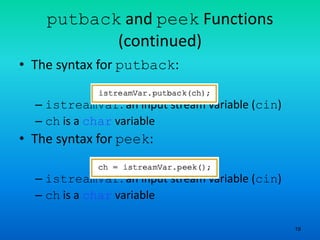
putback and peek Functions
(continued)
• The syntax for putback:
– istreamVar: an input stream variable (cin)
– ch is a char variable
• The syntax for peek:
– istreamVar: an input stream variable (cin)
– ch is a char variable
20
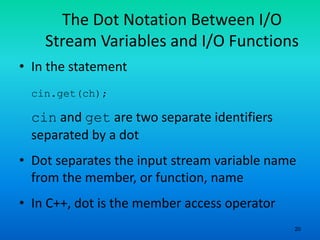
The Dot Notation Between I/O
Stream Variables and I/O Functions
• In the statement
cin.get(ch);
cin and get are two separate identifiers
separated by a dot
• Dot separates the input stream variable name
from the member, or function, name
• In C++, dot is the member access operator
21
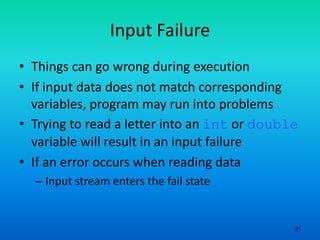
Input Failure
• Things can go wrong during execution
• If input data does not match corresponding
variables, program may run into problems
• Trying to read a letter into an int or double
variable will result in an input failure
• If an error occurs when reading data
– Input stream enters the fail state
22
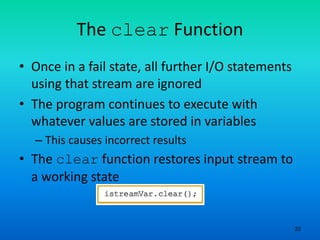
The clear Function
• Once in a fail state, all further I/O statements
using that stream are ignored
• The program continues to execute with
whatever values are stored in variables
– This causes incorrect results
• The clear function restores input stream to
a working state
Assignment
• Explain in detail the functioning of Input
Stream Operator
• What do you understand by Input Failure and
what is the role of clear function

Object oriented programming 13 input stream and devices in cpp

  • 1.
    Object Oriented Programming:13 Input Stream /Extraction Operator Prof Neeraj Bhargava Vaibhav Khanna Department of Computer Science School of Engineering and Systems Sciences Maharshi Dayanand Saraswati University Ajmer
  • 2.
    2 I/O Streams andStandard I/O Devices • I/O: sequence of bytes (stream of bytes) from source to destination – Bytes are usually characters, unless program requires other types of information • Stream: sequence of characters from source to destination • Input stream: sequence of characters from an input device to the computer • Output stream: sequence of characters from the computer to an output device
  • 3.
    3 I/O Streams andStandard I/O Devices (continued) • Use iostream header file to extract (receive) data from keyboard and send output to the screen – Contains definitions of two data types: • istream - input stream • ostream - output stream – Has two variables: • cin - stands for common input • cout - stands for common output
  • 4.
    4 I/O Streams andStandard I/O Devices (continued) • To use cin and cout, the preprocessor directive#include <iostream> must be used • Variable declaration is similar to: – istream cin; – ostream cout; • Input stream variables: type istream • Output stream variables: type ostream
  • 5.
    5 cin and theExtraction Operator >> • The syntax of an input statement using cin and the extraction operator >> is: • The extraction operator >> is binary – Left-side operand is an input stream variable • Example: cin – Right-side operand is a variable
  • 6.
    6 cin and theExtraction Operator >> (continued) • No difference between a single cin with multiple variables and multiple cin statements with one variable • When scanning, >> skips all whitespace – Blanks and certain nonprintable characters • >> distinguishes between character 2 and number 2 by the right-side operand of >> – If type char or int (or double), the 2 is treated as a character or as a number 2
  • 7.
    7 cin and theExtraction Operator >> (continued) • Entering a char value into an int or double variable causes serious errors, called input failure
  • 8.
    8 cin and theExtraction Operator >> (continued) • When reading data into a char variable – >> skips leading whitespace, finds and stores only the next character – Reading stops after a single character • To read data into an int or double variable – >> skips leading whitespace, reads + or - sign (if any), reads the digits (including decimal) – Reading stops on whitespace non-digit character
  • 9.
    9 cin and theExtraction Operator >> (continued)
  • 11.
    11 Using Predefined Functionsin a Program • Function (subprogram): set of instructions – When activated, it accomplishes a task • main executes when a program is run • Other functions execute only when called • C++ includes a wealth of functions – Predefined functions are organized as a collection of libraries called header files
  • 12.
    12 Using Predefined Functionsin a Program (continued) • Header file may contain several functions • To use a predefined function, you need the name of the appropriate header file – You also need to know: • Function name • Number of parameters required • Type of each parameter • What the function is going to do
  • 13.
    13 Using Predefined Functionsin a Program (continued) • To use pow (power), include cmath – Two numeric parameters – Syntax: pow(x,y) = xy • x and y are the arguments or parameters – In pow(2,3), the parameters are 2 and 3
  • 15.
    15 Using Predefined Functionsin a Program (continued) Sample Run: Line 1: 2 to the power of 6 = 64 Line 4: 12.5 to the power of 3 = 1953.13 Line 5: Square root of 24 = 4.89898 Line 7: u = 181.019 Line 9: Length of str = 20
  • 16.
    16 cin and theget Function • The get function – Inputs next character (including whitespace) – Stores in memory location indicated by its argument • The syntax of cin and the get function: varChar – Is a char variable – Is the argument (parameter) of the function
  • 17.
    17 cin and theignore Function • ignore: discards a portion of the input • The syntax to use the function ignore is: intExp is an integer expression chExp is a char expression • If intExp is a value m, the statement says to ignore the next m characters or all characters until the character specified by chExp
  • 18.
    18 putback and peekFunctions • putback function – Places previous character extracted by the get function from an input stream back to that stream • peek function – Returns next character from the input stream – Does not remove the character from that stream
  • 19.
    19 putback and peekFunctions (continued) • The syntax for putback: – istreamVar: an input stream variable (cin) – ch is a char variable • The syntax for peek: – istreamVar: an input stream variable (cin) – ch is a char variable
  • 20.
    20 The Dot NotationBetween I/O Stream Variables and I/O Functions • In the statement cin.get(ch); cin and get are two separate identifiers separated by a dot • Dot separates the input stream variable name from the member, or function, name • In C++, dot is the member access operator
  • 21.
    21 Input Failure • Thingscan go wrong during execution • If input data does not match corresponding variables, program may run into problems • Trying to read a letter into an int or double variable will result in an input failure • If an error occurs when reading data – Input stream enters the fail state
  • 22.
    22 The clear Function •Once in a fail state, all further I/O statements using that stream are ignored • The program continues to execute with whatever values are stored in variables – This causes incorrect results • The clear function restores input stream to a working state
  • 23.
    Assignment • Explain indetail the functioning of Input Stream Operator • What do you understand by Input Failure and what is the role of clear function