1
Spring Security: OAuth2Spring Security: OAuth2
1
Sang ShinSang Shin
““Code with Passion!”Code with Passion!”
2
Topics
• What is OAuth2?
• Why OAuth2?
• Authorization code flow
3
What is OAuth2?What is OAuth2?
4
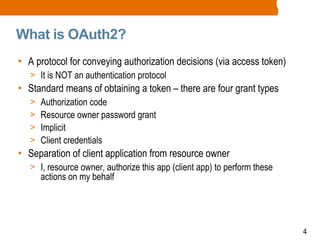
What is OAuth2?
• A protocol for conveying authorization decisions (via access token)
> It is NOT an authentication protocol
• Standard means of obtaining a token – there are four grant types
> Authorization code
> Resource owner password grant
> Implicit
> Client credentials
• Separation of client application from resource owner
> I, resource owner, authorize this app (client app) to perform these
actions on my behalf
5
What is OAuth2 Not?
• It is NOT an authentication protocol
> The user must be authenticated to obtain a token
> How the user is authenticated is outside of the spec
> How the token is validated is outside of the spec
> What the token contains is outside of the spec
6
Why OAuth2?Why OAuth2?
7
Securing Monolithic App
• You only need to authenticate the request once per user
• If there has been no session
> Verify user credentials
> Start a user session
> Provide role-based access control
• Else (session is already created)
> Verify session has not expired
• Method calls are trusted
8
Securing Monolithic App
• Pros
> Limited attack space
• Cons
> Once granted permission, the user has all the credentials for the rest of
the application including database access – once it is hacked, the whole
application is in danger
9
OAuth2 Secures Micro Services
• Single sign on (SSO)
• Stateless – backend services do not want to maintain user sessions
• Delegated access (access some resource on behalf of me)
• User credentials not exposed
• Fine grained authorization
• Interoperability with non browser clients
10
Authorization CodeAuthorization Code
FlowFlow
11
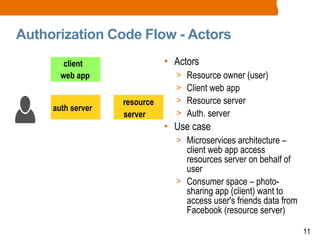
Authorization Code Flow - Actors
• Actors
> Resource owner (user)
> Client web app
> Resource server
> Auth. server
• Use case
> Microservices architecture –
client web app access
resources server on behalf of
user
> Consumer space – photo-
sharing app (client) want to
access user's friends data from
Facebook (resource server)
client
web app
auth server
resource
server
12
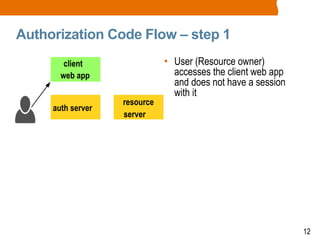
Authorization Code Flow – step 1
• User (Resource owner)
accesses the client web app
and does not have a session
with it
client
web app
auth server
resource
server
13
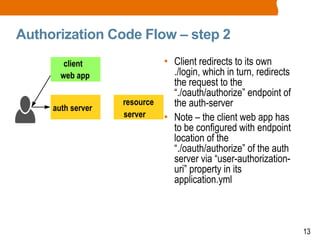
Authorization Code Flow – step 2
• Client redirects to its own
./login, which in turn, redirects
the request to the
“./oauth/authorize” endpoint of
the auth-server
• Note – the client web app has
to be configured with endpoint
location of the
“./oauth/authorize” of the auth
server via “user-authorization-
uri” property in its
application.yml
client
web app
auth server
resource
server
14
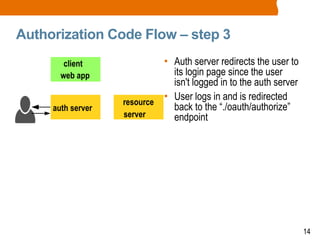
Authorization Code Flow – step 3
• Auth server redirects the user to
its login page since the user
isn't logged in to the auth server
• User logs in and is redirected
back to the “./oauth/authorize”
endpoint
client
web app
auth server
resource
server
15
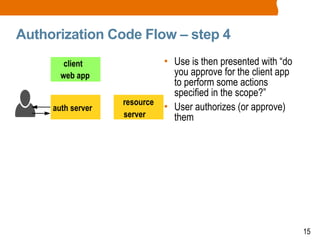
Authorization Code Flow – step 4
• Use is then presented with “do
you approve for the client app
to perform some actions
specified in the scope?”
• User authorizes (or approve)
them
client
web app
auth server
resource
server
16
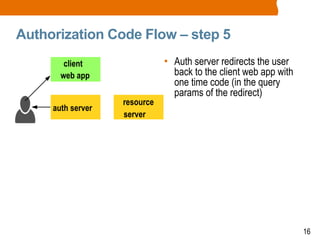
Authorization Code Flow – step 5
• Auth server redirects the user
back to the client web app with
one time code (in the query
params of the redirect)
client
web app
auth server
resource
server
17
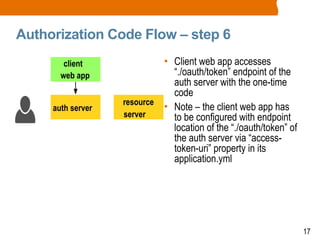
Authorization Code Flow – step 6
• Client web app accesses
“./oauth/token” endpoint of the
auth server with the one-time
code
• Note – the client web app has
to be configured with endpoint
location of the “./oauth/token” of
the auth server via “access-
token-uri” property in its
application.yml
client
web app
auth server
resource
server
18
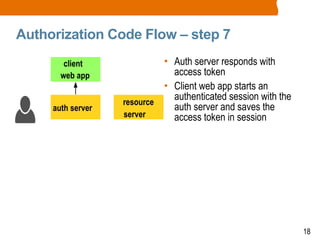
Authorization Code Flow – step 7
• Auth server responds with
access token
• Client web app starts an
authenticated session with the
auth server and saves the
access token in session
client
web app
auth server
resource
server
19
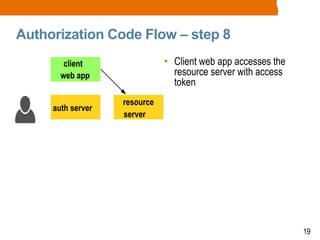
Authorization Code Flow – step 8
• Client web app accesses the
resource server with access
token
client
web app
auth server
resource
server
20
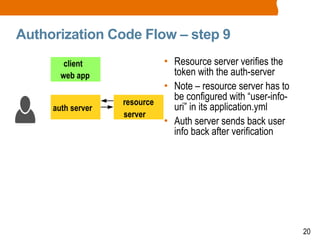
Authorization Code Flow – step 9
• Resource server verifies the
token with the auth-server
• Note – resource server has to
be configured with “user-info-
uri” in its application.yml
• Auth server sends back user
info back after verification
client
web app
auth server
resource
server
21
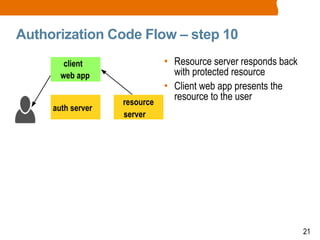
Authorization Code Flow – step 10
• Resource server responds back
with protected resource
• Client web app presents the
resource to the user
client
web app
auth server
resource
server
22
Code with Passion!Code with Passion!
22

Spring4 security oauth2

  • 1.
    1 Spring Security: OAuth2SpringSecurity: OAuth2 1 Sang ShinSang Shin ““Code with Passion!”Code with Passion!”
  • 2.
    2 Topics • What isOAuth2? • Why OAuth2? • Authorization code flow
  • 3.
  • 4.
    4 What is OAuth2? •A protocol for conveying authorization decisions (via access token) > It is NOT an authentication protocol • Standard means of obtaining a token – there are four grant types > Authorization code > Resource owner password grant > Implicit > Client credentials • Separation of client application from resource owner > I, resource owner, authorize this app (client app) to perform these actions on my behalf
  • 5.
    5 What is OAuth2Not? • It is NOT an authentication protocol > The user must be authenticated to obtain a token > How the user is authenticated is outside of the spec > How the token is validated is outside of the spec > What the token contains is outside of the spec
  • 6.
  • 7.
    7 Securing Monolithic App •You only need to authenticate the request once per user • If there has been no session > Verify user credentials > Start a user session > Provide role-based access control • Else (session is already created) > Verify session has not expired • Method calls are trusted
  • 8.
    8 Securing Monolithic App •Pros > Limited attack space • Cons > Once granted permission, the user has all the credentials for the rest of the application including database access – once it is hacked, the whole application is in danger
  • 9.
    9 OAuth2 Secures MicroServices • Single sign on (SSO) • Stateless – backend services do not want to maintain user sessions • Delegated access (access some resource on behalf of me) • User credentials not exposed • Fine grained authorization • Interoperability with non browser clients
  • 10.
  • 11.
    11 Authorization Code Flow- Actors • Actors > Resource owner (user) > Client web app > Resource server > Auth. server • Use case > Microservices architecture – client web app access resources server on behalf of user > Consumer space – photo- sharing app (client) want to access user's friends data from Facebook (resource server) client web app auth server resource server
  • 12.
    12 Authorization Code Flow– step 1 • User (Resource owner) accesses the client web app and does not have a session with it client web app auth server resource server
  • 13.
    13 Authorization Code Flow– step 2 • Client redirects to its own ./login, which in turn, redirects the request to the “./oauth/authorize” endpoint of the auth-server • Note – the client web app has to be configured with endpoint location of the “./oauth/authorize” of the auth server via “user-authorization- uri” property in its application.yml client web app auth server resource server
  • 14.
    14 Authorization Code Flow– step 3 • Auth server redirects the user to its login page since the user isn't logged in to the auth server • User logs in and is redirected back to the “./oauth/authorize” endpoint client web app auth server resource server
  • 15.
    15 Authorization Code Flow– step 4 • Use is then presented with “do you approve for the client app to perform some actions specified in the scope?” • User authorizes (or approve) them client web app auth server resource server
  • 16.
    16 Authorization Code Flow– step 5 • Auth server redirects the user back to the client web app with one time code (in the query params of the redirect) client web app auth server resource server
  • 17.
    17 Authorization Code Flow– step 6 • Client web app accesses “./oauth/token” endpoint of the auth server with the one-time code • Note – the client web app has to be configured with endpoint location of the “./oauth/token” of the auth server via “access- token-uri” property in its application.yml client web app auth server resource server
  • 18.
    18 Authorization Code Flow– step 7 • Auth server responds with access token • Client web app starts an authenticated session with the auth server and saves the access token in session client web app auth server resource server
  • 19.
    19 Authorization Code Flow– step 8 • Client web app accesses the resource server with access token client web app auth server resource server
  • 20.
    20 Authorization Code Flow– step 9 • Resource server verifies the token with the auth-server • Note – resource server has to be configured with “user-info- uri” in its application.yml • Auth server sends back user info back after verification client web app auth server resource server
  • 21.
    21 Authorization Code Flow– step 10 • Resource server responds back with protected resource • Client web app presents the resource to the user client web app auth server resource server
  • 22.
    22 Code with Passion!Codewith Passion! 22