

Prepared by – Kumaresh Chandra Baruri
Software Engineer
 Oauth 2 delegates user authentication to the service that holds user account. Like-
 Gmail account provided by Google service.
 FB account by Facebook service.
 It authorizes third-party applications to access that user account. Like- a web
application is using Oauth 2 to login and consequently to use account info.
 OAuth 2 provides authorization flows for web and desktop applications, as well as
mobile devices.
OAuth 2 is an authorization framework that enables applications
— such as Facebook, GitHub, Google or others — to obtain
limited access to user accounts on an HTTP service.
1. Resource Owner: The resource owner is the user who authorizes an
application to access their account. The application’s access to the
user’s account is limited to the scope of the authorization granted
(e.g. read or write access)
2. Client: The client is the application that wants to access the user’s
account. Before it may do so, it must be authorized by the user, and
the authorization must be validated by the API.
3. Resource Server: The resource server hosts the protected user
accounts.
4. Authorization Server: The authorization server verifies the identity of
the user then issues access tokens to the application.
There are four different roles in OAUTH 2.
The following information is required to register the application-
1. Application Name
2. Application Website
3. Redirect URI or Callback URL where the service will redirect the user
after they authorize (or deny).
App means the one which is going to use Oauth 2 for
authorization. Before using Oauth 2 with your
application, developer must register the application with
the service like- Google, FB etc.
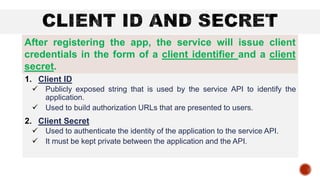
1. Client ID
 Publicly exposed string that is used by the service API to identify the
application.
 Used to build authorization URLs that are presented to users.
2. Client Secret
 Used to authenticate the identity of the application to the service API.
 It must be kept private between the application and the API.
After registering the app, the service will issue client
credentials in the form of a client identifier and a client
secret.
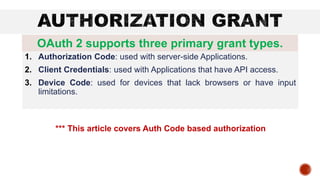
1. Authorization Code: used with server-side Applications.
2. Client Credentials: used with Applications that have API access.
3. Device Code: used for devices that lack browsers or have input
limitations.
OAuth 2 supports three primary grant types.
*** This article covers Auth Code based authorization
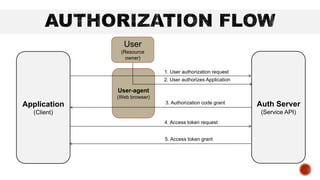
Application
(Client)
Auth Server
(Service API)
User
(Resource
owner)
User-agent
(Web browser)
1. User authorization request
2. User authorizes Application
3. Authorization code grant
4. Access token request
5. Access token grant
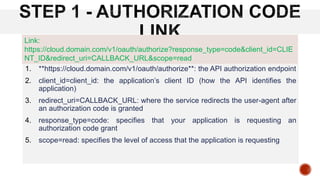
1. **https://cloud.domain.com/v1/oauth/authorize**: the API authorization endpoint
2. client_id=client_id: the application’s client ID (how the API identifies the
application)
3. redirect_uri=CALLBACK_URL: where the service redirects the user-agent after
an authorization code is granted
4. response_type=code: specifies that your application is requesting an
authorization code grant
5. scope=read: specifies the level of access that the application is requesting
Link:
https://cloud.domain.com/v1/oauth/authorize?response_type=code&client_id=CLIE
NT_ID&redirect_uri=CALLBACK_URL&scope=read
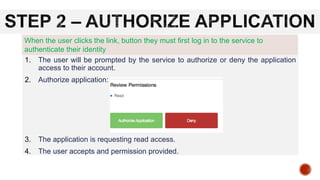
1. The user will be prompted by the service to authorize or deny the application
access to their account.
2. Authorize application:
3. The application is requesting read access.
4. The user accepts and permission provided.
When the user clicks the link, button they must first log in to the service to
authenticate their identity
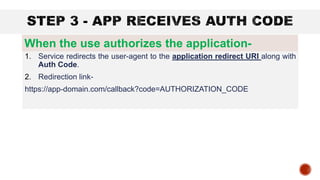
1. Service redirects the user-agent to the application redirect URI along with
Auth Code.
2. Redirection link-
https://app-domain.com/callback?code=AUTHORIZATION_CODE
When the use authorizes the application-
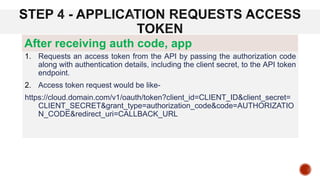
1. Requests an access token from the API by passing the authorization code
along with authentication details, including the client secret, to the API token
endpoint.
2. Access token request would be like-
https://cloud.domain.com/v1/oauth/token?client_id=CLIENT_ID&client_secret=
CLIENT_SECRET&grant_type=authorization_code&code=AUTHORIZATIO
N_CODE&redirect_uri=CALLBACK_URL
After receiving auth code, app
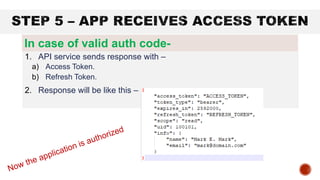
1. API service sends response with –
a) Access Token.
b) Refresh Token.
2. Response will be like this –
In case of valid auth code-
1. https://www.digitalocean.com/community/tutorials/an-introduction-to-oauth-2
2. https://www.slideshare.net/kumareshbaruri/authentication-and-single-sign-on-sso
3. https://learn.microsoft.com/en-us/azure/active-directory/develop/v2-oauth2-auth-code-flow
Introduction to OAuth2

Introduction to OAuth2

  • 1.
    Prepared by –Kumaresh Chandra Baruri Software Engineer
  • 2.
     Oauth 2delegates user authentication to the service that holds user account. Like-  Gmail account provided by Google service.  FB account by Facebook service.  It authorizes third-party applications to access that user account. Like- a web application is using Oauth 2 to login and consequently to use account info.  OAuth 2 provides authorization flows for web and desktop applications, as well as mobile devices. OAuth 2 is an authorization framework that enables applications — such as Facebook, GitHub, Google or others — to obtain limited access to user accounts on an HTTP service.
  • 3.
    1. Resource Owner:The resource owner is the user who authorizes an application to access their account. The application’s access to the user’s account is limited to the scope of the authorization granted (e.g. read or write access) 2. Client: The client is the application that wants to access the user’s account. Before it may do so, it must be authorized by the user, and the authorization must be validated by the API. 3. Resource Server: The resource server hosts the protected user accounts. 4. Authorization Server: The authorization server verifies the identity of the user then issues access tokens to the application. There are four different roles in OAUTH 2.
  • 4.
    The following informationis required to register the application- 1. Application Name 2. Application Website 3. Redirect URI or Callback URL where the service will redirect the user after they authorize (or deny). App means the one which is going to use Oauth 2 for authorization. Before using Oauth 2 with your application, developer must register the application with the service like- Google, FB etc.
  • 5.
    1. Client ID Publicly exposed string that is used by the service API to identify the application.  Used to build authorization URLs that are presented to users. 2. Client Secret  Used to authenticate the identity of the application to the service API.  It must be kept private between the application and the API. After registering the app, the service will issue client credentials in the form of a client identifier and a client secret.
  • 6.
    1. Authorization Code:used with server-side Applications. 2. Client Credentials: used with Applications that have API access. 3. Device Code: used for devices that lack browsers or have input limitations. OAuth 2 supports three primary grant types. *** This article covers Auth Code based authorization
  • 7.
    Application (Client) Auth Server (Service API) User (Resource owner) User-agent (Webbrowser) 1. User authorization request 2. User authorizes Application 3. Authorization code grant 4. Access token request 5. Access token grant
  • 8.
    1. **https://cloud.domain.com/v1/oauth/authorize**: theAPI authorization endpoint 2. client_id=client_id: the application’s client ID (how the API identifies the application) 3. redirect_uri=CALLBACK_URL: where the service redirects the user-agent after an authorization code is granted 4. response_type=code: specifies that your application is requesting an authorization code grant 5. scope=read: specifies the level of access that the application is requesting Link: https://cloud.domain.com/v1/oauth/authorize?response_type=code&client_id=CLIE NT_ID&redirect_uri=CALLBACK_URL&scope=read
  • 9.
    1. The userwill be prompted by the service to authorize or deny the application access to their account. 2. Authorize application: 3. The application is requesting read access. 4. The user accepts and permission provided. When the user clicks the link, button they must first log in to the service to authenticate their identity
  • 10.
    1. Service redirectsthe user-agent to the application redirect URI along with Auth Code. 2. Redirection link- https://app-domain.com/callback?code=AUTHORIZATION_CODE When the use authorizes the application-
  • 11.
    1. Requests anaccess token from the API by passing the authorization code along with authentication details, including the client secret, to the API token endpoint. 2. Access token request would be like- https://cloud.domain.com/v1/oauth/token?client_id=CLIENT_ID&client_secret= CLIENT_SECRET&grant_type=authorization_code&code=AUTHORIZATIO N_CODE&redirect_uri=CALLBACK_URL After receiving auth code, app
  • 12.
    1. API servicesends response with – a) Access Token. b) Refresh Token. 2. Response will be like this – In case of valid auth code-
  • 13.