


Donald Donais 
Welcome to the 
Minnesota SharePoint 
User Group 
November 12th, 2014 
SharePoint User Adoption 
Tamara Bredemus, Sarah Haase, Trevor Huinker, and Liz Sundet 
http://sharepointmn.com Meeting #119
Agenda 
• MNSPUG Information 
• SharePoint User Adoption – Sarah Haase 
• Break 
• SharePoint User Adoption Panel Discussion 
 Tamara Bredemus, Sarah Haase, Trevor Huinker, and Liz Sundet 
http://sharepointmn.com Meeting #119
User Group Goal / Objectives 
Develop and support a local community focused on 
Microsoft SharePoint Technologies 
• Educate user group members about SharePoint Technologies 
• Transfer knowledge within the community 
• Communicate best practices 
• Introduce new products / solutions 
http://sharepointmn.com Meeting #119
MNSPUG Sponsors 
Dedicated Sponsors 
Avtex (www.avtex.com) 
Microsoft (www.microsoft.com) 
SharePoint User Group Support 
Wrox Press (www.wrox.com) 
O’Reilly (www.oreilly.com) 
Annual Sponsor 
Currently Looking for Sponsorships! 
http://sharepointmn.com Meeting #119
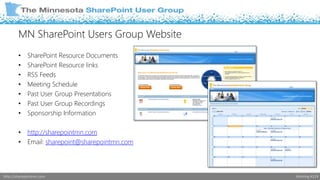
MN SharePoint Users Group Website 
• SharePoint Resource Documents 
• SharePoint Resource links 
• RSS Feeds 
• Meeting Schedule 
• Past User Group Presentations 
• Past User Group Recordings 
• Sponsorship Information 
• http://sharepointmn.com 
• Email: sharepoint@sharepointmn.com 
http://sharepointmn.com Meeting #119
Social Networking 
• Linked In group – The most interactive… includes job postings… 
 Post Job Posting on the Jobs Discussion page 
 http://www.linkedin.com/groups?gid=1878792 
• Twitter tags - @MNSPUG and #MNSPUG 
• Yammer – Minnesota SharePoint Users Group 
 https://www.yammer.com/mnspug/ 
http://sharepointmn.com Meeting #119
Upcoming Schedule 
• Next Meeting 
 December 10th, 2014 – Panel Discussion 
 Avtex Offices, Bloomington MN 
 Check www.SharePointMN.com for updates! 
• Ongoing Schedule 
 2nd Wednesday of every month 
 9:00 to 11:30 am 
 Microsoft Technical Center – Edina 
http://sharepointmn.com Meeting #119
Local and Online Events 
SPChat through SharePoint Community – Online 
Nov 12th - http://sharepoint-community.net/events/spchat-with-fabian-williams-on-sharepoint-hybrid-with-an-emphasis 
Dec 2nd - http://sharepoint-community.net/events/spchat-with-tim-ferro-on-visual-studio-2013-tfs-2013-new 
SharePoint Saturday Twin Cities – November 22nd, Normandale Community College 
http://spstc.com 
****Need help covering MNSPUG table during breaks and lunch 
Twin Cities PowerShell User Group – Dec 9th, 4:30 – 7:00 pm 
http://www.tcposhug.com/ 
Minnesota SharePoint SharePint – Tuesday, Dec 9th, 4:30 – 6:30 p.m. Joe Sensor ’s in Bloomington 
http://www.meetup.com/Minnesota-SharePoint-SharePint/events/218022732/ 
SPTechCon – February 8th – 11th, 2015 in Austin, Texas 
http://www.sptechcon.com/ 
Microsoft Ignite Conference – May 4th – 8th 2015 in Chicago, Illinois 
http://ignite.microsoft.com/?WT.mc_id=IG15W1SEBN#fbid=DFKoFfeorYN 
http://sharepointmn.com Meeting #119
Evaluations & Giveaways! 
http://sharepointmn.com Meeting #119
News Related Items 
• Office for Free? 
 http://bit.ly/1zAxngb 
• OneDrive Goes Unlimited 
 http://bit.ly/1tlH5dP 
• Microsoft and DropBox – Best Friends? 
 http://bit.ly/1yefYFS 
• SharePoint 2015? 
• Outlook for Mac Now Available, How About Office for Mac! 
• Yammer Analytics Tool 
 http://bit.ly/WaXHMT 
http://sharepointmn.com Meeting #119
Sarah Haase – SharePoint User Adoption at 
Best Buy 
http://sharepointmn.com Meeting #119
4 Teams…
8 Hours…
1 Challenge…
Librarian 
http://blog.splibrarian.com 
Number of 
children: 
2 @sarahhaase 
ROI 
Adoption 
Governance 
SharePoint 
Saturday Twin 
Cities 
sarah@splibrarian.com
LET’S START WITH THE MISSION…
Support Renew Blue by giving people the 
knowledge, tools and support they need to 
collaborate effectively.
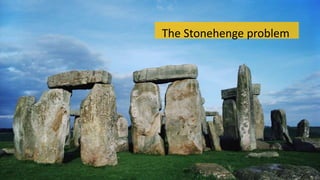
The Stonehenge problem
“Adoption is not something that can be mandated. Adoption 
occurs when users decide for themselves that the solution 
provides them with a net benefit.” 
- Socialtext white paper 
http://www.socialtext.com/solutions/wp_implementation.php
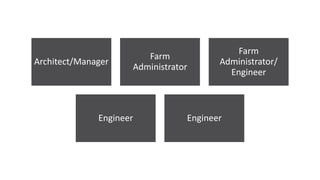
Architect/Manager 
Farm 
Administrator 
Farm 
Administrator/ 
Engineer 
Engineer Engineer
Center of Excellence. 
http://tinyurl.com/lq3xz8x
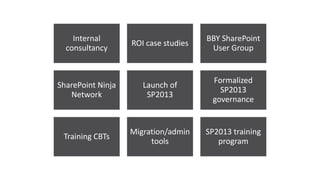
Internal 
consultancy 
ROI case studies 
BBY SharePoint 
User Group 
SharePoint Ninja 
Network 
Launch of 
SP2013 
Formalized 
SP2013 
governance 
Training CBTs 
Migration/admin 
tools 
SP2013 training 
program
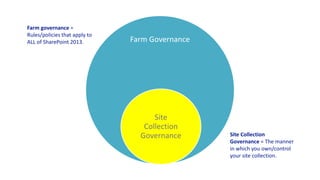
Farm Governance 
Site 
Collection 
Governance Site Collection 
Governance = The manner 
in which you own/control 
your site collection. 
Farm governance = 
Rules/policies that apply to 
ALL of SharePoint 2013.
We provide the safety bumpers. You 
make the detailed implementation 
decisions.
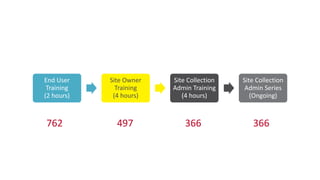
All site collection 
administrators must be trained 
before they can leave the 
sandbox.
End User 
Training 
(2 hours) 
Site Owner 
Training 
(4 hours) 
Site Collection 
Admin Training 
(4 hours) 
Site Collection 
Admin Series 
(Ongoing) 
762 497 366 366
Governance only works if there is 
enforcement.
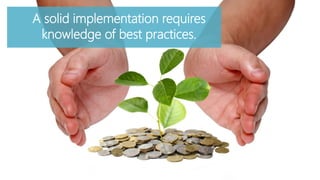
A solid implementation requires 
knowledge of best practices.
Our governance plan should 
match our corporate culture.
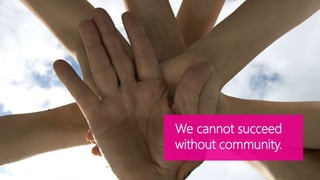
We cannot succeed 
without community.
Lightning Rounds
Hack-a-thon
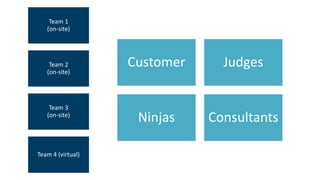
Team 1 
(on-site) 
Team 2 
(on-site) 
Team 3 
(on-site) 
Team 4 (virtual) 
Customer Judges 
Ninjas Consultants
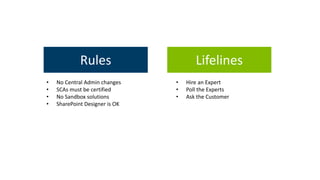
Rules 
• No Central Admin changes 
• SCAs must be certified 
• No Sandbox solutions 
• SharePoint Designer is OK 
Lifelines 
• Hire an Expert 
• Poll the Experts 
• Ask the Customer
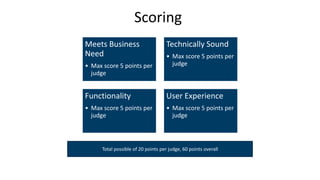
Scoring 
Meets Business 
Need 
• Max score 5 points per 
judge 
Technically Sound 
• Max score 5 points per 
judge 
Functionality 
• Max score 5 points per 
judge 
User Experience 
• Max score 5 points per 
judge 
Total possible of 20 points per judge, 60 points overall
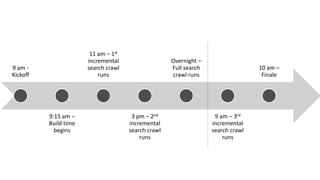
9 am - 
Kickoff 
9:15 am – 
Build time 
begins 
11 am – 1st 
incremental 
search crawl 
runs 
3 pm – 2nd 
incremental 
search crawl 
runs 
Overnight – 
Full search 
crawl runs 
9 am – 3rd 
incremental 
search crawl 
runs 
10 am – 
Finale
Business Case 
Many Best Buy teams use SharePoint to store project documents and materials. The structure of these SharePoint project sites vary. Some 
sites are file repositories, with a bevy of file folders and documents stored in a single Shared Documents library. Other project sites use a 
hybrid approach, mixing document storage with contact lists, project calendars, dashboards to display project status, etc. 
Many Best Buy teams use SharePoint to store project documents and materials. The structure of these SharePoint project sites vary. Some 
sites are file repositories, with a bevy of file folders and documents stored in a single Shared Documents library. Other project sites use a 
hybrid approach, mixing document storage with contact lists, project calendars, dashboards to display project status, etc. 
Your challenge today is to build a prototype project site in SharePoint 2013. Your prototype should illustrate a broad-range of project 
management capabilities and serve as a best-practice model for SharePoint’s use as a project collaboration tool. You may want to give your 
prototype a name and a fake project identity. This will help you present your site and show the SPUG audience how the site could actually 
be used. Also consider how your prototype site could be replicated for widespread use. Since Best Buy launches thousands of projects 
annually, it is imperative that new project sites be quick and easy to create—even across different SharePoint site collections. 
Your prototype should illustrate a broad-range of project management capabilities and serve as a best-practice model for SharePoint’s use 
as a project collaboration tool. You may want to give your prototype a name and a fake project identity. This will help you present your site 
and show the SPUG audience how the site could actually be used. Also consider how your prototype site could be replicated for widespread 
use. Since Best Buy launches thousands of projects annually, it is imperative that new project sites be quick and easy to create—even across 
different SharePoint site collections.
DEMO
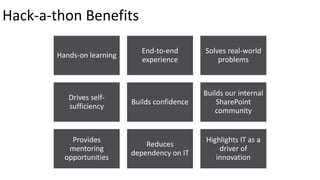
Hands-on learning 
End-to-end 
experience 
Solves real-world 
problems 
Drives self-sufficiency 
Builds confidence 
Builds our internal 
SharePoint 
community 
Provides 
mentoring 
opportunities 
Reduces 
dependency on IT 
Highlights IT as a 
driver of 
innovation 
Hack-a-thon Benefits
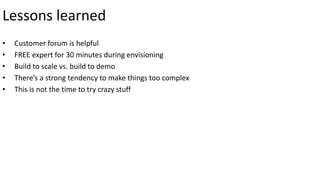
Lessons learned 
• Customer forum is helpful 
• FREE expert for 30 minutes during envisioning 
• Build to scale vs. build to demo 
• There’s a strong tendency to make things too complex 
• This is not the time to try crazy stuff
http://blog.splibrarian.com/ 
sarah@splibrarian. com 
@sarahhaase 
Questions?
Break Time 
http://sharepointmn.com Meeting #119
SharePoint User Adoption Panel 
http://sharepointmn.com Meeting #119
Tamara Bredemus 
• Senior Collaboration Architect, City of Minneapolis 
• Enjoys bring order out of chaos with out-of-the-box 
solutions 
• Works with: SharePoint 2007 – 2013, SharePoint 
Online, InfoPath and SharePoint Designer 
• tamara.bredemus@live.com 
• Blog: http://heytamara.com 
• Twitter: @TamaraBred 
http://sharepointmn.com Meeting #119
Sarah Haase 
• Librarian 
• Works at Best Buy 
• Focusing on ROI, Adoption, and Governance 
• sarah@splibrarian.com 
• http://blog.splibrarian.com 
http://sharepointmn.com Meeting #119
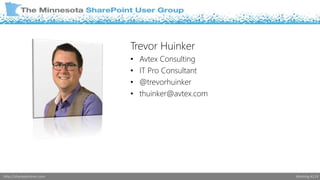
Trevor Huinker 
• Avtex Consulting 
• IT Pro Consultant 
• @trevorhuinker 
• thuinker@avtex.com 
http://sharepointmn.com Meeting #119
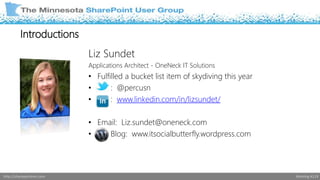
Liz Sundet 
Applications Architect - OneNeck IT Solutions 
• Fulfilled a bucket list item of skydiving this year 
• : @percusn 
• : www.linkedin.com/in/lizsundet/ 
• Email: Liz.sundet@oneneck.com 
• Blog: www.itsocialbutterfly.wordpress.com 
Introductions 
http://sharepointmn.com Meeting #119
SharePoint User Adoption Panel 
http://sharepointmn.com Meeting #119
Last But Not Least 
• Please Fill Out Evaluations 
• Drawings for Giveaways 
• Today’s Presenters: 
• Sarah Haase 
• Panel Group 
http://sharepointmn.com Meeting #119

November 2014 MNSPUG - SharePoint User Adoption

  • 1.
    Donald Donais Welcometo the Minnesota SharePoint User Group November 12th, 2014 SharePoint User Adoption Tamara Bredemus, Sarah Haase, Trevor Huinker, and Liz Sundet http://sharepointmn.com Meeting #119
  • 2.
    Agenda • MNSPUGInformation • SharePoint User Adoption – Sarah Haase • Break • SharePoint User Adoption Panel Discussion  Tamara Bredemus, Sarah Haase, Trevor Huinker, and Liz Sundet http://sharepointmn.com Meeting #119
  • 3.
    User Group Goal/ Objectives Develop and support a local community focused on Microsoft SharePoint Technologies • Educate user group members about SharePoint Technologies • Transfer knowledge within the community • Communicate best practices • Introduce new products / solutions http://sharepointmn.com Meeting #119
  • 4.
    MNSPUG Sponsors DedicatedSponsors Avtex (www.avtex.com) Microsoft (www.microsoft.com) SharePoint User Group Support Wrox Press (www.wrox.com) O’Reilly (www.oreilly.com) Annual Sponsor Currently Looking for Sponsorships! http://sharepointmn.com Meeting #119
  • 5.
    MN SharePoint UsersGroup Website • SharePoint Resource Documents • SharePoint Resource links • RSS Feeds • Meeting Schedule • Past User Group Presentations • Past User Group Recordings • Sponsorship Information • http://sharepointmn.com • Email: sharepoint@sharepointmn.com http://sharepointmn.com Meeting #119
  • 6.
    Social Networking •Linked In group – The most interactive… includes job postings…  Post Job Posting on the Jobs Discussion page  http://www.linkedin.com/groups?gid=1878792 • Twitter tags - @MNSPUG and #MNSPUG • Yammer – Minnesota SharePoint Users Group  https://www.yammer.com/mnspug/ http://sharepointmn.com Meeting #119
  • 7.
    Upcoming Schedule •Next Meeting  December 10th, 2014 – Panel Discussion  Avtex Offices, Bloomington MN  Check www.SharePointMN.com for updates! • Ongoing Schedule  2nd Wednesday of every month  9:00 to 11:30 am  Microsoft Technical Center – Edina http://sharepointmn.com Meeting #119
  • 8.
    Local and OnlineEvents SPChat through SharePoint Community – Online Nov 12th - http://sharepoint-community.net/events/spchat-with-fabian-williams-on-sharepoint-hybrid-with-an-emphasis Dec 2nd - http://sharepoint-community.net/events/spchat-with-tim-ferro-on-visual-studio-2013-tfs-2013-new SharePoint Saturday Twin Cities – November 22nd, Normandale Community College http://spstc.com ****Need help covering MNSPUG table during breaks and lunch Twin Cities PowerShell User Group – Dec 9th, 4:30 – 7:00 pm http://www.tcposhug.com/ Minnesota SharePoint SharePint – Tuesday, Dec 9th, 4:30 – 6:30 p.m. Joe Sensor ’s in Bloomington http://www.meetup.com/Minnesota-SharePoint-SharePint/events/218022732/ SPTechCon – February 8th – 11th, 2015 in Austin, Texas http://www.sptechcon.com/ Microsoft Ignite Conference – May 4th – 8th 2015 in Chicago, Illinois http://ignite.microsoft.com/?WT.mc_id=IG15W1SEBN#fbid=DFKoFfeorYN http://sharepointmn.com Meeting #119
  • 9.
    Evaluations & Giveaways! http://sharepointmn.com Meeting #119
  • 10.
    News Related Items • Office for Free?  http://bit.ly/1zAxngb • OneDrive Goes Unlimited  http://bit.ly/1tlH5dP • Microsoft and DropBox – Best Friends?  http://bit.ly/1yefYFS • SharePoint 2015? • Outlook for Mac Now Available, How About Office for Mac! • Yammer Analytics Tool  http://bit.ly/WaXHMT http://sharepointmn.com Meeting #119
  • 11.
    Sarah Haase –SharePoint User Adoption at Best Buy http://sharepointmn.com Meeting #119
  • 12.
  • 13.
  • 14.
  • 16.
    Librarian http://blog.splibrarian.com Numberof children: 2 @sarahhaase ROI Adoption Governance SharePoint Saturday Twin Cities sarah@splibrarian.com
  • 17.
    LET’S START WITHTHE MISSION…
  • 18.
    Support Renew Blueby giving people the knowledge, tools and support they need to collaborate effectively.
  • 19.
  • 20.
    “Adoption is notsomething that can be mandated. Adoption occurs when users decide for themselves that the solution provides them with a net benefit.” - Socialtext white paper http://www.socialtext.com/solutions/wp_implementation.php
  • 21.
    Architect/Manager Farm Administrator Farm Administrator/ Engineer Engineer Engineer
  • 22.
    Center of Excellence. http://tinyurl.com/lq3xz8x
  • 25.
    Internal consultancy ROIcase studies BBY SharePoint User Group SharePoint Ninja Network Launch of SP2013 Formalized SP2013 governance Training CBTs Migration/admin tools SP2013 training program
  • 26.
    Farm Governance Site Collection Governance Site Collection Governance = The manner in which you own/control your site collection. Farm governance = Rules/policies that apply to ALL of SharePoint 2013.
  • 27.
    We provide thesafety bumpers. You make the detailed implementation decisions.
  • 28.
    All site collection administrators must be trained before they can leave the sandbox.
  • 29.
    End User Training (2 hours) Site Owner Training (4 hours) Site Collection Admin Training (4 hours) Site Collection Admin Series (Ongoing) 762 497 366 366
  • 30.
    Governance only worksif there is enforcement.
  • 31.
    A solid implementationrequires knowledge of best practices.
  • 32.
    Our governance planshould match our corporate culture.
  • 33.
    We cannot succeed without community.
  • 35.
  • 36.
  • 37.
    Team 1 (on-site) Team 2 (on-site) Team 3 (on-site) Team 4 (virtual) Customer Judges Ninjas Consultants
  • 38.
    Rules • NoCentral Admin changes • SCAs must be certified • No Sandbox solutions • SharePoint Designer is OK Lifelines • Hire an Expert • Poll the Experts • Ask the Customer
  • 39.
    Scoring Meets Business Need • Max score 5 points per judge Technically Sound • Max score 5 points per judge Functionality • Max score 5 points per judge User Experience • Max score 5 points per judge Total possible of 20 points per judge, 60 points overall
  • 40.
    9 am - Kickoff 9:15 am – Build time begins 11 am – 1st incremental search crawl runs 3 pm – 2nd incremental search crawl runs Overnight – Full search crawl runs 9 am – 3rd incremental search crawl runs 10 am – Finale
  • 41.
    Business Case ManyBest Buy teams use SharePoint to store project documents and materials. The structure of these SharePoint project sites vary. Some sites are file repositories, with a bevy of file folders and documents stored in a single Shared Documents library. Other project sites use a hybrid approach, mixing document storage with contact lists, project calendars, dashboards to display project status, etc. Many Best Buy teams use SharePoint to store project documents and materials. The structure of these SharePoint project sites vary. Some sites are file repositories, with a bevy of file folders and documents stored in a single Shared Documents library. Other project sites use a hybrid approach, mixing document storage with contact lists, project calendars, dashboards to display project status, etc. Your challenge today is to build a prototype project site in SharePoint 2013. Your prototype should illustrate a broad-range of project management capabilities and serve as a best-practice model for SharePoint’s use as a project collaboration tool. You may want to give your prototype a name and a fake project identity. This will help you present your site and show the SPUG audience how the site could actually be used. Also consider how your prototype site could be replicated for widespread use. Since Best Buy launches thousands of projects annually, it is imperative that new project sites be quick and easy to create—even across different SharePoint site collections. Your prototype should illustrate a broad-range of project management capabilities and serve as a best-practice model for SharePoint’s use as a project collaboration tool. You may want to give your prototype a name and a fake project identity. This will help you present your site and show the SPUG audience how the site could actually be used. Also consider how your prototype site could be replicated for widespread use. Since Best Buy launches thousands of projects annually, it is imperative that new project sites be quick and easy to create—even across different SharePoint site collections.
  • 42.
  • 44.
    Hands-on learning End-to-end experience Solves real-world problems Drives self-sufficiency Builds confidence Builds our internal SharePoint community Provides mentoring opportunities Reduces dependency on IT Highlights IT as a driver of innovation Hack-a-thon Benefits
  • 45.
    Lessons learned •Customer forum is helpful • FREE expert for 30 minutes during envisioning • Build to scale vs. build to demo • There’s a strong tendency to make things too complex • This is not the time to try crazy stuff
  • 46.
  • 47.
  • 48.
    SharePoint User AdoptionPanel http://sharepointmn.com Meeting #119
  • 49.
    Tamara Bredemus •Senior Collaboration Architect, City of Minneapolis • Enjoys bring order out of chaos with out-of-the-box solutions • Works with: SharePoint 2007 – 2013, SharePoint Online, InfoPath and SharePoint Designer • tamara.bredemus@live.com • Blog: http://heytamara.com • Twitter: @TamaraBred http://sharepointmn.com Meeting #119
  • 50.
    Sarah Haase •Librarian • Works at Best Buy • Focusing on ROI, Adoption, and Governance • sarah@splibrarian.com • http://blog.splibrarian.com http://sharepointmn.com Meeting #119
  • 51.
    Trevor Huinker •Avtex Consulting • IT Pro Consultant • @trevorhuinker • thuinker@avtex.com http://sharepointmn.com Meeting #119
  • 52.
    Liz Sundet ApplicationsArchitect - OneNeck IT Solutions • Fulfilled a bucket list item of skydiving this year • : @percusn • : www.linkedin.com/in/lizsundet/ • Email: Liz.sundet@oneneck.com • Blog: www.itsocialbutterfly.wordpress.com Introductions http://sharepointmn.com Meeting #119
  • 53.
    SharePoint User AdoptionPanel http://sharepointmn.com Meeting #119
  • 54.
    Last But NotLeast • Please Fill Out Evaluations • Drawings for Giveaways • Today’s Presenters: • Sarah Haase • Panel Group http://sharepointmn.com Meeting #119

Editor's Notes

  • #16 I’m here today to share some of the innovative ways we’re driving user adoption of SharePoint at Best Buy—including our own SharePoint hack-a-thons. First, let me introduce myself….<click>
  • #20 Objectives & Benefits: Workflow automation Effective data storage/retrieval Elimination of redundant systems Business Drivers: Lower SG&A costs Eliminating support/licensing fees for unnecessary systems Internal collaboration Process automation
  • #21 One of the biggest challenges we faced in launching governance & a dedicated user adoption effort was our IT culture. The vestiges of our outsourced IT model were still prevalent, and people had adopted a Stonehenge outlook. Every project (regardless of size and scope) was viewed like Stonehenge—big, massive, stood up in stone. There are routine business problems that can be solved without this big Stonehenge philosophy, though. Our challenge was to convince people that SP could be used to build quick, point-source solutions. For sleepovers in the backyard you don’t need Stonehenge, you need Styrofoam-henge. You need to be fast, you need to be quick, you need to be adaptable.
  • #22 At our core, we believe that SharePoint adoption cannot be required, mandated or merely wished into being. Users will only adopt SharePoint and support our growth efforts if it is in their best interests to do so. Every step we’ve taken recognizes the need to appeal to people at their most basic level.
  • #23 Our enterprise Collaboration team was founded in 2011. We grew gradually and now have an enterprise staff of 5. We have built our team on the COE model…<click>
  • #24 Our COE is the foundation for our enterprise SharePoint user adoption and governance strategies. It offers guidance, support & education while fostering a feeling of community & belonging. Our COE was heavily influenced by Andrew Woodward’s COE philosophies. If you’d like to see Andrew Woodward present his COE methodology, his session from SPC12 is publicly available on Channel 9.
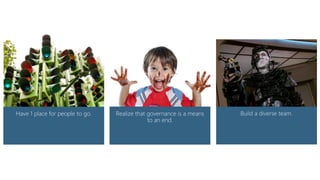
  • #25 Our COE is built on 6 key tenets: 1 place to go for all your SharePoint needs. (aka all roads lead to the COE) Brand your COE—name recognition is key. Take every opportunity to “get the word out” so that people point people to your pipeline. Realize that governance is a means to an end. It has to be practical. (aka “The business matters. SharePoint doesn’t matter”). As you’ll see in just a few minutes, we’ve designed a practical governance model for SharePoint. The goal is not in the governing—it is enabling the business to make a difference in the way they work. Be diverse—have people in your COE with a wide range of skills/aptitudes. You need technical authority, SMEs and influencers/change agents.
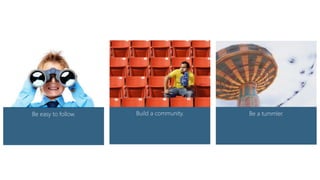
  • #26 Be easy to follow. Set an example by sharing your knowledge freely with others. The more people see you going out of your way to help others, the more they’ll be willing to do the same. Your internal SharePoint community is fundamental to your success. You can’t possibly change the way everyone works, but you can help them to get excited about the possibilities SharePoint offers. Hold events. Be upbeat. Make people feel like they’re part of something special. There’s nothing uniquely SharePoint here….it’s just good community building. Be a tummler. Our job is to stay engaged until the party is rocking. If we exit stage left too soon, the party dies and SharePoint use goes down the drain…
  • #27 We’re still a young team, but here are some of the initiatives that we’ve been working on during the past 3 years. Some of the things we’re proudest of include: Launch of our massive new SP2013 farm Launch of SP2013 training program Launch of our SharePoint ninja recognition program Launch of our new BBY SPUG, complete with monthly office hours & meetings, CBTs, eval sites, etc.
  • #28 We have 6 farm governance principles. All governance policies are tied to these 6 main principles…
  • #29 We provide the safety bumpers, but site collection admins (aka YOU) make the detailed implementation decisions. Who is “we”? Who are “you”? How do we do this? <click to next slide>
  • #30 You cannot give site collection administrator rights to someone that has not completed ALL of our training courses. Doing so violates our governance principles and may result in unnecessary armament. Use the foster admin program instead…
  • #31 Test-out options exist for the first 2 trainings. Last 2 trainings are required. No exceptions. Foster admin program for SCAs not yet certified.
  • #32 Rights management will be used if necessary to force compliance…
  • #33 You can’t succeed without knowledge. To assist with this, we have: SharePoint COE SPUG Training videos Online knowledge base (coming soon) Network of SharePoint users inside of BBY SharePoint Saturday Twin Cities and other events
  • #34 No long documents to read or things for you to sign. Instead we’re using 6 guiding principles. Their goal is to be easy to understand and easy to remember. The simpler we make it, the easier it will be to follow.
  • #35 Best Buy has undergone a SharePoint Renaissance. We learned (the hard way) that an ungoverned wild, wild west implementation doesn’t achieve the results we’re looking for. We need to come together to learn, to grow and to foster a community. Enterprise team/COE Site collection admins End-users SharePoint ninjas
  • #36 Distro list of 314 3 events held/month Attendees are geographically dispersed Our mission is to promote a community of learning. We want people to know one another and go to each other when they have questions. We teach best-practices, we demo and we build an engaging community that people want to join. Many of our monthly meetings are formal demos and teachouts on using content types, metadata, web parts, etc. We have implemented a couple of innovative monthly meetings, though. These are the ones I’m going to discuss today.
  • #38 Back to the hack-a-thon… The SharePoint Hack-a-thon is a an educational event sponsored by our enterprise Collaboration team. It allows SharePoint end-users and administrators from across the enterprise to get practical experience building out SharePoint sites/solutions. Participants are grouped into teams with an experienced SharePoint Ninja serving as team captain. During the event kickoff, all teams are briefed on the hack-a-thon business challenge, rules and judging criteria. Teams are then released to start building out solutions. SharePoint experts will be on hand to assist the teams as needed. The Hack-a-thon ends with a SharePoint User Group (SPUG) meeting. SPUG attendees have the opportunity to learn about the hack-a-thon business challenge and teams have the opportunity to demo their solutions. A panel of judges rates each solution based on several criteria (e.g. technical merit, user experience, functionality and applicability to business needs). The winning team receives a special prize and some serious bragging rights.
  • #39 Roles played during a hack-a-thon event…
  • #40 Rules/Lifelines for a hack-a-thon event…
  • #41 Scoring for a hack-a-thon event…
  • #42 Sample timeline for a hack-a-thon event…
  • #43 This is the business case we used for our 2nd hack-a-thon, which took place in October 2014. The business case is kept TOP SECRET until the event. Team leaders are given a sealed packet of information as they enter the hack-a-thon kickoff meeting. Inside are a copy of the rules, lifelines, team dossier and a copy of the business case. Choosing a business case is critical. It needs to be broad enough to allow for creativity but defined well enough to give the teams something to work towards. You also need to consider the types of resources on the teams. (In this case, teams that had project managers on them were well situated for envisioning a solution.)