Online Conference
June 17th and 18th 2015
WWW.COLLAB365.EVENTS
How to create user-friendly, engaging
SharePoint sites (no coding needed!)
WWW.COLLAB365.EVENTS
Wendy Neal
.NET SharePoint Developer for DMI
Email : wendy.neal@outlook.com
Twitter : @SharePointWendy
Facebook : facebook.com/wendynealblog
LinkedIn : linkedin.com/in/wendyneal
Google+ : plus.google.com/+WendyNeal
Website:
• http://wendy-neal.com
Contributing Author:
• CMSWire
• ITUnity
• SharePoint-Community.net
Contact Details:
Iowa City, Iowa, USA
WWW.COLLAB365.EVENTS
Agenda
Usability Best Practices
Usability Issues with OOTB SharePoint UI
Top Usability Tips That We’ll Apply
DEMO: Before and After
WWW.COLLAB365.EVENTS
Usability Best Practices
WWW.COLLAB365.EVENTS
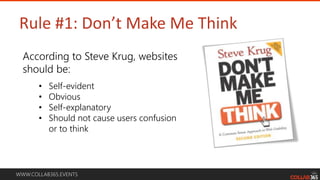
Rule #1: Don’t Make Me Think
According to Steve Krug, websites
should be:
• Self-evident
• Obvious
• Self-explanatory
• Should not cause users confusion
or to think
WWW.COLLAB365.EVENTS
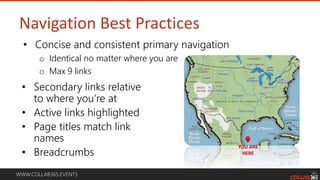
Navigation Best Practices
• Secondary links relative
to where you’re at
• Active links highlighted
• Page titles match link
names
• Breadcrumbs
YOU ARE
HERE
• Concise and consistent primary navigation
o Identical no matter where you are
o Max 9 links
WWW.COLLAB365.EVENTS
Home Page Design
• Attract attention
• Good balance of images and text
• Keep content succinct and
uncluttered
• Place important content “above
the fold”
WWW.COLLAB365.EVENTS
Design for Different Screen Sizes
• Typical minimum screen size
is 1024 x 768
o Test your site on different
screen resolutions
o You want to avoid left/right
scrolling at all costs!
o The “fold” will be in different
places depending on screen
resolution
WWW.COLLAB365.EVENTS
What Makes Users Frustrated?
• Inconsistent navigation
• Too many primary nav links
• Active links not highlighted
• Too many mouse clicks
• Can’t find what you’re
looking for
• Cluttered (balance between
text, images, whitespace)
• Too many words on page
• Left/right scrolling
• Performance (site is slow)
• Not evident whether form
was submitted successfully
• It isn’t clear what you’re
supposed to do/focus on
• Unclear error messages
WWW.COLLAB365.EVENTS
Usability Issues with OOTB SharePoint UI
WWW.COLLAB365.EVENTS
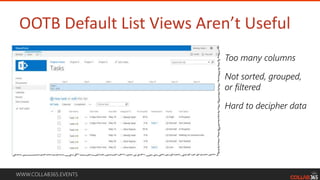
OOTB Default List Views Aren’t Useful
Too many columns
Not sorted, grouped,
or filtered
Hard to decipher data
WWW.COLLAB365.EVENTS
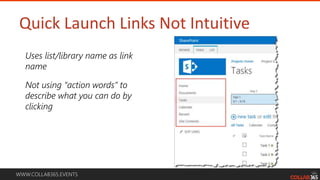
Quick Launch Links Not Intuitive
Uses list/library name as link
name
Not using “action words” to
describe what you can do by
clicking
WWW.COLLAB365.EVENTS
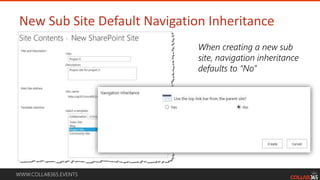
New Sub Site Default Navigation Inheritance
When creating a new sub
site, navigation inheritance
defaults to “No”
WWW.COLLAB365.EVENTS
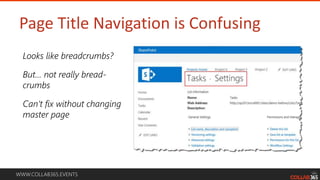
Page Title Navigation is Confusing
Looks like breadcrumbs?
But… not really bread-
crumbs
Can’t fix without changing
master page
WWW.COLLAB365.EVENTS
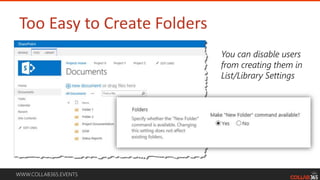
Too Easy to Create Folders
You can disable users
from creating them in
List/Library Settings
WWW.COLLAB365.EVENTS
Top Usability Tips That We’ll Apply
WWW.COLLAB365.EVENTS
Usability Tips
Use function-driven navigation when
possible (verbs instead of nouns)
WWW.COLLAB365.EVENTS
Usability Tips
Avoid too much content on the
home/landing pages
WWW.COLLAB365.EVENTS
Usability Tips
Only show relevant information to
the user
WWW.COLLAB365.EVENTS
Usability Tips
Change the default view on lists to
a view that is more useful
WWW.COLLAB365.EVENTS
Usability Tips
Use descriptive names for content
(lists, libraries, documents, & items)
WWW.COLLAB365.EVENTS
Usability Tips
Use metadata to organize your
data, not folders
WWW.COLLAB365.EVENTS
Usability Tips
Hide unnecessary form data from
users
WWW.COLLAB365.EVENTS
Usability Tips
Identify required fields and other
validation on forms
WWW.COLLAB365.EVENTS
Usability Tips
Set default values on forms when it
makes sense
WWW.COLLAB365.EVENTS
Usability Tips
Let users know that their form
submission was successful
WWW.COLLAB365.EVENTS
DEMO: Before and After
WWW.COLLAB365.EVENTS
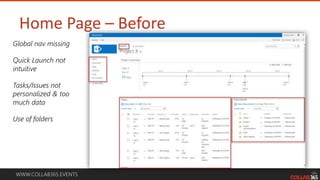
Home Page – Before
Global nav missing
Quick Launch not
intuitive
Tasks/Issues not
personalized & too
much data
Use of folders
WWW.COLLAB365.EVENTS
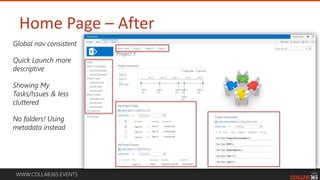
Home Page – After
Global nav consistent
Quick Launch more
descriptive
Showing My
Tasks/Issues & less
cluttered
No folders! Using
metadata instead
WWW.COLLAB365.EVENTS
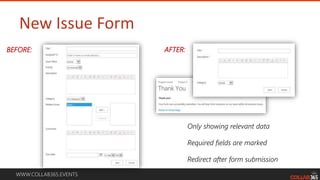
New Issue Form
Only showing relevant data
Required fields are marked
Redirect after form submission
BEFORE: AFTER:
WWW.COLLAB365.EVENTS
Stay tuned for more great sessions …

How to create user friendly, engaging share point sites (no coding needed!)