







Introducing Communication
Sites for Communicators
Showcase key Office 365 “Modern” Communication Site features
By: Kanwal Khipple
#spsottawa
October 28, 2017
SharePoint
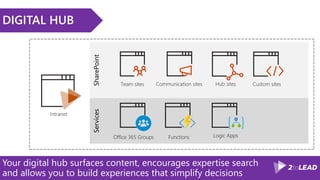
DIGITAL HUB
Your digital hub surfaces content, encourages expertise search
and allows you to build experiences that simplify decisions
Services
What we are planning on discussing today
INTRODUCTIONS
KEY FEATURES
LESSONS LEARNED
ROADMAP
SPEAKER | AUTHOR | SUPER GOOD LOOKING
KANWAL KHIPPLE, CEO
@kkhipple
bit.ly/linkedinkk
2014 2015
No matter what your role, its important to know your visitors.
PUT USERS FIRST
What content will be helpful to them?
How do they want the content to be presented?
What content should be surfaced at the top versus the bottom of the page?
How do you want to engage/interact with users?
How can users create content?
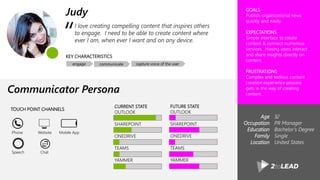
I love creating compelling content that inspires others
to engage. I need to be able to create content where
ever I am, when ever I want and on any device.
GOALS
Publish organizational news
quickly and easily
EXPECTATIONS
Simple interface to create
content & connect numerous
services. Having users interact
and share insights directly on
content.
FRUSTRATIONS
Complex and tedious content
creation experience process
gets in the way of creating
content.
“
KEY CHARACTERISTICS
Age
Occupation
Education
Family
Location
32
PR Manager
Bachelor’s Degree
Single
United States
FUTURE STATE
OUTLOOK
SHAREPOINT
ONEDRIVE
TEAMS
YAMMER
CURRENT STATE
OUTLOOK
SHAREPOINT
ONEDRIVE
TEAMS
YAMMER
Judy
Communicator Persona
engage communicate capture voice of the user
TOUCH POINT CHANNELS
Phone Website Mobile App
Speech Chat
Summarize agenda item 2
INTRODUCTIONS
KEY FEATURES
LESSONS LEARNED
ROADMAP
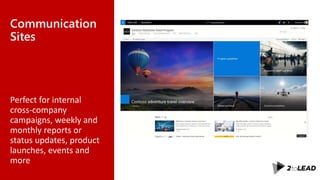
Communication
Sites
Perfect for internal
cross-company
campaigns, weekly and
monthly reports or
status updates, product
launches, events and
more
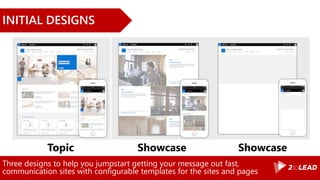
Three designs to help you jumpstart getting your message out fast,
communication sites with configurable templates for the sites and pages
INITIAL DESIGNS
Topic ShowcaseShowcase
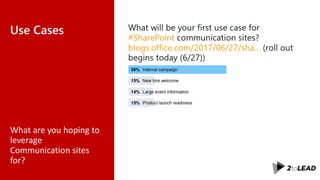
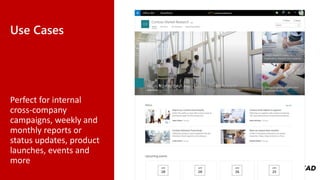
Use Cases
What are you hoping to
leverage
Communication sites
for?
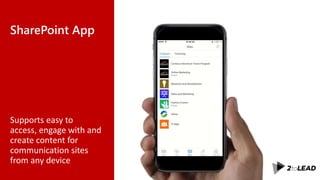
SharePoint App
Supports easy to
access, engage with and
create content for
communication sites
from any device
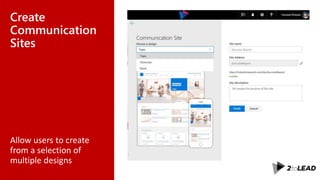
Create
Communication
Sites
Allow users to create
from a selection of
multiple designs
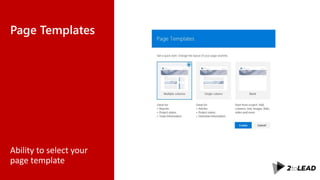
Page Templates
Ability to select your
page template
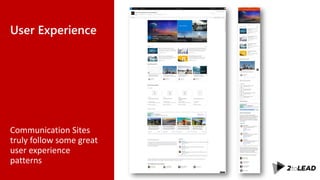
User Experience
Communication Sites
truly follow some great
user experience
patterns
Summarize agenda item 2
INTRODUCTIONS
KEY FEATURES
LESSONS LEARNED
ROADMAP
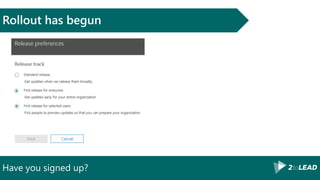
Have you signed up?
Rollout has begun
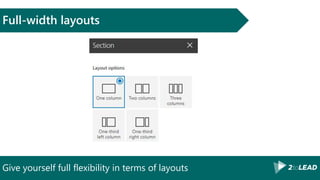
Give yourself full flexibility in terms of layouts
Full-width layouts
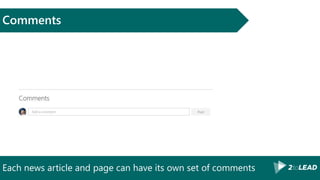
Each news article and page can have its own set of comments
Comments
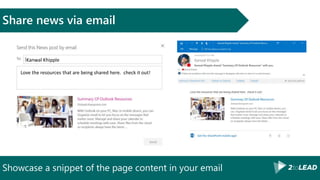
Showcase a snippet of the page content in your email
Share news via email
Kanwal Khipple
Love the resources that are being shared here. check it out!
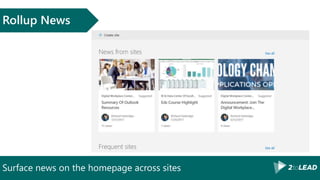
Surface news on the homepage across sites
Rollup News
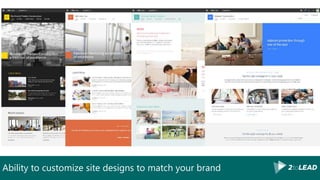
Ability to customize site designs to match your brand
Summarize agenda item 3
INTRODUCTIONS
KEY FEATURES
LESSONS LEARNED
ROADMAP
Use Cases
Perfect for internal
cross-company
campaigns, weekly and
monthly reports or
status updates, product
launches, events and
more
Brainstorm to help others communicate and engage
Think of a…
• place users want to explore but cannot
• super power that could be useful for your user
• Think of some real life activities your user likes to do together with others
• story your user might find inspiring or interesting
• person your users could learn from
• task that your users rarely complete
• task that your users frequently complete
• task when they’re transitioning between places or modes
• moment in your user’s day when its time to step away from work
• moment in your user’s day when they’re planned ahead and setting goals – weight loss
• moment in your user’s day when they’re excited or proud
• moment in your user’s day when they have experiences together with others (bday, leadership summits, scavenger hunts
Get more information and share this with your team!
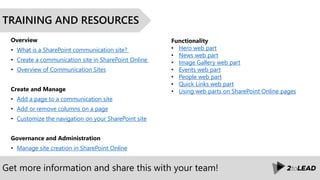
TRAINING AND RESOURCES
Overview
• What is a SharePoint communication site?
• Create a communication site in SharePoint Online
• Overview of Communication Sites
Create and Manage
• Add a page to a communication site
• Add or remove columns on a page
• Customize the navigation on your SharePoint site
Governance and Administration
• Manage site creation in SharePoint Online
Functionality
• Hero web part
• News web part
• Image Gallery web part
• Events web part
• People web part
• Quick Links web part
• Using web parts on SharePoint Online pages
Give you guidance and recommendations to successfully plan and
implement an Office 365 Intranet http://office365intranets.com
DOWNLOAD INTRANETS WITH
OFFICE 365 WHITEPAPER!
Summarize agenda item 3
INTRODUCTIONS
KEY FEATURES
LESSONS LEARNED
ROADMAP
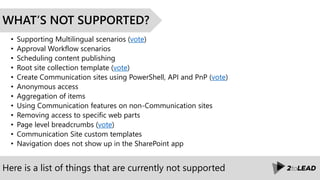
Here is a list of things that are currently not supported
WHAT’S NOT SUPPORTED?
• Supporting Multilingual scenarios (vote)
• Approval Workflow scenarios
• Scheduling content publishing
• Root site collection template (vote)
• Create Communication sites using PowerShell, API and PnP (vote)
• Anonymous access
• Aggregation of items
• Using Communication features on non-Communication sites
• Removing access to specific web parts
• Page level breadcrumbs (vote)
• Communication Site custom templates
• Navigation does not show up in the SharePoint app
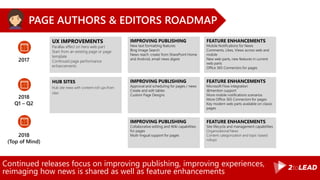
Continued releases focus on improving publishing, improving experiences,
reimaging how news is shared as well as feature enhancements
PAGE AUTHORS & EDITORS ROADMAP
2017
UX IMPROVEMENTS
Parallax effect on hero web part
Start from an existing page or page
template
Continued page performance
enhancements
IMPROVING PUBLISHING
New text formatting features
Bing Image Search
News reach: create from SharePoint Home
and Android, email news digest
FEATURE ENHANCEMENTS
Mobile Notifications for News
Comments, Likes, Views across web and
mobile
New web parts, new features in current
web parts
Office 365 Connectors for pages
2018
Q1 – Q2
HUB SITES
Hub site news with content roll-ups from
sites
IMPROVING PUBLISHING
Approval and scheduling for pages / news
Create and edit tables
Custom Page Designs
FEATURE ENHANCEMENTS
Microsoft Flow integration
@mention support
More mobile notifications scenarios
More Office 365 Connectors for pages
Key modern web parts available on classic
pages
2018
(Top of Mind)
IMPROVING PUBLISHING
Collaborative editing and Wiki capabilities
for pages
Multi-lingual support for pages
FEATURE ENHANCEMENTS
Site lifecycle and management capabilities
Organizational News
Content categorization and topic-based
rollups
Continuous releases focus on enabling and supporting hub
sites as well as feature enhancements
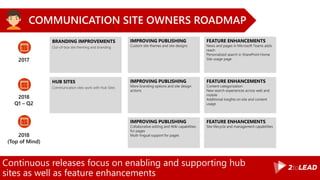
COMMUNICATION SITE OWNERS ROADMAP
2017
BRANDING IMPROVEMENTS
Out-of-box site theming and branding
IMPROVING PUBLISHING
Custom site themes and site designs
FEATURE ENHANCEMENTS
News and pages in Microsoft Teams adds
reach
Personalized search in SharePoint Home
Site usage page
2018
Q1 – Q2
HUB SITES
Communication sites work with Hub Sites
IMPROVING PUBLISHING
More branding options and site design
actions
FEATURE ENHANCEMENTS
Content categorization
New search experiences across web and
mobile
Additional insights on site and content
usage
2018
(Top of Mind)
IMPROVING PUBLISHING
Collaborative editing and Wiki capabilities
for pages
Multi-lingual support for pages
FEATURE ENHANCEMENTS
Site lifecycle and management capabilities
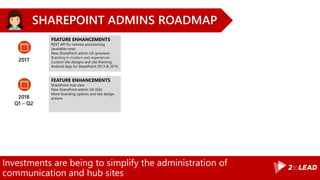
Investments are being to simplify the administration of
communication and hub sites
SHAREPOINT ADMINS ROADMAP
2017
FEATURE ENHANCEMENTS
REST API for remote provisioning
(available now)
New SharePoint admin UX (preview)
Branding in modern web experiences
Custom site designs and site theming
Android App for SharePoint 2013 & 2016
2018
Q1 – Q2
FEATURE ENHANCEMENTS
SharePoint hub sites
New SharePoint admin UX (GA)
More branding options and site design
actions
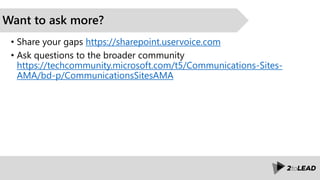
Want to ask more?
• Share your gaps https://sharepoint.uservoice.com
• Ask questions to the broader community
https://techcommunity.microsoft.com/t5/Communications-Sites-
AMA/bd-p/CommunicationsSitesAMA
Thank you Sponsors!!
Platinum
Gold
Silver
Bronze Breakfast
SharePint
Salon A
@4:45
pm
Please drink responsibly . We will be happy to call a cab for you
Sponsored By
Thank You!
Organizers, Sponsors and You for making this possible.
50+ SharePoint Presentations @ Slideshare.Net/kkhipple
When to Use What Whitepaper @ WhentoUseWhat.com
Intranets w/ Office 365 Whitepaper @ Office365Intranets.com
External Sharing w/ Office 365 Whitepaper @ Office365Extranets.com
and more!
Message Me On LinkedIn or Email Kanwal@Khipple.com
My twitter handle is @kkhipple and I work at
SPEAKER | AUTHOR | SUPER GOOD LOOKING

Introducing communication sites for communicators #spsottawa

  • 1.
    Introducing Communication Sites forCommunicators Showcase key Office 365 “Modern” Communication Site features By: Kanwal Khipple #spsottawa October 28, 2017
  • 2.
    SharePoint DIGITAL HUB Your digitalhub surfaces content, encourages expertise search and allows you to build experiences that simplify decisions Services
  • 3.
    What we areplanning on discussing today INTRODUCTIONS KEY FEATURES LESSONS LEARNED ROADMAP
  • 4.
    SPEAKER | AUTHOR| SUPER GOOD LOOKING KANWAL KHIPPLE, CEO @kkhipple bit.ly/linkedinkk 2014 2015
  • 5.
    No matter whatyour role, its important to know your visitors. PUT USERS FIRST What content will be helpful to them? How do they want the content to be presented? What content should be surfaced at the top versus the bottom of the page? How do you want to engage/interact with users? How can users create content?
  • 6.
    I love creatingcompelling content that inspires others to engage. I need to be able to create content where ever I am, when ever I want and on any device. GOALS Publish organizational news quickly and easily EXPECTATIONS Simple interface to create content & connect numerous services. Having users interact and share insights directly on content. FRUSTRATIONS Complex and tedious content creation experience process gets in the way of creating content. “ KEY CHARACTERISTICS Age Occupation Education Family Location 32 PR Manager Bachelor’s Degree Single United States FUTURE STATE OUTLOOK SHAREPOINT ONEDRIVE TEAMS YAMMER CURRENT STATE OUTLOOK SHAREPOINT ONEDRIVE TEAMS YAMMER Judy Communicator Persona engage communicate capture voice of the user TOUCH POINT CHANNELS Phone Website Mobile App Speech Chat
  • 7.
    Summarize agenda item2 INTRODUCTIONS KEY FEATURES LESSONS LEARNED ROADMAP
  • 8.
    Communication Sites Perfect for internal cross-company campaigns,weekly and monthly reports or status updates, product launches, events and more
  • 9.
    Three designs tohelp you jumpstart getting your message out fast, communication sites with configurable templates for the sites and pages INITIAL DESIGNS Topic ShowcaseShowcase
  • 10.
    Use Cases What areyou hoping to leverage Communication sites for?
  • 11.
    SharePoint App Supports easyto access, engage with and create content for communication sites from any device
  • 12.
    Create Communication Sites Allow users tocreate from a selection of multiple designs
  • 13.
    Page Templates Ability toselect your page template
  • 14.
    User Experience Communication Sites trulyfollow some great user experience patterns
  • 15.
    Summarize agenda item2 INTRODUCTIONS KEY FEATURES LESSONS LEARNED ROADMAP
  • 16.
    Have you signedup? Rollout has begun
  • 17.
    Give yourself fullflexibility in terms of layouts Full-width layouts
  • 18.
    Each news articleand page can have its own set of comments Comments
  • 19.
    Showcase a snippetof the page content in your email Share news via email Kanwal Khipple Love the resources that are being shared here. check it out!
  • 20.
    Surface news onthe homepage across sites Rollup News
  • 21.
    Ability to customizesite designs to match your brand
  • 22.
    Summarize agenda item3 INTRODUCTIONS KEY FEATURES LESSONS LEARNED ROADMAP
  • 23.
    Use Cases Perfect forinternal cross-company campaigns, weekly and monthly reports or status updates, product launches, events and more
  • 24.
    Brainstorm to helpothers communicate and engage Think of a… • place users want to explore but cannot • super power that could be useful for your user • Think of some real life activities your user likes to do together with others • story your user might find inspiring or interesting • person your users could learn from • task that your users rarely complete • task that your users frequently complete • task when they’re transitioning between places or modes • moment in your user’s day when its time to step away from work • moment in your user’s day when they’re planned ahead and setting goals – weight loss • moment in your user’s day when they’re excited or proud • moment in your user’s day when they have experiences together with others (bday, leadership summits, scavenger hunts
  • 25.
    Get more informationand share this with your team! TRAINING AND RESOURCES Overview • What is a SharePoint communication site? • Create a communication site in SharePoint Online • Overview of Communication Sites Create and Manage • Add a page to a communication site • Add or remove columns on a page • Customize the navigation on your SharePoint site Governance and Administration • Manage site creation in SharePoint Online Functionality • Hero web part • News web part • Image Gallery web part • Events web part • People web part • Quick Links web part • Using web parts on SharePoint Online pages
  • 26.
    Give you guidanceand recommendations to successfully plan and implement an Office 365 Intranet http://office365intranets.com DOWNLOAD INTRANETS WITH OFFICE 365 WHITEPAPER!
  • 27.
    Summarize agenda item3 INTRODUCTIONS KEY FEATURES LESSONS LEARNED ROADMAP
  • 28.
    Here is alist of things that are currently not supported WHAT’S NOT SUPPORTED? • Supporting Multilingual scenarios (vote) • Approval Workflow scenarios • Scheduling content publishing • Root site collection template (vote) • Create Communication sites using PowerShell, API and PnP (vote) • Anonymous access • Aggregation of items • Using Communication features on non-Communication sites • Removing access to specific web parts • Page level breadcrumbs (vote) • Communication Site custom templates • Navigation does not show up in the SharePoint app
  • 29.
    Continued releases focuson improving publishing, improving experiences, reimaging how news is shared as well as feature enhancements PAGE AUTHORS & EDITORS ROADMAP 2017 UX IMPROVEMENTS Parallax effect on hero web part Start from an existing page or page template Continued page performance enhancements IMPROVING PUBLISHING New text formatting features Bing Image Search News reach: create from SharePoint Home and Android, email news digest FEATURE ENHANCEMENTS Mobile Notifications for News Comments, Likes, Views across web and mobile New web parts, new features in current web parts Office 365 Connectors for pages 2018 Q1 – Q2 HUB SITES Hub site news with content roll-ups from sites IMPROVING PUBLISHING Approval and scheduling for pages / news Create and edit tables Custom Page Designs FEATURE ENHANCEMENTS Microsoft Flow integration @mention support More mobile notifications scenarios More Office 365 Connectors for pages Key modern web parts available on classic pages 2018 (Top of Mind) IMPROVING PUBLISHING Collaborative editing and Wiki capabilities for pages Multi-lingual support for pages FEATURE ENHANCEMENTS Site lifecycle and management capabilities Organizational News Content categorization and topic-based rollups
  • 30.
    Continuous releases focuson enabling and supporting hub sites as well as feature enhancements COMMUNICATION SITE OWNERS ROADMAP 2017 BRANDING IMPROVEMENTS Out-of-box site theming and branding IMPROVING PUBLISHING Custom site themes and site designs FEATURE ENHANCEMENTS News and pages in Microsoft Teams adds reach Personalized search in SharePoint Home Site usage page 2018 Q1 – Q2 HUB SITES Communication sites work with Hub Sites IMPROVING PUBLISHING More branding options and site design actions FEATURE ENHANCEMENTS Content categorization New search experiences across web and mobile Additional insights on site and content usage 2018 (Top of Mind) IMPROVING PUBLISHING Collaborative editing and Wiki capabilities for pages Multi-lingual support for pages FEATURE ENHANCEMENTS Site lifecycle and management capabilities
  • 31.
    Investments are beingto simplify the administration of communication and hub sites SHAREPOINT ADMINS ROADMAP 2017 FEATURE ENHANCEMENTS REST API for remote provisioning (available now) New SharePoint admin UX (preview) Branding in modern web experiences Custom site designs and site theming Android App for SharePoint 2013 & 2016 2018 Q1 – Q2 FEATURE ENHANCEMENTS SharePoint hub sites New SharePoint admin UX (GA) More branding options and site design actions
  • 32.
    Want to askmore? • Share your gaps https://sharepoint.uservoice.com • Ask questions to the broader community https://techcommunity.microsoft.com/t5/Communications-Sites- AMA/bd-p/CommunicationsSitesAMA
  • 33.
  • 34.
    Salon A @4:45 pm Please drinkresponsibly . We will be happy to call a cab for you Sponsored By
  • 35.
    Thank You! Organizers, Sponsorsand You for making this possible. 50+ SharePoint Presentations @ Slideshare.Net/kkhipple When to Use What Whitepaper @ WhentoUseWhat.com Intranets w/ Office 365 Whitepaper @ Office365Intranets.com External Sharing w/ Office 365 Whitepaper @ Office365Extranets.com and more! Message Me On LinkedIn or Email Kanwal@Khipple.com My twitter handle is @kkhipple and I work at SPEAKER | AUTHOR | SUPER GOOD LOOKING

Editor's Notes

  • #2 Are you an internal communicator who owns and manages the intranet? Are you looking to redesign your intranet but are not sure how Microsoft's Modern Communication sites fit into your project? Attend this session to learn about what features Communication Sites provide and how you can leverage them. This session will also be demo heavy to showcase key features that are available for 1st Release users in Office 365 tenants.
  • #10 Topic—Select the Topic design when you have a lot of information to share, such as news, events and other content. Showcase—Use the Showcase design to feature a product, team or event using photos or images. Blank—Start with a blank site and make your design come to life quickly and easily.
  • #11 Intranet Marketing Site Communication Site Product Showcase site Governance Site Training site Knowledge Base site Communities of Interest site Communities of Expertise site
  • #17 https://blogs.office.com/en-us/2017/06/27/sharepoint-communication-sites-begin-rollout-to-office-365-customers/
  • #18 The Hero and Image web parts can be placed in a section layout that spans the page from left to right, giving you ways to emphasize your most essential information.
  • #19 Each news article and page can have its own set of comments. It is possible to use the Yammer web part for broad discussion scenarios as well as targeted responses to engage your viewers on the sole message and content on the page—all keeping within the context of the page Comments are stored in the site page item in SharePoint (in a column). You can delete your comments, but you can't edit them. It's NOT linked to Yammer.
  • #20 When you share news via email from a communication site, it’s not just a blue link; it’s a visual, informative preview that adds context to both the email and the news article itself. Within the email, the recipient(s) will see a thumbnail, title, description and an optional message from the sender
  • #24 Communication sites allow people to create and share recurring updates beyond email. When you create a page on a communication site, you can embed documents and video, and dynamically pull in real-time data from across Office 365, including documents from SharePoint, Power BI reports, Microsoft Stream videos and Yammer discussions. The resulting page is a rich and dynamic communication. And the page persists on the site, so people can refer to it easily, even as the membership of your team changes, so new members can more easily get up to speed.
  • #34 At the end of the day, please ensure your evaluation is signed and handed in for door prizes. The draw takes place in The Observatory