Plugins
Monitor your entire server stack
> Network and server administrators often require specific
monitoring data that goes beyond the scope of vendors’
standard monitoring solutions.
> With Site24x7 Plugins, IT admins can now access that data
using thousands of supported, pre-built plugins or create
their own.
> Monitor hosts, devices, services, protocols, applications and
various resources, giving deep performance visibility into the
entire application stack.
Why Site24x7 Plugins?
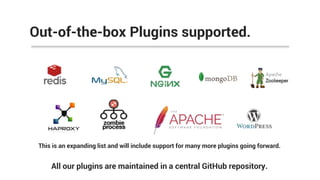
Out-of-the-box Plugins supported.
All our plugins are maintained in a central GitHub repository.
This is an expanding list and will include support for many more plugins going forward.
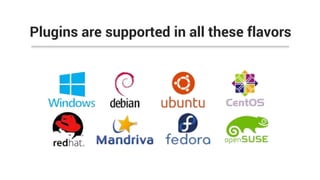
Plugins are supported in all these flavors
 Execute thousands of Nagios Plugins in Site24x7
without the need of running a Nagios Server
 No need to maintain a dedicated server for Nagios
and Nagios server software.
Execute Nagios plugins in Site24x7
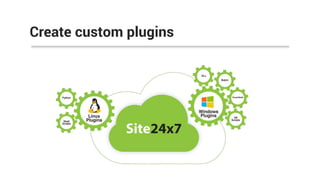
Create custom plugins
 Write your own scripts using Python or Shell scripts and
create your own plugins in Linux
 Set threshold values for individual attributes and configure
alerts
 View performance charts for custom attributes on your
Site24x7 dashboard
Create your own Linux plugins
 Site24x7 Windows Plugins: Write your own custom plugins
using DLL, Batch, PowerShell and VB scripts.
 Set threshold values for individual attributes and configure
alerts
 View performance charts for custom attributes on your
Site24x7 dashboard
Create your own Windows plugins
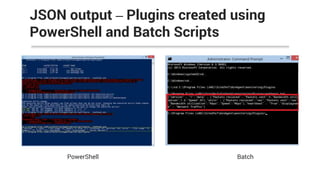
JSON output – Plugins created using
PowerShell and Batch Scripts
PowerShell Batch
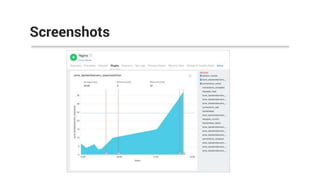
Screenshots
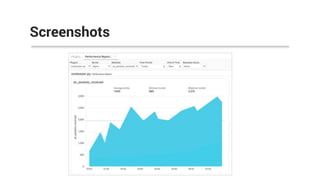
Screenshots
Screenshots
 Supported Plugins: Nagios, MySQL, Redis, MongoDB, NGINX,
Memcached, HAProxy, Zookeeper, WordPress, Apache, Zombie Process
 Execute Nagios plugins without Nagios servers
 Create your own plugins using Python or Shell scripts in Linux and using
DLL, Batch, PowerShell and VB scripts in Windows
 Set threshold values for individual attributes in a plugin and get immediate
notifications if set values exceed
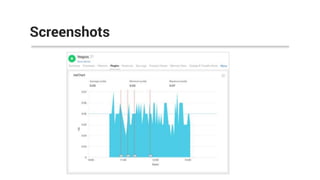
 View performance charts of multiple plugin instances across servers in a
single easy to understand chart.
Recap
 Site24x7 Plugins come as part of the standard
server monitoring capabilities. For example, with
the Site24x7 Standard Plan, you can monitor 10
Servers and its plugins for $9 per month when
billed annually. Sign up now!
Pricing
Customer testimonial
"We have been using Site24x7 for more than a year, and I should say
that we are more than just satisfied," said Aleksander Andrijenko, IT
infrastructure at Marcura Group in Dubai. "Site24x7’s broad feature
offerings and price point made it an obvious choice over other
vendors. The product is easy to set up, and you can start monitoring
your environments in just minutes. The instant alerts using [the
Site24x7] Plugins feature ensures we’re on top of issues all the time."
Aleksander Andrijenko, IT Infrastructure Manager with
Marcura Group.
 Site24x7 Plugins
 GitHub Repository
 Linux Server Monitoring
 Windows Server Monitoring
 Server Monitoring
Additional Resources
Sign up now!
Contact us:
support@site24x7.com
+1 408 352 9117Twitter | Facebook | Google+ | LinkedIn

Site24x7 Plugins - Monitor your entire server stack

  • 1.
  • 2.
    > Network andserver administrators often require specific monitoring data that goes beyond the scope of vendors’ standard monitoring solutions. > With Site24x7 Plugins, IT admins can now access that data using thousands of supported, pre-built plugins or create their own. > Monitor hosts, devices, services, protocols, applications and various resources, giving deep performance visibility into the entire application stack. Why Site24x7 Plugins?
  • 3.
    Out-of-the-box Plugins supported. Allour plugins are maintained in a central GitHub repository. This is an expanding list and will include support for many more plugins going forward.
  • 4.
    Plugins are supportedin all these flavors
  • 5.
     Execute thousandsof Nagios Plugins in Site24x7 without the need of running a Nagios Server  No need to maintain a dedicated server for Nagios and Nagios server software. Execute Nagios plugins in Site24x7
  • 6.
  • 7.
     Write yourown scripts using Python or Shell scripts and create your own plugins in Linux  Set threshold values for individual attributes and configure alerts  View performance charts for custom attributes on your Site24x7 dashboard Create your own Linux plugins
  • 8.
     Site24x7 WindowsPlugins: Write your own custom plugins using DLL, Batch, PowerShell and VB scripts.  Set threshold values for individual attributes and configure alerts  View performance charts for custom attributes on your Site24x7 dashboard Create your own Windows plugins
  • 9.
    JSON output –Plugins created using PowerShell and Batch Scripts PowerShell Batch
  • 10.
  • 11.
  • 12.
  • 13.
     Supported Plugins:Nagios, MySQL, Redis, MongoDB, NGINX, Memcached, HAProxy, Zookeeper, WordPress, Apache, Zombie Process  Execute Nagios plugins without Nagios servers  Create your own plugins using Python or Shell scripts in Linux and using DLL, Batch, PowerShell and VB scripts in Windows  Set threshold values for individual attributes in a plugin and get immediate notifications if set values exceed  View performance charts of multiple plugin instances across servers in a single easy to understand chart. Recap
  • 14.
     Site24x7 Pluginscome as part of the standard server monitoring capabilities. For example, with the Site24x7 Standard Plan, you can monitor 10 Servers and its plugins for $9 per month when billed annually. Sign up now! Pricing
  • 15.
    Customer testimonial "We havebeen using Site24x7 for more than a year, and I should say that we are more than just satisfied," said Aleksander Andrijenko, IT infrastructure at Marcura Group in Dubai. "Site24x7’s broad feature offerings and price point made it an obvious choice over other vendors. The product is easy to set up, and you can start monitoring your environments in just minutes. The instant alerts using [the Site24x7] Plugins feature ensures we’re on top of issues all the time." Aleksander Andrijenko, IT Infrastructure Manager with Marcura Group.
  • 16.
     Site24x7 Plugins GitHub Repository  Linux Server Monitoring  Windows Server Monitoring  Server Monitoring Additional Resources
  • 17.
    Sign up now! Contactus: support@site24x7.com +1 408 352 9117Twitter | Facebook | Google+ | LinkedIn