Download free for 30 days
Sign in
Upload
Language (EN)
Support
Business
Mobile
Social Media
Marketing
Technology
Art & Photos
Career
Design
Education
Presentations & Public Speaking
Government & Nonprofit
Healthcare
Internet
Law
Leadership & Management
Automotive
Engineering
Software
Recruiting & HR
Retail
Sales
Services
Science
Small Business & Entrepreneurship
Food
Environment
Economy & Finance
Data & Analytics
Investor Relations
Sports
Spiritual
News & Politics
Travel
Self Improvement
Real Estate
Entertainment & Humor
Health & Medicine
Devices & Hardware
Lifestyle
Change Language
Language
English
Español
Português
Français
Deutsche
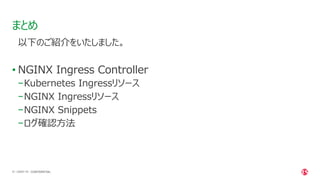
Cancel
Save
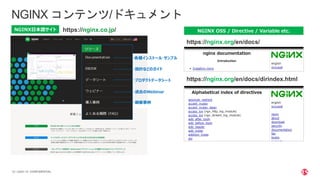
EN
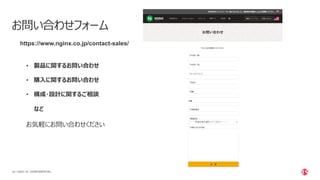
NI
Uploaded by
NGINX, Inc.
PDF, PPTX
844 views
NGINX Back to Basics: Ingress Controller (Japanese Webinar)
Check out this back to basics Japanese webinar covering NGINX Ingress Controller.
Software
◦
Read more
0
Save
Share
Embed
Embed presentation
Download
Download as PDF, PPTX
1
/ 59
2
/ 59
3
/ 59
4
/ 59
5
/ 59
6
/ 59
7
/ 59
8
/ 59
9
/ 59
10
/ 59
11
/ 59
12
/ 59
13
/ 59
14
/ 59
15
/ 59
16
/ 59
17
/ 59
18
/ 59
19
/ 59
20
/ 59
21
/ 59
22
/ 59
23
/ 59
24
/ 59
25
/ 59
26
/ 59
27
/ 59
28
/ 59
29
/ 59
30
/ 59
31
/ 59
32
/ 59
33
/ 59
34
/ 59
35
/ 59
36
/ 59
37
/ 59
38
/ 59
39
/ 59
40
/ 59
41
/ 59
42
/ 59
43
/ 59
44
/ 59
45
/ 59
46
/ 59
47
/ 59
48
/ 59
49
/ 59
50
/ 59
51
/ 59
52
/ 59
53
/ 59
54
/ 59
55
/ 59
56
/ 59
57
/ 59
58
/ 59
59
/ 59
More Related Content
PPTX
自宅インフラの育て方 第2回
by
富士通クラウドテクノロジーズ株式会社
PDF
PHP-FPM の子プロセス制御方法と設定をおさらいしよう
by
Shohei Okada
PPTX
今こそ知りたいSpring Batch(Spring Fest 2020講演資料)
by
NTT DATA Technology & Innovation
PPTX
CloudNativePGを動かしてみた! ~PostgreSQL on Kubernetes~(第34回PostgreSQLアンカンファレンス@オンライ...
by
NTT DATA Technology & Innovation
PDF
PostgreSQLでスケールアウト
by
Masahiko Sawada
PDF
Android起動周りのノウハウ
by
chancelab
PDF
UnboundとNSDの紹介 BIND9との比較編
by
hdais
PDF
Docker と ECS と WebSocket で最強のマルチプレイ・ゲームサーバを構築
by
gree_tech
自宅インフラの育て方 第2回
by
富士通クラウドテクノロジーズ株式会社
PHP-FPM の子プロセス制御方法と設定をおさらいしよう
by
Shohei Okada
今こそ知りたいSpring Batch(Spring Fest 2020講演資料)
by
NTT DATA Technology & Innovation
CloudNativePGを動かしてみた! ~PostgreSQL on Kubernetes~(第34回PostgreSQLアンカンファレンス@オンライ...
by
NTT DATA Technology & Innovation
PostgreSQLでスケールアウト
by
Masahiko Sawada
Android起動周りのノウハウ
by
chancelab
UnboundとNSDの紹介 BIND9との比較編
by
hdais
Docker と ECS と WebSocket で最強のマルチプレイ・ゲームサーバを構築
by
gree_tech
What's hot
PDF
Amazon Redshift 概要 (20分版)
by
Amazon Web Services Japan
PDF
Ansibleで始めるインフラ構築自動化
by
dcubeio
PDF
nginxの紹介
by
Takashi Takizawa
PPTX
Redisの特徴と活用方法について
by
Yuji Otani
PDF
Consistent hash
by
paulowniaceae
PDF
構成情報データベースをGitで管理したいネットワーク運用者の憂鬱
by
Yuya Rin
PDF
今話題のいろいろなコンテナランタイムを比較してみた
by
Kohei Tokunaga
PPTX
Argo CD Deep Dive
by
shunki fujiwara
PDF
AngularとSpring Bootで作るSPA + RESTful Web Serviceアプリケーション
by
ssuser070fa9
PDF
今からでも遅くないDBマイグレーション - Flyway と SchemaSpy の紹介 -
by
onozaty
PDF
レプリケーション遅延の監視について(第40回PostgreSQLアンカンファレンス@オンライン 発表資料)
by
NTT DATA Technology & Innovation
PDF
InnoDBのすゝめ(仮)
by
Takanori Sejima
PPTX
サポート エンジニアが Azure Networking をじっくりたっぷり語りつくす会
by
ShuheiUda
PDF
Docker Compose入門~今日から始めるComposeの初歩からswarm mode対応まで
by
Masahito Zembutsu
PPTX
Container Networking Deep Dive
by
Hirofumi Ichihara
PDF
[CEDEC 2021] 運用中タイトルでも怖くない! 『メルクストーリア』におけるハイパフォーマンス・ローコストなリアルタイム通信技術の導入事例
by
Naoya Kishimoto
PPTX
NginxとLuaを用いた動的なリバースプロキシでデプロイを 100 倍速くした
by
toshi_pp
PDF
DockerとPodmanの比較
by
Akihiro Suda
PDF
マルチテナント化で知っておきたいデータベースのこと
by
Amazon Web Services Japan
PPTX
PostgreSQL開発コミュニティに参加しよう!(PostgreSQL Conference Japan 2021 発表資料)
by
NTT DATA Technology & Innovation
Amazon Redshift 概要 (20分版)
by
Amazon Web Services Japan
Ansibleで始めるインフラ構築自動化
by
dcubeio
nginxの紹介
by
Takashi Takizawa
Redisの特徴と活用方法について
by
Yuji Otani
Consistent hash
by
paulowniaceae
構成情報データベースをGitで管理したいネットワーク運用者の憂鬱
by
Yuya Rin
今話題のいろいろなコンテナランタイムを比較してみた
by
Kohei Tokunaga
Argo CD Deep Dive
by
shunki fujiwara
AngularとSpring Bootで作るSPA + RESTful Web Serviceアプリケーション
by
ssuser070fa9
今からでも遅くないDBマイグレーション - Flyway と SchemaSpy の紹介 -
by
onozaty
レプリケーション遅延の監視について(第40回PostgreSQLアンカンファレンス@オンライン 発表資料)
by
NTT DATA Technology & Innovation
InnoDBのすゝめ(仮)
by
Takanori Sejima
サポート エンジニアが Azure Networking をじっくりたっぷり語りつくす会
by
ShuheiUda
Docker Compose入門~今日から始めるComposeの初歩からswarm mode対応まで
by
Masahito Zembutsu
Container Networking Deep Dive
by
Hirofumi Ichihara
[CEDEC 2021] 運用中タイトルでも怖くない! 『メルクストーリア』におけるハイパフォーマンス・ローコストなリアルタイム通信技術の導入事例
by
Naoya Kishimoto
NginxとLuaを用いた動的なリバースプロキシでデプロイを 100 倍速くした
by
toshi_pp
DockerとPodmanの比較
by
Akihiro Suda
マルチテナント化で知っておきたいデータベースのこと
by
Amazon Web Services Japan
PostgreSQL開発コミュニティに参加しよう!(PostgreSQL Conference Japan 2021 発表資料)
by
NTT DATA Technology & Innovation
Similar to NGINX Back to Basics: Ingress Controller (Japanese Webinar)
PDF
NGINX東京ハッピーアワー「DevOpsプラクティスによるクラウドでのKubernetesの利用」
by
Takaaki Suzuki
PDF
Fundamentals of Microservices Japanese Webinar
by
NGINX, Inc.
PDF
Openshift NGINX Kubernetes (Japanese Webinar)
by
NGINX, Inc.
PPTX
NGINX Plus Hands On Training
by
NGINX, Inc.
PDF
NGINX製品の最新機能アップデート情報
by
NGINX, Inc.
PDF
NGINX Ingress Controller on RedHat OpenShift.pdf
by
FumieNakayama
PDF
NGINX Ingress Controller with WAF for Kubernetes
by
NGINX, Inc.
PDF
NGINXセミナー(基本編)~いまさら聞けないNGINXコンフィグなど基本がわかる!
by
NGINX, Inc.
PDF
NGINX App Protect on Hatobaで実現するセキュリティサービス公開 構築手順書
by
富士通クラウドテクノロジーズ株式会社
PDF
NGINX & OpenShift Webinar for Energy Sector
by
NGINX, Inc.
PDF
【NGINXセミナー】 Ingressを使ってマイクロサービスの運用を楽にする方法
by
NGINX, Inc.
PPTX
NGINX Ingress With GKE
by
Hiroki Sakonju
PPTX
API and Modern App Security for Microservices
by
NGINX, Inc.
PDF
「これからはじめるNGINX技術解説~基本編」セミナー (NGINX Back to Basic in JP)
by
NGINX, Inc.
PPTX
NGINX + Ansible Automation Webinar (日本語版)
by
NGINX, Inc.
PDF
【NGINXセミナー】API ゲートウェイとしてのNGINX Plus活用方法
by
NGINX, Inc.
PPTX
Why NGINX Plus/NGINX Controller for NGINX OSS users
by
NGINX, Inc.
PPTX
NGINX Kubernetes API
by
NGINX, Inc.
PDF
NGINX Back to Basic 2 Part 2 (Japanese Webinar)
by
NGINX, Inc.
PPTX
Secure Kubernetes Apps in Production (Japanese Webinar)
by
NGINX, Inc.
NGINX東京ハッピーアワー「DevOpsプラクティスによるクラウドでのKubernetesの利用」
by
Takaaki Suzuki
Fundamentals of Microservices Japanese Webinar
by
NGINX, Inc.
Openshift NGINX Kubernetes (Japanese Webinar)
by
NGINX, Inc.
NGINX Plus Hands On Training
by
NGINX, Inc.
NGINX製品の最新機能アップデート情報
by
NGINX, Inc.
NGINX Ingress Controller on RedHat OpenShift.pdf
by
FumieNakayama
NGINX Ingress Controller with WAF for Kubernetes
by
NGINX, Inc.
NGINXセミナー(基本編)~いまさら聞けないNGINXコンフィグなど基本がわかる!
by
NGINX, Inc.
NGINX App Protect on Hatobaで実現するセキュリティサービス公開 構築手順書
by
富士通クラウドテクノロジーズ株式会社
NGINX & OpenShift Webinar for Energy Sector
by
NGINX, Inc.
【NGINXセミナー】 Ingressを使ってマイクロサービスの運用を楽にする方法
by
NGINX, Inc.
NGINX Ingress With GKE
by
Hiroki Sakonju
API and Modern App Security for Microservices
by
NGINX, Inc.
「これからはじめるNGINX技術解説~基本編」セミナー (NGINX Back to Basic in JP)
by
NGINX, Inc.
NGINX + Ansible Automation Webinar (日本語版)
by
NGINX, Inc.
【NGINXセミナー】API ゲートウェイとしてのNGINX Plus活用方法
by
NGINX, Inc.
Why NGINX Plus/NGINX Controller for NGINX OSS users
by
NGINX, Inc.
NGINX Kubernetes API
by
NGINX, Inc.
NGINX Back to Basic 2 Part 2 (Japanese Webinar)
by
NGINX, Inc.
Secure Kubernetes Apps in Production (Japanese Webinar)
by
NGINX, Inc.
More from NGINX, Inc.
PDF
【NGINXセミナー】 NGINXのWAFとは?その使い方と設定方法 解説セミナー
by
NGINX, Inc.
PPTX
Get Hands-On with NGINX and QUIC+HTTP/3
by
NGINX, Inc.
PPTX
Managing Kubernetes Cost and Performance with NGINX & Kubecost
by
NGINX, Inc.
PDF
Manage Microservices Chaos and Complexity with Observability
by
NGINX, Inc.
PDF
Accelerate Microservices Deployments with Automation
by
NGINX, Inc.
PDF
Unit 2: Microservices Secrets Management 101
by
NGINX, Inc.
PDF
Unit 1: Apply the Twelve-Factor App to Microservices Architectures
by
NGINX, Inc.
PDF
NGINX基本セミナー(セキュリティ編)~NGINXでセキュアなプラットフォームを実現する方法!
by
NGINX, Inc.
PDF
Easily View, Manage, and Scale Your App Security with F5 NGINX
by
NGINX, Inc.
PDF
Keep Ahead of Evolving Cyberattacks with OPSWAT and F5 NGINX
by
NGINX, Inc.
PPTX
Install and Configure NGINX Unit, the Universal Application, Web, and Proxy S...
by
NGINX, Inc.
PPTX
Protecting Apps from Hacks in Kubernetes with NGINX
by
NGINX, Inc.
PPTX
Successfully Implement Your API Strategy with NGINX
by
NGINX, Inc.
PPTX
Installing and Configuring NGINX Open Source
by
NGINX, Inc.
PPTX
Shift Left for More Secure Apps with F5 NGINX
by
NGINX, Inc.
PPTX
How to Avoid the Top 5 NGINX Configuration Mistakes.pptx
by
NGINX, Inc.
PDF
Kubernetes環境で実現するWebアプリケーションセキュリティ
by
NGINX, Inc.
PDF
Software Delivery and the Rube Goldberg Machine: What Is the Problem We Are T...
by
NGINX, Inc.
PDF
Open Sourcing NGINX Agent and Demo
by
NGINX, Inc.
PDF
NGINX, Open Source, and You – Another Decade of Innovation
by
NGINX, Inc.
【NGINXセミナー】 NGINXのWAFとは?その使い方と設定方法 解説セミナー
by
NGINX, Inc.
Get Hands-On with NGINX and QUIC+HTTP/3
by
NGINX, Inc.
Managing Kubernetes Cost and Performance with NGINX & Kubecost
by
NGINX, Inc.
Manage Microservices Chaos and Complexity with Observability
by
NGINX, Inc.
Accelerate Microservices Deployments with Automation
by
NGINX, Inc.
Unit 2: Microservices Secrets Management 101
by
NGINX, Inc.
Unit 1: Apply the Twelve-Factor App to Microservices Architectures
by
NGINX, Inc.
NGINX基本セミナー(セキュリティ編)~NGINXでセキュアなプラットフォームを実現する方法!
by
NGINX, Inc.
Easily View, Manage, and Scale Your App Security with F5 NGINX
by
NGINX, Inc.
Keep Ahead of Evolving Cyberattacks with OPSWAT and F5 NGINX
by
NGINX, Inc.
Install and Configure NGINX Unit, the Universal Application, Web, and Proxy S...
by
NGINX, Inc.
Protecting Apps from Hacks in Kubernetes with NGINX
by
NGINX, Inc.
Successfully Implement Your API Strategy with NGINX
by
NGINX, Inc.
Installing and Configuring NGINX Open Source
by
NGINX, Inc.
Shift Left for More Secure Apps with F5 NGINX
by
NGINX, Inc.
How to Avoid the Top 5 NGINX Configuration Mistakes.pptx
by
NGINX, Inc.
Kubernetes環境で実現するWebアプリケーションセキュリティ
by
NGINX, Inc.
Software Delivery and the Rube Goldberg Machine: What Is the Problem We Are T...
by
NGINX, Inc.
Open Sourcing NGINX Agent and Demo
by
NGINX, Inc.
NGINX, Open Source, and You – Another Decade of Innovation
by
NGINX, Inc.
NGINX Back to Basics: Ingress Controller (Japanese Webinar)
1.
これからはじめるNGINX 基本セミナー 〜Ingress Controller編〜 F5ネットワークスジャパン合同会社
2.
| ©2021 F5 2 F5ネットワークスジャパン合同会社 NGINX
Technical Solutions Architect 松本 央 鈴⽊ 孝彰
3.
| ©2021 F5 3 •
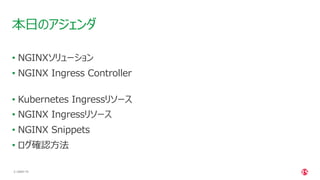
NGINXソリューション • NGINX Ingress Controller • Kubernetes Ingressリソース • NGINX Ingressリソース • NGINX Snippets • ログ確認⽅法 本⽇のアジェンダ
4.
| ©2021 F5 4 NGINX
ソリューション
5.
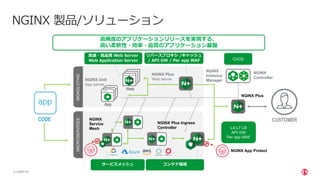
| ©2021 F5 5 Web KIC SP
MS SP MS L7 LB NGINX Plus NGINX Controller NGINX Plus Web server NGINX Unit App server CODE CUSTOMER App NGINX 製品/ソリューション L4-L7 LB API GW Per app WAF ⾼速・⾼品質 Web Server Web Application Server NGINX Service Mesh SP MS ⾼頻度のアプリケーションリリースを実現する、 ⾼い柔軟性・効率・品質のアプリケーション基盤 コンテナ環境 サービスメッシュ L7 LB リバースプロキシ /キャッシュ / API GW / Per app WAF MONOLOTHIC MICROSERVICES NGINX Plus Ingress Controller CI/CD NGINX Instance Manager NGINX App Protect
6.
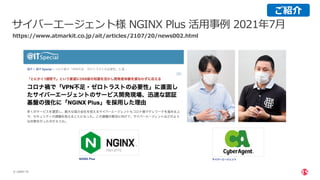
| ©2021 F5 6 サイバーエージェント様
NGINX Plus 活⽤事例 2021年7⽉ https://www.atmarkit.co.jp/ait/articles/2107/20/news002.html ご紹介
7.
| ©2021 F5 7 OʼREILLY
NGINXクックブック設定レシピ集(⽇本語版) https://www.nginx.co.jp/resources/ebooks/nginx-cookbook-jp/ ご紹介
8.
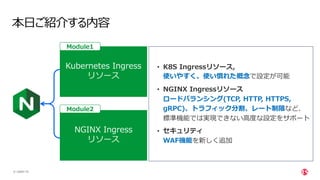
| ©2021 F5 8 本⽇ご紹介する内容 NGINX
Ingress リソース • K8S Ingressリソース, 使いやすく、使い慣れた概念で設定が可能 • NGINX Ingressリソース ロードバランシング(TCP, HTTP, HTTPS, gRPC)、トラフィック分割、レート制限など、 標準機能では実現できない⾼度な設定をサポート • セキュリティ WAF機能を新しく追加 Kubernetes Ingress リソース Module2 Module1
9.
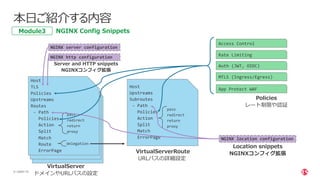
| ©2021 F5 9 Host TLS Upstreams Routes -
Path Action Split Match Route ErrorPage pass redirect return proxy delegation optional Host TLS Upstreams Routes - Path Action Split Match Route ErrorPage pass redirect return proxy delegation optional Host TLS Policies Upstreams Routes - Path Policies Action Split Match Route ErrorPage pass redirect return proxy delegation VirtualServer ドメインやURLパスの設定 pass redirect return proxy pass redirect return proxy Host Upstreams Subroutes - Path Policies Action Split Match ErrorPage pass redirect return proxy VirtualServerRoute URLパスの詳細設定 NGINX server configuration NGINX http configuration Server and HTTP snippets NGINXコンフィグ拡張 NGINX location configuration Location snippets NGINXコンフィグ拡張 Policies レート制限や認証 Access Control Rate Limiting Auth (JWT, OIDC) MTLS (Ingress/Egress) App Protect WAF 本⽇ご紹介する内容 NGINX Config Snippets Module3
10.
| ©2021 F5 10 NGINX
Ingress Controller CONFIDENTIAL
11.
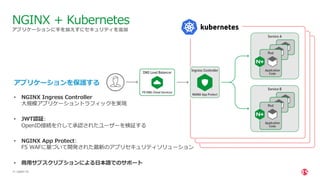
| ©2021 F5 11 アプリケーションに⼿を加えずにセキュリティを追加 NGINX
+ Kubernetes アプリケーションを保護する • NGINX Ingress Controller ⼤規模アプリケーショントラフィックを実現 • JWT認証: OpenID接続を介して承認されたユーザーを検証する • NGINX App Protect: F5 WAFに基づいて開発された最新のアプリセキュリティソリューション • 商⽤サブスクリプションによる⽇本語でのサポート
12.
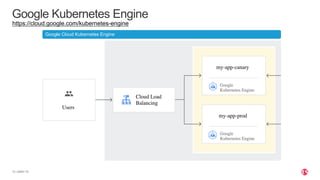
| ©2021 F5 12 Google
Kubernetes Engine Google Cloud Kubernetes Engine https://cloud.google.com/kubernetes-engine
13.
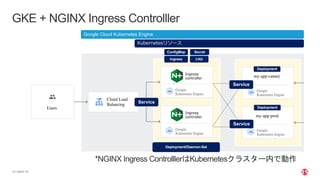
| ©2021 F5 13 GKE
+ NGINX Ingress Controlller Kubernetesリソース Google Cloud Kubernetes Engine Service ConfigMap Ingress Ingress controller Ingress controller CRD Deployment/Daemon-Set Service Service Deployment Deployment Secret *NGINX Ingress ControlllerはKubernetesクラスター内で動作
14.
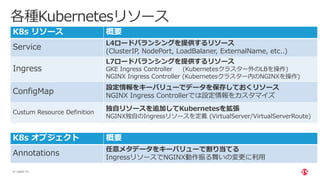
| ©2021 F5 14 各種Kubernetesリソース K8s
リソース 概要 Service L4ロードバランシングを提供するリソース (ClusterIP, NodePort, LoadBalaner, ExternalName, etc..) Ingress L7ロードバランシングを提供するリソース GKE Ingress Controller (Kubernetesクラスター外のLBを操作) NGINX Ingress Controller (Kubernetesクラスター内のNGINXを操作) ConfigMap 設定情報をキーバリューでデータを保存しておくリソース NGINX Ingress Controllerでは設定情報をカスタマイズ Custum Resource Definition 独⾃リソースを追加してKubernetesを拡張 NGINX独⾃のIngressリソースを定義 (VirtualServer/VirtualServerRoute) K8s オブジェクト 概要 Annotations 任意メタデータをキーバリューで割り当てる IngressリソースでNGINX動作振る舞いの変更に利⽤
15.
| ©2021 F5 15 NGINX
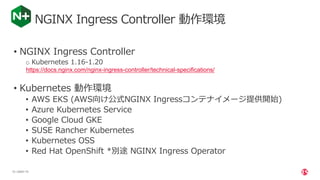
Ingress Controller 動作環境 • NGINX Ingress Controller o Kubernetes 1.16-1.20 https://docs.nginx.com/nginx-ingress-controller/technical-specifications/ • Kubernetes 動作環境 • AWS EKS (AWS向け公式NGINX Ingressコンテナイメージ提供開始) • Azure Kubernetes Service • Google Cloud GKE • SUSE Rancher Kubernetes • Kubernetes OSS • Red Hat OpenShift *別途 NGINX Ingress Operator
16.
| ©2021 F5 16 NGINX
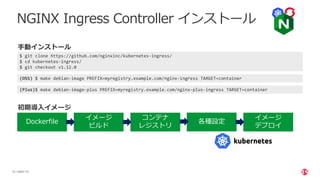
Ingress Controller インストール $ git clone https://github.com/nginxinc/kubernetes-ingress/ $ cd kubernetes-ingress/ $ git checkout v1.12.0 (Plus)$ make debian-image-plus PREFIX=myregistry.example.com/nginx-plus-ingress TARGET=container ⼿動インストール (OSS) $ make debian-image PREFIX=myregistry.example.com/nginx-ingress TARGET=container Dockerfile イメージ ビルド コンテナ レジストリ イメージ デプロイ 各種設定 初期導⼊イメージ
17.
| ©2021 F5 17 NGINX
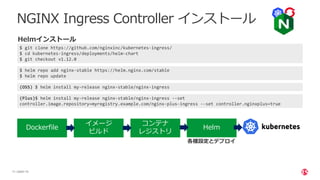
Ingress Controller インストール $ git clone https://github.com/nginxinc/kubernetes-ingress/ $ cd kubernetes-ingress/deployments/helm-chart $ git checkout v1.12.0 $ helm repo add nginx-stable https://helm.nginx.com/stable $ helm repo update (OSS) $ helm install my-release nginx-stable/nginx-ingress (Plus)$ helm install my-release nginx-stable/nginx-ingress --set controller.image.repository=myregistry.example.com/nginx-plus-ingress --set controller.nginxplus=true Helmインストール Dockerfile イメージ ビルド コンテナ レジストリ Helm 各種設定とデプロイ
18.
Module 1 Ingressリソース
19.
| ©2021 F5 19 •
Ingressの設定⽅法について −それぞれの設定パラメータと挙動について Module 1 Objectives CONFIDENTIAL
20.
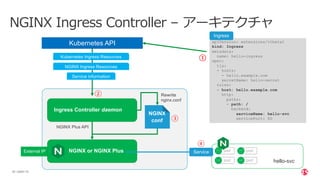
| ©2021 F5 20 NGINX
Ingress Controller – アーキテクチャ apiVersion: extensions/v1beta1 kind: Ingress metadata: name: hello-ingress spec: tls: - hosts: - hello.example.com secretName: hello-secret rules: - host: hello.example.com http: paths: - path: / backend: serviceName: hello-svc servicePort: 80 Ingress Controller daemon Kubernetes API NGINX conf Rewrite nginx.conf NGINX Plus API NGINX or NGINX Plus External IP Kubernetes Ingress Resources Service information hello-svc NGINX Ingress Resources pod pod pod pod ① ② ③ ④ Service Ingress
21.
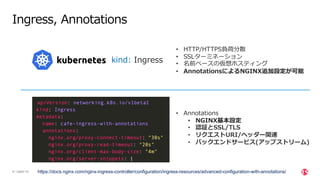
| ©2021 F5 21 Ingress,
Annotations https://docs.nginx.com/nginx-ingress-controller/configuration/ingress-resources/advanced-configuration-with-annotations/ kind: Ingress • HTTP/HTTPS負荷分散 • SSLターミネーション • 名前ベースの仮想ホスティング • AnnotationsによるNGINX追加設定が可能 • Annotations • NGINX基本設定 • 認証とSSL/TLS • リクエストURI/ヘッダー関連 • バックエンドサービス(アップストリーム)
22.
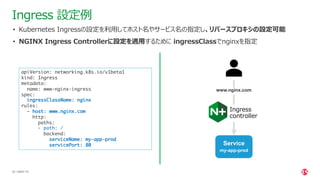
| ©2021 F5 22 apiVersion:
networking.k8s.io/v1beta1 kind: Ingress metadata: name: www-nginx-ingress spec: ingressClassName: nginx rules: - host: www.nginx.com http: paths: - path: / backend: serviceName: my-app-prod servicePort: 80 Ingress 設定例 • Kubernetes Ingressの設定を利⽤してホスト名やサービス名の指定し、リバースプロキシの設定可能 • NGINX Ingress Controllerに設定を適⽤するために ingressClassでnginxを指定 www.nginx.com Ingress controller Service my-app-prod
23.
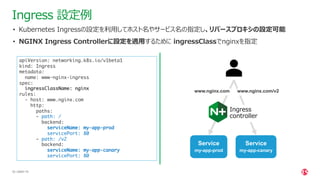
| ©2021 F5 23 apiVersion:
networking.k8s.io/v1beta1 kind: Ingress metadata: name: www-nginx-ingress spec: ingressClassName: nginx rules: - host: www.nginx.com http: paths: - path: / backend: serviceName: my-app-prod servicePort: 80 - path: /v2 backend: serviceName: my-app-canary servicePort: 80 Ingress 設定例 • Kubernetes Ingressの設定を利⽤してホスト名やサービス名の指定し、リバースプロキシの設定可能 • NGINX Ingress Controllerに設定を適⽤するために ingressClassでnginxを指定 www.nginx.com Ingress controller Service my-app-prod www.nginx.com/v2 Service my-app-canary
24.
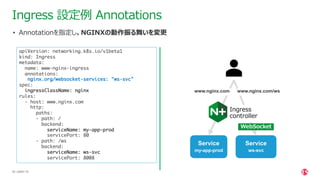
| ©2021 F5 24 Ingress
設定例 Annotations • Annotationを指定し、NGINXの動作振る舞いを変更 apiVersion: networking.k8s.io/v1beta1 kind: Ingress metadata: name: www-nginx-ingress annotations: nginx.org/websocket-services: "ws-svc" spec: ingressClassName: nginx rules: - host: www.nginx.com http: paths: - path: / backend: serviceName: my-app-prod servicePort: 80 - path: /ws backend: serviceName: ws-svc servicePort: 8008 www.nginx.com Ingress controller Service my-app-prod www.nginx.com/ws Service ws-svc WebSocket
25.
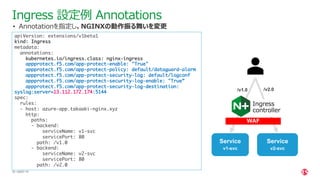
| ©2021 F5 25 apiVersion:
extensions/v1beta1 kind: Ingress metadata: annotations: kubernetes.io/ingress.class: nginx-ingress appprotect.f5.com/app-protect-enable: "True" appprotect.f5.com/app-protect-policy: default/dataguard-alarm appprotect.f5.com/app-protect-security-log: default/logconf appprotect.f5.com/app-protect-security-log-enable: "True” appprotect.f5.com/app-protect-security-log-destination: syslog:server=13.112.172.174:5144 spec: rules: - host: azure-app.takaaki-nginx.xyz http: paths: - backend: serviceName: v1-svc servicePort: 80 path: /v1.0 - backend: serviceName: v2-svc servicePort: 80 path: /v2.0 Ingress 設定例 Annotations • Annotationを指定し、NGINXの動作振る舞いを変更 /v1.0 Ingress controller Service v1-svc Service v2-svc WAF /v2.0
26.
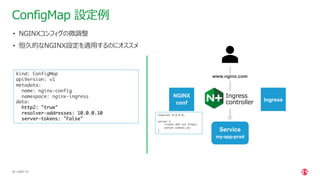
| ©2021 F5 26 kind:
ConfigMap apiVersion: v1 metadata: name: nginx-config namespace: nginx-ingress data: http2: "true" resolver-addresses: 10.0.0.10 server-tokens: "False" ConfigMap 設定例 • NGINXコンフィグの微調整 • 恒久的なNGINX設定を適⽤するのにオススメ NGINX conf www.nginx.com Ingress controller Service my-app-prod resolver 8.8.8.8; server { listen 443 ssl http2; server_tokens on; } Ingress
27.
| ©2021 F5 27 Demo CONFIDENTIAL
28.
| ©2021 F5 28 •
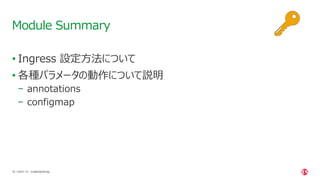
Ingress 設定⽅法について • 各種パラメータの動作について説明 − annotations − configmap Module Summary CONFIDENTIAL
29.
Module 2 VirtualServer VirtualServerRoute
30.
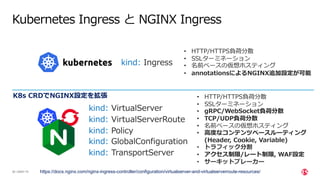
| ©2021 F5 30 Kubernetes
Ingress と NGINX Ingress https://docs.nginx.com/nginx-ingress-controller/configuration/virtualserver-and-virtualserverroute-resources/ kind: Ingress kind: VirtualServer kind: VirtualServerRoute kind: Policy • HTTP/HTTPS負荷分散 • SSLターミネーション • 名前ベースの仮想ホスティング • annotationsによるNGINX追加設定が可能 kind: TransportServer kind: GlobalConfiguration • HTTP/HTTPS負荷分散 • SSLターミネーション • gRPC/WebSocket負荷分散 • TCP/UDP負荷分散 • 名前ベースの仮想ホスティング • ⾼度なコンテンツベースルーティング (Header, Cookie, Variable) • トラフィック分割 • アクセス制限/レート制限, WAF設定 • サーキットブレーカー K8s CRDでNGINX設定を拡張
31.
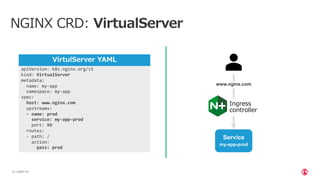
| ©2021 F5 31 NGINX
CRD: VirtualServer apiVersion: k8s.nginx.org/v1 kind: VirtualServer metadata: name: my-app namespace: my-app spec: host: www.nginx.com upstreams: - name: prod service: my-app-prod port: 80 routes: - path: / action: pass: prod VirtulServer YAML www.nginx.com Ingress controller Service my-app-prod
32.
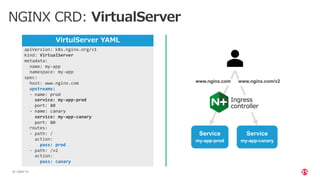
| ©2021 F5 32 NGINX
CRD: VirtualServer apiVersion: k8s.nginx.org/v1 kind: VirtualServer metadata: name: my-app namespace: my-app spec: host: www.nginx.com upstreams: - name: prod service: my-app-prod port: 80 - name: canary service: my-app-canary port: 80 routes: - path: / action: pass: prod - path: /v2 action: pass: canary VirtulServer YAML www.nginx.com Ingress controller Service my-app-prod www.nginx.com/v2 Service my-app-canary
33.
| ©2021 F5 33 NGINX
CRD: VirtualServer サーキットブレーカー apiVersion: k8s.nginx.org/v1 kind: VirtualServer metadata: name: app spec: host: www.nginx.com tls: secret: app-secret upstreams: - name: app service: app-svc port: 80 healthCheck: enable: true path: /status routes: - path: / errorPages: - codes: [502, 503] redirect: code: 301 url: https://nginx.org - codes: [404] return: code: 200 body: “アクセスしたページが⾒つかりません” action: pass: app VirtulServer YAML Ingress controller Service app Redirect: https://nginx.org Sorryページ www.nginx.com
34.
| ©2021 F5 34 Host TLS Upstreams Routes -
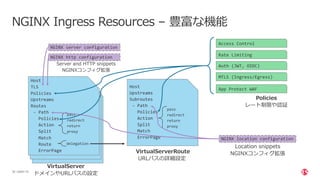
Path Action Split Match Route ErrorPage pass redirect return proxy delegation optional Host TLS Upstreams Routes - Path Action Split Match Route ErrorPage pass redirect return proxy delegation optional NGINX Ingress Resources – 豊富な機能 Host TLS Policies Upstreams Routes - Path Policies Action Split Match Route ErrorPage pass redirect return proxy delegation VirtualServer ドメインやURLパスの設定 pass redirect return proxy pass redirect return proxy Host Upstreams Subroutes - Path Policies Action Split Match ErrorPage pass redirect return proxy VirtualServerRoute URLパスの詳細設定 NGINX server configuration NGINX http configuration Server and HTTP snippets NGINXコンフィグ拡張 NGINX location configuration Location snippets NGINXコンフィグ拡張 Policies レート制限や認証 Access Control Rate Limiting Auth (JWT, OIDC) MTLS (Ingress/Egress) App Protect WAF
35.
| ©2021 F5 35 NGINX
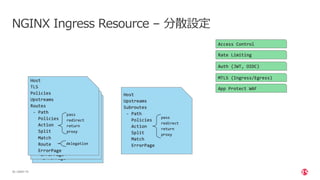
Ingress Resource – 分散設定
36.
| ©2021 F5 36 NGINX
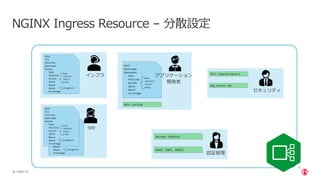
Ingress Resource – 分散設定 インフラ アプリケーション 開発者 SRE 認証管理 セキュリティ
37.
| ©2021 F5 37 NGINX
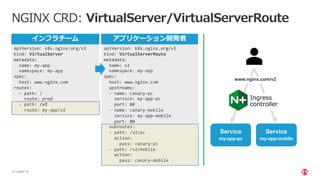
CRD: VirtualServer/VirtualServerRoute apiVersion: k8s.nginx.org/v1 kind: VirtualServer metadata: name: my-app namespace: my-app spec: host: www.nginx.com routes: - path: / route: prod - path: /v2 route: my-app/v2 apiVersion: k8s.nginx.org/v1 kind: VirtualServerRoute metadata: name: v2 namespace: my-app spec: host: www.nginx.com upstreams: - name: canary-pc service: my-app-pc port: 80 - name: canary-mobile service: my-app-mobile port: 80 subroutes: - path: /v2/pc action: pass: canary-pc - path: /v2/mobile action: pass: canary-mobile インフラチーム アプリケーション開発者 Ingress controller Service my-app-pc www.nginx.com/v2 Service my-app-mobile
38.
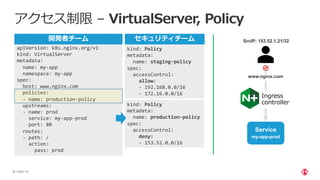
| ©2021 F5 38 アクセス制限
– VirtualServer, Policy apiVersion: k8s.nginx.org/v1 kind: VirtualServer metadata: name: my-app namespace: my-app spec: host: www.nginx.com policies: - name: production-policy upstreams: - name: prod service: my-app-prod port: 80 routes: - path: / action: pass: prod kind: Policy metadata: name: staging-policy spec: accessControl: allow: - 192.168.0.0/16 - 172.16.0.0/16 kind: Policy metadata: name: production-policy spec: accessControl: deny: - 153.52.0.0/16 www.nginx.com Ingress controller Service my-app-prod SrcIP: 153.52.1.21/32 セキュリティチーム 開発者チーム
39.
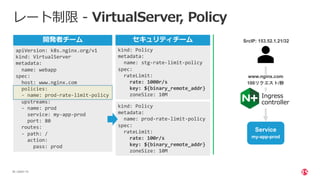
| ©2021 F5 39 レート制限
- VirtualServer, Policy apiVersion: k8s.nginx.org/v1 kind: VirtualServer metadata: name: webapp spec: host: www.nginx.com policies: - name: prod-rate-limit-policy upstreams: - name: prod service: my-app-prod port: 80 routes: - path: / action: pass: prod kind: Policy metadata: name: stg-rate-limit-policy spec: rateLimit: rate: 1000r/s key: ${binary_remote_addr} zoneSize: 10M kind: Policy metadata: name: prod-rate-limit-policy spec: rateLimit: rate: 100r/s key: ${binary_remote_addr} zoneSize: 10M www.nginx.com Ingress controller Service my-app-prod SrcIP: 153.52.1.21/32 100リクエスト/秒 セキュリティチーム 開発者チーム
40.
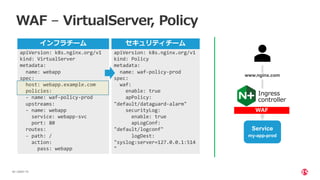
| ©2021 F5 40 WAF
– VirtualServer, Policy apiVersion: k8s.nginx.org/v1 kind: VirtualServer metadata: name: webapp spec: host: webapp.example.com policies: - name: waf-policy-prod upstreams: - name: webapp service: webapp-svc port: 80 routes: - path: / action: pass: webapp apiVersion: k8s.nginx.org/v1 kind: Policy metadata: name: waf-policy-prod spec: waf: enable: true apPolicy: "default/dataguard-alarm" securityLog: enable: true apLogConf: "default/logconf" logDest: "syslog:server=127.0.0.1:514 " www.nginx.com Ingress controller Service my-app-prod WAF セキュリティチーム インフラチーム
41.
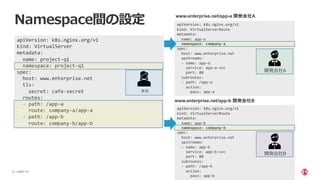
| ©2021 F5 41 Namespace間の設定 apiVersion:
k8s.nginx.org/v1 kind: VirtualServer metadata: name: project-q1 namespace: project-q1 spec: host: www.enterprise.net tls: secret: cafe-secret routes: - path: /app-a route: company-a/app-a - path: /app-b route: company-b/app-b 本社 apiVersion: k8s.nginx.org/v1 kind: VirtualServerRoute metadata: name: app-a namespace: company-a spec: host: www.enterprise.net upstreams: - name: app-a service: app-a-svc port: 80 subroutes: - path: /app-a action: pass: app-a apiVersion: k8s.nginx.org/v1 kind: VirtualServerRoute metadata: name: app-b namespace: company-b spec: host: www.enterprise.net upstreams: - name: app-b service: app-b-svc port: 80 subroutes: - path: /app-b action: pass: app-b 開発会社A 開発会社B www.enterprise.net/app-a 開発会社A www.enterprise.net/app-b 開発会社B
42.
| ©2021 F5 42 Demo CONFIDENTIAL
43.
| ©2021 F5 43 •
VirtualServer/VirtualServerRouteについて • Policyを活⽤してアクセス制限やレート制限 • Namespace間の設定可能 Module Summary CONFIDENTIAL
44.
Module 3 NGINX Config Snippets,
ログ確認⽅法
45.
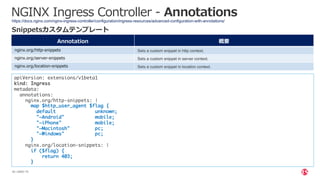
| ©2021 F5 45 NGINX
Ingress Controller - Annotations https://docs.nginx.com/nginx-ingress-controller/configuration/ingress-resources/advanced-configuration-with-annotations/ Annotation 概要 nginx.org/http-snippets Sets a custom snippet in http context. nginx.org/server-snippets Sets a custom snippet in server context. nginx.org/location-snippets Sets a custom snippet in location context. Snippetsカスタムテンプレート apiVersion: extensions/v1beta1 kind: Ingress metadata: annotations: nginx.org/http-snippets: | map $http_user_agent $flag { default unknown; "~Android" mobile; "~iPhone" mobile; "~Macintosh" pc; "~Windows" pc; } nginx.org/location-snippets: | if ($flag) { return 403; }
46.
| ©2021 F5 46 NGINX
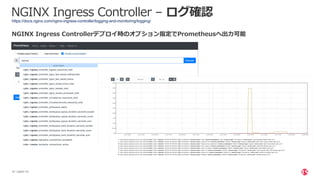
Ingress Controller – ログ確認 https://docs.nginx.com/nginx-ingress-controller/logging-and-monitoring/logging/ $ kubectl logs <nginx-ingress-pod> -n nginx-ingress アクセスログとエラーログを確認可能 135.125.217.54 - - [25/Jul/2021:17:08:26 +0000] "POST / HTTP/1.1" 404 556 "-" "Mozilla/5.0 (X11; Linux x86_64) AppleWebKit/537.36 (KHTML, like Gecko) Chrome/81.0.4044.129 Safari/537.36" "-" 135.125.217.54 - - [25/Jul/2021:17:08:27 +0000] "GET /.env HTTP/1.1" 404 556 "-" "Mozilla/5.0 (X11; Linux x86_64) AppleWebKit/537.36 (KHTML, like Gecko) Chrome/81.0.4044.129 Safari/537.36" "-” *ConfigMapでログフォーマットの変更可能 NGINX Plus ダッシュボード対応 (Ingress/VirtualServer)
47.
| ©2021 F5 47 NGINX
Ingress Controller – ログ確認 https://docs.nginx.com/nginx-ingress-controller/logging-and-monitoring/logging/ NGINX Ingress Controllerデプロイ時のオプション指定でPrometheusへ出⼒可能
48.
| ©2021 F5 48 Demo CONFIDENTIAL
49.
| ©2021 F5 49 •
NGINX Snippetsによるカスタマイズ • NGINX Ingress Controller ログ確認⽅法 • NGINX Plus ダッシュボード • Prometheus対応 Module Summary CONFIDENTIAL
50.
まとめ
51.
| ©2021 F5 51 以下のご紹介をいたしました。 •
NGINX Ingress Controller −Kubernetes Ingressリソース −NGINX Ingressリソース −NGINX Snippets −ログ確認⽅法 まとめ CONFIDENTIAL
52.
| ©2021 F5 52 その他参考情報 CONFIDENTIAL
53.
| ©2021 F5 53 NGINX
コンテンツ/ドキュメント https://nginx.co.jp/ 各種インストール・サンプル 設計などのガイド プロダクトデータシート 過去のWebinar 顧客事例 NGINX⽇本語サイト https://nginx.org/en/docs/ https://nginx.org/en/docs/dirindex.html NGINX OSS / Directive / Variable etc. CONFIDENTIAL
54.
| ©2021 F5 54 お問い合わせフォーム •
製品に関するお問い合わせ • 購⼊に関するお問い合わせ • 構成・設計に関するご相談 など https://www.nginx.co.jp/contact-sales/ お気軽にお問い合わせください CONFIDENTIAL
55.
| ©2021 F5 55 無料トライアル
(1ヶ⽉) https://www.nginx.co.jp/products/products-nginx/kubernetes-ingress-controller/
57.
| ©2021 F5 57 NGINX
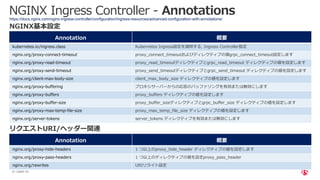
Ingress Controller - Annotations Annotation 概要 kubernetes.io/ingress.class Kubernetes Ingress設定を適⽤する, Ingress Controller指定 nginx.org/proxy-connect-timeout proxy_connect_timeoutおよびディレクティブの値grpc_connect_timeout設定します nginx.org/proxy-read-timeout proxy_read_timeoutディレクティブとgrpc_read_timeout ディレクティブの値を設定します nginx.org/proxy-send-timeout proxy_send_timeoutディレクティブとgrpc_send_timeout ディレクティブの値を設定します nginx.org/client-max-body-size client_max_body_size ディレクティブの値を設定します nginx.org/proxy-buffering プロキシサーバーからの応答のバッファリングを有効または無効にします nginx.org/proxy-buffers proxy_buffers ディレクティブの値を設定します nginx.org/proxy-buffer-size proxy_buffer_sizeディレクティブとgrpc_buffer_size ディレクティブの値を設定します nginx.org/proxy-max-temp-file-size proxy_max_temp_file_size ディレクティブの値を設定します nginx.org/server-tokens server_tokens ディレクティブを有効または無効にします https://docs.nginx.com/nginx-ingress-controller/configuration/ingress-resources/advanced-configuration-with-annotations/ NGINX基本設定 Annotation 概要 nginx.org/proxy-hide-headers 1 つ以上のproxy_hide_header ディレクティブの値を設定します nginx.org/proxy-pass-headers 1 つ以上のディレクティブの値を設定proxy_pass_header nginx.org/rewrites URIリライト設定 リクエストURI/ヘッダー関連
58.
| ©2021 F5 58 NGINX
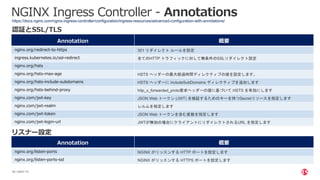
Ingress Controller - Annotations https://docs.nginx.com/nginx-ingress-controller/configuration/ingress-resources/advanced-configuration-with-annotations/ Annotation 概要 nginx.org/redirect-to-https 301 リダイレクト ルールを設定 ingress.kubernetes.io/ssl-redirect 全てのHTTP トラフィックに対して無条件のSSLリダイレクト設定 nginx.org/hsts nginx.org/hsts-max-age HSTS ヘッダーの最大経過時間ディレクティブの値を設定します。 nginx.org/hsts-include-subdomains HSTS ヘッダーに includeSubDomains ディレクティブを追加します nginx.org/hsts-behind-proxy http_x_forwarded_proto要求ヘッダーの値に基づいて HSTS を有効にします nginx.com/jwt-key JSON Web トークン (JWT) を検証するためのキーを持つSecretリソースを指定します nginx.com/jwt-realm レルムを指定します nginx.com/jwt-token JSON Web トークンを含む変数を指定します nginx.com/jwt-login-url JWTが無効の場合にクライアントにリダイレクトされるURL を指定します 認証とSSL/TLS Annotation 概要 nginx.org/listen-ports NGINX がリッスンする HTTP ポートを設定します nginx.org/listen-ports-ssl NGINX がリッスンする HTTPS ポートを設定します リスナー設定
59.
| ©2021 F5 59 NGINX
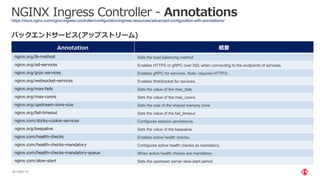
Ingress Controller - Annotations https://docs.nginx.com/nginx-ingress-controller/configuration/ingress-resources/advanced-configuration-with-annotations/ Annotation 概要 nginx.org/lb-method Sets the load balancing method nginx.org/ssl-services Enables HTTPS or gRPC over SSL when connecting to the endpoints of services. nginx.org/grpc-services Enables gRPC for services. Note: requires HTTP/2 nginx.org/websocket-services Enables WebSocket for services. nginx.org/max-fails Sets the value of the max_fails nginx.org/max-conns Sets the value of the max_conns nginx.org/upstream-zone-size Sets the size of the shared memory zone nginx.org/fail-timeout Sets the value of the fail_timeout nginx.com/sticky-cookie-services Configures session persistence. nginx.org/keepalive Sets the value of the keepalive nginx.com/health-checks Enables active health checks. nginx.com/health-checks-mandatory Configures active health checks as mandatory. nginx.com/health-checks-mandatory-queue When active health checks are mandatory nginx.com/slow-start Sets the upstream server slow-start period バックエンドサービス(アップストリーム)
Download





![| ©2021 F5
33
NGINX CRD: VirtualServer サーキットブレーカー
apiVersion: k8s.nginx.org/v1
kind: VirtualServer
metadata:
name: app
spec:
host: www.nginx.com
tls:
secret: app-secret
upstreams:
- name: app
service: app-svc
port: 80
healthCheck:
enable: true
path: /status
routes:
- path: /
errorPages:
- codes: [502, 503]
redirect:
code: 301
url: https://nginx.org
- codes: [404]
return:
code: 200
body: “アクセスしたページが⾒つかりません”
action:
pass: app
VirtulServer YAML
Ingress
controller
Service
app
Redirect:
https://nginx.org
Sorryページ
www.nginx.com](https://image.slidesharecdn.com/nginxcoreapcjwebinar-210730005357/85/NGINX-Back-to-Basics-Ingress-Controller-Japanese-Webinar-33-320.jpg)

![| ©2021 F5
46
NGINX Ingress Controller – ログ確認
https://docs.nginx.com/nginx-ingress-controller/logging-and-monitoring/logging/
$ kubectl logs <nginx-ingress-pod> -n nginx-ingress
アクセスログとエラーログを確認可能
135.125.217.54 - - [25/Jul/2021:17:08:26 +0000] "POST / HTTP/1.1" 404 556 "-" "Mozilla/5.0 (X11; Linux
x86_64) AppleWebKit/537.36 (KHTML, like Gecko) Chrome/81.0.4044.129 Safari/537.36" "-"
135.125.217.54 - - [25/Jul/2021:17:08:27 +0000] "GET /.env HTTP/1.1" 404 556 "-" "Mozilla/5.0 (X11; Linux
x86_64) AppleWebKit/537.36 (KHTML, like Gecko) Chrome/81.0.4044.129 Safari/537.36" "-”
*ConfigMapでログフォーマットの変更可能
NGINX Plus ダッシュボード対応 (Ingress/VirtualServer)](https://image.slidesharecdn.com/nginxcoreapcjwebinar-210730005357/85/NGINX-Back-to-Basics-Ingress-Controller-Japanese-Webinar-46-320.jpg)







![[CEDEC 2021] 運用中タイトルでも怖くない! 『メルクストーリア』におけるハイパフォーマンス・ローコストなリアルタイム通信技術の導入事例](https://cdn.slidesharecdn.com/ss_thumbnails/cedec2021-210825103749-thumbnail.jpg?width=640&height=640&fit=bounds)


