Next Step for Virtualization –  Pre Production Testing Dennis Powell StackSafe, Inc.
Agenda Virtualization, The Second Generation Pre-production testing and virtualization The impact of downtime Calming the Perfect Storm Challenges Summary
Virtualization The Second Generation
Virtualization  Red Hot Technology   Traditional drivers:  Consolidation cost savings Simplified QA testing Innovation drives the second generation Green computing Business continuity Service-oriented virtualization  Data center automation Pre-production infrastructure testing
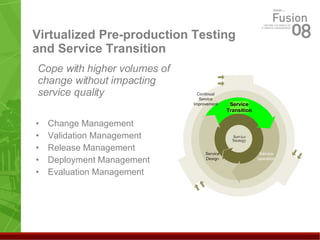
Virtualized Pre-production Testing and Service Transition Change Management Validation Management Release Management Deployment Management Evaluation Management Cope with higher volumes of change without impacting service quality Service Transition
Pre-Production Testing The Impact of Downtime
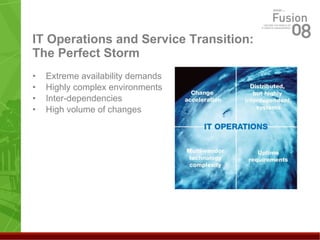
IT Operations and Service Transition: The Perfect Storm Extreme availability demands Highly complex environments Inter-dependencies High volume of changes
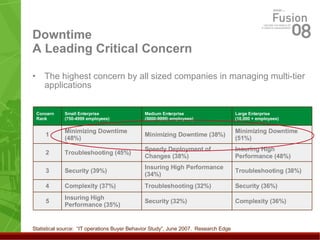
Downtime A Leading Critical Concern The highest concern by all sized companies in managing multi-tier applications Statistical source:  “IT operations Buyer Behavior Study”, June 2007.  Research Edge Security (32%) Troubleshooting (32%) Insuring High Performance (34%) Speedy Deployment of Changes (38%) Minimizing Downtime (38%) Medium Enterprise (5000-9999) employees) Complexity (36%) Security (36%) Troubleshooting (38%) Insuring High Performance (48%) Minimizing Downtime (51%) Large Enterprise (10,000 + employees) Small Enterprise (750-4999 employees) Insuring High Performance (35%) 5 Complexity (37%) 4 Security (39%) 3 Troubleshooting (45%) 2 Minimizing Downtime (48%) 1 Concern  Rank
Inadequate Testing A Leading Cause of Downtime Companies consider insufficient pre-production testing a key reason for downstream production problems Particularly considered a problem for companies: with high change volumes that consider e-commerce a top priority application (32%) that operate in the financial services sector (25%)
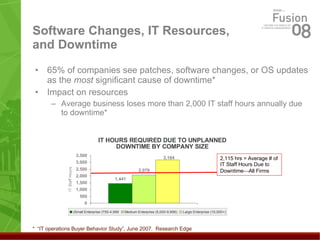
Software Changes, IT Resources, and Downtime 65% of companies see patches, software changes, or OS updates as the  most  significant cause of downtime* Impact on resources Average business loses more than 2,000 IT staff hours annually due to downtime* *  “IT operations Buyer Behavior Study”, June 2007.  Research Edge IT HOURS REQUIRED DUE TO UNPLANNED DOWNTIME BY COMPANY SIZE 2,115 hrs = Average # of IT Staff Hours Due to Downtime  All Firms
Pre-Production Testing and Virtualization Calming the Perfect Storm
Improving Testing Maturity During Service Transition Adopt best practices for smoother process Set customer expectations Regularly schedule changes Establish a consistent evaluation framework  Maintain a staging environment for IT operation testing Reduce predicted vs. actual performance variation Invest in automated change management Thoroughly test to reduce known errors and risk Test changes across the stack before deploying to production
Benefits of Improved Testing Maturity 30% less downtime incidents on an annual basis  Reduction of change impacts to production 22% lower problem rate  33% lower rollback rate 21% lower delay rate 17% reduction in IT hours spent per test  Smoother change/release management process Statistical source:  “IT operations Buyer Behavior Study”, June 2007.  Research Edge
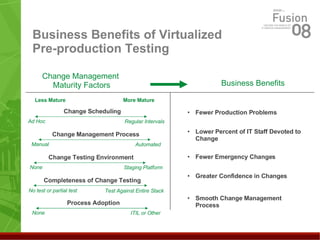
Virtualization Helps IT Maintain Consistent Change Schedules Rapid test platform build/update reduces change schedule dependency on the ‘right’ test platform  Regularly scheduled changes generate business benefits across all change management maturity factor categories: 6% fewer production problems caused by changes 5% reduction in IT staff devoted to change management  7% reduction in emergency changes   4% have greater confidence that changes will work properly 33% describe smoother change management process Eliminates ad-hoc reactivity, sets customer expectations
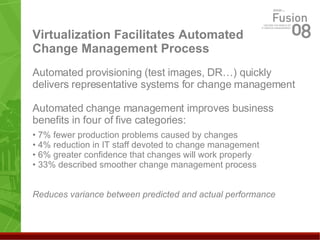
Virtualization Facilitates Automated Change Management Process Automated provisioning (test images, DR…) quickly delivers representative systems for change management Automated change management improves business benefits in four of five categories: 7% fewer production problems caused by changes 4% reduction in IT staff devoted to change management 6% greater confidence that changes will work properly 33% described smoother change management process Reduces variance between predicted and actual performance
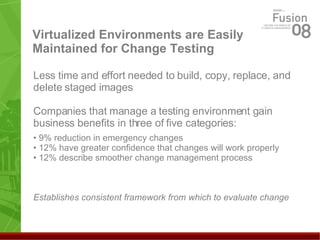
Virtualized Environments are Easily Maintained for Change Testing Less time and effort needed to build, copy, replace, and delete staged images Companies that manage a testing environment gain business benefits in three of five categories: 9% reduction in emergency changes   12% have greater confidence that changes will work properly 12% describe smoother change management process Establishes consistent framework from which to evaluate change
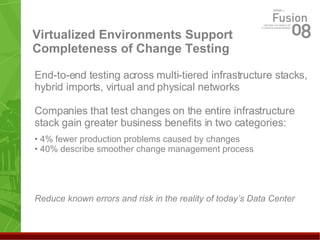
Virtualized Environments Support Completeness of Change Testing End-to-end testing across multi-tiered infrastructure stacks, hybrid imports, virtual and physical networks Companies that test changes on the entire infrastructure stack gain greater business benefits in two categories: 4% fewer production problems caused by changes 40% describe smoother change management process Reduce known errors and risk in the reality of today’s Data Center
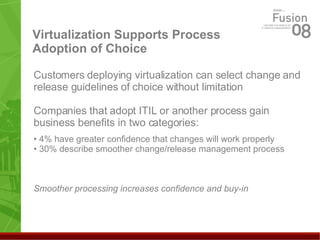
Virtualization Supports Process Adoption of Choice Customers deploying virtualization can select change and release guidelines of choice without limitation  Companies that adopt ITIL or another process gain business benefits in two categories: 4% have greater confidence that changes will work properly 30% describe smoother change/release management process Smoother processing increases confidence and buy-in
Business Benefits of Virtualized Pre-production Testing Less Mature More Mature Fewer Production Problems Lower Percent of IT Staff Devoted to Change Fewer Emergency Changes Greater Confidence in Changes Smooth Change Management Process Change Management  Maturity   Factors Business Benefits Change Testing Environment None Staging Platform Process Adoption None ITIL or Other Change Scheduling Ad Hoc Regular Intervals Change Management Process Manual Automated Completeness of Change Testing No test or partial test Test Against Entire Stack
Pre-Production Testing and Virtualization Challenges and Summary
Virtual Testing Limitations The virtual environment Avoid mixed hypervisor environments x86 OS support  Verify physical license restrictions Lack of fine-grained security control
Virtual Testing Limitations The virtual environment Network devices don’t import Each virtual processor “believes” that it has 100% of its physical processor resources Don’t oversubscribe physical processors ISO isn’t for shops with high disk utilization Verify free space before copying files
Virtual Testing Limitations Testing the enterprise Network administration needed to connect to non-virtualized components Imported test tools take up disk space Virtual production increases testing complexity
Summary IT operations’ perfect storm impacts change testing, leads to downtime Change maturity within Service Transition limits impacts/downtime Virtualization builds change maturity for IT operation pre-production testing Establishes formal staging and testing platform Quickly builds, updates staging and testing platform Minimizes dependency on ‘right’ test platform availability Helps test changes across E2E infrastructure stack Helps IT operations test much higher percentage of changes Nurtures the adoption of best practice guidelines
Follow up Questions:  Dennis Powell, Sr. Product Manager, StackSafe, Inc. [email_address] 301-992-2989 Thank you!

Next Step for Virtualization: Pre-production Testing

  • 1.
    Next Step forVirtualization – Pre Production Testing Dennis Powell StackSafe, Inc.
  • 2.
    Agenda Virtualization, TheSecond Generation Pre-production testing and virtualization The impact of downtime Calming the Perfect Storm Challenges Summary
  • 3.
  • 4.
    Virtualization RedHot Technology Traditional drivers: Consolidation cost savings Simplified QA testing Innovation drives the second generation Green computing Business continuity Service-oriented virtualization Data center automation Pre-production infrastructure testing
  • 5.
    Virtualized Pre-production Testingand Service Transition Change Management Validation Management Release Management Deployment Management Evaluation Management Cope with higher volumes of change without impacting service quality Service Transition
  • 6.
    Pre-Production Testing TheImpact of Downtime
  • 7.
    IT Operations andService Transition: The Perfect Storm Extreme availability demands Highly complex environments Inter-dependencies High volume of changes
  • 8.
    Downtime A LeadingCritical Concern The highest concern by all sized companies in managing multi-tier applications Statistical source: “IT operations Buyer Behavior Study”, June 2007. Research Edge Security (32%) Troubleshooting (32%) Insuring High Performance (34%) Speedy Deployment of Changes (38%) Minimizing Downtime (38%) Medium Enterprise (5000-9999) employees) Complexity (36%) Security (36%) Troubleshooting (38%) Insuring High Performance (48%) Minimizing Downtime (51%) Large Enterprise (10,000 + employees) Small Enterprise (750-4999 employees) Insuring High Performance (35%) 5 Complexity (37%) 4 Security (39%) 3 Troubleshooting (45%) 2 Minimizing Downtime (48%) 1 Concern Rank
  • 9.
    Inadequate Testing ALeading Cause of Downtime Companies consider insufficient pre-production testing a key reason for downstream production problems Particularly considered a problem for companies: with high change volumes that consider e-commerce a top priority application (32%) that operate in the financial services sector (25%)
  • 10.
    Software Changes, ITResources, and Downtime 65% of companies see patches, software changes, or OS updates as the most significant cause of downtime* Impact on resources Average business loses more than 2,000 IT staff hours annually due to downtime* * “IT operations Buyer Behavior Study”, June 2007. Research Edge IT HOURS REQUIRED DUE TO UNPLANNED DOWNTIME BY COMPANY SIZE 2,115 hrs = Average # of IT Staff Hours Due to Downtime  All Firms
  • 11.
    Pre-Production Testing andVirtualization Calming the Perfect Storm
  • 12.
    Improving Testing MaturityDuring Service Transition Adopt best practices for smoother process Set customer expectations Regularly schedule changes Establish a consistent evaluation framework Maintain a staging environment for IT operation testing Reduce predicted vs. actual performance variation Invest in automated change management Thoroughly test to reduce known errors and risk Test changes across the stack before deploying to production
  • 13.
    Benefits of ImprovedTesting Maturity 30% less downtime incidents on an annual basis Reduction of change impacts to production 22% lower problem rate 33% lower rollback rate 21% lower delay rate 17% reduction in IT hours spent per test Smoother change/release management process Statistical source: “IT operations Buyer Behavior Study”, June 2007. Research Edge
  • 14.
    Virtualization Helps ITMaintain Consistent Change Schedules Rapid test platform build/update reduces change schedule dependency on the ‘right’ test platform Regularly scheduled changes generate business benefits across all change management maturity factor categories: 6% fewer production problems caused by changes 5% reduction in IT staff devoted to change management 7% reduction in emergency changes 4% have greater confidence that changes will work properly 33% describe smoother change management process Eliminates ad-hoc reactivity, sets customer expectations
  • 15.
    Virtualization Facilitates AutomatedChange Management Process Automated provisioning (test images, DR…) quickly delivers representative systems for change management Automated change management improves business benefits in four of five categories: 7% fewer production problems caused by changes 4% reduction in IT staff devoted to change management 6% greater confidence that changes will work properly 33% described smoother change management process Reduces variance between predicted and actual performance
  • 16.
    Virtualized Environments areEasily Maintained for Change Testing Less time and effort needed to build, copy, replace, and delete staged images Companies that manage a testing environment gain business benefits in three of five categories: 9% reduction in emergency changes 12% have greater confidence that changes will work properly 12% describe smoother change management process Establishes consistent framework from which to evaluate change
  • 17.
    Virtualized Environments SupportCompleteness of Change Testing End-to-end testing across multi-tiered infrastructure stacks, hybrid imports, virtual and physical networks Companies that test changes on the entire infrastructure stack gain greater business benefits in two categories: 4% fewer production problems caused by changes 40% describe smoother change management process Reduce known errors and risk in the reality of today’s Data Center
  • 18.
    Virtualization Supports ProcessAdoption of Choice Customers deploying virtualization can select change and release guidelines of choice without limitation Companies that adopt ITIL or another process gain business benefits in two categories: 4% have greater confidence that changes will work properly 30% describe smoother change/release management process Smoother processing increases confidence and buy-in
  • 19.
    Business Benefits ofVirtualized Pre-production Testing Less Mature More Mature Fewer Production Problems Lower Percent of IT Staff Devoted to Change Fewer Emergency Changes Greater Confidence in Changes Smooth Change Management Process Change Management Maturity Factors Business Benefits Change Testing Environment None Staging Platform Process Adoption None ITIL or Other Change Scheduling Ad Hoc Regular Intervals Change Management Process Manual Automated Completeness of Change Testing No test or partial test Test Against Entire Stack
  • 20.
    Pre-Production Testing andVirtualization Challenges and Summary
  • 21.
    Virtual Testing LimitationsThe virtual environment Avoid mixed hypervisor environments x86 OS support Verify physical license restrictions Lack of fine-grained security control
  • 22.
    Virtual Testing LimitationsThe virtual environment Network devices don’t import Each virtual processor “believes” that it has 100% of its physical processor resources Don’t oversubscribe physical processors ISO isn’t for shops with high disk utilization Verify free space before copying files
  • 23.
    Virtual Testing LimitationsTesting the enterprise Network administration needed to connect to non-virtualized components Imported test tools take up disk space Virtual production increases testing complexity
  • 24.
    Summary IT operations’perfect storm impacts change testing, leads to downtime Change maturity within Service Transition limits impacts/downtime Virtualization builds change maturity for IT operation pre-production testing Establishes formal staging and testing platform Quickly builds, updates staging and testing platform Minimizes dependency on ‘right’ test platform availability Helps test changes across E2E infrastructure stack Helps IT operations test much higher percentage of changes Nurtures the adoption of best practice guidelines
  • 25.
    Follow up Questions: Dennis Powell, Sr. Product Manager, StackSafe, Inc. [email_address] 301-992-2989 Thank you!

Editor's Notes

  • #2 Good afternoon everyone, welcome to session 309 My name is dennis powell, sr pm with stacksafe My presentation is entitled “Next Step for Virtualization – Pre Production Testing”