Network Topology :
Everything You Need to
Know
Mr. Rudresh R. Fendar
Agenda
Introduction
Types of topologies
Conclusion
Q & A
Final tips.
Network Topology
Network topology is the physical and
logical arrangement of the devices,
connections, and data circuits in a
network. The arrangement of
various elements (links, nodes) in a
computer network.
Types of topologies
• Bus : A network topology where all devices are connected to a single
communication line.
• Star : A network topology with a central hub that connects all nodes
directly.
• Ring : A topology where each node connects to two others, forming a
circular data path.
• Mesh :A topology where every node connects directly to every other
node.
• Tree : A hierarchical topology with a root node and branching levels of
nodes.
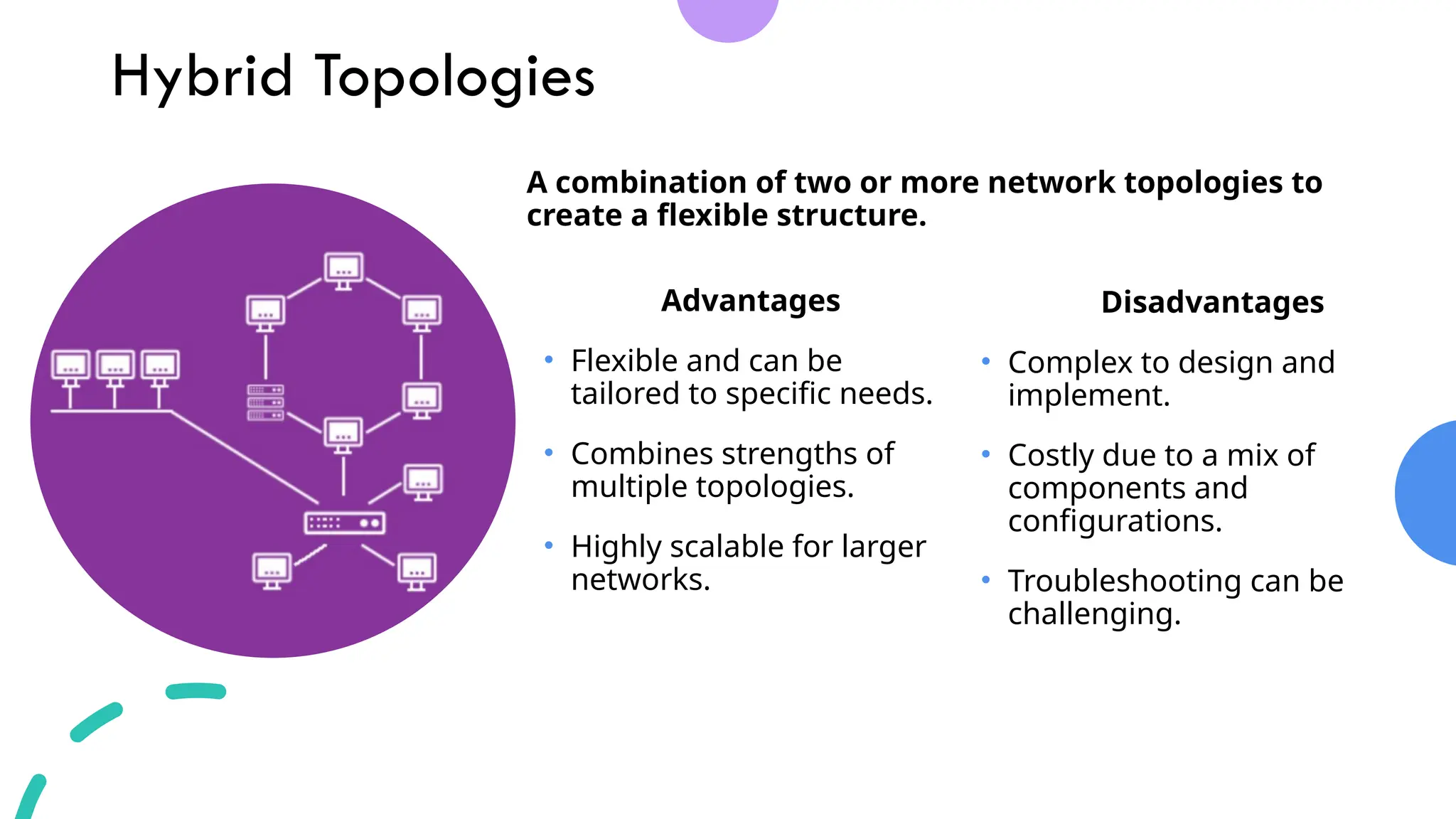
• Hybrid : A combination of two or more network topologies to create a
flexible structure.
Bus Topologies
Advantages
• Easy and inexpensive to
install.
• Works well for small
networks.
• Requires less cabling
compared to other
topologies.
Disadvantages
• Difficult to troubleshoot
issues.
• Performance degrades with
more devices.
• A failure in the main cable can
bring the entire network
down.
A network topology where all devices are connected to
a single communication line.
Star Topologies
A network topology with a central hub that connects all
nodes directly.
Advantages
• Easy to set up and manage.
• Centralized management
makes troubleshooting
easier.
• Failure of one node doesn’t
affect the rest of the network.
Disadvantages
• Failure of the central hub
disrupts the entire network.
• Requires more cabling,
increasing costs.
• Limited by the capacity of the
central hub.
Ring Topologies
Advantages
• Data flows in a single
direction, reducing collisions.
• Performance is consistent,
even with many nodes.
• Easy to install and configure
for smaller networks.
Disadvantages
• A failure in any single node
can disrupt the entire
network.
• Adding or removing nodes is
difficult.
• Troubleshooting can be
complex.
A topology where each node connects to two others,
forming a circular data path.
Mesh Topologies
Advantages
• Highly reliable with multiple
redundant connections.
• Offers high fault tolerance.
• Data can be transmitted
simultaneously between
multiple devices.
Disadvantages
• Expensive due to extensive
cabling.
• Complex to set up and
maintain.
• Requires more space for
cabling and connections.
A topology where every node connects directly to every
other node.
Tree Topologies
Advantages
• Hierarchical structure supports
scalable expansion.
• Easy to manage and
troubleshoot at individual levels.
• Combines benefits of star and
bus topologies.
Disadvantages
• If the root node fails, the entire
network may be affected.
• Requires significant cabling
and configuration.
• Difficult to maintain as the
network grows.
A hierarchical topology with a root node and branching
levels of nodes.
Hybrid Topologies
Advantages
• Flexible and can be
tailored to specific needs.
• Combines strengths of
multiple topologies.
• Highly scalable for larger
networks.
Disadvantages
• Complex to design and
implement.
• Costly due to a mix of
components and
configurations.
• Troubleshooting can be
challenging.
A combination of two or more network topologies to
create a flexible structure.
Conclusion
Network topology plays a vital role in the
design and efficiency of communication
systems. Choosing the right topology depends
on factors like scalability, cost, fault tolerance,
and network performance.
Understanding the strengths and limitations
of each topology—Bus, Star, Ring, Mesh, Tree,
and Hybrid—enables businesses and
individuals to build networks that meet their
specific needs, ensuring seamless connectivity
and robust performance in today’s
interconnected world.
Q&A
•Any Questions ?
Thank you

Network topologies Network topoologies

  • 1.
    Network Topology : EverythingYou Need to Know Mr. Rudresh R. Fendar
  • 2.
  • 3.
    Network Topology Network topologyis the physical and logical arrangement of the devices, connections, and data circuits in a network. The arrangement of various elements (links, nodes) in a computer network.
  • 4.
    Types of topologies •Bus : A network topology where all devices are connected to a single communication line. • Star : A network topology with a central hub that connects all nodes directly. • Ring : A topology where each node connects to two others, forming a circular data path. • Mesh :A topology where every node connects directly to every other node. • Tree : A hierarchical topology with a root node and branching levels of nodes. • Hybrid : A combination of two or more network topologies to create a flexible structure.
  • 5.
    Bus Topologies Advantages • Easyand inexpensive to install. • Works well for small networks. • Requires less cabling compared to other topologies. Disadvantages • Difficult to troubleshoot issues. • Performance degrades with more devices. • A failure in the main cable can bring the entire network down. A network topology where all devices are connected to a single communication line.
  • 6.
    Star Topologies A networktopology with a central hub that connects all nodes directly. Advantages • Easy to set up and manage. • Centralized management makes troubleshooting easier. • Failure of one node doesn’t affect the rest of the network. Disadvantages • Failure of the central hub disrupts the entire network. • Requires more cabling, increasing costs. • Limited by the capacity of the central hub.
  • 7.
    Ring Topologies Advantages • Dataflows in a single direction, reducing collisions. • Performance is consistent, even with many nodes. • Easy to install and configure for smaller networks. Disadvantages • A failure in any single node can disrupt the entire network. • Adding or removing nodes is difficult. • Troubleshooting can be complex. A topology where each node connects to two others, forming a circular data path.
  • 8.
    Mesh Topologies Advantages • Highlyreliable with multiple redundant connections. • Offers high fault tolerance. • Data can be transmitted simultaneously between multiple devices. Disadvantages • Expensive due to extensive cabling. • Complex to set up and maintain. • Requires more space for cabling and connections. A topology where every node connects directly to every other node.
  • 9.
    Tree Topologies Advantages • Hierarchicalstructure supports scalable expansion. • Easy to manage and troubleshoot at individual levels. • Combines benefits of star and bus topologies. Disadvantages • If the root node fails, the entire network may be affected. • Requires significant cabling and configuration. • Difficult to maintain as the network grows. A hierarchical topology with a root node and branching levels of nodes.
  • 10.
    Hybrid Topologies Advantages • Flexibleand can be tailored to specific needs. • Combines strengths of multiple topologies. • Highly scalable for larger networks. Disadvantages • Complex to design and implement. • Costly due to a mix of components and configurations. • Troubleshooting can be challenging. A combination of two or more network topologies to create a flexible structure.
  • 11.
    Conclusion Network topology playsa vital role in the design and efficiency of communication systems. Choosing the right topology depends on factors like scalability, cost, fault tolerance, and network performance. Understanding the strengths and limitations of each topology—Bus, Star, Ring, Mesh, Tree, and Hybrid—enables businesses and individuals to build networks that meet their specific needs, ensuring seamless connectivity and robust performance in today’s interconnected world.
  • 12.
  • 13.