Futuer programming
Network Topologies
Objectives
●
Describe the basic and hybrid LAN physical topologies,
and their uses, advantages and disadvantages
●
Describe the backbone structures that form the
foundation for most LANs
Simple Physical Topologies
●
Physical topology: physical layout of nodes on a
network
●
Three fundamental shapes:
– Bus
– Ring
– Star
●
May create hybrid topologies
●
Topology integral to type of network, cabling
infrastructure, and transmission media used
Bus
●
Single cable connects all network nodes without
intervening connectivity devices
●
Devices share responsibility for getting data from one
point to another
●
Terminators stop signals after reaching end of wire
– Prevent signal bounce
●
Inexpensive, not very scalable
●
Difficult to troubleshoot, not fault-tolerant
Bus (continued)
Advantages of Bus Topology
●
Works well for small networks
●
Relatively inexpensive to implement
●
Easy to add to it
Disadvantages of
Bus Topology
●
Management costs can be high
●
Potential for congestion with network traffic
Ring
Simple Physical Topologies
●
Physical topology
– Physical layout of a network
●
A Bus topology consists of a single cable—called
a bus— connecting all nodes on a network without
intervening connectivity devices
Advantages of Bus Topology
●
Works well for small networks
●
Relatively inexpensive to implement
●
Easy to add to it
Disadvantages of
Bus Topology
●
Management costs can be high
●
Potential for congestion with network traffic
Simple Physical Topologies
●
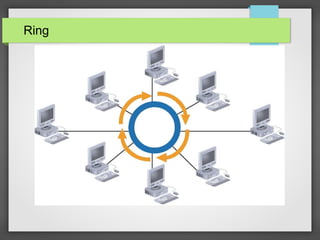
Ring topology
– Each node is connected to the two nearest nodes so the entire
network forms a circle
– One method for passing data on ring networks is token passing
●
Active topology
– Each workstation transmits data
Advantages of Ring Topology
●
Easier to manage; easier to locate a defective node or
cable problem
●
Well-suited for transmitting signals over long distances
on a LAN
●
Handles high-volume network traffic
●
Enables reliable communication
Disadvantages of
Ring Topology
●
Expensive
●
Requires more cable and network equipment at the start
●
Not used as widely as bus topology
– Fewer equipment options
– Fewer options for expansion to high-speed
communication
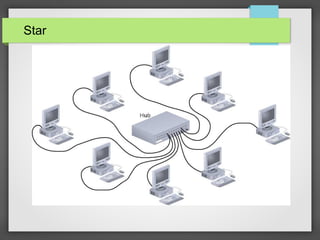
Star
Simple Physical Topologies
●
Star topology
– Every node on the network is connected through
a central device
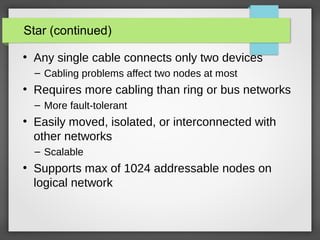
Star (continued)
●
Any single cable connects only two devices
– Cabling problems affect two nodes at most
●
Requires more cabling than ring or bus networks
– More fault-tolerant
●
Easily moved, isolated, or interconnected with
other networks
– Scalable
●
Supports max of 1024 addressable nodes on
logical network
Advantages of Star Topology
●
Good option for modern networks
●
Low startup costs
●
Easy to manage
●
Offers opportunities for expansion
●
Most popular topology in use; wide variety of equipment
available
Disadvantages of
Star Topology
●
Hub is a single point of failure
●
Requires more cable than the bus
Hybrid Physical Topologies:
Star-Wired Ring
Star-Wired Bus
Backbone Networks: Serial Backbone
●
Daisy chain: linked series of devices
– Hubs and switches often connected in daisy chain to
extend a network
●
Hubs, gateways, routers, switches, and bridges can form
part of backbone
●
Extent to which hubs can be connected is limited
Backbone Networks: Serial Backbone (continued)
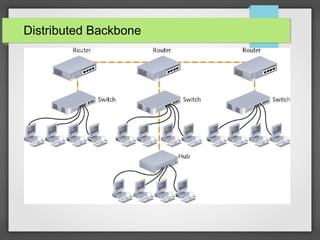
Distributed Backbone
Collapsed Backbone
Parallel Backbone
Logical Topologies
●
Logical topology: how data is transmitted
between nodes
– May not match physical topology
●
Bus logical topology: signals travel from one
network device to all other devices on network
– Required by bus, star, star-wired physical topologies
●
Ring logical topology: signals follow circular
path between sender and receiver
– Required by ring, star-wired ring topologies
Logical Topologies
●
Logical topology: how data is transmitted
between nodes
– May not match physical topology
●
Bus logical topology: signals travel from one
network device to all other devices on network
– Required by bus, star, star-wired physical topologies
●
Ring logical topology: signals follow circular
path between sender and receiver
– Required by ring, star-wired ring topologies
Thank You

Network Topologies

  • 1.
  • 2.
  • 3.
    Objectives ● Describe the basicand hybrid LAN physical topologies, and their uses, advantages and disadvantages ● Describe the backbone structures that form the foundation for most LANs
  • 4.
    Simple Physical Topologies ● Physicaltopology: physical layout of nodes on a network ● Three fundamental shapes: – Bus – Ring – Star ● May create hybrid topologies ● Topology integral to type of network, cabling infrastructure, and transmission media used
  • 5.
    Bus ● Single cable connectsall network nodes without intervening connectivity devices ● Devices share responsibility for getting data from one point to another ● Terminators stop signals after reaching end of wire – Prevent signal bounce ● Inexpensive, not very scalable ● Difficult to troubleshoot, not fault-tolerant
  • 6.
  • 7.
    Advantages of BusTopology ● Works well for small networks ● Relatively inexpensive to implement ● Easy to add to it
  • 8.
    Disadvantages of Bus Topology ● Managementcosts can be high ● Potential for congestion with network traffic
  • 9.
  • 10.
    Simple Physical Topologies ● Physicaltopology – Physical layout of a network ● A Bus topology consists of a single cable—called a bus— connecting all nodes on a network without intervening connectivity devices
  • 11.
    Advantages of BusTopology ● Works well for small networks ● Relatively inexpensive to implement ● Easy to add to it
  • 12.
    Disadvantages of Bus Topology ● Managementcosts can be high ● Potential for congestion with network traffic
  • 13.
    Simple Physical Topologies ● Ringtopology – Each node is connected to the two nearest nodes so the entire network forms a circle – One method for passing data on ring networks is token passing ● Active topology – Each workstation transmits data
  • 14.
    Advantages of RingTopology ● Easier to manage; easier to locate a defective node or cable problem ● Well-suited for transmitting signals over long distances on a LAN ● Handles high-volume network traffic ● Enables reliable communication
  • 15.
    Disadvantages of Ring Topology ● Expensive ● Requiresmore cable and network equipment at the start ● Not used as widely as bus topology – Fewer equipment options – Fewer options for expansion to high-speed communication
  • 16.
  • 17.
    Simple Physical Topologies ● Startopology – Every node on the network is connected through a central device
  • 18.
    Star (continued) ● Any singlecable connects only two devices – Cabling problems affect two nodes at most ● Requires more cabling than ring or bus networks – More fault-tolerant ● Easily moved, isolated, or interconnected with other networks – Scalable ● Supports max of 1024 addressable nodes on logical network
  • 19.
    Advantages of StarTopology ● Good option for modern networks ● Low startup costs ● Easy to manage ● Offers opportunities for expansion ● Most popular topology in use; wide variety of equipment available
  • 20.
    Disadvantages of Star Topology ● Hubis a single point of failure ● Requires more cable than the bus
  • 21.
  • 22.
  • 23.
    Backbone Networks: SerialBackbone ● Daisy chain: linked series of devices – Hubs and switches often connected in daisy chain to extend a network ● Hubs, gateways, routers, switches, and bridges can form part of backbone ● Extent to which hubs can be connected is limited
  • 24.
    Backbone Networks: SerialBackbone (continued)
  • 25.
  • 26.
  • 27.
  • 28.
    Logical Topologies ● Logical topology:how data is transmitted between nodes – May not match physical topology ● Bus logical topology: signals travel from one network device to all other devices on network – Required by bus, star, star-wired physical topologies ● Ring logical topology: signals follow circular path between sender and receiver – Required by ring, star-wired ring topologies
  • 29.
    Logical Topologies ● Logical topology:how data is transmitted between nodes – May not match physical topology ● Bus logical topology: signals travel from one network device to all other devices on network – Required by bus, star, star-wired physical topologies ● Ring logical topology: signals follow circular path between sender and receiver – Required by ring, star-wired ring topologies
  • 30.