1
Network Topology
2
Introduction
Physical and Logical Topologies
Topologies
Bus
Ring
Star
Extended Star
Mesh
Hybrid
3
Physical vs. Logical Topology
The actual layout of a network and its media
is its Physical Topology
The way in which the data access the medium
and transmits packets is the Logical
Topology
A glance at a network is not always revealing.
Cables emerging from a Hub does not make it
necessarily a Star Topology – it may actually
be a bus or a ring
4
Bus Topology
5
Bus Topology (5)
Advantages
Inexpensive to install
Easy to add stations
Use less cable than
other topologies
Works well for small
networks
Disadvantages
 No longer recommended
 Backbone breaks, whole
network down
 Limited no of devices can
be attached
 Difficult to isolate problems
 Sharing same cable slows
response rates
6
Ring Topology
7
Ring Topology (3)
Advantages
Data packets travel
at great speed
No collisions
Easier to fault find
No terminators
required
Disadvantages
Requires more cable
than a bus
A break in the ring
will bring it down
Not as common as
the bus – less
devices available
8
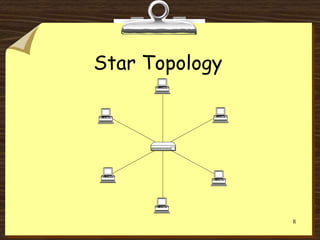
Star Topology
9
Star Topology (3)
 Advantages
 Easy to add devices as the
network expands
 One cable failure does not
bring down the entire
network (resilience)
 Hub provides centralised
management
 Easy to find device and cable
problems
 Can be upgraded to faster
speeds
 Lots of support as it is the
most used
 Disadvantages
 A star network requires more
cable than a ring or bus
network
 Failure of the central hub can
bring down the entire
network
 Costs are higher (installation
and equipment) than for most
bus networks
10
Extended Star Topology
A Star
Network
which has
been
expanded to
include an
additional
hub or hubs.
11
Mesh Topology (Web)
12
Mesh Topology (2)
Not common on LANs
Most often used in WANs to interconnect
LANS
Each node is connected to every other node
Allows communication to continue in the
event of a break in any one connection
It is “Fault Tolerant”
CP2073 Networking 13
Mesh Topology (3)
Advantages
Improves Fault
Tolerance
Disadvantages
Expensive
Difficult to install
Difficult to
manage
Difficult to
troubleshoot
14
Hybrid Topology
15
Logical Bus
•Modern Ethernet networks are Star Topologies (physically)
•The Hub is at the centre, and defines a Star Topology
•The Hub itself uses a Logical Bus Topology internally, to
transmit data to all segments
16
Logical Bus
Advantages
A single node failure
does not bring the
network down
Most widely
implemented topology
Network can be added
to or changed without
affecting other
stations
Disadvantages
Collisions can occur
easily
Only one device can
access the network
media at a time
17
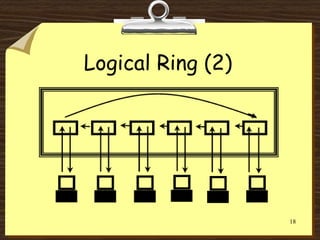
Logical Ring
Data in a Star Topology can transmit data
in a Ring
The MAU (Multistation Access Unit) looks
like an ordinary Hub, but data is passed
internally using a logical ring
It is superior to a Logical Bus Hub – see
later slide
18
Logical Ring (2)
19
Logical Ring (3)
Advantages
The amount of data
that can be carried
in a single message
is greater than on a
logical bus
There are no
collisions
Disadvantages
A broken ring will
stop all
transmissions
A device must wait
for an empty token
to be able to
transmit
20
Summary
Bus Topology
Ring Topology
Star Topology
Other Topologies
Logical Topologies
Questions and Answers

123gfg.ppt

  • 1.
  • 2.
    2 Introduction Physical and LogicalTopologies Topologies Bus Ring Star Extended Star Mesh Hybrid
  • 3.
    3 Physical vs. LogicalTopology The actual layout of a network and its media is its Physical Topology The way in which the data access the medium and transmits packets is the Logical Topology A glance at a network is not always revealing. Cables emerging from a Hub does not make it necessarily a Star Topology – it may actually be a bus or a ring
  • 4.
  • 5.
    5 Bus Topology (5) Advantages Inexpensiveto install Easy to add stations Use less cable than other topologies Works well for small networks Disadvantages  No longer recommended  Backbone breaks, whole network down  Limited no of devices can be attached  Difficult to isolate problems  Sharing same cable slows response rates
  • 6.
  • 7.
    7 Ring Topology (3) Advantages Datapackets travel at great speed No collisions Easier to fault find No terminators required Disadvantages Requires more cable than a bus A break in the ring will bring it down Not as common as the bus – less devices available
  • 8.
  • 9.
    9 Star Topology (3) Advantages  Easy to add devices as the network expands  One cable failure does not bring down the entire network (resilience)  Hub provides centralised management  Easy to find device and cable problems  Can be upgraded to faster speeds  Lots of support as it is the most used  Disadvantages  A star network requires more cable than a ring or bus network  Failure of the central hub can bring down the entire network  Costs are higher (installation and equipment) than for most bus networks
  • 10.
    10 Extended Star Topology AStar Network which has been expanded to include an additional hub or hubs.
  • 11.
  • 12.
    12 Mesh Topology (2) Notcommon on LANs Most often used in WANs to interconnect LANS Each node is connected to every other node Allows communication to continue in the event of a break in any one connection It is “Fault Tolerant”
  • 13.
    CP2073 Networking 13 MeshTopology (3) Advantages Improves Fault Tolerance Disadvantages Expensive Difficult to install Difficult to manage Difficult to troubleshoot
  • 14.
  • 15.
    15 Logical Bus •Modern Ethernetnetworks are Star Topologies (physically) •The Hub is at the centre, and defines a Star Topology •The Hub itself uses a Logical Bus Topology internally, to transmit data to all segments
  • 16.
    16 Logical Bus Advantages A singlenode failure does not bring the network down Most widely implemented topology Network can be added to or changed without affecting other stations Disadvantages Collisions can occur easily Only one device can access the network media at a time
  • 17.
    17 Logical Ring Data ina Star Topology can transmit data in a Ring The MAU (Multistation Access Unit) looks like an ordinary Hub, but data is passed internally using a logical ring It is superior to a Logical Bus Hub – see later slide
  • 18.
  • 19.
    19 Logical Ring (3) Advantages Theamount of data that can be carried in a single message is greater than on a logical bus There are no collisions Disadvantages A broken ring will stop all transmissions A device must wait for an empty token to be able to transmit
  • 20.
    20 Summary Bus Topology Ring Topology StarTopology Other Topologies Logical Topologies Questions and Answers