Network Field TripWestbrook High SchoolSteven J. Albrecht
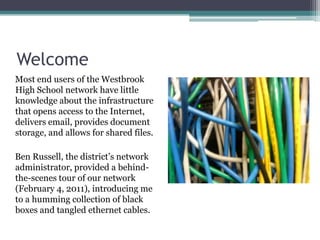
WelcomeMost end users of the Westbrook High School network have little knowledge about the infrastructure that opens access to the Internet, delivers email, provides document storage, and allows for shared files.Ben Russell, the district’s network administrator, provided a behind-the-scenes tour of our network (February 4, 2011), introducing me to a humming collection of black boxes and tangled ethernet cables.
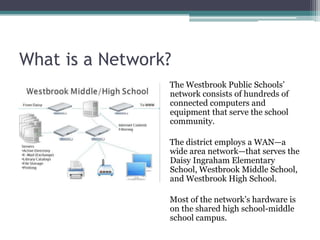
What is a Network?The Westbrook Public Schools’ network consists of hundreds of connected computers and equipment that serve the school community.  The district employs a WAN—a wide area network—that serves the Daisy Ingraham Elementary School, Westbrook Middle School, and Westbrook High School.Most of the network’s hardware is on the shared high school-middle school campus.
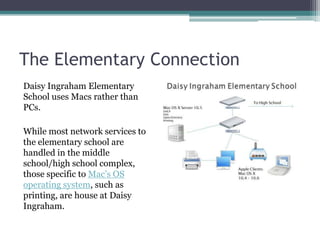
The Elementary ConnectionDaisy Ingraham Elementary School uses Macs rather than PCs.  While most network services to the elementary school are handled in the middle school/high school complex, those specific to Mac’s OS operating system, such as printing, are house at Daisy Ingraham.
Operating SystemThe district’s network uses Windows 2008 Server software, and both the middle school and the high school computers use the Windows 7 operating system.  The Daisy Ingraham Elementary School uses Macs instead of PCs, so network service is divided, with those elementary school functions supported by Windows being performed by the WHS servers.
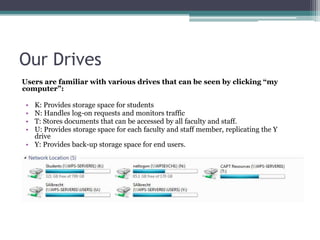
Our DrivesUsers are familiar with various drives that can be seen by clicking “my computer”:K: Provides storage space for studentsN: Handles log-on requests and monitors trafficT: Stores documents that can be accessed by all faculty and staff.U: Provides storage space for each faculty and staff member, replicating the Y driveY: Provides back-up storage space for end users.
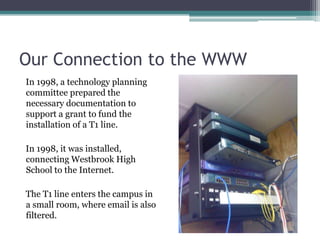
Our Connection to the WWWIn 1998, a technology planning committee prepared the necessary documentation to support a grant to fund the installation of a T1 line.  In 1998, it was installed, connecting Westbrook High School to the Internet. The T1 line enters the campus in a small room, where email is also filtered.
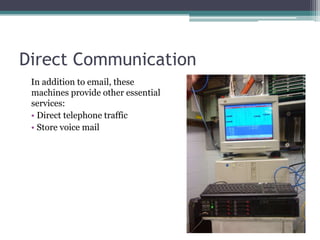
Direct CommunicationIn addition to email, these machines provide other essential services:  Direct telephone traffic Store voice mail
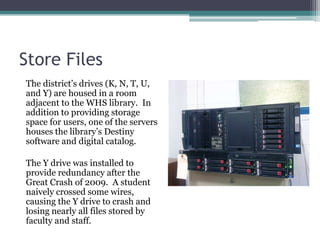
Store FilesThe district’s drives (K, N, T, U, and Y) are housed in a room adjacent to the WHS library.  In addition to providing storage space for users, one of the servers houses the library’s Destiny software and digital catalog.The Y drive was installed to provide redundancy after the Great Crash of 2009.  A student naively crossed some wires, causing the Y drive to crash and losing nearly all files stored by faculty and staff.
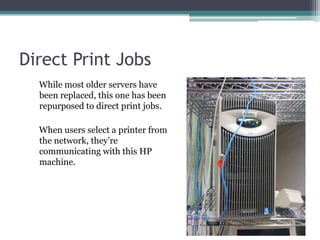
Direct Print JobsWhile most older servers have been replaced, this one has been repurposed to direct print jobs.  When users select a printer from the network, they’re communicating with this HP machine.
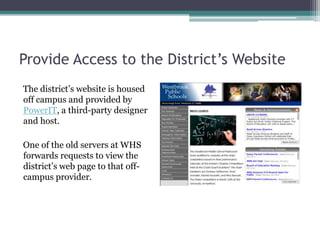
Provide Access to the District’s WebsiteThe district’s website is housed off campus and provided by PowerIT, a third-party designer and host.One of the old servers at WHS forwards requests to view the district’s web page to that off-campus provider.
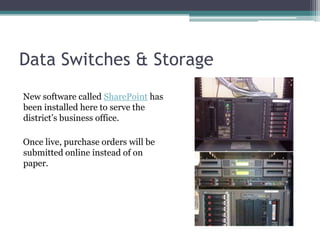
Data Switches & StorageNew software called SharePoint has been installed here to serve the district’s business office.  Once live, purchase orders will be submitted online instead of on paper.
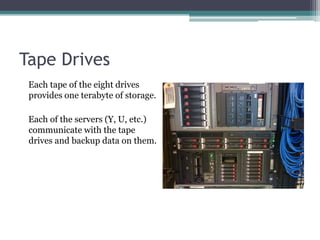
Tape DrivesEach tape of the eight drives provides one terabyte of storage.Each of the servers (Y, U, etc.) communicate with the tape drives and backup data on them.
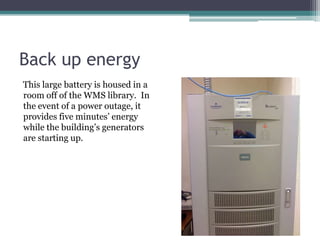
Back up energyThis large battery is housed in a room off of the WMS library.  In the event of a power outage, it provides five minutes’ energy while the building’s generators are starting up.
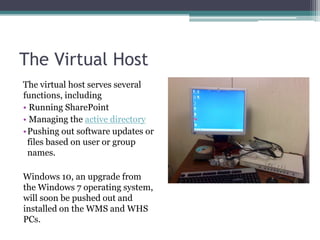
The Virtual HostThe virtual host serves several functions, including Running SharePoint Managing the active directoryPushing out software updates or files based on user or group names.Windows 10, an upgrade from the Windows 7 operating system, will soon be pushed out and installed on the WMS and WHS PCs.
What’s Next?According to Mr. Russell, the district’s networking hardware and software “is like having a big truck and nothing to pull with it.”His priorities for future improvement include: Upgrading the end-users’ hardware Implementing a one-to-one laptop initiativeIncreasing bandwithProviding greater face-to-face support for teachers

Network field trip

  • 1.
    Network Field TripWestbrookHigh SchoolSteven J. Albrecht
  • 2.
    WelcomeMost end usersof the Westbrook High School network have little knowledge about the infrastructure that opens access to the Internet, delivers email, provides document storage, and allows for shared files.Ben Russell, the district’s network administrator, provided a behind-the-scenes tour of our network (February 4, 2011), introducing me to a humming collection of black boxes and tangled ethernet cables.
  • 3.
    What is aNetwork?The Westbrook Public Schools’ network consists of hundreds of connected computers and equipment that serve the school community. The district employs a WAN—a wide area network—that serves the Daisy Ingraham Elementary School, Westbrook Middle School, and Westbrook High School.Most of the network’s hardware is on the shared high school-middle school campus.
  • 4.
    The Elementary ConnectionDaisyIngraham Elementary School uses Macs rather than PCs. While most network services to the elementary school are handled in the middle school/high school complex, those specific to Mac’s OS operating system, such as printing, are house at Daisy Ingraham.
  • 5.
    Operating SystemThe district’snetwork uses Windows 2008 Server software, and both the middle school and the high school computers use the Windows 7 operating system. The Daisy Ingraham Elementary School uses Macs instead of PCs, so network service is divided, with those elementary school functions supported by Windows being performed by the WHS servers.
  • 6.
    Our DrivesUsers arefamiliar with various drives that can be seen by clicking “my computer”:K: Provides storage space for studentsN: Handles log-on requests and monitors trafficT: Stores documents that can be accessed by all faculty and staff.U: Provides storage space for each faculty and staff member, replicating the Y driveY: Provides back-up storage space for end users.
  • 7.
    Our Connection tothe WWWIn 1998, a technology planning committee prepared the necessary documentation to support a grant to fund the installation of a T1 line. In 1998, it was installed, connecting Westbrook High School to the Internet. The T1 line enters the campus in a small room, where email is also filtered.
  • 8.
    Direct CommunicationIn additionto email, these machines provide other essential services: Direct telephone traffic Store voice mail
  • 9.
    Store FilesThe district’sdrives (K, N, T, U, and Y) are housed in a room adjacent to the WHS library. In addition to providing storage space for users, one of the servers houses the library’s Destiny software and digital catalog.The Y drive was installed to provide redundancy after the Great Crash of 2009. A student naively crossed some wires, causing the Y drive to crash and losing nearly all files stored by faculty and staff.
  • 10.
    Direct Print JobsWhilemost older servers have been replaced, this one has been repurposed to direct print jobs. When users select a printer from the network, they’re communicating with this HP machine.
  • 11.
    Provide Access tothe District’s WebsiteThe district’s website is housed off campus and provided by PowerIT, a third-party designer and host.One of the old servers at WHS forwards requests to view the district’s web page to that off-campus provider.
  • 12.
    Data Switches &StorageNew software called SharePoint has been installed here to serve the district’s business office. Once live, purchase orders will be submitted online instead of on paper.
  • 13.
    Tape DrivesEach tapeof the eight drives provides one terabyte of storage.Each of the servers (Y, U, etc.) communicate with the tape drives and backup data on them.
  • 14.
    Back up energyThislarge battery is housed in a room off of the WMS library. In the event of a power outage, it provides five minutes’ energy while the building’s generators are starting up.
  • 15.
    The Virtual HostThevirtual host serves several functions, including Running SharePoint Managing the active directoryPushing out software updates or files based on user or group names.Windows 10, an upgrade from the Windows 7 operating system, will soon be pushed out and installed on the WMS and WHS PCs.
  • 16.
    What’s Next?According toMr. Russell, the district’s networking hardware and software “is like having a big truck and nothing to pull with it.”His priorities for future improvement include: Upgrading the end-users’ hardware Implementing a one-to-one laptop initiativeIncreasing bandwithProviding greater face-to-face support for teachers