

Network Design &
Security Best Practices
Mike Sherwood
Director, Technical Operations – Milestone Systems
Moses Anderson
Security, Privacy and Management Systems Consultant – On-Demand CISO/CTO Services
Design Principles
• Layered approach to facilitate a well functioning and secure network
• Physical or virtual segmentation where access should be limited
• Understanding where the system is most vulnerable
• Quantity of endpoints
• Operating system vulnerabilities
• Ease of network access
• Nature of business and facility
• Securing Access and encrypting data in transit
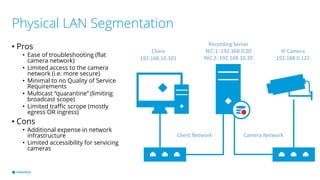
Physical LAN Segmentation
• Pros
• Ease of troubleshooting (flat
camera network)
• Limited access to the camera
network (i.e. more secure)
• Minimal to no Quality of Service
Requirements
• Multicast “quarantine” (limiting
broadcast scope)
• Limited traffic scrope (mostly
egress OR ingress)
• Cons
• Additional expense in network
infrastructure
• Limited accessibility for servicing
cameras
Client
192.168.10.101
IP Camera
192.168.0.122
Recording Server
NIC 1: 192.168.0.20
NIC 2: 192.168.10.20
Camera NetworkClient Network
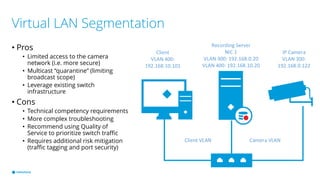
Virtual LAN Segmentation
• Pros
• Limited access to the camera
network (i.e. more secure)
• Multicast “quarantine” (limiting
broadcast scope)
• Leverage existing switch
infrastructure
• Cons
• Technical competency requirements
• More complex troubleshooting
• Recommend using Quality of
Service to prioritize switch traffic
• Requires additional risk mitigation
(traffic tagging and port security)
Client
VLAN 400:
192.168.10.101
IP Camera
VLAN 300:
192.168.0.122
Recording Server
NIC 1
VLAN 300: 192.168.0.20
VLAN 400: 192.168.10.20
Camera VLANClient VLAN
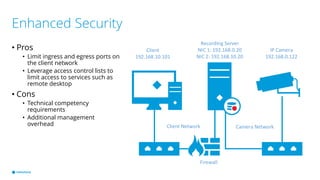
Enhanced Security
• Pros
• Limit ingress and egress ports on
the client network
• Leverage access control lists to
limit access to services such as
remote desktop
• Cons
• Technical competency
requirements
• Additional management
overhead
Client
192.168.10.101
IP Camera
192.168.0.122
Recording Server
NIC 1: 192.168.0.20
NIC 2: 192.168.10.20
Camera NetworkClient Network
Firewall
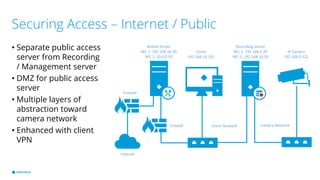
Securing Access – Internet / Public
• Separate public access
server from Recording
/ Management server
• DMZ for public access
server
• Multiple layers of
abstraction toward
camera network
• Enhanced with client
VPN
Client
192.168.10.101
IP Camera
192.168.0.122
Recording Server
NIC 1: 192.168.0.20
NIC 2: 192.168.10.20
Camera NetworkClient Network
Mobile Server
NIC 1: 192.168.10.30
NIC 2: 10.0.0.10
Internet
Firewall
Firewall
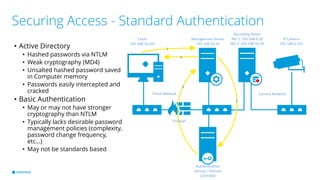
Securing Access - Standard Authentication
• Active Directory
• Hashed passwords via NTLM
• Weak cryptography (MD4)
• Unsalted hashed password saved
in Computer memory
• Passwords easily intercepted and
cracked
• Basic Authentication
• May or may not have stronger
cryptography than NTLM
• Typically lacks desirable password
management policies (complexity,
password change frequency,
etc…)
• May not be standards based
Client
192.168.10.101
IP Camera
192.168.0.122
Recording Server
NIC 1: 192.168.0.20
NIC 2: 192.168.10.20
Camera NetworkClient Network
Firewall
Management Server
192.168.10.10
Authentication
Service / Domain
Controller
1
2
3
4
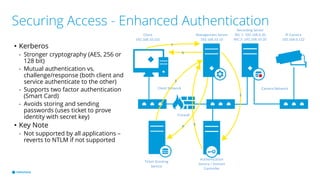
Securing Access - Enhanced Authentication
• Kerberos
- Stronger cryptography (AES, 256 or
128 bit)
- Mutual authentication vs.
challenge/response (both client and
service authenticate to the other)
- Supports two factor authentication
(Smart Card)
- Avoids storing and sending
passwords (uses ticket to prove
identity with secret key)
• Key Note
- Not supported by all applications –
reverts to NTLM if not supported
Client
192.168.10.101
IP Camera
192.168.0.122
Recording Server
NIC 1: 192.168.0.20
NIC 2: 192.168.10.20
Camera NetworkClient Network
Firewall
Management Server
192.168.10.10
Authentication
Service / Domain
Controller
1
2
3
Ticket Granting
Service
4
5
6
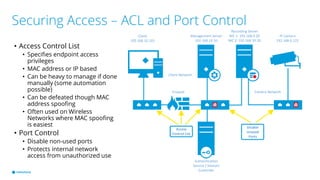
Securing Access – ACL and Port Control
• Access Control List
• Specifies endpoint access
privileges
• MAC address or IP based
• Can be heavy to manage if done
manually (some automation
possible)
• Can be defeated though MAC
address spoofing
• Often used on Wireless
Networks where MAC spoofing
is easiest
• Port Control
• Disable non-used ports
• Protects internal network
access from unauthorized use
Client
192.168.10.101
IP Camera
192.168.0.122
Recording Server
NIC 1: 192.168.0.20
NIC 2: 192.168.10.20
X
Client Network
Firewall
Management Server
192.168.10.10
Authentication
Service / Domain
Controller
Access
Control List
Disable
Unused
Ports
Camera Network
X
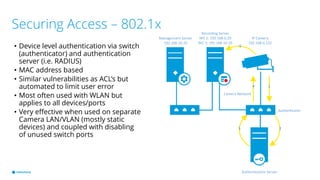
Securing Access – 802.1x
• Device level authentication via switch
(authenticator) and authentication
server (i.e. RADIUS)
• MAC address based
• Similar vulnerabilities as ACL’s but
automated to limit user error
• Most often used with WLAN but
applies to all devices/ports
• Very effective when used on separate
Camera LAN/VLAN (mostly static
devices) and coupled with disabling
of unused switch ports
IP Camera
192.168.0.122
Recording Server
NIC 1: 192.168.0.20
NIC 2: 192.168.10.20
Camera Network
Management Server
192.168.10.10
Authentication Server
Authenticator
1
23
4
5
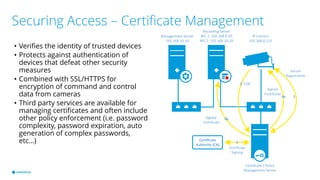
Securing Access – Certificate Management
• Verifies the identity of trusted devices
• Protects against authentication of
devices that defeat other security
measures
• Combined with SSL/HTTPS for
encryption of command and control
data from cameras
• Third party services are available for
managing certificates and often include
other policy enforcement (i.e. password
complexity, password expiration, auto
generation of complex passwords,
etc…)
IP Camera
192.168.0.122
Recording Server
NIC 1: 192.168.0.20
NIC 2: 192.168.10.20
Management Server
192.168.10.10
Certificate / Policy
Management Server
1
2
3
Secure
Registration
CSR
Certificate
Authority (CA)
Certificate
Signing
4a
4b
Signed
Certificate
Signed
Certificate
Securing Data in Transit - Encryption
• VPN / SSL
• Typically used for external access
• Limits the exposer of servers hosted in DMZ (does not necessarily limit the need for hosting public
access servers in DMZ)
• Can be used internally across networks where encryption is highly desireable
• Media Access Control Security (MACsec)
• Point to point encryption (IPSec/SSL) for all ethernet traffic on a given link (key based)
• Ensures data integrity and protects against a variety of attacks (man in the middle, denial of
service, intrusion, masquerading, playback attacks, etc…)
• Works in conjunction with 802.1x and RADIUS authentication
• Ideal solution for Windows host communications
• HTTPS – camera command and control
• Secure RTP (SRTP)
• Camera video stream encryption (limited vendor support to date)
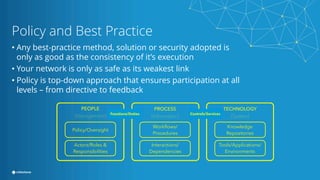
Policy and Best Practice
• Any best-practice method, solution or security adopted is
only as good as the consistency of it’s execution
• Your network is only as safe as its weakest link
• Policy is top-down approach that ensures participation at all
levels – from directive to feedback
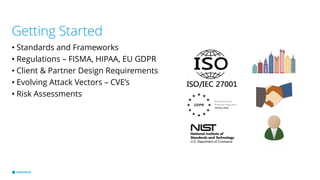
Getting Started
• Standards and Frameworks
• Regulations – FISMA, HIPAA, EU GDPR
• Client & Partner Design Requirements
• Evolving Attack Vectors – CVE’s
• Risk Assessments
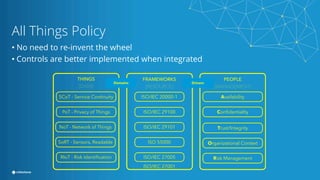
All Things Policy
• No need to re-invent the wheel
• Controls are better implemented when integrated
Network Security Policies – ISO/IEC 27001
• Segregation in Networks
- Groups of information services, users
and information systems
- Promoting such a practice through
policy making builds a culture of
consistency in network designs and
system integration
• Encryption
- A policy on the use of cryptographic
controls for protection
- A policy on the use, protection and
lifetime of cryptographic keys shall be
developed and implemented through
their whole lifecycle
- As product manufacturers, ensuring
the security of keys is paramount
• Access to networks and
Network Services
- Users shall only be provided with
access to the network and network
services that they have been
specifically authorized to use
- You products should avoid
attempting to use ports other than
those pre-arranged or documented
milestonesys.comThis publication contains information concerning Milestone Systems A/S and its affiliates that may be useful to Milestone’s customers, suppliers, employees as well members of the general public. However, in referencing this publication you
are accepting all of the terms of this disclaimer notice, including exclusions and limitations of liability. If you do not agree with anything in this notice, you should not use, or reference, this publication. While reasonable efforts are made to
ensure that the contents of this publication are accurate, this publication and its contents are provided on an “as is,” “as available” basis, without warranties of any kind, including any warranty that the publication will be kept up to date, be
true and not misleading, or that the publication will always (or ever) be available for use. Milestone and its affiliates disclaim all warranties, express or implied, with respect to the publication and its contents, including, without limitation, any
warranties of accuracy (to include any forward-looking statements based on assumptions), completeness, timeliness, non-infringement, title, merchantability, or fitness for a particular purpose. Because some jurisdictions do not permit the
exclusion of certain warranties, these exclusions may not apply to you

Network Design and Security Best Practices

  • 2.
    Network Design & SecurityBest Practices Mike Sherwood Director, Technical Operations – Milestone Systems Moses Anderson Security, Privacy and Management Systems Consultant – On-Demand CISO/CTO Services
  • 3.
    Design Principles • Layeredapproach to facilitate a well functioning and secure network • Physical or virtual segmentation where access should be limited • Understanding where the system is most vulnerable • Quantity of endpoints • Operating system vulnerabilities • Ease of network access • Nature of business and facility • Securing Access and encrypting data in transit
  • 4.
    Physical LAN Segmentation •Pros • Ease of troubleshooting (flat camera network) • Limited access to the camera network (i.e. more secure) • Minimal to no Quality of Service Requirements • Multicast “quarantine” (limiting broadcast scope) • Limited traffic scrope (mostly egress OR ingress) • Cons • Additional expense in network infrastructure • Limited accessibility for servicing cameras Client 192.168.10.101 IP Camera 192.168.0.122 Recording Server NIC 1: 192.168.0.20 NIC 2: 192.168.10.20 Camera NetworkClient Network
  • 5.
    Virtual LAN Segmentation •Pros • Limited access to the camera network (i.e. more secure) • Multicast “quarantine” (limiting broadcast scope) • Leverage existing switch infrastructure • Cons • Technical competency requirements • More complex troubleshooting • Recommend using Quality of Service to prioritize switch traffic • Requires additional risk mitigation (traffic tagging and port security) Client VLAN 400: 192.168.10.101 IP Camera VLAN 300: 192.168.0.122 Recording Server NIC 1 VLAN 300: 192.168.0.20 VLAN 400: 192.168.10.20 Camera VLANClient VLAN
  • 6.
    Enhanced Security • Pros •Limit ingress and egress ports on the client network • Leverage access control lists to limit access to services such as remote desktop • Cons • Technical competency requirements • Additional management overhead Client 192.168.10.101 IP Camera 192.168.0.122 Recording Server NIC 1: 192.168.0.20 NIC 2: 192.168.10.20 Camera NetworkClient Network Firewall
  • 7.
    Securing Access –Internet / Public • Separate public access server from Recording / Management server • DMZ for public access server • Multiple layers of abstraction toward camera network • Enhanced with client VPN Client 192.168.10.101 IP Camera 192.168.0.122 Recording Server NIC 1: 192.168.0.20 NIC 2: 192.168.10.20 Camera NetworkClient Network Mobile Server NIC 1: 192.168.10.30 NIC 2: 10.0.0.10 Internet Firewall Firewall
  • 8.
    Securing Access -Standard Authentication • Active Directory • Hashed passwords via NTLM • Weak cryptography (MD4) • Unsalted hashed password saved in Computer memory • Passwords easily intercepted and cracked • Basic Authentication • May or may not have stronger cryptography than NTLM • Typically lacks desirable password management policies (complexity, password change frequency, etc…) • May not be standards based Client 192.168.10.101 IP Camera 192.168.0.122 Recording Server NIC 1: 192.168.0.20 NIC 2: 192.168.10.20 Camera NetworkClient Network Firewall Management Server 192.168.10.10 Authentication Service / Domain Controller 1 2 3 4
  • 9.
    Securing Access -Enhanced Authentication • Kerberos - Stronger cryptography (AES, 256 or 128 bit) - Mutual authentication vs. challenge/response (both client and service authenticate to the other) - Supports two factor authentication (Smart Card) - Avoids storing and sending passwords (uses ticket to prove identity with secret key) • Key Note - Not supported by all applications – reverts to NTLM if not supported Client 192.168.10.101 IP Camera 192.168.0.122 Recording Server NIC 1: 192.168.0.20 NIC 2: 192.168.10.20 Camera NetworkClient Network Firewall Management Server 192.168.10.10 Authentication Service / Domain Controller 1 2 3 Ticket Granting Service 4 5 6
  • 10.
    Securing Access –ACL and Port Control • Access Control List • Specifies endpoint access privileges • MAC address or IP based • Can be heavy to manage if done manually (some automation possible) • Can be defeated though MAC address spoofing • Often used on Wireless Networks where MAC spoofing is easiest • Port Control • Disable non-used ports • Protects internal network access from unauthorized use Client 192.168.10.101 IP Camera 192.168.0.122 Recording Server NIC 1: 192.168.0.20 NIC 2: 192.168.10.20 X Client Network Firewall Management Server 192.168.10.10 Authentication Service / Domain Controller Access Control List Disable Unused Ports Camera Network X
  • 11.
    Securing Access –802.1x • Device level authentication via switch (authenticator) and authentication server (i.e. RADIUS) • MAC address based • Similar vulnerabilities as ACL’s but automated to limit user error • Most often used with WLAN but applies to all devices/ports • Very effective when used on separate Camera LAN/VLAN (mostly static devices) and coupled with disabling of unused switch ports IP Camera 192.168.0.122 Recording Server NIC 1: 192.168.0.20 NIC 2: 192.168.10.20 Camera Network Management Server 192.168.10.10 Authentication Server Authenticator 1 23 4 5
  • 12.
    Securing Access –Certificate Management • Verifies the identity of trusted devices • Protects against authentication of devices that defeat other security measures • Combined with SSL/HTTPS for encryption of command and control data from cameras • Third party services are available for managing certificates and often include other policy enforcement (i.e. password complexity, password expiration, auto generation of complex passwords, etc…) IP Camera 192.168.0.122 Recording Server NIC 1: 192.168.0.20 NIC 2: 192.168.10.20 Management Server 192.168.10.10 Certificate / Policy Management Server 1 2 3 Secure Registration CSR Certificate Authority (CA) Certificate Signing 4a 4b Signed Certificate Signed Certificate
  • 13.
    Securing Data inTransit - Encryption • VPN / SSL • Typically used for external access • Limits the exposer of servers hosted in DMZ (does not necessarily limit the need for hosting public access servers in DMZ) • Can be used internally across networks where encryption is highly desireable • Media Access Control Security (MACsec) • Point to point encryption (IPSec/SSL) for all ethernet traffic on a given link (key based) • Ensures data integrity and protects against a variety of attacks (man in the middle, denial of service, intrusion, masquerading, playback attacks, etc…) • Works in conjunction with 802.1x and RADIUS authentication • Ideal solution for Windows host communications • HTTPS – camera command and control • Secure RTP (SRTP) • Camera video stream encryption (limited vendor support to date)
  • 14.
    Policy and BestPractice • Any best-practice method, solution or security adopted is only as good as the consistency of it’s execution • Your network is only as safe as its weakest link • Policy is top-down approach that ensures participation at all levels – from directive to feedback
  • 15.
    Getting Started • Standardsand Frameworks • Regulations – FISMA, HIPAA, EU GDPR • Client & Partner Design Requirements • Evolving Attack Vectors – CVE’s • Risk Assessments
  • 16.
    All Things Policy •No need to re-invent the wheel • Controls are better implemented when integrated
  • 17.
    Network Security Policies– ISO/IEC 27001 • Segregation in Networks - Groups of information services, users and information systems - Promoting such a practice through policy making builds a culture of consistency in network designs and system integration • Encryption - A policy on the use of cryptographic controls for protection - A policy on the use, protection and lifetime of cryptographic keys shall be developed and implemented through their whole lifecycle - As product manufacturers, ensuring the security of keys is paramount • Access to networks and Network Services - Users shall only be provided with access to the network and network services that they have been specifically authorized to use - You products should avoid attempting to use ports other than those pre-arranged or documented
  • 18.
    milestonesys.comThis publication containsinformation concerning Milestone Systems A/S and its affiliates that may be useful to Milestone’s customers, suppliers, employees as well members of the general public. However, in referencing this publication you are accepting all of the terms of this disclaimer notice, including exclusions and limitations of liability. If you do not agree with anything in this notice, you should not use, or reference, this publication. While reasonable efforts are made to ensure that the contents of this publication are accurate, this publication and its contents are provided on an “as is,” “as available” basis, without warranties of any kind, including any warranty that the publication will be kept up to date, be true and not misleading, or that the publication will always (or ever) be available for use. Milestone and its affiliates disclaim all warranties, express or implied, with respect to the publication and its contents, including, without limitation, any warranties of accuracy (to include any forward-looking statements based on assumptions), completeness, timeliness, non-infringement, title, merchantability, or fitness for a particular purpose. Because some jurisdictions do not permit the exclusion of certain warranties, these exclusions may not apply to you