Tips for Commissioning,
Managing, and Troubleshooting
your Industrial Network
Moxa Technology Webinar Series
Richard Wood
Networking Infrastructure Manager
Agenda
Industrial Network Challenges
Network Configuration & Commissioning
Managing Industrial Networks
Troubleshooting to Minimize Downtime
Tips for Commissioning, Managing & Troubleshooting Your Industrial Network
Industrial Network Challenges
• Harsh operating
environments
• Network availability
requirements are much
higher than enterprise IT
• Cost of downtime is
extremely high
• Interoperability of industrial
devices/networks
• Limited networking
expertise
Typical challenges
Source:
http://www.strategiccompanies.com/pdfs/Assessing%20t
he%20Financial%20Impact%20of%20Downtime.pdf
Network Configuration &
Commissioning
Tips, Tricks & Tools
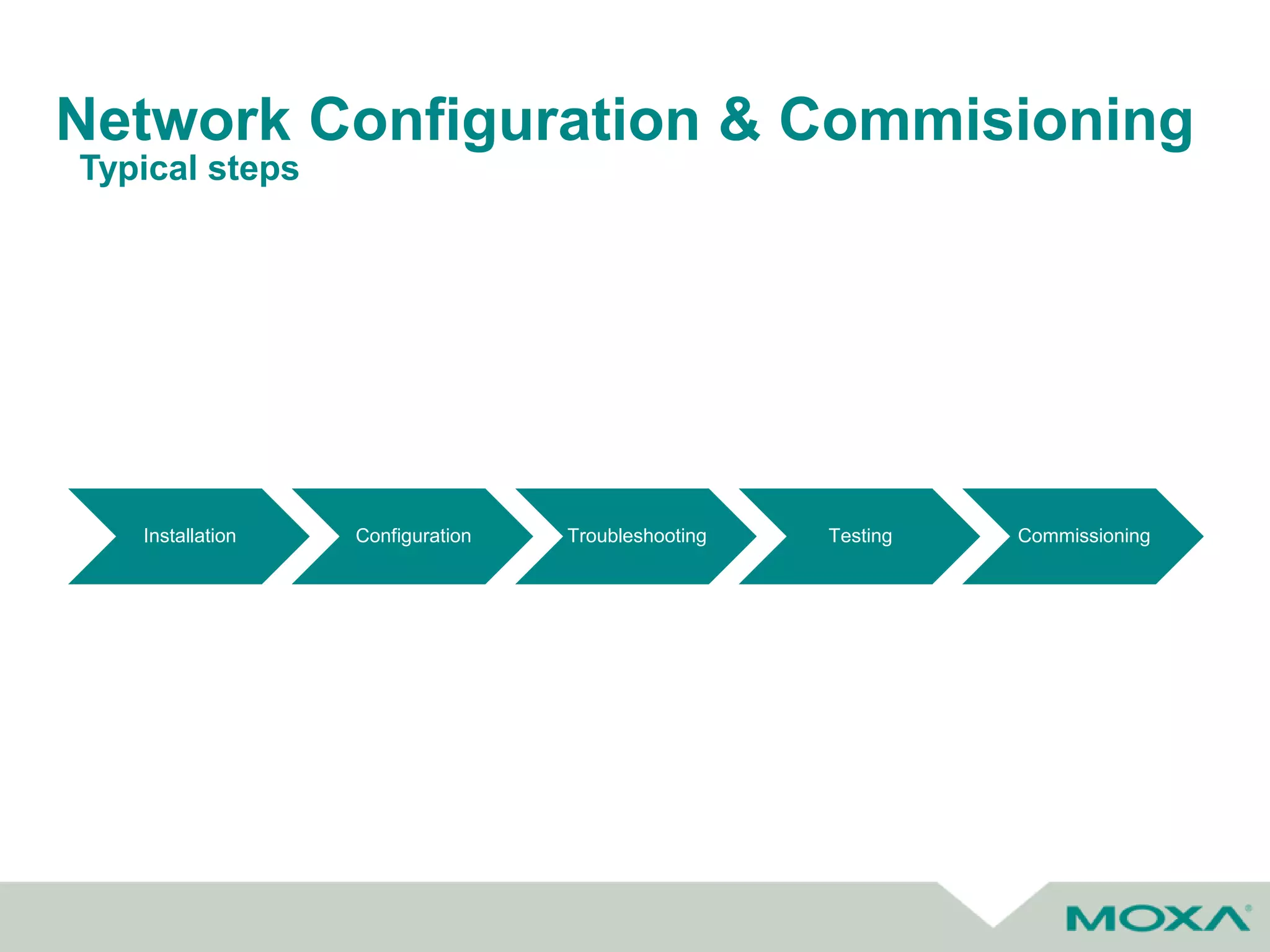
Network Configuration & Commisioning
Installation Configuration Troubleshooting Testing Commissioning
Typical steps
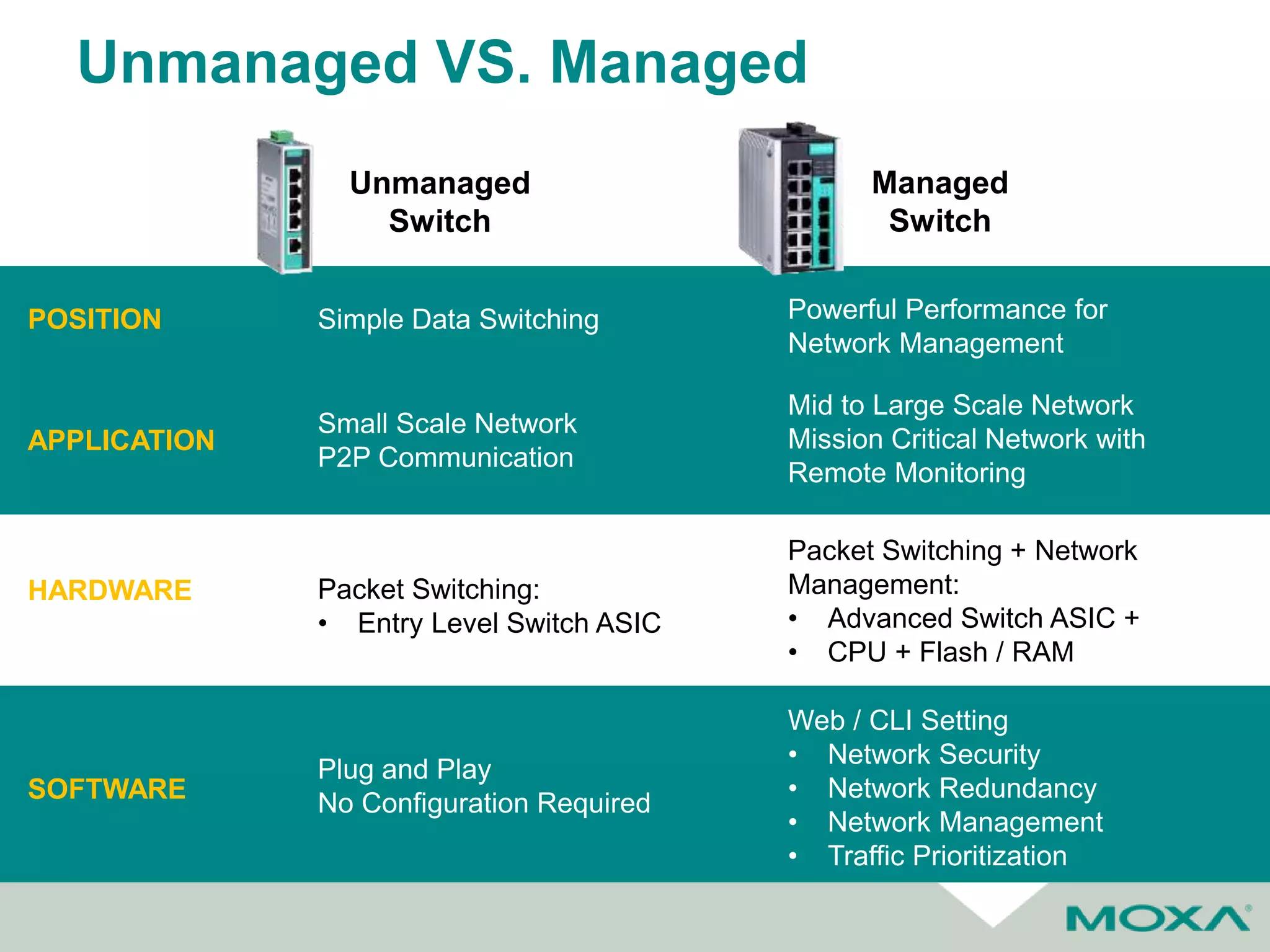
Unmanaged VS. Managed
HARDWARE
SOFTWARE
APPLICATION
Small Scale Network
P2P Communication
Mid to Large Scale Network
Mission Critical Network with
Remote Monitoring
Packet Switching:
• Entry Level Switch ASIC
Packet Switching + Network
Management:
• Advanced Switch ASIC +
• CPU + Flash / RAM
Simple Data Switching Powerful Performance for
Network Management
POSITION
Plug and Play
No Configuration Required
Web / CLI Setting
• Network Security
• Network Redundancy
• Network Management
• Traffic Prioritization
Unmanaged
Switch
Managed
Switch
Network Topology
Typical Enterprise Star Topology
• Single point of failure
• Long, costly wire/fiber runs
Network Configuration
Selecting the Right Topology for Your Needs
Redundant
Technology
Type Mesh STP RSTP Ring/Chain HSR/PRP
Feature
• Every node
connects to
each other
• IEEE
802.1D
• Loop-free
tree shape
topology
• IEEE 802.1w
• Loop-free
tree shape
topology
• Proprietary
technology
• Ring/Chain
Topology
• IEC 61850
• Dual Network (PRP)
• Dual Path (HSR)
Pros
• Highly
reliable
• Self-healing
• Open
Protocol
• Self-healing
• Open
Protocol
• Faster
recovery time:
~1 sec
• Low cost
• Self-healing
• Faster recovery
time (<20 ms)
• Open protocol
• Self-healing
• Zero recovery time
(0 ms)
Cons
• Too costly for
large network
deployment
• Recovery
time:
~15 sec
• Recovery
time not fast
enough
• Vendor specific
technology
• Prohibitively
expensive unless
absolutely needed
Backup Link
Root
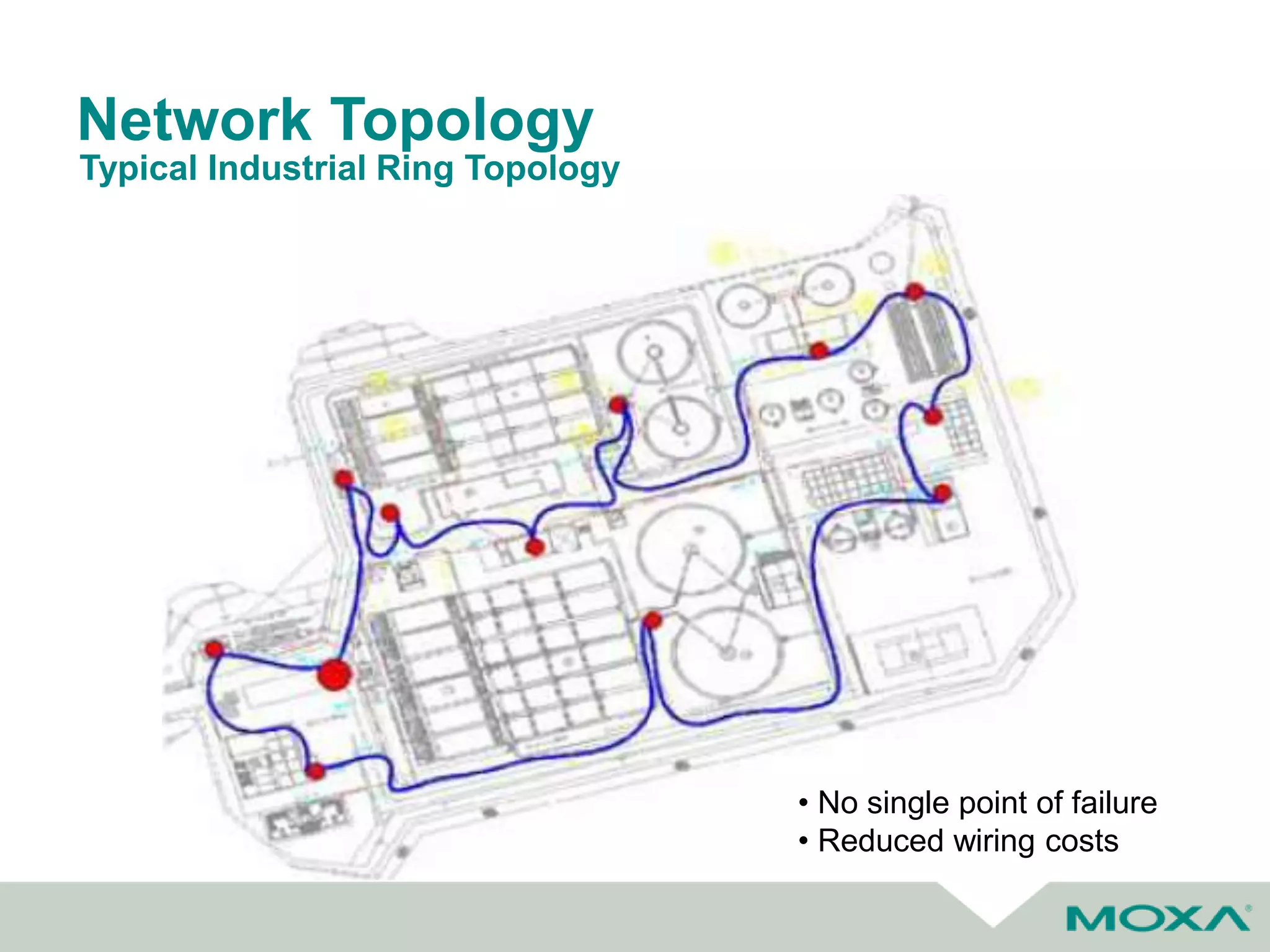
Network Topology
Typical Industrial Ring Topology
• No single point of failure
• Reduced wiring costs
Industrial Protocols
• SCADA control / monitor PLC and field
devices via industrial protocols
Integration of SCADA & PLC Networks
Drive
I/O PLC
Ethernet
Switch
HMI
Network Configuration & Commissioning
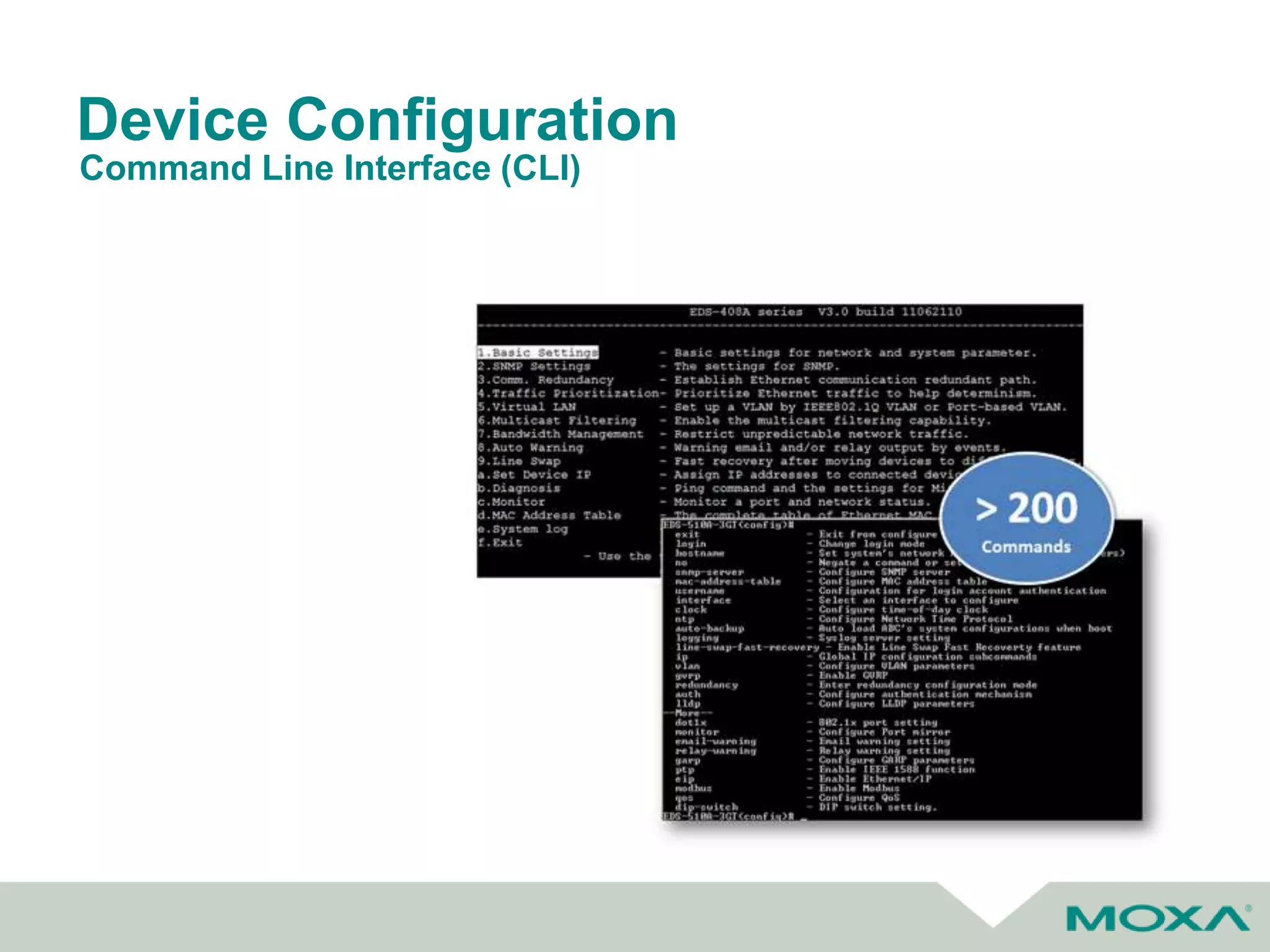
• Two different methodologies for configuration of
network devices
• Many users from the industrial side prefer web
GUI
• Most users for commercial/enterprise side will
favor CLI
– Used by Cisco
Web Interface vs CLI
Device Configuration
Command Line Interface (CLI)
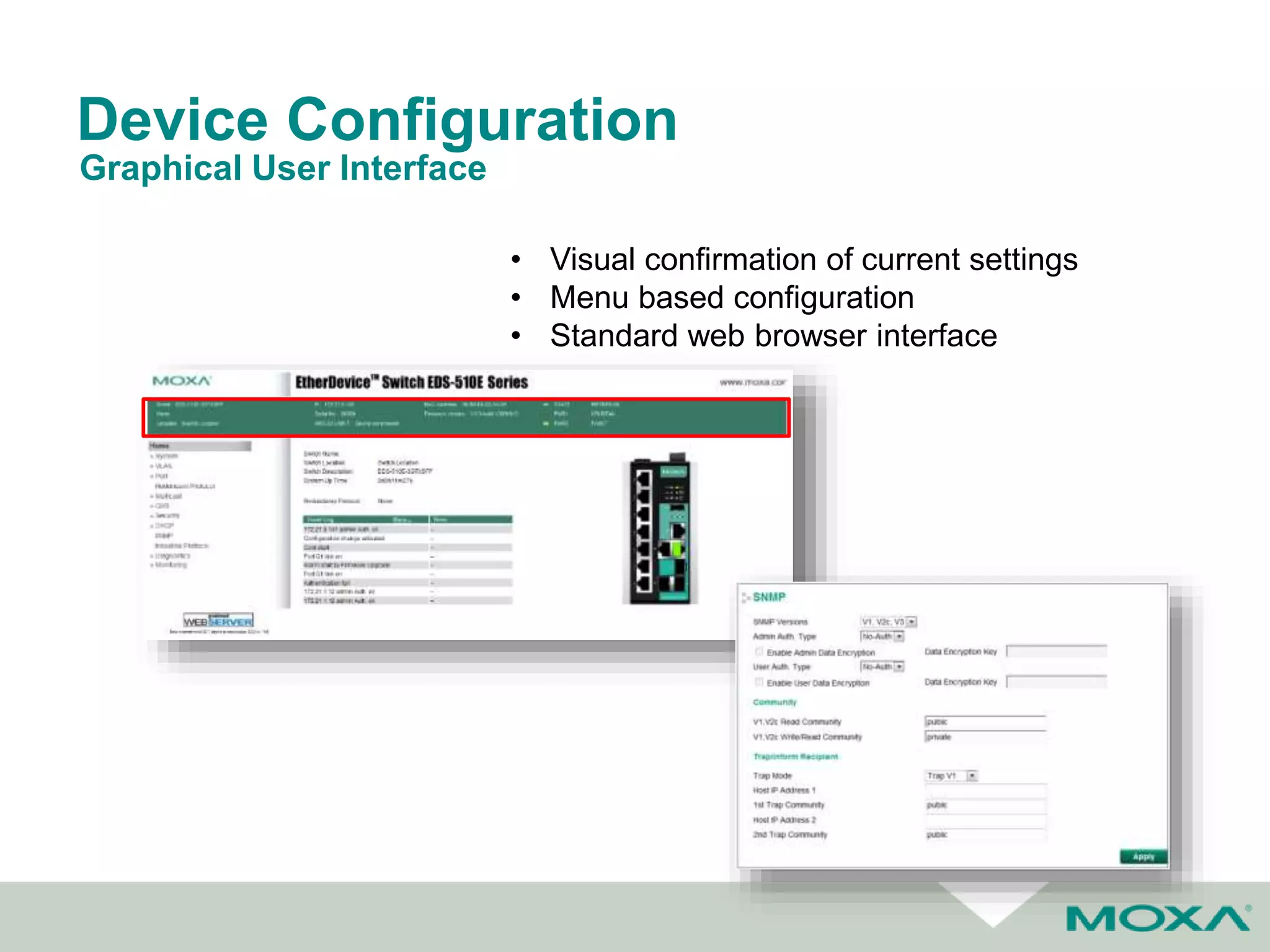
Device Configuration
Graphical User Interface
• Visual confirmation of current settings
• Menu based configuration
• Standard web browser interface
Network Management Tools
Easy Configuration @ Installation Stage
Efficient Monitoring @ Operation Stage
Easy Backup/recovery @ Maintenance Stage
Quick Troubleshooting @ Diagnostics Stage
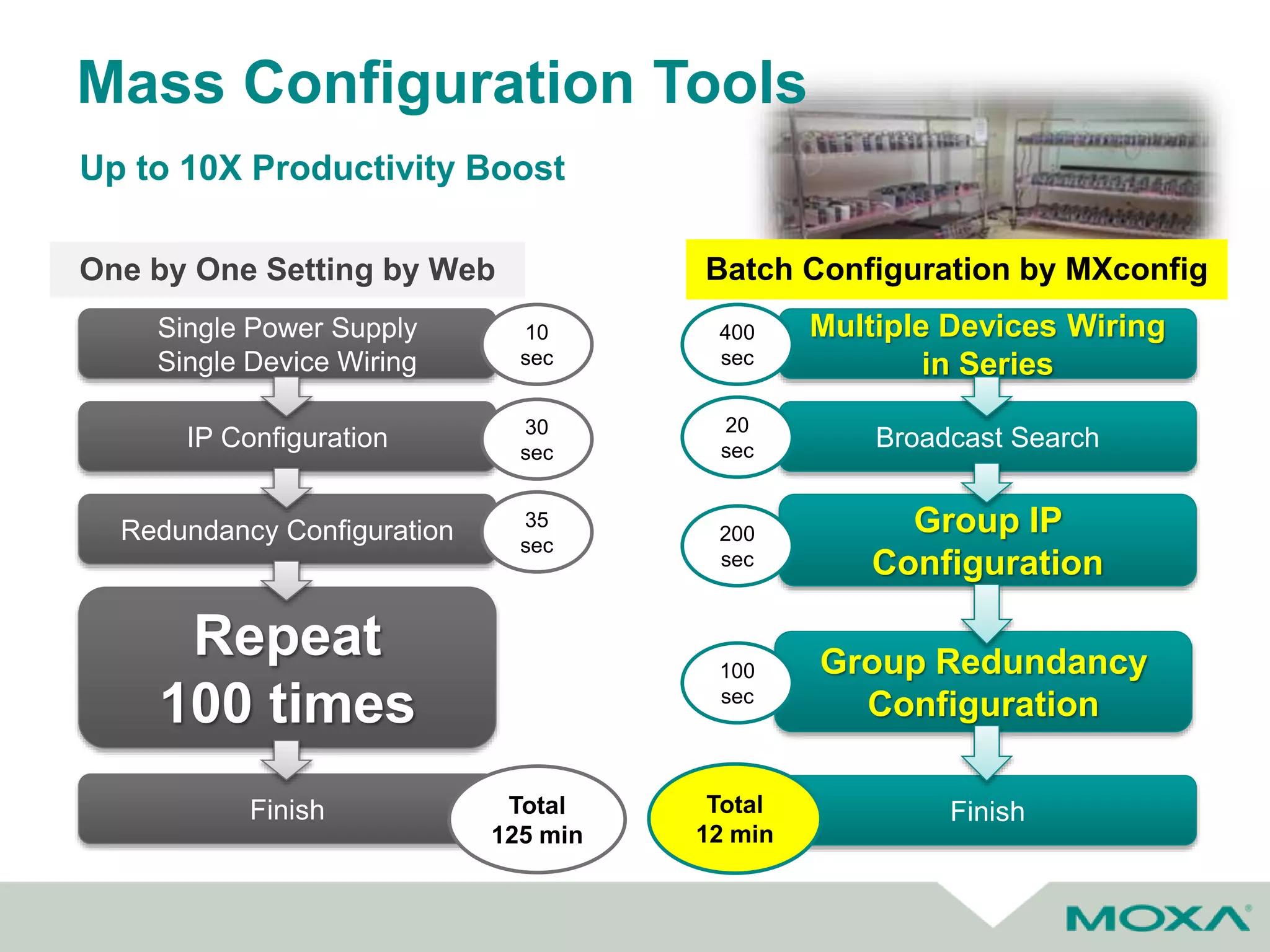
Mass Configuration Tools
Up to 10X Productivity Boost
One by One Setting by Web Batch Configuration by MXconfig
Multiple Devices Wiring
in Series
Broadcast Search
Group IP
Configuration
Group Redundancy
Configuration
Finish
400
sec
20
sec
200
sec
100
sec
Total
12 min
Single Power Supply
Single Device Wiring
IP Configuration
Redundancy Configuration
Repeat
100 times
Finish
10
sec
30
sec
35
sec
Total
125 min
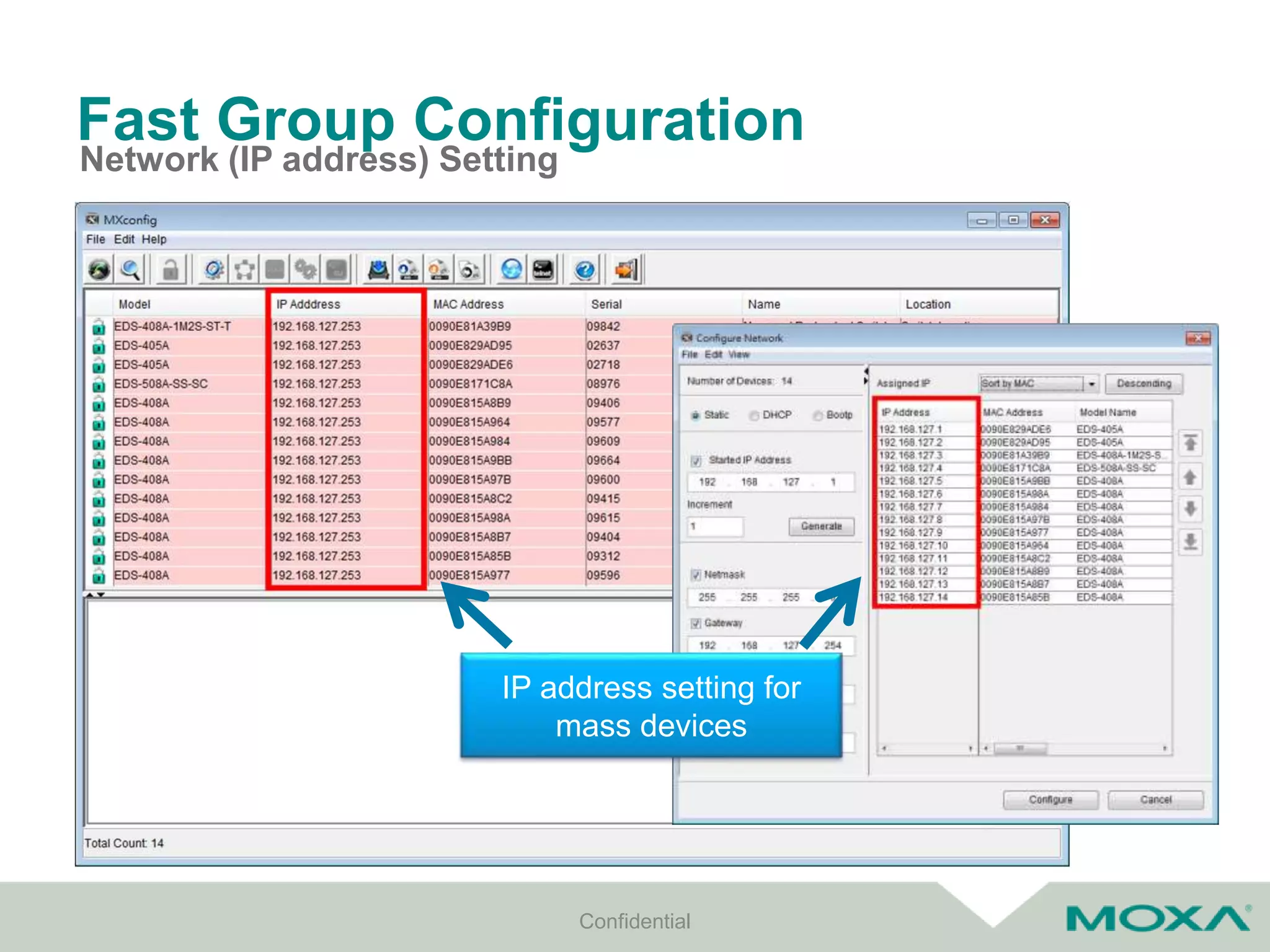
Fast Group Configuration
Network (IP address) Setting
Confidential
IP address setting for
mass devices
Fast Group Configuration
802.1Q VLAN Setting
Confidential
Quick Add Panel
for cloning setting
*Mass 802.1Q VLAN Setting only for devices with the same model name
Fast Configuration Deployment
Copy Configuration
Confidential
Quick configuration copy
from one specific setting
to mass devices
Support mass IP
address setting
*Copy Configuration only for devices with the same model name
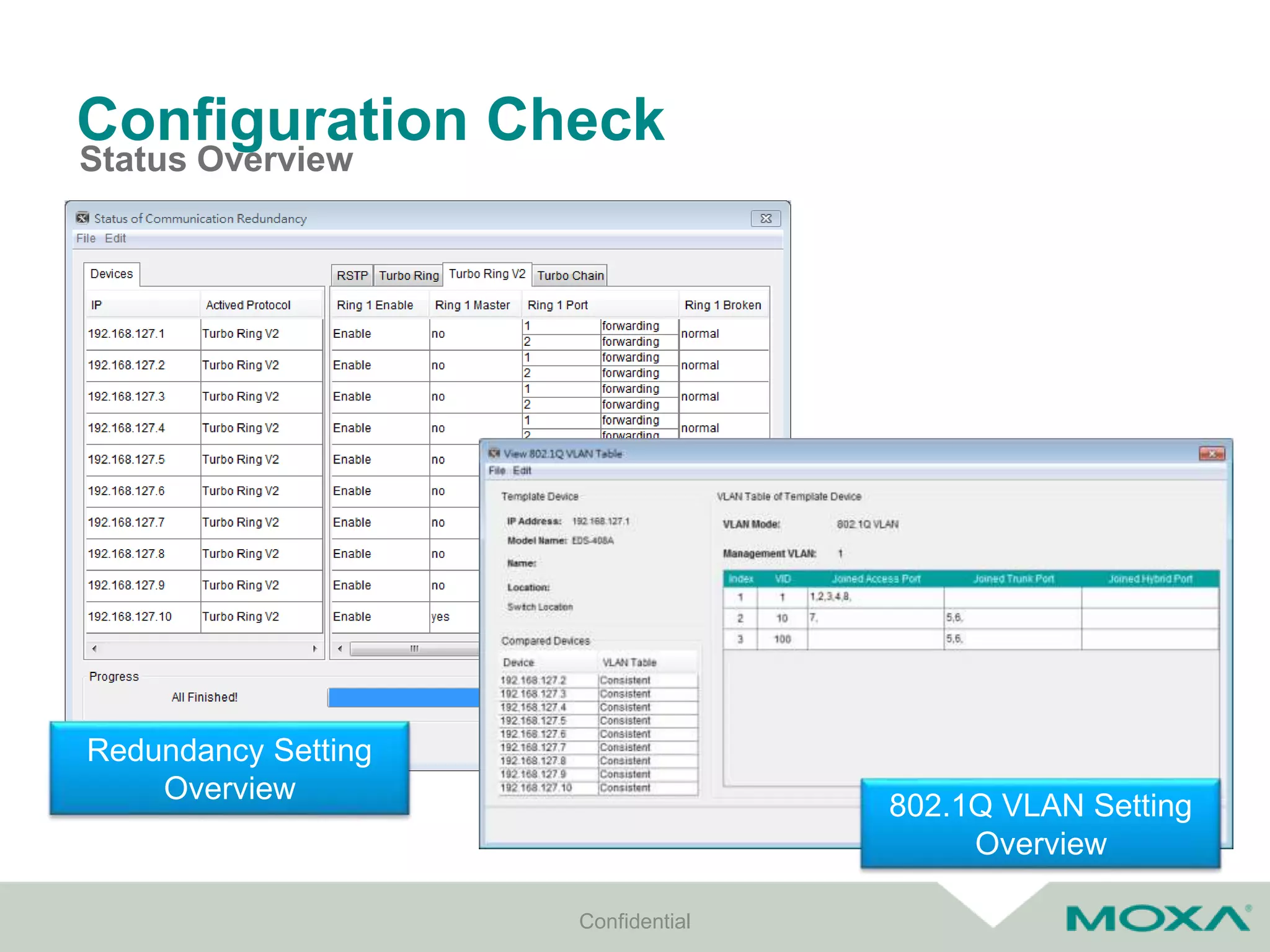
Configuration Check
Status Overview
Confidential
Redundancy Setting
Overview
802.1Q VLAN Setting
Overview
Startup Troubleshooting
Confidential21
Compare a Single Device with Whole Network
VLAN
1: Access, PVID=1, Forb=200
2: Access, PVID=2, Forb=300
3: Trunk, PVID=100, Tag=1,2
4: Trunk, PVID=100, Tag=1,2
VLAN
1: Access, PVID=1, Forb=200
2: Access, PVID=2, Forb=300
3: Trunk, PVID=100, Tag=1,2
4: Trunk, PVID=100, Tag=1,2
VLAN
1: Access, PVID=1, Forb=200
2: Access, PVID=2, Forb=300
3: Trunk, PVID=100, Tag=1,2
4: Trunk, PVID=100, Tag=1,2
VLAN
1: Access, PVID=1, Forb=200
2: Access, PVID=2, Forb=300
3: Trunk, PVID=101, Tag=1,2
4: Trunk, PVID=100, Tag=1,2
VLAN
1: Access, PVID=1, Forb=200
2: Access, PVID=2, Forb=300
3: Trunk, PVID=100, Tag=1,2
4: Trunk, PVID=100, Tag=1,2
VLAN
1: Access, PVID=1, Forb=200
2: Access, PVID=2, Forb=300
3: Trunk, PVID=100, Tag=1,2
4: Trunk, PVID=100, Tag=1,2
VLAN
1: Access, PVID=1, Forb=200
2: Access, PVID=2, Forb=300
3: Trunk, PVID=100, Tag=1,2
4: Trunk, PVID=100, Tag=1,2
VLAN
1: Access, PVID=1, Forb=200
2: Access, PVID=2, Forb=300
3: Trunk, PVID=100, Tag=1,2
4: Trunk, PVID=100, Tag=1,2
VLAN
1: Access, PVID=1, Forb=200
2: Access, PVID=2, Forb=300
3: Trunk, PVID=100, Tag=1,2
4: Trunk, PVID=100, Tag=1,2
VLAN
1: Access, PVID=1, Forb=200
2: Access, PVID=2, Forb=300
3: Trunk, PVID=100, Tag=1,2
4: Trunk, PVID=100, Tag=1,2
VLAN
1: Access, PVID=1, Forb=200
2: Access, PVID=2, Forb=300
3: Trunk, PVID=100, Tag=1,2
4: Trunk, PVID=100, Tag=1,2
VLAN
1: Access, PVID=1, Forb=200
2: Access, PVID=2, Forb=300
3: Trunk, PVID=100, Tag=1,2
4: Trunk, PVID=100, Tag=1,2
VLAN
1: Access, PVID=1, Forb=200
2: Access, PVID=2, Forb=300
3: Trunk, PVID=100, Tag=1,2
4: Trunk, PVID=100, Tag=1,2
VLAN
1: Access, PVID=1, Forb=200
2: Access, PVID=2, Forb=300
3: Trunk, PVID=100, Tag=1,2
4: Trunk, PVID=100, Tag=1,2
VLAN
1: Access, PVID=1, Forb=200
2: Access, PVID=2, Forb=300
3: Trunk, PVID=100, Tag=1,2
4: Trunk, PVID=100, Tag=1,2
Comparison
Sample
Benefit
Reduce Manual Setting Errors
Documentation
Export Configuration
Confidential
Export mass
configurations by
preference name
Network Management & Maintenance
Best Practices
Network Management & Maintenance
• Industrial NMS
– Auto topology visualization
– Remote device management
– Real-time event management
– Comprehensive performance
reporting
Network Management Software
Confidential
Network Management & Maintenance
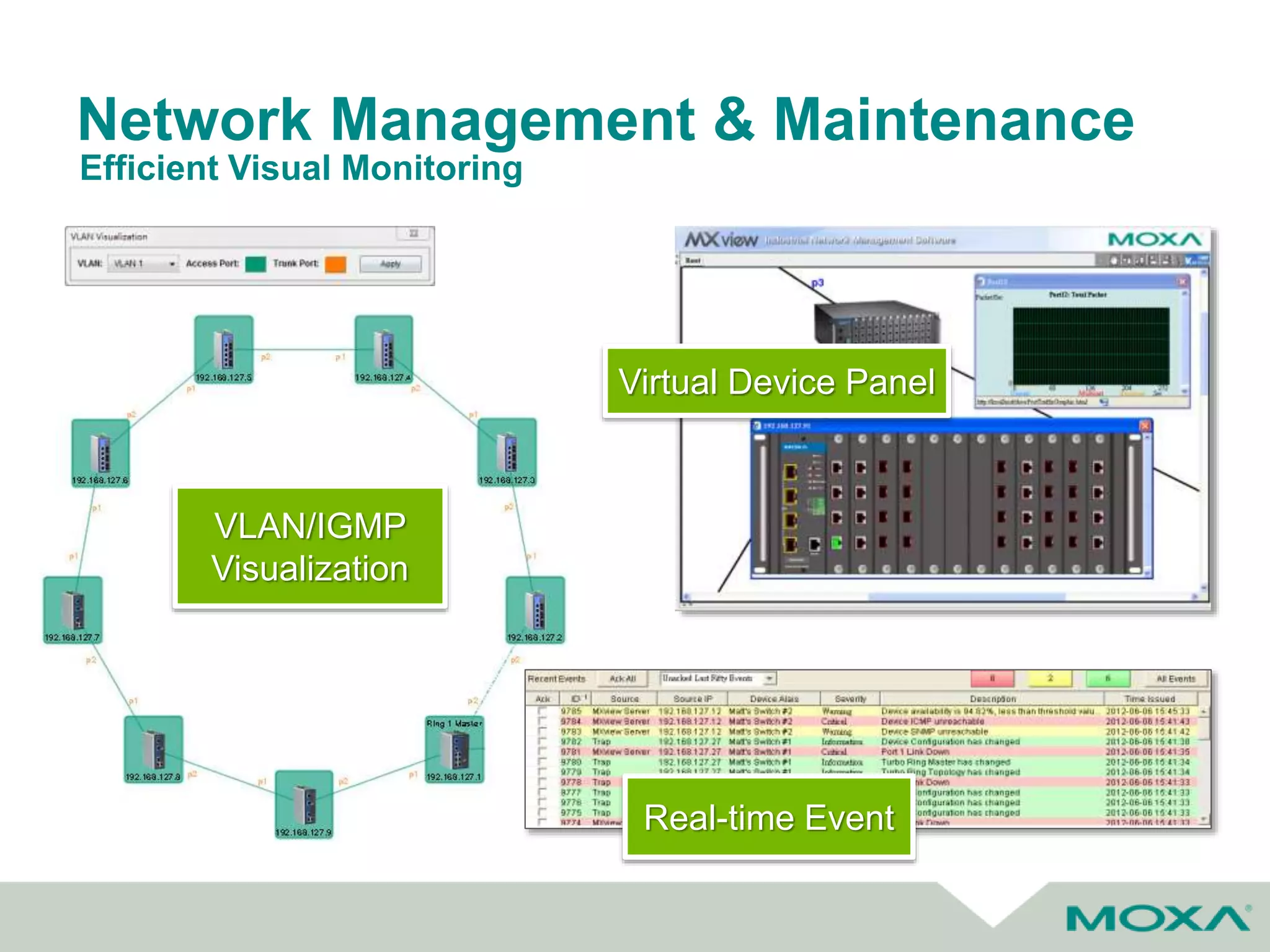
Efficient Visual Monitoring
Virtual Device Panel
Real-time Event
VLAN/IGMP
Visualization
CONFIGURATION CENTER
 1-click for mass configuration backup and
firmware upgrade
 Job scheduling for nightly configuration backup
 Configuration change history
Network Management & Maintenance
Schedule Automatic Backups
• One-click Backup
– Only trigger ‘Reset’ button on switch to copy configuration and log
files to ABC-02-USB
• Files Import & Backup
– Configuration import & backup
– Firmware upgrade
– System log backup
Confidential
Rotate blinking under backup
Network Management & Maintenance
Easy Field Backup & Recovery
Potential Cyber Security Threats in Automation
• Operations disrupted by huge number of nuisance messages on
network, slowing or blocking legitimate network traffic
Denial of service
• Causes computer to run attacker’s programStorage modification
• Replaces pieces of running program with attacker’s program
Memory modification /Memory
Injection / SQL injection
• Attacker impersonates trusted computer, inserting itself as a
middleman between trusted partner computers, modifying the
messages between them to accomplish the attacker’s goals
Man-in-the-Middle
• Watches messages between computers to gain information about
systemNetwork monitoring
• Gives attacker administrative privileges on systemEscalation of privilege
• Convincing users to unknowingly install malware by clicking on links,
bypassing outward-directed firewallsPhishing attacks
• Attackers exploit trusting, helpful impulses of plant personnel to
gain information used to bypass defenses and physical modification
or sabotage of control equipment
Social engineering
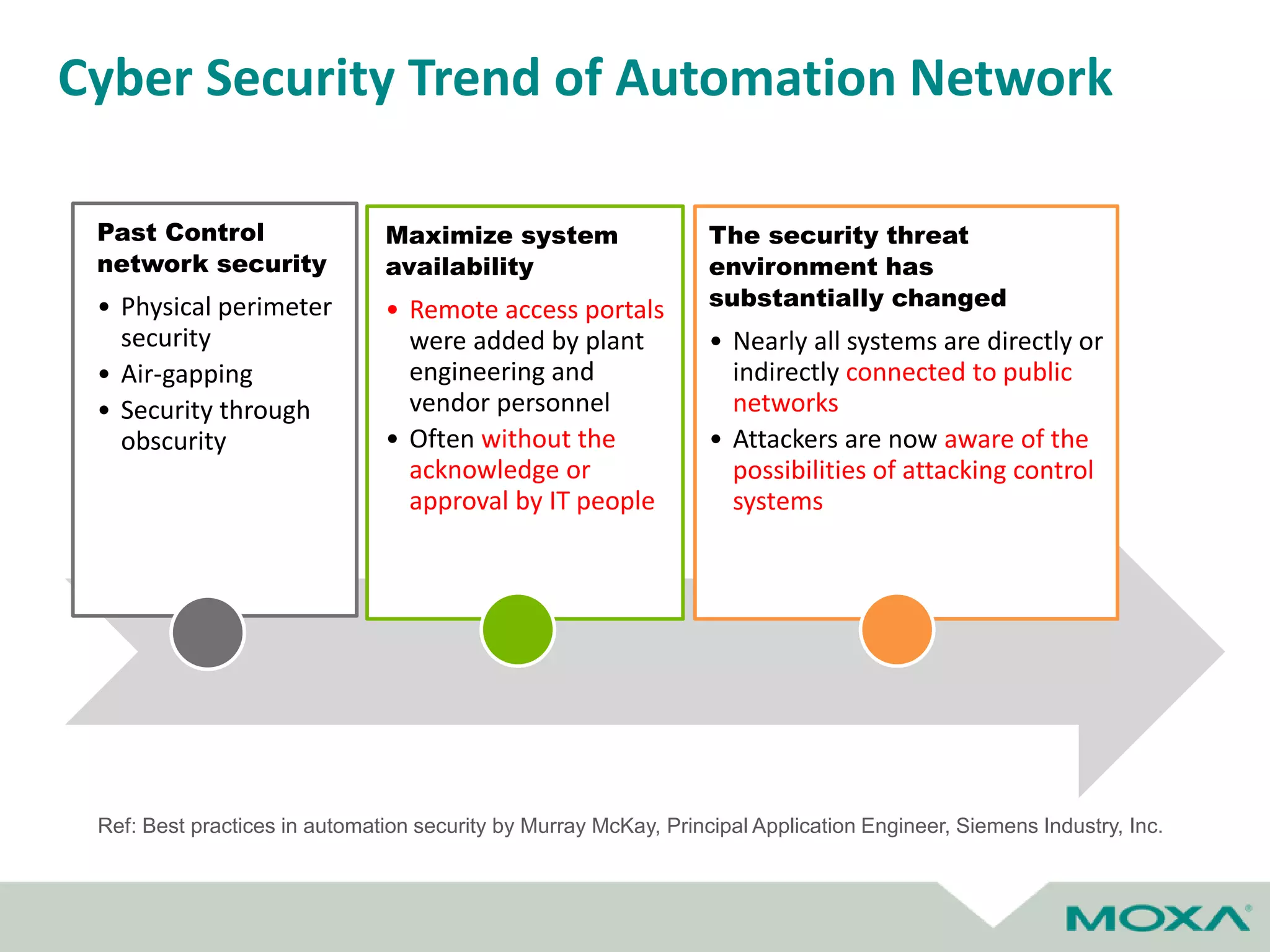
Past Control
network security
• Physical perimeter
security
• Air-gapping
• Security through
obscurity
Maximize system
availability
• Remote access portals
were added by plant
engineering and
vendor personnel
• Often without the
acknowledge or
approval by IT people
The security threat
environment has
substantially changed
• Nearly all systems are directly or
indirectly connected to public
networks
• Attackers are now aware of the
possibilities of attacking control
systems
Cyber Security Trend of Automation Network
Ref: Best practices in automation security by Murray McKay, Principal Application Engineer, Siemens Industry, Inc.
Create a Defense-in-Depth
Network Security Environment
Defense in Multiple Places
• Defend the Networks and Infrastructure
(encryption and traffic flow security
measures to resist passive monitoring)
• Defend the Enclave Boundaries (deploy
Firewalls and Intrusion Detection to resist
active network attacks)
• Defend the Computing Environment
Layered Defenses
• Each of these mechanisms must present
unique obstacles to the adversary.
• Further, each should include both
“protection” and “detection” measures
Confidential
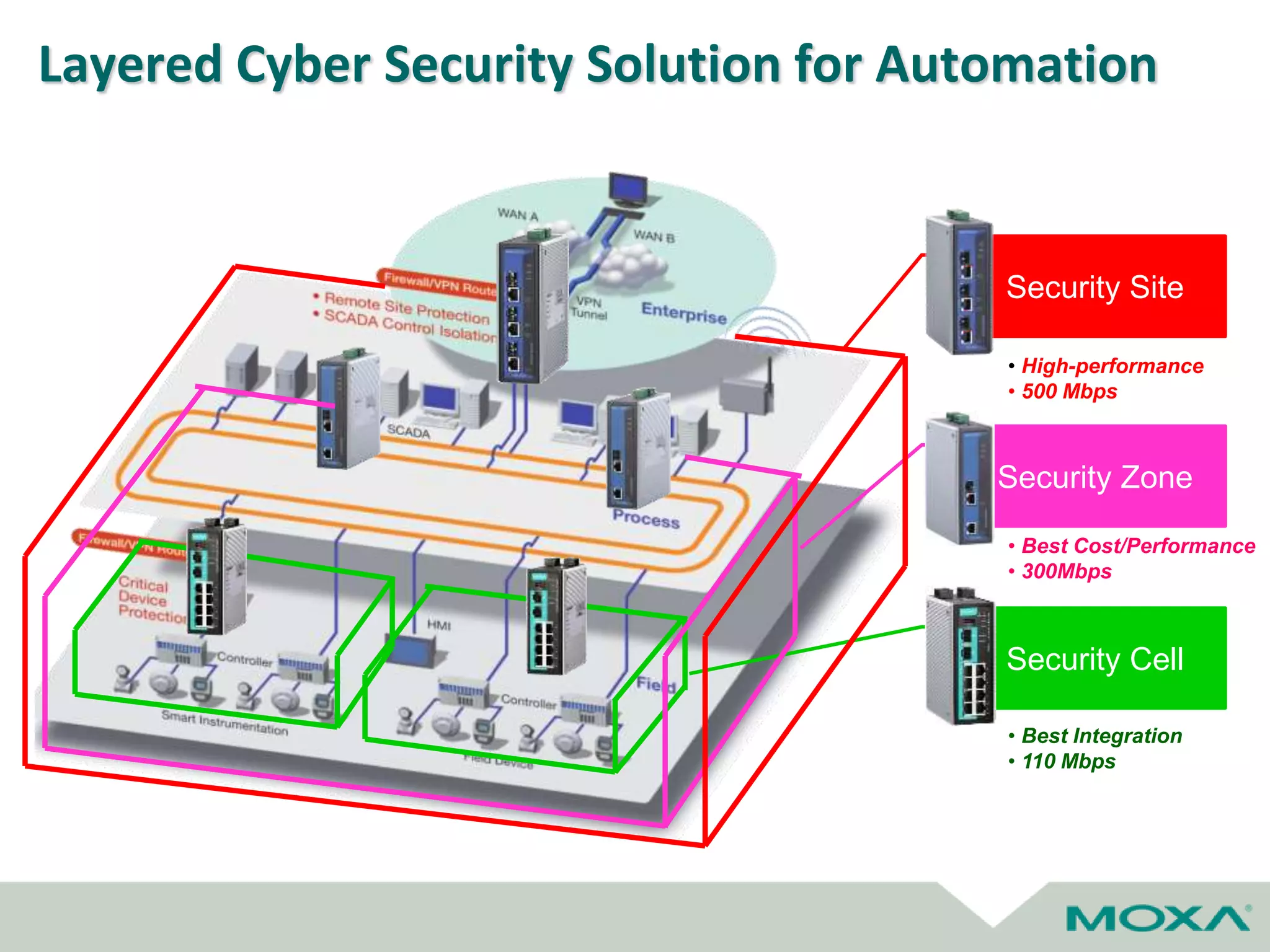
The Best Countermeasure against Cyber Threats
Layered Cyber Security Solution for Automation
Security Site
• High-performance
• 500 Mbps
Security Zone
• Best Cost/Performance
• 300Mbps
Security Cell
• Best Integration
• 110 Mbps
Firmware updates
• FW updates are critical to ensuring your devices
are always up to date with the latest technology
– Includes both technology and security updates
• Many manufacturers offer free FW upgrades to
ensure their customers have longevity with the
products they have purhcased
Network Troubleshooting
Minimizing Downtime
Alerts on Unmanaged Switches
• While unmanaged switches
generally cannot communicate
status over the network, they
can be simply configured to
provide relay outputs for
alarms such as:
– Power Supply Failure
– Port Break Alarms
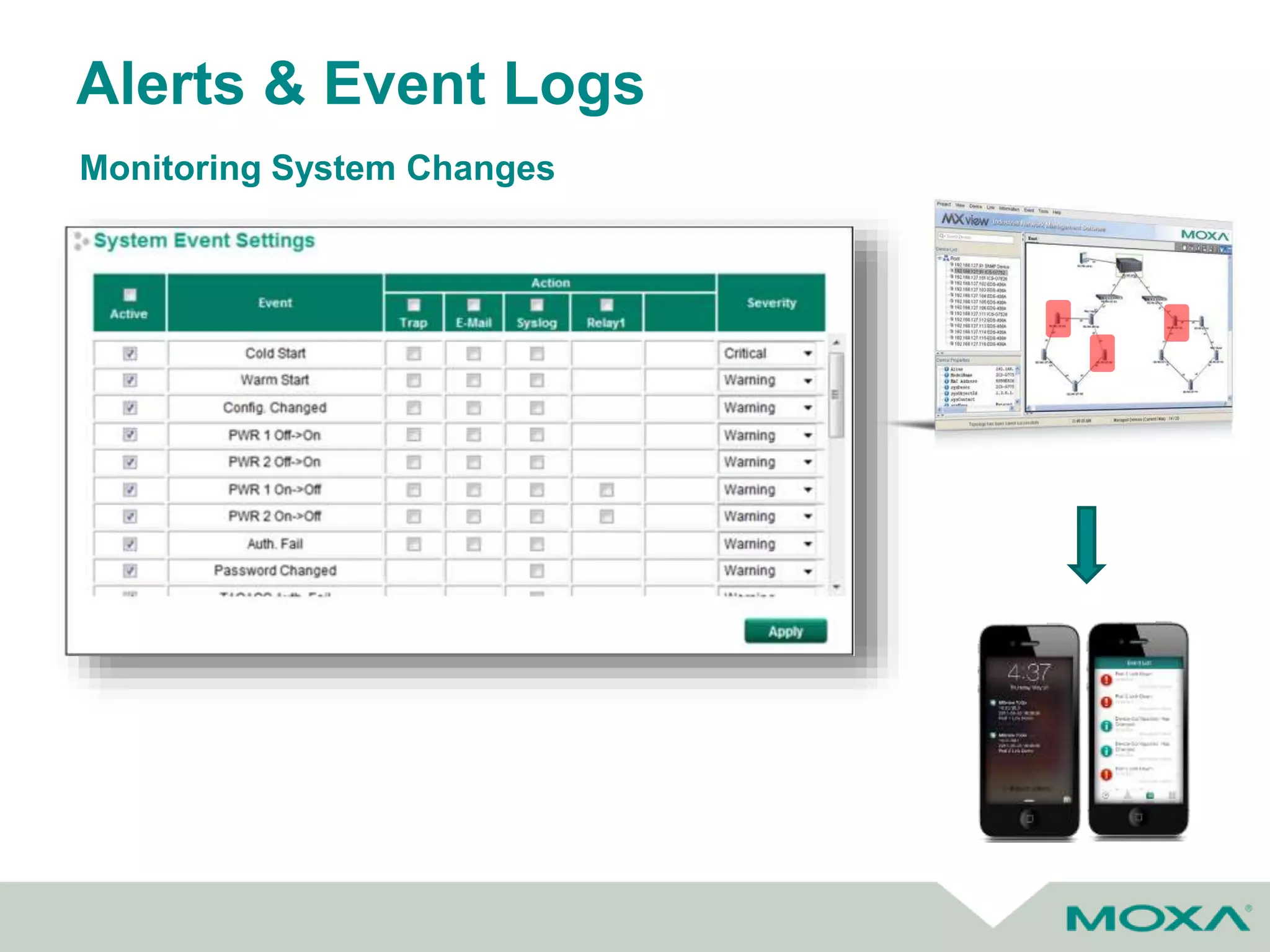
Monitoring System Changes
Alerts & Event Logs
Monitoring System Changes
Predictive Monitoring & Alerts
Comprehensive Fiber Status Monitoring and Warnings
Fiber Status Monitoring – Fiber
Temperature, Working Voltage,
Tx /Rx Powers
Auto Event Warning – SNMP
trap, Relay, Email, Event log
(DDM: Digital Diagnostics Monitoring)
SC ST SFP
All Fiber should be monitored
for fault prevention
Troubleshooting Tools
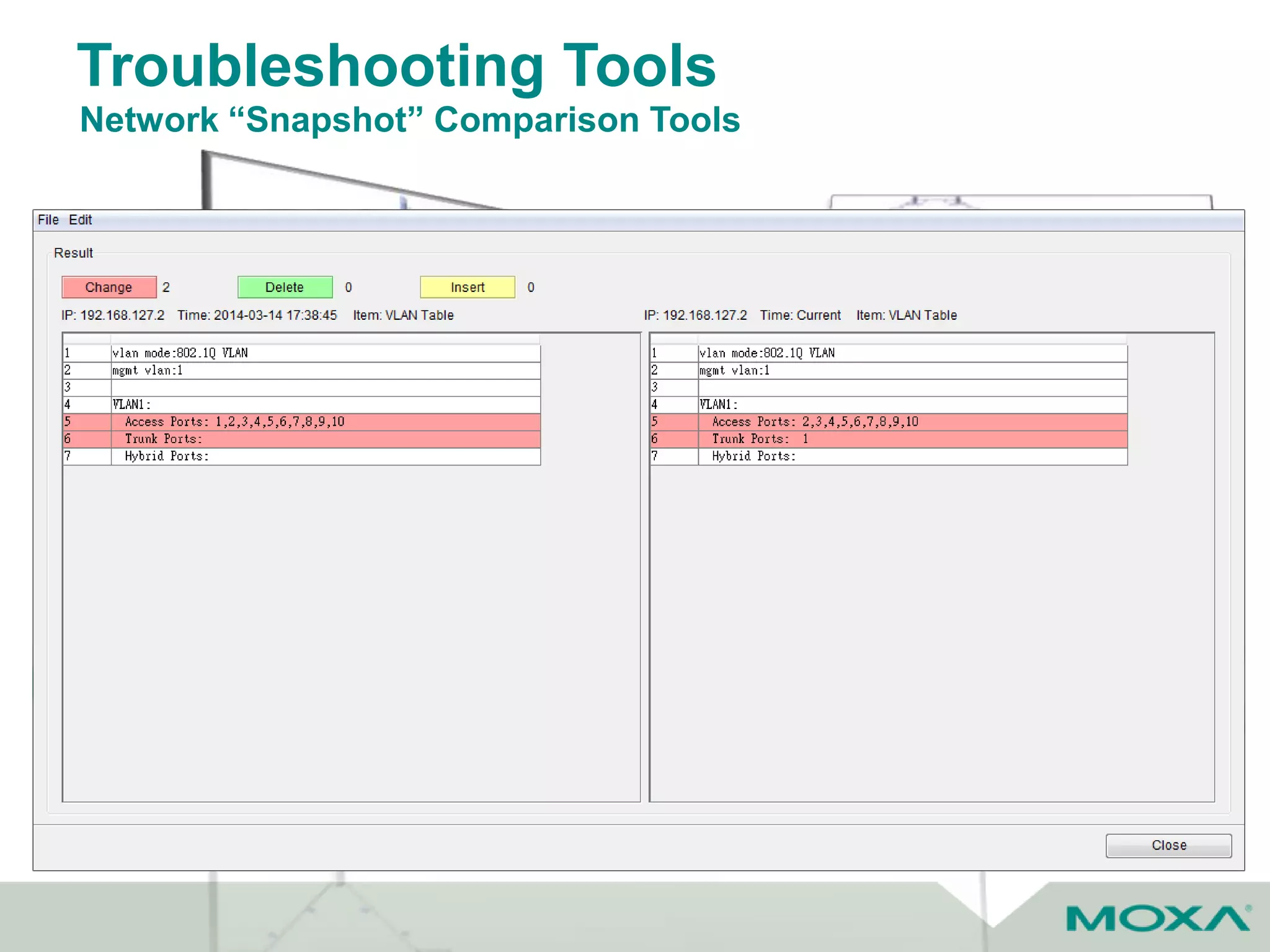
Network “Snapshot” Comparison Tools
• Quickly Collect Switch Info
(Take Network Snapshot)
• Quickly Compare Switch Info
(Compare Network Snapshots)
Troubleshooting Tools
Event Playback
EVENT PLAYBACK
 Record network status in 30 days
 Network playback on any time/any event
 Play at 1x, 2x, or 4x speed
Troubleshooting Tools
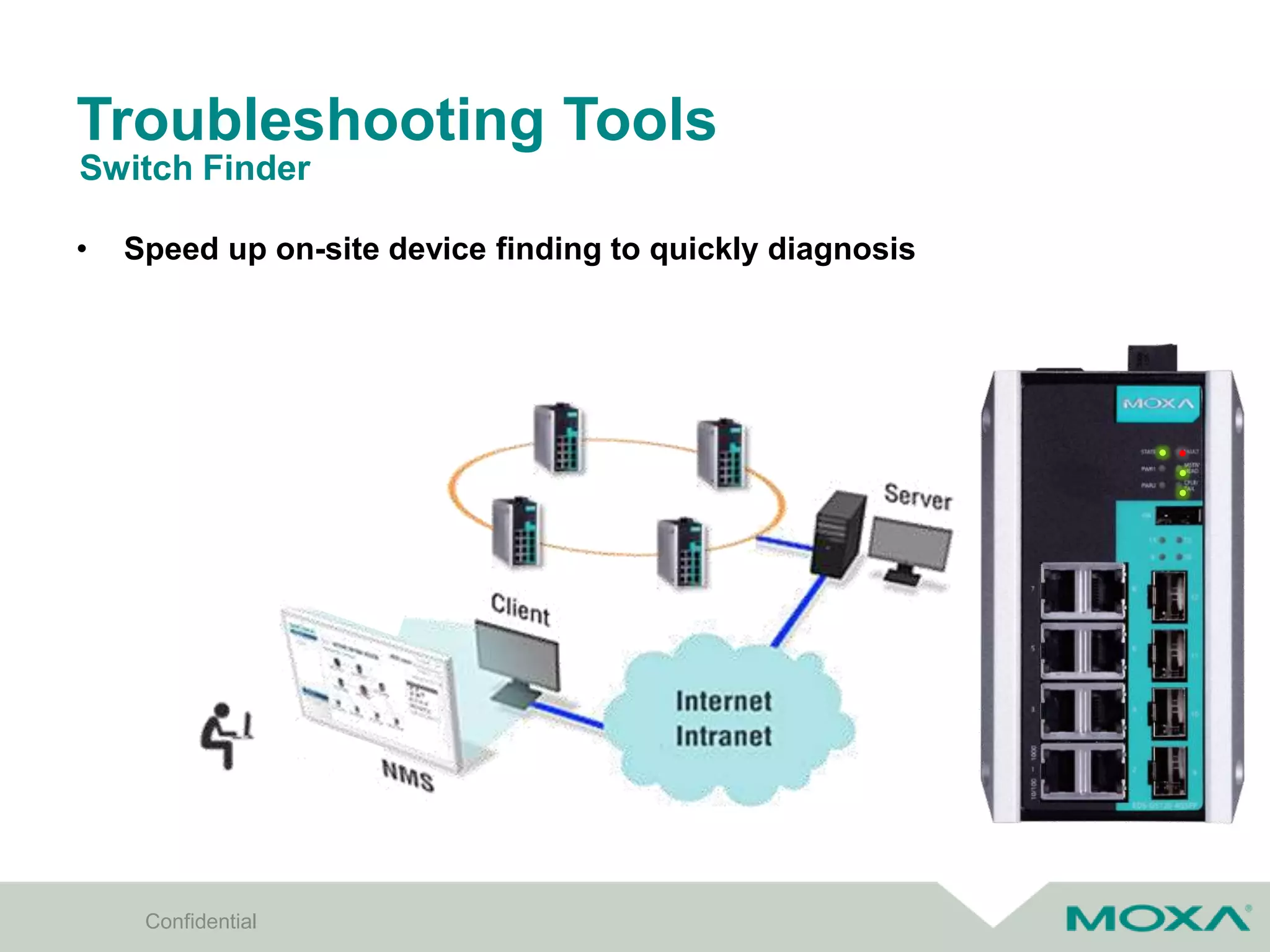
• Speed up on-site device finding to quickly diagnosis
Switch Finder
Confidential
Troubleshooting Tools
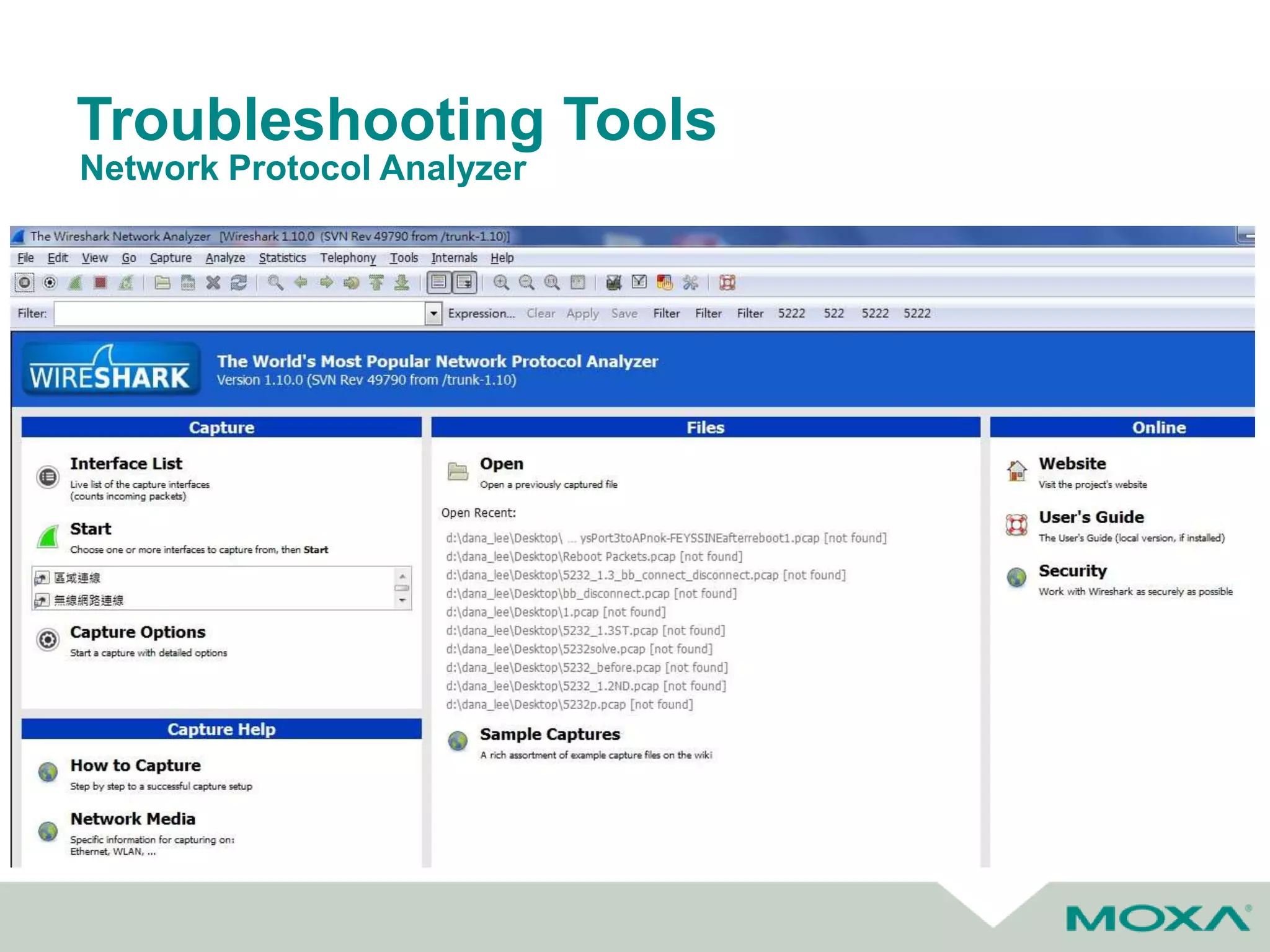
Network Protocol Analyzer
Q&A
Thank You

Commissioning, Managing &amp; Troubleshooting Industrial Networks

  • 1.
    Tips for Commissioning, Managing,and Troubleshooting your Industrial Network Moxa Technology Webinar Series Richard Wood Networking Infrastructure Manager
  • 2.
    Agenda Industrial Network Challenges NetworkConfiguration & Commissioning Managing Industrial Networks Troubleshooting to Minimize Downtime Tips for Commissioning, Managing & Troubleshooting Your Industrial Network
  • 3.
    Industrial Network Challenges •Harsh operating environments • Network availability requirements are much higher than enterprise IT • Cost of downtime is extremely high • Interoperability of industrial devices/networks • Limited networking expertise Typical challenges Source: http://www.strategiccompanies.com/pdfs/Assessing%20t he%20Financial%20Impact%20of%20Downtime.pdf
  • 4.
  • 5.
    Network Configuration &Commisioning Installation Configuration Troubleshooting Testing Commissioning Typical steps
  • 6.
    Unmanaged VS. Managed HARDWARE SOFTWARE APPLICATION SmallScale Network P2P Communication Mid to Large Scale Network Mission Critical Network with Remote Monitoring Packet Switching: • Entry Level Switch ASIC Packet Switching + Network Management: • Advanced Switch ASIC + • CPU + Flash / RAM Simple Data Switching Powerful Performance for Network Management POSITION Plug and Play No Configuration Required Web / CLI Setting • Network Security • Network Redundancy • Network Management • Traffic Prioritization Unmanaged Switch Managed Switch
  • 7.
    Network Topology Typical EnterpriseStar Topology • Single point of failure • Long, costly wire/fiber runs
  • 8.
    Network Configuration Selecting theRight Topology for Your Needs Redundant Technology Type Mesh STP RSTP Ring/Chain HSR/PRP Feature • Every node connects to each other • IEEE 802.1D • Loop-free tree shape topology • IEEE 802.1w • Loop-free tree shape topology • Proprietary technology • Ring/Chain Topology • IEC 61850 • Dual Network (PRP) • Dual Path (HSR) Pros • Highly reliable • Self-healing • Open Protocol • Self-healing • Open Protocol • Faster recovery time: ~1 sec • Low cost • Self-healing • Faster recovery time (<20 ms) • Open protocol • Self-healing • Zero recovery time (0 ms) Cons • Too costly for large network deployment • Recovery time: ~15 sec • Recovery time not fast enough • Vendor specific technology • Prohibitively expensive unless absolutely needed Backup Link Root
  • 9.
    Network Topology Typical IndustrialRing Topology • No single point of failure • Reduced wiring costs
  • 10.
    Industrial Protocols • SCADAcontrol / monitor PLC and field devices via industrial protocols Integration of SCADA & PLC Networks Drive I/O PLC Ethernet Switch HMI
  • 11.
    Network Configuration &Commissioning • Two different methodologies for configuration of network devices • Many users from the industrial side prefer web GUI • Most users for commercial/enterprise side will favor CLI – Used by Cisco Web Interface vs CLI
  • 12.
  • 13.
    Device Configuration Graphical UserInterface • Visual confirmation of current settings • Menu based configuration • Standard web browser interface
  • 14.
    Network Management Tools EasyConfiguration @ Installation Stage Efficient Monitoring @ Operation Stage Easy Backup/recovery @ Maintenance Stage Quick Troubleshooting @ Diagnostics Stage
  • 15.
    Mass Configuration Tools Upto 10X Productivity Boost One by One Setting by Web Batch Configuration by MXconfig Multiple Devices Wiring in Series Broadcast Search Group IP Configuration Group Redundancy Configuration Finish 400 sec 20 sec 200 sec 100 sec Total 12 min Single Power Supply Single Device Wiring IP Configuration Redundancy Configuration Repeat 100 times Finish 10 sec 30 sec 35 sec Total 125 min
  • 16.
    Fast Group Configuration Network(IP address) Setting Confidential IP address setting for mass devices
  • 17.
    Fast Group Configuration 802.1QVLAN Setting Confidential Quick Add Panel for cloning setting *Mass 802.1Q VLAN Setting only for devices with the same model name
  • 18.
    Fast Configuration Deployment CopyConfiguration Confidential Quick configuration copy from one specific setting to mass devices Support mass IP address setting *Copy Configuration only for devices with the same model name
  • 19.
    Configuration Check Status Overview Confidential RedundancySetting Overview 802.1Q VLAN Setting Overview
  • 20.
    Startup Troubleshooting Confidential21 Compare aSingle Device with Whole Network VLAN 1: Access, PVID=1, Forb=200 2: Access, PVID=2, Forb=300 3: Trunk, PVID=100, Tag=1,2 4: Trunk, PVID=100, Tag=1,2 VLAN 1: Access, PVID=1, Forb=200 2: Access, PVID=2, Forb=300 3: Trunk, PVID=100, Tag=1,2 4: Trunk, PVID=100, Tag=1,2 VLAN 1: Access, PVID=1, Forb=200 2: Access, PVID=2, Forb=300 3: Trunk, PVID=100, Tag=1,2 4: Trunk, PVID=100, Tag=1,2 VLAN 1: Access, PVID=1, Forb=200 2: Access, PVID=2, Forb=300 3: Trunk, PVID=101, Tag=1,2 4: Trunk, PVID=100, Tag=1,2 VLAN 1: Access, PVID=1, Forb=200 2: Access, PVID=2, Forb=300 3: Trunk, PVID=100, Tag=1,2 4: Trunk, PVID=100, Tag=1,2 VLAN 1: Access, PVID=1, Forb=200 2: Access, PVID=2, Forb=300 3: Trunk, PVID=100, Tag=1,2 4: Trunk, PVID=100, Tag=1,2 VLAN 1: Access, PVID=1, Forb=200 2: Access, PVID=2, Forb=300 3: Trunk, PVID=100, Tag=1,2 4: Trunk, PVID=100, Tag=1,2 VLAN 1: Access, PVID=1, Forb=200 2: Access, PVID=2, Forb=300 3: Trunk, PVID=100, Tag=1,2 4: Trunk, PVID=100, Tag=1,2 VLAN 1: Access, PVID=1, Forb=200 2: Access, PVID=2, Forb=300 3: Trunk, PVID=100, Tag=1,2 4: Trunk, PVID=100, Tag=1,2 VLAN 1: Access, PVID=1, Forb=200 2: Access, PVID=2, Forb=300 3: Trunk, PVID=100, Tag=1,2 4: Trunk, PVID=100, Tag=1,2 VLAN 1: Access, PVID=1, Forb=200 2: Access, PVID=2, Forb=300 3: Trunk, PVID=100, Tag=1,2 4: Trunk, PVID=100, Tag=1,2 VLAN 1: Access, PVID=1, Forb=200 2: Access, PVID=2, Forb=300 3: Trunk, PVID=100, Tag=1,2 4: Trunk, PVID=100, Tag=1,2 VLAN 1: Access, PVID=1, Forb=200 2: Access, PVID=2, Forb=300 3: Trunk, PVID=100, Tag=1,2 4: Trunk, PVID=100, Tag=1,2 VLAN 1: Access, PVID=1, Forb=200 2: Access, PVID=2, Forb=300 3: Trunk, PVID=100, Tag=1,2 4: Trunk, PVID=100, Tag=1,2 VLAN 1: Access, PVID=1, Forb=200 2: Access, PVID=2, Forb=300 3: Trunk, PVID=100, Tag=1,2 4: Trunk, PVID=100, Tag=1,2 Comparison Sample Benefit Reduce Manual Setting Errors
  • 21.
  • 22.
    Network Management &Maintenance Best Practices
  • 23.
    Network Management &Maintenance • Industrial NMS – Auto topology visualization – Remote device management – Real-time event management – Comprehensive performance reporting Network Management Software Confidential
  • 24.
    Network Management &Maintenance Efficient Visual Monitoring Virtual Device Panel Real-time Event VLAN/IGMP Visualization
  • 25.
    CONFIGURATION CENTER  1-clickfor mass configuration backup and firmware upgrade  Job scheduling for nightly configuration backup  Configuration change history Network Management & Maintenance Schedule Automatic Backups
  • 26.
    • One-click Backup –Only trigger ‘Reset’ button on switch to copy configuration and log files to ABC-02-USB • Files Import & Backup – Configuration import & backup – Firmware upgrade – System log backup Confidential Rotate blinking under backup Network Management & Maintenance Easy Field Backup & Recovery
  • 27.
    Potential Cyber SecurityThreats in Automation • Operations disrupted by huge number of nuisance messages on network, slowing or blocking legitimate network traffic Denial of service • Causes computer to run attacker’s programStorage modification • Replaces pieces of running program with attacker’s program Memory modification /Memory Injection / SQL injection • Attacker impersonates trusted computer, inserting itself as a middleman between trusted partner computers, modifying the messages between them to accomplish the attacker’s goals Man-in-the-Middle • Watches messages between computers to gain information about systemNetwork monitoring • Gives attacker administrative privileges on systemEscalation of privilege • Convincing users to unknowingly install malware by clicking on links, bypassing outward-directed firewallsPhishing attacks • Attackers exploit trusting, helpful impulses of plant personnel to gain information used to bypass defenses and physical modification or sabotage of control equipment Social engineering
  • 28.
    Past Control network security •Physical perimeter security • Air-gapping • Security through obscurity Maximize system availability • Remote access portals were added by plant engineering and vendor personnel • Often without the acknowledge or approval by IT people The security threat environment has substantially changed • Nearly all systems are directly or indirectly connected to public networks • Attackers are now aware of the possibilities of attacking control systems Cyber Security Trend of Automation Network Ref: Best practices in automation security by Murray McKay, Principal Application Engineer, Siemens Industry, Inc.
  • 29.
    Create a Defense-in-Depth NetworkSecurity Environment Defense in Multiple Places • Defend the Networks and Infrastructure (encryption and traffic flow security measures to resist passive monitoring) • Defend the Enclave Boundaries (deploy Firewalls and Intrusion Detection to resist active network attacks) • Defend the Computing Environment Layered Defenses • Each of these mechanisms must present unique obstacles to the adversary. • Further, each should include both “protection” and “detection” measures Confidential The Best Countermeasure against Cyber Threats
  • 30.
    Layered Cyber SecuritySolution for Automation Security Site • High-performance • 500 Mbps Security Zone • Best Cost/Performance • 300Mbps Security Cell • Best Integration • 110 Mbps
  • 31.
    Firmware updates • FWupdates are critical to ensuring your devices are always up to date with the latest technology – Includes both technology and security updates • Many manufacturers offer free FW upgrades to ensure their customers have longevity with the products they have purhcased
  • 32.
  • 33.
    Alerts on UnmanagedSwitches • While unmanaged switches generally cannot communicate status over the network, they can be simply configured to provide relay outputs for alarms such as: – Power Supply Failure – Port Break Alarms Monitoring System Changes
  • 34.
    Alerts & EventLogs Monitoring System Changes
  • 35.
    Predictive Monitoring &Alerts Comprehensive Fiber Status Monitoring and Warnings Fiber Status Monitoring – Fiber Temperature, Working Voltage, Tx /Rx Powers Auto Event Warning – SNMP trap, Relay, Email, Event log (DDM: Digital Diagnostics Monitoring) SC ST SFP All Fiber should be monitored for fault prevention
  • 36.
    Troubleshooting Tools Network “Snapshot”Comparison Tools • Quickly Collect Switch Info (Take Network Snapshot) • Quickly Compare Switch Info (Compare Network Snapshots)
  • 37.
    Troubleshooting Tools Event Playback EVENTPLAYBACK  Record network status in 30 days  Network playback on any time/any event  Play at 1x, 2x, or 4x speed
  • 38.
    Troubleshooting Tools • Speedup on-site device finding to quickly diagnosis Switch Finder Confidential
  • 39.
  • 40.
  • 41.