Network Assignment On Project Design
1. Project Scope and Requirements
1.1 Scope of the Project discussed in network assignment:
From the newly developed system, expects of the organization is included in the
following project scope:
 For new office branches, the implementation of structure and design architecture
is required.
 By developing network architecture, the organization can implement the
connectivity within the organization.
 To measures, the resource and cost required the organization to invest in new
architecture developments.
1.2 Requirements of the Project:
In IT project of a company should follow these essential types of equipment are:
 Security: Security measures need to implement to giving protection to the
confidential information so that outsiders cannot access any technology or
information.
 Effective Communication: To improve the growth and effectiveness of the
business, it is essential to build communication among various department of a
company.
 Addressing: To avoid conflict while data transaction, it is essential to use the
effective addressing scheme.
 Budget: For developing an active network within time and budget, it is essential to
evaluate budget [1].
1
2. Network Design and Justification:
2.1 Network Design:
For the IT industry, various devices of hardware have selected with the support of
Cisco Packet Tracer. The structure of the IT industry has shown in the image below:
2.2 Justification:
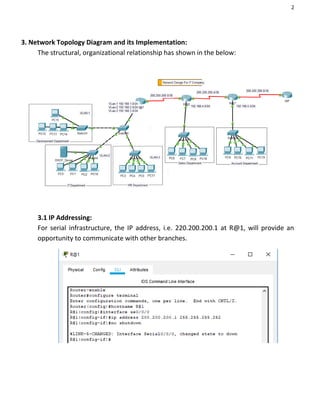
With the help of Cisco Packet Tracer, the above structure mentioned in this network
assignment depicts the configured and design for the organization. For support, the
business organization various device such as PCs, switches, routers have set. Based
on the departments, the network has categorized. The departments are HR, sales, IT,
development and accounting. These departments are also interconnected with
various VLANs [3]. Multiple techniques have been used to assign an IP address. For
enable, device communication, need to configure RIP routing protocol over the
devices. FastEthernet cables are uses for interdependent connection; on the other
hand, serial cables are used for the connection of central organization router with
department routers.
2
3. Network Topology Diagram and its Implementation:
The structural, organizational relationship has shown in the below:
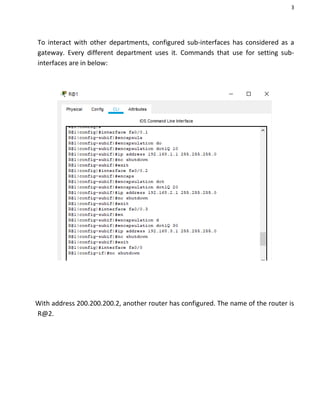
3.1 IP Addressing:
For serial infrastructure, the IP address, i.e. 220.200.200.1 at R@1, will provide an
opportunity to communicate with other branches.
3
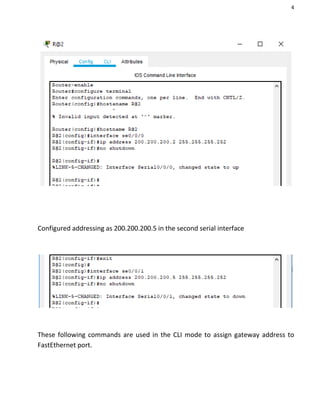
To interact with other departments, configured sub-interfaces has considered as a
gateway. Every different department uses it. Commands that use for setting sub-
interfaces are in below:
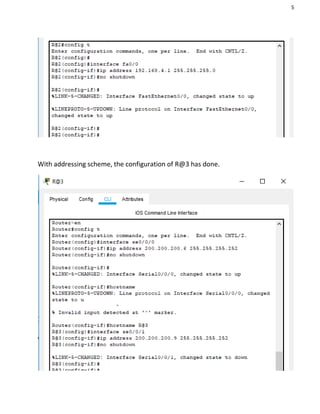
With address 200.200.200.2, another router has configured. The name of the router is
R@2.
4
Configured addressing as 200.200.200.5 in the second serial interface
These following commands are used in the CLI mode to assign gateway address to
FastEthernet port.
5
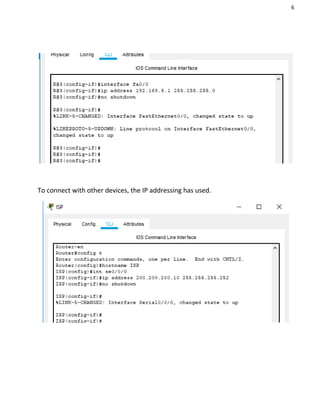
With addressing scheme, the configuration of R@3 has done.
6
To connect with other devices, the IP addressing has used.
7
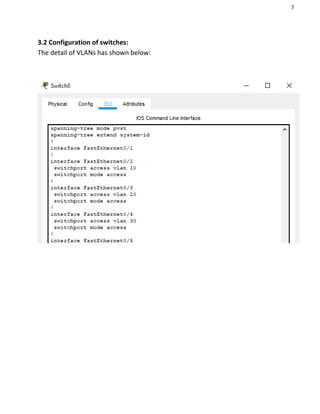
3.2 Configuration of switches:
The detail of VLANs has shown below:
8
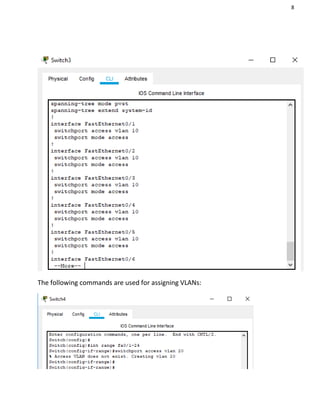
The following commands are used for assigning VLANs:
9
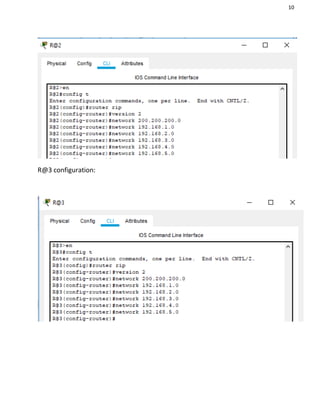
3.3 Routing protocol Configuration:
RIP that is a routing protocol has methods for adding the communication medium
among all other routers [2]. Multiple network addresses have added in this protocol,
which has connected with the router.
With the scheme of addressing, other routers have configured.
10
R@3 configuration:
11
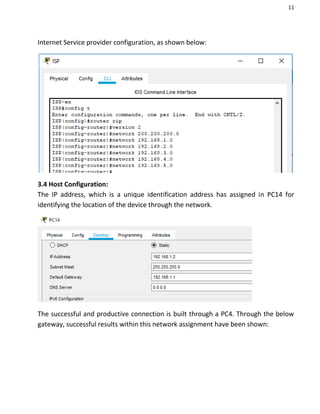
Internet Service provider configuration, as shown below:
3.4 Host Configuration:
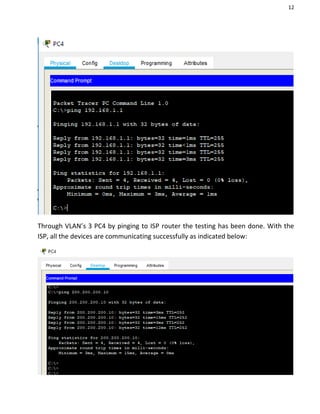
The IP address, which is a unique identification address has assigned in PC14 for
identifying the location of the device through the network.
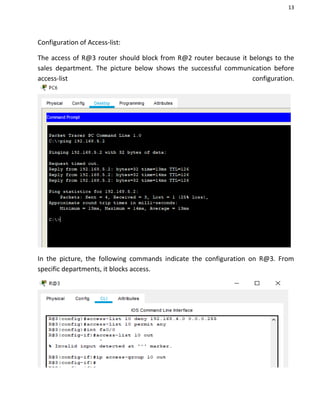
The successful and productive connection is built through a PC4. Through the below
gateway, successful results within this network assignment have been shown:
12
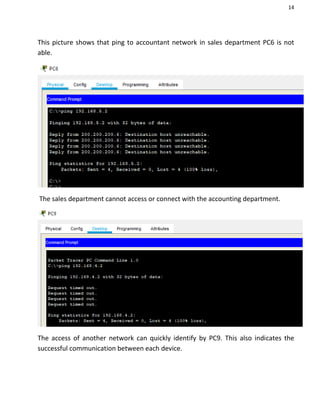
Through VLAN’s 3 PC4 by pinging to ISP router the testing has been done. With the
ISP, all the devices are communicating successfully as indicated below:
13
Configuration of Access-list:
The access of R@3 router should block from R@2 router because it belongs to the
sales department. The picture below shows the successful communication before
access-list configuration.
In the picture, the following commands indicate the configuration on R@3. From
specific departments, it blocks access.
14
This picture shows that ping to accountant network in sales department PC6 is not
able.
The sales department cannot access or connect with the accounting department.
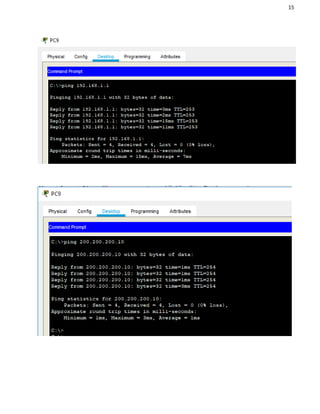
The access of another network can quickly identify by PC9. This also indicates the
successful communication between each device.
15
16
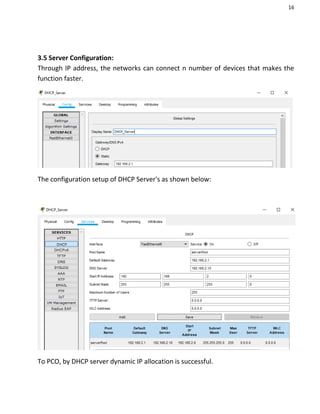
3.5 Server Configuration:
Through IP address, the networks can connect n number of devices that makes the
function faster.
The configuration setup of DHCP Server's as shown below:
To PCO, by DHCP server dynamic IP allocation is successful.
17
4. Timeline and Budget Estimation
The schedule followed for completing this project is presented with the help of the
Gantt chart [4]. By making the most use of different resources, the performance of
the project is shown approximately:
4.1 Project timeline
The project is displayed with the help of MS Office Project software, it is completed
with the timetable, and phases followed. Users can be able to understand the
resources that are utilized for deploying the network with the help of the timeline [5]:
18
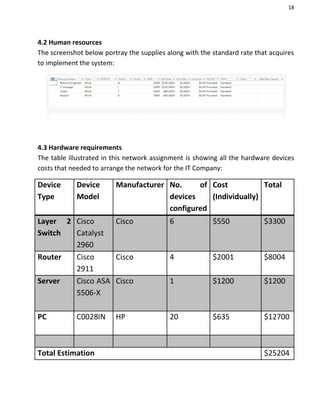
4.2 Human resources
The screenshot below portray the supplies along with the standard rate that acquires
to implement the system:
4.3 Hardware requirements
The table illustrated in this network assignment is showing all the hardware devices
costs that needed to arrange the network for the IT Company:
Device
Type
Device
Model
Manufacturer No. of
devices
configured
Cost
(Individually)
Total
Layer 2
Switch
Cisco
Catalyst
2960
Cisco 6 $550 $3300
Router Cisco
2911
Cisco 4 $2001 $8004
Server Cisco ASA
5506-X
Cisco 1 $1200 $1200
PC C0028IN HP 20 $635 $12700
Total Estimation $25204
19
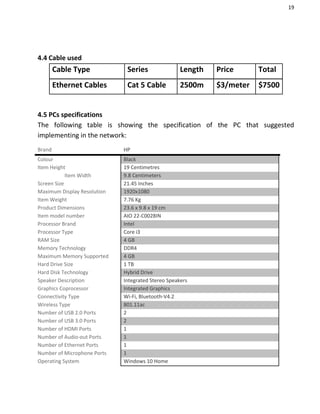
4.4 Cable used
4.5 PCs specifications
The following table is showing the specification of the PC that suggested
implementing in the network:
Brand HP
Colour Black
Item Height 19 Centimetres
Item Width 9.8 Centimeters
Screen Size 21.45 Inches
Maximum Display Resolution 1920x1080
Item Weight 7.76 Kg
Product Dimensions 23.6 x 9.8 x 19 cm
Item model number AIO 22-C0028IN
Processor Brand Intel
Processor Type Core i3
RAM Size 4 GB
Memory Technology DDR4
Maximum Memory Supported 4 GB
Hard Drive Size 1 TB
Hard Disk Technology Hybrid Drive
Speaker Description Integrated Stereo Speakers
Graphics Coprocessor Integrated Graphics
Connectivity Type Wi-Fi, Bluetooth-V4.2
Wireless Type 801.11ac
Number of USB 2.0 Ports 2
Number of USB 3.0 Ports 2
Number of HDMI Ports 1
Number of Audio-out Ports 1
Number of Ethernet Ports 1
Number of Microphone Ports 1
Operating System Windows 10 Home
Cable Type Series Length Price Total
Ethernet Cables Cat 5 Cable 2500m $3/meter $7500
20
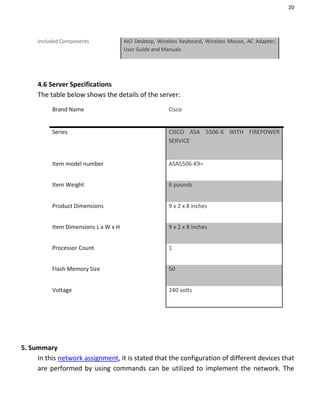
Included Components AIO Desktop, Wireless Keyboard, Wireless Mouse, AC Adapter,
User Guide and Manuals
4.6 Server Specifications
The table below shows the details of the server:
Brand Name Cisco
Series CISCO ASA 5506-X WITH FIREPOWER
SERVICE
Item model number ASA5506-K9=
Item Weight 6 pounds
Product Dimensions 9 x 2 x 8 inches
Item Dimensions L x W x H 9 x 2 x 8 inches
Processor Count 1
Flash Memory Size 50
Voltage 240 volts
5. Summary
In this network assignment, it is stated that the configuration of different devices that
are performed by using commands can be utilized to implement the network. The
21
installation of a system is for IT Company, for increasing the growth of the business of
the new branch office that is planned to be open. The branch office network will
comprise of switches, PCs, constitute routers and server. Cisco tracer tool is utilized
for the simulation of the system, and by running different commands, it provides the
different number of devices to connect and configure. DHCP server deploys to
support IP addressing allocation process. It assigns an IP device when it is requesting
the network to access the tools. By configuring access-list, the security measures are
implemented, in which it blocks access to the sales department of the accountant
department. In the IT Company, the discussion of the timeline it also discusses and
follows to deploy the desired network.
22
References
[1] A. M. Rahmani et al., “Smart e-Health Gateway: Bringing intelligence to
Internet-of-Things based ubiquitous healthcare systems,” in 2015 12th Annual IEEE
Consumer Communications and Networking Conference, CCNC 2015, 2015.
[2] A. Y. Ding, J. Crowcroft, S. Tarkoma, and H. Flinck, “Software defined
networking for security enhancement in wireless mobile networks,” Comput.
Networks, 2014.
[3] B. D. Allen, A. C. Singer, and E. S. Boyden, “Principles of designing interpretable
optogenetic behavior experiments,” Learning and Memory. 2015.
[4] A. G. Fiks et al., network assignment “Comparative effectiveness research
through a collaborative electronic reporting consortium,” Pediatrics, 2015.
[5] N. Kratzke and P. C. Quint, “Investigation of impacts on network performance in
the advance of a microservice design,” in Communications in Computer and
Information Science, 2017.
[6] B. Camburn et al., “A Systematic Method for Design Prototyping,” J. Mech. Des.
Trans. ASME, 2015.
[7] T. El-Diraby, T. Krijnen, and M. Papagelis, “BIM-based collaborative design and
socio-technical analytics of green buildings,” Autom. Constr., 2017.

Network assignment on project design

  • 1.
    Network Assignment OnProject Design 1. Project Scope and Requirements 1.1 Scope of the Project discussed in network assignment: From the newly developed system, expects of the organization is included in the following project scope:  For new office branches, the implementation of structure and design architecture is required.  By developing network architecture, the organization can implement the connectivity within the organization.  To measures, the resource and cost required the organization to invest in new architecture developments. 1.2 Requirements of the Project: In IT project of a company should follow these essential types of equipment are:  Security: Security measures need to implement to giving protection to the confidential information so that outsiders cannot access any technology or information.  Effective Communication: To improve the growth and effectiveness of the business, it is essential to build communication among various department of a company.  Addressing: To avoid conflict while data transaction, it is essential to use the effective addressing scheme.  Budget: For developing an active network within time and budget, it is essential to evaluate budget [1].
  • 2.
    1 2. Network Designand Justification: 2.1 Network Design: For the IT industry, various devices of hardware have selected with the support of Cisco Packet Tracer. The structure of the IT industry has shown in the image below: 2.2 Justification: With the help of Cisco Packet Tracer, the above structure mentioned in this network assignment depicts the configured and design for the organization. For support, the business organization various device such as PCs, switches, routers have set. Based on the departments, the network has categorized. The departments are HR, sales, IT, development and accounting. These departments are also interconnected with various VLANs [3]. Multiple techniques have been used to assign an IP address. For enable, device communication, need to configure RIP routing protocol over the devices. FastEthernet cables are uses for interdependent connection; on the other hand, serial cables are used for the connection of central organization router with department routers.
  • 3.
    2 3. Network TopologyDiagram and its Implementation: The structural, organizational relationship has shown in the below: 3.1 IP Addressing: For serial infrastructure, the IP address, i.e. 220.200.200.1 at R@1, will provide an opportunity to communicate with other branches.
  • 4.
    3 To interact withother departments, configured sub-interfaces has considered as a gateway. Every different department uses it. Commands that use for setting sub- interfaces are in below: With address 200.200.200.2, another router has configured. The name of the router is R@2.
  • 5.
    4 Configured addressing as200.200.200.5 in the second serial interface These following commands are used in the CLI mode to assign gateway address to FastEthernet port.
  • 6.
    5 With addressing scheme,the configuration of R@3 has done.
  • 7.
    6 To connect withother devices, the IP addressing has used.
  • 8.
    7 3.2 Configuration ofswitches: The detail of VLANs has shown below:
  • 9.
    8 The following commandsare used for assigning VLANs:
  • 10.
    9 3.3 Routing protocolConfiguration: RIP that is a routing protocol has methods for adding the communication medium among all other routers [2]. Multiple network addresses have added in this protocol, which has connected with the router. With the scheme of addressing, other routers have configured.
  • 11.
  • 12.
    11 Internet Service providerconfiguration, as shown below: 3.4 Host Configuration: The IP address, which is a unique identification address has assigned in PC14 for identifying the location of the device through the network. The successful and productive connection is built through a PC4. Through the below gateway, successful results within this network assignment have been shown:
  • 13.
    12 Through VLAN’s 3PC4 by pinging to ISP router the testing has been done. With the ISP, all the devices are communicating successfully as indicated below:
  • 14.
    13 Configuration of Access-list: Theaccess of R@3 router should block from R@2 router because it belongs to the sales department. The picture below shows the successful communication before access-list configuration. In the picture, the following commands indicate the configuration on R@3. From specific departments, it blocks access.
  • 15.
    14 This picture showsthat ping to accountant network in sales department PC6 is not able. The sales department cannot access or connect with the accounting department. The access of another network can quickly identify by PC9. This also indicates the successful communication between each device.
  • 16.
  • 17.
    16 3.5 Server Configuration: ThroughIP address, the networks can connect n number of devices that makes the function faster. The configuration setup of DHCP Server's as shown below: To PCO, by DHCP server dynamic IP allocation is successful.
  • 18.
    17 4. Timeline andBudget Estimation The schedule followed for completing this project is presented with the help of the Gantt chart [4]. By making the most use of different resources, the performance of the project is shown approximately: 4.1 Project timeline The project is displayed with the help of MS Office Project software, it is completed with the timetable, and phases followed. Users can be able to understand the resources that are utilized for deploying the network with the help of the timeline [5]:
  • 19.
    18 4.2 Human resources Thescreenshot below portray the supplies along with the standard rate that acquires to implement the system: 4.3 Hardware requirements The table illustrated in this network assignment is showing all the hardware devices costs that needed to arrange the network for the IT Company: Device Type Device Model Manufacturer No. of devices configured Cost (Individually) Total Layer 2 Switch Cisco Catalyst 2960 Cisco 6 $550 $3300 Router Cisco 2911 Cisco 4 $2001 $8004 Server Cisco ASA 5506-X Cisco 1 $1200 $1200 PC C0028IN HP 20 $635 $12700 Total Estimation $25204
  • 20.
    19 4.4 Cable used 4.5PCs specifications The following table is showing the specification of the PC that suggested implementing in the network: Brand HP Colour Black Item Height 19 Centimetres Item Width 9.8 Centimeters Screen Size 21.45 Inches Maximum Display Resolution 1920x1080 Item Weight 7.76 Kg Product Dimensions 23.6 x 9.8 x 19 cm Item model number AIO 22-C0028IN Processor Brand Intel Processor Type Core i3 RAM Size 4 GB Memory Technology DDR4 Maximum Memory Supported 4 GB Hard Drive Size 1 TB Hard Disk Technology Hybrid Drive Speaker Description Integrated Stereo Speakers Graphics Coprocessor Integrated Graphics Connectivity Type Wi-Fi, Bluetooth-V4.2 Wireless Type 801.11ac Number of USB 2.0 Ports 2 Number of USB 3.0 Ports 2 Number of HDMI Ports 1 Number of Audio-out Ports 1 Number of Ethernet Ports 1 Number of Microphone Ports 1 Operating System Windows 10 Home Cable Type Series Length Price Total Ethernet Cables Cat 5 Cable 2500m $3/meter $7500
  • 21.
    20 Included Components AIODesktop, Wireless Keyboard, Wireless Mouse, AC Adapter, User Guide and Manuals 4.6 Server Specifications The table below shows the details of the server: Brand Name Cisco Series CISCO ASA 5506-X WITH FIREPOWER SERVICE Item model number ASA5506-K9= Item Weight 6 pounds Product Dimensions 9 x 2 x 8 inches Item Dimensions L x W x H 9 x 2 x 8 inches Processor Count 1 Flash Memory Size 50 Voltage 240 volts 5. Summary In this network assignment, it is stated that the configuration of different devices that are performed by using commands can be utilized to implement the network. The
  • 22.
    21 installation of asystem is for IT Company, for increasing the growth of the business of the new branch office that is planned to be open. The branch office network will comprise of switches, PCs, constitute routers and server. Cisco tracer tool is utilized for the simulation of the system, and by running different commands, it provides the different number of devices to connect and configure. DHCP server deploys to support IP addressing allocation process. It assigns an IP device when it is requesting the network to access the tools. By configuring access-list, the security measures are implemented, in which it blocks access to the sales department of the accountant department. In the IT Company, the discussion of the timeline it also discusses and follows to deploy the desired network.
  • 23.
    22 References [1] A. M.Rahmani et al., “Smart e-Health Gateway: Bringing intelligence to Internet-of-Things based ubiquitous healthcare systems,” in 2015 12th Annual IEEE Consumer Communications and Networking Conference, CCNC 2015, 2015. [2] A. Y. Ding, J. Crowcroft, S. Tarkoma, and H. Flinck, “Software defined networking for security enhancement in wireless mobile networks,” Comput. Networks, 2014. [3] B. D. Allen, A. C. Singer, and E. S. Boyden, “Principles of designing interpretable optogenetic behavior experiments,” Learning and Memory. 2015. [4] A. G. Fiks et al., network assignment “Comparative effectiveness research through a collaborative electronic reporting consortium,” Pediatrics, 2015. [5] N. Kratzke and P. C. Quint, “Investigation of impacts on network performance in the advance of a microservice design,” in Communications in Computer and Information Science, 2017. [6] B. Camburn et al., “A Systematic Method for Design Prototyping,” J. Mech. Des. Trans. ASME, 2015. [7] T. El-Diraby, T. Krijnen, and M. Papagelis, “BIM-based collaborative design and socio-technical analytics of green buildings,” Autom. Constr., 2017.