COURSE: Computer Networking Lab (
PROJECT TITLE: Bangladesh Computer Council Network Design.
Submitted To:
Pranab Bandhu Nath
Senior Lecturer
Dept. of CSE
City University, Dhaka.
Date of submission:
Computer Networking Lab (CSE- 318)
Bangladesh Computer Council Network Design.
Dhaka.
Submitted By:
Name: MD MUSAB MAHMUD
ID:
Program: B.SC in CSE
Date of submission: 28-10-21
1
Bangladesh Computer Council Network Design.
Submitted By:
MD MUSAB MAHMUD
ID: 181472538
Batch: 47th
B.SC in CSE
2
Abstract
In this Project I tried to simulate Bangladesh Computer Council (BCC) networking design. Due
to covid-19, I failed to enter the building. but trying to get the ideas of the whole building. I also
designed a pattern for the whole building, which is the head office Bangladesh Computer
Council. Besides, I calculated the total cost of the devices and it gives me the idea of the total
project cost. I also show Assemble and Disassemble gives images that gives an idea of hardware
parts of the computer.
Keyword: Bangladesh Computer Council Network design, Network Design, Computer
Networking.
Introduction
The Bangladesh Computer Council (BCC), is a statutory and autonomous government body
located in Dhaka, Bangladesh, that aids in the use of information technology and the formulation
of related policy. Bangladesh Computer Council operates a tier III certified national data center
in Bangladesh.
The ICT Division of Bangladesh Computer Council is building a tier IV (most reliable) National
Data Center (4TDC) at Bangabandhu Hi-Tech City, Kaliakoir, Gazipur with the help of the
Chinese Government. This data center will be equipped with cloud computing and G-cloud (e-
Governance through cloud computing) technology.
History
In 1983, the National Computer Council was formed by the government of Bangladesh. The
name was changed to the Bangladesh Computer Council in 1990 by the Bangladesh Computer
Council Ordinance. It falls under the Information Technology (ICT) division of the Ministry of
Posts, Telecommunications and Information and provides support and services to 661
government organizations and agencies.
In 2016, the BCC launched eshikkha.net to teach computer programming in Bengali. The
Bangladeshi government awarded the BCC a contract worth over 12 billion taka (US$149
million in February 2017) to connect 2,600 union councils to the internet via fiber optic cable.
3
Information
Name Bangladesh Computer Council
Formation 1983
Type Autonomous government body
Purpose Information technology policy
Headquarters Dhaka, Bangladesh
Location Agargaon, Dhaka-1207
Website www.bcc.gov.bd
Project Plan
The main objective of this project is build a sophisticated network design of Bangladesh
Computer Council building.
 This project includes:
 Logical diagram design
 Physical diagram design
 Equipment price list
 Total project cost
Project objectives
 Provide a good security networks
 Improve and consolidate network performance at Bangladesh Computer Council building
 Provide increased network capacity
 Improve the network's fault tolerance, security, and high speed connection.
 Recommend which points of failure should be addressed to increase availability and how
to increase this goal.
Projected benefits
 Improved network reliability, security, and fault tolerance. Critical points of failure will
be identified and redundancy will be implemented to provide fault tolerance.
 This will save Bangladesh Computer Council building a great deal of money lost from a
failure.
4
 Low costs
Network design scenario
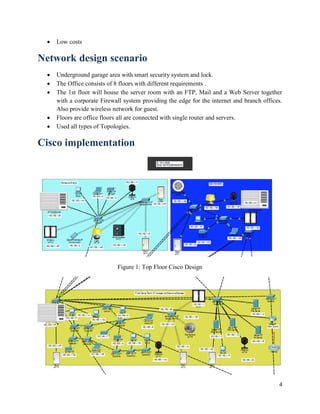
 Underground garage area with smart security system and lock.
 The Office consists of 8 floors with different requirements .
 The 1st floor will house the server room with an FTP, Mail and a Web Server together
with a corporate Firewall system providing the edge for the internet and branch offices.
Also provide wireless network for guest.
 Floors are office floors all are connected with single router and servers.
 Used all types of Topologies.
Cisco implementation
Figure 1: Top Floor Cisco Design
5
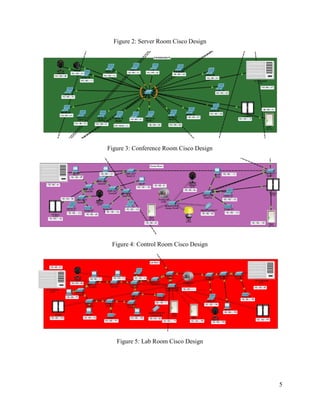
Figure 2: Server Room Cisco Design
Figure 3: Conference Room Cisco Design
Figure 4: Control Room Cisco Design
Figure 5: Lab Room Cisco Design
6
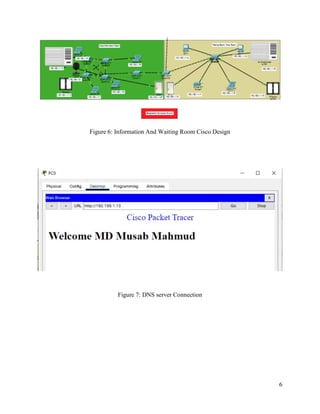
Figure 6: Information And Waiting Room Cisco Design
Figure 7: DNS server Connection
7
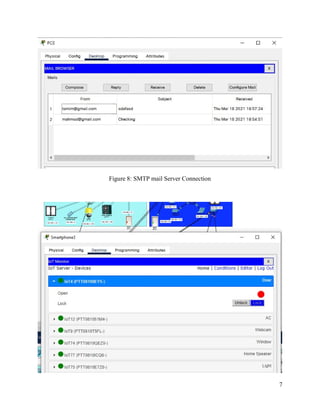
Figure 8: SMTP mail Server Connection
8
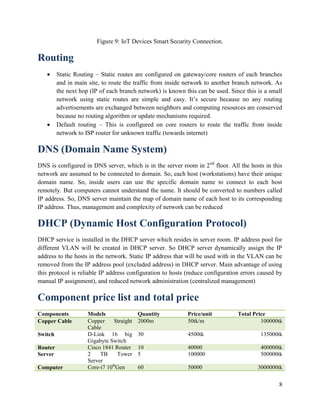
Figure 9: IoT Devices Smart Security Connection.
Routing
 Static Routing – Static routes are configured on gateway/core routers of each branches
and in main site, to route the traffic from inside network to another branch network. As
the next hop (IP of each branch network) is known this can be used. Since this is a small
network using static routes are simple and easy. It’s secure because no any routing
advertisements are exchanged between neighbors and computing resources are conserved
because no routing algorithm or update mechanisms required.
 Default routing – This is configured on core routers to route the traffic from inside
network to ISP router for unknown traffic (towards internet)
DNS (Domain Name System)
DNS is configured in DNS server, which is in the server room in 2nd
floor. All the hosts in this
network are assumed to be connected to domain. So, each host (workstations) have their unique
domain name. So, inside users can use the specific domain name to connect to each host
remotely. But computers cannot understand the name. It should be converted to numbers called
IP address. So, DNS server maintain the map of domain name of each host to its corresponding
IP address. Thus, management and complexity of network can be reduced
DHCP (Dynamic Host Configuration Protocol)
DHCP service is installed in the DHCP server which resides in server room. IP address pool for
different VLAN will be created in DHCP server. So DHCP server dynamically assign the IP
address to the hosts in the network. Static IP address that will be used with in the VLAN can be
removed from the IP address pool (excluded address) in DHCP server. Main advantage of using
this protocol is reliable IP address configuration to hosts (reduce configuration errors caused by
manual IP assignment), and reduced network administration (centralized management)
Component price list and total price
Components Models Quantity Price/unit Total Price
Copper Cable Copper Straight
Cable
2000m 50tk/m 100000tk
Switch D-Link 16 big
Gigabyte Switch
30 4500tk 135000tk
Router Cisco 1841 Router 10 40000 400000tk
Server 2 TB Tower
Server
5 100000 500000tk
Computer Core-i7 10th
Gen 60 50000 3000000tk
9
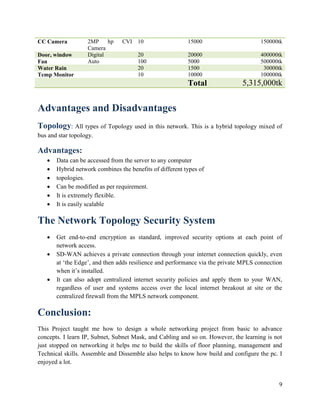
CC Camera 2MP hp CVI
Camera
10 15000 150000tk
Door, window Digital 20 20000 400000tk
Fan Auto 100 5000 500000tk
Water Rain 20 1500 30000tk
Temp Monitor 10 10000 100000tk
Total 5,315,000tk
Advantages and Disadvantages
Topology: All types of Topology used in this network. This is a hybrid topology mixed of
bus and star topology.
Advantages:
 Data can be accessed from the server to any computer
 Hybrid network combines the benefits of different types of
 topologies.
 Can be modified as per requirement.
 It is extremely flexible.
 It is easily scalable
The Network Topology Security System
 Get end-to-end encryption as standard, improved security options at each point of
network access.
 SD-WAN achieves a private connection through your internet connection quickly, even
at ‘the Edge’, and then adds resilience and performance via the private MPLS connection
when it’s installed.
 It can also adopt centralized internet security policies and apply them to your WAN,
regardless of user and systems access over the local internet breakout at site or the
centralized firewall from the MPLS network component.
Conclusion:
This Project taught me how to design a whole networking project from basic to advance
concepts. I learn IP, Subnet, Subnet Mask, and Cabling and so on. However, the learning is not
just stopped on networking it helps me to build the skills of floor planning, management and
Technical skills. Assemble and Dissemble also helps to know how build and configure the pc. I
enjoyed a lot.
10
Reference:
➢ https://www.startech.com.bd/
➢ https://www.ryanscomputers.com/category/desktop-pc--server-server
➢ https://www.daraz.com.bd/products/utp-cat-6-brb-305-meter-cable-i132002384.html
➢ https://brbcable.com/
➢ https://waltonbd.com/

Bcc network connection

  • 1.
    COURSE: Computer NetworkingLab ( PROJECT TITLE: Bangladesh Computer Council Network Design. Submitted To: Pranab Bandhu Nath Senior Lecturer Dept. of CSE City University, Dhaka. Date of submission: Computer Networking Lab (CSE- 318) Bangladesh Computer Council Network Design. Dhaka. Submitted By: Name: MD MUSAB MAHMUD ID: Program: B.SC in CSE Date of submission: 28-10-21 1 Bangladesh Computer Council Network Design. Submitted By: MD MUSAB MAHMUD ID: 181472538 Batch: 47th B.SC in CSE
  • 2.
    2 Abstract In this ProjectI tried to simulate Bangladesh Computer Council (BCC) networking design. Due to covid-19, I failed to enter the building. but trying to get the ideas of the whole building. I also designed a pattern for the whole building, which is the head office Bangladesh Computer Council. Besides, I calculated the total cost of the devices and it gives me the idea of the total project cost. I also show Assemble and Disassemble gives images that gives an idea of hardware parts of the computer. Keyword: Bangladesh Computer Council Network design, Network Design, Computer Networking. Introduction The Bangladesh Computer Council (BCC), is a statutory and autonomous government body located in Dhaka, Bangladesh, that aids in the use of information technology and the formulation of related policy. Bangladesh Computer Council operates a tier III certified national data center in Bangladesh. The ICT Division of Bangladesh Computer Council is building a tier IV (most reliable) National Data Center (4TDC) at Bangabandhu Hi-Tech City, Kaliakoir, Gazipur with the help of the Chinese Government. This data center will be equipped with cloud computing and G-cloud (e- Governance through cloud computing) technology. History In 1983, the National Computer Council was formed by the government of Bangladesh. The name was changed to the Bangladesh Computer Council in 1990 by the Bangladesh Computer Council Ordinance. It falls under the Information Technology (ICT) division of the Ministry of Posts, Telecommunications and Information and provides support and services to 661 government organizations and agencies. In 2016, the BCC launched eshikkha.net to teach computer programming in Bengali. The Bangladeshi government awarded the BCC a contract worth over 12 billion taka (US$149 million in February 2017) to connect 2,600 union councils to the internet via fiber optic cable.
  • 3.
    3 Information Name Bangladesh ComputerCouncil Formation 1983 Type Autonomous government body Purpose Information technology policy Headquarters Dhaka, Bangladesh Location Agargaon, Dhaka-1207 Website www.bcc.gov.bd Project Plan The main objective of this project is build a sophisticated network design of Bangladesh Computer Council building.  This project includes:  Logical diagram design  Physical diagram design  Equipment price list  Total project cost Project objectives  Provide a good security networks  Improve and consolidate network performance at Bangladesh Computer Council building  Provide increased network capacity  Improve the network's fault tolerance, security, and high speed connection.  Recommend which points of failure should be addressed to increase availability and how to increase this goal. Projected benefits  Improved network reliability, security, and fault tolerance. Critical points of failure will be identified and redundancy will be implemented to provide fault tolerance.  This will save Bangladesh Computer Council building a great deal of money lost from a failure.
  • 4.
    4  Low costs Networkdesign scenario  Underground garage area with smart security system and lock.  The Office consists of 8 floors with different requirements .  The 1st floor will house the server room with an FTP, Mail and a Web Server together with a corporate Firewall system providing the edge for the internet and branch offices. Also provide wireless network for guest.  Floors are office floors all are connected with single router and servers.  Used all types of Topologies. Cisco implementation Figure 1: Top Floor Cisco Design
  • 5.
    5 Figure 2: ServerRoom Cisco Design Figure 3: Conference Room Cisco Design Figure 4: Control Room Cisco Design Figure 5: Lab Room Cisco Design
  • 6.
    6 Figure 6: InformationAnd Waiting Room Cisco Design Figure 7: DNS server Connection
  • 7.
    7 Figure 8: SMTPmail Server Connection
  • 8.
    8 Figure 9: IoTDevices Smart Security Connection. Routing  Static Routing – Static routes are configured on gateway/core routers of each branches and in main site, to route the traffic from inside network to another branch network. As the next hop (IP of each branch network) is known this can be used. Since this is a small network using static routes are simple and easy. It’s secure because no any routing advertisements are exchanged between neighbors and computing resources are conserved because no routing algorithm or update mechanisms required.  Default routing – This is configured on core routers to route the traffic from inside network to ISP router for unknown traffic (towards internet) DNS (Domain Name System) DNS is configured in DNS server, which is in the server room in 2nd floor. All the hosts in this network are assumed to be connected to domain. So, each host (workstations) have their unique domain name. So, inside users can use the specific domain name to connect to each host remotely. But computers cannot understand the name. It should be converted to numbers called IP address. So, DNS server maintain the map of domain name of each host to its corresponding IP address. Thus, management and complexity of network can be reduced DHCP (Dynamic Host Configuration Protocol) DHCP service is installed in the DHCP server which resides in server room. IP address pool for different VLAN will be created in DHCP server. So DHCP server dynamically assign the IP address to the hosts in the network. Static IP address that will be used with in the VLAN can be removed from the IP address pool (excluded address) in DHCP server. Main advantage of using this protocol is reliable IP address configuration to hosts (reduce configuration errors caused by manual IP assignment), and reduced network administration (centralized management) Component price list and total price Components Models Quantity Price/unit Total Price Copper Cable Copper Straight Cable 2000m 50tk/m 100000tk Switch D-Link 16 big Gigabyte Switch 30 4500tk 135000tk Router Cisco 1841 Router 10 40000 400000tk Server 2 TB Tower Server 5 100000 500000tk Computer Core-i7 10th Gen 60 50000 3000000tk
  • 9.
    9 CC Camera 2MPhp CVI Camera 10 15000 150000tk Door, window Digital 20 20000 400000tk Fan Auto 100 5000 500000tk Water Rain 20 1500 30000tk Temp Monitor 10 10000 100000tk Total 5,315,000tk Advantages and Disadvantages Topology: All types of Topology used in this network. This is a hybrid topology mixed of bus and star topology. Advantages:  Data can be accessed from the server to any computer  Hybrid network combines the benefits of different types of  topologies.  Can be modified as per requirement.  It is extremely flexible.  It is easily scalable The Network Topology Security System  Get end-to-end encryption as standard, improved security options at each point of network access.  SD-WAN achieves a private connection through your internet connection quickly, even at ‘the Edge’, and then adds resilience and performance via the private MPLS connection when it’s installed.  It can also adopt centralized internet security policies and apply them to your WAN, regardless of user and systems access over the local internet breakout at site or the centralized firewall from the MPLS network component. Conclusion: This Project taught me how to design a whole networking project from basic to advance concepts. I learn IP, Subnet, Subnet Mask, and Cabling and so on. However, the learning is not just stopped on networking it helps me to build the skills of floor planning, management and Technical skills. Assemble and Dissemble also helps to know how build and configure the pc. I enjoyed a lot.
  • 10.
    10 Reference: ➢ https://www.startech.com.bd/ ➢ https://www.ryanscomputers.com/category/desktop-pc--server-server ➢https://www.daraz.com.bd/products/utp-cat-6-brb-305-meter-cable-i132002384.html ➢ https://brbcable.com/ ➢ https://waltonbd.com/