Network Analysis Using Wireshark Version 2Network Analysis using Wireshark V.2 yoram@ndi-com.com
Network analysis using Wireshark V2 yoram@ndi-com.comPage 1
Network Analysis Using Wireshark
Lesson 1:
Introduction & TS Basics
Network Analysis Using Wireshark Version 2Network Analysis using Wireshark V.2 yoram@ndi-com.com
Network analysis using Wireshark V2 yoram@ndi-com.comPage 2
By the end of this lesson you will:
• Understand how to approach a network problem
• Understand the difference between GO-NOGO and
performance problems
• Understand the tools that assist us in the network
troubleshooting process
Lesson Objectives
Network Analysis Using Wireshark Version 2Network Analysis using Wireshark V.2 yoram@ndi-com.com
Network analysis using Wireshark V2 yoram@ndi-com.comPage 3
What is network troubleshooting
Troubleshooting tools
Troubleshooting methodologies
Chapter Content
The network is guilty until proven otherwise…
Network Analysis Using Wireshark Version 2Network Analysis using Wireshark V.2 yoram@ndi-com.com
Network analysis using Wireshark V2 yoram@ndi-com.comPage 4
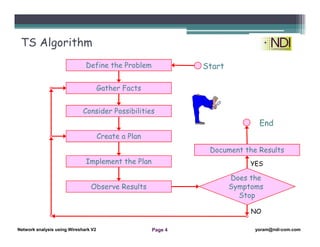
Define the Problem
Gather Facts
Consider Possibilities
Create a Plan
Implement the Plan
Observe Results
Does the
Symptoms
Stop
Document the Results
Start
End
TS Algorithm
YES
NO
Network Analysis Using Wireshark Version 2Network Analysis using Wireshark V.2 yoram@ndi-com.com
Network analysis using Wireshark V2 yoram@ndi-com.comPage 5
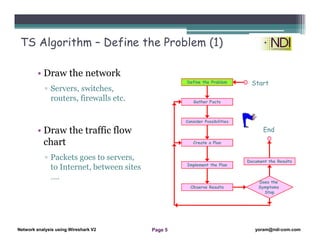
TS Algorithm – Define the Problem (1)
• Draw the network
▫ Servers, switches,
routers, firewalls etc.
• Draw the traffic flow
chart
▫ Packets goes to servers,
to Internet, between sites
….
Define the Problem
Gather Facts
Consider Possibilities
Create a Plan
Implement the Plan
Observe Results
Does the
Symptoms
Stop
Document the Results
Start
End
Network Analysis Using Wireshark Version 2Network Analysis using Wireshark V.2 yoram@ndi-com.com
Network analysis using Wireshark V2 yoram@ndi-com.comPage 6
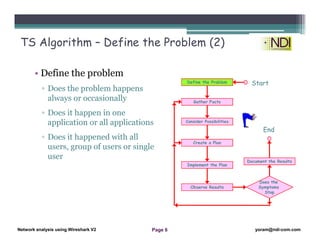
TS Algorithm – Define the Problem (2)
• Define the problem
▫ Does the problem happens
always or occasionally
▫ Does it happen in one
application or all applications
▫ Does it happened with all
users, group of users or single
user
Define the Problem
Gather Facts
Consider Possibilities
Create a Plan
Implement the Plan
Observe Results
Does the
Symptoms
Stop
Document the Results
Start
End
Network Analysis Using Wireshark Version 2Network Analysis using Wireshark V.2 yoram@ndi-com.com
Network analysis using Wireshark V2 yoram@ndi-com.comPage 7
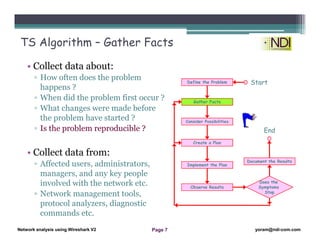
TS Algorithm – Gather Facts
• Collect data about:
▫ How often does the problem
happens ?
▫ When did the problem first occur ?
▫ What changes were made before
the problem have started ?
▫ Is the problem reproducible ?
• Collect data from:
▫ Affected users, administrators,
managers, and any key people
involved with the network etc.
▫ Network management tools,
protocol analyzers, diagnostic
commands etc.
Define the Problem
Gather Facts
Consider Possibilities
Create a Plan
Implement the Plan
Observe Results
Does the
Symptoms
Stop
Document the Results
Start
End
Network Analysis Using Wireshark Version 2Network Analysis using Wireshark V.2 yoram@ndi-com.com
Network analysis using Wireshark V2 yoram@ndi-com.comPage 8
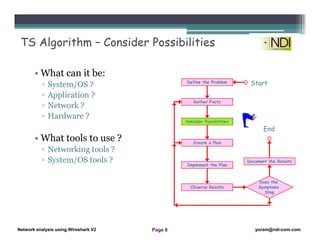
TS Algorithm – Consider Possibilities
• What can it be:
▫ System/OS ?
▫ Application ?
▫ Network ?
▫ Hardware ?
• What tools to use ?
▫ Networking tools ?
▫ System/OS tools ?
Define the Problem
Gather Facts
Consider Possibilities
Create a Plan
Implement the Plan
Observe Results
Does the
Symptoms
Stop
Document the Results
Start
End
Network Analysis Using Wireshark Version 2Network Analysis using Wireshark V.2 yoram@ndi-com.com
Network analysis using Wireshark V2 yoram@ndi-com.comPage 9
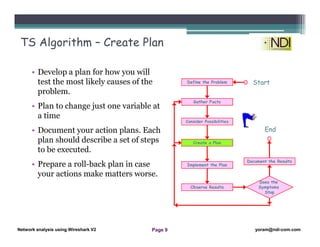
TS Algorithm – Create Plan
• Develop a plan for how you will
test the most likely causes of the
problem.
• Plan to change just one variable at
a time
• Document your action plans. Each
plan should describe a set of steps
to be executed.
• Prepare a roll-back plan in case
your actions make matters worse.
Define the Problem
Gather Facts
Consider Possibilities
Create a Plan
Implement the Plan
Observe Results
Does the
Symptoms
Stop
Document the Results
Start
End
Network Analysis Using Wireshark Version 2Network Analysis using Wireshark V.2 yoram@ndi-com.com
Network analysis using Wireshark V2 yoram@ndi-com.comPage 10
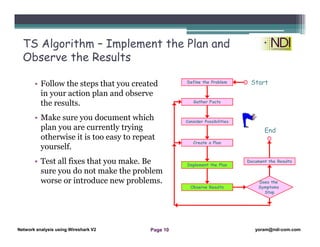
TS Algorithm – Implement the Plan and
Observe the Results
• Follow the steps that you created
in your action plan and observe
the results.
• Make sure you document which
plan you are currently trying
otherwise it is too easy to repeat
yourself.
• Test all fixes that you make. Be
sure you do not make the problem
worse or introduce new problems.
Define the Problem
Gather Facts
Consider Possibilities
Create a Plan
Implement the Plan
Observe Results
Does the
Symptoms
Stop
Document the Results
Start
End
Network Analysis Using Wireshark Version 2Network Analysis using Wireshark V.2 yoram@ndi-com.com
Network analysis using Wireshark V2 yoram@ndi-com.comPage 11
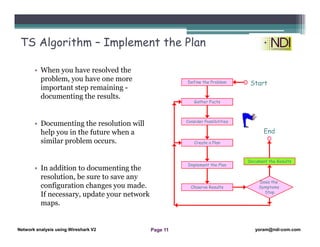
TS Algorithm – Implement the Plan
• When you have resolved the
problem, you have one more
important step remaining -
documenting the results.
• Documenting the resolution will
help you in the future when a
similar problem occurs.
• In addition to documenting the
resolution, be sure to save any
configuration changes you made.
If necessary, update your network
maps.
Define the Problem
Gather Facts
Consider Possibilities
Create a Plan
Implement the Plan
Observe Results
Does the
Symptoms
Stop
Document the Results
Start
End
Network Analysis Using Wireshark Version 2Network Analysis using Wireshark V.2 yoram@ndi-com.com
Network analysis using Wireshark V2 yoram@ndi-com.comPage 12
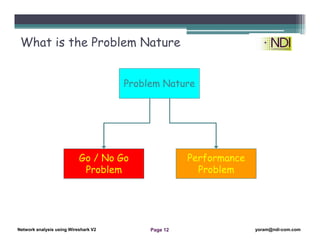
What is the Problem Nature
Go / No Go
Problem
Performance
Problem
Problem Nature
Network Analysis Using Wireshark Version 2Network Analysis using Wireshark V.2 yoram@ndi-com.com
Network analysis using Wireshark V2 yoram@ndi-com.comPage 13
What is network
troubleshooting
Troubleshooting tools
Troubleshooting
methodologies
Chapter Content
Don’t forget: user responses are relative …
Network Analysis Using Wireshark Version 2Network Analysis using Wireshark V.2 yoram@ndi-com.com
Network analysis using Wireshark V2 yoram@ndi-com.comPage 14
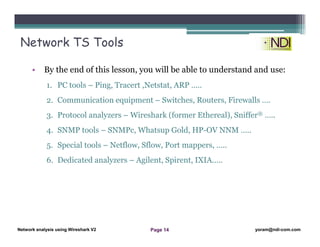
• By the end of this lesson, you will be able to understand and use:
1. PC tools – Ping, Tracert ,Netstat, ARP …..
2. Communication equipment – Switches, Routers, Firewalls ….
3. Protocol analyzers – Wireshark (former Ethereal), Sniffer® …..
4. SNMP tools – SNMPc, Whatsup Gold, HP-OV NNM …..
5. Special tools – Netflow, Sflow, Port mappers, …..
6. Dedicated analyzers – Agilent, Spirent, IXIA…..
Network TS Tools
Network Analysis Using Wireshark Version 2Network Analysis using Wireshark V.2 yoram@ndi-com.com
Network analysis using Wireshark V2 yoram@ndi-com.comPage 15
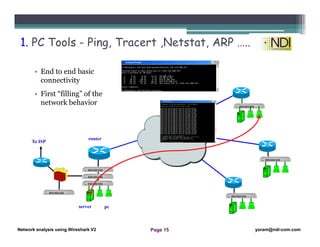
• End to end basic
connectivity
• First “filling” of the
network behavior
1. PC Tools - Ping, Tracert ,Netstat, ARP …..
To ISP
server pc
router
Network Analysis Using Wireshark Version 2Network Analysis using Wireshark V.2 yoram@ndi-com.com
Network analysis using Wireshark V2 yoram@ndi-com.comPage 16
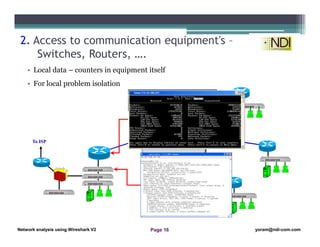
• Local data – counters in equipment itself
• For local problem isolation
2. Access to communication equipment's –
Switches, Routers, ….
To ISP
Network Analysis Using Wireshark Version 2Network Analysis using Wireshark V.2 yoram@ndi-com.com
Network analysis using Wireshark V2 yoram@ndi-com.comPage 17
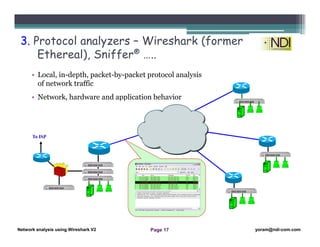
• Local, in-depth, packet-by-packet protocol analysis
of network traffic
• Network, hardware and application behavior
3. Protocol analyzers – Wireshark (former
Ethereal), Sniffer® …..
To ISP
Network Analysis Using Wireshark Version 2Network Analysis using Wireshark V.2 yoram@ndi-com.com
Network analysis using Wireshark V2 yoram@ndi-com.comPage 18
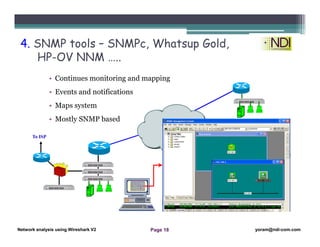
• Continues monitoring and mapping
• Events and notifications
• Maps system
• Mostly SNMP based
4. SNMP tools – SNMPc, Whatsup Gold,
HP-OV NNM …..
To ISP
Network Analysis Using Wireshark Version 2Network Analysis using Wireshark V.2 yoram@ndi-com.com
Network analysis using Wireshark V2 yoram@ndi-com.comPage 19
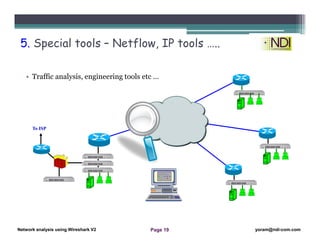
• Traffic analysis, engineering tools etc …
5. Special tools – Netflow, IP tools …..
To ISP
Network Analysis Using Wireshark Version 2Network Analysis using Wireshark V.2 yoram@ndi-com.com
Network analysis using Wireshark V2 yoram@ndi-com.comPage 20
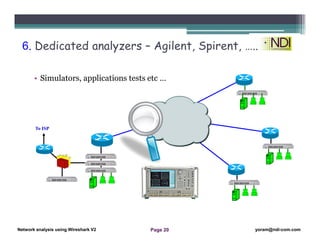
• Simulators, applications tests etc …
6. Dedicated analyzers – Agilent, Spirent, …..
To ISP
Network Analysis Using Wireshark Version 2Network Analysis using Wireshark V.2 yoram@ndi-com.com
Network analysis using Wireshark V2 yoram@ndi-com.comPage 21
What is network troubleshooting
Troubleshooting tools
Troubleshooting methodologies
Chapter Content
Applications are typically developed in a “Golden Environment” -
Fastest possible PCs, High Bandwidth, low latency etc. When they
move from test (LAN) to production (WAN/WIFi/Cellular) the
phone starts ringing…
Network Analysis Using Wireshark Version 2Network Analysis using Wireshark V.2 yoram@ndi-com.com
Network analysis using Wireshark V2 yoram@ndi-com.comPage 22
T.S. Approaches
• Theoretical – “Scientist”
approach
• Practical – “Caveman”
Approach
Network Analysis Using Wireshark Version 2Network Analysis using Wireshark V.2 yoram@ndi-com.com
Network analysis using Wireshark V2 yoram@ndi-com.comPage 23
• The “Scientist” approach will be to
analyze and re-analyze the situation
until the exact cause of the problem
has been identified
• This approach will finally lead for
solving the problem, but although this
process is fairly reliable.
Theoretical - Scientist Approach
Network Analysis Using Wireshark Version 2Network Analysis using Wireshark V.2 yoram@ndi-com.com
Network analysis using Wireshark V2 yoram@ndi-com.comPage 24
• The “Caveman” first instinct is start
swapping cards, cables, hub's, and
everything available, until
miraculously, the network begins to
work, even though not always
properly.
• The problem with the “caveman”
approach is that most of the times
the root cause of the problem will
still be present.
Practical - The Caveman Approach
Network Analysis Using Wireshark Version 2Network Analysis using Wireshark V.2 yoram@ndi-com.com
Network analysis using Wireshark V2 yoram@ndi-com.comPage 25
• Analyze the network as a whole - rather than in pieces.
• Ask the questions - then collect the information - concentrate on
the problem - and then replace one broken ring in the chain to
solve it.
• Do not forget to verify that the problem have been truly fixed.
• Many problems can be user problems or mental problems that do
not involve anything in the network. Eliminate these problems at
the beginning!
The Right Approach
Network Analysis Using Wireshark Version 2Network Analysis using Wireshark V.2 yoram@ndi-com.com
Network analysis using Wireshark V2 yoram@ndi-com.comPage 26
Summary
• In this lesson we talked about:
▫ Work in order
▫ Document, Document, Document!
▫ Scientist or Caveman? Both, as required
Thanks for your time
Yoram Orzach
yoram@ndi-com.com
Many examples, case-studies, capture files and more on
my classroom course or online on:
https://www.eknower.com/

Network Analysis Using Wireshark 1

  • 1.
    Network Analysis UsingWireshark Version 2Network Analysis using Wireshark V.2 yoram@ndi-com.com Network analysis using Wireshark V2 yoram@ndi-com.comPage 1 Network Analysis Using Wireshark Lesson 1: Introduction & TS Basics
  • 2.
    Network Analysis UsingWireshark Version 2Network Analysis using Wireshark V.2 yoram@ndi-com.com Network analysis using Wireshark V2 yoram@ndi-com.comPage 2 By the end of this lesson you will: • Understand how to approach a network problem • Understand the difference between GO-NOGO and performance problems • Understand the tools that assist us in the network troubleshooting process Lesson Objectives
  • 3.
    Network Analysis UsingWireshark Version 2Network Analysis using Wireshark V.2 yoram@ndi-com.com Network analysis using Wireshark V2 yoram@ndi-com.comPage 3 What is network troubleshooting Troubleshooting tools Troubleshooting methodologies Chapter Content The network is guilty until proven otherwise…
  • 4.
    Network Analysis UsingWireshark Version 2Network Analysis using Wireshark V.2 yoram@ndi-com.com Network analysis using Wireshark V2 yoram@ndi-com.comPage 4 Define the Problem Gather Facts Consider Possibilities Create a Plan Implement the Plan Observe Results Does the Symptoms Stop Document the Results Start End TS Algorithm YES NO
  • 5.
    Network Analysis UsingWireshark Version 2Network Analysis using Wireshark V.2 yoram@ndi-com.com Network analysis using Wireshark V2 yoram@ndi-com.comPage 5 TS Algorithm – Define the Problem (1) • Draw the network ▫ Servers, switches, routers, firewalls etc. • Draw the traffic flow chart ▫ Packets goes to servers, to Internet, between sites …. Define the Problem Gather Facts Consider Possibilities Create a Plan Implement the Plan Observe Results Does the Symptoms Stop Document the Results Start End
  • 6.
    Network Analysis UsingWireshark Version 2Network Analysis using Wireshark V.2 yoram@ndi-com.com Network analysis using Wireshark V2 yoram@ndi-com.comPage 6 TS Algorithm – Define the Problem (2) • Define the problem ▫ Does the problem happens always or occasionally ▫ Does it happen in one application or all applications ▫ Does it happened with all users, group of users or single user Define the Problem Gather Facts Consider Possibilities Create a Plan Implement the Plan Observe Results Does the Symptoms Stop Document the Results Start End
  • 7.
    Network Analysis UsingWireshark Version 2Network Analysis using Wireshark V.2 yoram@ndi-com.com Network analysis using Wireshark V2 yoram@ndi-com.comPage 7 TS Algorithm – Gather Facts • Collect data about: ▫ How often does the problem happens ? ▫ When did the problem first occur ? ▫ What changes were made before the problem have started ? ▫ Is the problem reproducible ? • Collect data from: ▫ Affected users, administrators, managers, and any key people involved with the network etc. ▫ Network management tools, protocol analyzers, diagnostic commands etc. Define the Problem Gather Facts Consider Possibilities Create a Plan Implement the Plan Observe Results Does the Symptoms Stop Document the Results Start End
  • 8.
    Network Analysis UsingWireshark Version 2Network Analysis using Wireshark V.2 yoram@ndi-com.com Network analysis using Wireshark V2 yoram@ndi-com.comPage 8 TS Algorithm – Consider Possibilities • What can it be: ▫ System/OS ? ▫ Application ? ▫ Network ? ▫ Hardware ? • What tools to use ? ▫ Networking tools ? ▫ System/OS tools ? Define the Problem Gather Facts Consider Possibilities Create a Plan Implement the Plan Observe Results Does the Symptoms Stop Document the Results Start End
  • 9.
    Network Analysis UsingWireshark Version 2Network Analysis using Wireshark V.2 yoram@ndi-com.com Network analysis using Wireshark V2 yoram@ndi-com.comPage 9 TS Algorithm – Create Plan • Develop a plan for how you will test the most likely causes of the problem. • Plan to change just one variable at a time • Document your action plans. Each plan should describe a set of steps to be executed. • Prepare a roll-back plan in case your actions make matters worse. Define the Problem Gather Facts Consider Possibilities Create a Plan Implement the Plan Observe Results Does the Symptoms Stop Document the Results Start End
  • 10.
    Network Analysis UsingWireshark Version 2Network Analysis using Wireshark V.2 yoram@ndi-com.com Network analysis using Wireshark V2 yoram@ndi-com.comPage 10 TS Algorithm – Implement the Plan and Observe the Results • Follow the steps that you created in your action plan and observe the results. • Make sure you document which plan you are currently trying otherwise it is too easy to repeat yourself. • Test all fixes that you make. Be sure you do not make the problem worse or introduce new problems. Define the Problem Gather Facts Consider Possibilities Create a Plan Implement the Plan Observe Results Does the Symptoms Stop Document the Results Start End
  • 11.
    Network Analysis UsingWireshark Version 2Network Analysis using Wireshark V.2 yoram@ndi-com.com Network analysis using Wireshark V2 yoram@ndi-com.comPage 11 TS Algorithm – Implement the Plan • When you have resolved the problem, you have one more important step remaining - documenting the results. • Documenting the resolution will help you in the future when a similar problem occurs. • In addition to documenting the resolution, be sure to save any configuration changes you made. If necessary, update your network maps. Define the Problem Gather Facts Consider Possibilities Create a Plan Implement the Plan Observe Results Does the Symptoms Stop Document the Results Start End
  • 12.
    Network Analysis UsingWireshark Version 2Network Analysis using Wireshark V.2 yoram@ndi-com.com Network analysis using Wireshark V2 yoram@ndi-com.comPage 12 What is the Problem Nature Go / No Go Problem Performance Problem Problem Nature
  • 13.
    Network Analysis UsingWireshark Version 2Network Analysis using Wireshark V.2 yoram@ndi-com.com Network analysis using Wireshark V2 yoram@ndi-com.comPage 13 What is network troubleshooting Troubleshooting tools Troubleshooting methodologies Chapter Content Don’t forget: user responses are relative …
  • 14.
    Network Analysis UsingWireshark Version 2Network Analysis using Wireshark V.2 yoram@ndi-com.com Network analysis using Wireshark V2 yoram@ndi-com.comPage 14 • By the end of this lesson, you will be able to understand and use: 1. PC tools – Ping, Tracert ,Netstat, ARP ….. 2. Communication equipment – Switches, Routers, Firewalls …. 3. Protocol analyzers – Wireshark (former Ethereal), Sniffer® ….. 4. SNMP tools – SNMPc, Whatsup Gold, HP-OV NNM ….. 5. Special tools – Netflow, Sflow, Port mappers, ….. 6. Dedicated analyzers – Agilent, Spirent, IXIA….. Network TS Tools
  • 15.
    Network Analysis UsingWireshark Version 2Network Analysis using Wireshark V.2 yoram@ndi-com.com Network analysis using Wireshark V2 yoram@ndi-com.comPage 15 • End to end basic connectivity • First “filling” of the network behavior 1. PC Tools - Ping, Tracert ,Netstat, ARP ….. To ISP server pc router
  • 16.
    Network Analysis UsingWireshark Version 2Network Analysis using Wireshark V.2 yoram@ndi-com.com Network analysis using Wireshark V2 yoram@ndi-com.comPage 16 • Local data – counters in equipment itself • For local problem isolation 2. Access to communication equipment's – Switches, Routers, …. To ISP
  • 17.
    Network Analysis UsingWireshark Version 2Network Analysis using Wireshark V.2 yoram@ndi-com.com Network analysis using Wireshark V2 yoram@ndi-com.comPage 17 • Local, in-depth, packet-by-packet protocol analysis of network traffic • Network, hardware and application behavior 3. Protocol analyzers – Wireshark (former Ethereal), Sniffer® ….. To ISP
  • 18.
    Network Analysis UsingWireshark Version 2Network Analysis using Wireshark V.2 yoram@ndi-com.com Network analysis using Wireshark V2 yoram@ndi-com.comPage 18 • Continues monitoring and mapping • Events and notifications • Maps system • Mostly SNMP based 4. SNMP tools – SNMPc, Whatsup Gold, HP-OV NNM ….. To ISP
  • 19.
    Network Analysis UsingWireshark Version 2Network Analysis using Wireshark V.2 yoram@ndi-com.com Network analysis using Wireshark V2 yoram@ndi-com.comPage 19 • Traffic analysis, engineering tools etc … 5. Special tools – Netflow, IP tools ….. To ISP
  • 20.
    Network Analysis UsingWireshark Version 2Network Analysis using Wireshark V.2 yoram@ndi-com.com Network analysis using Wireshark V2 yoram@ndi-com.comPage 20 • Simulators, applications tests etc … 6. Dedicated analyzers – Agilent, Spirent, ….. To ISP
  • 21.
    Network Analysis UsingWireshark Version 2Network Analysis using Wireshark V.2 yoram@ndi-com.com Network analysis using Wireshark V2 yoram@ndi-com.comPage 21 What is network troubleshooting Troubleshooting tools Troubleshooting methodologies Chapter Content Applications are typically developed in a “Golden Environment” - Fastest possible PCs, High Bandwidth, low latency etc. When they move from test (LAN) to production (WAN/WIFi/Cellular) the phone starts ringing…
  • 22.
    Network Analysis UsingWireshark Version 2Network Analysis using Wireshark V.2 yoram@ndi-com.com Network analysis using Wireshark V2 yoram@ndi-com.comPage 22 T.S. Approaches • Theoretical – “Scientist” approach • Practical – “Caveman” Approach
  • 23.
    Network Analysis UsingWireshark Version 2Network Analysis using Wireshark V.2 yoram@ndi-com.com Network analysis using Wireshark V2 yoram@ndi-com.comPage 23 • The “Scientist” approach will be to analyze and re-analyze the situation until the exact cause of the problem has been identified • This approach will finally lead for solving the problem, but although this process is fairly reliable. Theoretical - Scientist Approach
  • 24.
    Network Analysis UsingWireshark Version 2Network Analysis using Wireshark V.2 yoram@ndi-com.com Network analysis using Wireshark V2 yoram@ndi-com.comPage 24 • The “Caveman” first instinct is start swapping cards, cables, hub's, and everything available, until miraculously, the network begins to work, even though not always properly. • The problem with the “caveman” approach is that most of the times the root cause of the problem will still be present. Practical - The Caveman Approach
  • 25.
    Network Analysis UsingWireshark Version 2Network Analysis using Wireshark V.2 yoram@ndi-com.com Network analysis using Wireshark V2 yoram@ndi-com.comPage 25 • Analyze the network as a whole - rather than in pieces. • Ask the questions - then collect the information - concentrate on the problem - and then replace one broken ring in the chain to solve it. • Do not forget to verify that the problem have been truly fixed. • Many problems can be user problems or mental problems that do not involve anything in the network. Eliminate these problems at the beginning! The Right Approach
  • 26.
    Network Analysis UsingWireshark Version 2Network Analysis using Wireshark V.2 yoram@ndi-com.com Network analysis using Wireshark V2 yoram@ndi-com.comPage 26 Summary • In this lesson we talked about: ▫ Work in order ▫ Document, Document, Document! ▫ Scientist or Caveman? Both, as required Thanks for your time Yoram Orzach yoram@ndi-com.com Many examples, case-studies, capture files and more on my classroom course or online on: https://www.eknower.com/