Network Analysis Using Wireshark Version 2Network Analysis using Wireshark V.2 yoram@ndi-com.com
Network analysis using Wireshark V2 yoram@ndi-com.comPage 1
Network analysis Using Wireshark
Lesson 6:
Basic Statistics Tools
Network Analysis Using Wireshark Version 2Network Analysis using Wireshark V.2 yoram@ndi-com.com
Network analysis using Wireshark V2 yoram@ndi-com.comPage 2
• By the end of this lesson, the participant will be able to:
▫ Understand the types of statistics tools available in Wireshark
▫ Perform network monitoring with these tools
Lesson Objectives
Network Analysis Using Wireshark Version 2Network Analysis using Wireshark V.2 yoram@ndi-com.com
Network analysis using Wireshark V2 yoram@ndi-com.comPage 3
yoram@ndi-com.com
For More lectures, Courses & Keynote Speaking
Contact Me to:
Network Analysis Using Wireshark Version 2Network Analysis using Wireshark V.2 yoram@ndi-com.com
Network analysis using Wireshark V2 yoram@ndi-com.comPage 4
Using the File Properties
Address resolution (Resolved Addresses)
Using the Protocol Hierarchy tool from the Statistics menu
Using the Conversations tool from the Statistics menu
Using the Endpoints tool from the Statistics menu
Using Packet Length statistics
Using the HTTP tool from the Statistics menu
Configuring Flow Graph for viewing TCP flows
Creating IP-based statistics
Chapter Content
“Be yourself; everyone else is
already taken.”
Oscar Wilde
Network Analysis Using Wireshark Version 2Network Analysis using Wireshark V.2 yoram@ndi-com.com
Network analysis using Wireshark V2 yoram@ndi-com.comPage 5
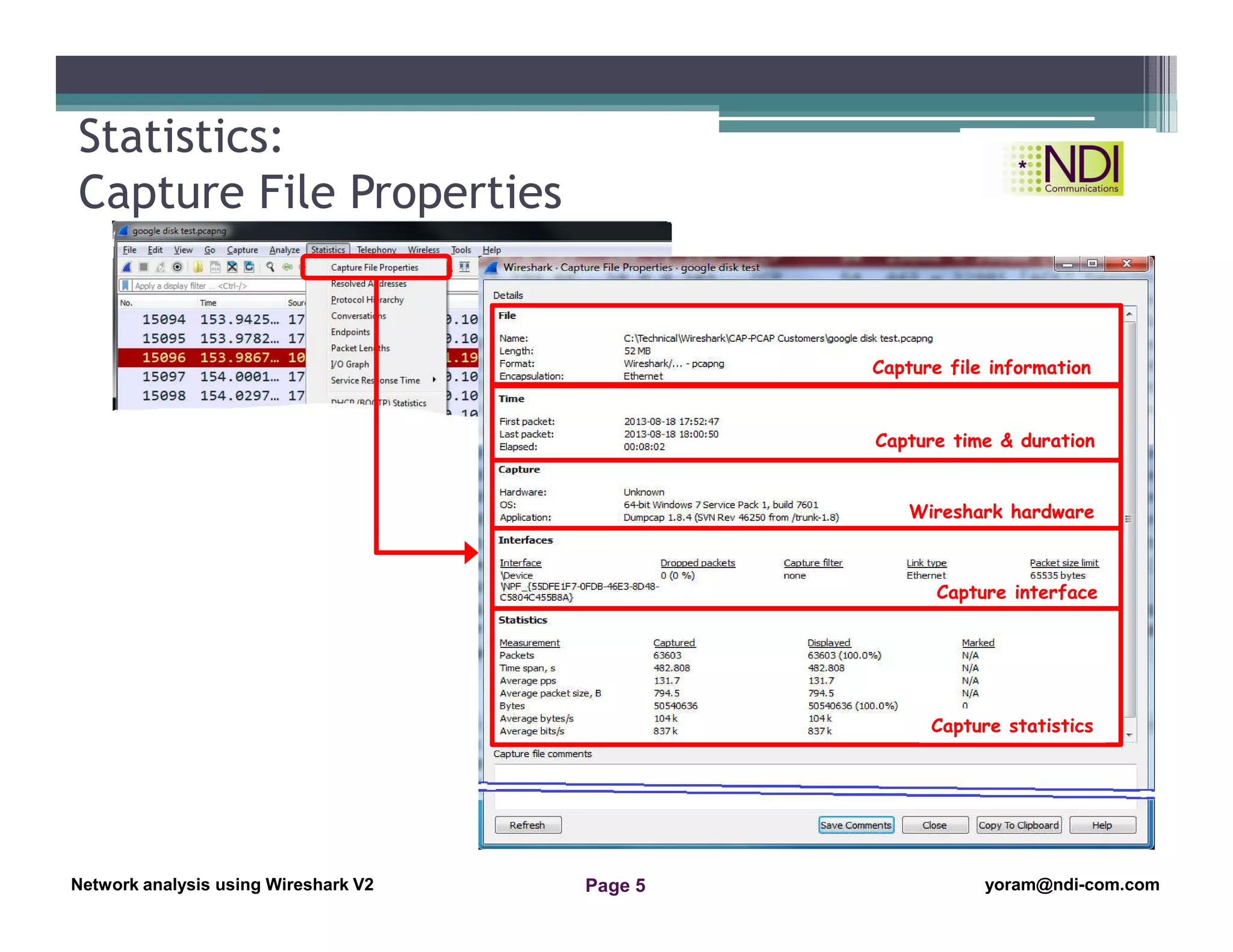
Statistics:
Capture File Properties
Capture file information
Capture time & duration
Wireshark hardware
Capture interface
Capture statistics
Network Analysis Using Wireshark Version 2Network Analysis using Wireshark V.2 yoram@ndi-com.com
Network analysis using Wireshark V2 yoram@ndi-com.comPage 6
Using the File Properties
Address resolution (Resolved Addresses)
Using the Protocol Hierarchy tool from the Statistics menu
Using the Conversations tool from the Statistics menu
Using the Endpoints tool from the Statistics menu
Using Packet Length statistics
Using the HTTP tool from the Statistics menu
Configuring Flow Graph for viewing TCP flows
Creating IP-based statistics
Chapter Content
“Two things are infinite: the universe
and human stupidity; and I'm not sure
about the universe.”
― Albert Einstein
Network Analysis Using Wireshark Version 2Network Analysis using Wireshark V.2 yoram@ndi-com.com
Network analysis using Wireshark V2 yoram@ndi-com.comPage 7
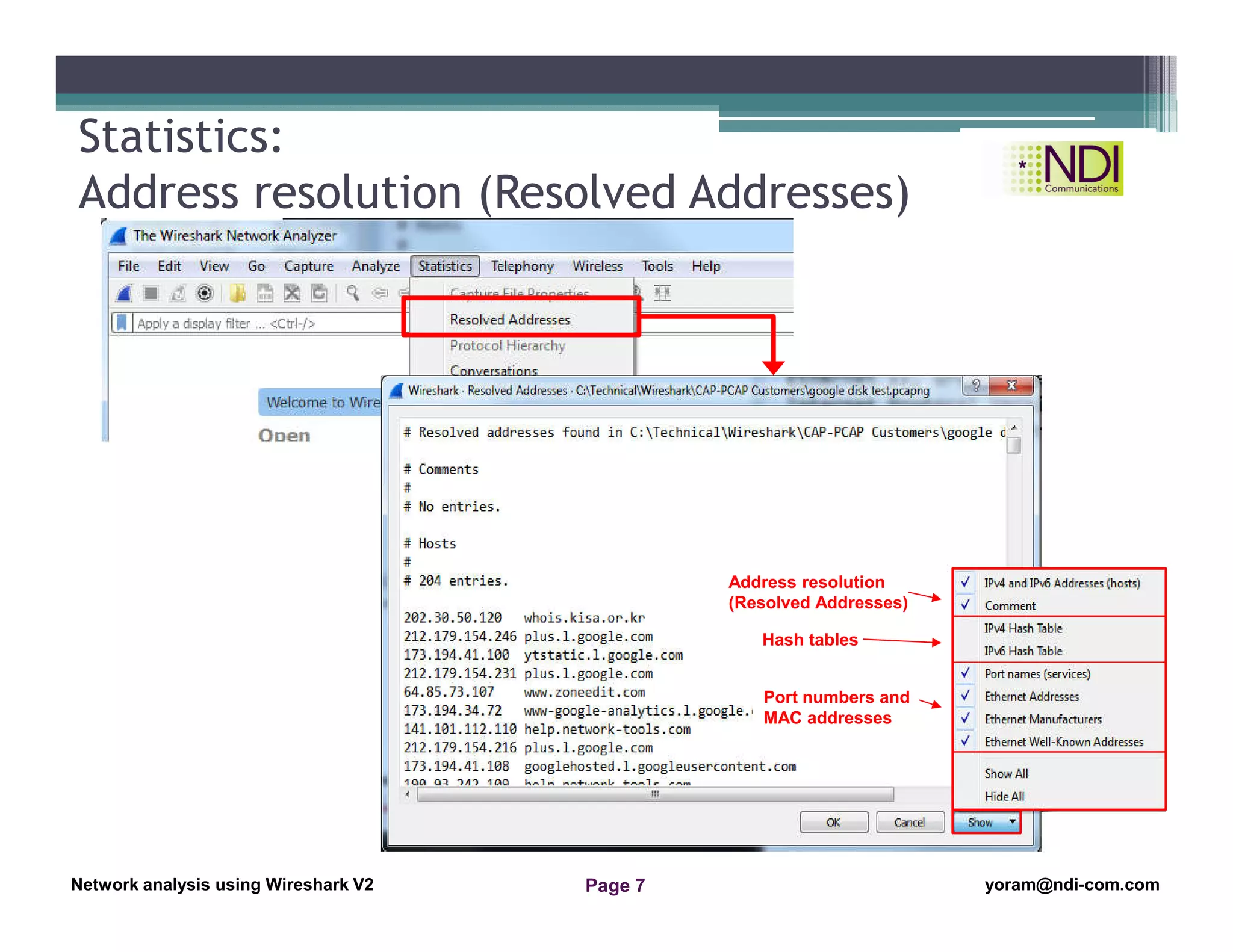
Statistics:
Address resolution (Resolved Addresses)
Address resolution
(Resolved Addresses)
Hash tables
Port numbers and
MAC addresses
Network Analysis Using Wireshark Version 2Network Analysis using Wireshark V.2 yoram@ndi-com.com
Network analysis using Wireshark V2 yoram@ndi-com.comPage 8
Using the File Properties
Address resolution (Resolved Addresses)
Using the Protocol Hierarchy tool from the Statistics menu
Using the Conversations tool from the Statistics menu
Using the Endpoints tool from the Statistics menu
Using Packet Length statistics
Using the HTTP tool from the Statistics menu
Configuring Flow Graph for viewing TCP flows
Creating IP-based statistics
Chapter Content
“So many books, so little time.”
― Frank Zappa
Network Analysis Using Wireshark Version 2Network Analysis using Wireshark V.2 yoram@ndi-com.com
Network analysis using Wireshark V2 yoram@ndi-com.comPage 9
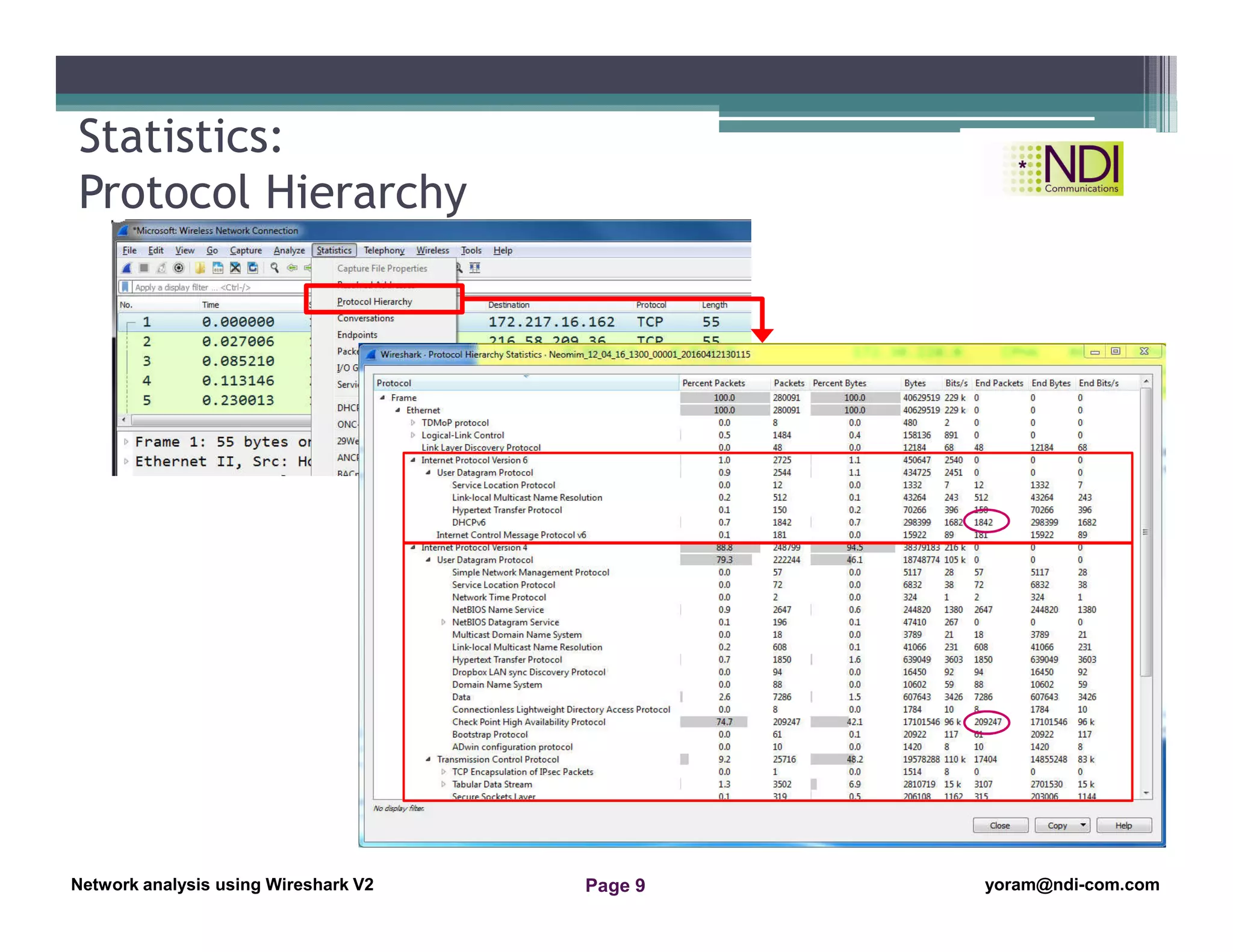
Statistics:
Protocol Hierarchy
Network Analysis Using Wireshark Version 2Network Analysis using Wireshark V.2 yoram@ndi-com.com
Network analysis using Wireshark V2 yoram@ndi-com.comPage 10
Using the File Properties
Address resolution (Resolved Addresses)
Using the Protocol Hierarchy tool from the Statistics menu
Using the Conversations tool from the Statistics menu
Using the Endpoints tool from the Statistics menu
Using Packet Length statistics
Using the HTTP tool from the Statistics menu
Configuring Flow Graph for viewing TCP flows
Creating IP-based statistics
Chapter Content
“Be the change that you wish
to see in the world.”
Mahatma Gandhi
Network Analysis Using Wireshark Version 2Network Analysis using Wireshark V.2 yoram@ndi-com.com
Network analysis using Wireshark V2 yoram@ndi-com.comPage 11
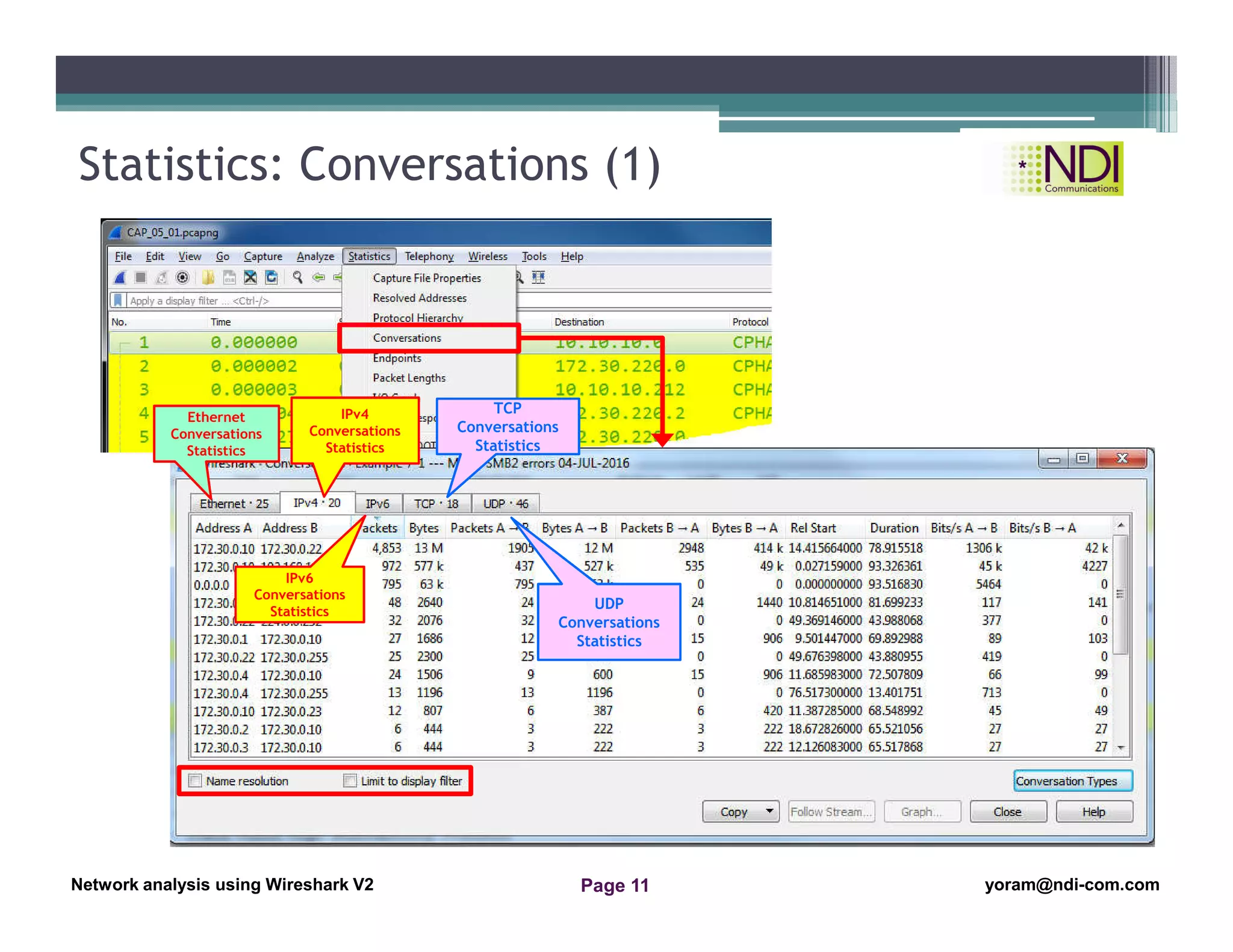
Statistics: Conversations (1)
Ethernet
Conversations
Statistics
IPv4
Conversations
Statistics
IPv6
Conversations
Statistics
TCP
Conversations
Statistics
UDP
Conversations
Statistics
Network Analysis Using Wireshark Version 2Network Analysis using Wireshark V.2 yoram@ndi-com.com
Network analysis using Wireshark V2 yoram@ndi-com.comPage 12
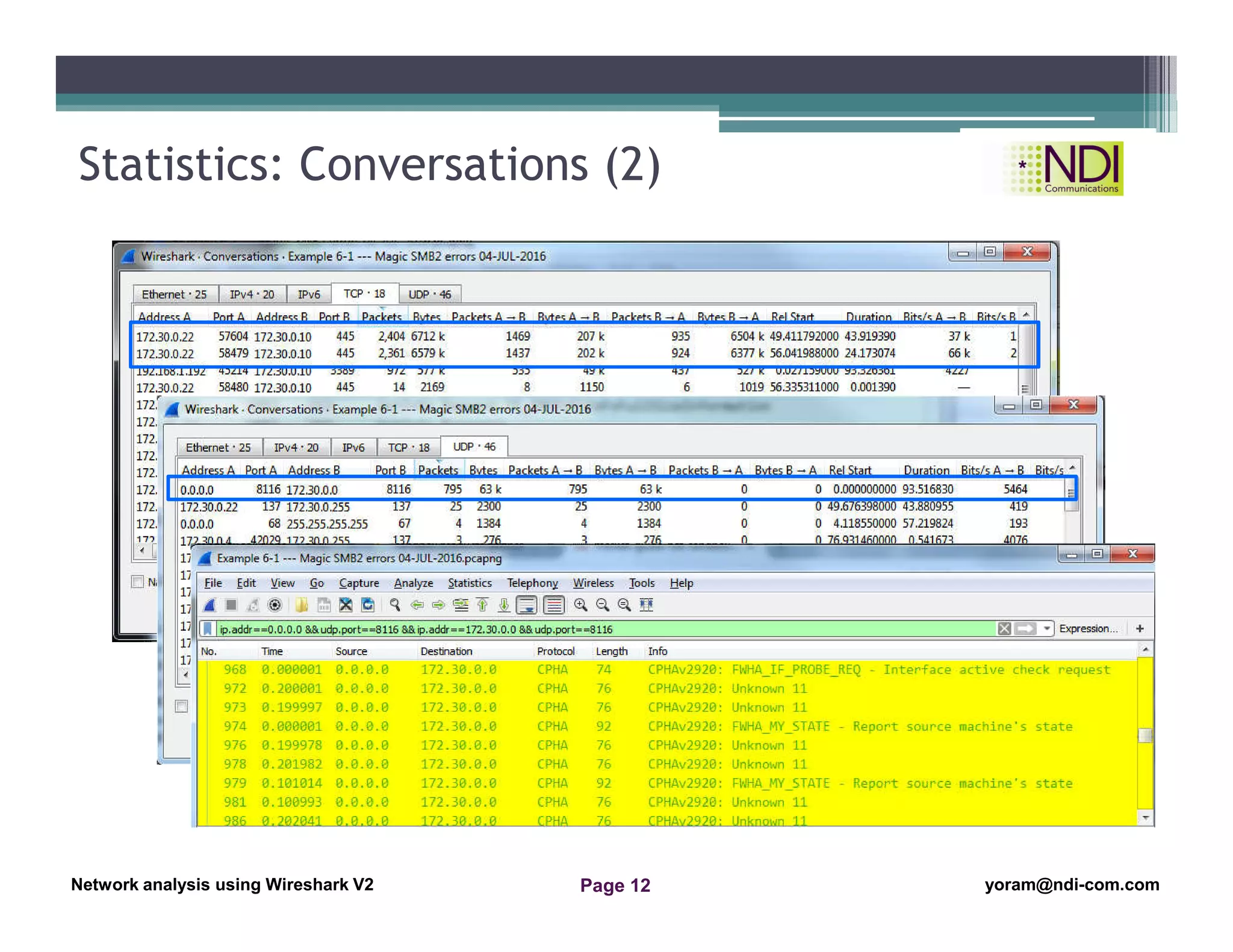
Statistics: Conversations (2)
Network Analysis Using Wireshark Version 2Network Analysis using Wireshark V.2 yoram@ndi-com.com
Network analysis using Wireshark V2 yoram@ndi-com.comPage 13
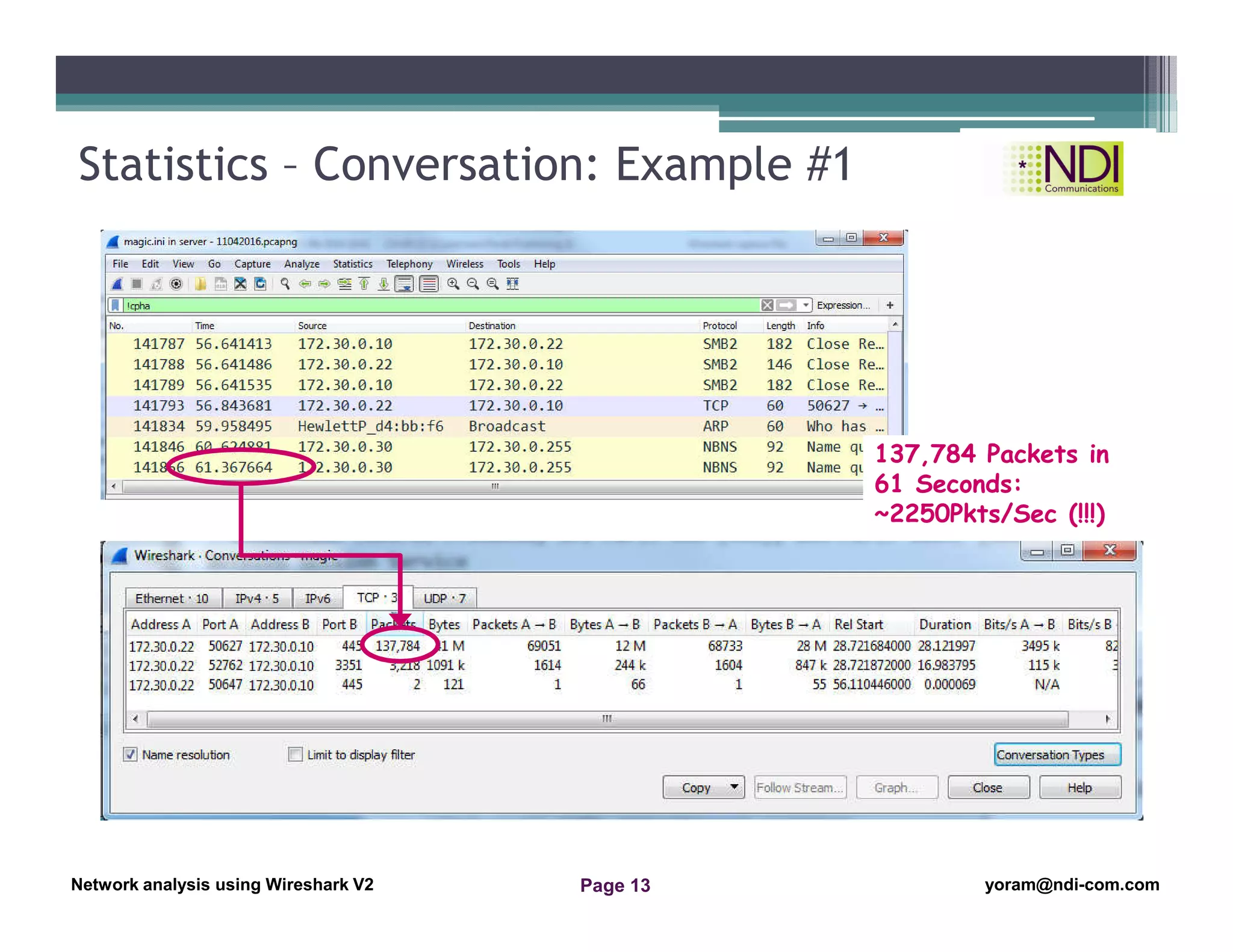
Statistics – Conversation: Example #1
137,784 Packets in
61 Seconds:
~2250Pkts/Sec (!!!)
Network Analysis Using Wireshark Version 2Network Analysis using Wireshark V.2 yoram@ndi-com.com
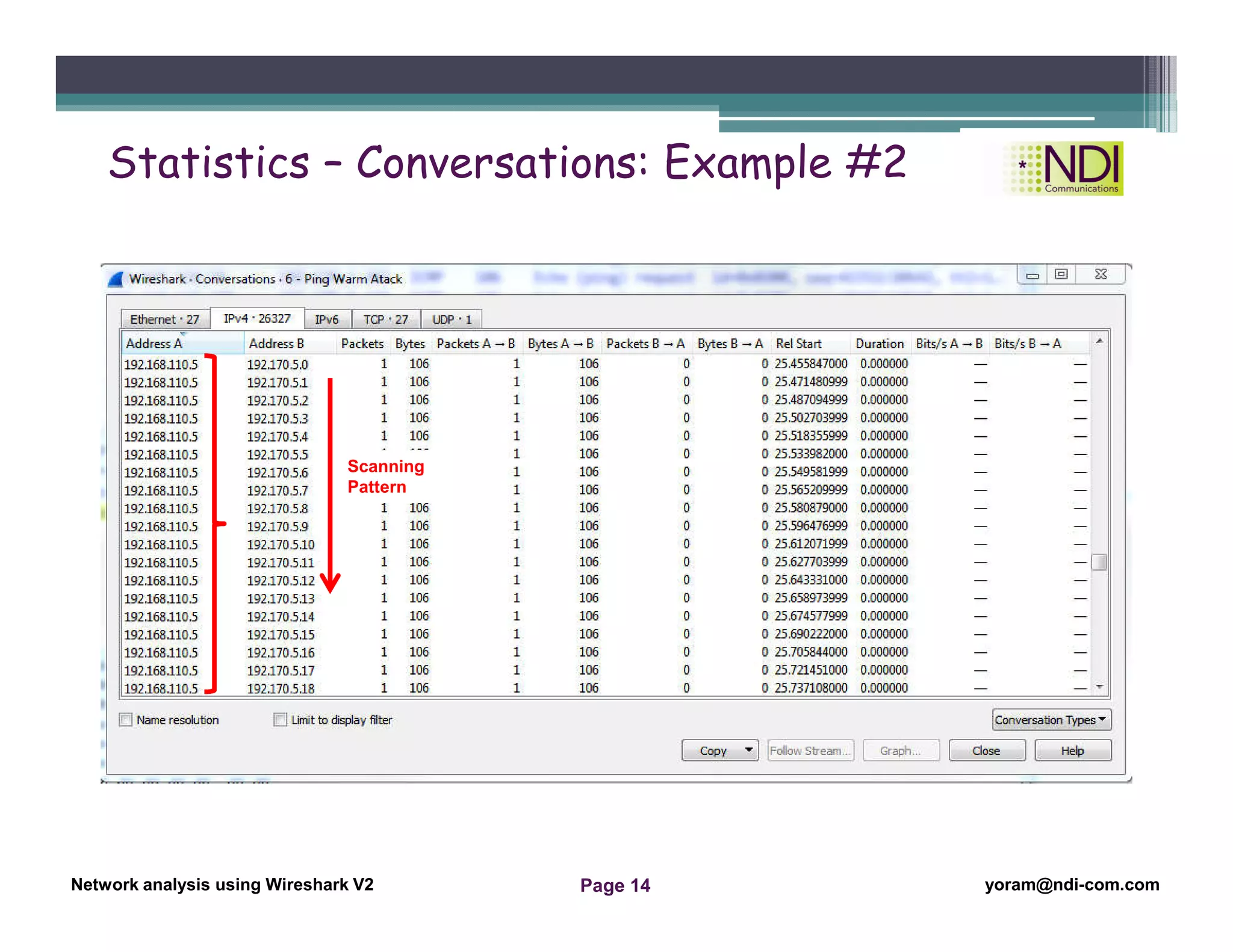
Network analysis using Wireshark V2 yoram@ndi-com.comPage 14
Scanning
Pattern
Statistics – Conversations: Example #2
Network Analysis Using Wireshark Version 2Network Analysis using Wireshark V.2 yoram@ndi-com.com
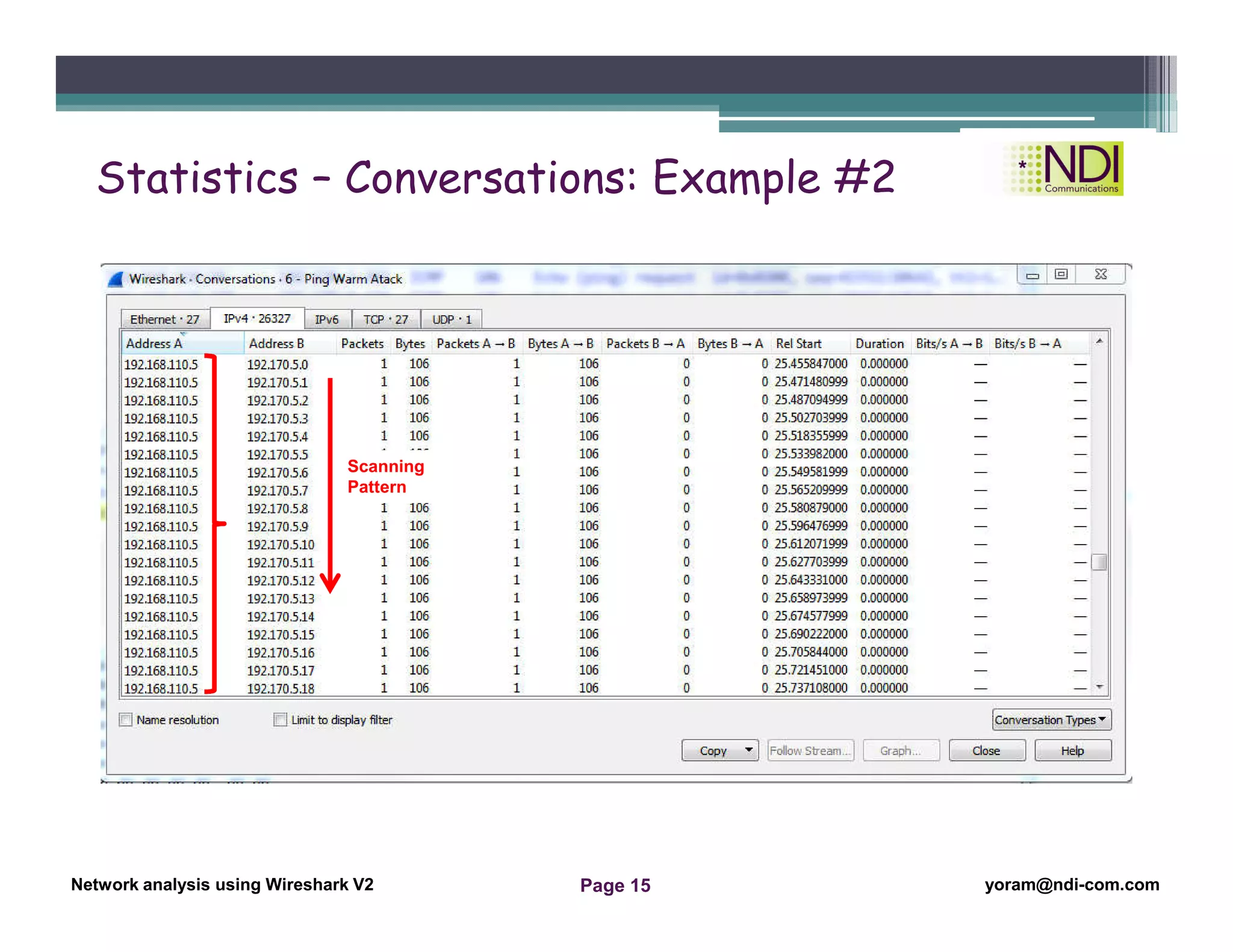
Network analysis using Wireshark V2 yoram@ndi-com.comPage 15
Scanning
Pattern
Statistics – Conversations: Example #2
Network Analysis Using Wireshark Version 2Network Analysis using Wireshark V.2 yoram@ndi-com.com
Network analysis using Wireshark V2 yoram@ndi-com.comPage 16
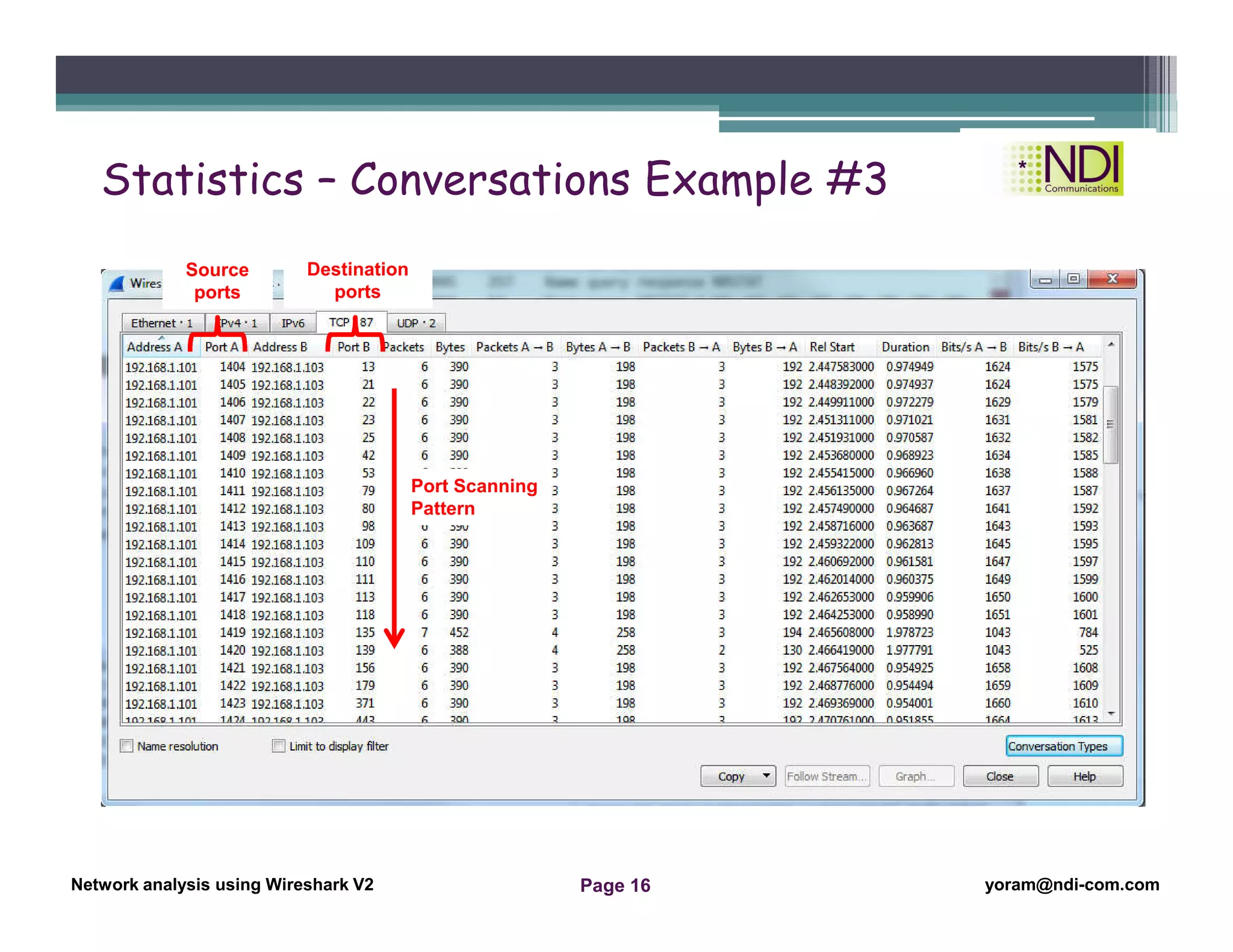
Port Scanning
Pattern
Source
ports
Destination
ports
Statistics – Conversations Example #3
Network Analysis Using Wireshark Version 2Network Analysis using Wireshark V.2 yoram@ndi-com.com
Network analysis using Wireshark V2 yoram@ndi-com.comPage 17
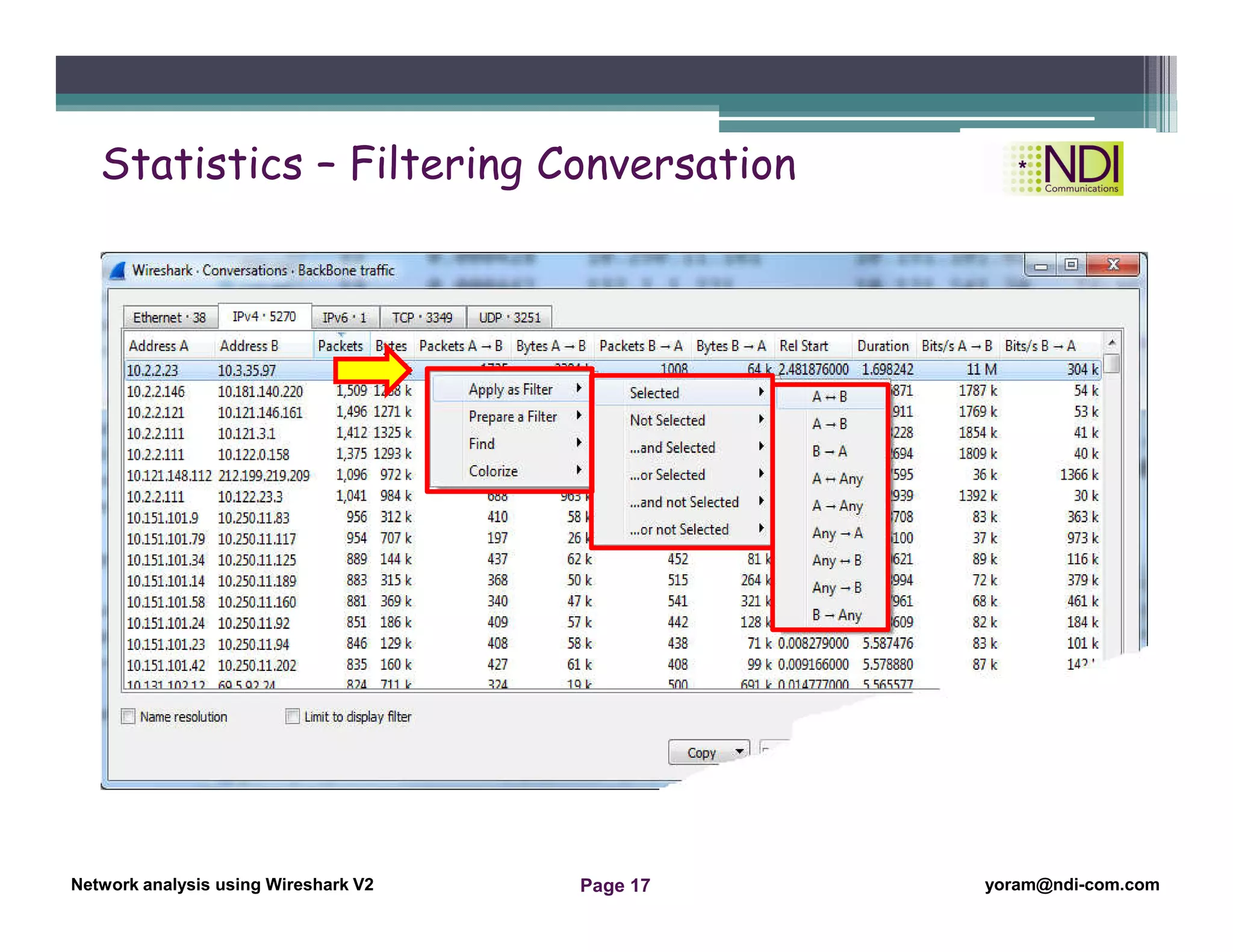
Statistics – Filtering Conversation
Network Analysis Using Wireshark Version 2Network Analysis using Wireshark V.2 yoram@ndi-com.com
Network analysis using Wireshark V2 yoram@ndi-com.comPage 18
Using the File Properties
Address resolution (Resolved Addresses)
Using the Protocol Hierarchy tool from the Statistics menu
Using the Conversations tool from the Statistics menu
Using the Endpoints tool from the Statistics menu
Using Packet Length statistics
Using the HTTP tool from the Statistics menu
Configuring Flow Graph for viewing TCP flows
Creating IP-based statistics
Chapter Content
“To live is the rarest thing in the
world. Most people exist, that is all.”
Oscar Wilde
Network Analysis Using Wireshark Version 2Network Analysis using Wireshark V.2 yoram@ndi-com.com
Network analysis using Wireshark V2 yoram@ndi-com.comPage 19
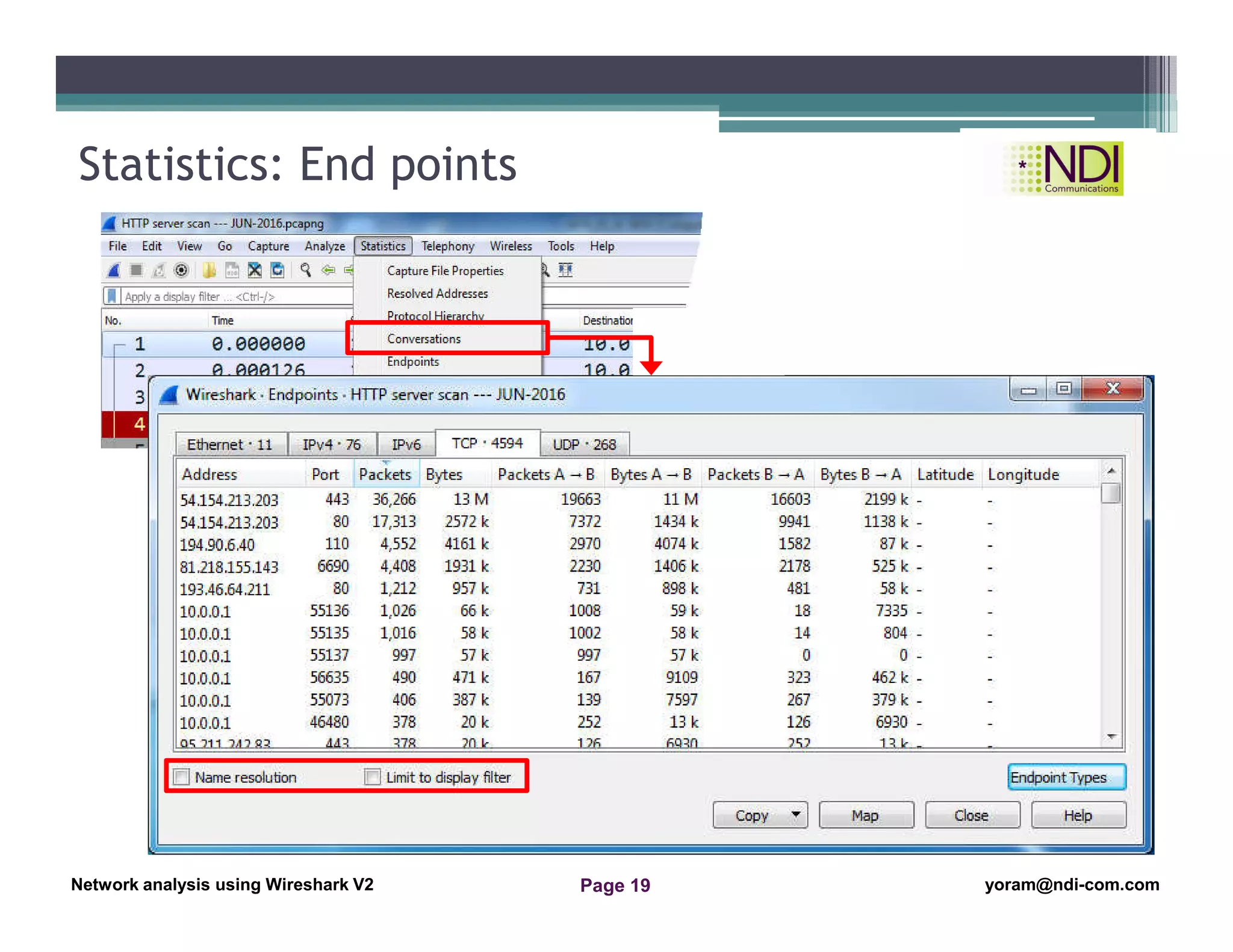
Statistics: End points
Network Analysis Using Wireshark Version 2Network Analysis using Wireshark V.2 yoram@ndi-com.com
Network analysis using Wireshark V2 yoram@ndi-com.comPage 20
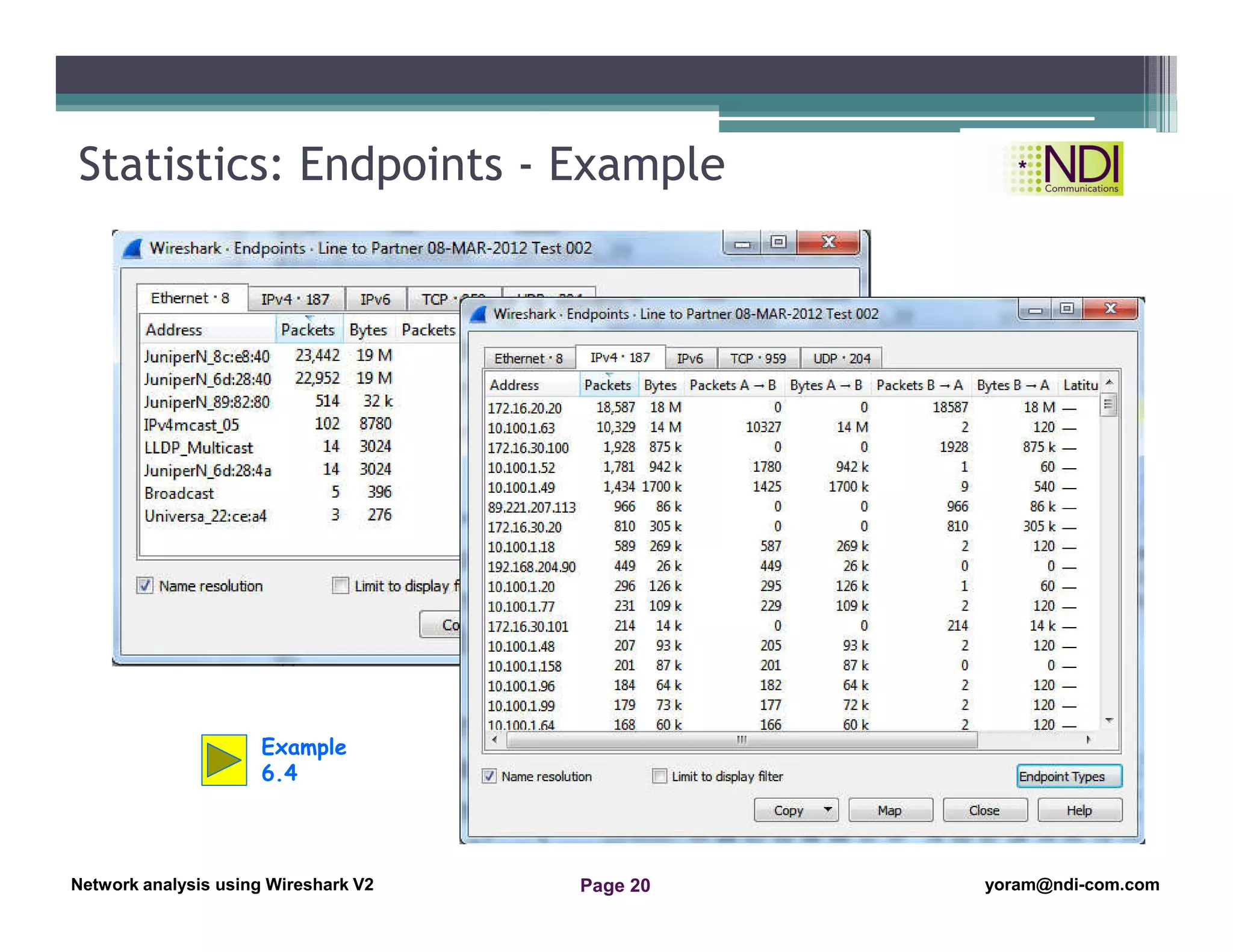
Statistics: Endpoints - Example
Example
6.4
Network Analysis Using Wireshark Version 2Network Analysis using Wireshark V.2 yoram@ndi-com.com
Network analysis using Wireshark V2 yoram@ndi-com.comPage 21
Using the File Properties
Address resolution (Resolved Addresses)
Using the Protocol Hierarchy tool from the Statistics menu
Using the Conversations tool from the Statistics menu
Using the Endpoints tool from the Statistics menu
Using Packet Length statistics
Using the HTTP tool from the Statistics menu
Configuring Flow Graph for viewing TCP flows
Creating IP-based statistics
Chapter Content
“Darkness cannot drive out darkness: only
light can do that. Hate cannot drive out hate:
only love can do that.”
Martin Luther King Jr
Network Analysis Using Wireshark Version 2Network Analysis using Wireshark V.2 yoram@ndi-com.com
Network analysis using Wireshark V2 yoram@ndi-com.comPage 22
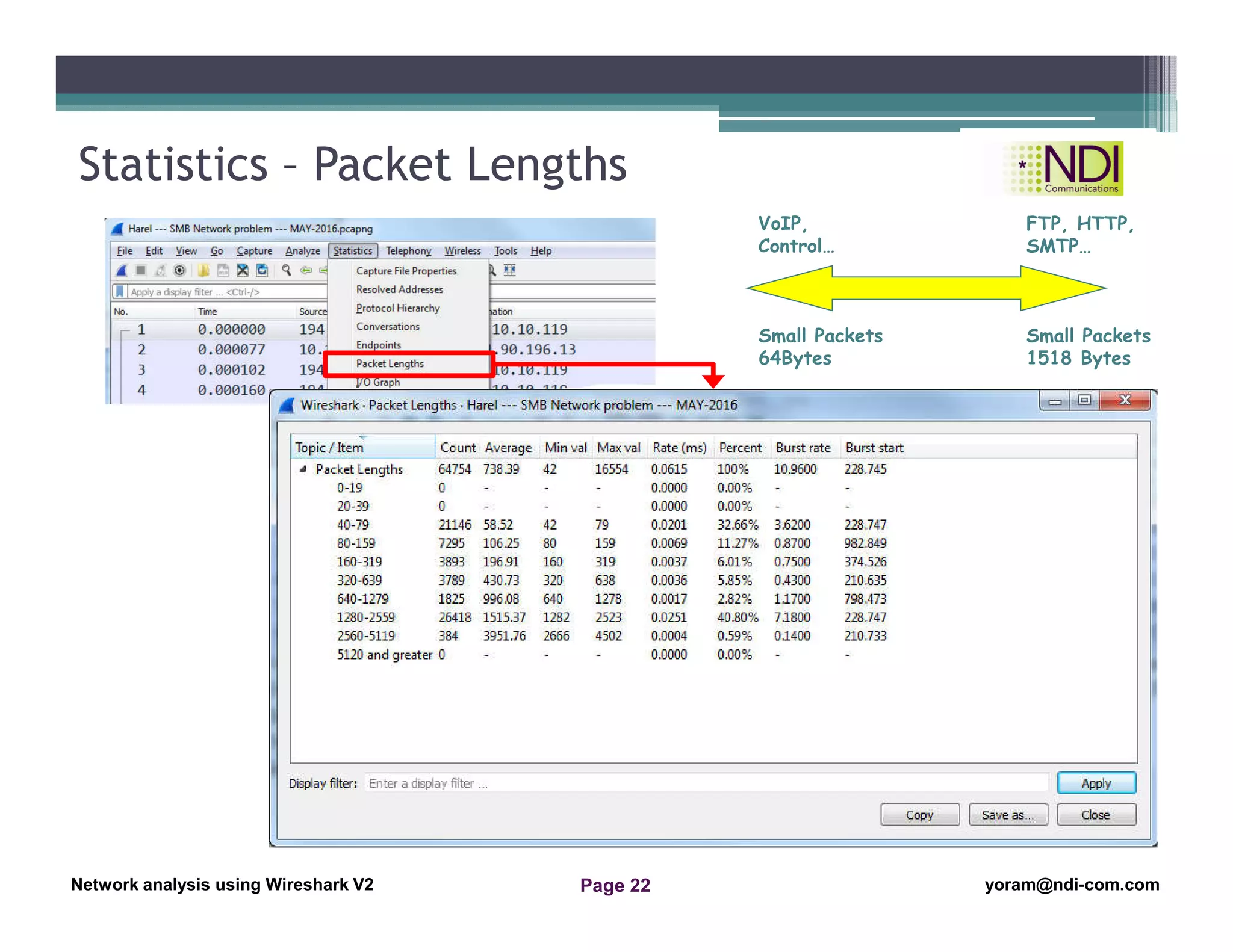
Statistics – Packet Lengths
Small Packets
64Bytes
Small Packets
1518 Bytes
VoIP,
Control…
FTP, HTTP,
SMTP…
Network Analysis Using Wireshark Version 2Network Analysis using Wireshark V.2 yoram@ndi-com.com
Network analysis using Wireshark V2 yoram@ndi-com.comPage 23
Using the File Properties
Address resolution (Resolved Addresses)
Using the Protocol Hierarchy tool from the Statistics menu
Using the Conversations tool from the Statistics menu
Using the Endpoints tool from the Statistics menu
Using Packet Length statistics
Using the HTTP tool from the Statistics menu
Configuring Flow Graph for viewing TCP flows
Creating IP-based statistics
Chapter Content
“I have not failed. I've just found
10,000 ways that won't work.”
Thomas A. Edison
Network Analysis Using Wireshark Version 2Network Analysis using Wireshark V.2 yoram@ndi-com.com
Network analysis using Wireshark V2 yoram@ndi-com.comPage 24
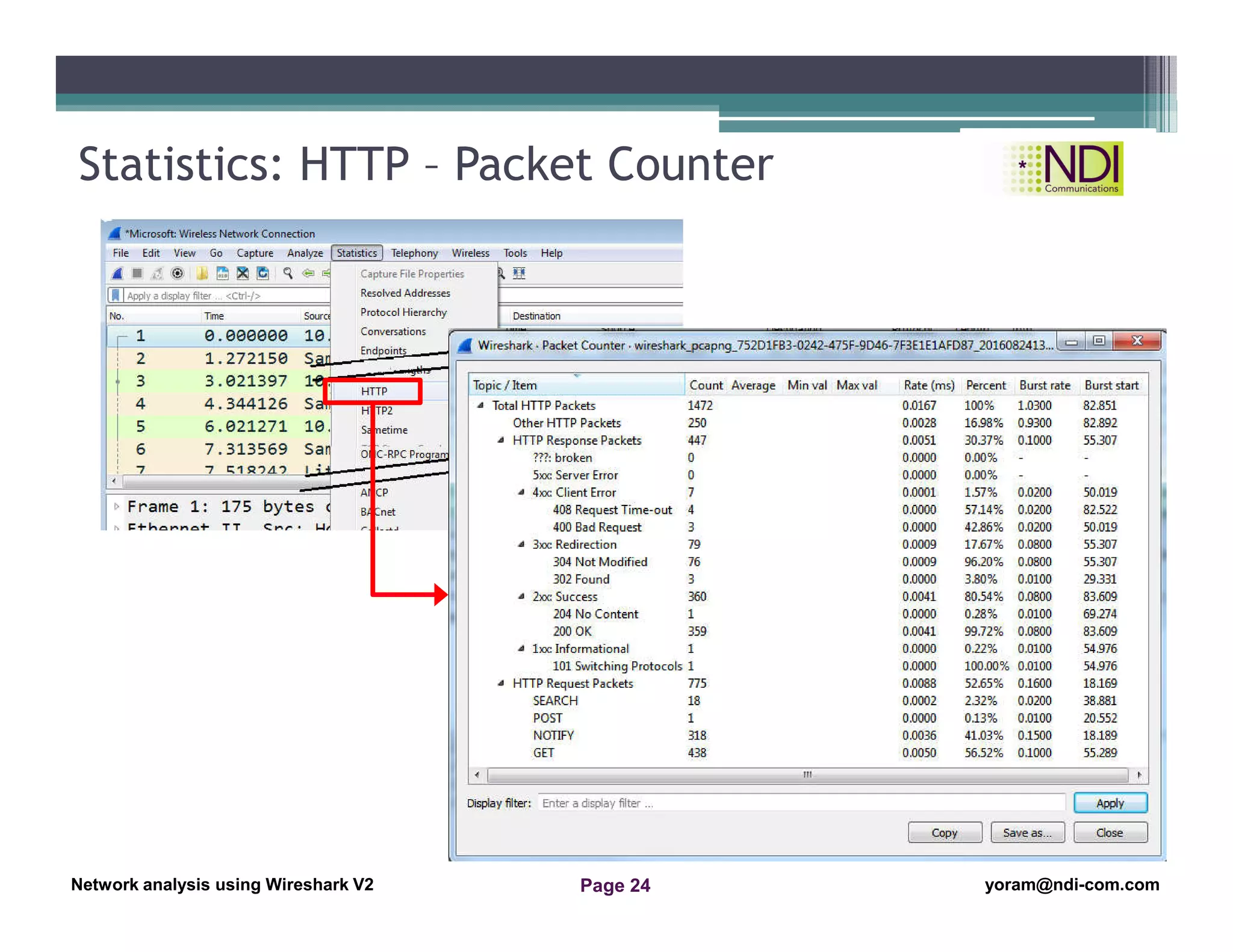
Statistics: HTTP – Packet Counter
Network Analysis Using Wireshark Version 2Network Analysis using Wireshark V.2 yoram@ndi-com.com
Network analysis using Wireshark V2 yoram@ndi-com.comPage 25
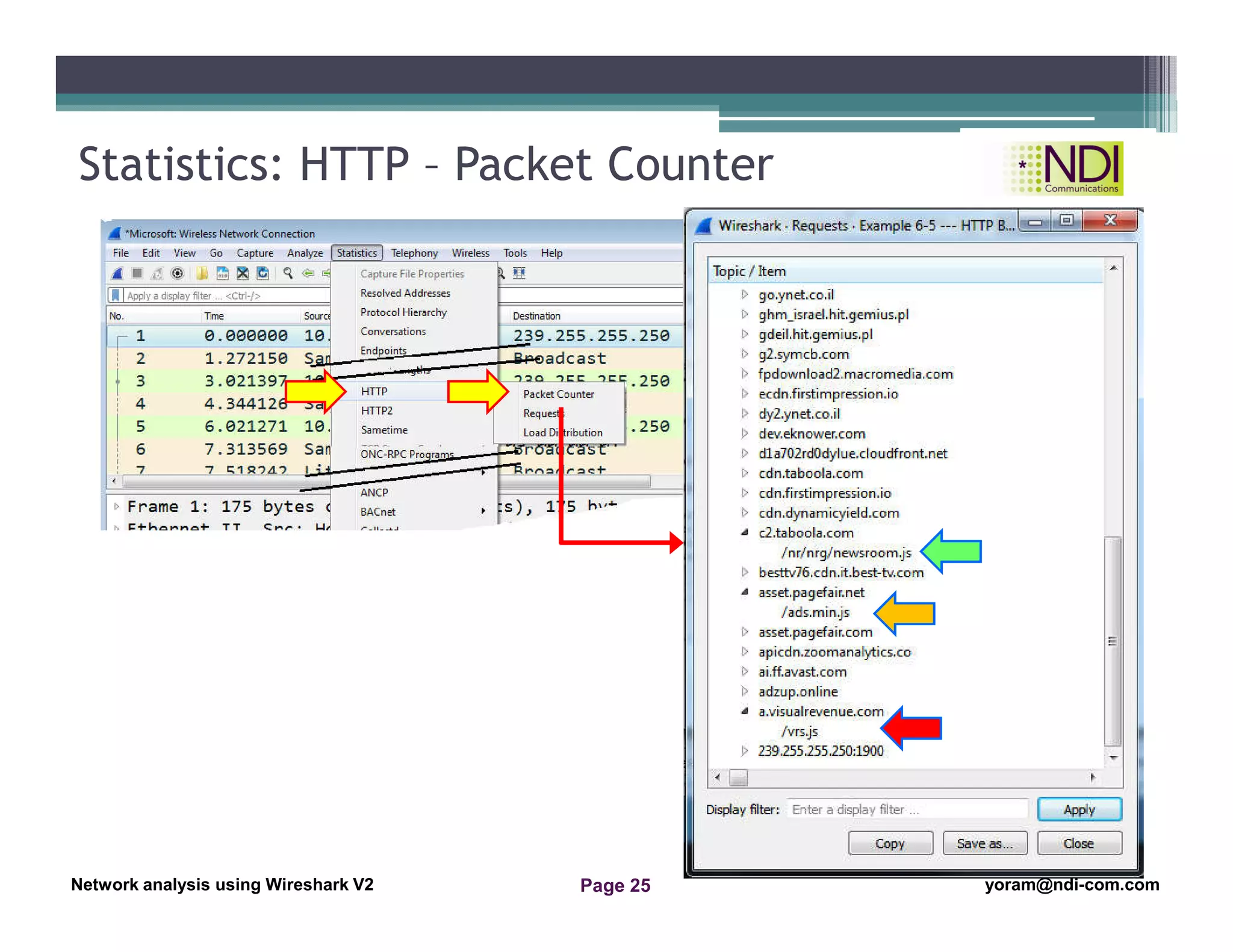
Statistics: HTTP – Packet Counter
Network Analysis Using Wireshark Version 2Network Analysis using Wireshark V.2 yoram@ndi-com.com
Network analysis using Wireshark V2 yoram@ndi-com.comPage 26
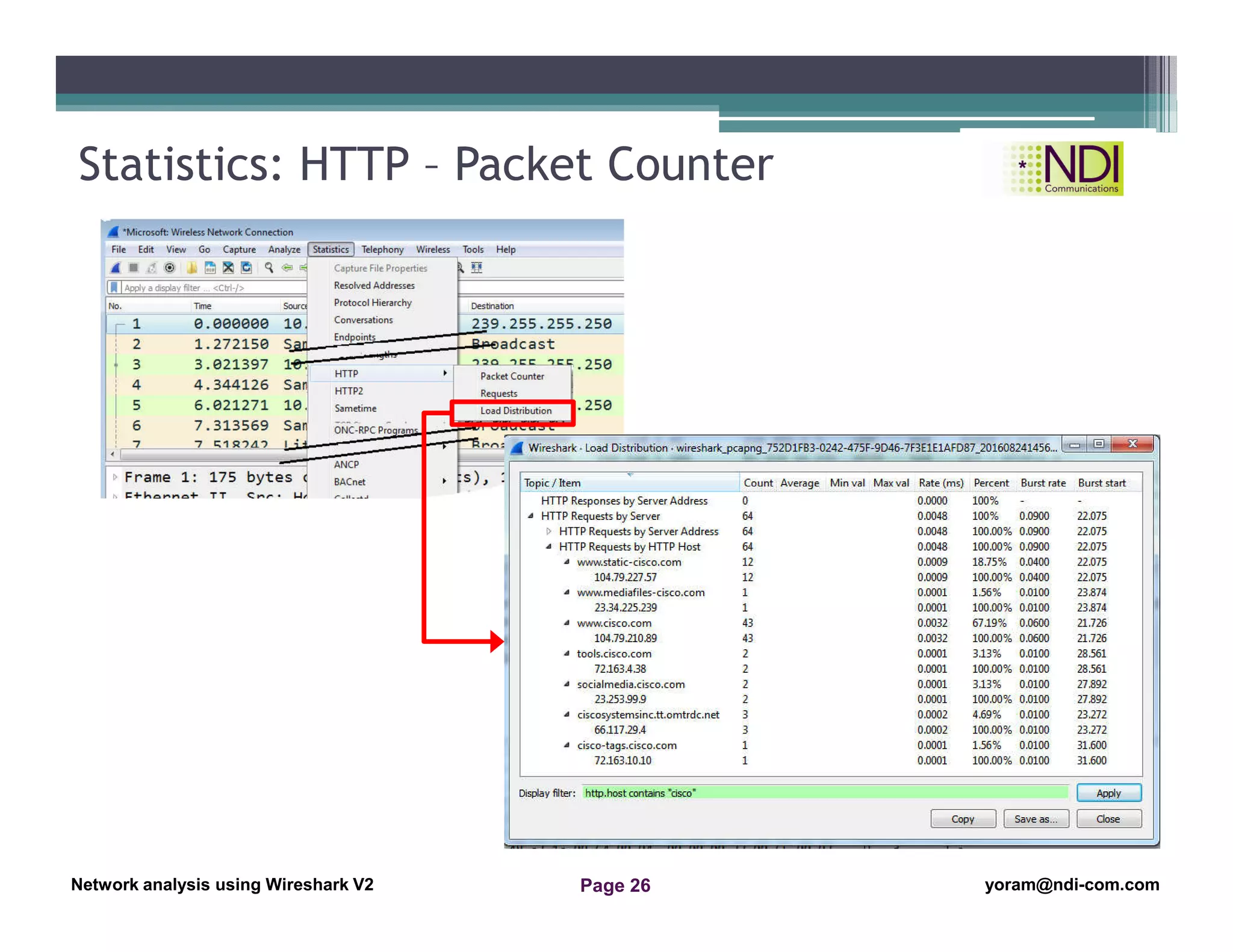
Statistics: HTTP – Packet Counter
Network Analysis Using Wireshark Version 2Network Analysis using Wireshark V.2 yoram@ndi-com.com
Network analysis using Wireshark V2 yoram@ndi-com.comPage 27
Using the File Properties
Address resolution (Resolved Addresses)
Using the Protocol Hierarchy tool from the Statistics menu
Using the Conversations tool from the Statistics menu
Using the Endpoints tool from the Statistics menu
Using Packet Length statistics
Using the HTTP tool from the Statistics menu
Configuring Flow Graph for viewing TCP flows
Creating IP-based statistics
Chapter Content
“It is never too late to be what
you might have been.”
George Eliot
Network Analysis Using Wireshark Version 2Network Analysis using Wireshark V.2 yoram@ndi-com.com
Network analysis using Wireshark V2 yoram@ndi-com.comPage 28
Follow TCP Stream
Referrer
Host
Network Analysis Using Wireshark Version 2Network Analysis using Wireshark V.2 yoram@ndi-com.com
Network analysis using Wireshark V2 yoram@ndi-com.comPage 29
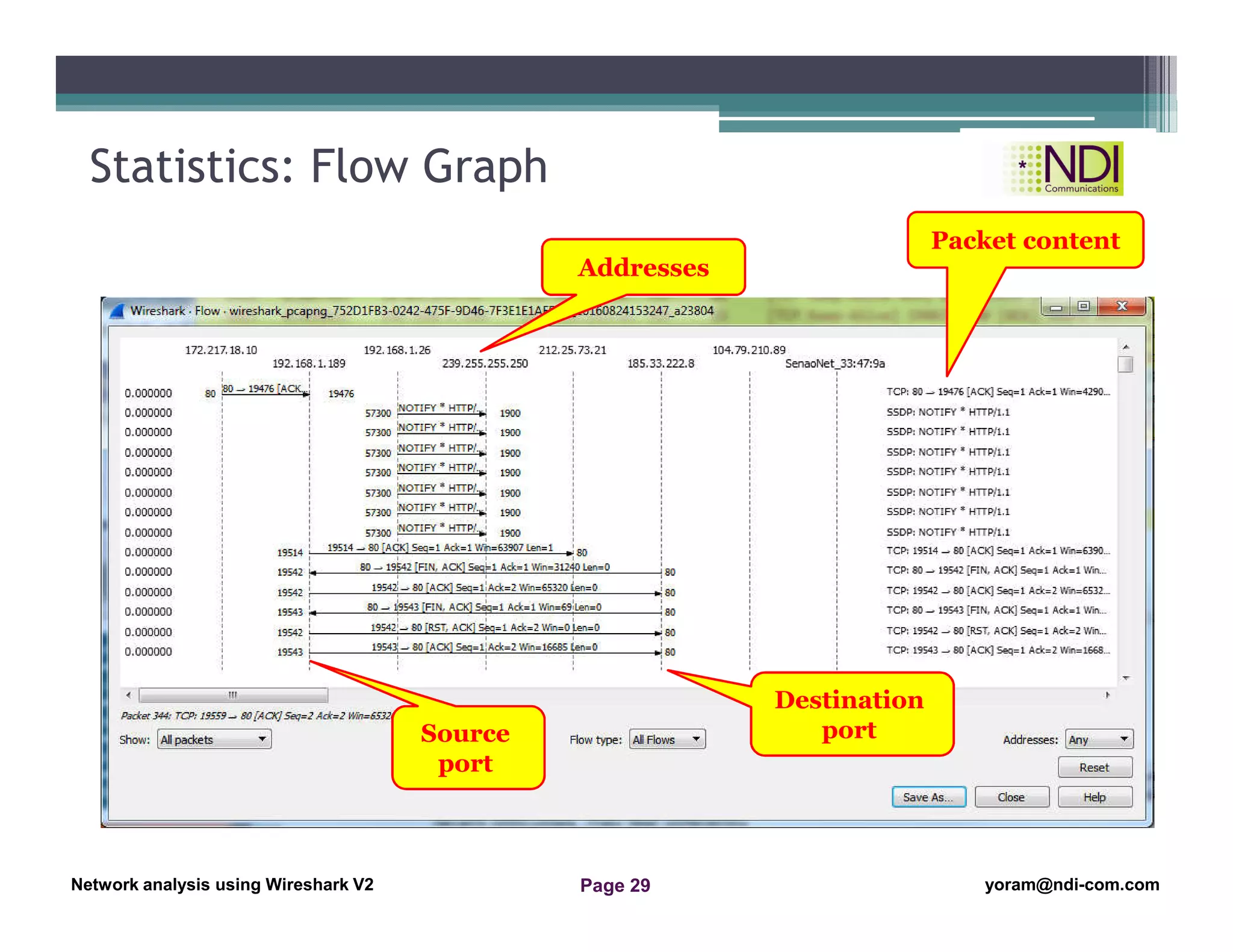
Statistics: Flow Graph
Source
port
Destination
port
Addresses
Packet content
Network Analysis Using Wireshark Version 2Network Analysis using Wireshark V.2 yoram@ndi-com.com
Network analysis using Wireshark V2 yoram@ndi-com.comPage 30
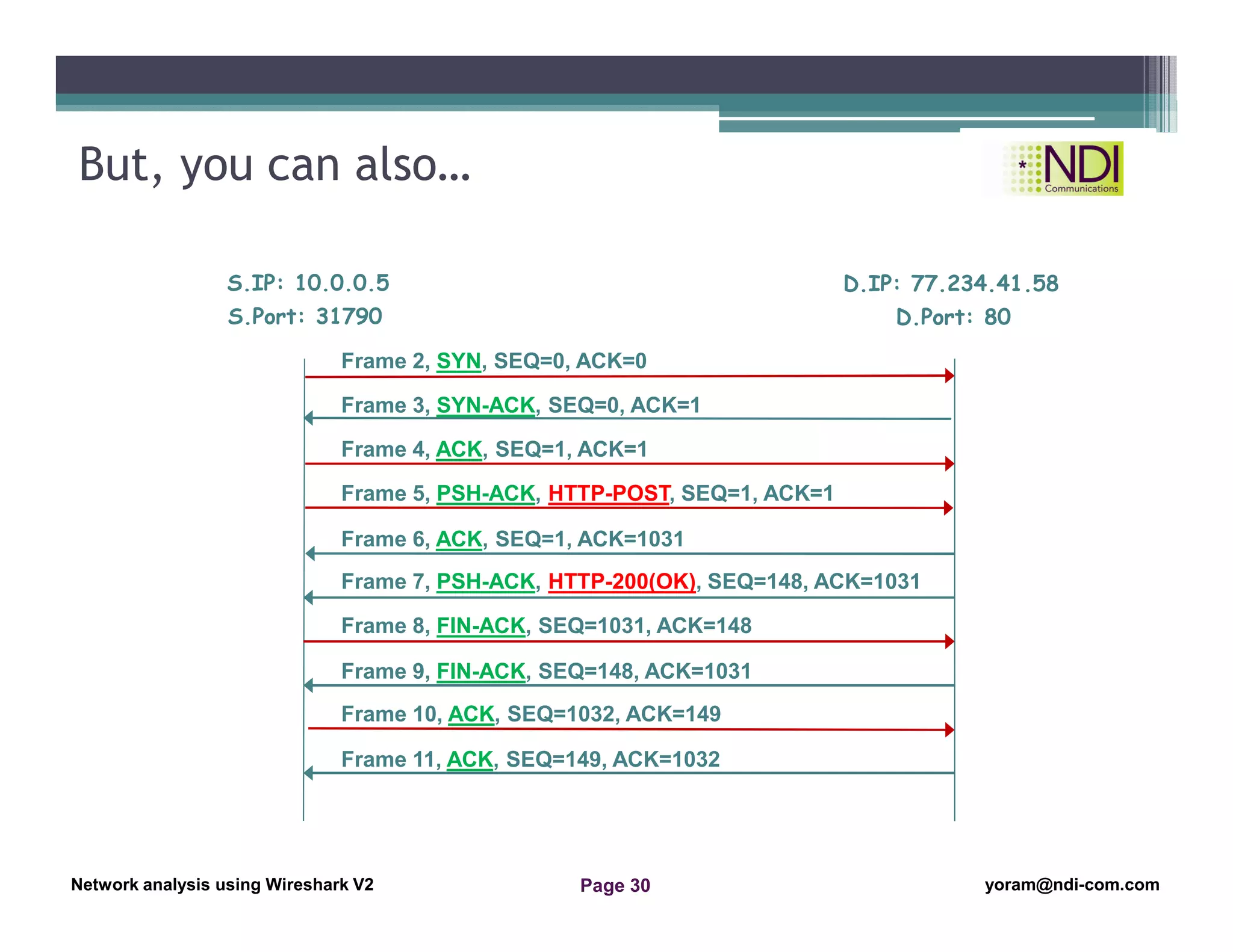
But, you can also…
S.IP: 10.0.0.5
Frame 3, SYN-ACK, SEQ=0, ACK=1
Frame 4, ACK, SEQ=1, ACK=1
Frame 5, PSH-ACK, HTTP-POST, SEQ=1, ACK=1
Frame 6, ACK, SEQ=1, ACK=1031
Frame 10, ACK, SEQ=1032, ACK=149
Frame 2, SYN, SEQ=0, ACK=0
S.Port: 31790
D.IP: 77.234.41.58
D.Port: 80
Frame 7, PSH-ACK, HTTP-200(OK), SEQ=148, ACK=1031
Frame 8, FIN-ACK, SEQ=1031, ACK=148
Frame 9, FIN-ACK, SEQ=148, ACK=1031
Frame 11, ACK, SEQ=149, ACK=1032
Network Analysis Using Wireshark Version 2Network Analysis using Wireshark V.2 yoram@ndi-com.com
Network analysis using Wireshark V2 yoram@ndi-com.comPage 31
Using the File Properties
Address resolution (Resolved Addresses)
Using the Protocol Hierarchy tool from the Statistics menu
Using the Conversations tool from the Statistics menu
Using the Endpoints tool from the Statistics menu
Using Packet Length statistics
Using the HTTP tool from the Statistics menu
Configuring Flow Graph for viewing TCP flows
Creating IP-based statistics
Chapter Content
“If you can't explain it to a six year old,
you don't understand it yourself.”
Albert Einstein
Network Analysis Using Wireshark Version 2Network Analysis using Wireshark V.2 yoram@ndi-com.com
Network analysis using Wireshark V2 yoram@ndi-com.comPage 32
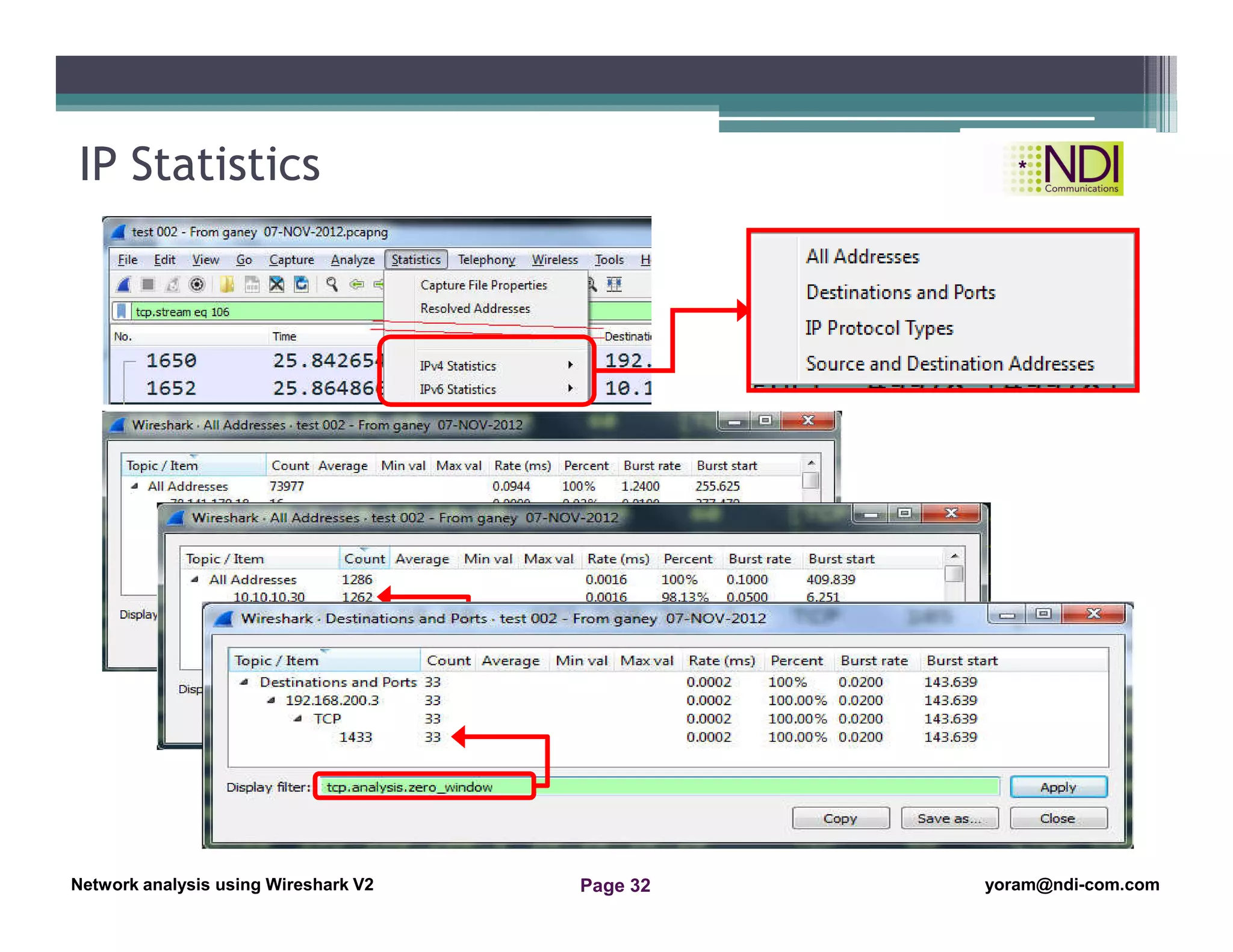
IP Statistics
Display
filter
Network Analysis Using Wireshark Version 2Network Analysis using Wireshark V.2 yoram@ndi-com.com
Network analysis using Wireshark V2 yoram@ndi-com.comPage 33
Summary
• In this lesson we talked about:
▫ Basic statistics tools like hosts and conversations
▫ Some additional tools for IP and HTTP statistics
Network Analysis Using Wireshark Version 2Network Analysis using Wireshark V.2 yoram@ndi-com.com
Network analysis using Wireshark V2 yoram@ndi-com.comPage 34
yoram@ndi-com.com
For More lectures, Courses & Keynote Speaking
Contact Me to:

Network Analysis Using Wireshark -Chapter 6- basic statistics tools

  • 1.
    Network Analysis UsingWireshark Version 2Network Analysis using Wireshark V.2 yoram@ndi-com.com Network analysis using Wireshark V2 yoram@ndi-com.comPage 1 Network analysis Using Wireshark Lesson 6: Basic Statistics Tools
  • 2.
    Network Analysis UsingWireshark Version 2Network Analysis using Wireshark V.2 yoram@ndi-com.com Network analysis using Wireshark V2 yoram@ndi-com.comPage 2 • By the end of this lesson, the participant will be able to: ▫ Understand the types of statistics tools available in Wireshark ▫ Perform network monitoring with these tools Lesson Objectives
  • 3.
    Network Analysis UsingWireshark Version 2Network Analysis using Wireshark V.2 yoram@ndi-com.com Network analysis using Wireshark V2 yoram@ndi-com.comPage 3 yoram@ndi-com.com For More lectures, Courses & Keynote Speaking Contact Me to:
  • 4.
    Network Analysis UsingWireshark Version 2Network Analysis using Wireshark V.2 yoram@ndi-com.com Network analysis using Wireshark V2 yoram@ndi-com.comPage 4 Using the File Properties Address resolution (Resolved Addresses) Using the Protocol Hierarchy tool from the Statistics menu Using the Conversations tool from the Statistics menu Using the Endpoints tool from the Statistics menu Using Packet Length statistics Using the HTTP tool from the Statistics menu Configuring Flow Graph for viewing TCP flows Creating IP-based statistics Chapter Content “Be yourself; everyone else is already taken.” Oscar Wilde
  • 5.
    Network Analysis UsingWireshark Version 2Network Analysis using Wireshark V.2 yoram@ndi-com.com Network analysis using Wireshark V2 yoram@ndi-com.comPage 5 Statistics: Capture File Properties Capture file information Capture time & duration Wireshark hardware Capture interface Capture statistics
  • 6.
    Network Analysis UsingWireshark Version 2Network Analysis using Wireshark V.2 yoram@ndi-com.com Network analysis using Wireshark V2 yoram@ndi-com.comPage 6 Using the File Properties Address resolution (Resolved Addresses) Using the Protocol Hierarchy tool from the Statistics menu Using the Conversations tool from the Statistics menu Using the Endpoints tool from the Statistics menu Using Packet Length statistics Using the HTTP tool from the Statistics menu Configuring Flow Graph for viewing TCP flows Creating IP-based statistics Chapter Content “Two things are infinite: the universe and human stupidity; and I'm not sure about the universe.” ― Albert Einstein
  • 7.
    Network Analysis UsingWireshark Version 2Network Analysis using Wireshark V.2 yoram@ndi-com.com Network analysis using Wireshark V2 yoram@ndi-com.comPage 7 Statistics: Address resolution (Resolved Addresses) Address resolution (Resolved Addresses) Hash tables Port numbers and MAC addresses
  • 8.
    Network Analysis UsingWireshark Version 2Network Analysis using Wireshark V.2 yoram@ndi-com.com Network analysis using Wireshark V2 yoram@ndi-com.comPage 8 Using the File Properties Address resolution (Resolved Addresses) Using the Protocol Hierarchy tool from the Statistics menu Using the Conversations tool from the Statistics menu Using the Endpoints tool from the Statistics menu Using Packet Length statistics Using the HTTP tool from the Statistics menu Configuring Flow Graph for viewing TCP flows Creating IP-based statistics Chapter Content “So many books, so little time.” ― Frank Zappa
  • 9.
    Network Analysis UsingWireshark Version 2Network Analysis using Wireshark V.2 yoram@ndi-com.com Network analysis using Wireshark V2 yoram@ndi-com.comPage 9 Statistics: Protocol Hierarchy
  • 10.
    Network Analysis UsingWireshark Version 2Network Analysis using Wireshark V.2 yoram@ndi-com.com Network analysis using Wireshark V2 yoram@ndi-com.comPage 10 Using the File Properties Address resolution (Resolved Addresses) Using the Protocol Hierarchy tool from the Statistics menu Using the Conversations tool from the Statistics menu Using the Endpoints tool from the Statistics menu Using Packet Length statistics Using the HTTP tool from the Statistics menu Configuring Flow Graph for viewing TCP flows Creating IP-based statistics Chapter Content “Be the change that you wish to see in the world.” Mahatma Gandhi
  • 11.
    Network Analysis UsingWireshark Version 2Network Analysis using Wireshark V.2 yoram@ndi-com.com Network analysis using Wireshark V2 yoram@ndi-com.comPage 11 Statistics: Conversations (1) Ethernet Conversations Statistics IPv4 Conversations Statistics IPv6 Conversations Statistics TCP Conversations Statistics UDP Conversations Statistics
  • 12.
    Network Analysis UsingWireshark Version 2Network Analysis using Wireshark V.2 yoram@ndi-com.com Network analysis using Wireshark V2 yoram@ndi-com.comPage 12 Statistics: Conversations (2)
  • 13.
    Network Analysis UsingWireshark Version 2Network Analysis using Wireshark V.2 yoram@ndi-com.com Network analysis using Wireshark V2 yoram@ndi-com.comPage 13 Statistics – Conversation: Example #1 137,784 Packets in 61 Seconds: ~2250Pkts/Sec (!!!)
  • 14.
    Network Analysis UsingWireshark Version 2Network Analysis using Wireshark V.2 yoram@ndi-com.com Network analysis using Wireshark V2 yoram@ndi-com.comPage 14 Scanning Pattern Statistics – Conversations: Example #2
  • 15.
    Network Analysis UsingWireshark Version 2Network Analysis using Wireshark V.2 yoram@ndi-com.com Network analysis using Wireshark V2 yoram@ndi-com.comPage 15 Scanning Pattern Statistics – Conversations: Example #2
  • 16.
    Network Analysis UsingWireshark Version 2Network Analysis using Wireshark V.2 yoram@ndi-com.com Network analysis using Wireshark V2 yoram@ndi-com.comPage 16 Port Scanning Pattern Source ports Destination ports Statistics – Conversations Example #3
  • 17.
    Network Analysis UsingWireshark Version 2Network Analysis using Wireshark V.2 yoram@ndi-com.com Network analysis using Wireshark V2 yoram@ndi-com.comPage 17 Statistics – Filtering Conversation
  • 18.
    Network Analysis UsingWireshark Version 2Network Analysis using Wireshark V.2 yoram@ndi-com.com Network analysis using Wireshark V2 yoram@ndi-com.comPage 18 Using the File Properties Address resolution (Resolved Addresses) Using the Protocol Hierarchy tool from the Statistics menu Using the Conversations tool from the Statistics menu Using the Endpoints tool from the Statistics menu Using Packet Length statistics Using the HTTP tool from the Statistics menu Configuring Flow Graph for viewing TCP flows Creating IP-based statistics Chapter Content “To live is the rarest thing in the world. Most people exist, that is all.” Oscar Wilde
  • 19.
    Network Analysis UsingWireshark Version 2Network Analysis using Wireshark V.2 yoram@ndi-com.com Network analysis using Wireshark V2 yoram@ndi-com.comPage 19 Statistics: End points
  • 20.
    Network Analysis UsingWireshark Version 2Network Analysis using Wireshark V.2 yoram@ndi-com.com Network analysis using Wireshark V2 yoram@ndi-com.comPage 20 Statistics: Endpoints - Example Example 6.4
  • 21.
    Network Analysis UsingWireshark Version 2Network Analysis using Wireshark V.2 yoram@ndi-com.com Network analysis using Wireshark V2 yoram@ndi-com.comPage 21 Using the File Properties Address resolution (Resolved Addresses) Using the Protocol Hierarchy tool from the Statistics menu Using the Conversations tool from the Statistics menu Using the Endpoints tool from the Statistics menu Using Packet Length statistics Using the HTTP tool from the Statistics menu Configuring Flow Graph for viewing TCP flows Creating IP-based statistics Chapter Content “Darkness cannot drive out darkness: only light can do that. Hate cannot drive out hate: only love can do that.” Martin Luther King Jr
  • 22.
    Network Analysis UsingWireshark Version 2Network Analysis using Wireshark V.2 yoram@ndi-com.com Network analysis using Wireshark V2 yoram@ndi-com.comPage 22 Statistics – Packet Lengths Small Packets 64Bytes Small Packets 1518 Bytes VoIP, Control… FTP, HTTP, SMTP…
  • 23.
    Network Analysis UsingWireshark Version 2Network Analysis using Wireshark V.2 yoram@ndi-com.com Network analysis using Wireshark V2 yoram@ndi-com.comPage 23 Using the File Properties Address resolution (Resolved Addresses) Using the Protocol Hierarchy tool from the Statistics menu Using the Conversations tool from the Statistics menu Using the Endpoints tool from the Statistics menu Using Packet Length statistics Using the HTTP tool from the Statistics menu Configuring Flow Graph for viewing TCP flows Creating IP-based statistics Chapter Content “I have not failed. I've just found 10,000 ways that won't work.” Thomas A. Edison
  • 24.
    Network Analysis UsingWireshark Version 2Network Analysis using Wireshark V.2 yoram@ndi-com.com Network analysis using Wireshark V2 yoram@ndi-com.comPage 24 Statistics: HTTP – Packet Counter
  • 25.
    Network Analysis UsingWireshark Version 2Network Analysis using Wireshark V.2 yoram@ndi-com.com Network analysis using Wireshark V2 yoram@ndi-com.comPage 25 Statistics: HTTP – Packet Counter
  • 26.
    Network Analysis UsingWireshark Version 2Network Analysis using Wireshark V.2 yoram@ndi-com.com Network analysis using Wireshark V2 yoram@ndi-com.comPage 26 Statistics: HTTP – Packet Counter
  • 27.
    Network Analysis UsingWireshark Version 2Network Analysis using Wireshark V.2 yoram@ndi-com.com Network analysis using Wireshark V2 yoram@ndi-com.comPage 27 Using the File Properties Address resolution (Resolved Addresses) Using the Protocol Hierarchy tool from the Statistics menu Using the Conversations tool from the Statistics menu Using the Endpoints tool from the Statistics menu Using Packet Length statistics Using the HTTP tool from the Statistics menu Configuring Flow Graph for viewing TCP flows Creating IP-based statistics Chapter Content “It is never too late to be what you might have been.” George Eliot
  • 28.
    Network Analysis UsingWireshark Version 2Network Analysis using Wireshark V.2 yoram@ndi-com.com Network analysis using Wireshark V2 yoram@ndi-com.comPage 28 Follow TCP Stream Referrer Host
  • 29.
    Network Analysis UsingWireshark Version 2Network Analysis using Wireshark V.2 yoram@ndi-com.com Network analysis using Wireshark V2 yoram@ndi-com.comPage 29 Statistics: Flow Graph Source port Destination port Addresses Packet content
  • 30.
    Network Analysis UsingWireshark Version 2Network Analysis using Wireshark V.2 yoram@ndi-com.com Network analysis using Wireshark V2 yoram@ndi-com.comPage 30 But, you can also… S.IP: 10.0.0.5 Frame 3, SYN-ACK, SEQ=0, ACK=1 Frame 4, ACK, SEQ=1, ACK=1 Frame 5, PSH-ACK, HTTP-POST, SEQ=1, ACK=1 Frame 6, ACK, SEQ=1, ACK=1031 Frame 10, ACK, SEQ=1032, ACK=149 Frame 2, SYN, SEQ=0, ACK=0 S.Port: 31790 D.IP: 77.234.41.58 D.Port: 80 Frame 7, PSH-ACK, HTTP-200(OK), SEQ=148, ACK=1031 Frame 8, FIN-ACK, SEQ=1031, ACK=148 Frame 9, FIN-ACK, SEQ=148, ACK=1031 Frame 11, ACK, SEQ=149, ACK=1032
  • 31.
    Network Analysis UsingWireshark Version 2Network Analysis using Wireshark V.2 yoram@ndi-com.com Network analysis using Wireshark V2 yoram@ndi-com.comPage 31 Using the File Properties Address resolution (Resolved Addresses) Using the Protocol Hierarchy tool from the Statistics menu Using the Conversations tool from the Statistics menu Using the Endpoints tool from the Statistics menu Using Packet Length statistics Using the HTTP tool from the Statistics menu Configuring Flow Graph for viewing TCP flows Creating IP-based statistics Chapter Content “If you can't explain it to a six year old, you don't understand it yourself.” Albert Einstein
  • 32.
    Network Analysis UsingWireshark Version 2Network Analysis using Wireshark V.2 yoram@ndi-com.com Network analysis using Wireshark V2 yoram@ndi-com.comPage 32 IP Statistics Display filter
  • 33.
    Network Analysis UsingWireshark Version 2Network Analysis using Wireshark V.2 yoram@ndi-com.com Network analysis using Wireshark V2 yoram@ndi-com.comPage 33 Summary • In this lesson we talked about: ▫ Basic statistics tools like hosts and conversations ▫ Some additional tools for IP and HTTP statistics
  • 34.
    Network Analysis UsingWireshark Version 2Network Analysis using Wireshark V.2 yoram@ndi-com.com Network analysis using Wireshark V2 yoram@ndi-com.comPage 34 yoram@ndi-com.com For More lectures, Courses & Keynote Speaking Contact Me to: