Network Analysis Using Wireshark Version 2Network Analysis using Wireshark V.2 yoram@ndi-com.com
Network analysis using Wireshark V2 yoram@ndi-com.comPage 1
Network analysis Using Wireshark
Lesson 9:
Ethernet and LAN Switching
Network Analysis Using Wireshark Version 2Network Analysis using Wireshark V.2 yoram@ndi-com.com
Network analysis using Wireshark V2 yoram@ndi-com.comPage 2
• By the end of this lesson, the participant will be able to:
▫ Understand Ethernet frame structure
▫ Use Wireshark for resolving Ethernet problems
Lesson Objectives
Network Analysis Using Wireshark Version 2Network Analysis using Wireshark V.2 yoram@ndi-com.com
Network analysis using Wireshark V2 yoram@ndi-com.comPage 3
yoram@ndi-com.com
For More lectures, Courses & Keynote Speaking
Contact Me to:
Network Analysis Using Wireshark Version 2Network Analysis using Wireshark V.2 yoram@ndi-com.com
Network analysis using Wireshark V2 yoram@ndi-com.comPage 4
Ethernet frame structure
What problems to look for
Chapter Content
Network Analysis Using Wireshark Version 2Network Analysis using Wireshark V.2 yoram@ndi-com.com
Network analysis using Wireshark V2 yoram@ndi-com.comPage 5
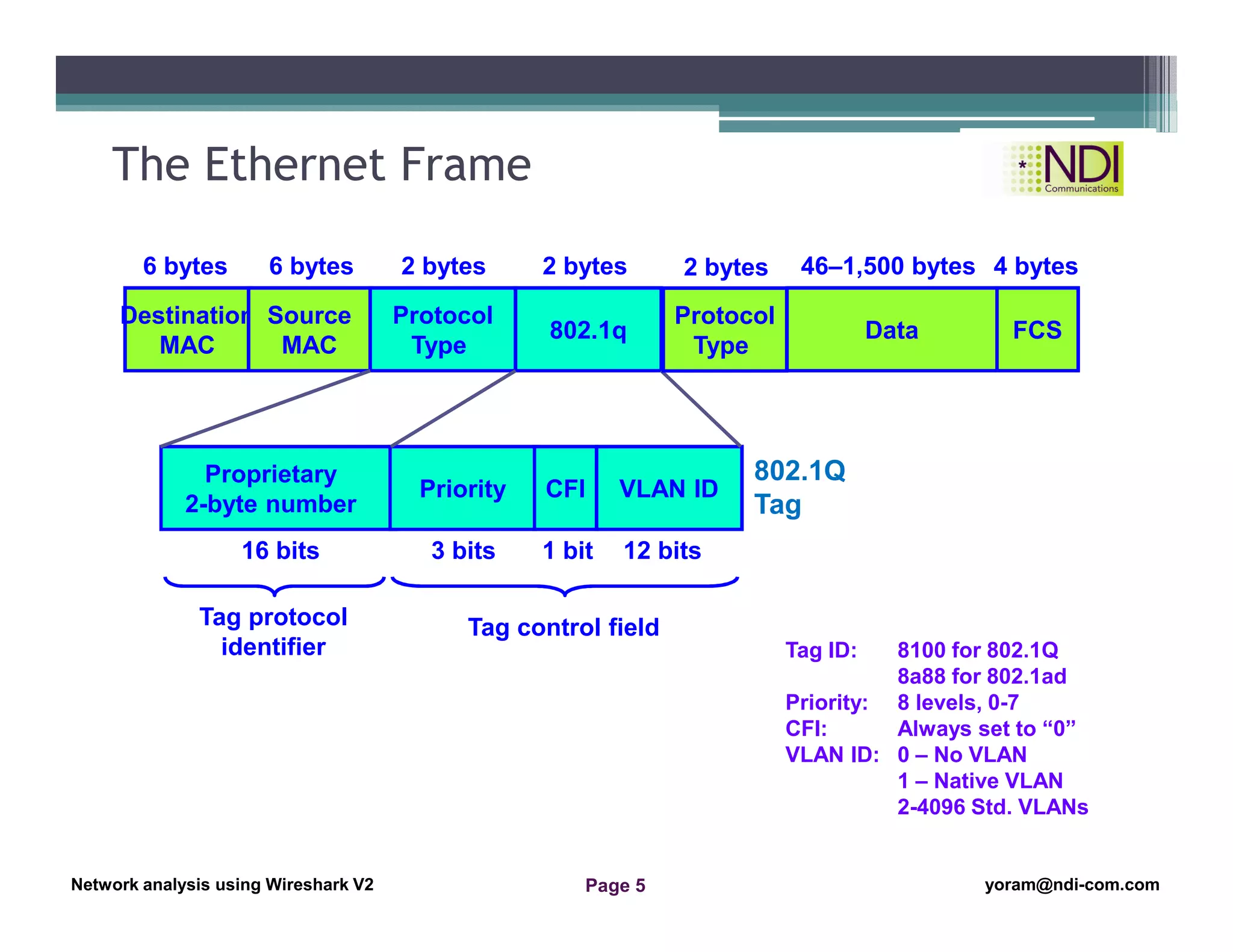
The Ethernet Frame
Destination
MAC
Source
MAC
Protocol
Type
802.1q Data FCS
6 bytes 6 bytes 2 bytes 2 bytes 46–1,500 bytes 4 bytes
Priority CFI VLAN ID
Tag protocol
identifier
Tag control field
Proprietary
2-byte number
16 bits 3 bits 1 bit 12 bits
Protocol
Type
2 bytes
802.1Q
Tag
Tag ID: 8100 for 802.1Q
8a88 for 802.1ad
Priority: 8 levels, 0-7
CFI: Always set to “0”
VLAN ID: 0 – No VLAN
1 – Native VLAN
2-4096 Std. VLANs
Network Analysis Using Wireshark Version 2Network Analysis using Wireshark V.2 yoram@ndi-com.com
Network analysis using Wireshark V2 yoram@ndi-com.comPage 6
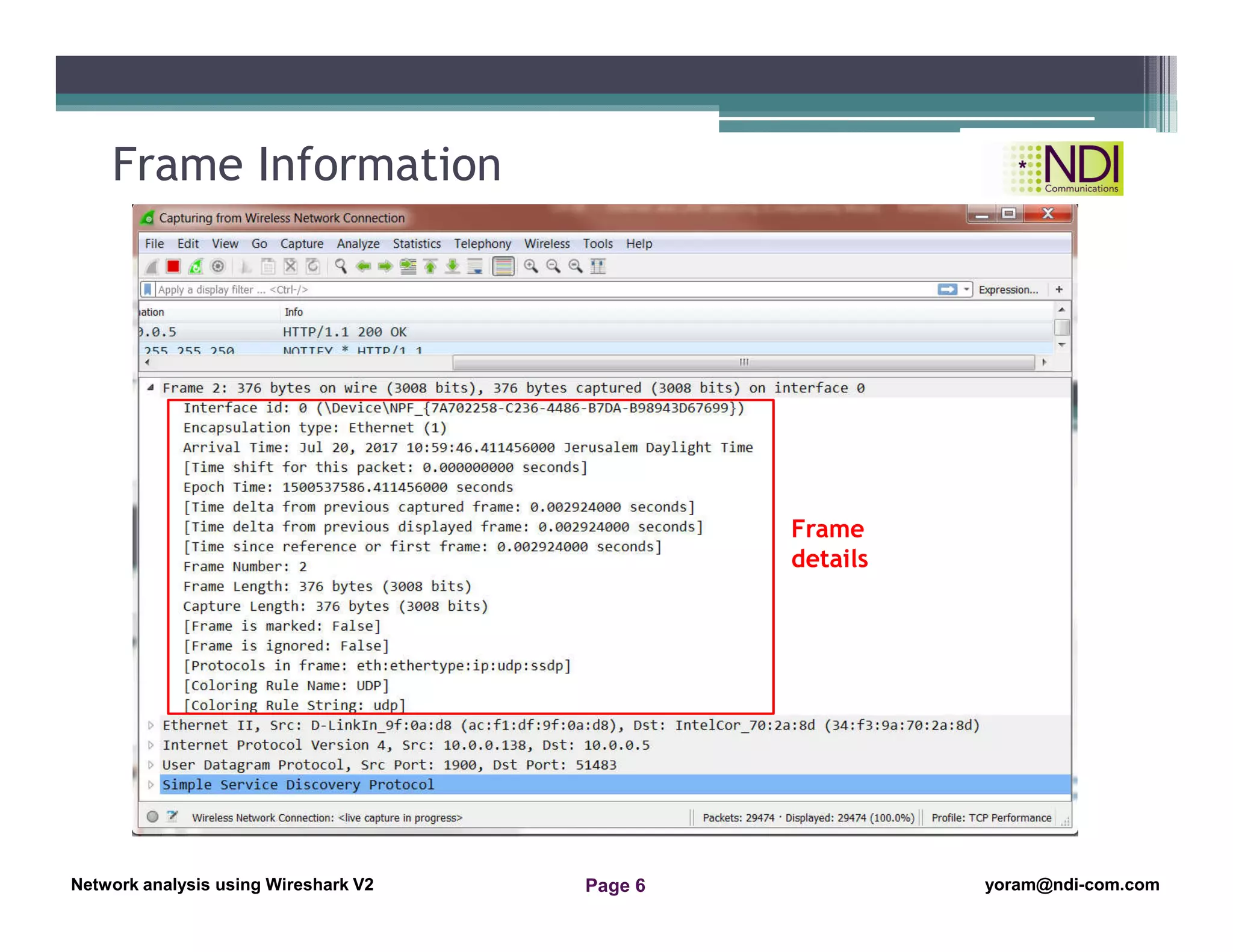
Frame Information
Frame
details
Network Analysis Using Wireshark Version 2Network Analysis using Wireshark V.2 yoram@ndi-com.com
Network analysis using Wireshark V2 yoram@ndi-com.comPage 7
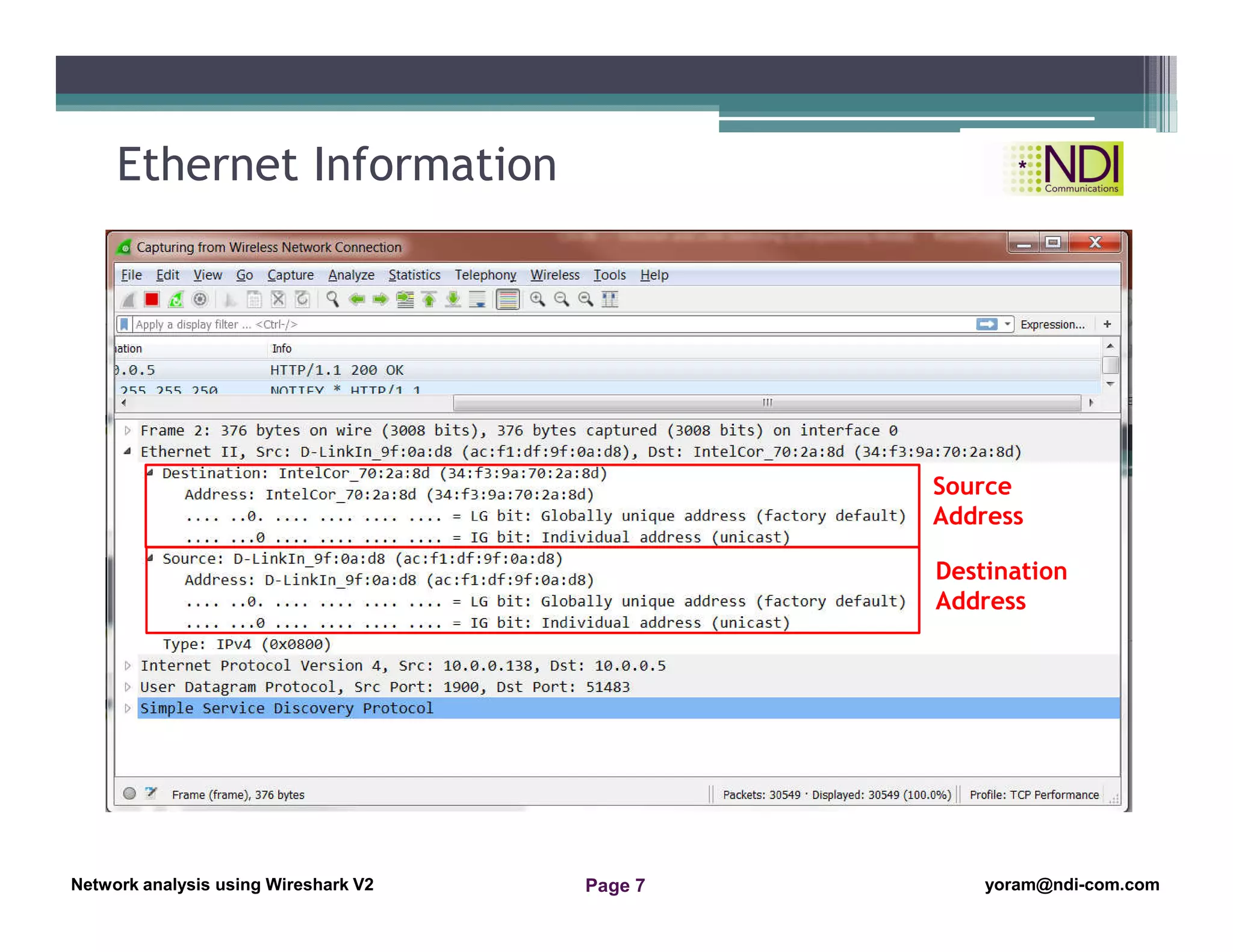
Ethernet Information
Source
Address
Destination
Address
Network Analysis Using Wireshark Version 2Network Analysis using Wireshark V.2 yoram@ndi-com.com
Network analysis using Wireshark V2 yoram@ndi-com.comPage 8
Ethernet frame structure
What problems to look for
Chapter Content
Network Analysis Using Wireshark Version 2Network Analysis using Wireshark V.2 yoram@ndi-com.com
Network analysis using Wireshark V2 yoram@ndi-com.comPage 9
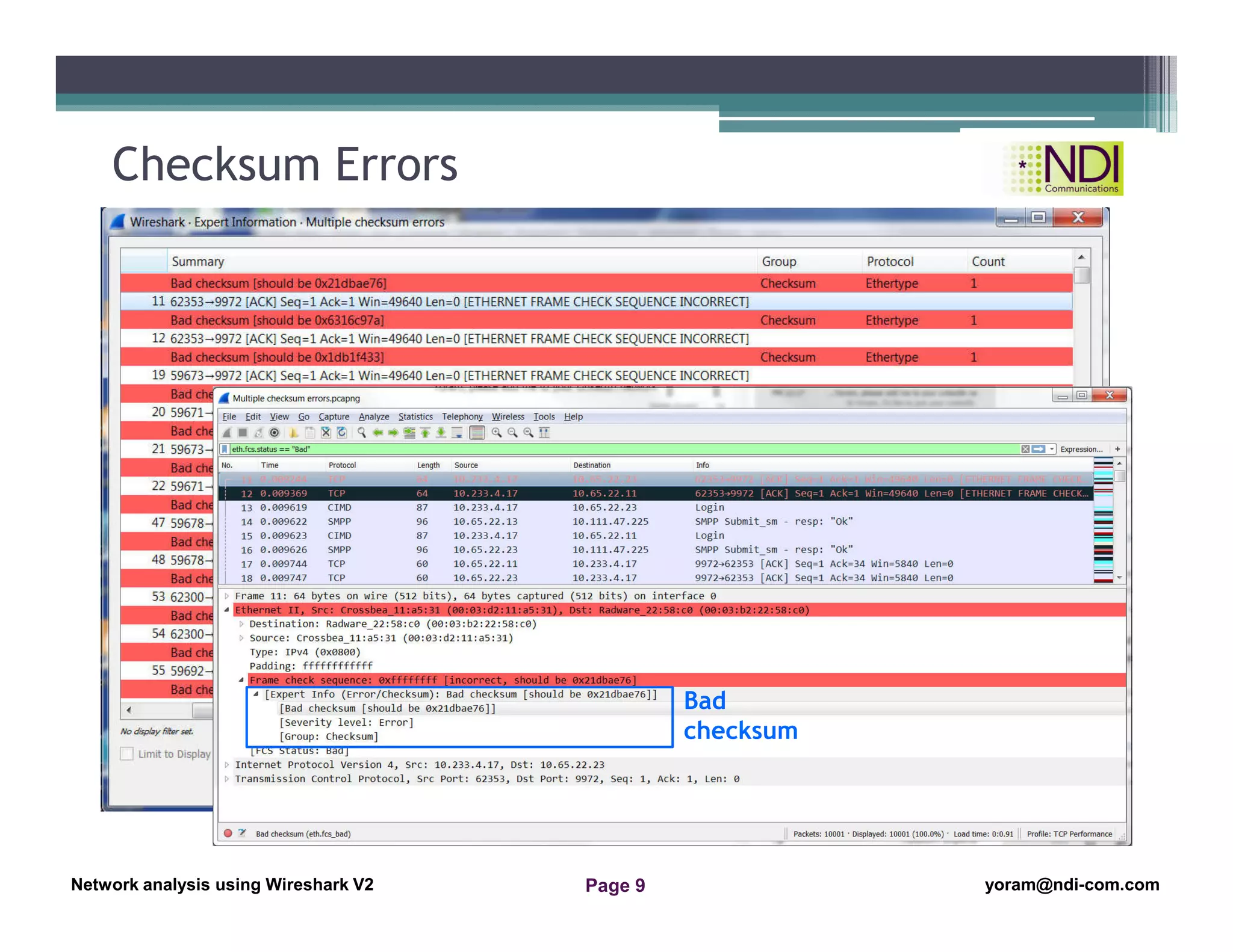
Checksum Errors
Bad
checksum
Network Analysis Using Wireshark Version 2Network Analysis using Wireshark V.2 yoram@ndi-com.com
Network analysis using Wireshark V2 yoram@ndi-com.comPage 10
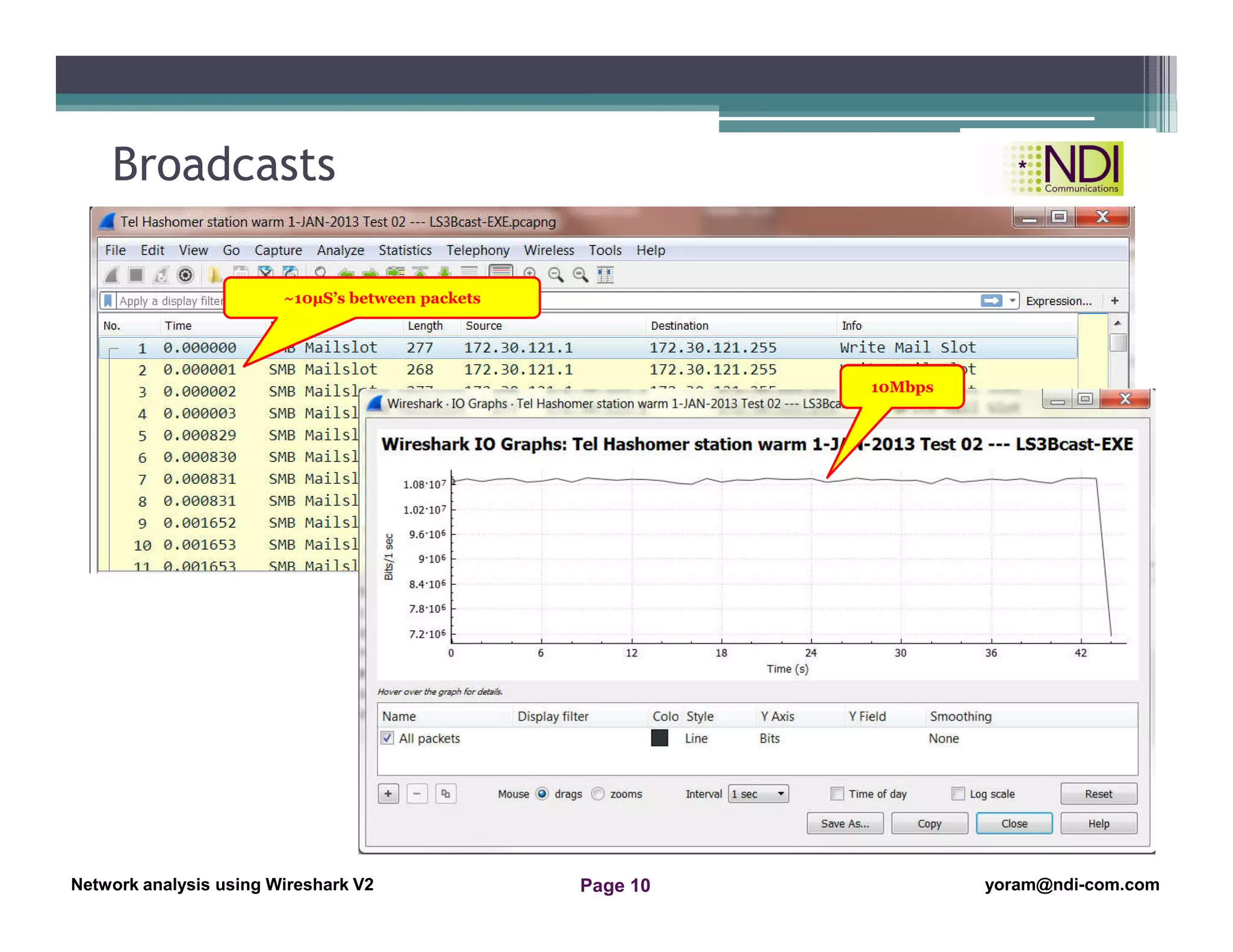
Broadcasts
10Mbps
~10µS’s between packets
Network Analysis Using Wireshark Version 2Network Analysis using Wireshark V.2 yoram@ndi-com.com
Network analysis using Wireshark V2 yoram@ndi-com.comPage 11
Summary
• In this lesson we talked about:
▫ The Ethernet Protocol and what to look for in a capture fule
▫ LAN and Ethernet problems that might happen in your network
Thanks for your time
Yoram Orzach
yoram@ndi-com.com
Network Analysis Using Wireshark Version 2Network Analysis using Wireshark V.2 yoram@ndi-com.com
Network analysis using Wireshark V2 yoram@ndi-com.comPage 12
yoram@ndi-com.com
For More lectures, Courses & Keynote Speaking
Contact Me to:

Network Analysis Using Wireshark Chapter 09 ethernet and lan switching

  • 1.
    Network Analysis UsingWireshark Version 2Network Analysis using Wireshark V.2 yoram@ndi-com.com Network analysis using Wireshark V2 yoram@ndi-com.comPage 1 Network analysis Using Wireshark Lesson 9: Ethernet and LAN Switching
  • 2.
    Network Analysis UsingWireshark Version 2Network Analysis using Wireshark V.2 yoram@ndi-com.com Network analysis using Wireshark V2 yoram@ndi-com.comPage 2 • By the end of this lesson, the participant will be able to: ▫ Understand Ethernet frame structure ▫ Use Wireshark for resolving Ethernet problems Lesson Objectives
  • 3.
    Network Analysis UsingWireshark Version 2Network Analysis using Wireshark V.2 yoram@ndi-com.com Network analysis using Wireshark V2 yoram@ndi-com.comPage 3 yoram@ndi-com.com For More lectures, Courses & Keynote Speaking Contact Me to:
  • 4.
    Network Analysis UsingWireshark Version 2Network Analysis using Wireshark V.2 yoram@ndi-com.com Network analysis using Wireshark V2 yoram@ndi-com.comPage 4 Ethernet frame structure What problems to look for Chapter Content
  • 5.
    Network Analysis UsingWireshark Version 2Network Analysis using Wireshark V.2 yoram@ndi-com.com Network analysis using Wireshark V2 yoram@ndi-com.comPage 5 The Ethernet Frame Destination MAC Source MAC Protocol Type 802.1q Data FCS 6 bytes 6 bytes 2 bytes 2 bytes 46–1,500 bytes 4 bytes Priority CFI VLAN ID Tag protocol identifier Tag control field Proprietary 2-byte number 16 bits 3 bits 1 bit 12 bits Protocol Type 2 bytes 802.1Q Tag Tag ID: 8100 for 802.1Q 8a88 for 802.1ad Priority: 8 levels, 0-7 CFI: Always set to “0” VLAN ID: 0 – No VLAN 1 – Native VLAN 2-4096 Std. VLANs
  • 6.
    Network Analysis UsingWireshark Version 2Network Analysis using Wireshark V.2 yoram@ndi-com.com Network analysis using Wireshark V2 yoram@ndi-com.comPage 6 Frame Information Frame details
  • 7.
    Network Analysis UsingWireshark Version 2Network Analysis using Wireshark V.2 yoram@ndi-com.com Network analysis using Wireshark V2 yoram@ndi-com.comPage 7 Ethernet Information Source Address Destination Address
  • 8.
    Network Analysis UsingWireshark Version 2Network Analysis using Wireshark V.2 yoram@ndi-com.com Network analysis using Wireshark V2 yoram@ndi-com.comPage 8 Ethernet frame structure What problems to look for Chapter Content
  • 9.
    Network Analysis UsingWireshark Version 2Network Analysis using Wireshark V.2 yoram@ndi-com.com Network analysis using Wireshark V2 yoram@ndi-com.comPage 9 Checksum Errors Bad checksum
  • 10.
    Network Analysis UsingWireshark Version 2Network Analysis using Wireshark V.2 yoram@ndi-com.com Network analysis using Wireshark V2 yoram@ndi-com.comPage 10 Broadcasts 10Mbps ~10µS’s between packets
  • 11.
    Network Analysis UsingWireshark Version 2Network Analysis using Wireshark V.2 yoram@ndi-com.com Network analysis using Wireshark V2 yoram@ndi-com.comPage 11 Summary • In this lesson we talked about: ▫ The Ethernet Protocol and what to look for in a capture fule ▫ LAN and Ethernet problems that might happen in your network Thanks for your time Yoram Orzach yoram@ndi-com.com
  • 12.
    Network Analysis UsingWireshark Version 2Network Analysis using Wireshark V.2 yoram@ndi-com.com Network analysis using Wireshark V2 yoram@ndi-com.comPage 12 yoram@ndi-com.com For More lectures, Courses & Keynote Speaking Contact Me to: