Network Analysis Using Wireshark Version 2Network Analysis using Wireshark V.2 yoram@ndi-com.com
Network analysis using Wireshark V2 yoram@ndi-com.comPage 1
Chapter Content
Network analysis Using Wireshark
Lesson 2:
Introduction to Wireshark
Network Analysis Using Wireshark Version 2Network Analysis using Wireshark V.2 yoram@ndi-com.com
Network analysis using Wireshark V2 yoram@ndi-com.comPage 2
• By the end of this lesson, the you will be able to:
▫ Understand the main menus and commands of Wireshark
▫ Start capturing data with the Wireshark software
▫ Configure basic parameters with Wireshark
Lesson Objectives
Network Analysis Using Wireshark Version 2Network Analysis using Wireshark V.2 yoram@ndi-com.com
Network analysis using Wireshark V2 yoram@ndi-com.comPage 3
yoram@ndi-com.com
For More lectures, Courses & Keynote Speaking
Contact Me to:
Network Analysis Using Wireshark Version 2Network Analysis using Wireshark V.2 yoram@ndi-com.com
Network analysis using Wireshark V2 yoram@ndi-com.comPage 4
A brief history and introduction
Wireshark main window
Starting the capture of data
Configuring the start window
Using time values and summaries
Chapter Content
Configuring name resolution
Navigation and colorization techniques
Preferences configuration
File operations – save and export
“Experience is a hard teacher because she gives the
test first, the lesson afterwards“
Vernon Sanders Law
Network Analysis Using Wireshark Version 2Network Analysis using Wireshark V.2 yoram@ndi-com.com
Network analysis using Wireshark V2 yoram@ndi-com.comPage 5
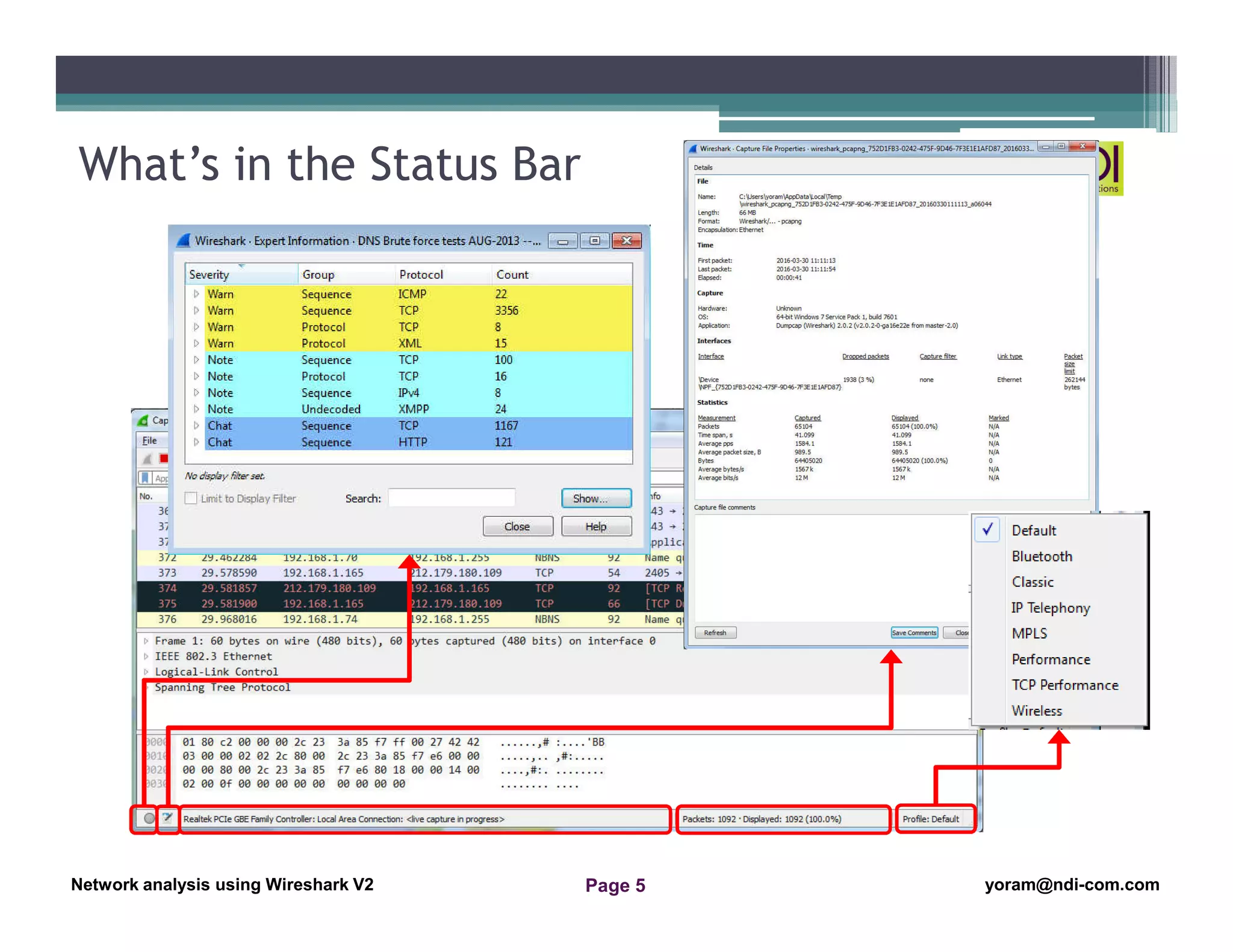
What’s in the Status Bar
Network Analysis Using Wireshark Version 2Network Analysis using Wireshark V.2 yoram@ndi-com.com
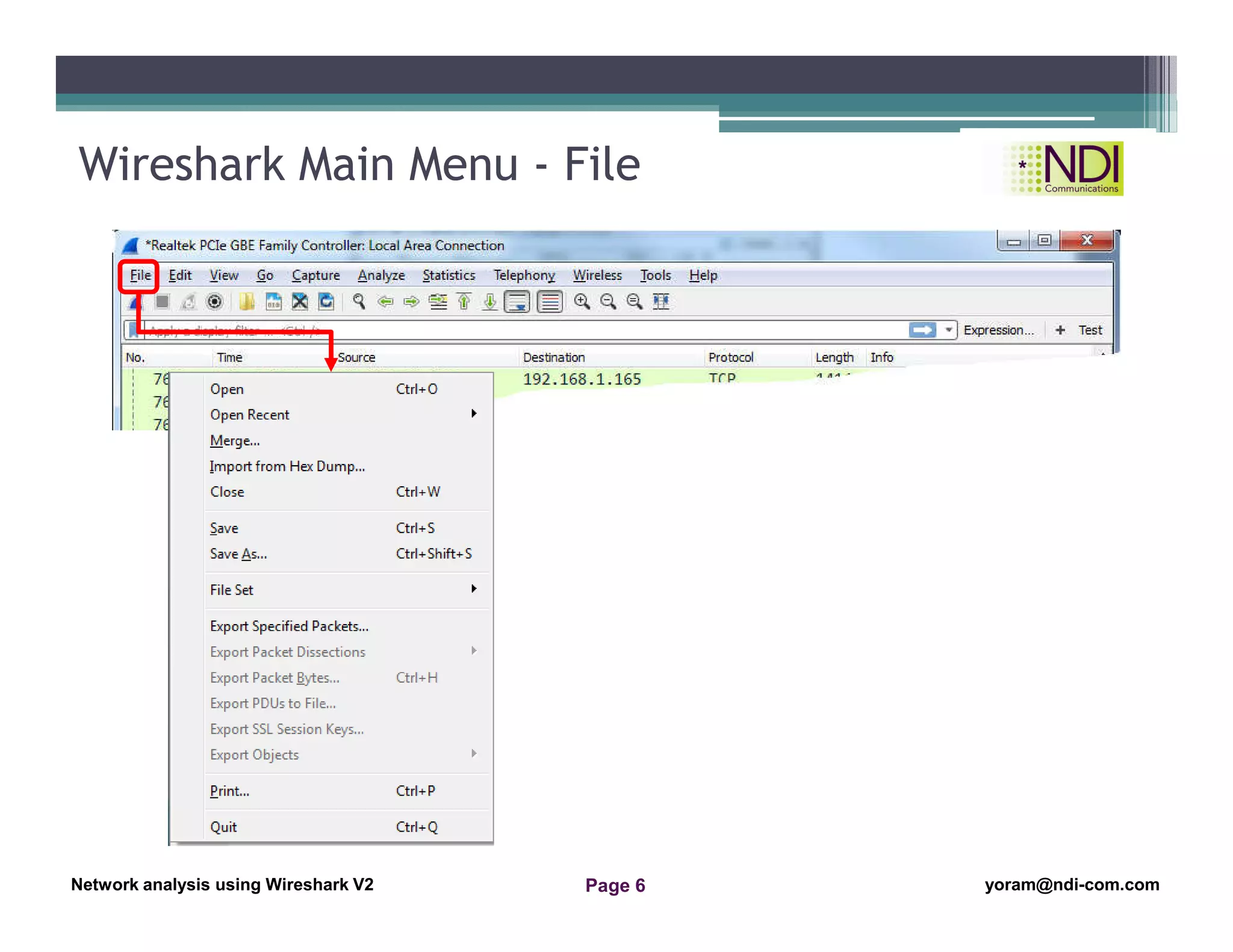
Network analysis using Wireshark V2 yoram@ndi-com.comPage 6
Wireshark Main Menu - File
Network Analysis Using Wireshark Version 2Network Analysis using Wireshark V.2 yoram@ndi-com.com
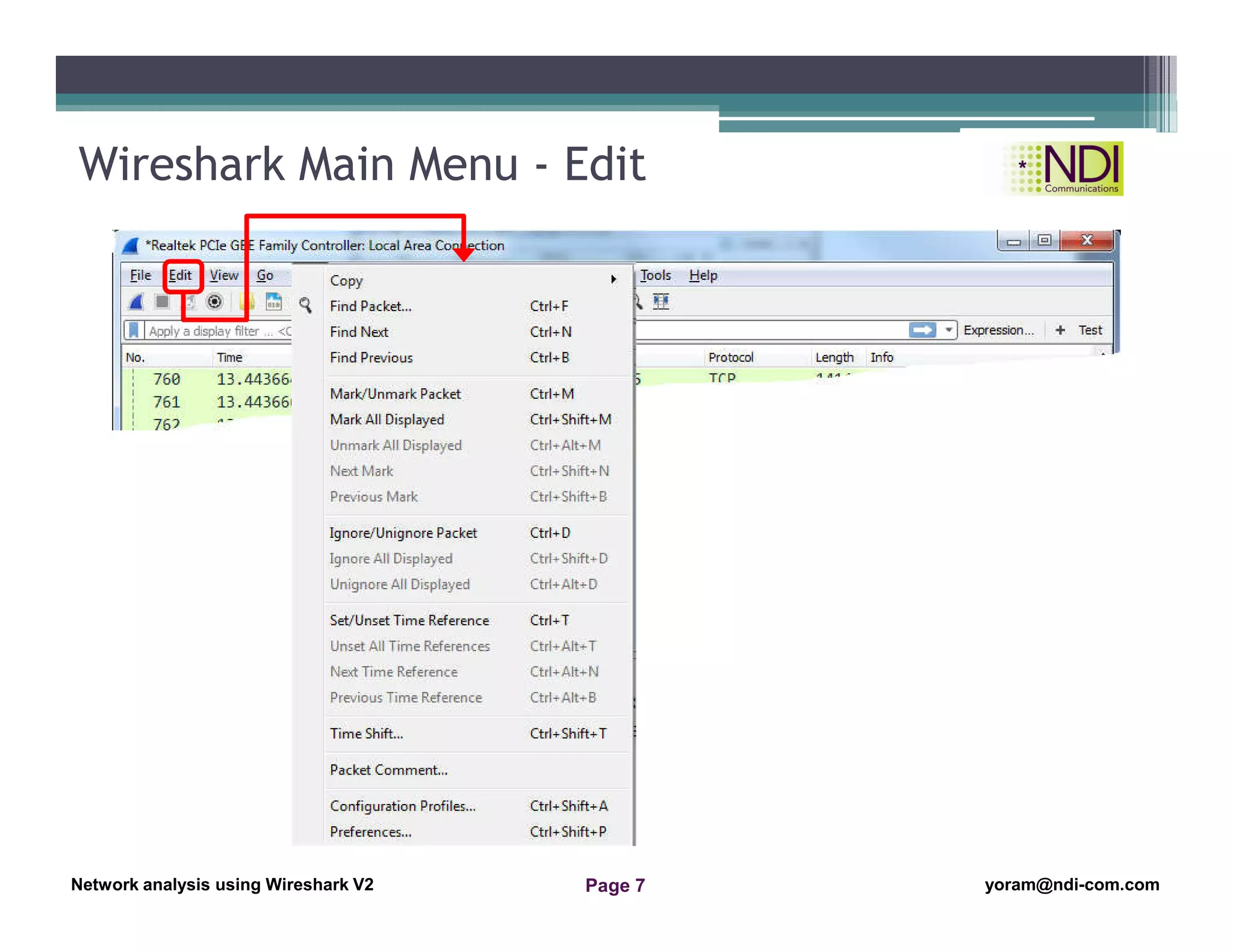
Network analysis using Wireshark V2 yoram@ndi-com.comPage 7
Wireshark Main Menu - Edit
PIC-003c
Network Analysis Using Wireshark Version 2Network Analysis using Wireshark V.2 yoram@ndi-com.com
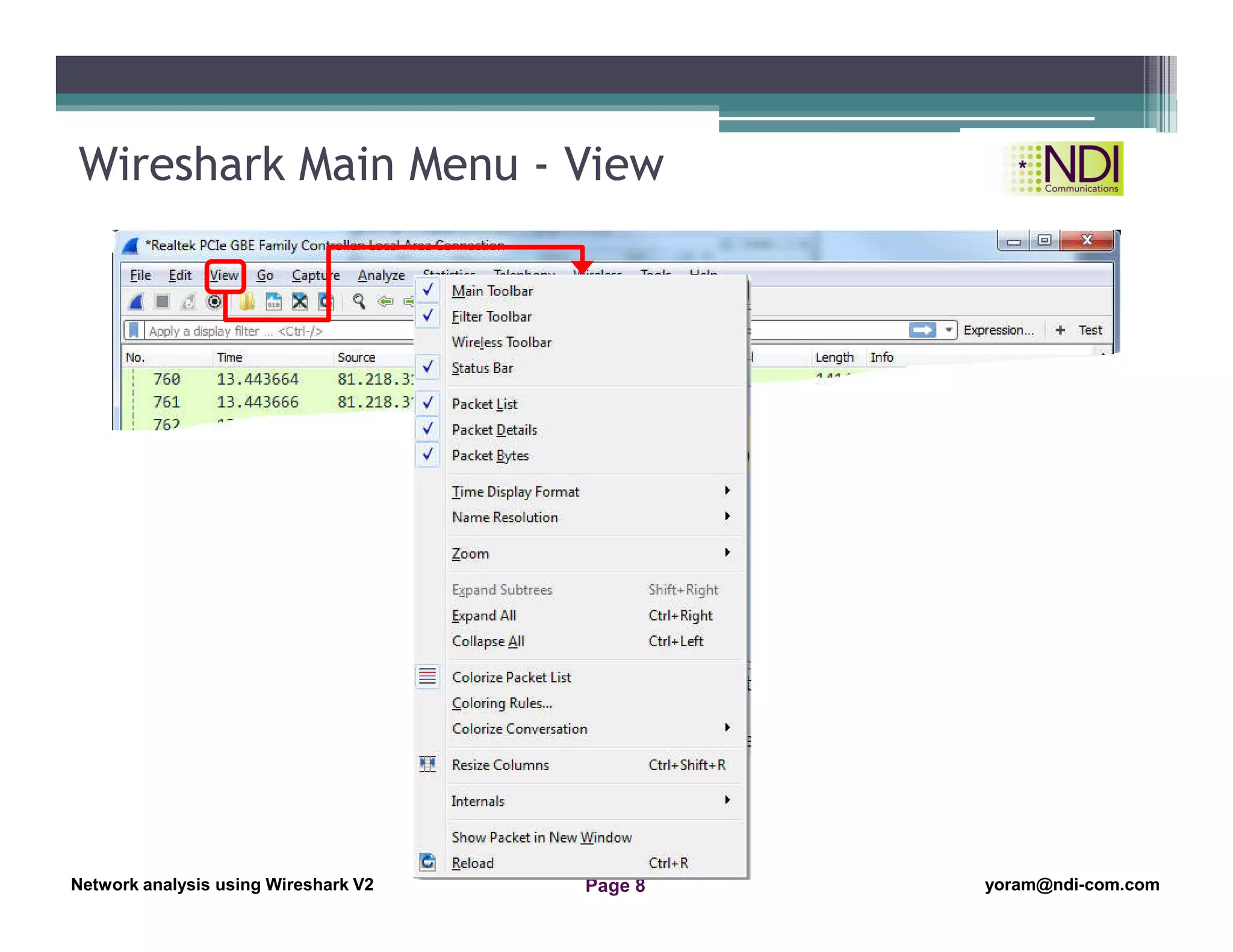
Network analysis using Wireshark V2 yoram@ndi-com.comPage 8
Wireshark Main Menu - View
Network Analysis Using Wireshark Version 2Network Analysis using Wireshark V.2 yoram@ndi-com.com
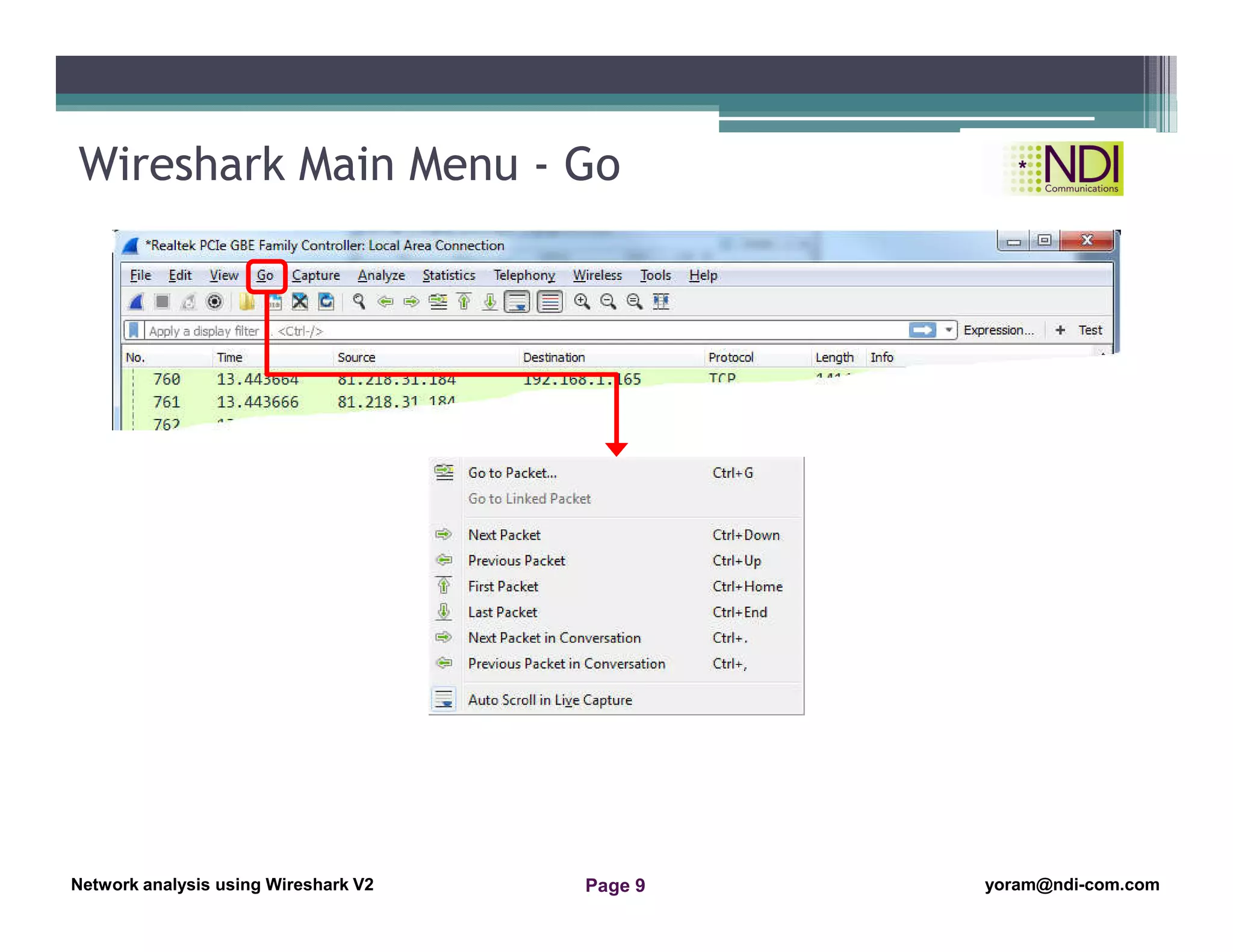
Network analysis using Wireshark V2 yoram@ndi-com.comPage 9
Wireshark Main Menu - Go
Network Analysis Using Wireshark Version 2Network Analysis using Wireshark V.2 yoram@ndi-com.com
Network analysis using Wireshark V2 yoram@ndi-com.comPage 10
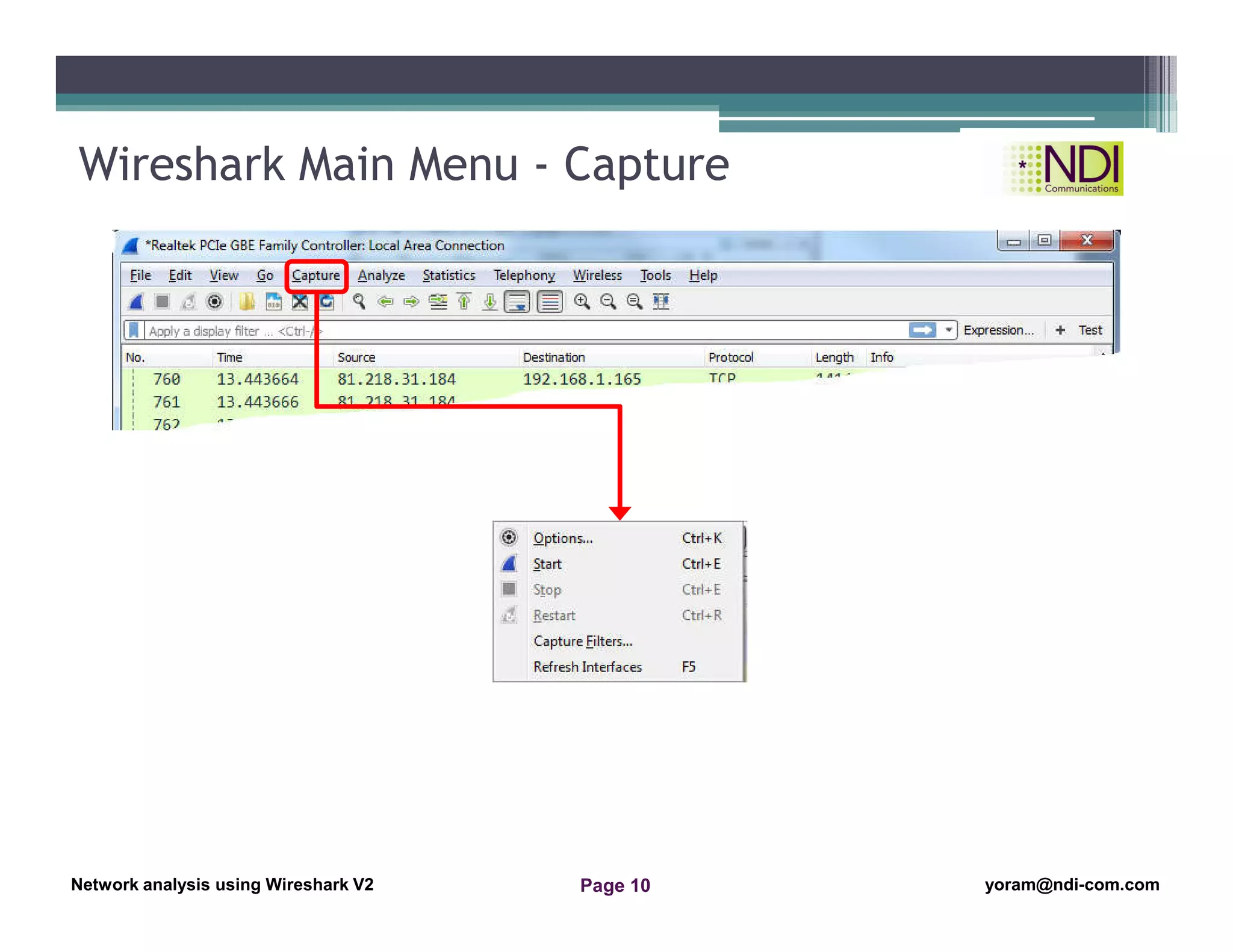
Wireshark Main Menu - Capture
Network Analysis Using Wireshark Version 2Network Analysis using Wireshark V.2 yoram@ndi-com.com
Network analysis using Wireshark V2 yoram@ndi-com.comPage 11
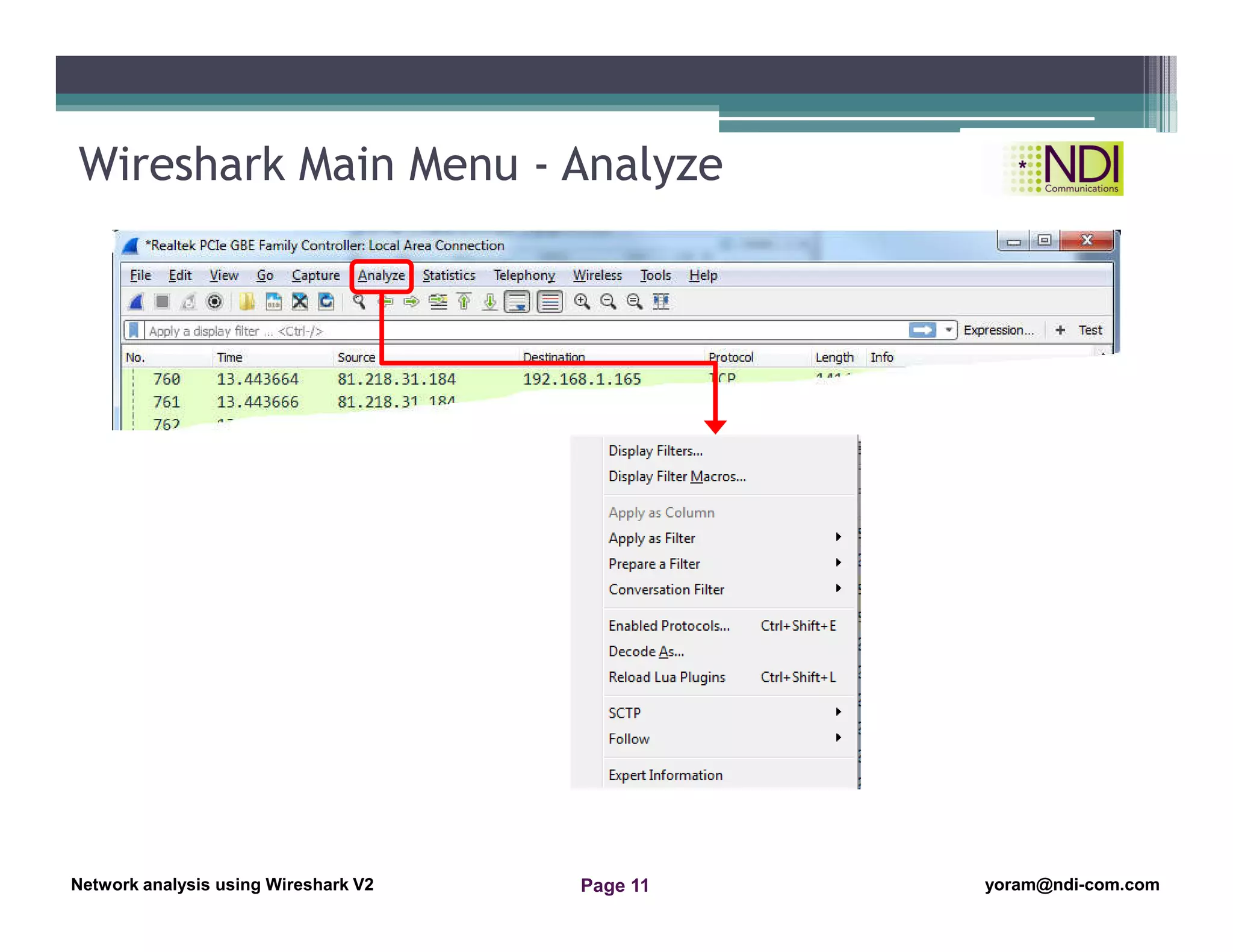
Wireshark Main Menu - Analyze
Network Analysis Using Wireshark Version 2Network Analysis using Wireshark V.2 yoram@ndi-com.com
Network analysis using Wireshark V2 yoram@ndi-com.comPage 12
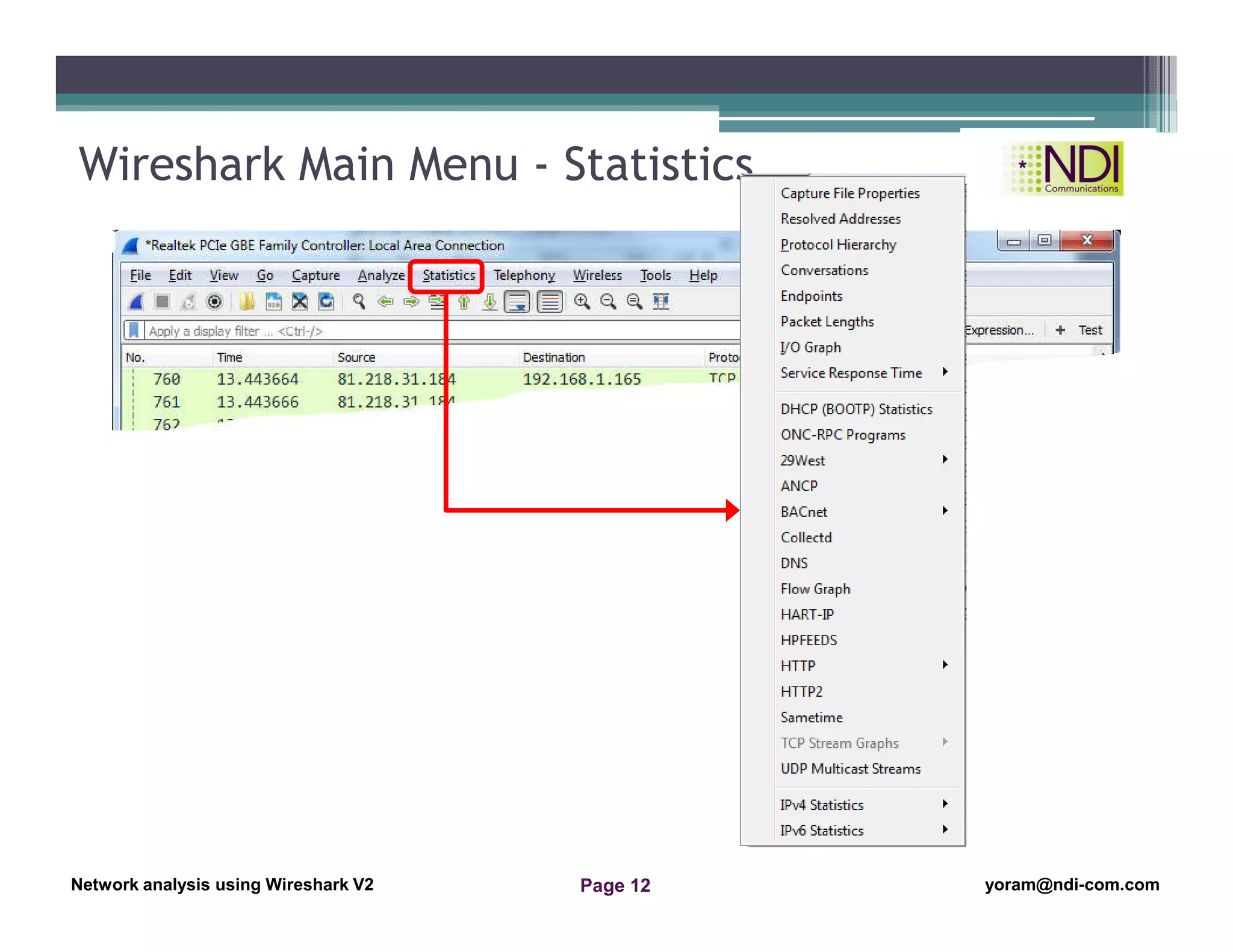
Wireshark Main Menu - Statistics
Network Analysis Using Wireshark Version 2Network Analysis using Wireshark V.2 yoram@ndi-com.com
Network analysis using Wireshark V2 yoram@ndi-com.comPage 13
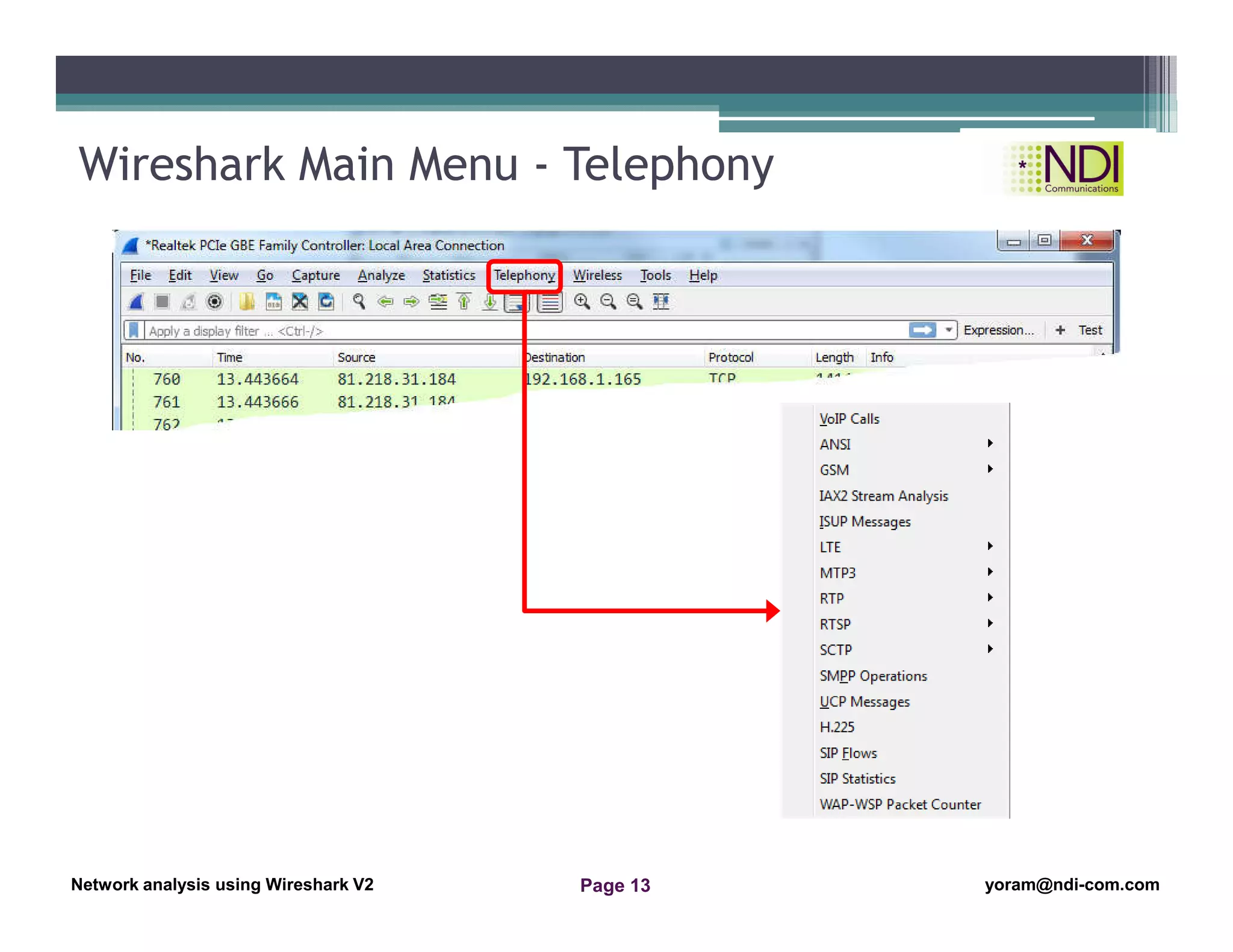
Wireshark Main Menu - Telephony
Network Analysis Using Wireshark Version 2Network Analysis using Wireshark V.2 yoram@ndi-com.com
Network analysis using Wireshark V2 yoram@ndi-com.comPage 14
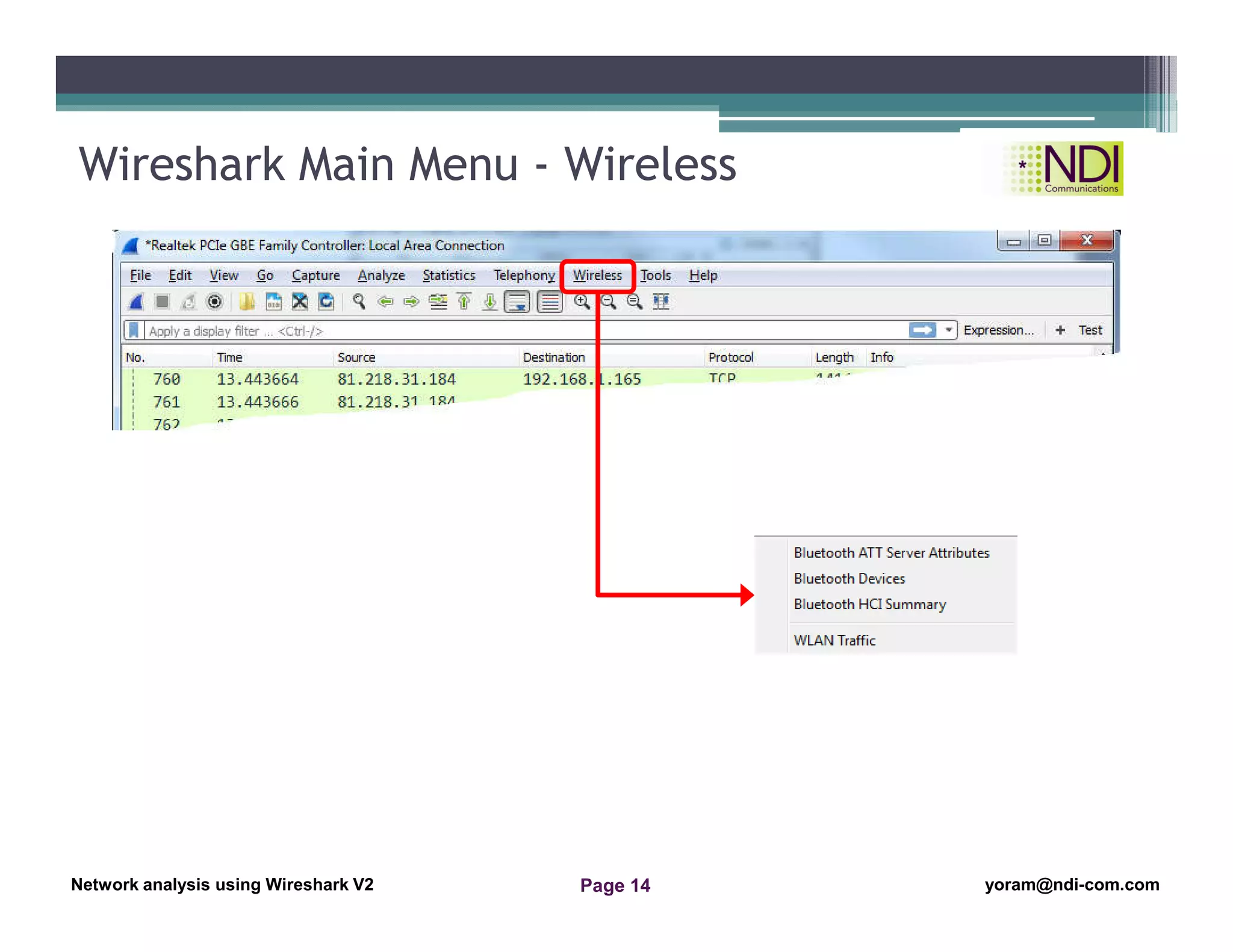
Wireshark Main Menu - Wireless
Network Analysis Using Wireshark Version 2Network Analysis using Wireshark V.2 yoram@ndi-com.com
Network analysis using Wireshark V2 yoram@ndi-com.comPage 15
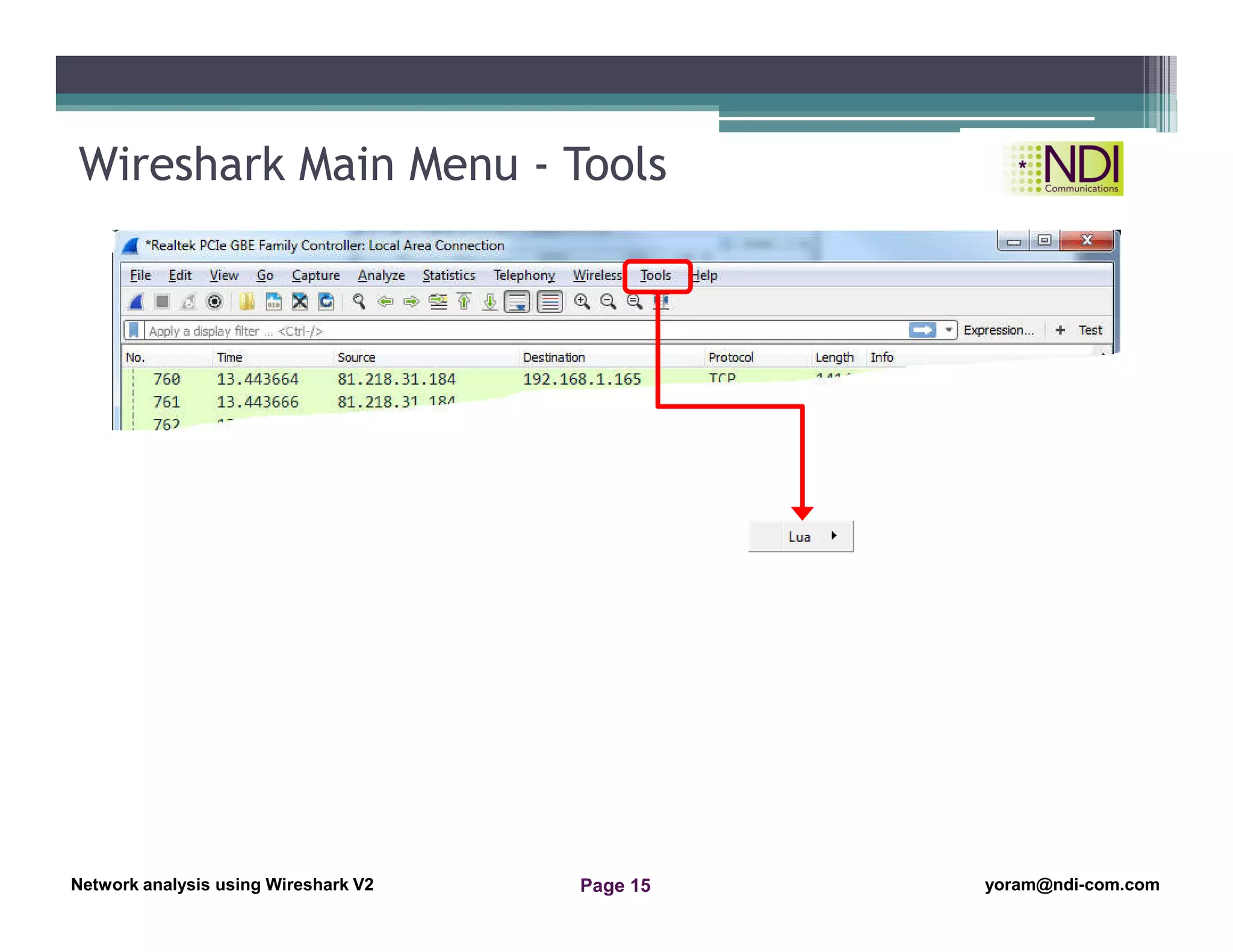
Wireshark Main Menu - Tools
Network Analysis Using Wireshark Version 2Network Analysis using Wireshark V.2 yoram@ndi-com.com
Network analysis using Wireshark V2 yoram@ndi-com.comPage 16
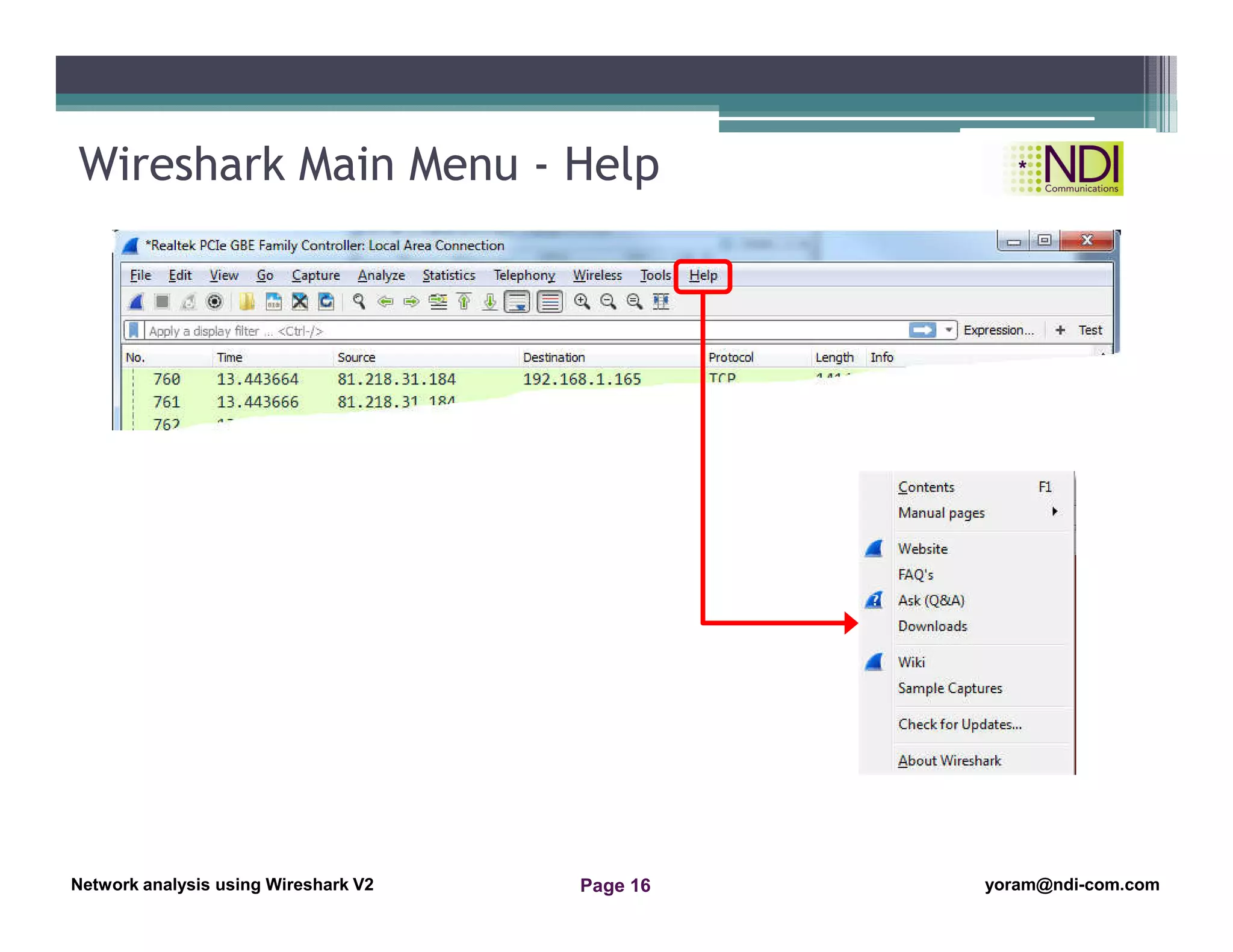
Wireshark Main Menu - Help
Network Analysis Using Wireshark Version 2Network Analysis using Wireshark V.2 yoram@ndi-com.com
Network analysis using Wireshark V2 yoram@ndi-com.comPage 17
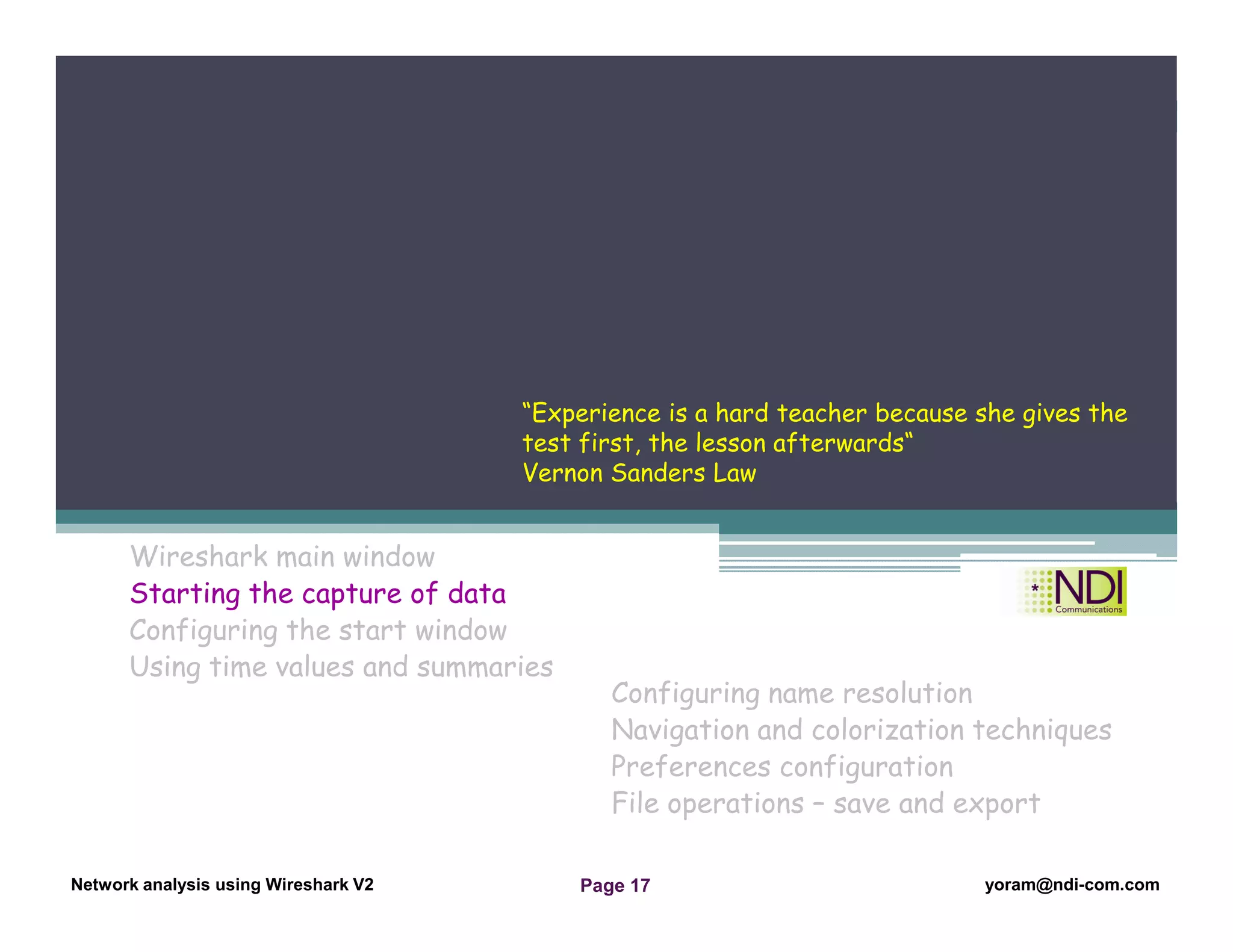
Wireshark main window
Starting the capture of data
Configuring the start window
Using time values and summaries
Chapter Content
Configuring name resolution
Navigation and colorization techniques
Preferences configuration
File operations – save and export
“Experience is a hard teacher because she gives the
test first, the lesson afterwards“
Vernon Sanders Law
Network Analysis Using Wireshark Version 2Network Analysis using Wireshark V.2 yoram@ndi-com.com
Network analysis using Wireshark V2 yoram@ndi-com.comPage 18
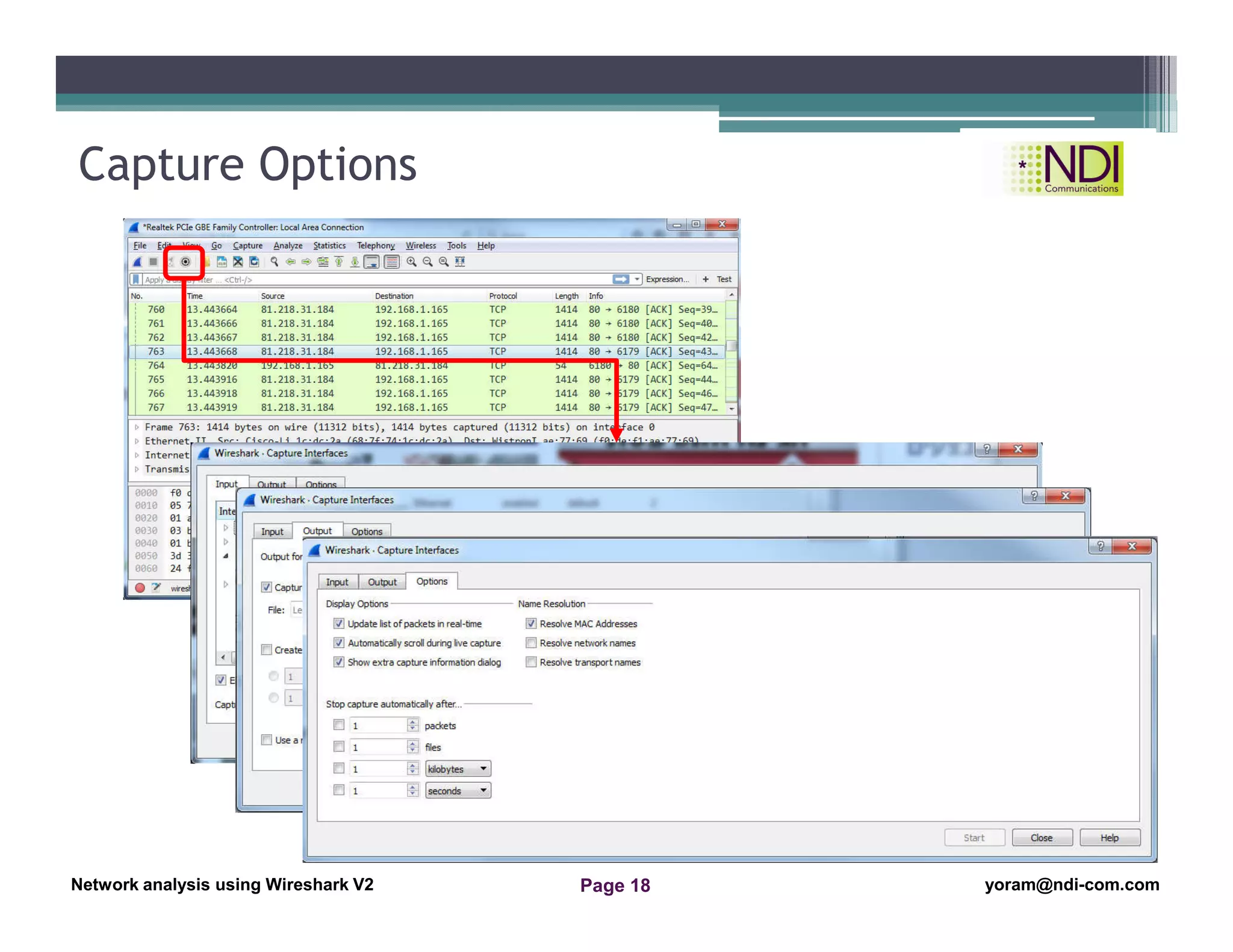
Capture Options
Network Analysis Using Wireshark Version 2Network Analysis using Wireshark V.2 yoram@ndi-com.com
Network analysis using Wireshark V2 yoram@ndi-com.comPage 19
Wireshark main window
Starting the capture of data
Configuring the start window
Using time values and summaries
Chapter Content
Configuring name resolution
Navigation and colorization techniques
Preferences configuration
File operations – save and export
“Imagination is more important that knowledge“
Albert Einstein
Network Analysis Using Wireshark Version 2Network Analysis using Wireshark V.2 yoram@ndi-com.com
Network analysis using Wireshark V2 yoram@ndi-com.comPage 20
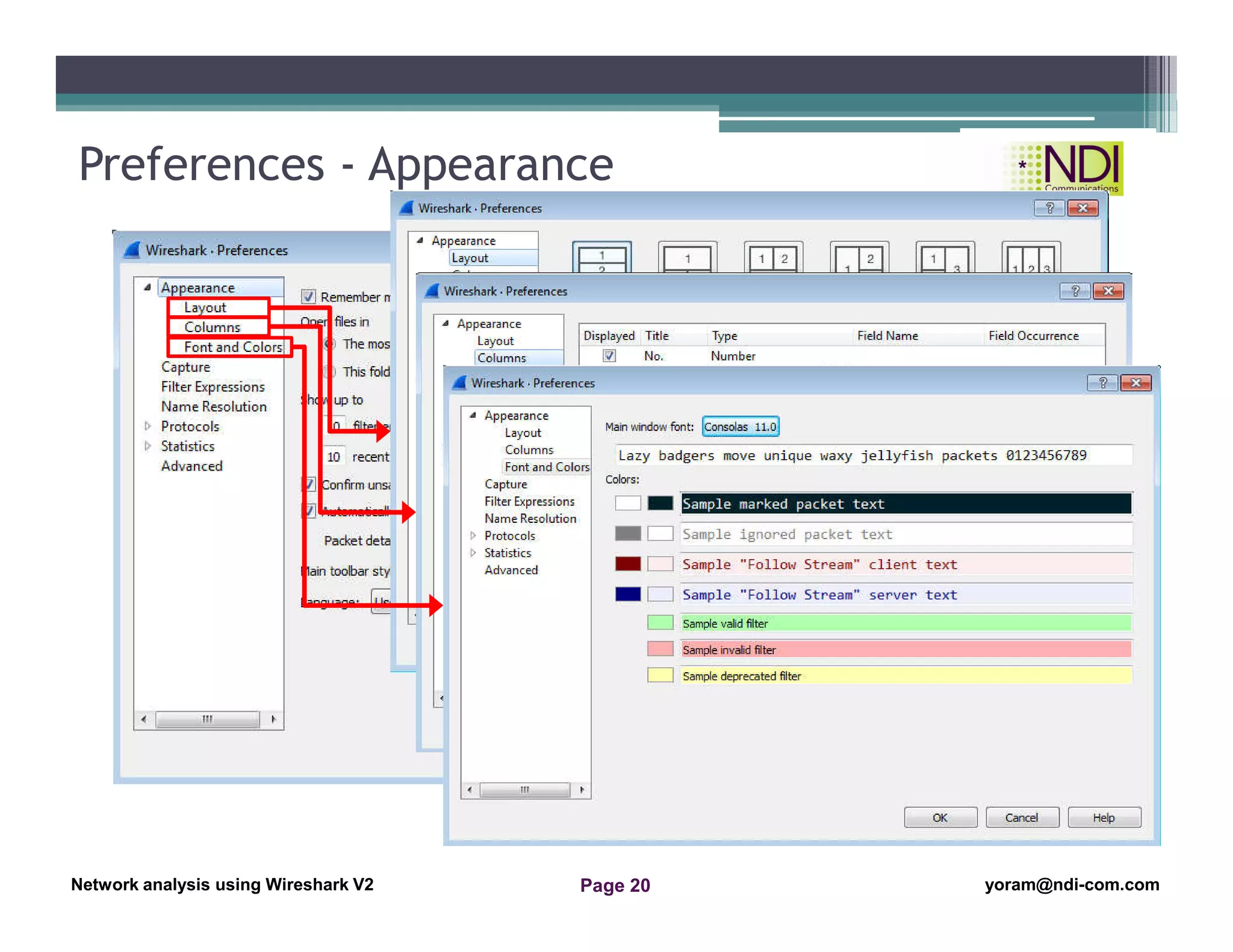
Preferences - Appearance
Network Analysis Using Wireshark Version 2Network Analysis using Wireshark V.2 yoram@ndi-com.com
Network analysis using Wireshark V2 yoram@ndi-com.comPage 21
Wireshark main window
Starting the capture of data
Configuring the start window
Using time values and summaries
Chapter Content
Configuring name resolution
Navigation and colorization techniques
Preferences configuration
File operations – save and export
“The important thing I not to stop questioning“
Albert Einstein
Network Analysis Using Wireshark Version 2Network Analysis using Wireshark V.2 yoram@ndi-com.com
Network analysis using Wireshark V2 yoram@ndi-com.comPage 22
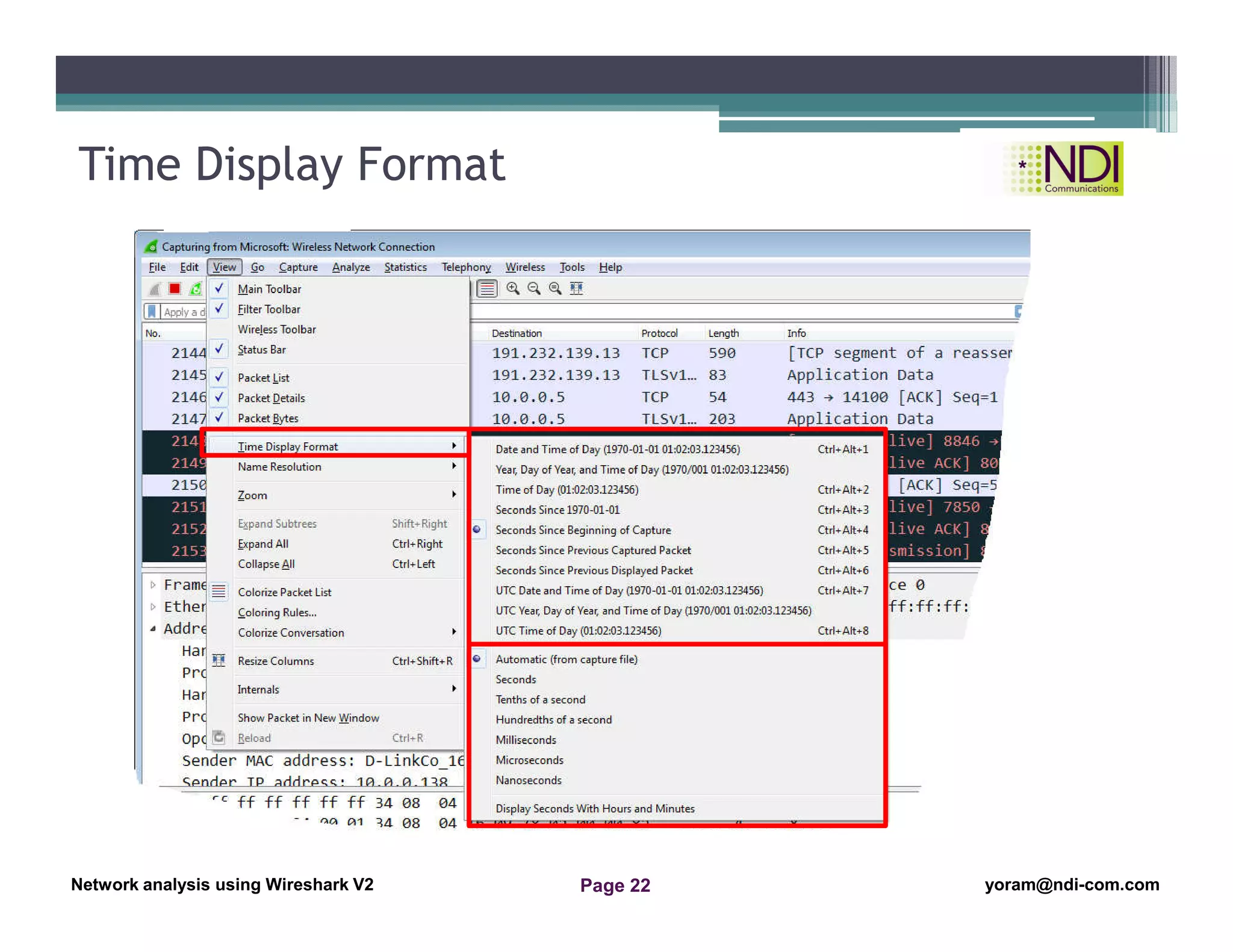
Time Display Format
Network Analysis Using Wireshark Version 2Network Analysis using Wireshark V.2 yoram@ndi-com.com
Network analysis using Wireshark V2 yoram@ndi-com.comPage 23
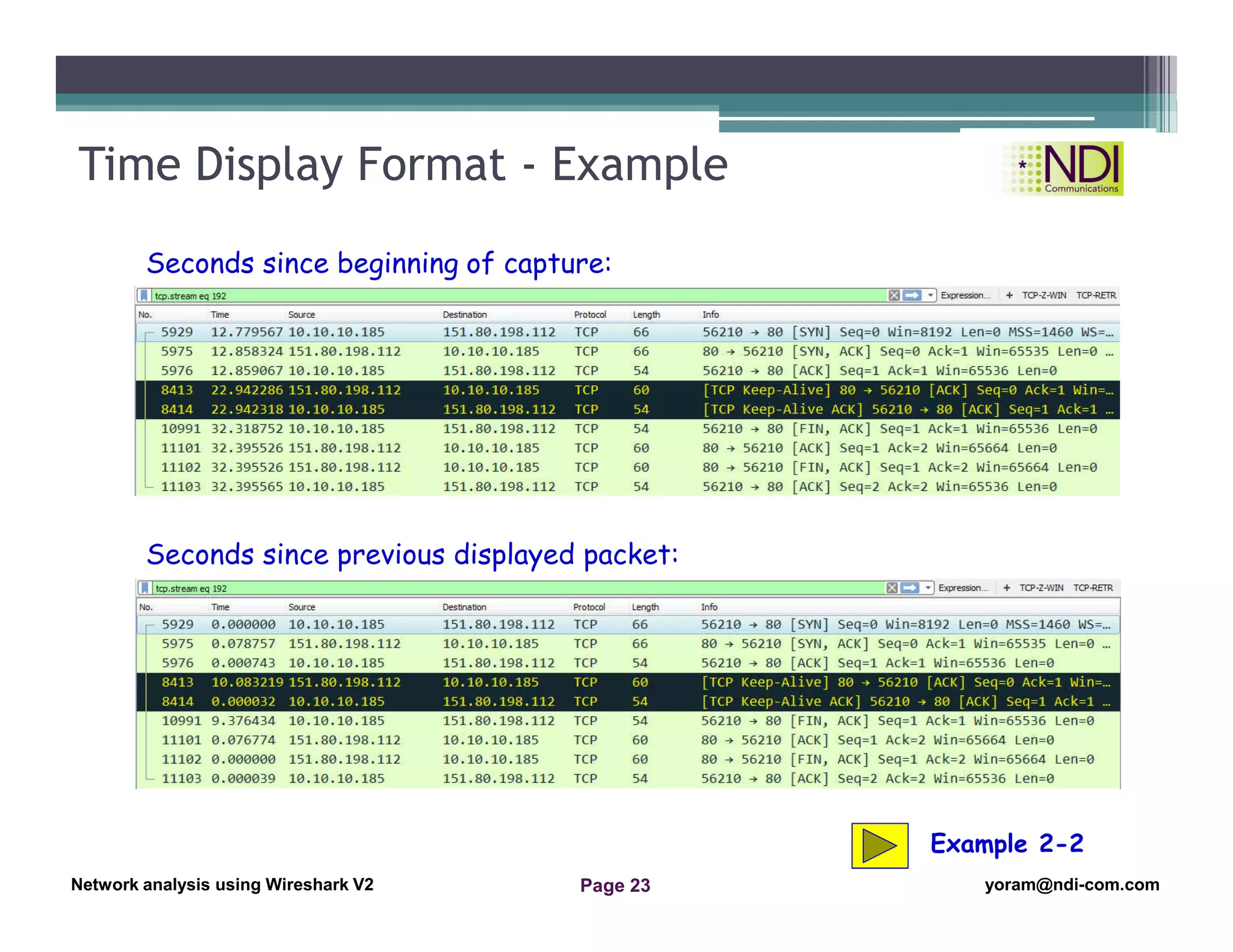
Time Display Format - Example
Seconds since beginning of capture:
Seconds since previous displayed packet:
Example 2-2
Network Analysis Using Wireshark Version 2Network Analysis using Wireshark V.2 yoram@ndi-com.com
Network analysis using Wireshark V2 yoram@ndi-com.comPage 24
Wireshark main window
Starting the capture of data
Configuring the start window
Using time values and summaries
Chapter Content
Configuring name resolution
Navigation and colorization techniques
Preferences configuration
File operations – save and export
“The important thing I not to stop questioning“
Albert Einstein
Network Analysis Using Wireshark Version 2Network Analysis using Wireshark V.2 yoram@ndi-com.com
Network analysis using Wireshark V2 yoram@ndi-com.comPage 25
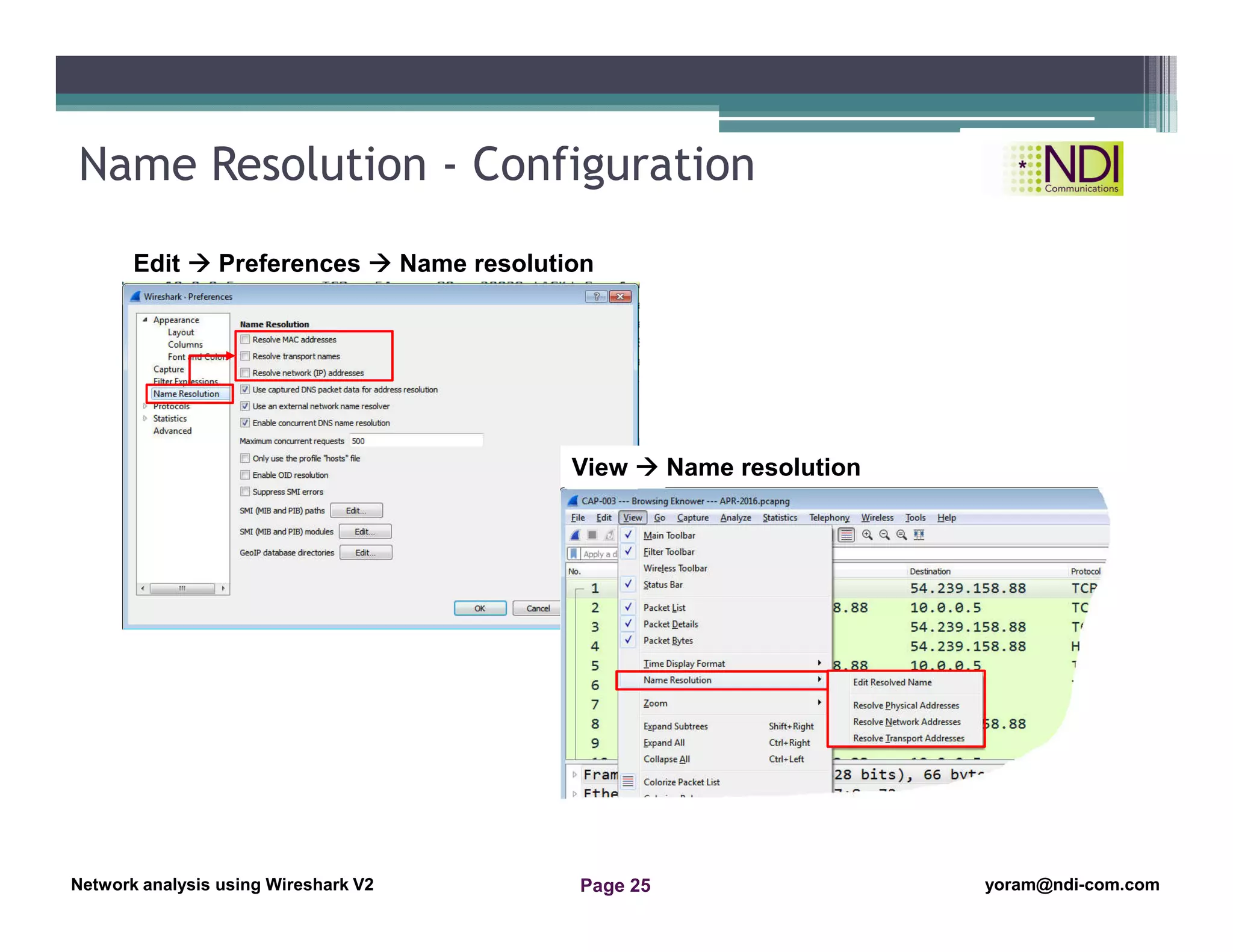
Name Resolution - Configuration
Edit  Preferences  Name resolution
View  Name resolution
Network Analysis Using Wireshark Version 2Network Analysis using Wireshark V.2 yoram@ndi-com.com
Network analysis using Wireshark V2 yoram@ndi-com.comPage 26
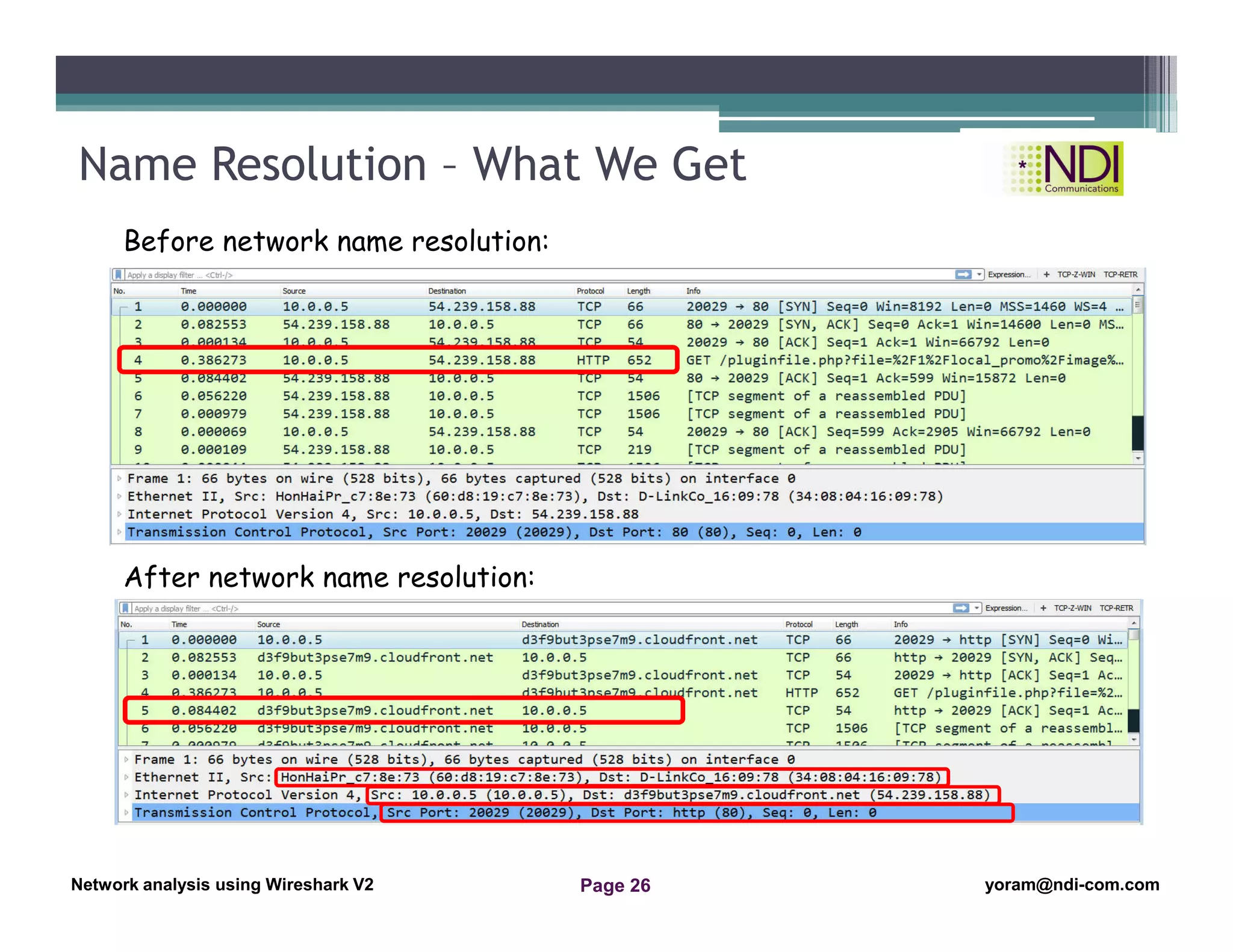
Name Resolution – What We Get
Before network name resolution:
After network name resolution:
Network Analysis Using Wireshark Version 2Network Analysis using Wireshark V.2 yoram@ndi-com.com
Network analysis using Wireshark V2 yoram@ndi-com.comPage 27
Wireshark main window
Starting the capture of data
Configuring the start window
Using time values and summaries
Chapter Content
Configuring name resolution
Navigation and colorization techniques
Preferences configuration
File operations – save and export
“Do not worry about your difficulties in Mathematics.
I can assure you mine are still greater.“
Albert Einstein
Network Analysis Using Wireshark Version 2Network Analysis using Wireshark V.2 yoram@ndi-com.com
Network analysis using Wireshark V2 yoram@ndi-com.comPage 28
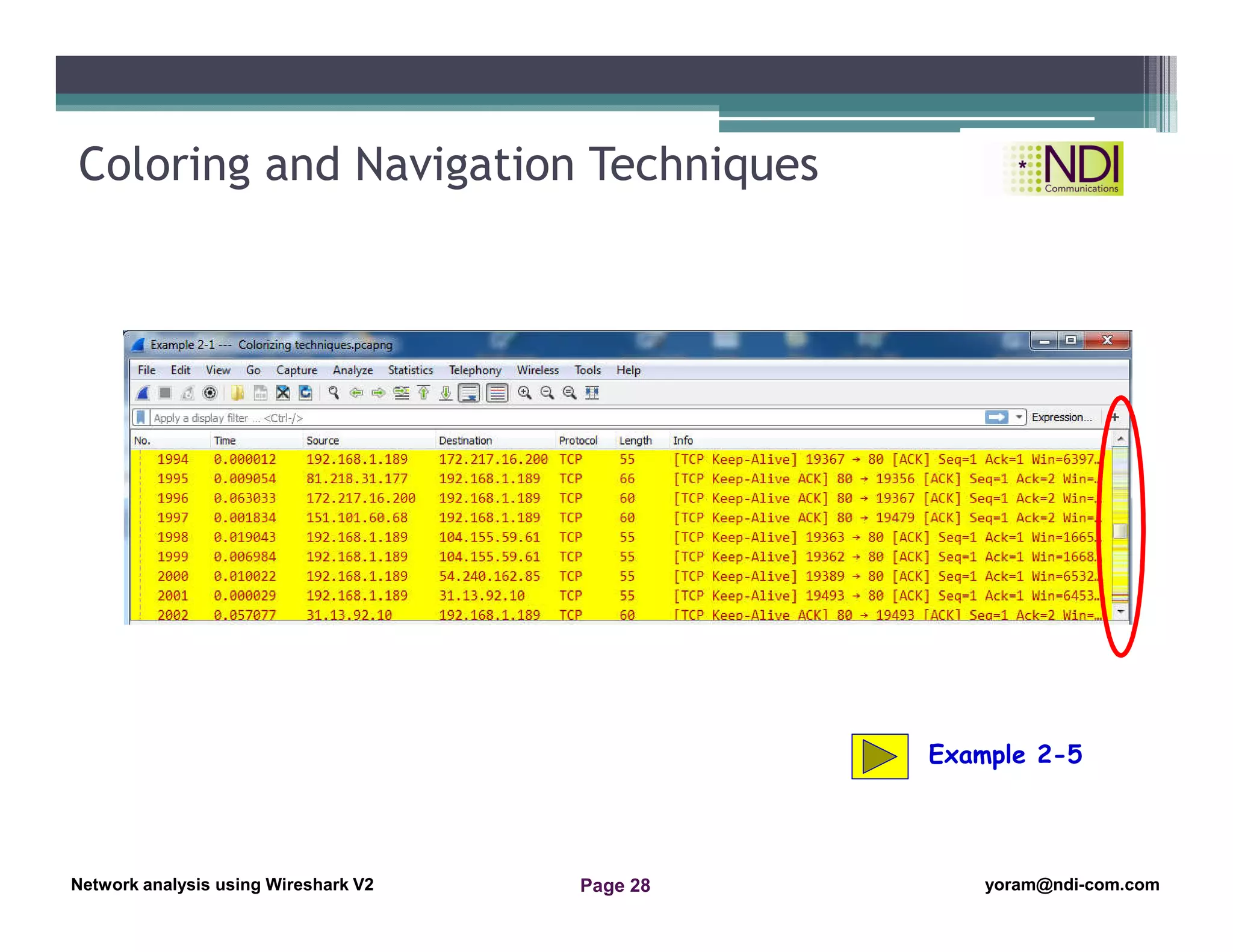
Coloring and Navigation Techniques
Example 2-5
Network Analysis Using Wireshark Version 2Network Analysis using Wireshark V.2 yoram@ndi-com.com
Network analysis using Wireshark V2 yoram@ndi-com.comPage 29
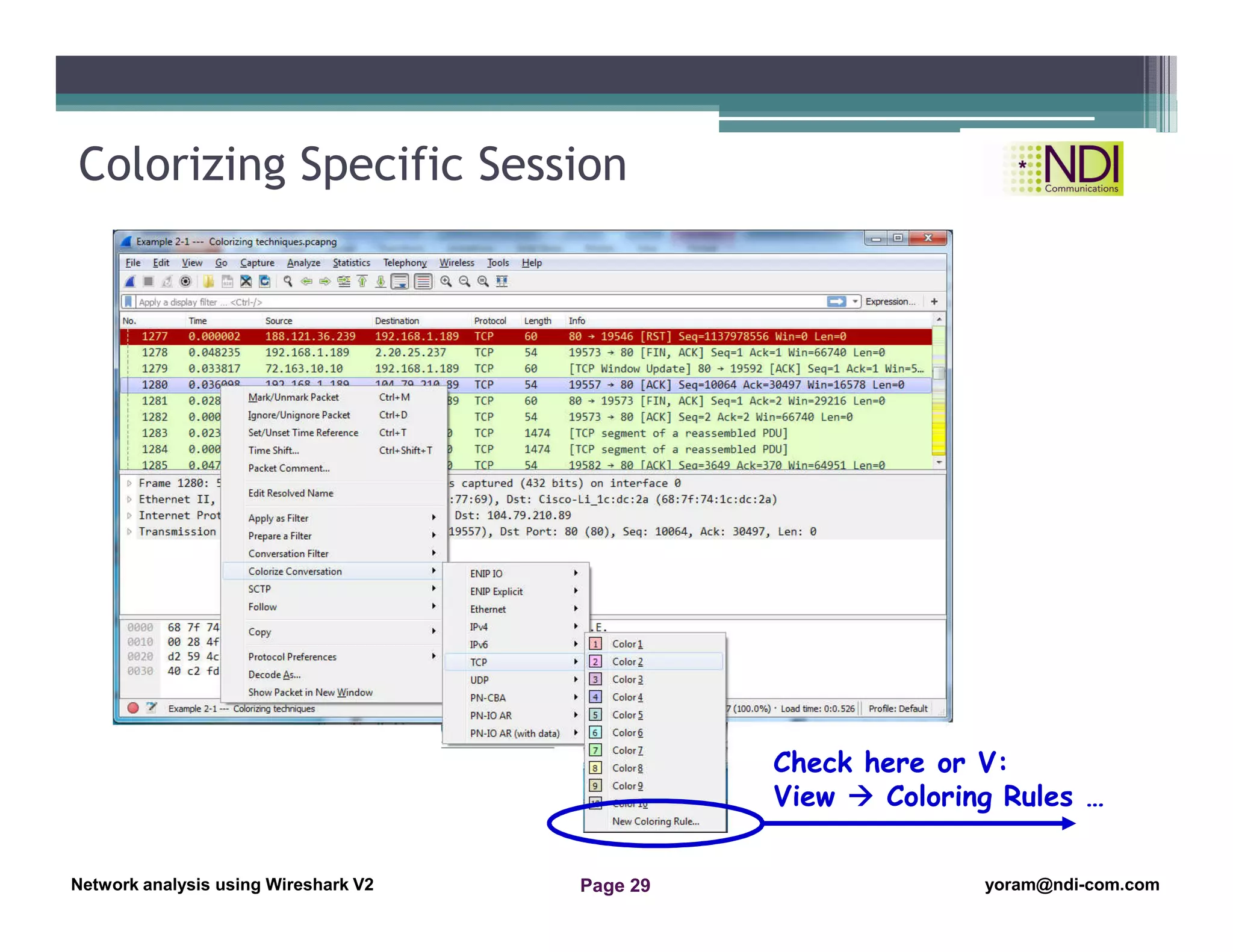
Colorizing Specific Session
Check here or V:
View  Coloring Rules …
Network Analysis Using Wireshark Version 2Network Analysis using Wireshark V.2 yoram@ndi-com.com
Network analysis using Wireshark V2 yoram@ndi-com.comPage 30
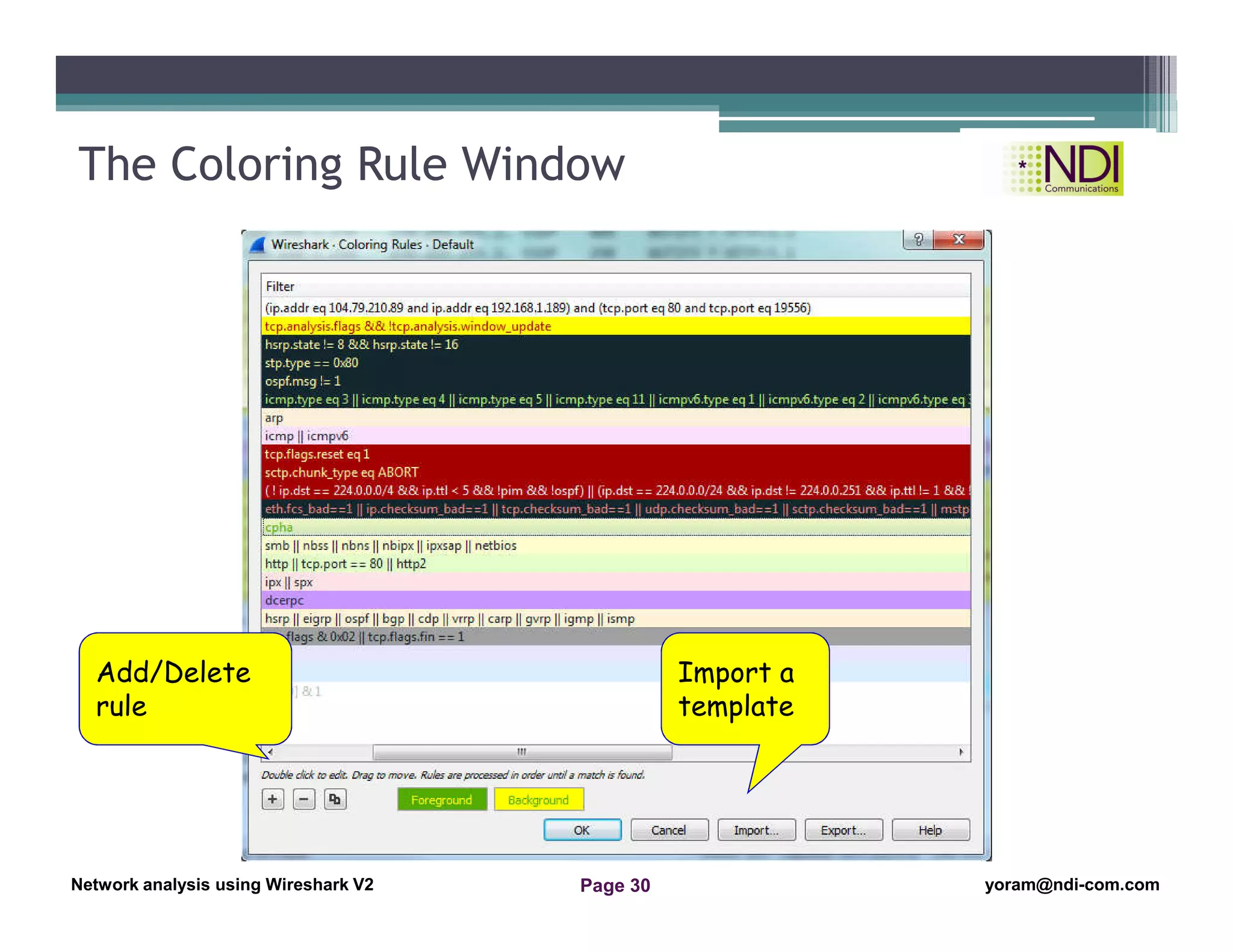
The Coloring Rule Window
Add/Delete
rule
Import a
template
Network Analysis Using Wireshark Version 2Network Analysis using Wireshark V.2 yoram@ndi-com.com
Network analysis using Wireshark V2 yoram@ndi-com.comPage 31
Wireshark main window
Starting the capture of data
Configuring the start window
Using time values and summaries
Chapter Content
Configuring name resolution
Navigation and colorization techniques
Preferences configuration
File operations – save and export
“Try not to become a man of success but
rather to become a man of value.“
Albert Einstein
Network Analysis Using Wireshark Version 2Network Analysis using Wireshark V.2 yoram@ndi-com.com
Network analysis using Wireshark V2 yoram@ndi-com.comPage 32
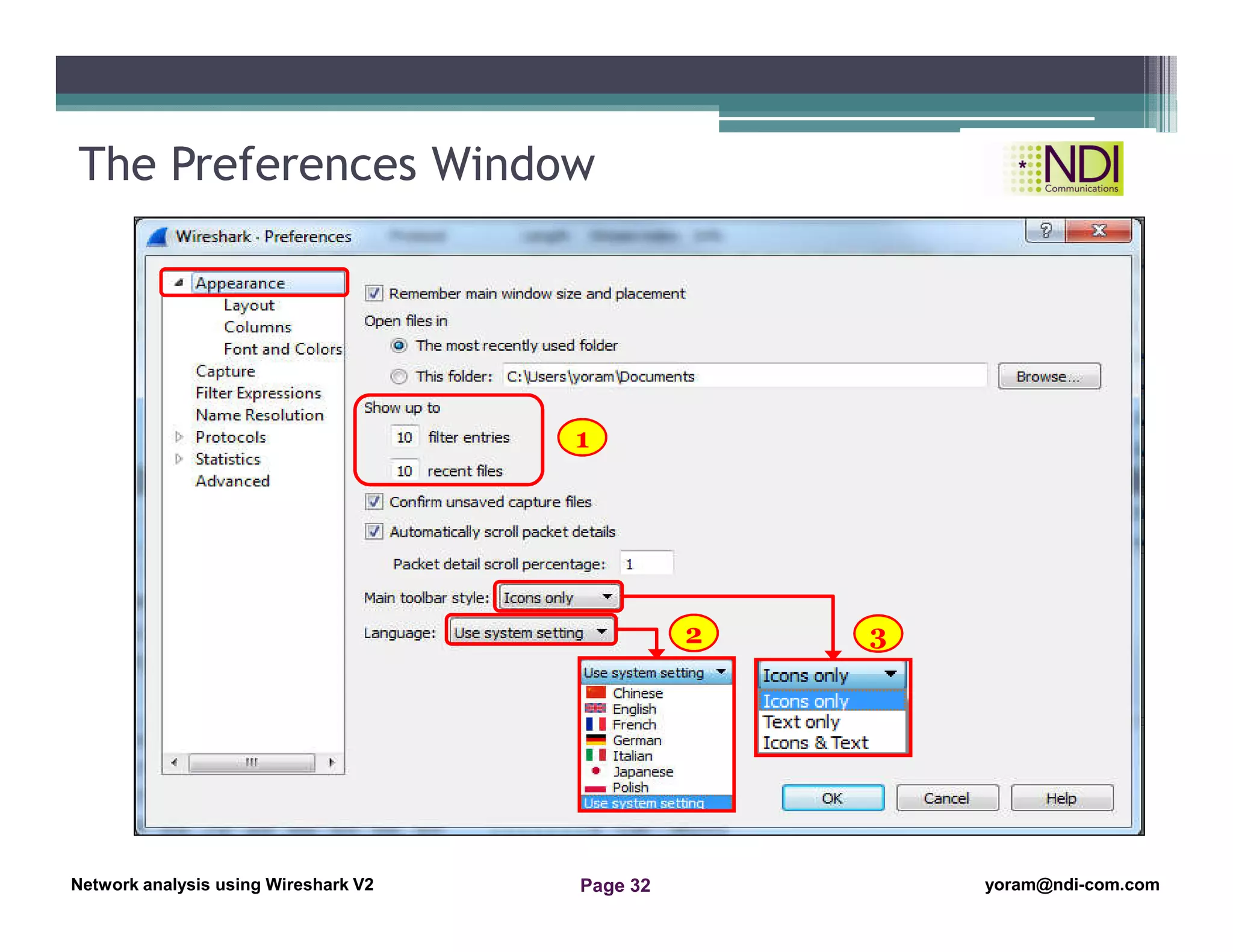
The Preferences Window
1
2 3
Network Analysis Using Wireshark Version 2Network Analysis using Wireshark V.2 yoram@ndi-com.com
Network analysis using Wireshark V2 yoram@ndi-com.comPage 33
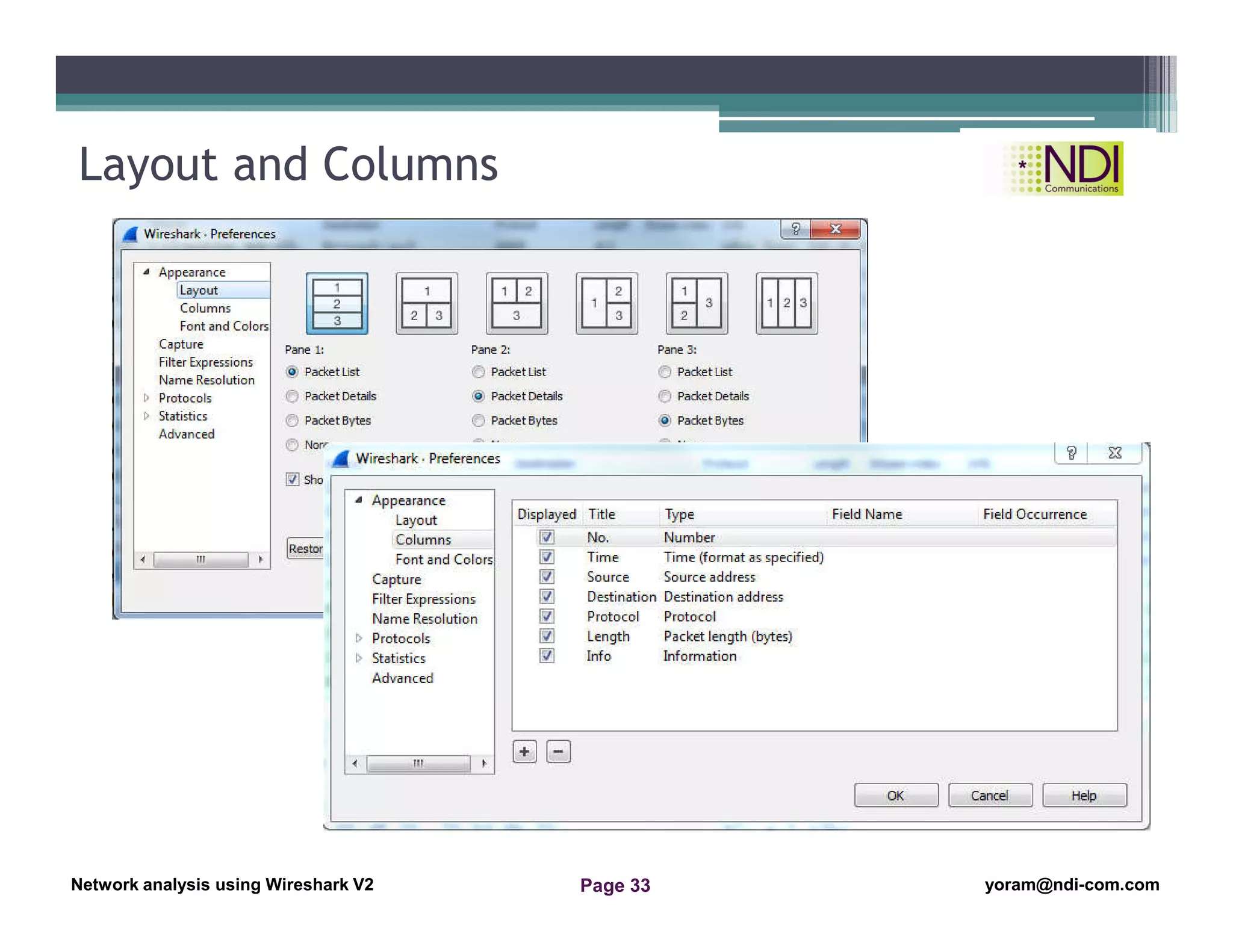
Layout and Columns
Network Analysis Using Wireshark Version 2Network Analysis using Wireshark V.2 yoram@ndi-com.com
Network analysis using Wireshark V2 yoram@ndi-com.comPage 34
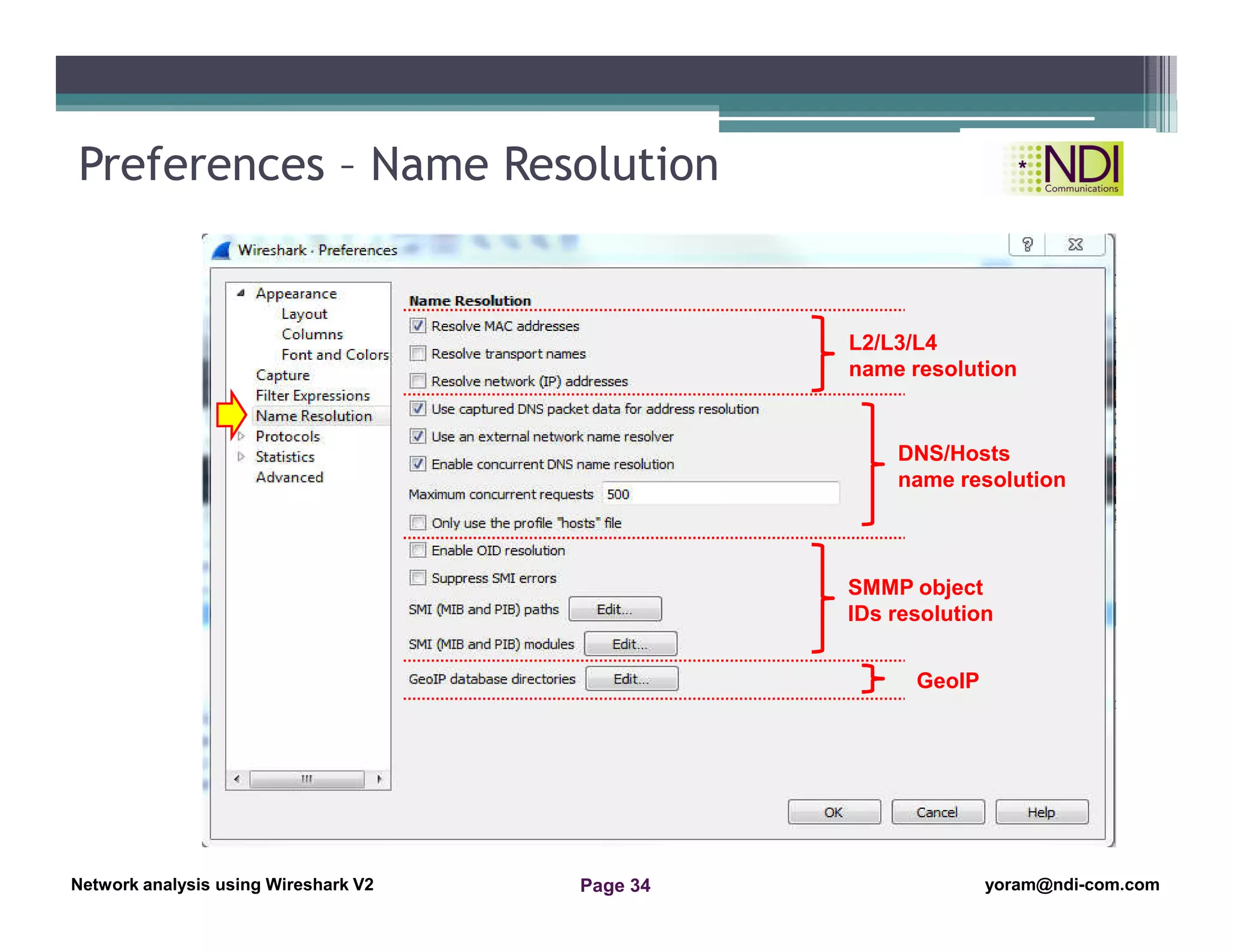
Preferences – Name Resolution
L2/L3/L4
name resolution
DNS/Hosts
name resolution
SMMP object
IDs resolution
GeoIP
Network Analysis Using Wireshark Version 2Network Analysis using Wireshark V.2 yoram@ndi-com.com
Network analysis using Wireshark V2 yoram@ndi-com.comPage 35
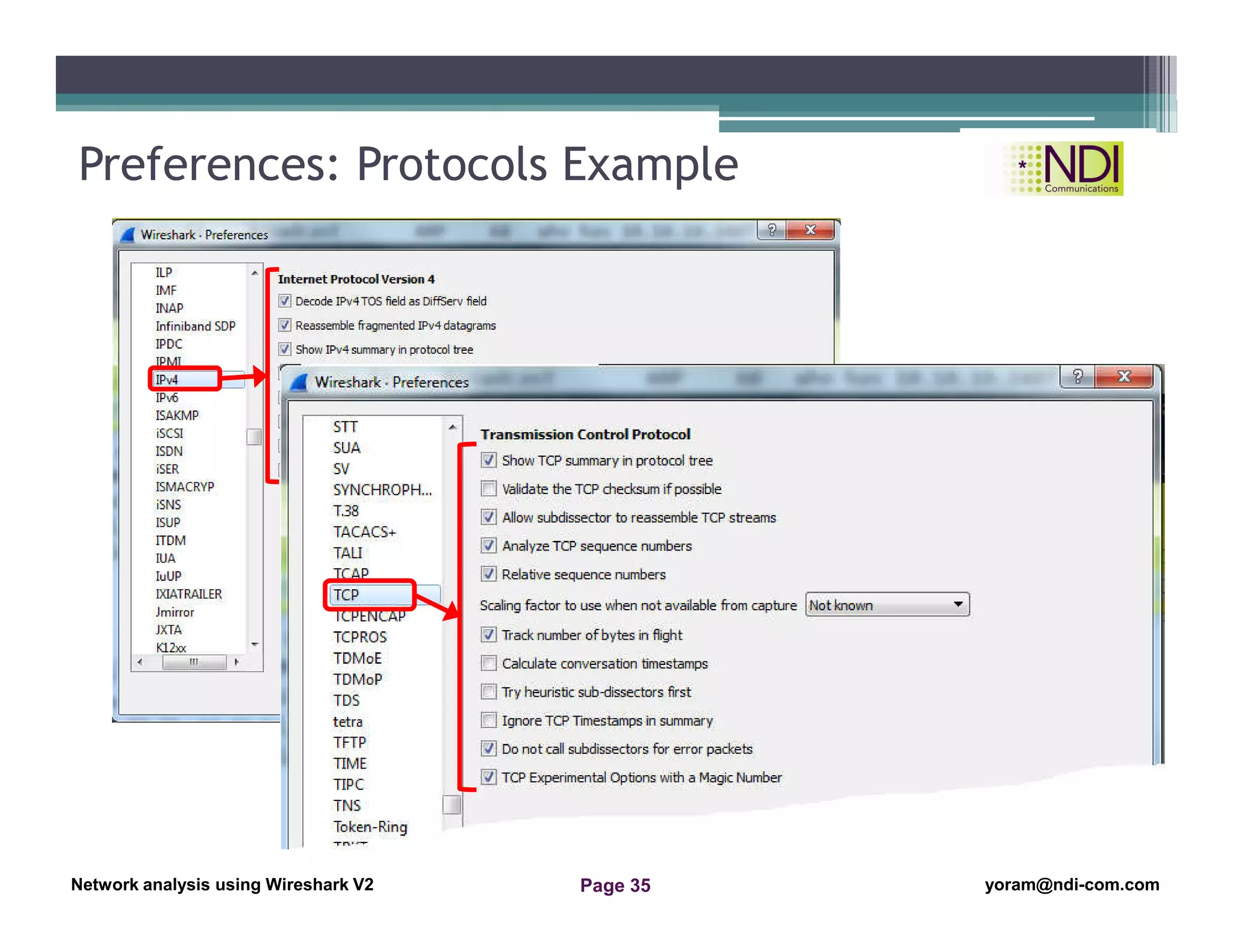
Preferences: Protocols Example
Network Analysis Using Wireshark Version 2Network Analysis using Wireshark V.2 yoram@ndi-com.com
Network analysis using Wireshark V2 yoram@ndi-com.comPage 36
A brief history and introduction
Wireshark main window
Starting the capture of data
Configuring the start window
Using time values and summaries
Chapter Content
Configuring name resolution
Navigation and colorization techniques
Preferences configuration
File operations – save and export
“Personally I'm always ready to learn,
although I do not always like being taught.“
Winston Churchil
Network Analysis Using Wireshark Version 2Network Analysis using Wireshark V.2 yoram@ndi-com.com
Network analysis using Wireshark V2 yoram@ndi-com.comPage 37
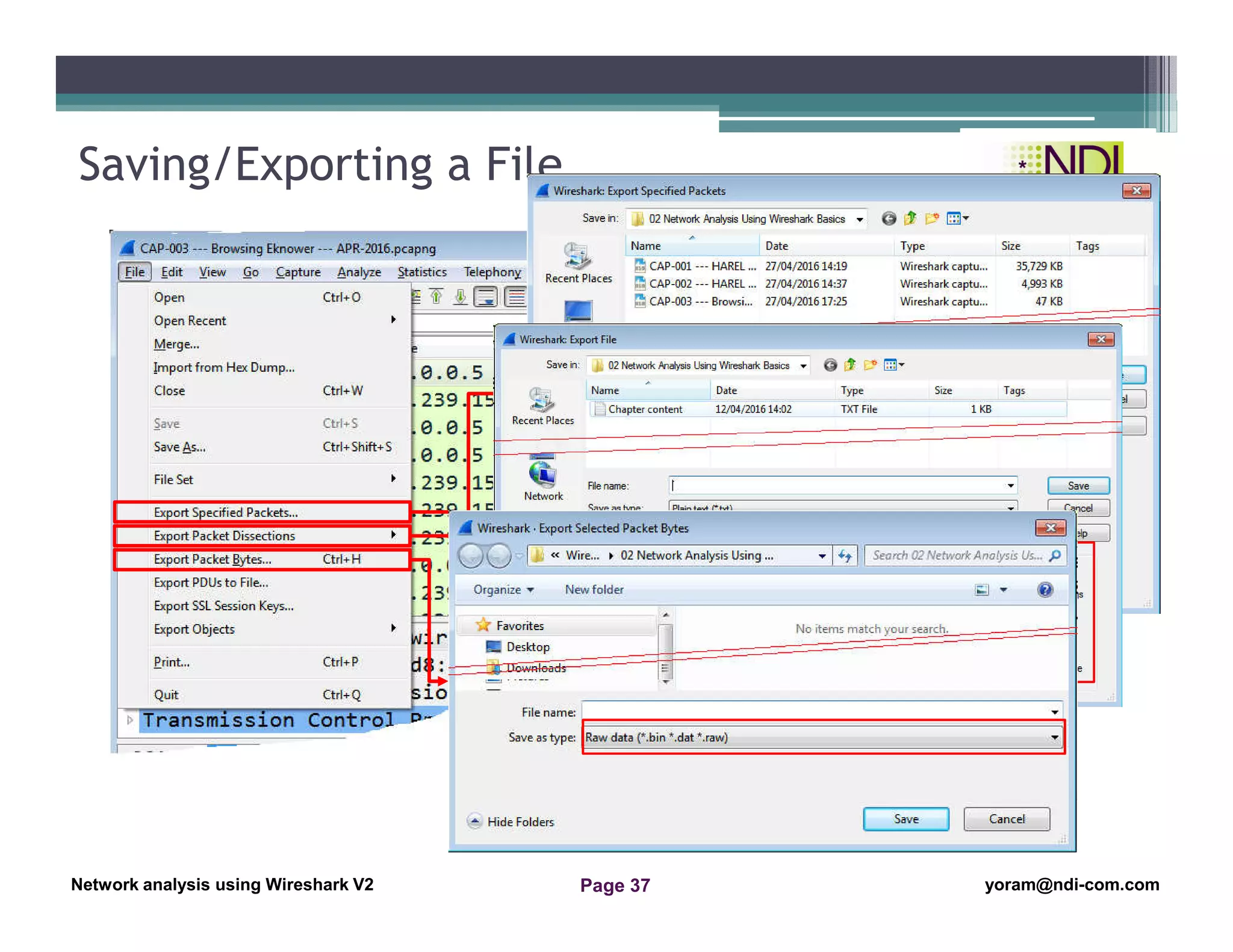
Saving/Exporting a File
Network Analysis Using Wireshark Version 2Network Analysis using Wireshark V.2 yoram@ndi-com.com
Network analysis using Wireshark V2 yoram@ndi-com.comPage 38
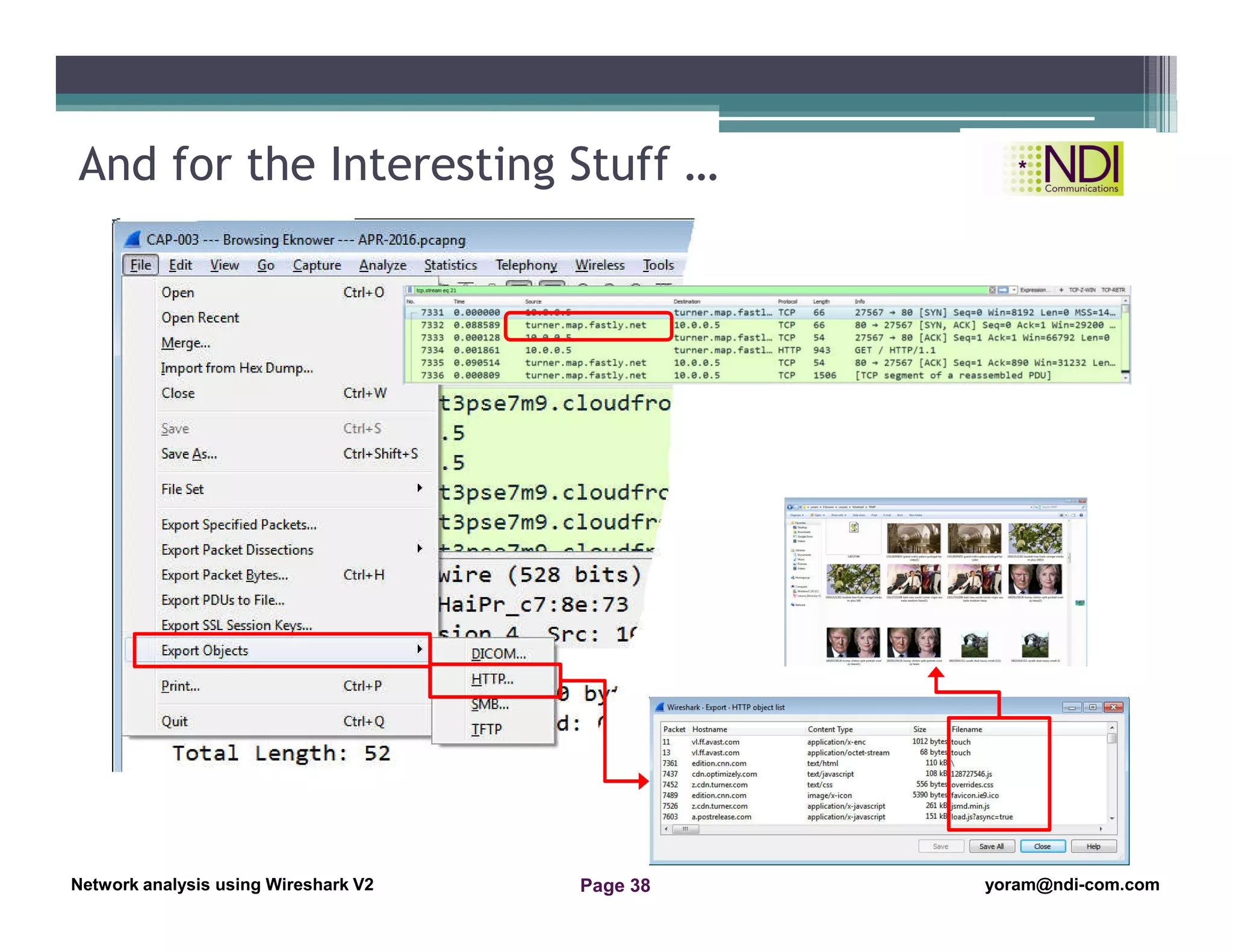
And for the Interesting Stuff …
Network Analysis Using Wireshark Version 2Network Analysis using Wireshark V.2 yoram@ndi-com.com
Network analysis using Wireshark V2 yoram@ndi-com.comPage 39
Summary
• In this lesson we talked about:
▫ Wireshark origins and when we can use it
▫ Wireshark menus and how to use them
▫ Wireshark basic configuration tasks
Thanks for your time
Yoram Orzach
yoram@ndi-com.com
Network Analysis Using Wireshark Version 2Network Analysis using Wireshark V.2 yoram@ndi-com.com
Network analysis using Wireshark V2 yoram@ndi-com.comPage 40
yoram@ndi-com.com
For More lectures, Courses & Keynote Speaking
Contact Me to:

lesson 2- Network analysis Using Wireshark introduction to cellular feb-2017

  • 1.
    Network Analysis UsingWireshark Version 2Network Analysis using Wireshark V.2 yoram@ndi-com.com Network analysis using Wireshark V2 yoram@ndi-com.comPage 1 Chapter Content Network analysis Using Wireshark Lesson 2: Introduction to Wireshark
  • 2.
    Network Analysis UsingWireshark Version 2Network Analysis using Wireshark V.2 yoram@ndi-com.com Network analysis using Wireshark V2 yoram@ndi-com.comPage 2 • By the end of this lesson, the you will be able to: ▫ Understand the main menus and commands of Wireshark ▫ Start capturing data with the Wireshark software ▫ Configure basic parameters with Wireshark Lesson Objectives
  • 3.
    Network Analysis UsingWireshark Version 2Network Analysis using Wireshark V.2 yoram@ndi-com.com Network analysis using Wireshark V2 yoram@ndi-com.comPage 3 yoram@ndi-com.com For More lectures, Courses & Keynote Speaking Contact Me to:
  • 4.
    Network Analysis UsingWireshark Version 2Network Analysis using Wireshark V.2 yoram@ndi-com.com Network analysis using Wireshark V2 yoram@ndi-com.comPage 4 A brief history and introduction Wireshark main window Starting the capture of data Configuring the start window Using time values and summaries Chapter Content Configuring name resolution Navigation and colorization techniques Preferences configuration File operations – save and export “Experience is a hard teacher because she gives the test first, the lesson afterwards“ Vernon Sanders Law
  • 5.
    Network Analysis UsingWireshark Version 2Network Analysis using Wireshark V.2 yoram@ndi-com.com Network analysis using Wireshark V2 yoram@ndi-com.comPage 5 What’s in the Status Bar
  • 6.
    Network Analysis UsingWireshark Version 2Network Analysis using Wireshark V.2 yoram@ndi-com.com Network analysis using Wireshark V2 yoram@ndi-com.comPage 6 Wireshark Main Menu - File
  • 7.
    Network Analysis UsingWireshark Version 2Network Analysis using Wireshark V.2 yoram@ndi-com.com Network analysis using Wireshark V2 yoram@ndi-com.comPage 7 Wireshark Main Menu - Edit PIC-003c
  • 8.
    Network Analysis UsingWireshark Version 2Network Analysis using Wireshark V.2 yoram@ndi-com.com Network analysis using Wireshark V2 yoram@ndi-com.comPage 8 Wireshark Main Menu - View
  • 9.
    Network Analysis UsingWireshark Version 2Network Analysis using Wireshark V.2 yoram@ndi-com.com Network analysis using Wireshark V2 yoram@ndi-com.comPage 9 Wireshark Main Menu - Go
  • 10.
    Network Analysis UsingWireshark Version 2Network Analysis using Wireshark V.2 yoram@ndi-com.com Network analysis using Wireshark V2 yoram@ndi-com.comPage 10 Wireshark Main Menu - Capture
  • 11.
    Network Analysis UsingWireshark Version 2Network Analysis using Wireshark V.2 yoram@ndi-com.com Network analysis using Wireshark V2 yoram@ndi-com.comPage 11 Wireshark Main Menu - Analyze
  • 12.
    Network Analysis UsingWireshark Version 2Network Analysis using Wireshark V.2 yoram@ndi-com.com Network analysis using Wireshark V2 yoram@ndi-com.comPage 12 Wireshark Main Menu - Statistics
  • 13.
    Network Analysis UsingWireshark Version 2Network Analysis using Wireshark V.2 yoram@ndi-com.com Network analysis using Wireshark V2 yoram@ndi-com.comPage 13 Wireshark Main Menu - Telephony
  • 14.
    Network Analysis UsingWireshark Version 2Network Analysis using Wireshark V.2 yoram@ndi-com.com Network analysis using Wireshark V2 yoram@ndi-com.comPage 14 Wireshark Main Menu - Wireless
  • 15.
    Network Analysis UsingWireshark Version 2Network Analysis using Wireshark V.2 yoram@ndi-com.com Network analysis using Wireshark V2 yoram@ndi-com.comPage 15 Wireshark Main Menu - Tools
  • 16.
    Network Analysis UsingWireshark Version 2Network Analysis using Wireshark V.2 yoram@ndi-com.com Network analysis using Wireshark V2 yoram@ndi-com.comPage 16 Wireshark Main Menu - Help
  • 17.
    Network Analysis UsingWireshark Version 2Network Analysis using Wireshark V.2 yoram@ndi-com.com Network analysis using Wireshark V2 yoram@ndi-com.comPage 17 Wireshark main window Starting the capture of data Configuring the start window Using time values and summaries Chapter Content Configuring name resolution Navigation and colorization techniques Preferences configuration File operations – save and export “Experience is a hard teacher because she gives the test first, the lesson afterwards“ Vernon Sanders Law
  • 18.
    Network Analysis UsingWireshark Version 2Network Analysis using Wireshark V.2 yoram@ndi-com.com Network analysis using Wireshark V2 yoram@ndi-com.comPage 18 Capture Options
  • 19.
    Network Analysis UsingWireshark Version 2Network Analysis using Wireshark V.2 yoram@ndi-com.com Network analysis using Wireshark V2 yoram@ndi-com.comPage 19 Wireshark main window Starting the capture of data Configuring the start window Using time values and summaries Chapter Content Configuring name resolution Navigation and colorization techniques Preferences configuration File operations – save and export “Imagination is more important that knowledge“ Albert Einstein
  • 20.
    Network Analysis UsingWireshark Version 2Network Analysis using Wireshark V.2 yoram@ndi-com.com Network analysis using Wireshark V2 yoram@ndi-com.comPage 20 Preferences - Appearance
  • 21.
    Network Analysis UsingWireshark Version 2Network Analysis using Wireshark V.2 yoram@ndi-com.com Network analysis using Wireshark V2 yoram@ndi-com.comPage 21 Wireshark main window Starting the capture of data Configuring the start window Using time values and summaries Chapter Content Configuring name resolution Navigation and colorization techniques Preferences configuration File operations – save and export “The important thing I not to stop questioning“ Albert Einstein
  • 22.
    Network Analysis UsingWireshark Version 2Network Analysis using Wireshark V.2 yoram@ndi-com.com Network analysis using Wireshark V2 yoram@ndi-com.comPage 22 Time Display Format
  • 23.
    Network Analysis UsingWireshark Version 2Network Analysis using Wireshark V.2 yoram@ndi-com.com Network analysis using Wireshark V2 yoram@ndi-com.comPage 23 Time Display Format - Example Seconds since beginning of capture: Seconds since previous displayed packet: Example 2-2
  • 24.
    Network Analysis UsingWireshark Version 2Network Analysis using Wireshark V.2 yoram@ndi-com.com Network analysis using Wireshark V2 yoram@ndi-com.comPage 24 Wireshark main window Starting the capture of data Configuring the start window Using time values and summaries Chapter Content Configuring name resolution Navigation and colorization techniques Preferences configuration File operations – save and export “The important thing I not to stop questioning“ Albert Einstein
  • 25.
    Network Analysis UsingWireshark Version 2Network Analysis using Wireshark V.2 yoram@ndi-com.com Network analysis using Wireshark V2 yoram@ndi-com.comPage 25 Name Resolution - Configuration Edit  Preferences  Name resolution View  Name resolution
  • 26.
    Network Analysis UsingWireshark Version 2Network Analysis using Wireshark V.2 yoram@ndi-com.com Network analysis using Wireshark V2 yoram@ndi-com.comPage 26 Name Resolution – What We Get Before network name resolution: After network name resolution:
  • 27.
    Network Analysis UsingWireshark Version 2Network Analysis using Wireshark V.2 yoram@ndi-com.com Network analysis using Wireshark V2 yoram@ndi-com.comPage 27 Wireshark main window Starting the capture of data Configuring the start window Using time values and summaries Chapter Content Configuring name resolution Navigation and colorization techniques Preferences configuration File operations – save and export “Do not worry about your difficulties in Mathematics. I can assure you mine are still greater.“ Albert Einstein
  • 28.
    Network Analysis UsingWireshark Version 2Network Analysis using Wireshark V.2 yoram@ndi-com.com Network analysis using Wireshark V2 yoram@ndi-com.comPage 28 Coloring and Navigation Techniques Example 2-5
  • 29.
    Network Analysis UsingWireshark Version 2Network Analysis using Wireshark V.2 yoram@ndi-com.com Network analysis using Wireshark V2 yoram@ndi-com.comPage 29 Colorizing Specific Session Check here or V: View  Coloring Rules …
  • 30.
    Network Analysis UsingWireshark Version 2Network Analysis using Wireshark V.2 yoram@ndi-com.com Network analysis using Wireshark V2 yoram@ndi-com.comPage 30 The Coloring Rule Window Add/Delete rule Import a template
  • 31.
    Network Analysis UsingWireshark Version 2Network Analysis using Wireshark V.2 yoram@ndi-com.com Network analysis using Wireshark V2 yoram@ndi-com.comPage 31 Wireshark main window Starting the capture of data Configuring the start window Using time values and summaries Chapter Content Configuring name resolution Navigation and colorization techniques Preferences configuration File operations – save and export “Try not to become a man of success but rather to become a man of value.“ Albert Einstein
  • 32.
    Network Analysis UsingWireshark Version 2Network Analysis using Wireshark V.2 yoram@ndi-com.com Network analysis using Wireshark V2 yoram@ndi-com.comPage 32 The Preferences Window 1 2 3
  • 33.
    Network Analysis UsingWireshark Version 2Network Analysis using Wireshark V.2 yoram@ndi-com.com Network analysis using Wireshark V2 yoram@ndi-com.comPage 33 Layout and Columns
  • 34.
    Network Analysis UsingWireshark Version 2Network Analysis using Wireshark V.2 yoram@ndi-com.com Network analysis using Wireshark V2 yoram@ndi-com.comPage 34 Preferences – Name Resolution L2/L3/L4 name resolution DNS/Hosts name resolution SMMP object IDs resolution GeoIP
  • 35.
    Network Analysis UsingWireshark Version 2Network Analysis using Wireshark V.2 yoram@ndi-com.com Network analysis using Wireshark V2 yoram@ndi-com.comPage 35 Preferences: Protocols Example
  • 36.
    Network Analysis UsingWireshark Version 2Network Analysis using Wireshark V.2 yoram@ndi-com.com Network analysis using Wireshark V2 yoram@ndi-com.comPage 36 A brief history and introduction Wireshark main window Starting the capture of data Configuring the start window Using time values and summaries Chapter Content Configuring name resolution Navigation and colorization techniques Preferences configuration File operations – save and export “Personally I'm always ready to learn, although I do not always like being taught.“ Winston Churchil
  • 37.
    Network Analysis UsingWireshark Version 2Network Analysis using Wireshark V.2 yoram@ndi-com.com Network analysis using Wireshark V2 yoram@ndi-com.comPage 37 Saving/Exporting a File
  • 38.
    Network Analysis UsingWireshark Version 2Network Analysis using Wireshark V.2 yoram@ndi-com.com Network analysis using Wireshark V2 yoram@ndi-com.comPage 38 And for the Interesting Stuff …
  • 39.
    Network Analysis UsingWireshark Version 2Network Analysis using Wireshark V.2 yoram@ndi-com.com Network analysis using Wireshark V2 yoram@ndi-com.comPage 39 Summary • In this lesson we talked about: ▫ Wireshark origins and when we can use it ▫ Wireshark menus and how to use them ▫ Wireshark basic configuration tasks Thanks for your time Yoram Orzach yoram@ndi-com.com
  • 40.
    Network Analysis UsingWireshark Version 2Network Analysis using Wireshark V.2 yoram@ndi-com.com Network analysis using Wireshark V2 yoram@ndi-com.comPage 40 yoram@ndi-com.com For More lectures, Courses & Keynote Speaking Contact Me to: