Scaling near-realtime
analytics with Kafka and
HBase
OSCON 2012
Dave Revell & Nate Putnam
Urban Airship
About Us

•   Nate Putnam
    •   Team Lead, Core Data and Analytics (1 year)
    •   Previously Engineer at Jive Software (4 years)
    •   Contributor to HBase/Zookeeper
•   Dave Revell
    •   Database Engineer, Core Data and Analytics (1 year)
    •   Previously Engineer at Meebo (1 year)
    •   HBase contributor
In this Talk

•   About Urban Airship
•   Why near-realtime?
•   About Kafka
•   Data Consumption
•   Scheduling
•   HBase / High speed counting
•   Questions
What is an Urban Airship?
•   Hosting for mobile services that developers should not
    build themselves
•   Unified API for services across platforms
•   SLAs for throughput, latency
By The Numbers
By The Numbers


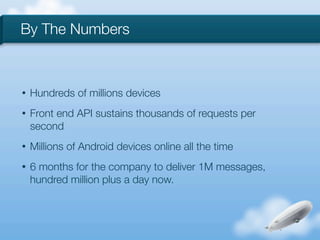
•   Hundreds of millions devices
By The Numbers


•   Hundreds of millions devices
•   Front end API sustains thousands of requests per
    second
By The Numbers


•   Hundreds of millions devices
•   Front end API sustains thousands of requests per
    second
•   Millions of Android devices online all the time
By The Numbers


•   Hundreds of millions devices
•   Front end API sustains thousands of requests per
    second
•   Millions of Android devices online all the time
•   6 months for the company to deliver 1M messages,
    hundred million plus a day now.
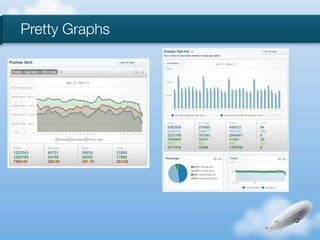
Pretty Graphs
Near-Realtime?


•   Realtime or Really fast?
•   Events happen async
•   Realtime failure scenarios are hard
•   In practice a few minutes is all right for analytics
Overview

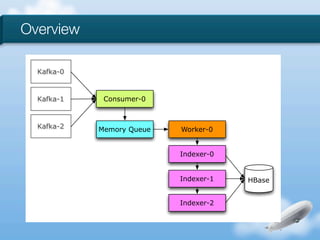
  Kafka-0


  Kafka-1    Consumer-0


  Kafka-2   Memory Queue   Worker-0


                           Indexer-0


                           Indexer-1   HBase


                           Indexer-2
Kafka


•   Created by the SNA Team @ LinkedIn
•   Publish-Subscribe system with minimal features
•   Can keep as many messages buffered as you have disk
    space
•   Fast with some trade offs
Kafka

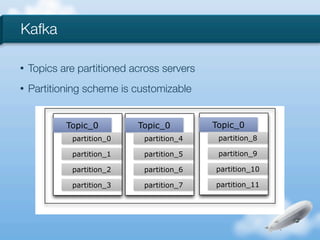
•   Topics are partitioned across servers
•   Partitioning scheme is customizable


            Topic_0         Topic_0         Topic_0
             partition_0     partition_4     partition_8

             partition_1     partition_5     partition_9

             partition_2     partition_6    partition_10

             partition_3     partition_7    partition_11
Kafka

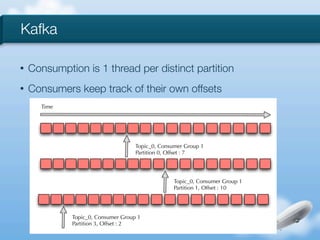
•   Consumption is 1 thread per distinct partition
•   Consumers keep track of their own offsets
      Time


                                    Topic_0, Consumer Group 1
                                    Partition 0, Offset : 7


                                                  Topic_0, Consumer Group 1
                                                  Partition 1, Offset : 10


             Topic_0, Consumer Group 1
             Partition 3, Offset : 2
Kafka


•   Manipulation of time based indexes is powerful
•   Monitor offsets and lag
•   Throw as much disk at this as you can
•   http://incubator.apache.org/kafka/
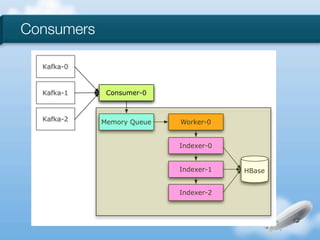
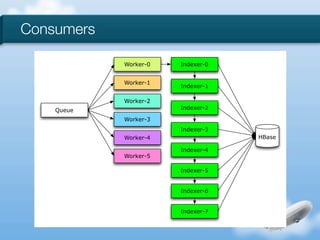
Consumers


•   Mirror Kafka design
•   Lots of parallelism to increase throughput
•   Share nothing
•   No ordering guarantees
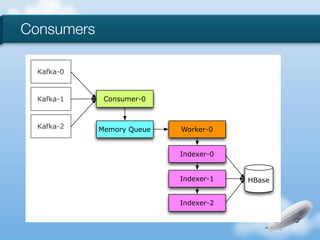
Consumers

  Kafka-0


  Kafka-1    Consumer-0


  Kafka-2   Memory Queue   Worker-0


                           Indexer-0


                           Indexer-1   HBase


                           Indexer-2
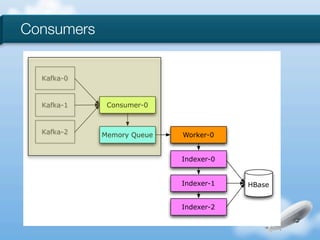
Consumers


  Kafka-0


  Kafka-1    Consumer-0


  Kafka-2   Memory Queue   Worker-0


                           Indexer-0


                           Indexer-1   HBase


                           Indexer-2
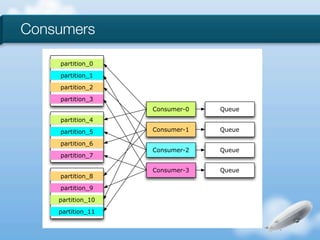
Consumers

    partition_0

    partition_1
    partition_2

    partition_3
                   Consumer-0   Queue
    partition_4

    partition_5    Consumer-1   Queue

    partition_6
                   Consumer-2   Queue
    partition_7

                   Consumer-3   Queue
    partition_8
    partition_9

    partition_10
    partition_11
Consumers

  Kafka-0


  Kafka-1    Consumer-0


  Kafka-2   Memory Queue   Worker-0


                           Indexer-0


                           Indexer-1   HBase


                           Indexer-2
Consumers

            Worker-0   Indexer-0


            Worker-1
                       Indexer-1

            Worker-2
    Queue              Indexer-2

            Worker-3
                       Indexer-3
            Worker-4               HBase

                       Indexer-4
            Worker-5

                       Indexer-5


                       Indexer-6


                       Indexer-7
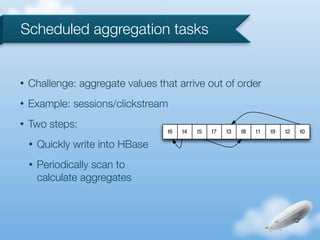
Scheduled aggregation tasks


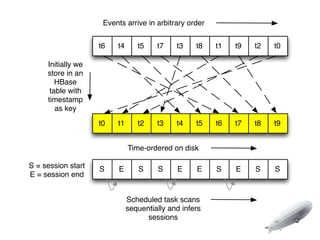
•   Challenge: aggregate values that arrive out of order
•   Example: sessions/clickstream
•   Two steps:
                                   t6   t4   t5   t7   t3   t8   t1   t9   t2   t0

    •   Quickly write into HBase
    •   Periodically scan to
        calculate aggregates
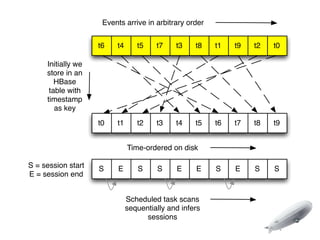
Events arrive in arbitrary order


                    t6   t4      t5    t7    t3    t8   t1   t9   t2   t0

     Initially we
     store in an
        HBase
      table with
     timestamp
        as key
                    t0   t1      t2    t3    t4    t5   t6   t7   t8   t9


                              Time-ordered on disk

S = session start   S     E      S     S     E     E    S    E    S    S
E = session end


                              Scheduled task scans
                              sequentially and infers
                                    sessions
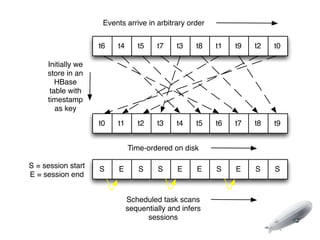
Events arrive in arbitrary order


                    t6   t4      t5    t7    t3    t8   t1   t9   t2   t0

     Initially we
     store in an
        HBase
      table with
     timestamp
        as key
                    t0   t1      t2    t3    t4    t5   t6   t7   t8   t9


                              Time-ordered on disk

S = session start   S     E      S     S     E     E    S    E    S    S
E = session end


                              Scheduled task scans
                              sequentially and infers
                                    sessions
Events arrive in arbitrary order


                    t6   t4      t5    t7    t3    t8   t1   t9   t2   t0

     Initially we
     store in an
        HBase
      table with
     timestamp
        as key
                    t0   t1      t2    t3    t4    t5   t6   t7   t8   t9


                              Time-ordered on disk

S = session start   S     E      S     S     E     E    S    E    S    S
E = session end


                              Scheduled task scans
                              sequentially and infers
                                    sessions
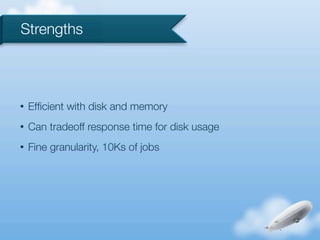
Strengths


•   Efficient with disk and memory
•   Can tradeoff response time for disk usage
•   Fine granularity, 10Ks of jobs
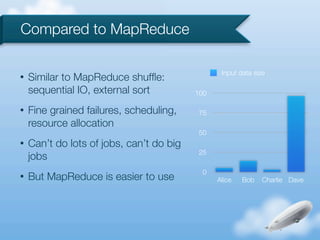
Compared to MapReduce

                                                 Input data size
•   Similar to MapReduce shuffle:
    sequential IO, external sort          100

•   Fine grained failures, scheduling,    75
    resource allocation
                                          50
•   Can’t do lots of jobs, can’t do big
                                          25
    jobs
                                           0
•   But MapReduce is easier to use              Alice   Bob   Charlie Dave
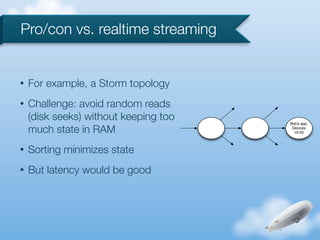
Pro/con vs. realtime streaming


•   For example, a Storm topology
•   Challenge: avoid random reads
    (disk seeks) without keeping too   Bob's app,

    much state in RAM                   Devices
                                         10-20


•   Sorting minimizes state
•   But latency would be good
HBase


•   What it is
•   Why it’s good for low-latency big data
HBase

•   A database that uses HDFS for storage
•   Based on Google’s BigTable
•   Solves the problem “how do I query my Hadoop data?”
      •   Operations typically measured in milliseconds
      •   MapReduce is not suitable for real time queries
•   Scales well by adding servers (if you do everything right)
•   Not partition tolerant or eventually consistent
Why we like HBase


•   Scalable
•   Fast: millions of ops/sec
•   Open source, ASF top-level project
•   Strong community
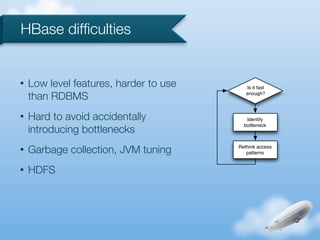
HBase difficulties


•   Low level features, harder to use      Is it fast

    than RDBMS                             enough?


•   Hard to avoid accidentally             Identify

    introducing bottlenecks
                                          bottleneck


•   Garbage collection, JVM tuning      Rethink access
                                           patterns


•   HDFS
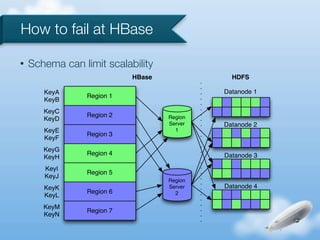
How to fail at HBase

•   Schema can limit scalability
                            HBase              HDFS

       KeyA                                  Datanode 1
                 Region 1
       KeyB
       KeyC
                 Region 2           Region
       KeyD
                                    Server   Datanode 2
       KeyE                           1
                 Region 3
       KeyF
       KeyG
                 Region 4                    Datanode 3
       KeyH
       KeyI
                 Region 5
       KeyJ
                                    Region
       KeyK                         Server   Datanode 4
                 Region 6             2
       KeyL
       KeyM
                 Region 7
       KeyN
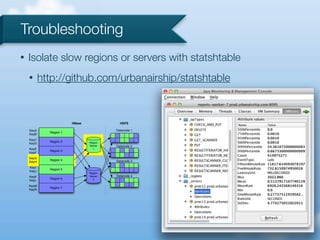
Troubleshooting
•   Isolate slow regions or servers with statshtable
    •      http://github.com/urbanairship/statshtable


                        HBase              HDFS

    KeyA                                 Datanode 1
             Region 1
    KeyB
    KeyC
             Region 2           Region
    KeyD
                                Server   Datanode 2
    KeyE                          1
             Region 3
    KeyF
    KeyG
             Region 4                    Datanode 3
    KeyH
    KeyI
             Region 5
    KeyJ
                                Region
    KeyK                        Server   Datanode 4
             Region 6             2
    KeyL
    KeyM
             Region 7
    KeyN
Counting


•   The main thing that we do
•   Scaling dimensions:
    •   Many counters of interest per event
    •   Many events
    •   Many changes to counter definitions
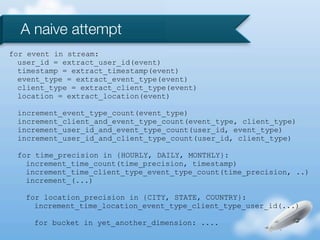
A naive attempt
for event in stream:
  user_id = extract_user_id(event)
  timestamp = extract_timestamp(event)
  event_type = extract_event_type(event)
  client_type = extract_client_type(event)
  location = extract_location(event)

 increment_event_type_count(event_type)
 increment_client_and_event_type_count(event_type, client_type)
 increment_user_id_and_event_type_count(user_id, event_type)
 increment_user_id_and_client_type_count(user_id, client_type)

 for time_precision in {HOURLY, DAILY, MONTHLY}:
   increment_time_count(time_precision, timestamp)
   increment_time_client_type_event_type_count(time_precision, ..)
   increment_(...)

   for location_precision in {CITY, STATE, COUNTRY}:
     increment_time_location_event_type_client_type_user_id(...)

     for bucket in yet_another_dimension: ....
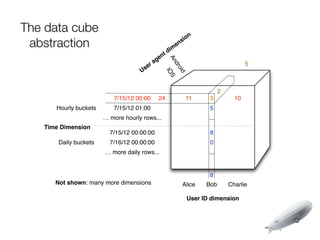
Counting with datacubes


•   Challenge: count items in a stream matching various
    criteria, when criteria may change
•   github.com/urbanairship/datacube
•   A Java library for turning
    streams into OLAP cubes
    •   Especially multidimensional counters
The data cube                                                    n
 abstraction                                                 s io
                                                           en
                                                       m
                                                   t di
                                                 en


                                                      An
                                               ag                                      5
                                          er


                                                   dr
                                        s


                                                      oid
                                    U


                                                       IO
                                                          S
                                                                            2
                          7/15/12 00:00          24            11     3           10
      Hourly buckets      7/15/12 01:00                               5
                       … more hourly rows...                          ...
   Time Dimension
                         7/15/12 00:00:00                             8
       Daily buckets     7/16/12 00:00:00                             0
                       … more daily rows...                           ...


                                                                      8
      Not shown: many more dimensions                        Alice   Bob        Charlie

                                                               User ID dimension
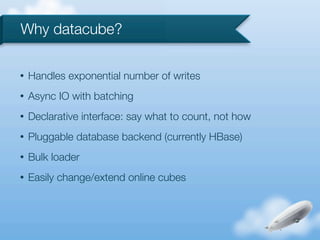
Why datacube?

•   Handles exponential number of writes
•   Async IO with batching
•   Declarative interface: say what to count, not how
•   Pluggable database backend (currently HBase)
•   Bulk loader
•   Easily change/extend online cubes
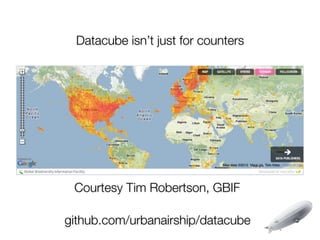
Datacube isn’t just for counters


 Courtesy Tim Robertson, GBIF

github.com/urbanairship/datacube
Courtesy Tim Robertson, GBIF

github.com/urbanairship/datacube
Questions?
Thanks!


•   HBase and Kafka for being awesome
•   We’re hiring! urbanairship.com/jobs/
•   @nateputnam @dave_revell

Near-realtime analytics with Kafka and HBase

  • 1.
    Scaling near-realtime analytics withKafka and HBase OSCON 2012 Dave Revell & Nate Putnam Urban Airship
  • 2.
    About Us • Nate Putnam • Team Lead, Core Data and Analytics (1 year) • Previously Engineer at Jive Software (4 years) • Contributor to HBase/Zookeeper • Dave Revell • Database Engineer, Core Data and Analytics (1 year) • Previously Engineer at Meebo (1 year) • HBase contributor
  • 3.
    In this Talk • About Urban Airship • Why near-realtime? • About Kafka • Data Consumption • Scheduling • HBase / High speed counting • Questions
  • 4.
    What is anUrban Airship? • Hosting for mobile services that developers should not build themselves • Unified API for services across platforms • SLAs for throughput, latency
  • 5.
  • 6.
    By The Numbers • Hundreds of millions devices
  • 7.
    By The Numbers • Hundreds of millions devices • Front end API sustains thousands of requests per second
  • 8.
    By The Numbers • Hundreds of millions devices • Front end API sustains thousands of requests per second • Millions of Android devices online all the time
  • 9.
    By The Numbers • Hundreds of millions devices • Front end API sustains thousands of requests per second • Millions of Android devices online all the time • 6 months for the company to deliver 1M messages, hundred million plus a day now.
  • 10.
  • 11.
    Near-Realtime? • Realtime or Really fast? • Events happen async • Realtime failure scenarios are hard • In practice a few minutes is all right for analytics
  • 12.
    Overview Kafka-0 Kafka-1 Consumer-0 Kafka-2 Memory Queue Worker-0 Indexer-0 Indexer-1 HBase Indexer-2
  • 13.
    Kafka • Created by the SNA Team @ LinkedIn • Publish-Subscribe system with minimal features • Can keep as many messages buffered as you have disk space • Fast with some trade offs
  • 14.
    Kafka • Topics are partitioned across servers • Partitioning scheme is customizable Topic_0 Topic_0 Topic_0 partition_0 partition_4 partition_8 partition_1 partition_5 partition_9 partition_2 partition_6 partition_10 partition_3 partition_7 partition_11
  • 15.
    Kafka • Consumption is 1 thread per distinct partition • Consumers keep track of their own offsets Time Topic_0, Consumer Group 1 Partition 0, Offset : 7 Topic_0, Consumer Group 1 Partition 1, Offset : 10 Topic_0, Consumer Group 1 Partition 3, Offset : 2
  • 16.
    Kafka • Manipulation of time based indexes is powerful • Monitor offsets and lag • Throw as much disk at this as you can • http://incubator.apache.org/kafka/
  • 17.
    Consumers • Mirror Kafka design • Lots of parallelism to increase throughput • Share nothing • No ordering guarantees
  • 18.
    Consumers Kafka-0 Kafka-1 Consumer-0 Kafka-2 Memory Queue Worker-0 Indexer-0 Indexer-1 HBase Indexer-2
  • 19.
    Consumers Kafka-0 Kafka-1 Consumer-0 Kafka-2 Memory Queue Worker-0 Indexer-0 Indexer-1 HBase Indexer-2
  • 20.
    Consumers partition_0 partition_1 partition_2 partition_3 Consumer-0 Queue partition_4 partition_5 Consumer-1 Queue partition_6 Consumer-2 Queue partition_7 Consumer-3 Queue partition_8 partition_9 partition_10 partition_11
  • 21.
    Consumers Kafka-0 Kafka-1 Consumer-0 Kafka-2 Memory Queue Worker-0 Indexer-0 Indexer-1 HBase Indexer-2
  • 22.
    Consumers Worker-0 Indexer-0 Worker-1 Indexer-1 Worker-2 Queue Indexer-2 Worker-3 Indexer-3 Worker-4 HBase Indexer-4 Worker-5 Indexer-5 Indexer-6 Indexer-7
  • 23.
    Scheduled aggregation tasks • Challenge: aggregate values that arrive out of order • Example: sessions/clickstream • Two steps: t6 t4 t5 t7 t3 t8 t1 t9 t2 t0 • Quickly write into HBase • Periodically scan to calculate aggregates
  • 24.
    Events arrive inarbitrary order t6 t4 t5 t7 t3 t8 t1 t9 t2 t0 Initially we store in an HBase table with timestamp as key t0 t1 t2 t3 t4 t5 t6 t7 t8 t9 Time-ordered on disk S = session start S E S S E E S E S S E = session end Scheduled task scans sequentially and infers sessions
  • 25.
    Events arrive inarbitrary order t6 t4 t5 t7 t3 t8 t1 t9 t2 t0 Initially we store in an HBase table with timestamp as key t0 t1 t2 t3 t4 t5 t6 t7 t8 t9 Time-ordered on disk S = session start S E S S E E S E S S E = session end Scheduled task scans sequentially and infers sessions
  • 26.
    Events arrive inarbitrary order t6 t4 t5 t7 t3 t8 t1 t9 t2 t0 Initially we store in an HBase table with timestamp as key t0 t1 t2 t3 t4 t5 t6 t7 t8 t9 Time-ordered on disk S = session start S E S S E E S E S S E = session end Scheduled task scans sequentially and infers sessions
  • 27.
    Strengths • Efficient with disk and memory • Can tradeoff response time for disk usage • Fine granularity, 10Ks of jobs
  • 28.
    Compared to MapReduce Input data size • Similar to MapReduce shuffle: sequential IO, external sort 100 • Fine grained failures, scheduling, 75 resource allocation 50 • Can’t do lots of jobs, can’t do big 25 jobs 0 • But MapReduce is easier to use Alice Bob Charlie Dave
  • 29.
    Pro/con vs. realtimestreaming • For example, a Storm topology • Challenge: avoid random reads (disk seeks) without keeping too Bob's app, much state in RAM Devices 10-20 • Sorting minimizes state • But latency would be good
  • 30.
    HBase • What it is • Why it’s good for low-latency big data
  • 31.
    HBase • A database that uses HDFS for storage • Based on Google’s BigTable • Solves the problem “how do I query my Hadoop data?” • Operations typically measured in milliseconds • MapReduce is not suitable for real time queries • Scales well by adding servers (if you do everything right) • Not partition tolerant or eventually consistent
  • 32.
    Why we likeHBase • Scalable • Fast: millions of ops/sec • Open source, ASF top-level project • Strong community
  • 33.
    HBase difficulties • Low level features, harder to use Is it fast than RDBMS enough? • Hard to avoid accidentally Identify introducing bottlenecks bottleneck • Garbage collection, JVM tuning Rethink access patterns • HDFS
  • 34.
    How to failat HBase • Schema can limit scalability HBase HDFS KeyA Datanode 1 Region 1 KeyB KeyC Region 2 Region KeyD Server Datanode 2 KeyE 1 Region 3 KeyF KeyG Region 4 Datanode 3 KeyH KeyI Region 5 KeyJ Region KeyK Server Datanode 4 Region 6 2 KeyL KeyM Region 7 KeyN
  • 35.
    Troubleshooting • Isolate slow regions or servers with statshtable • http://github.com/urbanairship/statshtable HBase HDFS KeyA Datanode 1 Region 1 KeyB KeyC Region 2 Region KeyD Server Datanode 2 KeyE 1 Region 3 KeyF KeyG Region 4 Datanode 3 KeyH KeyI Region 5 KeyJ Region KeyK Server Datanode 4 Region 6 2 KeyL KeyM Region 7 KeyN
  • 36.
    Counting • The main thing that we do • Scaling dimensions: • Many counters of interest per event • Many events • Many changes to counter definitions
  • 37.
    A naive attempt forevent in stream: user_id = extract_user_id(event) timestamp = extract_timestamp(event) event_type = extract_event_type(event) client_type = extract_client_type(event) location = extract_location(event) increment_event_type_count(event_type) increment_client_and_event_type_count(event_type, client_type) increment_user_id_and_event_type_count(user_id, event_type) increment_user_id_and_client_type_count(user_id, client_type) for time_precision in {HOURLY, DAILY, MONTHLY}: increment_time_count(time_precision, timestamp) increment_time_client_type_event_type_count(time_precision, ..) increment_(...) for location_precision in {CITY, STATE, COUNTRY}: increment_time_location_event_type_client_type_user_id(...) for bucket in yet_another_dimension: ....
  • 38.
    Counting with datacubes • Challenge: count items in a stream matching various criteria, when criteria may change • github.com/urbanairship/datacube • A Java library for turning streams into OLAP cubes • Especially multidimensional counters
  • 39.
    The data cube n abstraction s io en m t di en An ag 5 er dr s oid U IO S 2 7/15/12 00:00 24 11 3 10 Hourly buckets 7/15/12 01:00 5 … more hourly rows... ... Time Dimension 7/15/12 00:00:00 8 Daily buckets 7/16/12 00:00:00 0 … more daily rows... ... 8 Not shown: many more dimensions Alice Bob Charlie User ID dimension
  • 40.
    Why datacube? • Handles exponential number of writes • Async IO with batching • Declarative interface: say what to count, not how • Pluggable database backend (currently HBase) • Bulk loader • Easily change/extend online cubes
  • 41.
    Datacube isn’t justfor counters Courtesy Tim Robertson, GBIF github.com/urbanairship/datacube
  • 42.
    Courtesy Tim Robertson,GBIF github.com/urbanairship/datacube
  • 43.
  • 44.
    Thanks! • HBase and Kafka for being awesome • We’re hiring! urbanairship.com/jobs/ • @nateputnam @dave_revell