Fast Analytics with
Apache Kudu
(incubating)
Ryan Bosshart//Systems Engineer
bosshart@cloudera.com
2
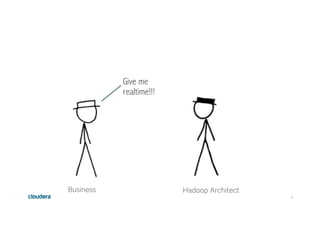
Business
Give me
realtime!!!
Hadoop Architect
3
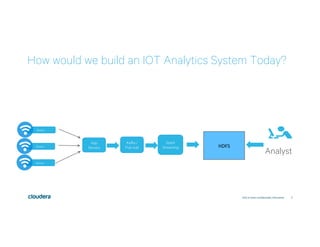
How would we build an IOT Analytics System Today?
Click to enter confidentiality information
Kafka /
Pub-sub HDFS	
Analyst
App
Servers
Sensor
Sensor
Sensor
Spark
Streaming
4
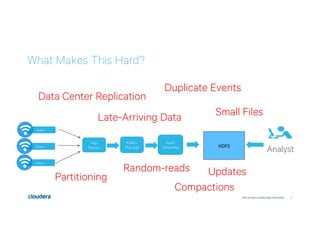
What Makes This Hard?
Click to enter confidentiality information
Analyst
Duplicate Events
Late-Arriving Data
Data Center Replication
Partitioning
Random-reads
Compactions
Updates
Small Files
Sensor
Sensor
Sensor
Kafka /
Pub-sub HDFS	
App
Servers
Spark
Streaming
5
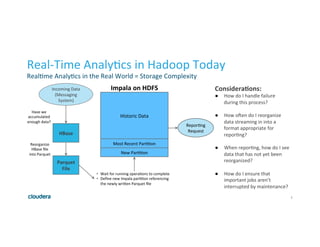
Real-Time	Analy1cs	in	Hadoop	Today	
Real1me	Analy1cs	in	the	Real	World	=	Storage	Complexity	
Considera*ons:	
●  How	do	I	handle	failure	
during	this	process?	
	
●  How	oEen	do	I	reorganize	
data	streaming	in	into	a	
format	appropriate	for	
repor1ng?	
	
●  When	repor1ng,	how	do	I	see	
data	that	has	not	yet	been	
reorganized?	
	
●  How	do	I	ensure	that	
important	jobs	aren’t	
interrupted	by	maintenance?	
New	Par11on	
Most	Recent	Par11on	
Historic	Data	
HBase	
Parquet	
File	
Have	we	
accumulated	
enough	data?	
Reorganize	
HBase	file	
into	Parquet	
•  Wait	for	running	opera1ons	to	complete		
•  Define	new	Impala	par11on	referencing	
the	newly	wriRen	Parquet	file	
Incoming	Data	
(Messaging	
System)	
Repor1ng	
Request	
Impala	on	HDFS
6
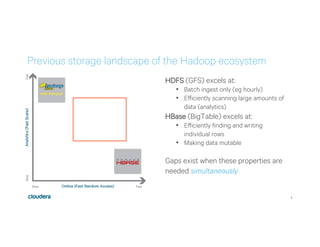
Previous storage landscape of the Hadoop ecosystem
HDFS (GFS) excels at:
•  Batch ingest only (eg hourly)
•  Efficiently scanning large amounts of
data (analytics)
HBase (BigTable) excels at:
•  Efficiently finding and writing
individual rows
•  Making data mutable
Gaps exist when these properties are
needed simultaneously
7
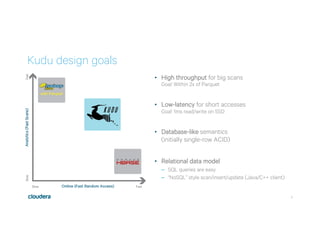
•  High throughput for big scans
Goal: Within 2x of Parquet
•  Low-latency for short accesses
Goal: 1ms read/write on SSD
•  Database-like semantics
(initially single-row ACID)
•  Relational data model
–  SQL queries are easy
–  “NoSQL” style scan/insert/update (Java/C++ client)
Kudu design goals
8
Kudu for Fast Analytics
Why Now
9
Major Changes in Storage Landscape
All	spinning	disks	
Limited	RAM	
	
	
SSD/NAND	cost	effec1ve	
RAM	much	cheaper	
Intel	3Dxpoint	
256GB,	512GB	RAM	common	
.		
	
The	next	boRleneck	is	CPU	
[2007ish] [2013ish] [2017+]
50
50000
10000000
1 1000 1000000
3D Xpoint
SSD
Spinning Disk
Seek Time (in nanoseconds)
3D Xpoint
SSD
Spinning Disk
10
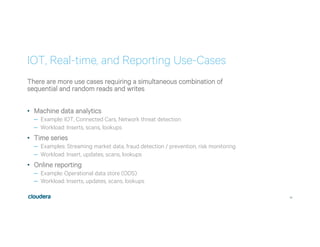
IOT, Real-time, and Reporting Use-Cases
There are more use cases requiring a simultaneous combination of
sequential and random reads and writes
•  Machine data analytics
–  Example: IOT, Connected Cars, Network threat detection
–  Workload: Inserts, scans, lookups
•  Time series
–  Examples: Streaming market data, fraud detection / prevention, risk monitoring
–  Workload: Insert, updates, scans, lookups
•  Online reporting
–  Example: Operational data store (ODS)
–  Workload: Inserts, updates, scans, lookups
11
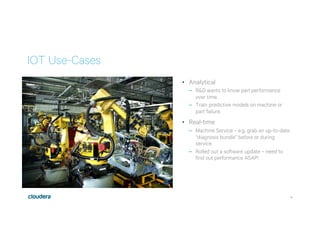
IOT Use-Cases
•  Analytical
–  R&D wants to know part performance
over time.
–  Train predictive models on machine or
part failure.
•  Real-time
–  Machine Service – e.g. grab an up-to-date
“diagnosis bundle” before or during
service.
–  Rolled out a software update – need to
find out performance ASAP!
12
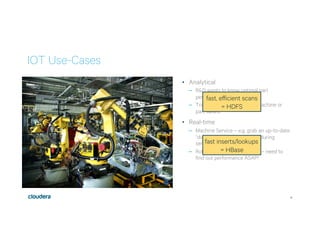
IOT Use-Cases
•  Analytical
–  R&D wants to know optimal part
performance over time.
–  Train predictive models on machine or
part failure.
•  Real-time
–  Machine Service – e.g. grab an up-to-date
“diagnosis bundle” before or during
service.
–  Rolled out a software update – need to
find out performance ASAP!
fast, efficient scans
= HDFS
fast inserts/lookups
= HBase
13
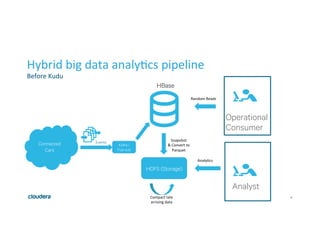
Hybrid	big	data	analy1cs	pipeline	
Before	Kudu	
Connected
Cars
Kafka /
Pub-sub
Events
HBase
Operational
Consumer
HDFS (Storage)
Random	Reads	
Analyst
Analy1cs	
Snapshot	
&	Convert	to	
Parquet	
Compact	late	
arriving	data
14
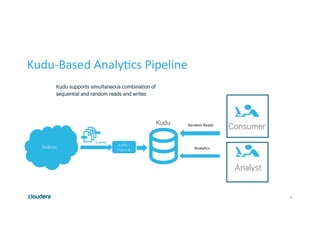
Kudu-Based	Analy1cs	Pipeline	
Robots Kafka /
Pub-sub
Events
Kudu
ConsumerRandom	Reads	
Analyst
Analy1cs	
Kudu supports simultaneous combination of
sequential and random reads and writes
15
How it worksReplication and fault tolerance
16
Kudu Basic Design
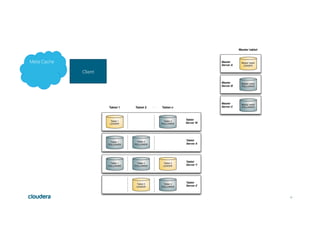
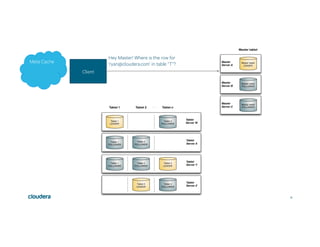
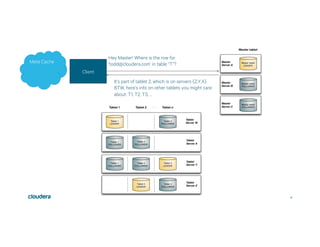
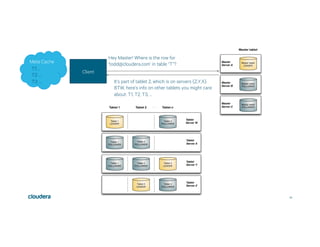
•  Basic Construct: Tables
–  Tables broken down into Tablets (roughly equivalent to regions or partitions)
•  Typed storage
•  Maintains consistency via:
–  Multi-Version Concurrency Control (MVCC)
–  Raft Consensus1 to replicate operations
•  Architecture supports geographically disparate, active/active systems
–  Not in the initial implementation
1http://thesecretlivesofdata.com/raft/
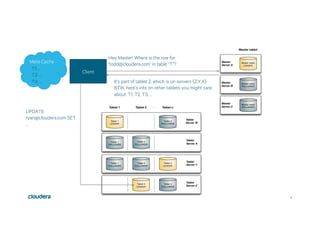
17
Client
Meta Cache
18
Client
Hey Master! Where is the row for
‘ryan@cloudera.com’ in table “T”?Meta Cache
19
Client
Hey Master! Where is the row for
‘todd@cloudera.com’ in table “T”?
It’s part of tablet 2, which is on servers {Z,Y,X}.
BTW, here’s info on other tablets you might care
about: T1, T2, T3, …
Meta Cache
20
Client
Hey Master! Where is the row for
‘todd@cloudera.com’ in table “T”?
It’s part of tablet 2, which is on servers {Z,Y,X}.
BTW, here’s info on other tablets you might care
about: T1, T2, T3, …
Meta Cache
T1: …
T2: …
T3: …
21
Client
Hey Master! Where is the row for
‘todd@cloudera.com’ in table “T”?
It’s part of tablet 2, which is on servers {Z,Y,X}.
BTW, here’s info on other tablets you might care
about: T1, T2, T3, …
UPDATE
ryan@cloudera.com SET
…
Meta Cache
T1: …
T2: …
T3: …
22
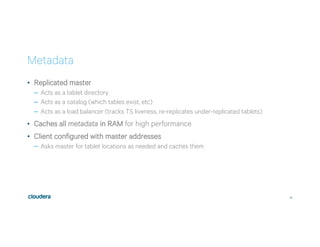
Metadata
•  Replicated master
–  Acts as a tablet directory
–  Acts as a catalog (which tables exist, etc)
–  Acts as a load balancer (tracks TS liveness, re-replicates under-replicated tablets)
•  Caches all metadata in RAM for high performance
•  Client configured with master addresses
–  Asks master for tablet locations as needed and caches them
23
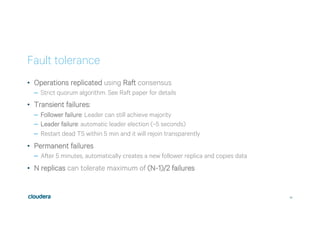
Fault tolerance
•  Operations replicated using Raft consensus
–  Strict quorum algorithm. See Raft paper for details
•  Transient failures:
–  Follower failure: Leader can still achieve majority
–  Leader failure: automatic leader election (~5 seconds)
–  Restart dead TS within 5 min and it will rejoin transparently
•  Permanent failures
–  After 5 minutes, automatically creates a new follower replica and copies data
•  N replicas can tolerate maximum of (N-1)/2 failures
24
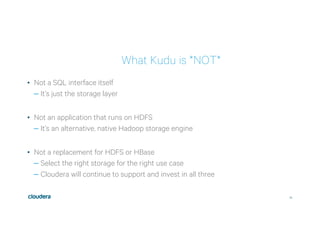
What Kudu is *NOT*
•  Not a SQL interface itself
– It’s just the storage layer
•  Not an application that runs on HDFS
– It’s an alternative, native Hadoop storage engine
•  Not a replacement for HDFS or HBase
– Select the right storage for the right use case
– Cloudera will continue to support and invest in all three
25
Kudu Trade-Offs (vs Hbase)
•  Random updates will be slower
– HBase model allows random updates without incurring a disk seek
– Kudu requires a key lookup before update, Bloom lookup before insert
•  Single-row reads may be slower
– Columnar design is optimized for scans
– Future: may introduce “column groups” for applications where single-row
access is more important
26
How it works
Replication and fault tolerance
27
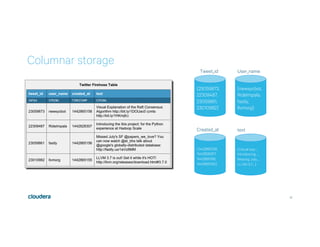
Columnar storage
{25059873,
22309487,
23059861,
23010982}
Tweet_id
{newsycbot,
RideImpala,
fastly,
llvmorg}
User_name
{1442865158,
1442828307,
1442865156,
1442865155}
Created_at
{Visual exp…,
Introducing ..,
Missing July…,
LLVM 3.7….}
text
28
Columnar storage
{25059873,
22309487,
23059861,
23010982}
Tweet_id
{newsycbot,
RideImpala,
fastly,
llvmorg}
User_name
{1442865158,
1442828307,
1442865156,
1442865155}
Created_at
{Visual exp…,
Introducing ..,
Missing July…,
LLVM 3.7….}
text
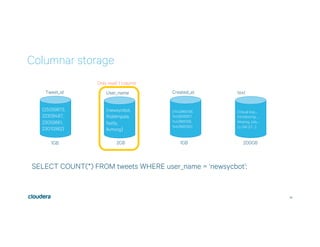
SELECT COUNT(*) FROM tweets WHERE user_name = ‘newsycbot’;
Only read 1 column
1GB 2GB 1GB 200GB
29
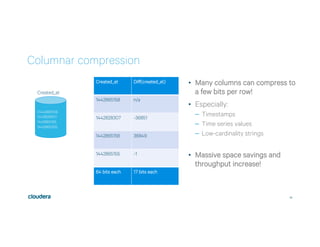
Columnar compression
{1442865158,
1442828307,
1442865156,
1442865155}
Created_at
Created_at Diff(created_at)
1442865158 n/a
1442828307 -36851
1442865156 36849
1442865155 -1
64 bits each 17 bits each
•  Many columns can compress to
a few bits per row!
•  Especially:
–  Timestamps
–  Time series values
–  Low-cardinality strings
•  Massive space savings and
throughput increase!
30
Handling inserts and updates
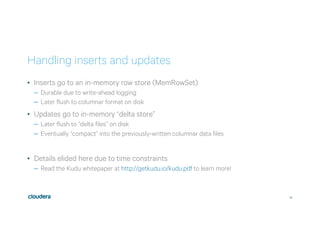
•  Inserts go to an in-memory row store (MemRowSet)
–  Durable due to write-ahead logging
–  Later flush to columnar format on disk
•  Updates go to in-memory “delta store”
–  Later flush to “delta files” on disk
–  Eventually “compact” into the previously-written columnar data files
•  Details elided here due to time constraints
–  Read the Kudu whitepaper at http://getkudu.io/kudu.pdf to learn more!
31
Integrations
32
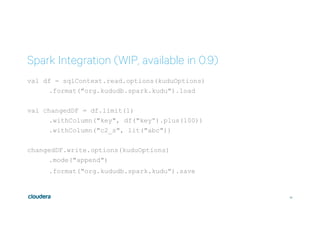
Spark Integration (WIP, available in 0.9)
val df = sqlContext.read.options(kuduOptions)
.format("org.kududb.spark.kudu").load
val changedDF = df.limit(1)
.withColumn("key", df("key”).plus(100))
.withColumn("c2_s", lit("abc"))
changedDF.write.options(kuduOptions)
.mode("append")
.format("org.kududb.spark.kudu").save
33
Impala integration
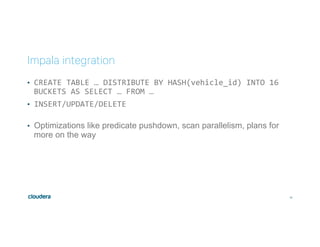
•  CREATE	TABLE	…	DISTRIBUTE	BY	HASH(vehicle_id)	INTO	16	
BUCKETS	AS	SELECT	…	FROM	…	
•  INSERT/UPDATE/DELETE	
	
•  Optimizations like predicate pushdown, scan parallelism, plans for
more on the way
34
MapReduce integration
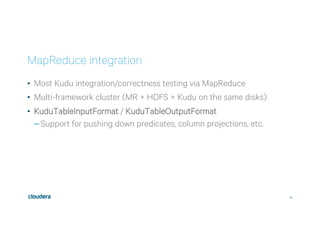
•  Most Kudu integration/correctness testing via MapReduce
•  Multi-framework cluster (MR + HDFS + Kudu on the same disks)
•  KuduTableInputFormat / KuduTableOutputFormat
– Support for pushing down predicates, column projections, etc.
35
Performance
36
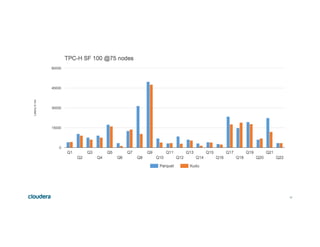
TPC-H (analytics benchmark)
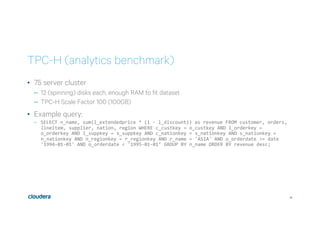
•  75 server cluster
–  12 (spinning) disks each, enough RAM to fit dataset
–  TPC-H Scale Factor 100 (100GB)
•  Example query:
–  SELECT	n_name,	sum(l_extendedprice	*	(1	-	l_discount))	as	revenue	FROM	customer,	orders,	
lineitem,	supplier,	nation,	region	WHERE	c_custkey	=	o_custkey	AND	l_orderkey	=	
o_orderkey	AND	l_suppkey	=	s_suppkey	AND	c_nationkey	=	s_nationkey	AND	s_nationkey	=	
n_nationkey	AND	n_regionkey	=	r_regionkey	AND	r_name	=	'ASIA'	AND	o_orderdate	>=	date	
'1994-01-01'	AND	o_orderdate	<	'1995-01-01’	GROUP	BY	n_name	ORDER	BY	revenue	desc;
37
38
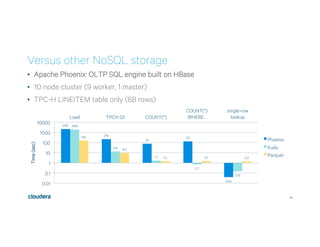
Versus other NoSQL storage
•  Apache Phoenix: OLTP SQL engine built on HBase
•  10 node cluster (9 worker, 1 master)
•  TPC-H LINEITEM table only (6B rows)
2152
219
76
131
0.04
1918
13.2
1.7
0.7
0.15
155
9.3
1.4 1.5 1.37
0.01
0.1
1
10
100
1000
10000
Load TPCH Q1 COUNT(*)
COUNT(*)
WHERE…
single-row
lookup
Time(sec)
Phoenix
Kudu
Parquet
39
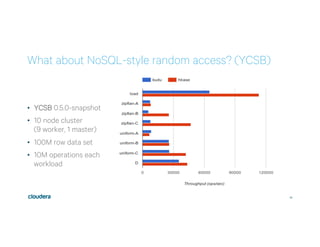
What about NoSQL-style random access? (YCSB)
•  YCSB 0.5.0-snapshot
•  10 node cluster
(9 worker, 1 master)
•  100M row data set
•  10M operations each
workload
40
Getting started with
Kudu
41
Getting started as a user
•  http://getkudu.io
•  kudu-user@googlegroups.com
•  http://getkudu-slack.herokuapp.com/
•  Quickstart VM
–  Easiest way to get started
–  Impala and Kudu in an easy-to-install VM
•  CSD and Parcels
–  For installation on a Cloudera Manager-managed cluster
42
Questions?
http://getkudu.io
bosshart@cloudera.com
43
BETA	SAFE	HARBOR	WARNING	
•  Kudu	is	BETA	(DO	NOT	PUT	IT	IN	PRODUCTION)		
•  Please	play	with	it,	and	let	us	know	your	feedback	
•  Please	consider	this	when	building	out	architectures	for	
second	half	of	2016	
•  Why?	
•  Storage	is	important	and	needs	to	be	stable		
•  (That	said:	we	have	not	experienced	data	loss.	
Kudu	is	reasonably	stable,	almost	no	crashes	
reported)	
•  S1ll	requires	some	expert	assistance,	and	you’ll	
probably	find	some	bugs

Kudu - Fast Analytics on Fast Data

  • 1.
    Fast Analytics with ApacheKudu (incubating) Ryan Bosshart//Systems Engineer bosshart@cloudera.com
  • 2.
  • 3.
    3 How would webuild an IOT Analytics System Today? Click to enter confidentiality information Kafka / Pub-sub HDFS Analyst App Servers Sensor Sensor Sensor Spark Streaming
  • 4.
    4 What Makes ThisHard? Click to enter confidentiality information Analyst Duplicate Events Late-Arriving Data Data Center Replication Partitioning Random-reads Compactions Updates Small Files Sensor Sensor Sensor Kafka / Pub-sub HDFS App Servers Spark Streaming
  • 5.
    5 Real-Time Analy1cs in Hadoop Today Real1me Analy1cs in the Real World = Storage Complexity Considera*ons: ●  How do I handle failure during this process? ●  How oEen do I reorganize data streaming in into a format appropriate for repor1ng? ● When repor1ng, how do I see data that has not yet been reorganized? ●  How do I ensure that important jobs aren’t interrupted by maintenance? New Par11on Most Recent Par11on Historic Data HBase Parquet File Have we accumulated enough data? Reorganize HBase file into Parquet •  Wait for running opera1ons to complete •  Define new Impala par11on referencing the newly wriRen Parquet file Incoming Data (Messaging System) Repor1ng Request Impala on HDFS
  • 6.
    6 Previous storage landscapeof the Hadoop ecosystem HDFS (GFS) excels at: •  Batch ingest only (eg hourly) •  Efficiently scanning large amounts of data (analytics) HBase (BigTable) excels at: •  Efficiently finding and writing individual rows •  Making data mutable Gaps exist when these properties are needed simultaneously
  • 7.
    7 •  High throughputfor big scans Goal: Within 2x of Parquet •  Low-latency for short accesses Goal: 1ms read/write on SSD •  Database-like semantics (initially single-row ACID) •  Relational data model –  SQL queries are easy –  “NoSQL” style scan/insert/update (Java/C++ client) Kudu design goals
  • 8.
    8 Kudu for FastAnalytics Why Now
  • 9.
    9 Major Changes inStorage Landscape All spinning disks Limited RAM SSD/NAND cost effec1ve RAM much cheaper Intel 3Dxpoint 256GB, 512GB RAM common . The next boRleneck is CPU [2007ish] [2013ish] [2017+] 50 50000 10000000 1 1000 1000000 3D Xpoint SSD Spinning Disk Seek Time (in nanoseconds) 3D Xpoint SSD Spinning Disk
  • 10.
    10 IOT, Real-time, andReporting Use-Cases There are more use cases requiring a simultaneous combination of sequential and random reads and writes •  Machine data analytics –  Example: IOT, Connected Cars, Network threat detection –  Workload: Inserts, scans, lookups •  Time series –  Examples: Streaming market data, fraud detection / prevention, risk monitoring –  Workload: Insert, updates, scans, lookups •  Online reporting –  Example: Operational data store (ODS) –  Workload: Inserts, updates, scans, lookups
  • 11.
    11 IOT Use-Cases •  Analytical – R&D wants to know part performance over time. –  Train predictive models on machine or part failure. •  Real-time –  Machine Service – e.g. grab an up-to-date “diagnosis bundle” before or during service. –  Rolled out a software update – need to find out performance ASAP!
  • 12.
    12 IOT Use-Cases •  Analytical – R&D wants to know optimal part performance over time. –  Train predictive models on machine or part failure. •  Real-time –  Machine Service – e.g. grab an up-to-date “diagnosis bundle” before or during service. –  Rolled out a software update – need to find out performance ASAP! fast, efficient scans = HDFS fast inserts/lookups = HBase
  • 13.
  • 14.
    14 Kudu-Based Analy1cs Pipeline Robots Kafka / Pub-sub Events Kudu ConsumerRandom Reads Analyst Analy1cs Kudusupports simultaneous combination of sequential and random reads and writes
  • 15.
    15 How it worksReplicationand fault tolerance
  • 16.
    16 Kudu Basic Design • Basic Construct: Tables –  Tables broken down into Tablets (roughly equivalent to regions or partitions) •  Typed storage •  Maintains consistency via: –  Multi-Version Concurrency Control (MVCC) –  Raft Consensus1 to replicate operations •  Architecture supports geographically disparate, active/active systems –  Not in the initial implementation 1http://thesecretlivesofdata.com/raft/
  • 17.
  • 18.
    18 Client Hey Master! Whereis the row for ‘ryan@cloudera.com’ in table “T”?Meta Cache
  • 19.
    19 Client Hey Master! Whereis the row for ‘todd@cloudera.com’ in table “T”? It’s part of tablet 2, which is on servers {Z,Y,X}. BTW, here’s info on other tablets you might care about: T1, T2, T3, … Meta Cache
  • 20.
    20 Client Hey Master! Whereis the row for ‘todd@cloudera.com’ in table “T”? It’s part of tablet 2, which is on servers {Z,Y,X}. BTW, here’s info on other tablets you might care about: T1, T2, T3, … Meta Cache T1: … T2: … T3: …
  • 21.
    21 Client Hey Master! Whereis the row for ‘todd@cloudera.com’ in table “T”? It’s part of tablet 2, which is on servers {Z,Y,X}. BTW, here’s info on other tablets you might care about: T1, T2, T3, … UPDATE ryan@cloudera.com SET … Meta Cache T1: … T2: … T3: …
  • 22.
    22 Metadata •  Replicated master – Acts as a tablet directory –  Acts as a catalog (which tables exist, etc) –  Acts as a load balancer (tracks TS liveness, re-replicates under-replicated tablets) •  Caches all metadata in RAM for high performance •  Client configured with master addresses –  Asks master for tablet locations as needed and caches them
  • 23.
    23 Fault tolerance •  Operationsreplicated using Raft consensus –  Strict quorum algorithm. See Raft paper for details •  Transient failures: –  Follower failure: Leader can still achieve majority –  Leader failure: automatic leader election (~5 seconds) –  Restart dead TS within 5 min and it will rejoin transparently •  Permanent failures –  After 5 minutes, automatically creates a new follower replica and copies data •  N replicas can tolerate maximum of (N-1)/2 failures
  • 24.
    24 What Kudu is*NOT* •  Not a SQL interface itself – It’s just the storage layer •  Not an application that runs on HDFS – It’s an alternative, native Hadoop storage engine •  Not a replacement for HDFS or HBase – Select the right storage for the right use case – Cloudera will continue to support and invest in all three
  • 25.
    25 Kudu Trade-Offs (vsHbase) •  Random updates will be slower – HBase model allows random updates without incurring a disk seek – Kudu requires a key lookup before update, Bloom lookup before insert •  Single-row reads may be slower – Columnar design is optimized for scans – Future: may introduce “column groups” for applications where single-row access is more important
  • 26.
    26 How it works Replicationand fault tolerance
  • 27.
  • 28.
    28 Columnar storage {25059873, 22309487, 23059861, 23010982} Tweet_id {newsycbot, RideImpala, fastly, llvmorg} User_name {1442865158, 1442828307, 1442865156, 1442865155} Created_at {Visual exp…, Introducing.., Missing July…, LLVM 3.7….} text SELECT COUNT(*) FROM tweets WHERE user_name = ‘newsycbot’; Only read 1 column 1GB 2GB 1GB 200GB
  • 29.
    29 Columnar compression {1442865158, 1442828307, 1442865156, 1442865155} Created_at Created_at Diff(created_at) 1442865158n/a 1442828307 -36851 1442865156 36849 1442865155 -1 64 bits each 17 bits each •  Many columns can compress to a few bits per row! •  Especially: –  Timestamps –  Time series values –  Low-cardinality strings •  Massive space savings and throughput increase!
  • 30.
    30 Handling inserts andupdates •  Inserts go to an in-memory row store (MemRowSet) –  Durable due to write-ahead logging –  Later flush to columnar format on disk •  Updates go to in-memory “delta store” –  Later flush to “delta files” on disk –  Eventually “compact” into the previously-written columnar data files •  Details elided here due to time constraints –  Read the Kudu whitepaper at http://getkudu.io/kudu.pdf to learn more!
  • 31.
  • 32.
    32 Spark Integration (WIP,available in 0.9) val df = sqlContext.read.options(kuduOptions) .format("org.kududb.spark.kudu").load val changedDF = df.limit(1) .withColumn("key", df("key”).plus(100)) .withColumn("c2_s", lit("abc")) changedDF.write.options(kuduOptions) .mode("append") .format("org.kududb.spark.kudu").save
  • 33.
    33 Impala integration •  CREATE TABLE … DISTRIBUTE BY HASH(vehicle_id) INTO 16 BUCKETS AS SELECT … FROM … • INSERT/UPDATE/DELETE •  Optimizations like predicate pushdown, scan parallelism, plans for more on the way
  • 34.
    34 MapReduce integration •  MostKudu integration/correctness testing via MapReduce •  Multi-framework cluster (MR + HDFS + Kudu on the same disks) •  KuduTableInputFormat / KuduTableOutputFormat – Support for pushing down predicates, column projections, etc.
  • 35.
  • 36.
    36 TPC-H (analytics benchmark) • 75 server cluster –  12 (spinning) disks each, enough RAM to fit dataset –  TPC-H Scale Factor 100 (100GB) •  Example query: –  SELECT n_name, sum(l_extendedprice * (1 - l_discount)) as revenue FROM customer, orders, lineitem, supplier, nation, region WHERE c_custkey = o_custkey AND l_orderkey = o_orderkey AND l_suppkey = s_suppkey AND c_nationkey = s_nationkey AND s_nationkey = n_nationkey AND n_regionkey = r_regionkey AND r_name = 'ASIA' AND o_orderdate >= date '1994-01-01' AND o_orderdate < '1995-01-01’ GROUP BY n_name ORDER BY revenue desc;
  • 37.
  • 38.
    38 Versus other NoSQLstorage •  Apache Phoenix: OLTP SQL engine built on HBase •  10 node cluster (9 worker, 1 master) •  TPC-H LINEITEM table only (6B rows) 2152 219 76 131 0.04 1918 13.2 1.7 0.7 0.15 155 9.3 1.4 1.5 1.37 0.01 0.1 1 10 100 1000 10000 Load TPCH Q1 COUNT(*) COUNT(*) WHERE… single-row lookup Time(sec) Phoenix Kudu Parquet
  • 39.
    39 What about NoSQL-stylerandom access? (YCSB) •  YCSB 0.5.0-snapshot •  10 node cluster (9 worker, 1 master) •  100M row data set •  10M operations each workload
  • 40.
  • 41.
    41 Getting started asa user •  http://getkudu.io •  kudu-user@googlegroups.com •  http://getkudu-slack.herokuapp.com/ •  Quickstart VM –  Easiest way to get started –  Impala and Kudu in an easy-to-install VM •  CSD and Parcels –  For installation on a Cloudera Manager-managed cluster
  • 42.
  • 43.
    43 BETA SAFE HARBOR WARNING •  Kudu is BETA (DO NOT PUT IT IN PRODUCTION) •  Please play with it, and let us know your feedback • Please consider this when building out architectures for second half of 2016 •  Why? •  Storage is important and needs to be stable •  (That said: we have not experienced data loss. Kudu is reasonably stable, almost no crashes reported) •  S1ll requires some expert assistance, and you’ll probably find some bugs