NetBackup 7.7 New Features
Overview
Petr Vančák
Senior Presales Consultant – Arrow ECS, a.s.
Copyright © 2015 Symantec Corporation2
Summary of New Features1
Enhanced vSphere 6.0 Support2
Enhanced Security and Auditing9Hyper-V Intelligent Policies4
Microsoft SCVMM Add-in5
SQL Intelligent Policies6
Improved Amazon S3 Performance7
Support for NetApp cDOT8
NetBackup Self Service10
Enhanced VMware Instant Recovery3
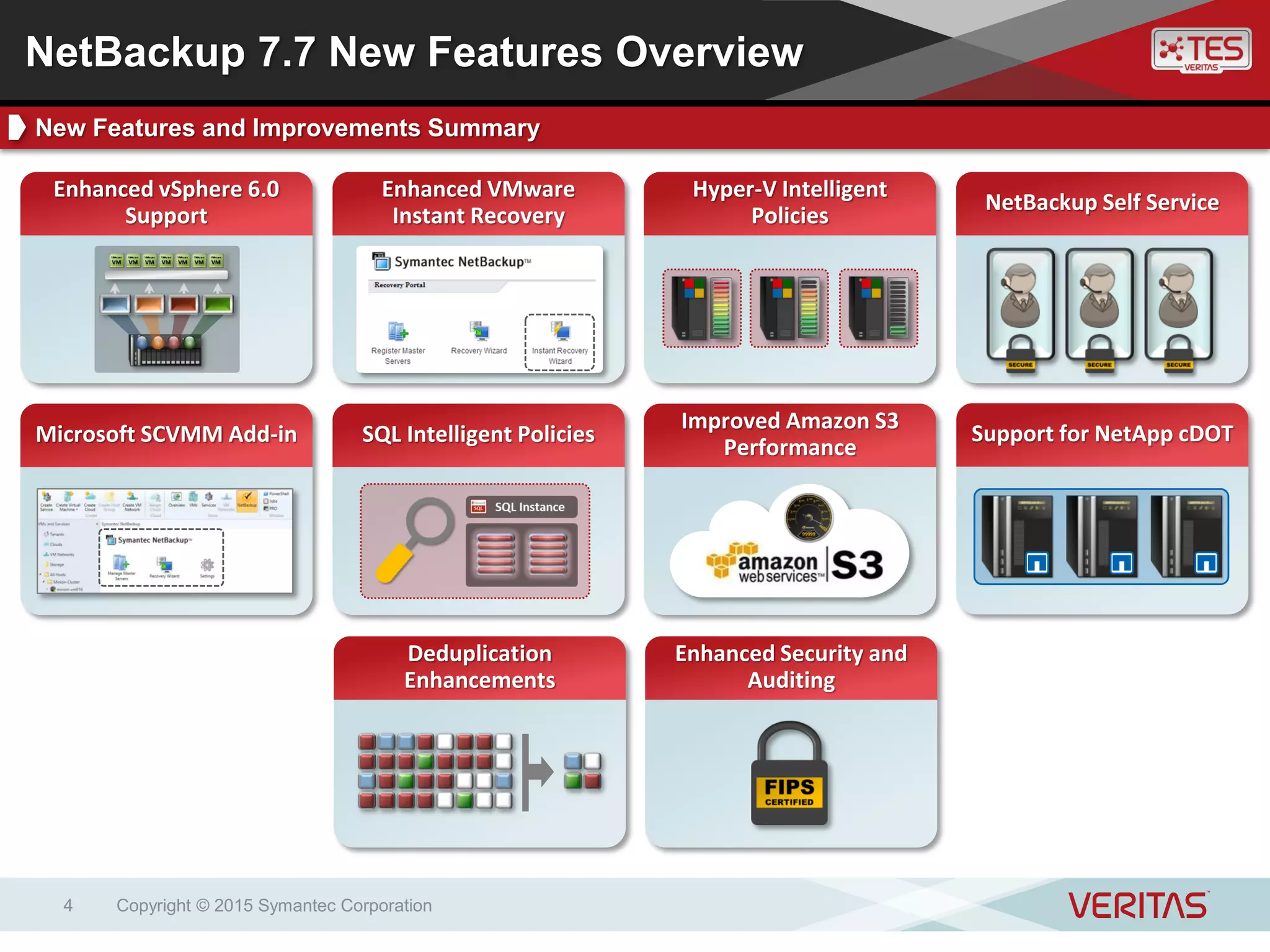
NetBackup 7.7 New Features Overview
Contents
NetBackup 7.7 New Features
Summary
High level introduction to new capabilities introduced
in NetBackup 7.7
Copyright © 2015 Symantec Corporation3
Improved Amazon S3
Performance
Hyper-V Intelligent
Policies
NetBackup Self Service
Copyright © 2015 Symantec Corporation4
Enhanced vSphere 6.0
Support
Enhanced VMware
Instant Recovery
SQL Intelligent Policies Support for NetApp cDOT
Deduplication
Enhancements
Enhanced Security and
Auditing
NetBackup 7.7 New Features Overview
New Features and Improvements Summary
Microsoft SCVMM Add-in
Enhanced vSphere 6.0 Support
Support for vSAN 2.0 and VMware Virtual Volumes
Copyright © 2015 Symantec Corporation5
Copyright © 2015 Symantec Corporation6
Key BenefitsKey FeaturesNetBackup supports VMware software-defined storage environments, including those using
vSAN and VVOL components. Virtual machines hosted on vSAN datastores and VVOLs are
automatically discovered and protected using NetBackup VMware VM Intelligent Policies.
Key Features Key Benefits
Automation – Dynamic detection
of VMs on vSphere vSANs, VVOLs
VMware Integration – Integration
with the VMware vSphere platform
Storage Flexibility – Support for
VMware software-defined storage
vSAN Support – Dynamic
protection of vSAN datastore VMs
New! VVOL Support – Dynamic
protection of VVOL VMs
NetBackup 7.7 vSphere 6.0 Support
Introduction
Copyright © 2015 Symantec Corporation7
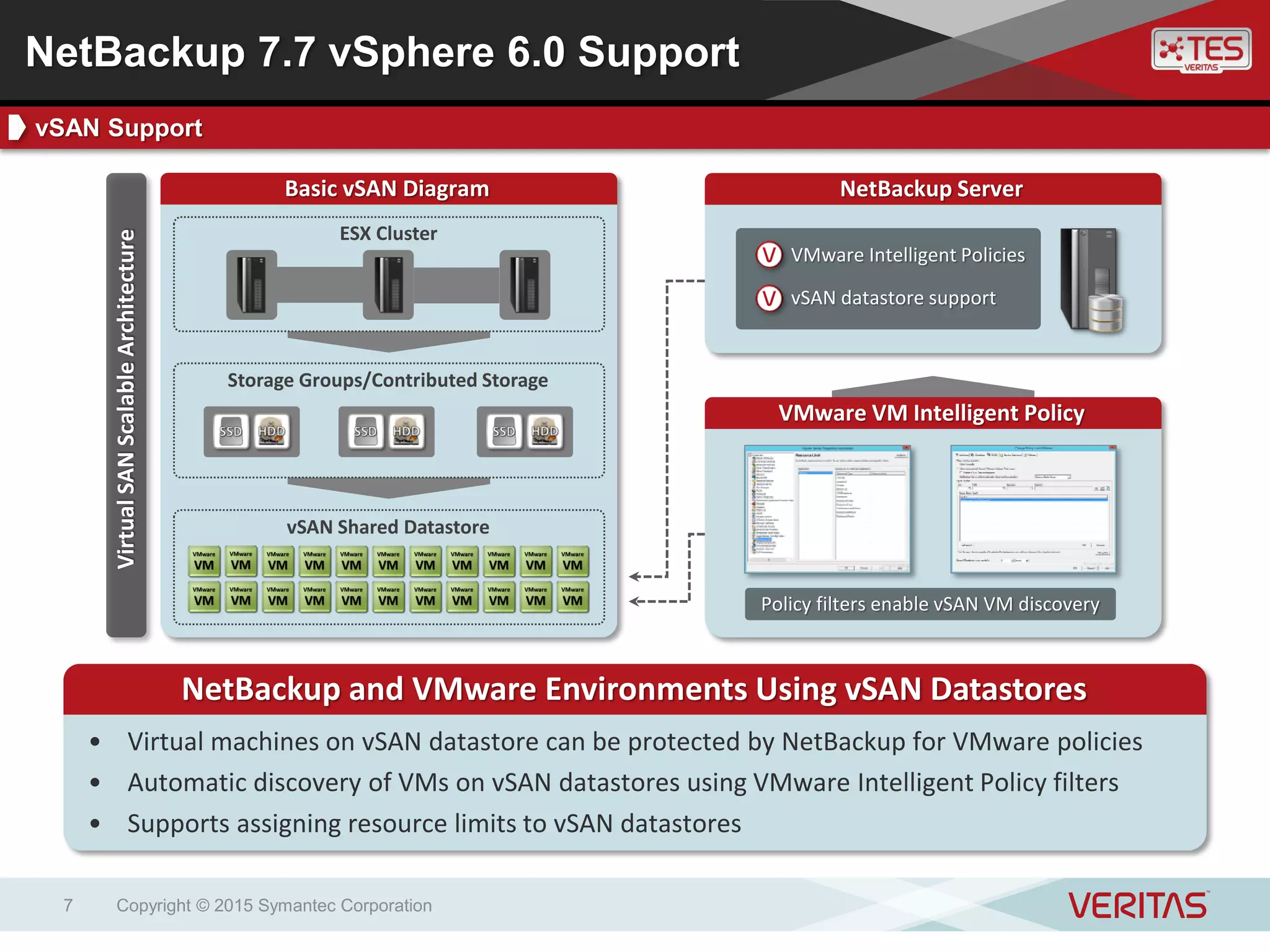
NetBackup Server
VMware Intelligent Policies
vSAN datastore support
Basic vSAN Diagram
VMware VM Intelligent Policy
NetBackup and VMware Environments Using vSAN Datastores
• Virtual machines on vSAN datastore can be protected by NetBackup for VMware policies
• Automatic discovery of VMs on vSAN datastores using VMware Intelligent Policy filters
• Supports assigning resource limits to vSAN datastores
Policy filters enable vSAN VM discovery
VirtualSANScalableArchitecture
Storage Groups/Contributed Storage
vSAN Shared Datastore
ESX Cluster
NetBackup 7.7 vSphere 6.0 Support
vSAN Support
Copyright © 2015 Symantec Corporation8
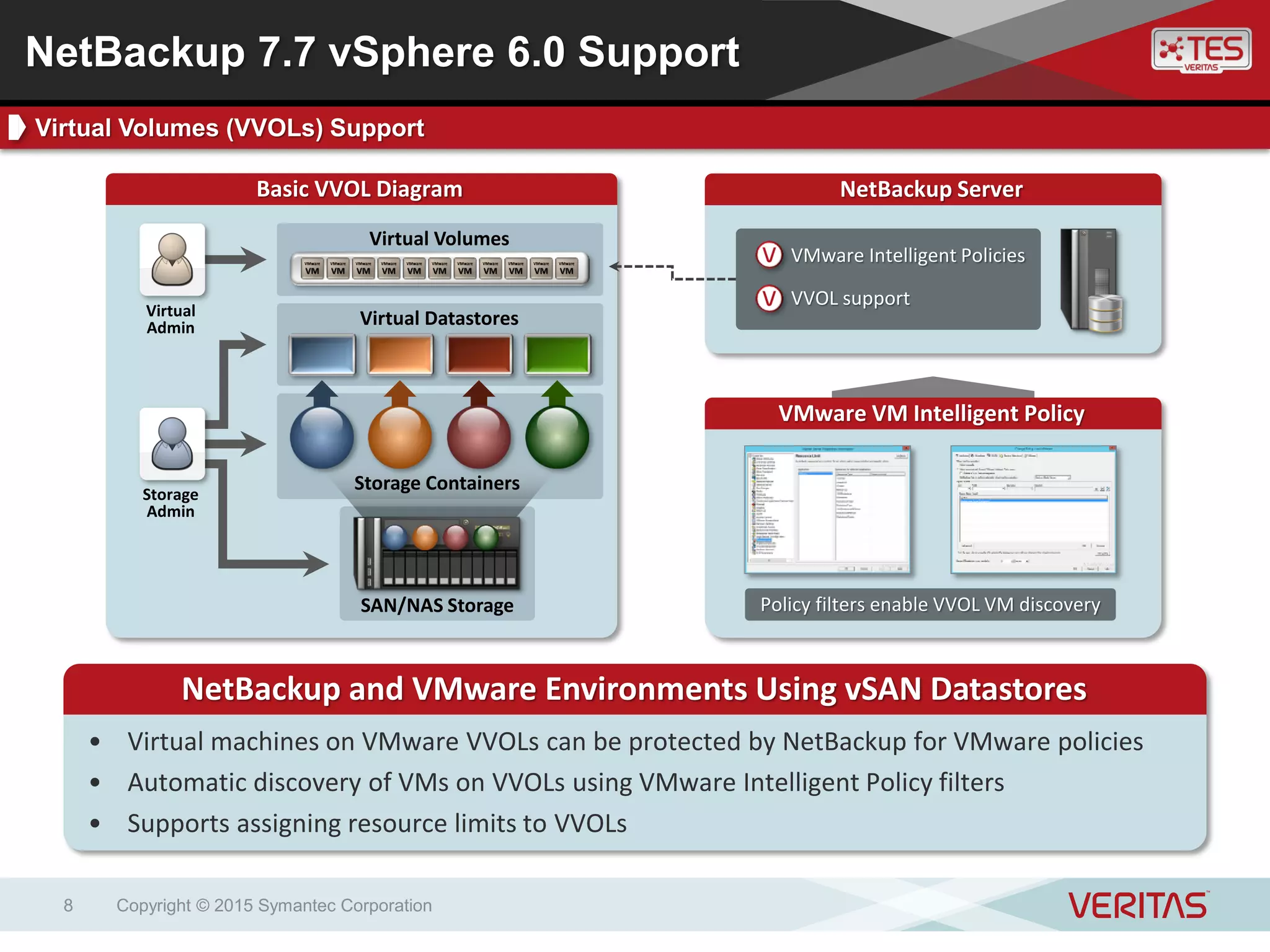
Basic VVOL Diagram
VMware VM Intelligent Policy
NetBackup and VMware Environments Using vSAN Datastores
• Virtual machines on VMware VVOLs can be protected by NetBackup for VMware policies
• Automatic discovery of VMs on VVOLs using VMware Intelligent Policy filters
• Supports assigning resource limits to VVOLs
Policy filters enable VVOL VM discoverySAN/NAS Storage
Virtual Volumes
Storage Containers
Virtual Datastores
NetBackup Server
VMware Intelligent Policies
VVOL support
Storage
Admin
Virtual
Admin
NetBackup 7.7 vSphere 6.0 Support
Virtual Volumes (VVOLs) Support
Enhanced Instant Recovery for
VMware
New recovery wizard supporting the Instant Recovery
for VMware feature
Copyright © 2015 Symantec Corporation9
Copyright © 2015 Symantec Corporation10
Key BenefitsKey FeaturesNetBackup Instant Recovery for VMware provides ultra-fast, disk-based recovery
for VMware backups without putting backup data at risk and without requiring
additional infrastructure.
Key Features Key Benefits
High Speed – Recovered VMs
booted directly from backup storage
Safe – Source VM backups
protected during restore event
Infrastructure Neutral – Requires
no new or additional infrastructure
Instant Recovery – Fast access to
recovered VM and VM contents
Storage vMotion – Used to migrate
restored VM to production datastore
New! Restore Wizard – Available in
vSphere Web Client Plug-in
NetBackup 7.7 Instant Recovery for VMware
Introduction
Instant Recovery for VMware Example Use Cases
Copyright © 2015 Symantec Corporation11
VM admin self-service
restorePre-patch testing
Multi-VM recoveryHigh-speed VM
recovery
NetBackup 7.7 Instant Recovery for VMware
Instant Recovery for VMware Use Cases
Copyright © 2015 Symantec Corporation12
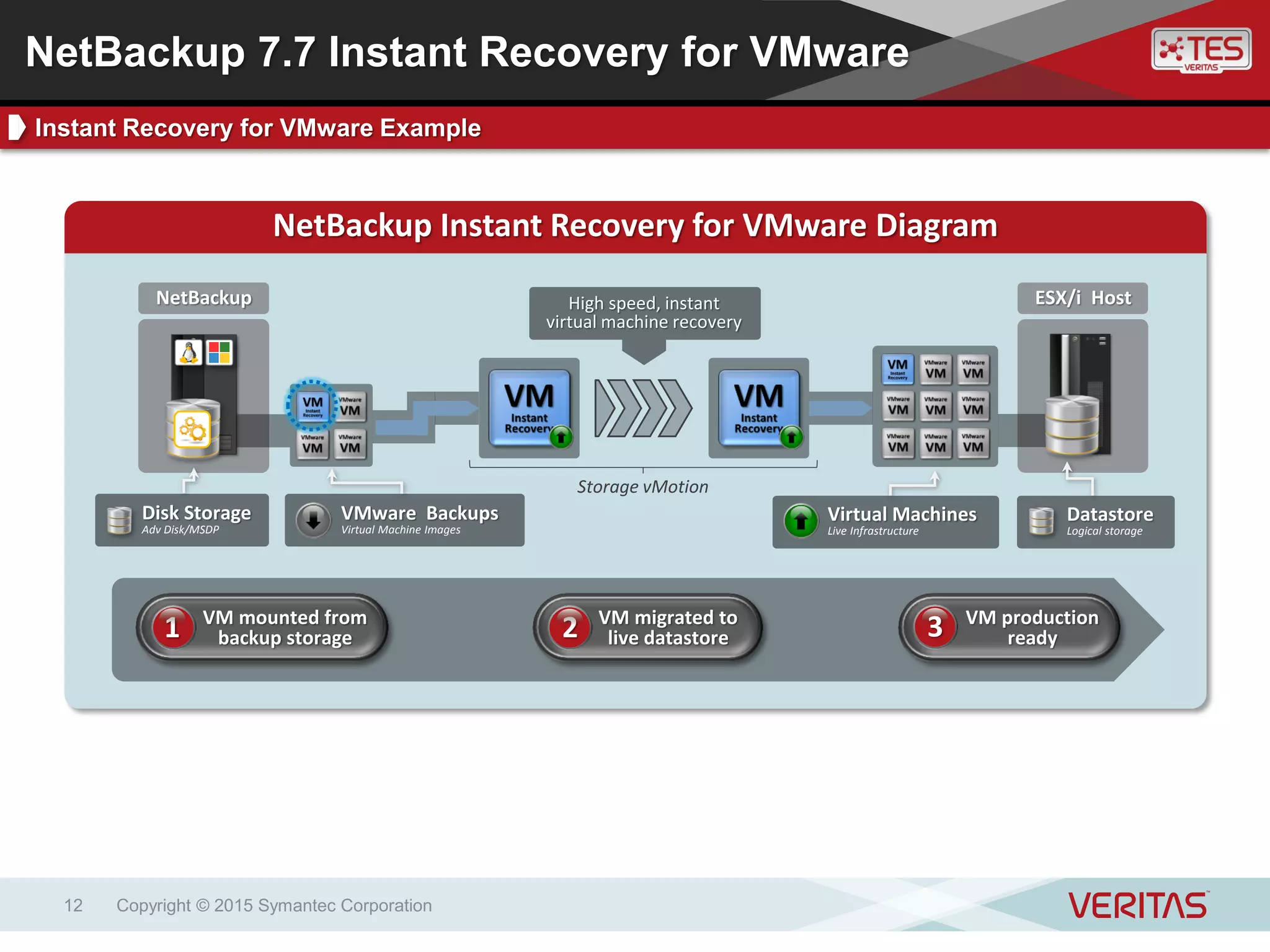
NetBackup Instant Recovery for VMware Diagram
ESX/i HostNetBackup High speed, instant
virtual machine recovery
Virtual Machines
Live Infrastructure
Datastore
Logical storage
Storage vMotion
VMware Backups
Virtual Machine Images
Disk Storage
Adv Disk/MSDP
VM mounted from
backup storage1 VM migrated to
live datastore2 VM production
ready3
NetBackup 7.7 Instant Recovery for VMware
Instant Recovery for VMware Example
Copyright © 2015 Symantec Corporation13
NetBackup Instant Recovery for VMware Wizard
Launch Recovery
Wizard
NetBackup 7.7 Instant Recovery for VMware
Instant Recovery for VMware Wizard
Copyright © 2015 Symantec Corporation14
NetBackup Instant Recovery for VMware Wizard
NetBackup 7.7 Instant Recovery for VMware
Instant Recovery for VMware Wizard
Job Status
Job time
information
Hyper-V Intelligent Policies
Automation and optimization of virtual machine
backups across large Hyper-V environments
Copyright © 2015 Symantec Corporation15
Copyright © 2015 Symantec Corporation16
Key BenefitsKey FeaturesNetBackup Hyper-V Intelligent Policies help automate and optimize backup
operations across large Hyper-V data centers, helping administrators meet their
backup scalability and performance goals
Key Features Key Benefits
Automation – Dynamic detection
and backup of virtual machines
Performance – Avoidance of
backup bottlenecks
Workload Balancing – Distribution
of workloads across virtual hosts
Query System – Virtual machines
detected according to query rules
Resource Limits – Set as master
server global settings; enables
resource load balancing
NetBackup 7.7 Hyper-V Intelligent Policies
Introduction
Copyright © 2015 Symantec Corporation17
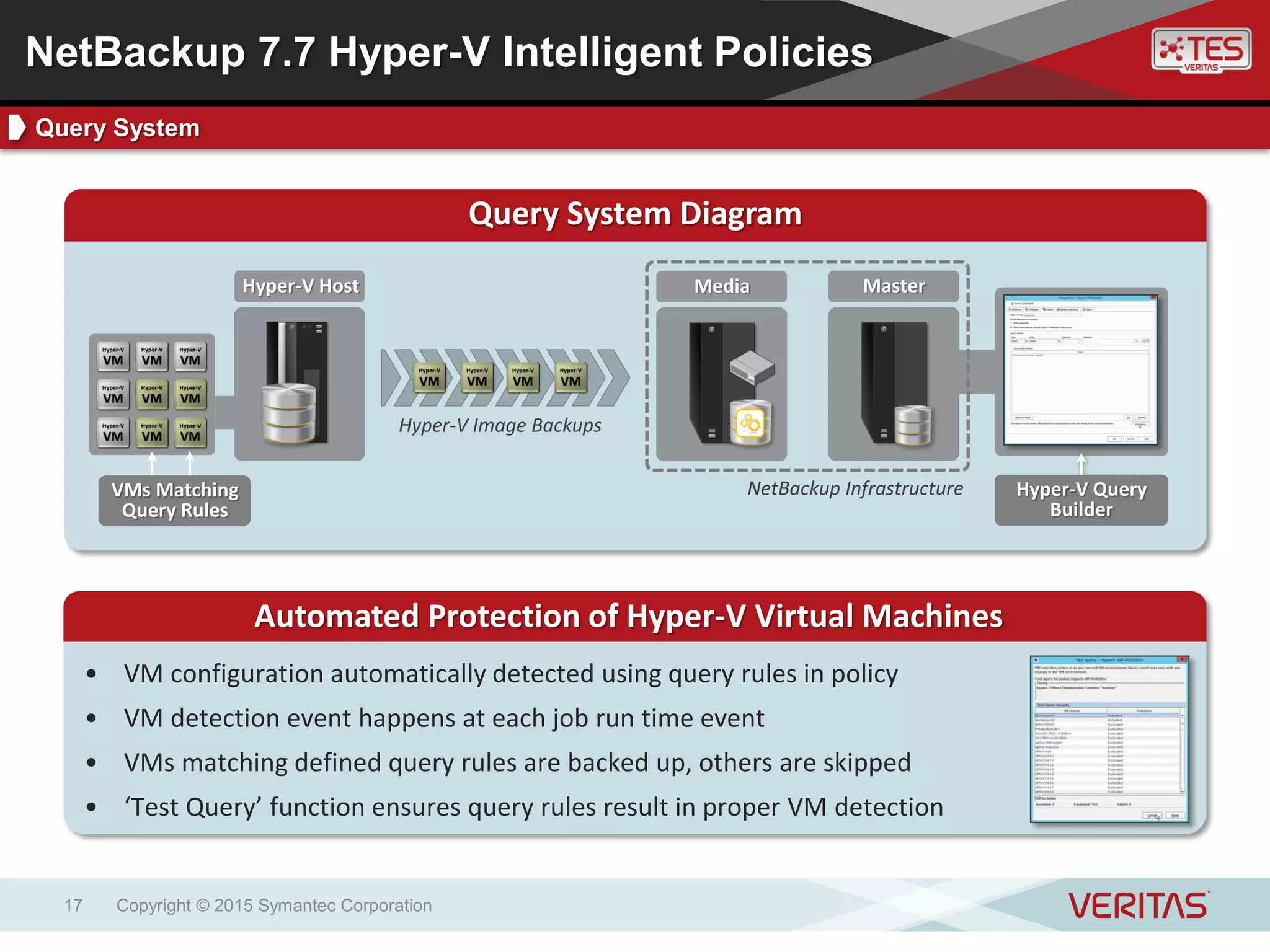
Query System Diagram
Automated Protection of Hyper-V Virtual Machines
• VM configuration automatically detected using query rules in policy
• VM detection event happens at each job run time event
• VMs matching defined query rules are backed up, others are skipped
• ‘Test Query’ function ensures query rules result in proper VM detection
Hyper-V Host MasterMedia
VMs Matching
Query Rules
Hyper-V Image Backups
NetBackup Infrastructure Hyper-V Query
Builder
NetBackup 7.7 Hyper-V Intelligent Policies
Query System
Copyright © 2015 Symantec Corporation18
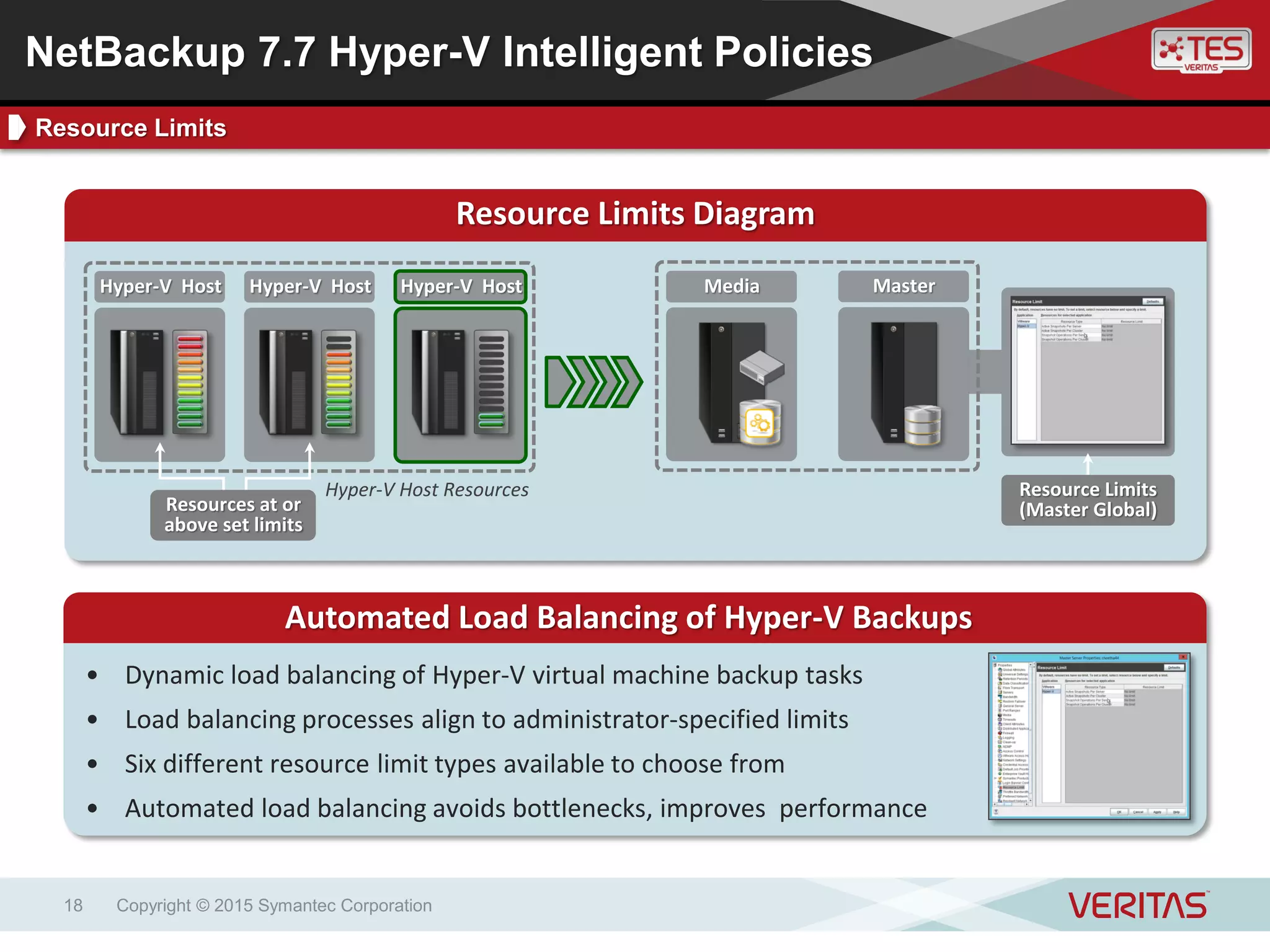
Resource Limits Diagram
Automated Load Balancing of Hyper-V Backups
• Dynamic load balancing of Hyper-V virtual machine backup tasks
• Load balancing processes align to administrator-specified limits
• Six different resource limit types available to choose from
• Automated load balancing avoids bottlenecks, improves performance
MasterMediaHyper-V HostHyper-V HostHyper-V Host
Hyper-V Host Resources
Resources at or
above set limits
Resource Limits
(Master Global)
NetBackup 7.7 Hyper-V Intelligent Policies
Resource Limits
Microsoft SCVMM Add-in
Perform and monitor full Hyper-V virtual machine
recovery operations from the SCVMM console
Copyright © 2015 Symantec Corporation19
Copyright © 2015 Symantec Corporation20
Key BenefitsKey FeaturesNetBackup’s Add-in for the System Center Virtual Machine Manager (SCVMM)
offers administrators additional virtual machine recovery options for Hyper-V data
centers.
Key Features Key Benefits
Add-in – Client-side install
(SCVMM console)
Full VM Recovery – Full recovery
of Hyper-V VMs
Recovery Monitoring – Monitor
VM recovery process
SCVMM Integration – Enables VM
recovery from SCVMM console
No Charge – Available to
NetBackup customers at no cost
NetBackup 7.7 SCVMM Add-in
Introduction
Copyright © 2015 Symantec Corporation21
SCVMM Add-in
• Designed for System Center Administrators
• Enables virtual machine image restore capability
• Presented within System Center Virtual Machine Manager interface
Deployment Requirements
• SCVMM 2012 R2
• NetBackup 7.7 (or later) Master and Media Server
NetBackup 7.7 SCVMM Add-in
Design and Deployment Requirements
Copyright © 2015 Symantec Corporation22
NetBackup 7.7 SCVMM Add-in
Screenshot
SQL Intelligent Policies
Intelligent and automated protection of SQL servers
and database instances
Copyright © 2015 Symantec Corporation23
Copyright © 2015 Symantec Corporation24
Key BenefitsKey Features
NetBackup SQL Intelligent Policies build upon the powerful SQL protection
capabilities of NetBackup by simplifying and automating key elements of the SQL
protection process, and adding additional intelligence to streamline the overall
administrative experience.
Key Features Key Benefits
Simple – Centralized management
of SQL backups and jobs
Automated – Automatic SQL
instance discovery and protection
Intelligent – SQL batch files
generated intelligently
SQL Instance Groups – Simplified
SQL credential management
SQL Discovery – Automatic
discovery of SQL instances
Automated Batch File Creation –
SQL batch files created intelligently
Simplified Backup Schedules –
Fulls, differentials, transaction logs
NetBackup 7.7 SQL Intelligent Policies
Introduction
Copyright © 2015 Symantec Corporation25
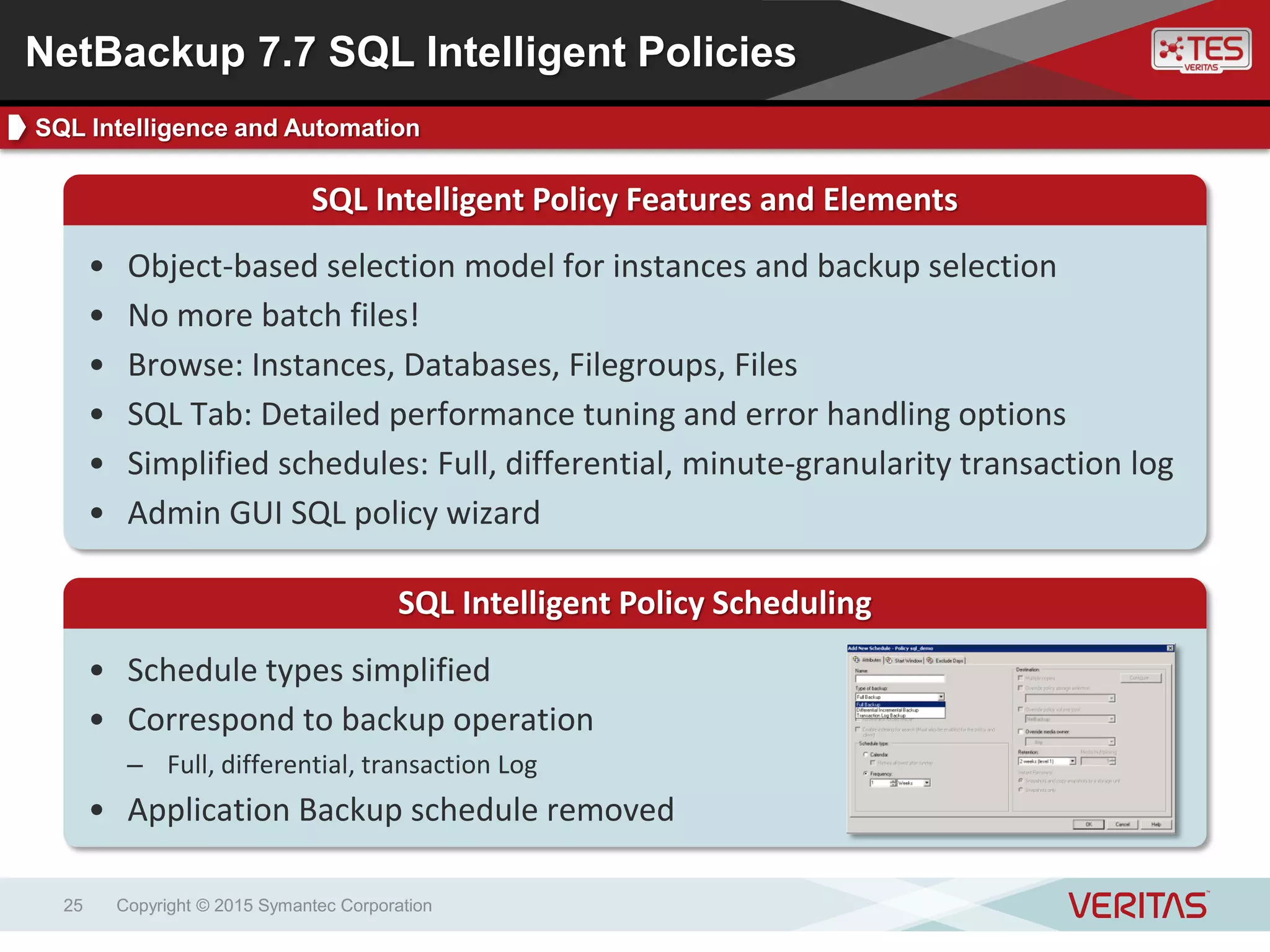
SQL Intelligent Policy Features and Elements
• Object-based selection model for instances and backup selection
• No more batch files!
• Browse: Instances, Databases, Filegroups, Files
• SQL Tab: Detailed performance tuning and error handling options
• Simplified schedules: Full, differential, minute-granularity transaction log
• Admin GUI SQL policy wizard
SQL Intelligent Policy Scheduling
• Schedule types simplified
• Correspond to backup operation
– Full, differential, transaction Log
• Application Backup schedule removed
NetBackup 7.7 SQL Intelligent Policies
SQL Intelligence and Automation
Copyright © 2015 Symantec Corporation26
Instance Groups
• Instances can be organized into groups
• Groups can have common credentials
• Instance groups can be individually added to SQL policies
• Discovered instances can be auto-added to default instance group
• Discovered instances can be auto-protected with default instance group
policy
• Validation operation can ensure credentials are up to date
NetBackup 7.7 SQL Intelligent Policies
SQL Instance Groups
Copyright © 2015 Symantec Corporation27
SQL Intelligent Policy Diagram
SQL Instance
NetBackupSQL Server SQL Schedules
Instance Groups
SQL instances
auto-discovered Instance Groups
simplify credential
management
Simplified
backup schedules
NetBackup Client
NetBackup 7.7 SQL Intelligent Policies
SQL Intelligent Policy Example
Improved NetBackup S3 Connector
Backup and Recovery
Improving backup and recovery to the cloud
Copyright © 2015 Symantec Corporation28
Copyright © 2015 Symantec Corporation29
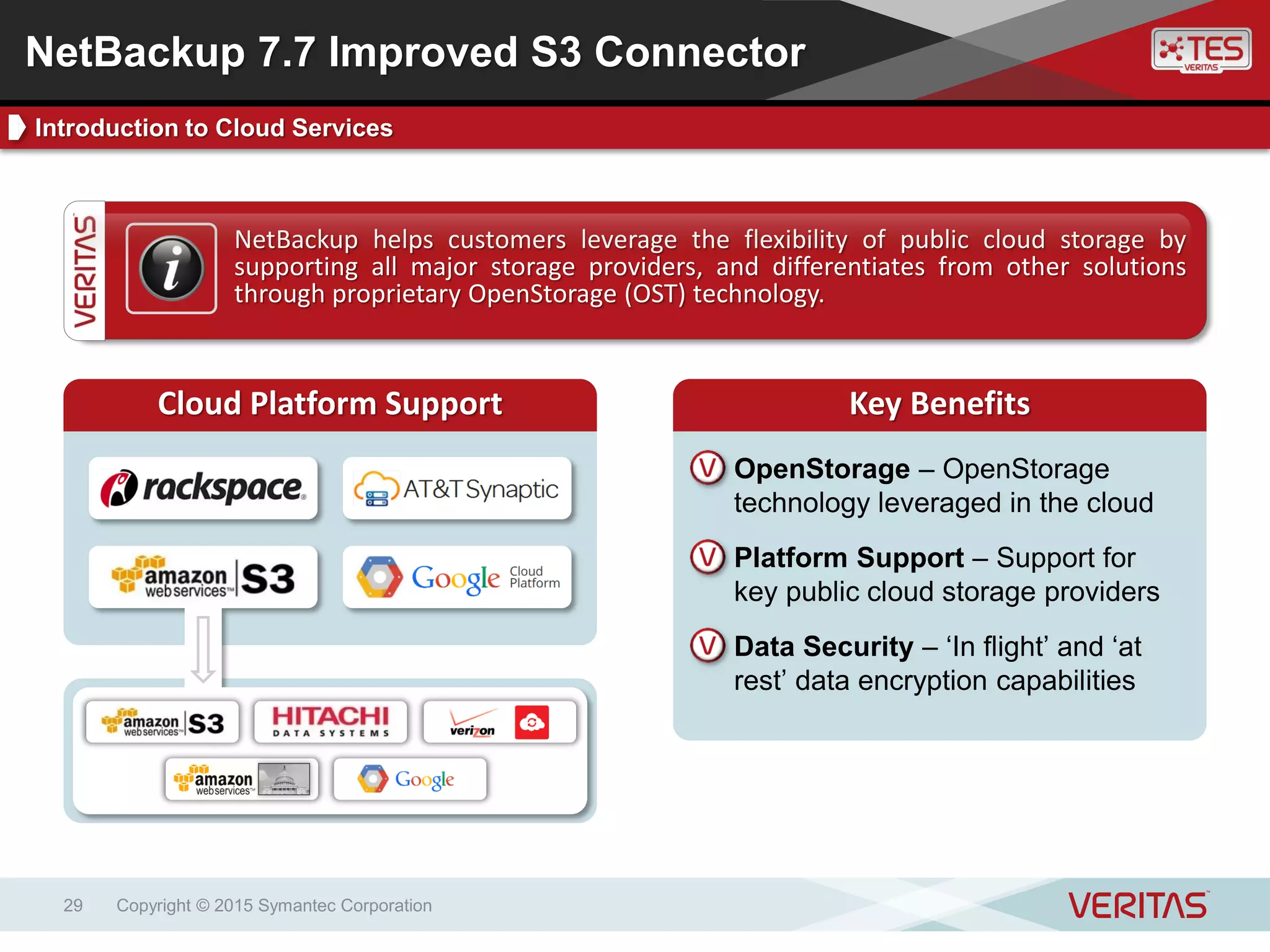
Key BenefitsKey FeaturesNetBackup helps customers leverage the flexibility of public cloud storage by
supporting all major storage providers, and differentiates from other solutions
through proprietary OpenStorage (OST) technology.
Cloud Platform Support Key Benefits
OpenStorage – OpenStorage
technology leveraged in the cloud
Platform Support – Support for
key public cloud storage providers
Data Security – ‘In flight’ and ‘at
rest’ data encryption capabilities
NetBackup 7.7 Improved S3 Connector
Introduction to Cloud Services
Copyright © 2015 Symantec Corporation30
S3 Cloud Plug-in Diagram – Improved Performance
S3 Plug-in Performance Enhancements
• S3 compatible Cloud connector architecture updated to improve performance for
participating vendors
• Dramatic performance improvement for both backup and restore
• Requires CloudStore Service Container on media server
• Requires an account with the Cloud Provider being used
NetBackup
CloudStore
Service
Multiple
Paths
S3 Plug-in
NetBackup 7.7 Improved S3 Connector
Amazon S3 Cloud Plug-in Performance Improvements
Support for NetApp cDOT
NDMP Policy Type Indexing and Replication Director
support for NetApp Clustered Data ONTAP (cDOT)
Copyright © 2015 Symantec Corporation31
Copyright © 2015 Symantec Corporation32
Key BenefitsKey Features
In joint development activities with NetApp, NetBackup 7.7 introduces support for
the NetApp cDOT platform. This latest advancement helps customers protect their
modern storage infrastructure, helping customers mitigate business risk and
comply with regulatory and compliance requirements.
Key Features Key Benefits
cDOT – NetBackup customers can
adopt cDOT and remain protected
NDMP and cDOT – NDMP backup
support of cDOT environments
Replication Director – Snapshot
management in cDOT environments
NDMP Indexing – Ability to use an
NDMP Snapshot and create the
catalog files
NetBackup 7.7 and NetApp cDOT
Introduction
NetBackup
Copyright © 2015 Symantec Corporation33
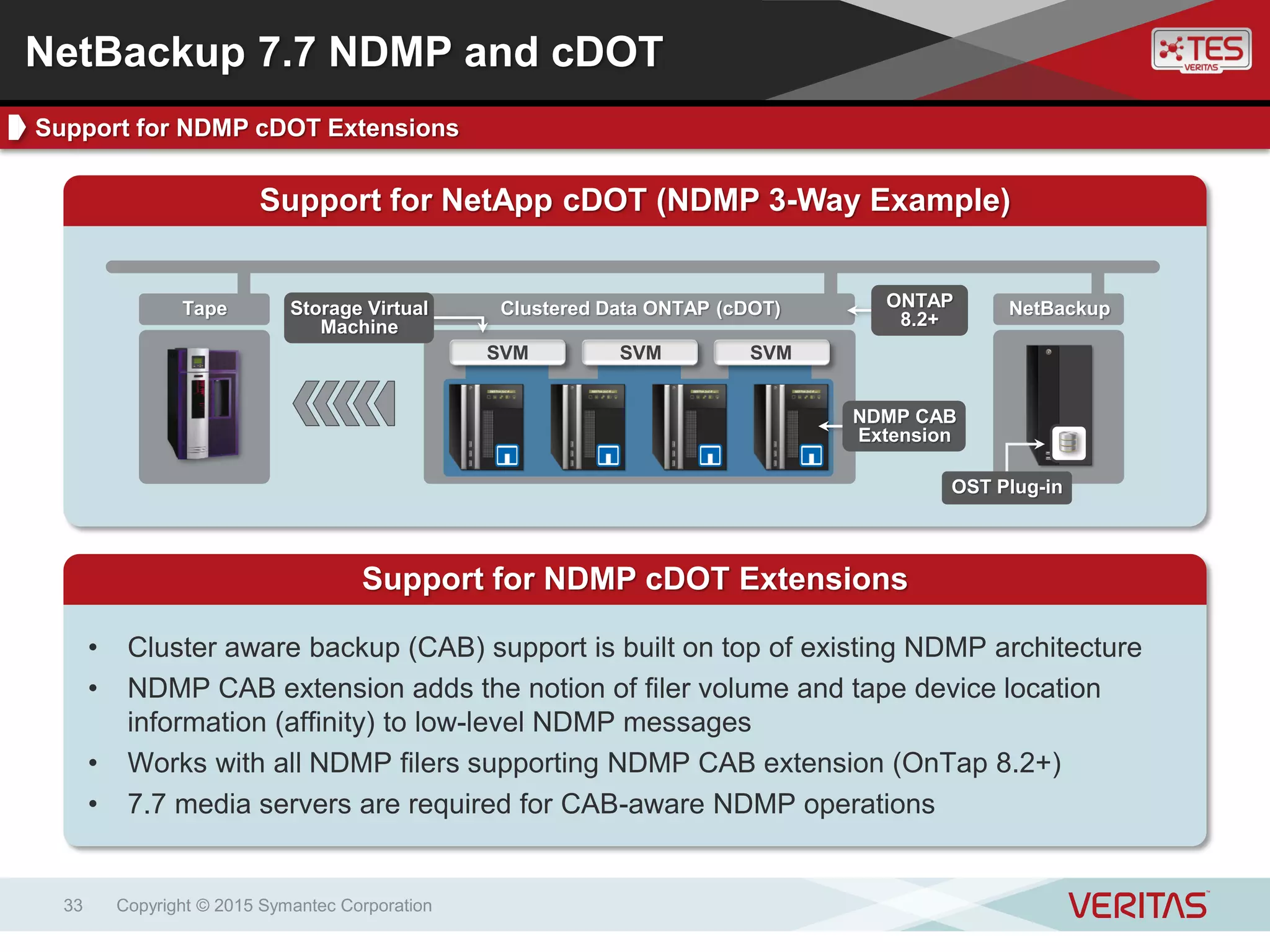
Support for NetApp cDOT (NDMP 3-Way Example)
Support for NDMP cDOT Extensions
• Cluster aware backup (CAB) support is built on top of existing NDMP architecture
• NDMP CAB extension adds the notion of filer volume and tape device location
information (affinity) to low-level NDMP messages
• Works with all NDMP filers supporting NDMP CAB extension (OnTap 8.2+)
• 7.7 media servers are required for CAB-aware NDMP operations
Clustered Data ONTAP (cDOT)Tape
SVMSVM SVM
NDMP CAB
Extension
ONTAP
8.2+
Storage Virtual
Machine
OST Plug-in
NetBackup 7.7 NDMP and cDOT
Support for NDMP cDOT Extensions
Copyright © 2015 Symantec Corporation34
NetBackup
Replication Director Support for NetApp cDOT
Replication Director and NetApp cDOT
• The backup selection in a NetBackup Policy refers to volume on the SVMs/vServer
• Replication occurs between SVMs (vServers)
• A target SVM can be on the same cluster as the source SVM or on different cluster
(inter-cluster replication)
• A peering of source and target SVMs is required upfront and done in OnCommand
Clustered Data ONTAP (cDOT)
SVMSVM SVM
OST Plug-in
Replication
Event
Storage Virtual
Machine
NetBackup 7.7 Replication Director and cDOT
Replication Director and NetApp cDOT
Copyright © 2015 Symantec Corporation35
NetBackup 7.7 Replication Director and cDOT
Replication Director and NetApp cDOT
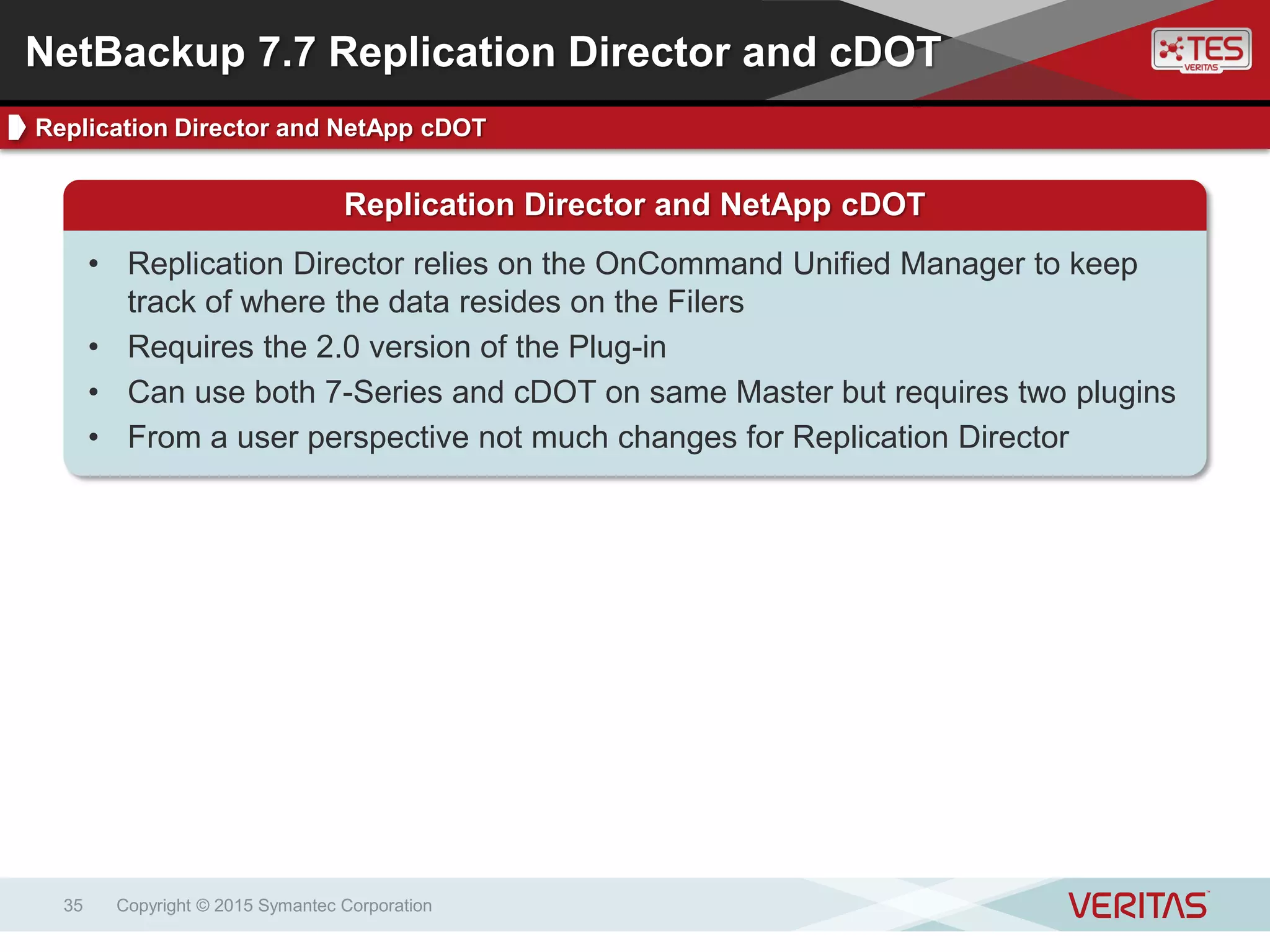
• Replication Director relies on the OnCommand Unified Manager to keep
track of where the data resides on the Filers
• Requires the 2.0 version of the Plug-in
• Can use both 7-Series and cDOT on same Master but requires two plugins
• From a user perspective not much changes for Replication Director
Copyright © 2015 Symantec Corporation36
NetBackup 7.7 NDMP Indexing
Indexing of NDMP Policy Type Snapshots
NDMP Indexing
• Problem with NDMP has always been there is no “file system” to obtain file
information and build the catalog
• After a NDMP Snapshot is created, an Indexing step in the SLP can now
obtain the file information directly from the filer
• No need to mount the snapshot
• Uses the NetApp SnapDiff functionality
• Requires credentials on the filers – add as a Storage Server
• Only works with NetApp at this time
• Does not specifically require RD, however it does require an SLP indexing
step after a snapshot
Enhanced Security and Auditing
FIPS Certified Cryptographic Module and user-
specific auditing without enabling NBAC
Copyright © 2015 Symantec Corporation37
Copyright © 2015 Symantec Corporation38
What is FIPS 140-2
• Well Designed
• Can protect its own keys
• Can run self tests
• Allows for Role Based Authentication
NetBackup 7.7 Security and Auditing
FIPS Certification
NetBackup 7.7 and FIPS
• NetBackup now has a FIPS-certified cryptographic module
What is Our FIPS Focus?
• Encryption
• Random number generation
• Hashing
Copyright © 2015 Symantec Corporation39
FIPS-compliant KMS on NetBackup Master Server
MasterClient
NetBackup
Client
Media
NetBackup 7.7 and FIPS
• FIPS-compliant algorithms used to generate backup encryption keys
• Enabled only for KMS on master server
• Requires NetBackup 7.7 or later
FIPS-compliant backup
encryption keys
NetBackup 7.7 Security and Auditing
FIPS-compliant KMS on NetBackup Master Server
Copyright © 2015 Symantec Corporation40
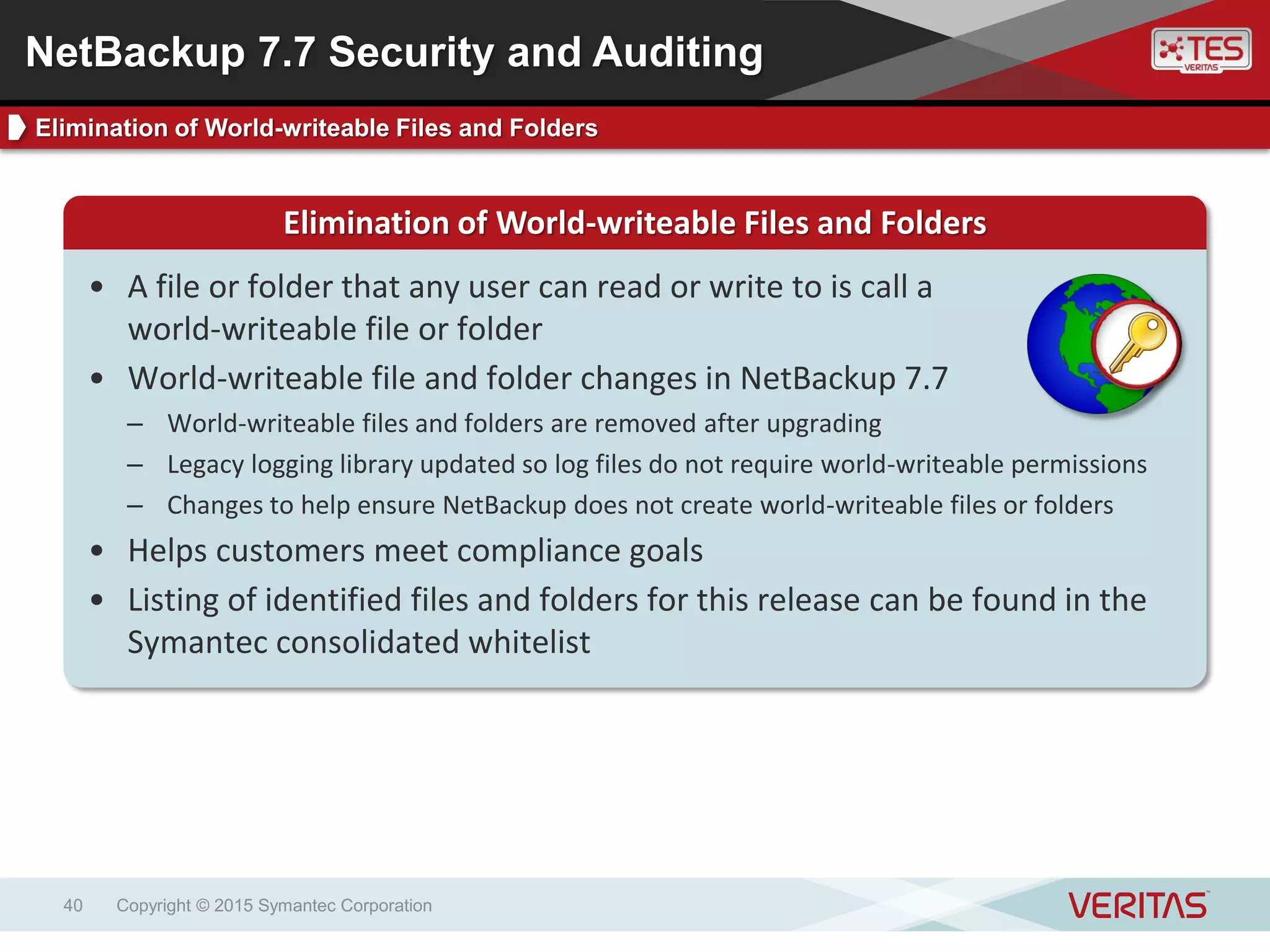
Elimination of World-writeable Files and Folders
• A file or folder that any user can read or write to is call a
world-writeable file or folder
• World-writeable file and folder changes in NetBackup 7.7
– World-writeable files and folders are removed after upgrading
– Legacy logging library updated so log files do not require world-writeable permissions
– Changes to help ensure NetBackup does not create world-writeable files or folders
• Helps customers meet compliance goals
• Listing of identified files and folders for this release can be found in the
Symantec consolidated whitelist
NetBackup 7.7 Security and Auditing
Elimination of World-writeable Files and Folders
Copyright © 2015 Symantec Corporation41
Enhanced Auditing
• Enhances existing Audit Trails functionality
• Cannot be using NBAC
• Returns user-specific information beyond “root/administrator”
• Available for Policy, Job and Storage unit operations at this time
• Based on use of the JAVA GUI and logins associated with it
User-specific Auditing
John Steve LisaSarah
User Obscured
Admin Admin AdminAdmin
? ? ??
NetBackup 7.7 Security and Auditing
User-specific Auditing Without Enabling NBAC
NetBackup Self Service
Segregating data for Managed Service Providers and
enterprise customers
Copyright © 2015 Symantec Corporation42
Copyright © 2015 Symantec Corporation43
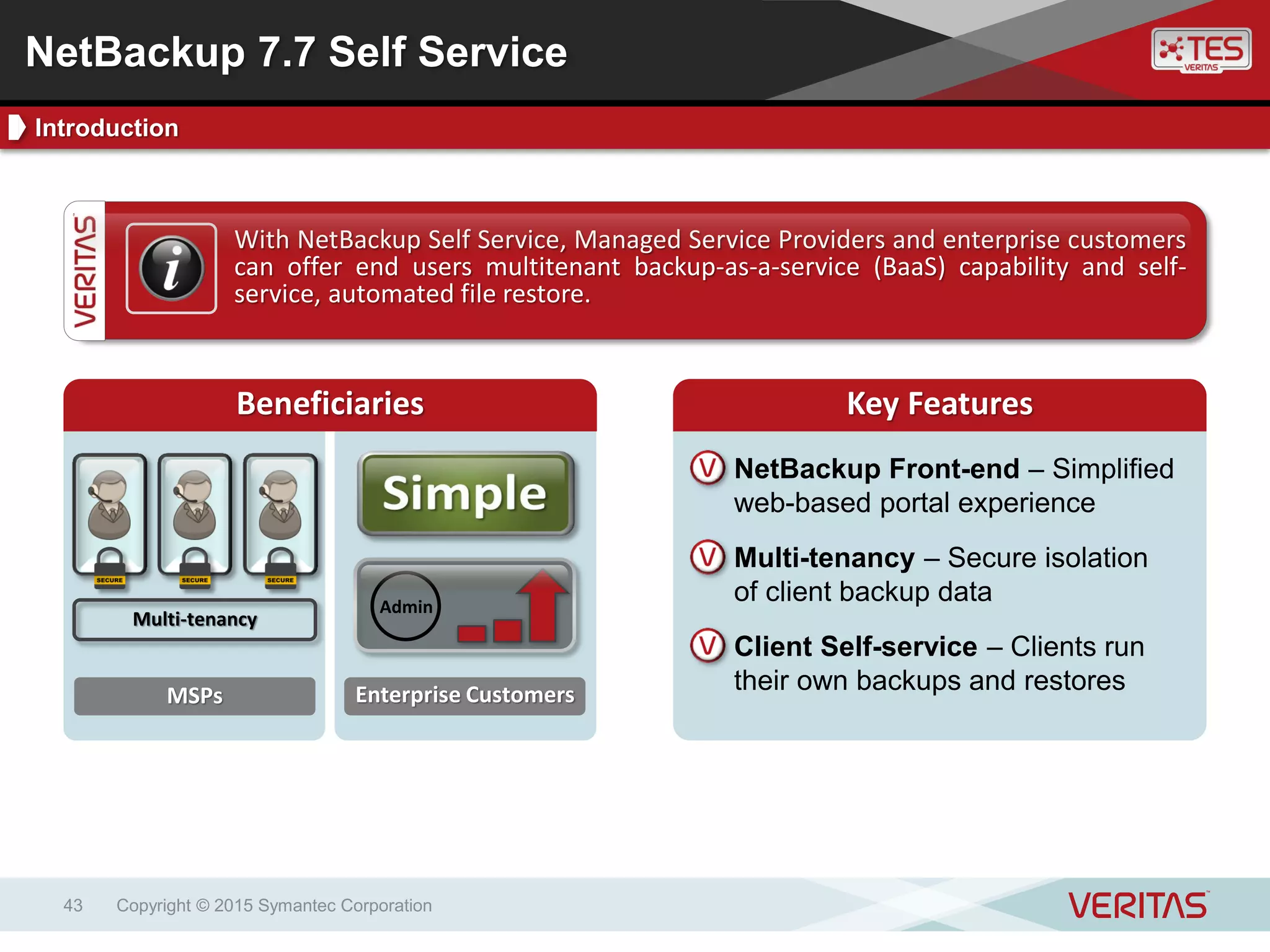
Key BenefitsKey FeaturesWith NetBackup Self Service, Managed Service Providers and enterprise customers
can offer end users multitenant backup-as-a-service (BaaS) capability and self-
service, automated file restore.
Beneficiaries Key Features
NetBackup Front-end – Simplified
web-based portal experience
Multi-tenancy – Secure isolation
of client backup data
Client Self-service – Clients run
their own backups and restoresMSPs Enterprise Customers
Admin
Multi-tenancy
NetBackup 7.7 Self Service
Introduction
Copyright © 2015 Symantec Corporation44
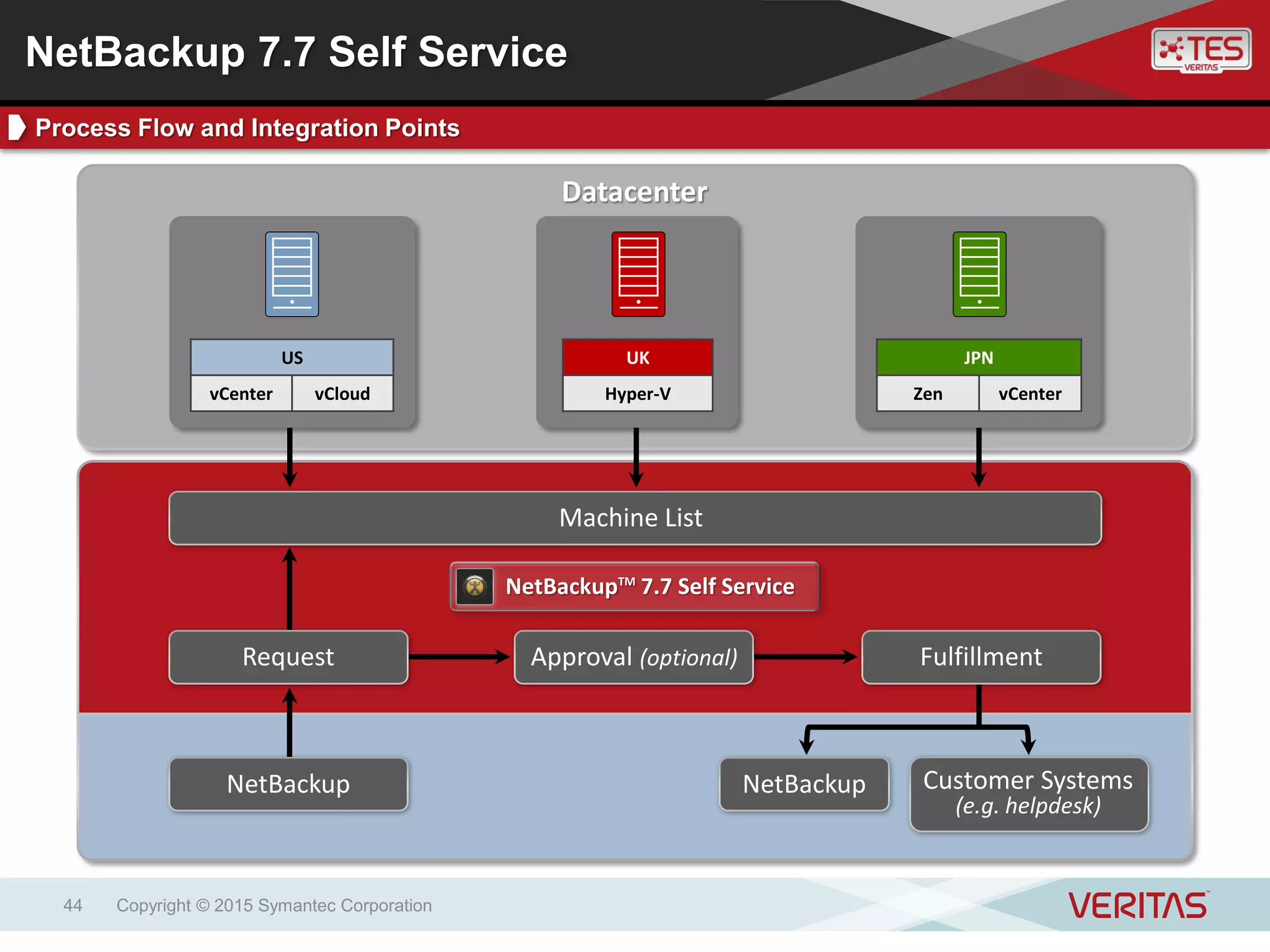
Datacenter
Request
NetBackup Customer Systems
(e.g. helpdesk)
NetBackup
Approval (optional) Fulfillment
JPN
Zen vCenter
US
vCenter vCloud
UK
Hyper-V
NetBackupTM
7.7 Self Service
Machine List
NetBackup 7.7 Self Service
Process Flow and Integration Points
Copyright © 2015 Symantec Corporation45
NetBackup Self Service – Backup Administrator Experience
NetBackup 7.7 Self Service
Backup Admin Experience
Copyright © 2015 Symantec Corporation46
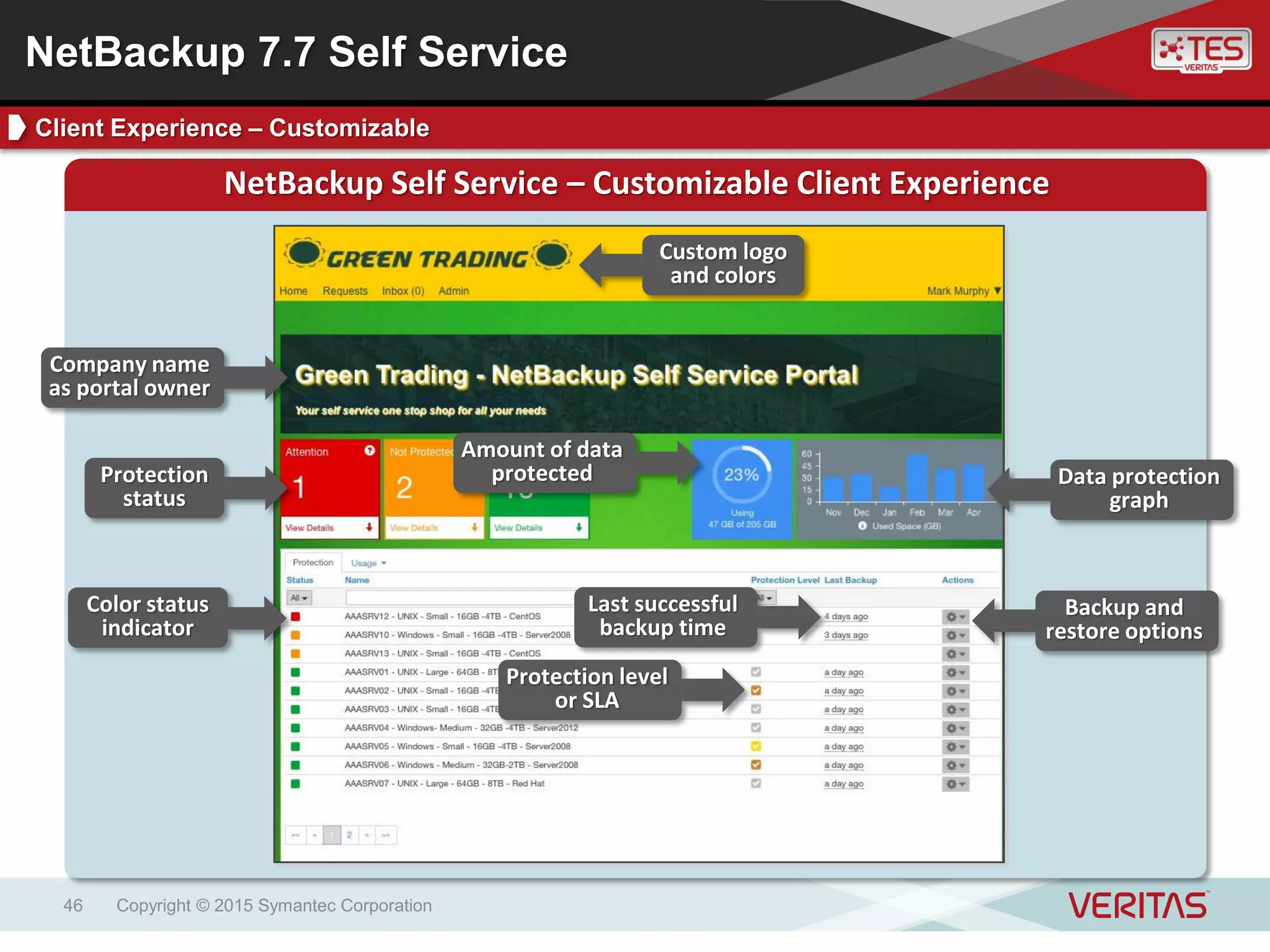
NetBackup Self Service – Customizable Client Experience
Custom logo
and colors
Company name
as portal owner
Protection
status
Amount of data
protected Data protection
graph
Color status
indicator
Protection level
or SLA
Last successful
backup time
Backup and
restore options
NetBackup 7.7 Self Service
Client Experience – Customizable
Copyright © 2015 Symantec Corporation47
Enhancements Coming with NetBackup 7.7
• Seamless upgrades from previous versions
• Enhanced multiple file restores
• Enhanced data sync between Self Service and NetBackup
• Enhanced vCloud experience similar to Mixed Inventory Portal
• Ability to deactivate a single NetBackup Client (allows restores but not
backups)
• Changes to which users can raise requests on behalf of other users
NetBackup 7.7 Self Service
New with the NetBackup 7.7 Release
&Q A
Copyright © 2015 Symantec Corporation48
Thank you!
Copyright © 2015 Symantec Corporation. All rights reserved. Veritas and the Veritas Logo are trademarks or registered trademarks
of Symantec Corporation or its affiliates in the U.S. and other countries. Other names may be trademarks of their respective owners.
This document is provided for informational purposes only and is not intended as advertising. All warranties relating to the information in
this document, either express or implied, are disclaimed to the maximum extent allowed by law. The information in this document is
subject to change without notice.
Petr Vančák
symantec@arrowecs.cz

Novinky v NetBackup 7.7

  • 1.
    NetBackup 7.7 NewFeatures Overview Petr Vančák Senior Presales Consultant – Arrow ECS, a.s.
  • 2.
    Copyright © 2015Symantec Corporation2 Summary of New Features1 Enhanced vSphere 6.0 Support2 Enhanced Security and Auditing9Hyper-V Intelligent Policies4 Microsoft SCVMM Add-in5 SQL Intelligent Policies6 Improved Amazon S3 Performance7 Support for NetApp cDOT8 NetBackup Self Service10 Enhanced VMware Instant Recovery3 NetBackup 7.7 New Features Overview Contents
  • 3.
    NetBackup 7.7 NewFeatures Summary High level introduction to new capabilities introduced in NetBackup 7.7 Copyright © 2015 Symantec Corporation3
  • 4.
    Improved Amazon S3 Performance Hyper-VIntelligent Policies NetBackup Self Service Copyright © 2015 Symantec Corporation4 Enhanced vSphere 6.0 Support Enhanced VMware Instant Recovery SQL Intelligent Policies Support for NetApp cDOT Deduplication Enhancements Enhanced Security and Auditing NetBackup 7.7 New Features Overview New Features and Improvements Summary Microsoft SCVMM Add-in
  • 5.
    Enhanced vSphere 6.0Support Support for vSAN 2.0 and VMware Virtual Volumes Copyright © 2015 Symantec Corporation5
  • 6.
    Copyright © 2015Symantec Corporation6 Key BenefitsKey FeaturesNetBackup supports VMware software-defined storage environments, including those using vSAN and VVOL components. Virtual machines hosted on vSAN datastores and VVOLs are automatically discovered and protected using NetBackup VMware VM Intelligent Policies. Key Features Key Benefits Automation – Dynamic detection of VMs on vSphere vSANs, VVOLs VMware Integration – Integration with the VMware vSphere platform Storage Flexibility – Support for VMware software-defined storage vSAN Support – Dynamic protection of vSAN datastore VMs New! VVOL Support – Dynamic protection of VVOL VMs NetBackup 7.7 vSphere 6.0 Support Introduction
  • 7.
    Copyright © 2015Symantec Corporation7 NetBackup Server VMware Intelligent Policies vSAN datastore support Basic vSAN Diagram VMware VM Intelligent Policy NetBackup and VMware Environments Using vSAN Datastores • Virtual machines on vSAN datastore can be protected by NetBackup for VMware policies • Automatic discovery of VMs on vSAN datastores using VMware Intelligent Policy filters • Supports assigning resource limits to vSAN datastores Policy filters enable vSAN VM discovery VirtualSANScalableArchitecture Storage Groups/Contributed Storage vSAN Shared Datastore ESX Cluster NetBackup 7.7 vSphere 6.0 Support vSAN Support
  • 8.
    Copyright © 2015Symantec Corporation8 Basic VVOL Diagram VMware VM Intelligent Policy NetBackup and VMware Environments Using vSAN Datastores • Virtual machines on VMware VVOLs can be protected by NetBackup for VMware policies • Automatic discovery of VMs on VVOLs using VMware Intelligent Policy filters • Supports assigning resource limits to VVOLs Policy filters enable VVOL VM discoverySAN/NAS Storage Virtual Volumes Storage Containers Virtual Datastores NetBackup Server VMware Intelligent Policies VVOL support Storage Admin Virtual Admin NetBackup 7.7 vSphere 6.0 Support Virtual Volumes (VVOLs) Support
  • 9.
    Enhanced Instant Recoveryfor VMware New recovery wizard supporting the Instant Recovery for VMware feature Copyright © 2015 Symantec Corporation9
  • 10.
    Copyright © 2015Symantec Corporation10 Key BenefitsKey FeaturesNetBackup Instant Recovery for VMware provides ultra-fast, disk-based recovery for VMware backups without putting backup data at risk and without requiring additional infrastructure. Key Features Key Benefits High Speed – Recovered VMs booted directly from backup storage Safe – Source VM backups protected during restore event Infrastructure Neutral – Requires no new or additional infrastructure Instant Recovery – Fast access to recovered VM and VM contents Storage vMotion – Used to migrate restored VM to production datastore New! Restore Wizard – Available in vSphere Web Client Plug-in NetBackup 7.7 Instant Recovery for VMware Introduction
  • 11.
    Instant Recovery forVMware Example Use Cases Copyright © 2015 Symantec Corporation11 VM admin self-service restorePre-patch testing Multi-VM recoveryHigh-speed VM recovery NetBackup 7.7 Instant Recovery for VMware Instant Recovery for VMware Use Cases
  • 12.
    Copyright © 2015Symantec Corporation12 NetBackup Instant Recovery for VMware Diagram ESX/i HostNetBackup High speed, instant virtual machine recovery Virtual Machines Live Infrastructure Datastore Logical storage Storage vMotion VMware Backups Virtual Machine Images Disk Storage Adv Disk/MSDP VM mounted from backup storage1 VM migrated to live datastore2 VM production ready3 NetBackup 7.7 Instant Recovery for VMware Instant Recovery for VMware Example
  • 13.
    Copyright © 2015Symantec Corporation13 NetBackup Instant Recovery for VMware Wizard Launch Recovery Wizard NetBackup 7.7 Instant Recovery for VMware Instant Recovery for VMware Wizard
  • 14.
    Copyright © 2015Symantec Corporation14 NetBackup Instant Recovery for VMware Wizard NetBackup 7.7 Instant Recovery for VMware Instant Recovery for VMware Wizard Job Status Job time information
  • 15.
    Hyper-V Intelligent Policies Automationand optimization of virtual machine backups across large Hyper-V environments Copyright © 2015 Symantec Corporation15
  • 16.
    Copyright © 2015Symantec Corporation16 Key BenefitsKey FeaturesNetBackup Hyper-V Intelligent Policies help automate and optimize backup operations across large Hyper-V data centers, helping administrators meet their backup scalability and performance goals Key Features Key Benefits Automation – Dynamic detection and backup of virtual machines Performance – Avoidance of backup bottlenecks Workload Balancing – Distribution of workloads across virtual hosts Query System – Virtual machines detected according to query rules Resource Limits – Set as master server global settings; enables resource load balancing NetBackup 7.7 Hyper-V Intelligent Policies Introduction
  • 17.
    Copyright © 2015Symantec Corporation17 Query System Diagram Automated Protection of Hyper-V Virtual Machines • VM configuration automatically detected using query rules in policy • VM detection event happens at each job run time event • VMs matching defined query rules are backed up, others are skipped • ‘Test Query’ function ensures query rules result in proper VM detection Hyper-V Host MasterMedia VMs Matching Query Rules Hyper-V Image Backups NetBackup Infrastructure Hyper-V Query Builder NetBackup 7.7 Hyper-V Intelligent Policies Query System
  • 18.
    Copyright © 2015Symantec Corporation18 Resource Limits Diagram Automated Load Balancing of Hyper-V Backups • Dynamic load balancing of Hyper-V virtual machine backup tasks • Load balancing processes align to administrator-specified limits • Six different resource limit types available to choose from • Automated load balancing avoids bottlenecks, improves performance MasterMediaHyper-V HostHyper-V HostHyper-V Host Hyper-V Host Resources Resources at or above set limits Resource Limits (Master Global) NetBackup 7.7 Hyper-V Intelligent Policies Resource Limits
  • 19.
    Microsoft SCVMM Add-in Performand monitor full Hyper-V virtual machine recovery operations from the SCVMM console Copyright © 2015 Symantec Corporation19
  • 20.
    Copyright © 2015Symantec Corporation20 Key BenefitsKey FeaturesNetBackup’s Add-in for the System Center Virtual Machine Manager (SCVMM) offers administrators additional virtual machine recovery options for Hyper-V data centers. Key Features Key Benefits Add-in – Client-side install (SCVMM console) Full VM Recovery – Full recovery of Hyper-V VMs Recovery Monitoring – Monitor VM recovery process SCVMM Integration – Enables VM recovery from SCVMM console No Charge – Available to NetBackup customers at no cost NetBackup 7.7 SCVMM Add-in Introduction
  • 21.
    Copyright © 2015Symantec Corporation21 SCVMM Add-in • Designed for System Center Administrators • Enables virtual machine image restore capability • Presented within System Center Virtual Machine Manager interface Deployment Requirements • SCVMM 2012 R2 • NetBackup 7.7 (or later) Master and Media Server NetBackup 7.7 SCVMM Add-in Design and Deployment Requirements
  • 22.
    Copyright © 2015Symantec Corporation22 NetBackup 7.7 SCVMM Add-in Screenshot
  • 23.
    SQL Intelligent Policies Intelligentand automated protection of SQL servers and database instances Copyright © 2015 Symantec Corporation23
  • 24.
    Copyright © 2015Symantec Corporation24 Key BenefitsKey Features NetBackup SQL Intelligent Policies build upon the powerful SQL protection capabilities of NetBackup by simplifying and automating key elements of the SQL protection process, and adding additional intelligence to streamline the overall administrative experience. Key Features Key Benefits Simple – Centralized management of SQL backups and jobs Automated – Automatic SQL instance discovery and protection Intelligent – SQL batch files generated intelligently SQL Instance Groups – Simplified SQL credential management SQL Discovery – Automatic discovery of SQL instances Automated Batch File Creation – SQL batch files created intelligently Simplified Backup Schedules – Fulls, differentials, transaction logs NetBackup 7.7 SQL Intelligent Policies Introduction
  • 25.
    Copyright © 2015Symantec Corporation25 SQL Intelligent Policy Features and Elements • Object-based selection model for instances and backup selection • No more batch files! • Browse: Instances, Databases, Filegroups, Files • SQL Tab: Detailed performance tuning and error handling options • Simplified schedules: Full, differential, minute-granularity transaction log • Admin GUI SQL policy wizard SQL Intelligent Policy Scheduling • Schedule types simplified • Correspond to backup operation – Full, differential, transaction Log • Application Backup schedule removed NetBackup 7.7 SQL Intelligent Policies SQL Intelligence and Automation
  • 26.
    Copyright © 2015Symantec Corporation26 Instance Groups • Instances can be organized into groups • Groups can have common credentials • Instance groups can be individually added to SQL policies • Discovered instances can be auto-added to default instance group • Discovered instances can be auto-protected with default instance group policy • Validation operation can ensure credentials are up to date NetBackup 7.7 SQL Intelligent Policies SQL Instance Groups
  • 27.
    Copyright © 2015Symantec Corporation27 SQL Intelligent Policy Diagram SQL Instance NetBackupSQL Server SQL Schedules Instance Groups SQL instances auto-discovered Instance Groups simplify credential management Simplified backup schedules NetBackup Client NetBackup 7.7 SQL Intelligent Policies SQL Intelligent Policy Example
  • 28.
    Improved NetBackup S3Connector Backup and Recovery Improving backup and recovery to the cloud Copyright © 2015 Symantec Corporation28
  • 29.
    Copyright © 2015Symantec Corporation29 Key BenefitsKey FeaturesNetBackup helps customers leverage the flexibility of public cloud storage by supporting all major storage providers, and differentiates from other solutions through proprietary OpenStorage (OST) technology. Cloud Platform Support Key Benefits OpenStorage – OpenStorage technology leveraged in the cloud Platform Support – Support for key public cloud storage providers Data Security – ‘In flight’ and ‘at rest’ data encryption capabilities NetBackup 7.7 Improved S3 Connector Introduction to Cloud Services
  • 30.
    Copyright © 2015Symantec Corporation30 S3 Cloud Plug-in Diagram – Improved Performance S3 Plug-in Performance Enhancements • S3 compatible Cloud connector architecture updated to improve performance for participating vendors • Dramatic performance improvement for both backup and restore • Requires CloudStore Service Container on media server • Requires an account with the Cloud Provider being used NetBackup CloudStore Service Multiple Paths S3 Plug-in NetBackup 7.7 Improved S3 Connector Amazon S3 Cloud Plug-in Performance Improvements
  • 31.
    Support for NetAppcDOT NDMP Policy Type Indexing and Replication Director support for NetApp Clustered Data ONTAP (cDOT) Copyright © 2015 Symantec Corporation31
  • 32.
    Copyright © 2015Symantec Corporation32 Key BenefitsKey Features In joint development activities with NetApp, NetBackup 7.7 introduces support for the NetApp cDOT platform. This latest advancement helps customers protect their modern storage infrastructure, helping customers mitigate business risk and comply with regulatory and compliance requirements. Key Features Key Benefits cDOT – NetBackup customers can adopt cDOT and remain protected NDMP and cDOT – NDMP backup support of cDOT environments Replication Director – Snapshot management in cDOT environments NDMP Indexing – Ability to use an NDMP Snapshot and create the catalog files NetBackup 7.7 and NetApp cDOT Introduction
  • 33.
    NetBackup Copyright © 2015Symantec Corporation33 Support for NetApp cDOT (NDMP 3-Way Example) Support for NDMP cDOT Extensions • Cluster aware backup (CAB) support is built on top of existing NDMP architecture • NDMP CAB extension adds the notion of filer volume and tape device location information (affinity) to low-level NDMP messages • Works with all NDMP filers supporting NDMP CAB extension (OnTap 8.2+) • 7.7 media servers are required for CAB-aware NDMP operations Clustered Data ONTAP (cDOT)Tape SVMSVM SVM NDMP CAB Extension ONTAP 8.2+ Storage Virtual Machine OST Plug-in NetBackup 7.7 NDMP and cDOT Support for NDMP cDOT Extensions
  • 34.
    Copyright © 2015Symantec Corporation34 NetBackup Replication Director Support for NetApp cDOT Replication Director and NetApp cDOT • The backup selection in a NetBackup Policy refers to volume on the SVMs/vServer • Replication occurs between SVMs (vServers) • A target SVM can be on the same cluster as the source SVM or on different cluster (inter-cluster replication) • A peering of source and target SVMs is required upfront and done in OnCommand Clustered Data ONTAP (cDOT) SVMSVM SVM OST Plug-in Replication Event Storage Virtual Machine NetBackup 7.7 Replication Director and cDOT Replication Director and NetApp cDOT
  • 35.
    Copyright © 2015Symantec Corporation35 NetBackup 7.7 Replication Director and cDOT Replication Director and NetApp cDOT Replication Director and NetApp cDOT • Replication Director relies on the OnCommand Unified Manager to keep track of where the data resides on the Filers • Requires the 2.0 version of the Plug-in • Can use both 7-Series and cDOT on same Master but requires two plugins • From a user perspective not much changes for Replication Director
  • 36.
    Copyright © 2015Symantec Corporation36 NetBackup 7.7 NDMP Indexing Indexing of NDMP Policy Type Snapshots NDMP Indexing • Problem with NDMP has always been there is no “file system” to obtain file information and build the catalog • After a NDMP Snapshot is created, an Indexing step in the SLP can now obtain the file information directly from the filer • No need to mount the snapshot • Uses the NetApp SnapDiff functionality • Requires credentials on the filers – add as a Storage Server • Only works with NetApp at this time • Does not specifically require RD, however it does require an SLP indexing step after a snapshot
  • 37.
    Enhanced Security andAuditing FIPS Certified Cryptographic Module and user- specific auditing without enabling NBAC Copyright © 2015 Symantec Corporation37
  • 38.
    Copyright © 2015Symantec Corporation38 What is FIPS 140-2 • Well Designed • Can protect its own keys • Can run self tests • Allows for Role Based Authentication NetBackup 7.7 Security and Auditing FIPS Certification NetBackup 7.7 and FIPS • NetBackup now has a FIPS-certified cryptographic module What is Our FIPS Focus? • Encryption • Random number generation • Hashing
  • 39.
    Copyright © 2015Symantec Corporation39 FIPS-compliant KMS on NetBackup Master Server MasterClient NetBackup Client Media NetBackup 7.7 and FIPS • FIPS-compliant algorithms used to generate backup encryption keys • Enabled only for KMS on master server • Requires NetBackup 7.7 or later FIPS-compliant backup encryption keys NetBackup 7.7 Security and Auditing FIPS-compliant KMS on NetBackup Master Server
  • 40.
    Copyright © 2015Symantec Corporation40 Elimination of World-writeable Files and Folders • A file or folder that any user can read or write to is call a world-writeable file or folder • World-writeable file and folder changes in NetBackup 7.7 – World-writeable files and folders are removed after upgrading – Legacy logging library updated so log files do not require world-writeable permissions – Changes to help ensure NetBackup does not create world-writeable files or folders • Helps customers meet compliance goals • Listing of identified files and folders for this release can be found in the Symantec consolidated whitelist NetBackup 7.7 Security and Auditing Elimination of World-writeable Files and Folders
  • 41.
    Copyright © 2015Symantec Corporation41 Enhanced Auditing • Enhances existing Audit Trails functionality • Cannot be using NBAC • Returns user-specific information beyond “root/administrator” • Available for Policy, Job and Storage unit operations at this time • Based on use of the JAVA GUI and logins associated with it User-specific Auditing John Steve LisaSarah User Obscured Admin Admin AdminAdmin ? ? ?? NetBackup 7.7 Security and Auditing User-specific Auditing Without Enabling NBAC
  • 42.
    NetBackup Self Service Segregatingdata for Managed Service Providers and enterprise customers Copyright © 2015 Symantec Corporation42
  • 43.
    Copyright © 2015Symantec Corporation43 Key BenefitsKey FeaturesWith NetBackup Self Service, Managed Service Providers and enterprise customers can offer end users multitenant backup-as-a-service (BaaS) capability and self- service, automated file restore. Beneficiaries Key Features NetBackup Front-end – Simplified web-based portal experience Multi-tenancy – Secure isolation of client backup data Client Self-service – Clients run their own backups and restoresMSPs Enterprise Customers Admin Multi-tenancy NetBackup 7.7 Self Service Introduction
  • 44.
    Copyright © 2015Symantec Corporation44 Datacenter Request NetBackup Customer Systems (e.g. helpdesk) NetBackup Approval (optional) Fulfillment JPN Zen vCenter US vCenter vCloud UK Hyper-V NetBackupTM 7.7 Self Service Machine List NetBackup 7.7 Self Service Process Flow and Integration Points
  • 45.
    Copyright © 2015Symantec Corporation45 NetBackup Self Service – Backup Administrator Experience NetBackup 7.7 Self Service Backup Admin Experience
  • 46.
    Copyright © 2015Symantec Corporation46 NetBackup Self Service – Customizable Client Experience Custom logo and colors Company name as portal owner Protection status Amount of data protected Data protection graph Color status indicator Protection level or SLA Last successful backup time Backup and restore options NetBackup 7.7 Self Service Client Experience – Customizable
  • 47.
    Copyright © 2015Symantec Corporation47 Enhancements Coming with NetBackup 7.7 • Seamless upgrades from previous versions • Enhanced multiple file restores • Enhanced data sync between Self Service and NetBackup • Enhanced vCloud experience similar to Mixed Inventory Portal • Ability to deactivate a single NetBackup Client (allows restores but not backups) • Changes to which users can raise requests on behalf of other users NetBackup 7.7 Self Service New with the NetBackup 7.7 Release
  • 48.
    &Q A Copyright ©2015 Symantec Corporation48
  • 49.
    Thank you! Copyright ©2015 Symantec Corporation. All rights reserved. Veritas and the Veritas Logo are trademarks or registered trademarks of Symantec Corporation or its affiliates in the U.S. and other countries. Other names may be trademarks of their respective owners. This document is provided for informational purposes only and is not intended as advertising. All warranties relating to the information in this document, either express or implied, are disclaimed to the maximum extent allowed by law. The information in this document is subject to change without notice. Petr Vančák symantec@arrowecs.cz