Strategic Autovacuum
Who am I?
• Jim Mlodgenski
• jimm@openscg.com
• @jim_mlodgenski
• Co-Chair
• PGConf US
• Director
• United States PostgreSQL (www.postgresql.us)
• Co-organizer of
• Philly PUG (www.phlpug.org)
• NYC PUG (www.nycpug.org)
• CTO, OpenSCG
• www.openscg.com
ACID
• Atomicity
• All or nothing (COMMIT / ROLLBACK)
• Consistency
• A transaction brings the database from one valid
state to another
• Isolation
• Concurrent transactions execute isolated from
each other
• Tunable with ‘transaction_isolation’
• Durability
• Once a COMMIT has completed, the data is safe,
even in the event of power loss or crash.
A Simple Transaction
BEGIN;
INSERT INTO users VALUES (1,’Scott’,’Mead’);
INSERT INTO users VALUES (2,’Jim’,’Mlodgenski’);
END;
Transactions
• The ACID properties apply to every postgres
transaction
• To satisfy these properties, PostgreSQL
implements MVCC
• Multi-Version Concurrency Control
MVCC
• Gurantees that Postgres is ACID compliant
• Readers never block writers and vice-versa
• This has implications down to the storage
manager
Data Modification
• The Isolation rule requires that concurrent xacts
are isolated
• UPDATE / DELETE statements change data
• What happens while concurrent transactions are
executing ?
Data Modification
• Setup our ‘users’ table and bulk load the data
CREATE TABLE users (
id int,
fname text,
lname text
) ;
INSERT INTO users VALUES
(1,’Scott’,’Mead’),
(2,’Chuck’,’Mead’),
(3,’Sally’,’Smith’);
Data Modification
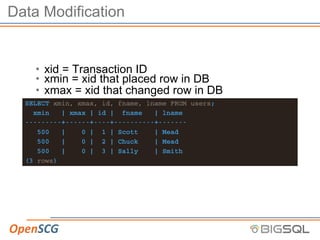
• xid = Transaction ID
• xmin = xid that placed row in DB
• xmax = xid that changed row in DB
SELECT xmin, xmax, id, fname, lname FROM users;
xmin | xmax | id | fname | lname
---------+------+----+----------+-------
500 | 0 | 1 | Scott | Mead
500 | 0 | 2 | Chuck | Mead
500 | 0 | 3 | Sally | Smith
(3 rows)
Data Modification
• Marry Me?
UPDATE users SET lname = ’Mead’ WHERE id = 3;
SELECT xmin, xmax, id, fname, lname FROM users;
xmin | xmax | id | fname | lname
---------+------+----+----------+-------
500 | 0 | 1 | Scott | Mead
500 | 0 | 2 | Chuck | Mead
1000 | 0 | 3 | Sally | Mead
(3 rows)
Data Modification
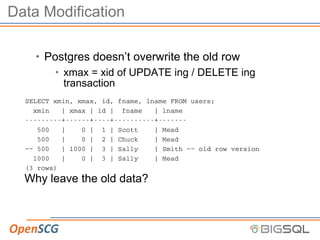
• Postgres doesn’t overwrite the old row
• xmax = xid of UPDATE ing / DELETE ing
transaction
SELECT xmin, xmax, id, fname, lname FROM users;
xmin | xmax | id | fname | lname
---------+------+----+----------+-------
500 | 0 | 1 | Scott | Mead
500 | 0 | 2 | Chuck | Mead
~~ 500 | 1000 | 3 | Sally | Smith ~~ old row version
1000 | 0 | 3 | Sally | Mead
(3 rows)
Why leave the old data?
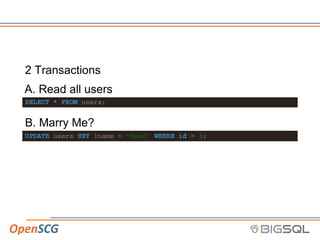
2 Transactions
A. Read all users
SELECT * FROM users;
B. Marry Me?
UPDATE users SET lname = ’Mead’ WHERE id = 3;
Concurrent transactions
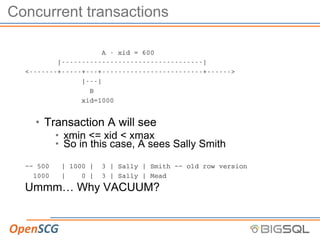
A - xid = 600
|-----------------------------------|
<-------+-----+---+-------------------------+------>
|---|
B
xid=1000
• Transaction A will see
• xmin <= xid < xmax
• So in this case, A sees Sally Smith
~~ 500 | 1000 | 3 | Sally | Smith ~~ old row version
1000 | 0 | 3 | Sally | Mead
Ummm… Why VACUUM?
Dead Rows
• In order to satisfy isolation & consistency of ACID,
postgres leaves multiple row versions
• After some time, these row versions are not visible to
anybody
• Typically referred to as ‘bloat’ or ‘fragmentation’
XID Wrap-Around
• Data visibility depends on sequential XIDs
• Postgres uses unsigned 32 bit int as XID
• What happens when I hit 4,294,967,295 XID?
VACUUM
• Remember, as DBA’s, we love free space.
• Allocated space that we can re-use
• Too much can be a problem
• Find these old rows and mark them as available
• FSM (Free Space Map)
• Future transactions can re-use the space
• VACUUM can also:
• Update Planner statistics
• Protect against xid wrap-around (FREEZE)
That’s VACUUM… what about AUTOvacuum?
Autovacuum
• Autovacuum daemon kicks off VACUUM tasks based on
thresholds
• Quite a few configuration options available
• Defaults:
• autovacuum = on
• 3 background workers
Issues with Autovacuum
• “Saw a performance problem, noticed autovacuum, killed
it”
• “When Autovacuum runs, performance sucks, I kill it”
• “Slow! -> Outage (full dump / restore).”
• Things run GREAT after that!
• For a while…
• “I see autovacuum running for days at a time”
• “After I purge my logging table, autovacuum runs for days”
• “Autovacuum is constantly running on table X,Y,Z”
Autovacuum is your friend
• Maintains a database
• Uses usage metrics to maintain relations
• Throttled to avoid I/O penalty
• Updates planner stats as tables change
• Protects against wrap around
A note on contention
• Autovacuum doesn’t take exclusive locks
• Autovacuum will prevent others from taking
exclusive locks
• Does contend for I/O bandwidth
We are not
• Talking about compaction!
• DBAs love freespace
• Autovacuum does not VACUUM FULL
• Recommend pg_repack for online compaction
DBA in a box
• Autovacuum grew from a few basic algorithms
• A DBA would examine your workload and build a
strategy
• It’s still a machine, and operates based on
conservative defaults
• Workload defaults
• vacuum_threshold = 50
• vacuum_scale_factor = 0.2 (20%)
• vacuum_cost_delay = 20 (ms)
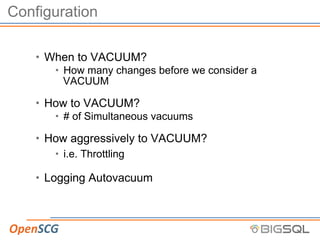
Configuration
• When to VACUUM?
• How many changes before we consider a
VACUUM
• How to VACUUM?
• # of Simultaneous vacuums
• How aggressively to VACUUM?
• i.e. Throttling
• Logging Autovacuum
Other config
• There are many other config options for
autovacuum
SELECT name, setting, unit, short_desc
FROM pg_settings
WHERE name ilike ’%vacuum%’;
• Controls are available for:
• ANALYZE
• FREEZE
• Memory Utilization
When to vacuum?
• autovacuum_vacuum_threshold = 50
• autovacuum_vacuum_scale_factor = 0.2 (20%)
How to vacuum?
• autovacuum_max_workers = 3
• autovacuum_naptime = 60 (seconds)
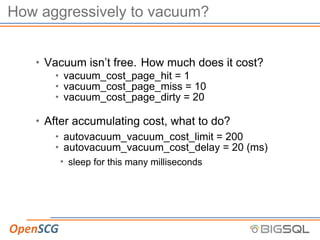
How aggressively to vacuum?
• Vacuum isn’t free. How much does it cost?
• vacuum_cost_page_hit = 1
• vacuum_cost_page_miss = 10
• vacuum_cost_page_dirty = 20
• After accumulating cost, what to do?
• autovacuum_vacuum_cost_limit = 200
• autovacuum_vacuum_cost_delay = 20 (ms)
• sleep for this many milliseconds
Logging Autovacuum
• log_autovacuum_min_duration = xx (ms)
• Recommend: 0 (zero), logs all autovacuum
activity
• Easily parsed from the logs with pgBadger
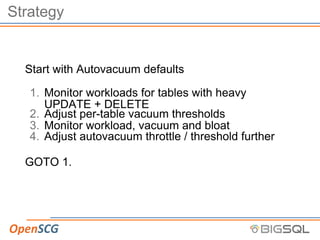
Strategy
Start with Autovacuum defaults
1. Monitor workloads for tables with heavy
UPDATE + DELETE
2. Adjust per-table vacuum thresholds
3. Monitor workload, vacuum and bloat
4. Adjust autovacuum throttle / threshold further
GOTO 1.
Monitor workload
• Monitor UPDATE & DELETE workloads on all
tables
• Single out heaviest modified tables
• These tables monopolize autovacuum processes
Adjust per-table vacuum thresholds
• Look for tables with 10 - 100x the next largest
workload
• Tuning autovacuum:
1. Increase the number of
autovacuum_max_workers
• Adds capacity to vacuum
• Provides ‘dedicated’ workers for busy tables
2. Increase the ‘vacuum_threshold’
• Prevents autovacuum from constantly tending to a
table
• Allows other tables a chance to be vacuumed
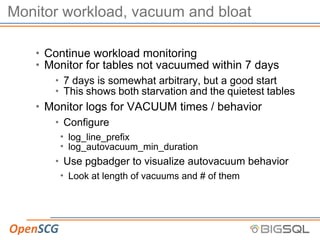
Monitor workload, vacuum and bloat
• Continue workload monitoring
• Monitor for tables not vacuumed within 7 days
• 7 days is somewhat arbitrary, but a good start
• This shows both starvation and the quietest tables
• Monitor logs for VACUUM times / behavior
• Configure
• log_line_prefix
• log_autovacuum_min_duration
• Use pgbadger to visualize autovacuum behavior
• Look at length of vacuums and # of them
Monitor workload, vacuum and bloat …
• Monitor bloat
• A number of ways to monitor
• Typically complex queries, but give good insight
• Monitor for long-running vacuum
• Too long between vacuum (high threshold)
• Throttle is too high
• Monitor I/O subsystem
• Vacuum demands I/O bandwidth, monitor and
throughput to avoid starving the database
server’s query activity
Adjust autovacuum throttle / threshold further
• Choose tables with high bloat and/or
long-running vacuums
• Marry the data to your workload analysis
• If the thresholds are normal, lower the throttle
• If the thresholds are high, lower them
Other Considerations
• Ultra-high change tables may require special
attention
• custom vacuum cron-job for ultra-high fliers
• Logging tables like special attention
• Typical logging tables have high INSERT with
perdiodic, large bulk DELETE
• Partition
• Use ‘truncate table ’ instead of DELETE
• No VACUUM required
Other Considerations
• Modify globals
• By now, you know the impact of modifying your
settings
• Adjusting the global threshold can spread
vacuums out
• Adjusting the global throttle can speed vacuums
up
Implementation
Monitor workload
• VACUUM matters most for heavy UPDATE and
DELETE workloads
• Look at table usage by most updated + deleted
SELECT relname,
n_tup_ins, n_tup_upd, n_tup_del, seq_scan, idx_scan,
pg_total_relation_size(relid) rawsize
FROM pg_stat_all_tables
ORDER BY ( n_tup_upd + n_tup_del) DESC;
Let’s examine
relname | n_tup_ins | n_tup_upd | n_tup_del
-------------------+-----------+-----------+-----------
pgbench_branches | 100 | 10000 | 0
pgbench_accounts | 10000000 | 10000 | 0
pgbench_tellers | 1000 | 10000 | 0
pg_attribute | 104 | 2 | 44
pg_statistic | 17 | 7 | 17
pg_depend | 37 | 0 | 18
pg_class | 14 | 5 | 7
pg_type | 15 | 0 | 8
users | 3 | 6 | 0
hosts | 2 | 4 | 0
Analysis?
• The pgbench_branches, accounts and tellers
tables took 4 orders magnitude higher updates
than the next table
• If this traffic continues around the clock, then the
pgbench tables will require all 3 of our
autovacuum workers, all the time
• Since only a few tables are demanding time, let’s
optimize those away
Adjust configuration
• Threshold
ALTER TABLE pgbench_accounts
SET (autovacuum_vacuum_threshold = 1000);
We want to pick a threshold that will allow other tables
to be vacuumed without ignoring our critical tables too
long.
• Number of workers
• Add to the pool of available vacuum processes
• We need to be mindful of I/O
Monitor workload, vacuum and bloat
• Adjusting thresholds and workers impacts the
system
• Increased demand on I/O subsystem
• Increased time between table vacuums
What to monitor
• Workload
• Tables not vacuumed within 7 days
• Autovacuum Logs
• Long-running vacuum
• Bloat
Monitor workload
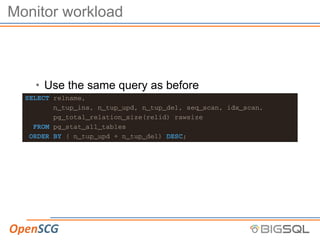
• Use the same query as before
SELECT relname,
n_tup_ins, n_tup_upd, n_tup_del, seq_scan, idx_scan,
pg_total_relation_size(relid) rawsize
FROM pg_stat_all_tables
ORDER BY ( n_tup_upd + n_tup_del) DESC;
Monitor
We want to see all tables that:
• Have not been vacuumed in 7 days
• Have not been autovacuumed in 7 days
• Have never been vacuumed or autovacuumed
• 7 days is a starting point, adjust as necessary
Query
SELECT schemaname,relname,
now() - last_autovacuum AS ”noautovac”,
now() - last_vacuum AS ”novac”,
n_tup_upd,n_tup_del,
pg_total_relation_size(relid),
autovacuum_count,last_autovacuum,
vacuum_count,last_vacuum
FROM pg_stat_user_tables
WHERE (now() - last_autovacuum > ’7 days’::interval
OR now() - last_vacuum >’7 days’::interval )
OR (last_autovacuum IS NULL
AND last_vacuum IS NULL)
ORDER BY novac DESC;
Autovacuum logs
1. Set your log_line_prefix correctly
2. use pgBadger to parse your logs
pgbadger provides rich and detailed graphs and ta-
bles around autovacuum behavior in an easy-to-read
HTML report.
Long running autovacuum
select state,
now()-query_start runtime,
query
FROM pg_stat_activity
WHERE now() - query_start > ’1 hour’::interval;
Bloat
• Estimate (recommended)
• https://github.com/ioguix/pgsql-bloat-estimation
• https://bucardo.org/wiki/Check_postgres
• Calculate (Takes longer, more accurate)
• pg_stattuple
•
https://www.postgresql.org/docs/9.5/static/pgstattuple.h
Adjust autovacuum throttle / threshold
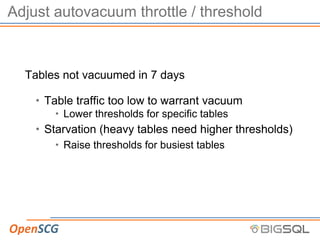
Tables not vacuumed in 7 days
• Table traffic too low to warrant vacuum
• Lower thresholds for specific tables
• Starvation (heavy tables need higher thresholds)
• Raise thresholds for busiest tables
Adjust autovacuum throttle / threshold
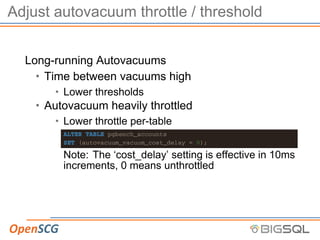
Long-running Autovacuums
• Time between vacuums high
• Lower thresholds
• Autovacuum heavily throttled
• Lower throttle per-table
ALTER TABLE pgbench_accounts
SET (autovacuum_vacuum_cost_delay = 0);
Note: The ‘cost_delay’ setting is effective in 10ms
increments, 0 means unthrottled
4. Adjust autovacuum throttle / threshold further…
• High Bloat
• Typcially workload dependent
• High UPDATE / DELETE, new rows don’t fit freespace
• Ultra-high rate of change
• VACUUM can’t complete fast enough for new rows
• Remediation
• Change workload
• Lower throttles on these
• Move to separate disk
• Disable autovacuum, move to ‘cron-based’ vacuum
• Partition
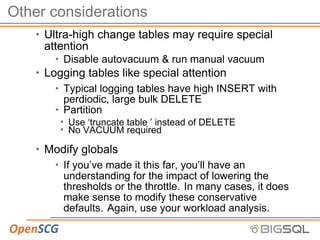
Other considerations
• Ultra-high change tables may require special
attention
• Disable autovacuum & run manual vacuum
• Logging tables like special attention
• Typical logging tables have high INSERT with
perdiodic, large bulk DELETE
• Partition
• Use ‘truncate table ’ instead of DELETE
• No VACUUM required
• Modify globals
• If you’ve made it this far, you’ll have an
understanding for the impact of lowering the
thresholds or the throttle. In many cases, it does
make sense to modify these conservative
defaults. Again, use your workload analysis.
Autovacuum Strategy
Start with Autovacuum defaults
1. Monitor workloads for tables with heavy
UPDATE + DELETE
2. Adjust per-table vacuum thresholds
3. Monitor workload and vacuum behavior
4. Adjust autovacuum throttle / threshold further
GOTO 1.
Questions?
jimm@openscg.com
@jim_mlodgenski

Strategic autovacuum

  • 1.
  • 2.
    Who am I? •Jim Mlodgenski • jimm@openscg.com • @jim_mlodgenski • Co-Chair • PGConf US • Director • United States PostgreSQL (www.postgresql.us) • Co-organizer of • Philly PUG (www.phlpug.org) • NYC PUG (www.nycpug.org) • CTO, OpenSCG • www.openscg.com
  • 3.
    ACID • Atomicity • Allor nothing (COMMIT / ROLLBACK) • Consistency • A transaction brings the database from one valid state to another • Isolation • Concurrent transactions execute isolated from each other • Tunable with ‘transaction_isolation’ • Durability • Once a COMMIT has completed, the data is safe, even in the event of power loss or crash.
  • 4.
    A Simple Transaction BEGIN; INSERTINTO users VALUES (1,’Scott’,’Mead’); INSERT INTO users VALUES (2,’Jim’,’Mlodgenski’); END;
  • 5.
    Transactions • The ACIDproperties apply to every postgres transaction • To satisfy these properties, PostgreSQL implements MVCC • Multi-Version Concurrency Control
  • 6.
    MVCC • Gurantees thatPostgres is ACID compliant • Readers never block writers and vice-versa • This has implications down to the storage manager
  • 7.
    Data Modification • TheIsolation rule requires that concurrent xacts are isolated • UPDATE / DELETE statements change data • What happens while concurrent transactions are executing ?
  • 8.
    Data Modification • Setupour ‘users’ table and bulk load the data CREATE TABLE users ( id int, fname text, lname text ) ; INSERT INTO users VALUES (1,’Scott’,’Mead’), (2,’Chuck’,’Mead’), (3,’Sally’,’Smith’);
  • 9.
    Data Modification • xid= Transaction ID • xmin = xid that placed row in DB • xmax = xid that changed row in DB SELECT xmin, xmax, id, fname, lname FROM users; xmin | xmax | id | fname | lname ---------+------+----+----------+------- 500 | 0 | 1 | Scott | Mead 500 | 0 | 2 | Chuck | Mead 500 | 0 | 3 | Sally | Smith (3 rows)
  • 10.
    Data Modification • MarryMe? UPDATE users SET lname = ’Mead’ WHERE id = 3; SELECT xmin, xmax, id, fname, lname FROM users; xmin | xmax | id | fname | lname ---------+------+----+----------+------- 500 | 0 | 1 | Scott | Mead 500 | 0 | 2 | Chuck | Mead 1000 | 0 | 3 | Sally | Mead (3 rows)
  • 11.
    Data Modification • Postgresdoesn’t overwrite the old row • xmax = xid of UPDATE ing / DELETE ing transaction SELECT xmin, xmax, id, fname, lname FROM users; xmin | xmax | id | fname | lname ---------+------+----+----------+------- 500 | 0 | 1 | Scott | Mead 500 | 0 | 2 | Chuck | Mead ~~ 500 | 1000 | 3 | Sally | Smith ~~ old row version 1000 | 0 | 3 | Sally | Mead (3 rows) Why leave the old data?
  • 12.
    2 Transactions A. Readall users SELECT * FROM users; B. Marry Me? UPDATE users SET lname = ’Mead’ WHERE id = 3;
  • 13.
    Concurrent transactions A -xid = 600 |-----------------------------------| <-------+-----+---+-------------------------+------> |---| B xid=1000 • Transaction A will see • xmin <= xid < xmax • So in this case, A sees Sally Smith ~~ 500 | 1000 | 3 | Sally | Smith ~~ old row version 1000 | 0 | 3 | Sally | Mead Ummm… Why VACUUM?
  • 14.
    Dead Rows • Inorder to satisfy isolation & consistency of ACID, postgres leaves multiple row versions • After some time, these row versions are not visible to anybody • Typically referred to as ‘bloat’ or ‘fragmentation’
  • 15.
    XID Wrap-Around • Datavisibility depends on sequential XIDs • Postgres uses unsigned 32 bit int as XID • What happens when I hit 4,294,967,295 XID?
  • 16.
    VACUUM • Remember, asDBA’s, we love free space. • Allocated space that we can re-use • Too much can be a problem • Find these old rows and mark them as available • FSM (Free Space Map) • Future transactions can re-use the space • VACUUM can also: • Update Planner statistics • Protect against xid wrap-around (FREEZE) That’s VACUUM… what about AUTOvacuum?
  • 17.
    Autovacuum • Autovacuum daemonkicks off VACUUM tasks based on thresholds • Quite a few configuration options available • Defaults: • autovacuum = on • 3 background workers
  • 18.
    Issues with Autovacuum •“Saw a performance problem, noticed autovacuum, killed it” • “When Autovacuum runs, performance sucks, I kill it” • “Slow! -> Outage (full dump / restore).” • Things run GREAT after that! • For a while… • “I see autovacuum running for days at a time” • “After I purge my logging table, autovacuum runs for days” • “Autovacuum is constantly running on table X,Y,Z”
  • 19.
    Autovacuum is yourfriend • Maintains a database • Uses usage metrics to maintain relations • Throttled to avoid I/O penalty • Updates planner stats as tables change • Protects against wrap around
  • 20.
    A note oncontention • Autovacuum doesn’t take exclusive locks • Autovacuum will prevent others from taking exclusive locks • Does contend for I/O bandwidth
  • 21.
    We are not •Talking about compaction! • DBAs love freespace • Autovacuum does not VACUUM FULL • Recommend pg_repack for online compaction
  • 22.
    DBA in abox • Autovacuum grew from a few basic algorithms • A DBA would examine your workload and build a strategy • It’s still a machine, and operates based on conservative defaults • Workload defaults • vacuum_threshold = 50 • vacuum_scale_factor = 0.2 (20%) • vacuum_cost_delay = 20 (ms)
  • 23.
    Configuration • When toVACUUM? • How many changes before we consider a VACUUM • How to VACUUM? • # of Simultaneous vacuums • How aggressively to VACUUM? • i.e. Throttling • Logging Autovacuum
  • 24.
    Other config • Thereare many other config options for autovacuum SELECT name, setting, unit, short_desc FROM pg_settings WHERE name ilike ’%vacuum%’; • Controls are available for: • ANALYZE • FREEZE • Memory Utilization
  • 25.
    When to vacuum? •autovacuum_vacuum_threshold = 50 • autovacuum_vacuum_scale_factor = 0.2 (20%)
  • 26.
    How to vacuum? •autovacuum_max_workers = 3 • autovacuum_naptime = 60 (seconds)
  • 27.
    How aggressively tovacuum? • Vacuum isn’t free. How much does it cost? • vacuum_cost_page_hit = 1 • vacuum_cost_page_miss = 10 • vacuum_cost_page_dirty = 20 • After accumulating cost, what to do? • autovacuum_vacuum_cost_limit = 200 • autovacuum_vacuum_cost_delay = 20 (ms) • sleep for this many milliseconds
  • 28.
    Logging Autovacuum • log_autovacuum_min_duration= xx (ms) • Recommend: 0 (zero), logs all autovacuum activity • Easily parsed from the logs with pgBadger
  • 29.
    Strategy Start with Autovacuumdefaults 1. Monitor workloads for tables with heavy UPDATE + DELETE 2. Adjust per-table vacuum thresholds 3. Monitor workload, vacuum and bloat 4. Adjust autovacuum throttle / threshold further GOTO 1.
  • 30.
    Monitor workload • MonitorUPDATE & DELETE workloads on all tables • Single out heaviest modified tables • These tables monopolize autovacuum processes
  • 31.
    Adjust per-table vacuumthresholds • Look for tables with 10 - 100x the next largest workload • Tuning autovacuum: 1. Increase the number of autovacuum_max_workers • Adds capacity to vacuum • Provides ‘dedicated’ workers for busy tables 2. Increase the ‘vacuum_threshold’ • Prevents autovacuum from constantly tending to a table • Allows other tables a chance to be vacuumed
  • 32.
    Monitor workload, vacuumand bloat • Continue workload monitoring • Monitor for tables not vacuumed within 7 days • 7 days is somewhat arbitrary, but a good start • This shows both starvation and the quietest tables • Monitor logs for VACUUM times / behavior • Configure • log_line_prefix • log_autovacuum_min_duration • Use pgbadger to visualize autovacuum behavior • Look at length of vacuums and # of them
  • 33.
    Monitor workload, vacuumand bloat … • Monitor bloat • A number of ways to monitor • Typically complex queries, but give good insight • Monitor for long-running vacuum • Too long between vacuum (high threshold) • Throttle is too high • Monitor I/O subsystem • Vacuum demands I/O bandwidth, monitor and throughput to avoid starving the database server’s query activity
  • 34.
    Adjust autovacuum throttle/ threshold further • Choose tables with high bloat and/or long-running vacuums • Marry the data to your workload analysis • If the thresholds are normal, lower the throttle • If the thresholds are high, lower them
  • 35.
    Other Considerations • Ultra-highchange tables may require special attention • custom vacuum cron-job for ultra-high fliers • Logging tables like special attention • Typical logging tables have high INSERT with perdiodic, large bulk DELETE • Partition • Use ‘truncate table ’ instead of DELETE • No VACUUM required
  • 36.
    Other Considerations • Modifyglobals • By now, you know the impact of modifying your settings • Adjusting the global threshold can spread vacuums out • Adjusting the global throttle can speed vacuums up
  • 37.
    Implementation Monitor workload • VACUUMmatters most for heavy UPDATE and DELETE workloads • Look at table usage by most updated + deleted SELECT relname, n_tup_ins, n_tup_upd, n_tup_del, seq_scan, idx_scan, pg_total_relation_size(relid) rawsize FROM pg_stat_all_tables ORDER BY ( n_tup_upd + n_tup_del) DESC;
  • 38.
    Let’s examine relname |n_tup_ins | n_tup_upd | n_tup_del -------------------+-----------+-----------+----------- pgbench_branches | 100 | 10000 | 0 pgbench_accounts | 10000000 | 10000 | 0 pgbench_tellers | 1000 | 10000 | 0 pg_attribute | 104 | 2 | 44 pg_statistic | 17 | 7 | 17 pg_depend | 37 | 0 | 18 pg_class | 14 | 5 | 7 pg_type | 15 | 0 | 8 users | 3 | 6 | 0 hosts | 2 | 4 | 0
  • 39.
    Analysis? • The pgbench_branches,accounts and tellers tables took 4 orders magnitude higher updates than the next table • If this traffic continues around the clock, then the pgbench tables will require all 3 of our autovacuum workers, all the time • Since only a few tables are demanding time, let’s optimize those away
  • 40.
    Adjust configuration • Threshold ALTERTABLE pgbench_accounts SET (autovacuum_vacuum_threshold = 1000); We want to pick a threshold that will allow other tables to be vacuumed without ignoring our critical tables too long. • Number of workers • Add to the pool of available vacuum processes • We need to be mindful of I/O
  • 41.
    Monitor workload, vacuumand bloat • Adjusting thresholds and workers impacts the system • Increased demand on I/O subsystem • Increased time between table vacuums
  • 42.
    What to monitor •Workload • Tables not vacuumed within 7 days • Autovacuum Logs • Long-running vacuum • Bloat
  • 43.
    Monitor workload • Usethe same query as before SELECT relname, n_tup_ins, n_tup_upd, n_tup_del, seq_scan, idx_scan, pg_total_relation_size(relid) rawsize FROM pg_stat_all_tables ORDER BY ( n_tup_upd + n_tup_del) DESC;
  • 44.
    Monitor We want tosee all tables that: • Have not been vacuumed in 7 days • Have not been autovacuumed in 7 days • Have never been vacuumed or autovacuumed • 7 days is a starting point, adjust as necessary
  • 45.
    Query SELECT schemaname,relname, now() -last_autovacuum AS ”noautovac”, now() - last_vacuum AS ”novac”, n_tup_upd,n_tup_del, pg_total_relation_size(relid), autovacuum_count,last_autovacuum, vacuum_count,last_vacuum FROM pg_stat_user_tables WHERE (now() - last_autovacuum > ’7 days’::interval OR now() - last_vacuum >’7 days’::interval ) OR (last_autovacuum IS NULL AND last_vacuum IS NULL) ORDER BY novac DESC;
  • 46.
    Autovacuum logs 1. Setyour log_line_prefix correctly 2. use pgBadger to parse your logs pgbadger provides rich and detailed graphs and ta- bles around autovacuum behavior in an easy-to-read HTML report.
  • 47.
    Long running autovacuum selectstate, now()-query_start runtime, query FROM pg_stat_activity WHERE now() - query_start > ’1 hour’::interval;
  • 48.
    Bloat • Estimate (recommended) •https://github.com/ioguix/pgsql-bloat-estimation • https://bucardo.org/wiki/Check_postgres • Calculate (Takes longer, more accurate) • pg_stattuple • https://www.postgresql.org/docs/9.5/static/pgstattuple.h
  • 49.
    Adjust autovacuum throttle/ threshold Tables not vacuumed in 7 days • Table traffic too low to warrant vacuum • Lower thresholds for specific tables • Starvation (heavy tables need higher thresholds) • Raise thresholds for busiest tables
  • 50.
    Adjust autovacuum throttle/ threshold Long-running Autovacuums • Time between vacuums high • Lower thresholds • Autovacuum heavily throttled • Lower throttle per-table ALTER TABLE pgbench_accounts SET (autovacuum_vacuum_cost_delay = 0); Note: The ‘cost_delay’ setting is effective in 10ms increments, 0 means unthrottled
  • 51.
    4. Adjust autovacuumthrottle / threshold further… • High Bloat • Typcially workload dependent • High UPDATE / DELETE, new rows don’t fit freespace • Ultra-high rate of change • VACUUM can’t complete fast enough for new rows • Remediation • Change workload • Lower throttles on these • Move to separate disk • Disable autovacuum, move to ‘cron-based’ vacuum • Partition
  • 52.
    Other considerations • Ultra-highchange tables may require special attention • Disable autovacuum & run manual vacuum • Logging tables like special attention • Typical logging tables have high INSERT with perdiodic, large bulk DELETE • Partition • Use ‘truncate table ’ instead of DELETE • No VACUUM required • Modify globals • If you’ve made it this far, you’ll have an understanding for the impact of lowering the thresholds or the throttle. In many cases, it does make sense to modify these conservative defaults. Again, use your workload analysis.
  • 53.
    Autovacuum Strategy Start withAutovacuum defaults 1. Monitor workloads for tables with heavy UPDATE + DELETE 2. Adjust per-table vacuum thresholds 3. Monitor workload and vacuum behavior 4. Adjust autovacuum throttle / threshold further GOTO 1.
  • 54.