MYOB TRAINING

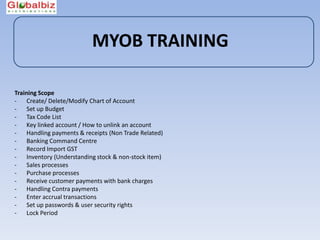
Training Scope
- Create/ Delete/Modify Chart of Account
- Set up Budget
- Tax Code List
- Key linked account / How to unlink an account
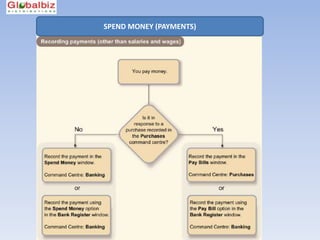
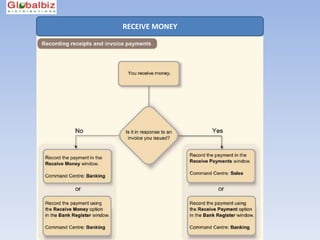
- Handling payments & receipts (Non Trade Related)
- Banking Command Centre
- Record Import GST
- Inventory (Understanding stock & non-stock item)
- Sales processes
- Purchase processes
- Receive customer payments with bank charges
- Handling Contra payments
- Enter accrual transactions
- Set up passwords & user security rights
- Lock Period
MYOB TRAINING

Create Chart of Accounts
MYOB TRAINING

Understanding the different levels of reports

Key linked accounts

Create/ Delete/Modify Chart of Account
MYOB TRAINING
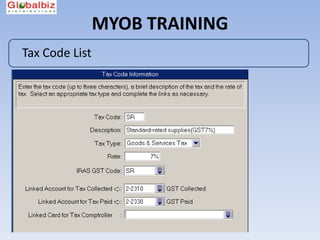
Tax Code List
MYOB TRAINING

Key-Linked Accounts
MYOB TRAINING


??? Questions???
MYOB TRAINING


Break Time 
  15 mins
MYOB TRAINING

Banking Command Centre
MYOB TRAINING

     Find transactions
Reverse/ Delete Transaction
    Impacts on Reports
MYOB TRAINING

Record Import GST
MYOB TRAINING


??? Questions???
MYOB TRAINING
Inventory (Understanding stock & non-stock item)
MYOB TRAINING
MYOB TRAINING

Purchases Command Centre


              Get ready to learn more on Purchases Processes in MYOB !
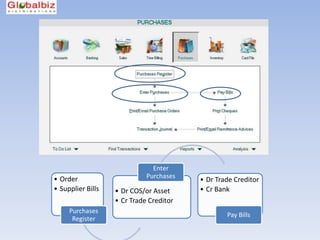
Enter
• Order                      Purchases
                                         • Dr Trade Creditor
• Supplier Bills   • Dr COS/or Asset     • Cr Bank
                   • Cr Trade Creditor
     Purchases
                                                 Pay Bills
      Register
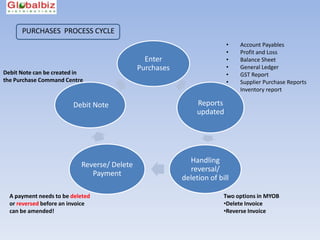
PURCHASES PROCESS CYCLE
                                                                        •   Account Payables
                                                                        •   Profit and Loss
                                               Enter                    •   Balance Sheet
                                             Purchases                  •   General Ledger
Debit Note can be created in                                            •   GST Report
the Purchase Command Centre                                             •   Supplier Purchase Reports
                                                                        •   Inventory report

                        Debit Note                            Reports
                                                              updated


                                                           Handling
                           Reverse/ Delete
                                                           reversal/
                              Payment
                                                         deletion of bill

  A payment needs to be deleted                                        Two options in MYOB
  or reversed before an invoice                                        •Delete Invoice
  can be amended!                                                      •Reverse Invoice
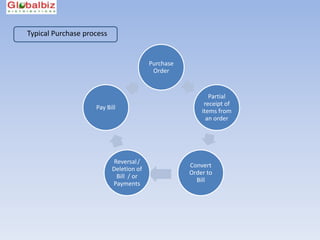
Typical Purchase process


                                         Purchase
                                          Order


                                                           Partial
                                                         receipt of
                    Pay Bill
                                                        items from
                                                          an order


                            Reversal /
                                                    Convert
                           Deletion of
                                                    Order to
                             Bill / or
                                                      Bill
                           Payments
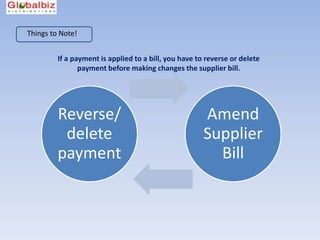
Things to Note!


         If a payment is applied to a bill, you have to reverse or delete
                payment before making changes the supplier bill.


         Reverse/                                      Amend
          delete                                       Supplier
         payment                                         Bill
MYOB TRAINING

Purchases Command Centre
MYOB TRAINING

Handling Supplier Payments with Bank Charges
MYOB TRAINING


??? Questions???
MYOB TRAINING

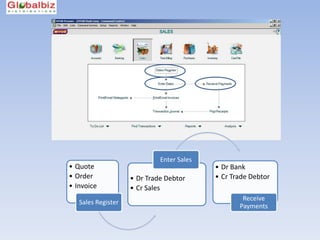
Sales Command Centre


              Get ready to learn more on Sales Processes in MYOB !
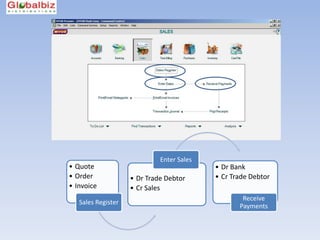
Enter Sales
• Quote                                    • Dr Bank
• Order             • Dr Trade Debtor      • Cr Trade Debtor
• Invoice           • Cr Sales
                                                   Receive
   Sales Register
                                                  Payments
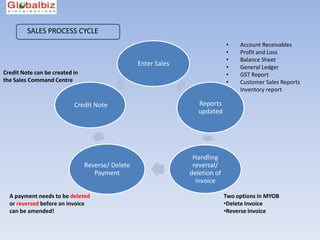
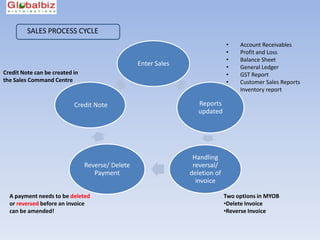
SALES PROCESS CYCLE
                                                                              •    Account Receivables
                                                                              •    Profit and Loss
                                                                              •    Balance Sheet
                                                  Enter Sales                 •    General Ledger
Credit Note can be created in                                                 •    GST Report
the Sales Command Centre                                                      •    Customer Sales Reports
                                                                              •    Inventory report

                           Credit Note                             Reports
                                                                   updated


                                                                 Handling
                                Reverse/ Delete                  reversal/
                                   Payment                      deletion of
                                                                  invoice

  A payment needs to be deleted                                               Two options in MYOB
  or reversed before an invoice                                               •Delete Invoice
  can be amended!                                                             •Reverse Invoice
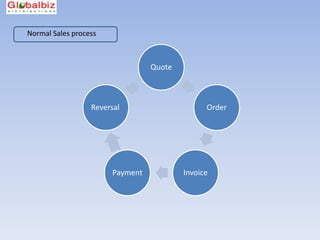
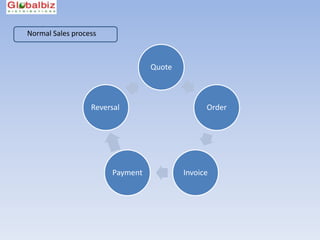
Normal Sales process


                                 Quote


                  Reversal                     Order


                       Payment           Invoice
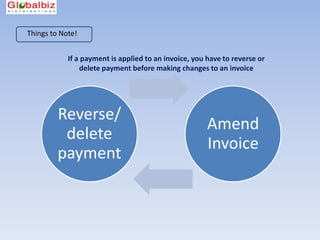
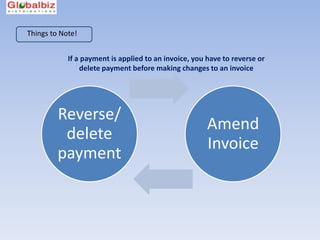
Things to Note!


            If a payment is applied to an invoice, you have to reverse or
                delete payment before making changes to an invoice


         Reverse/
                                                       Amend
          delete
                                                       Invoice
         payment
MYOB TRAINING

Sales Command Centre
MYOB TRAINING

Receive Customer Payments with Bank Charges
MYOB TRAINING

Handling contra payments
MYOB TRAINING

Enter accrual transactions
MYOB TRAINING


??? Questions???
MYOB TRAINING

Lock Period
MYOB TRAINING

 End of Session


   Q&A
THANK YOU !
MYOB TRAINING
MYOB TRAINING

Sales Command Centre


              Get ready to learn more on Sales Processes in MYOB !
Enter Sales
• Quote                                    • Dr Bank
• Order             • Dr Trade Debtor      • Cr Trade Debtor
• Invoice           • Cr Sales
                                                   Receive
   Sales Register
                                                  Payments
SALES PROCESS CYCLE
                                                                              •    Account Receivables
                                                                              •    Profit and Loss
                                                                              •    Balance Sheet
                                                  Enter Sales                 •    General Ledger
Credit Note can be created in                                                 •    GST Report
the Sales Command Centre                                                      •    Customer Sales Reports
                                                                              •    Inventory report

                           Credit Note                             Reports
                                                                   updated


                                                                 Handling
                                Reverse/ Delete                  reversal/
                                   Payment                      deletion of
                                                                  invoice

  A payment needs to be deleted                                               Two options in MYOB
  or reversed before an invoice                                               •Delete Invoice
  can be amended!                                                             •Reverse Invoice
Normal Sales process


                                 Quote


                  Reversal                     Order


                       Payment           Invoice
Things to Note!


            If a payment is applied to an invoice, you have to reverse or
                delete payment before making changes to an invoice


         Reverse/
                                                       Amend
          delete
                                                       Invoice
         payment
MYOB TRAINING

Set up passwords & user security rights
MYOB TRAINING

             Handling payments & receipts
                 (Non Trade Related)

What are non-trade related transactions ?


Paying rent, utilities, or wages are classified as
non-trade payments.


Receiving funds from a director or to record an initial capital
injection are classified as non-trade receipts.
SPEND MONEY (PAYMENTS)
RECEIVE MONEY

MYOB Classroom

Editor's Notes

  • #2 Introduction : Who are you ? Your learning objectives Who we are The course outline , a more interactive learning class (10.15am) Opening balances – A/R reconciliation/ A/P reconciliation
  • #3 Entering opening balances into the accounts If you are converting your existing accounting records from another accounting system into your MYOB software for the first time, after setting up your accounts list you will need to enter the opening balances of the accounts into your MYOB software. This topic shows you how! Hopefully you have just followed the instructions on modifying the accounts list found in this learning centre. If so, you should have open the 'Enter your opening balances' window in the Accounts Easy Setup Assistant. If not, make sure you have modified the accounts list to suit your business. Then, open the Accounts Easy Setup Assistant and select Opening Balances from the navigation list on the left hand side. Reports : Opening balances – A/R reconciliation/ A/P reconciliation
  • #4 Chart of Account Understand & learn to structure the levels of account list to facilitate better reporting Eg. Fixed Assets Computer @ Cost Computer AccumDepNet book value Share the feature of “Combine Accounts” in MYOB
  • #5 The tax code list can be found under Lists> Tax CodesA list of tax codes are pre-set up by MYOB, and satisfy the latest statutory board standards.Do take your time to go through and understand the tax codes.You may maintain a set of usable tax codes related closest to your trade. In this topic, you will learn and understand how To link the standard tax codes Delete a tax code Add a new tax code
  • #6 Unlink an account Link account to bank charges
  • #7 Introduction : Who are you ? Your learning objectives Who we are The course outline , a more interactive learning class (10.15am) Opening balances – A/R reconciliation/ A/P reconciliation
  • #9 Banking Spend Money > Go to the next slide to show the work flowHandling non trade related transactionsPrint Payment Voucher
  • #10 Find transactions for the entries posted into MYOBResults in reports, show audience the zoom in function from reportsDo a simple custom report
  • #11 You can record GST payments for imported goods without creating a Purchase invoice.The GST payments you record are then included in the IAF and GST Return Detail report.
  • #13 Create a stock/ non-stock itemUnderstanding linked accountsCustom Fields & ListsSelling Price
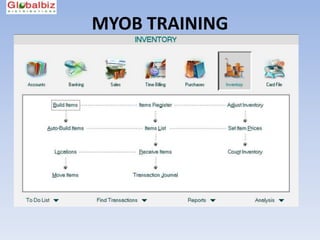
  • #14 Go through briefly on the Inventory Command Centre Build Items - Good for Build of Material (B.O.M) Eg, manufacturing raw material into a finished productAuto Build Items – Ready to use when you had built a “Finished Product” in Item List Item Register – Display the movement of stock Item List – Displays an overview of the stock quantity Adjust Inventory – For adjustment of stock by qty/ value or used for recording opening balances for stockSet Item Prices – A quick update on the selling prices for products Location – Create new location Receive Items – To handle partial receipt of items to a P.O.Count Inventory – Stock Count Move Items – Move items from one location to another (Note! There is no trace record for this function)Transaction Journal – Displays the double entries recorded for stocks
  • #16 High level flow of events > Navigation on MYOB programGo through all functions in Purchases Command Centre
  • #17 In a typical sales process cycle, The normal sequence is quote > order > invoice > payment - If any of these steps is cancelled, use the reversal function / or delete function – Go through Setup > SecurityExplain! – In quote & order , no transaction is recorded
  • #18 A run-through on activities in Purchases Command Centre
  • #20 Create a QuoteChoose the type of layout Convert quote to order / invoice
  • #21 Create a QuoteChoose the type of layout Convert quote to order / invoice
  • #24 High level flow of events > Navigation on MYOB programGo through all functions in Sales Command Centre
  • #25 In a typical sales process cycle, The normal sequence is quote > order > invoice > payment - If any of these steps is cancelled, use the reversal function / or delete function – Go through Setup > SecurityExplain! – In quote & order , no transaction is recorded
  • #26 A run-through on activities in Sales Command Centre
  • #27 The normal sequence is quote > order > invoice > payment - If any of these steps is cancelled, use the reversal function / or delete function Show on MYOB the way to find payment history to an invoice Sales Register > Invoice> History Bank RegisterFind Transaction window > By Card
  • #28 Create a QuoteChoose the type of layout Convert quote to order / invoice
  • #29 Create a QuoteChoose the type of layout Convert quote to order / invoice
  • #30 Create a QuoteChoose the type of layout Convert quote to order / invoice
  • #31 Ways to record accrual transactionsJournal entries to record accrual for incomeDr. Debtor/ Cr. AccrualDr. Accrual / Cr. IncomeAccrue for salaries from Banking Spend Money (Cr. Accrual/ Dr. Expenses)
  • #33 It is important to lock period when a financial month is closed.This is to prevent changes from being made into the prior, in a result of changing the tax (GST) reports in MYOB.To lock period , go to Setup> Preferences> Security > Lock Period
  • #34 Initial bank rec.
  • #36 Introduction : Who are you ? Your learning objectives Who we are The course outline , a more interactive learning class (10.15am) Opening balances – A/R reconciliation/ A/P reconciliation
  • #37 High level flow of events > Navigation on MYOB programGo through all functions in Sales Command Centre
  • #38 In a typical sales process cycle, The normal sequence is quote > order > invoice > payment - If any of these steps is cancelled, use the reversal function / or delete function – Go through Setup > SecurityExplain! – In quote & order , no transaction is recorded
  • #39 A run-through on activities in Sales Command Centre
  • #40 The normal sequence is quote > order > invoice > payment - If any of these steps is cancelled, use the reversal function / or delete function Show on MYOB the way to find payment history to an invoice Sales Register > Invoice> History Bank RegisterFind Transaction window > By Card
  • #42 Banking Spend Money > Go to the next slide to show the work flow