Solutions That Work For Your Business

                 55 South “A” Street
                Pensacola, FL 32502
How We Got Started
eKIOSS was born in the summer of 2010 when owners, Jamie Walker and Tim Renfroe, were
asked to build from scratch an onsite donation kiosk for Harvest Church of Pensacola.
Associate Pastor of Harvest Church, Roger Hirth, came to Jamie and Tim after looking at
other companies and finding that the equipment was too expensive and the rates and fees
were too high.

After conducting extensive research and building several test models we produced a sleek
looking self service kiosk for half the price of the other companies that Pastor Hirth had
initially researched. Our eGIVINGS Product was born and is now our #1 branded product.
The end result was a huge success for the church and the congregation. Harvest provided
their members with a more convenient way to give to the church, buy church products such
as CD’s and books, and register for church supported events.

Over the last two years we have expanded our product portfolio and our management team
with the addition of Jason Coley to head our sales division. We now have a full product line
of different donation / payment solutions that complement our growing donation kiosk
business. Our full portfolio of branded products include eGIVINGS, ePOS, eRENTAL Pay
and eKID Care.

Our philosophy is to offer affordable custom payment solutions that work to fulfil
the needs of our clients and produce maximum savings and profits.
Management Team

Tim Renfroe – President / CEO (Head Developer)


Jamie Walker – COO / CFO (Marketing)


Jason Coley – Vice President / Director of Sales
Business Solutions
 eGIVINGS Donation Solutions

 ePOS Software & Hardware for Small Businesses

 eRENTAL Payment Solution for Apartments, Storage, Property Management,
  Office Buildings and Gyms

 Restaurant / Bar POS Software & Hardware

 eMobile Payments

 eMobile Work Ticket & Invoicing

 eKiosk Solutions - Donation Kiosks, Payment Kiosks, Ticketing Kiosks,
  Information Kiosks, Check in Kiosks, Health Care Kiosk

 Merchant Processing, E-check and ACH

 Website Design and Mobile Pages

 Web Purchase Order Program

 Custom design / build payment solutions
We offer solutions that you will not find anywhere else
Local Customers
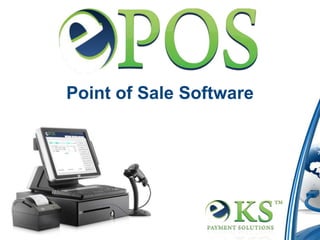
Point of Sale Software
Introducing
ePOS was developed with simplicity in mind. It offers the small business owner a full powered

POS software that is fluid in design, simple to learn and easy to master. Small business owners

spend thousands of dollars each year on expensive point of sale software. Most times, small

businesses are buying software with features that they don’t need or they are being oversold on

the software’s capabilities.

ePOS Features Include:
• Can be used on any existing POS, computer or tablet PC
• Processes all transaction types
• Can process split payments
• Generate Sales Reports- Daily Recap, Sales by User, Top 5 Sales Items
• Login to your Back Office Anywhere
• Export Sales to your Accounting Software
• Manages inventory
• Employee clock in / clock out
Order Processing
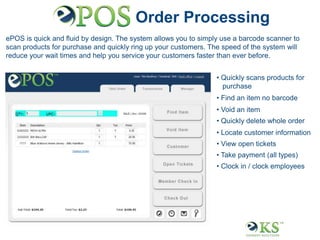
ePOS is quick and fluid by design. The system allows you to simply use a barcode scanner to
scan products for purchase and quickly ring up your customers. The speed of the system will
reduce your wait times and help you service your customers faster than ever before.


                                                                 • Quickly scans products for
                                                                   purchase
                                                                 • Find an item no barcode
                                                                 • Void an item
                                                                 • Quickly delete whole order
                                                                 • Locate customer information
                                                                 • View open tickets
                                                                 • Take payment (all types)
                                                                 • Clock in / clock employees
Manager’s Console
The ePOS Manager’s Console allows you to manage all aspects of the point of sale software
and keeps you up to date on how your business is progressing.

From here you can access inventory, execute a return, clock in an employee and view your daily
transaction recap. The great thing is that you do not need an advanced degree to learn how
each function works and that saves you time and keeps you focused on running your business.

                                                                 • Add Cash to a drawer
                                                                 • Execute a Void / Return
                                                                 • Manage Inventory
                                                                 • Reporting
                                                                 • Employee Management
                                                                 • System Settings
Inventory Control
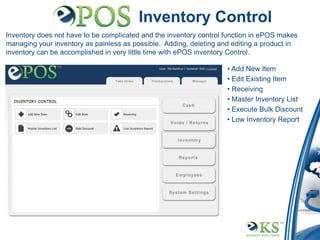
Inventory does not have to be complicated and the inventory control function in ePOS makes
managing your inventory as painless as possible. Adding, deleting and editing a product in
inventory can be accomplished in very little time with ePOS inventory Control.

                                                                    • Add New Item
                                                                    • Edit Existing Item
                                                                    • Receiving
                                                                    • Master Inventory List
                                                                    • Execute Bulk Discount
                                                                    • Low Inventory Report
Inventory Control
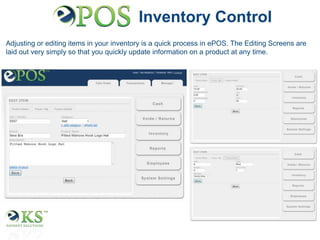
Adjusting or editing items in your inventory is a quick process in ePOS. The Editing Screens are
laid out very simply so that you quickly update information on a product at any time.
Reporting & Export
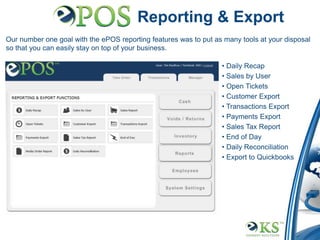
Our number one goal with the ePOS reporting features was to put as many tools at your disposal
so that you can easily stay on top of your business.

                                                                  • Daily Recap
                                                                  • Sales by User
                                                                  • Open Tickets
                                                                  • Customer Export
                                                                  • Transactions Export
                                                                  • Payments Export
                                                                  • Sales Tax Report
                                                                  • End of Day
                                                                  • Daily Reconciliation
                                                                  • Export to Quickbooks
Thank you for your time.

Any Questions or comments?

E kiosk epos presentation

  • 1.
    Solutions That WorkFor Your Business 55 South “A” Street Pensacola, FL 32502
  • 2.
    How We GotStarted eKIOSS was born in the summer of 2010 when owners, Jamie Walker and Tim Renfroe, were asked to build from scratch an onsite donation kiosk for Harvest Church of Pensacola. Associate Pastor of Harvest Church, Roger Hirth, came to Jamie and Tim after looking at other companies and finding that the equipment was too expensive and the rates and fees were too high. After conducting extensive research and building several test models we produced a sleek looking self service kiosk for half the price of the other companies that Pastor Hirth had initially researched. Our eGIVINGS Product was born and is now our #1 branded product. The end result was a huge success for the church and the congregation. Harvest provided their members with a more convenient way to give to the church, buy church products such as CD’s and books, and register for church supported events. Over the last two years we have expanded our product portfolio and our management team with the addition of Jason Coley to head our sales division. We now have a full product line of different donation / payment solutions that complement our growing donation kiosk business. Our full portfolio of branded products include eGIVINGS, ePOS, eRENTAL Pay and eKID Care. Our philosophy is to offer affordable custom payment solutions that work to fulfil the needs of our clients and produce maximum savings and profits.
  • 3.
    Management Team Tim Renfroe– President / CEO (Head Developer) Jamie Walker – COO / CFO (Marketing) Jason Coley – Vice President / Director of Sales
  • 4.
    Business Solutions  eGIVINGSDonation Solutions  ePOS Software & Hardware for Small Businesses  eRENTAL Payment Solution for Apartments, Storage, Property Management, Office Buildings and Gyms  Restaurant / Bar POS Software & Hardware  eMobile Payments  eMobile Work Ticket & Invoicing  eKiosk Solutions - Donation Kiosks, Payment Kiosks, Ticketing Kiosks, Information Kiosks, Check in Kiosks, Health Care Kiosk  Merchant Processing, E-check and ACH  Website Design and Mobile Pages  Web Purchase Order Program  Custom design / build payment solutions
  • 5.
    We offer solutionsthat you will not find anywhere else
  • 6.
  • 7.
    Point of SaleSoftware
  • 8.
    Introducing ePOS was developedwith simplicity in mind. It offers the small business owner a full powered POS software that is fluid in design, simple to learn and easy to master. Small business owners spend thousands of dollars each year on expensive point of sale software. Most times, small businesses are buying software with features that they don’t need or they are being oversold on the software’s capabilities. ePOS Features Include: • Can be used on any existing POS, computer or tablet PC • Processes all transaction types • Can process split payments • Generate Sales Reports- Daily Recap, Sales by User, Top 5 Sales Items • Login to your Back Office Anywhere • Export Sales to your Accounting Software • Manages inventory • Employee clock in / clock out
  • 9.
    Order Processing ePOS isquick and fluid by design. The system allows you to simply use a barcode scanner to scan products for purchase and quickly ring up your customers. The speed of the system will reduce your wait times and help you service your customers faster than ever before. • Quickly scans products for purchase • Find an item no barcode • Void an item • Quickly delete whole order • Locate customer information • View open tickets • Take payment (all types) • Clock in / clock employees
  • 10.
    Manager’s Console The ePOSManager’s Console allows you to manage all aspects of the point of sale software and keeps you up to date on how your business is progressing. From here you can access inventory, execute a return, clock in an employee and view your daily transaction recap. The great thing is that you do not need an advanced degree to learn how each function works and that saves you time and keeps you focused on running your business. • Add Cash to a drawer • Execute a Void / Return • Manage Inventory • Reporting • Employee Management • System Settings
  • 11.
    Inventory Control Inventory doesnot have to be complicated and the inventory control function in ePOS makes managing your inventory as painless as possible. Adding, deleting and editing a product in inventory can be accomplished in very little time with ePOS inventory Control. • Add New Item • Edit Existing Item • Receiving • Master Inventory List • Execute Bulk Discount • Low Inventory Report
  • 12.
    Inventory Control Adjusting orediting items in your inventory is a quick process in ePOS. The Editing Screens are laid out very simply so that you quickly update information on a product at any time.
  • 13.
    Reporting & Export Ournumber one goal with the ePOS reporting features was to put as many tools at your disposal so that you can easily stay on top of your business. • Daily Recap • Sales by User • Open Tickets • Customer Export • Transactions Export • Payments Export • Sales Tax Report • End of Day • Daily Reconciliation • Export to Quickbooks
  • 14.
    Thank you foryour time. Any Questions or comments?