

A Customized Solution…
Agenda


   Overview Chart of eGarage 2.3.
       Overall Structure
       Features in brief

   Editions Overview for Different types of Organizations
       Pricing
       Support
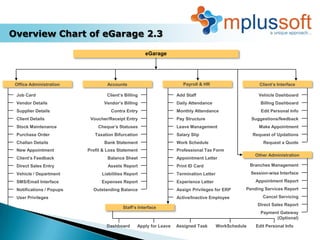
Overview Chart of eGarage 2.3

                                                     eGarage


 Office Administration             Accounts                           Payroll & HR                         Client’s Interface

 Job Card                         Client’s Billing                 Add Staff                              Vehicle Dashboard
 Vendor Details                  Vendor’s Billing                  Daily Attendance                        Billing Dashboard
 Supplier Details                   Contra Entry                   Monthly Attendance                      Edit Personal Info
 Client Details            Voucher/Receipt Entry                   Pay Structure                       Suggestions/feedback
 Stock Maintenance            Cheque’s Statuses                    Leave Management                       Make Appointment
 Purchase Order              Taxation Bifurcation                  Salary Slip                          Request of Updations
 Challan Details                 Bank Statement                    Work Schedule                            Request a Quote
 New Appointment          Profit & Loss Statement                  Professional Tax Form
                                                                                                         Other Administration
 Client’s Feedback                 Balance Sheet                   Appointment Letter
 Direct Sales Entry                Assets Report                   Print ID Card                       Branches Management
 Vehicle / Department           Liabilities Report                 Termination Letter                  Session-wise Interface
 SMS/Email Interface            Expenses Report                    Experience Letter                     Appointment Report
 Notifications / Popups     Outstanding Balance                    Assign Privileges for ERP       Pending Services Report
 User Privileges                                                   Active/Inactive Employee                 Cancel Servicing
                                                                                                          Direct Sales Report
                                          Staff’s Interface
                                                                                                           Payment Gateway
                                                                                                                 (Optional)
                                  Dashboard      Apply for Leave   Assigned Task        WorkSchedule     Edit Personal Info
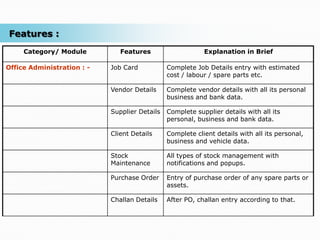
Features :
     Category/ Module          Features                    Explanation in Brief

Office Administration : -   Job Card           Complete Job Details entry with estimated
                                               cost / labour / spare parts etc.

                            Vendor Details     Complete vendor details with all its personal
                                               business and bank data.

                            Supplier Details   Complete supplier details with all its
                                               personal, business and bank data.

                            Client Details     Complete client details with all its personal,
                                               business and vehicle data.

                            Stock              All types of stock management with
                            Maintenance        notifications and popups.

                            Purchase Order     Entry of purchase order of any spare parts or
                                               assets.

                            Challan Details    After PO, challan entry according to that.
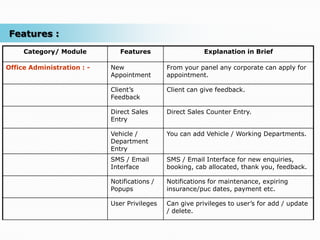
Features :
     Category/ Module          Features                   Explanation in Brief

Office Administration : -   New               From your panel any corporate can apply for
                            Appointment       appointment.

                            Client’s          Client can give feedback.
                            Feedback

                            Direct Sales      Direct Sales Counter Entry.
                            Entry

                            Vehicle /         You can add Vehicle / Working Departments.
                            Department
                            Entry
                            SMS / Email       SMS / Email Interface for new enquiries,
                            Interface         booking, cab allocated, thank you, feedback.

                            Notifications /   Notifications for maintenance, expiring
                            Popups            insurance/puc dates, payment etc.

                            User Privileges   Can give privileges to user’s for add / update
                                              / delete.
Features :
     Category/ Module      Features                    Explanation in Brief

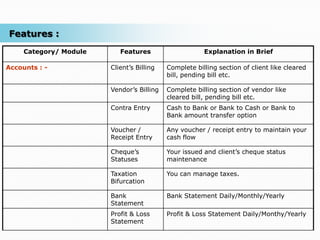
Accounts : -            Client’s Billing   Complete billing section of client like cleared
                                           bill, pending bill etc.

                        Vendor’s Billing   Complete billing section of vendor like
                                           cleared bill, pending bill etc.
                        Contra Entry       Cash to Bank or Bank to Cash or Bank to
                                           Bank amount transfer option

                        Voucher /          Any voucher / receipt entry to maintain your
                        Receipt Entry      cash flow

                        Cheque’s           Your issued and client’s cheque status
                        Statuses           maintenance

                        Taxation           You can manage taxes.
                        Bifurcation

                        Bank               Bank Statement Daily/Monthly/Yearly
                        Statement
                        Profit & Loss      Profit & Loss Statement Daily/Monthy/Yearly
                        Statement
Features :
     Category/ Module      Features                  Explanation in Brief

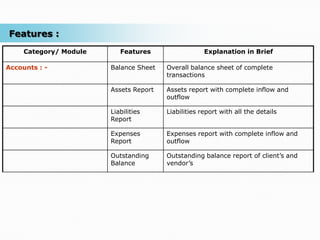
Accounts : -            Balance Sheet   Overall balance sheet of complete
                                        transactions

                        Assets Report   Assets report with complete inflow and
                                        outflow

                        Liabilities     Liabilities report with all the details
                        Report

                        Expenses        Expenses report with complete inflow and
                        Report          outflow

                        Outstanding     Outstanding balance report of client’s and
                        Balance         vendor’s
Features :
     Category/ Module      Features                 Explanation in Brief

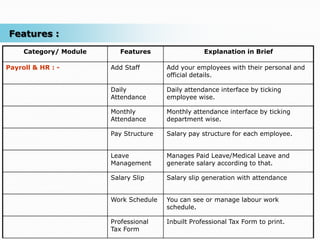
Payroll & HR : -        Add Staff       Add your employees with their personal and
                                        official details.

                        Daily           Daily attendance interface by ticking
                        Attendance      employee wise.

                        Monthly         Monthly attendance interface by ticking
                        Attendance      department wise.

                        Pay Structure   Salary pay structure for each employee.


                        Leave           Manages Paid Leave/Medical Leave and
                        Management      generate salary according to that.

                        Salary Slip     Salary slip generation with attendance


                        Work Schedule   You can see or manage labour work
                                        schedule.

                        Professional    Inbuilt Professional Tax Form to print.
                        Tax Form
Features :
     Category/ Module      Features                   Explanation in Brief

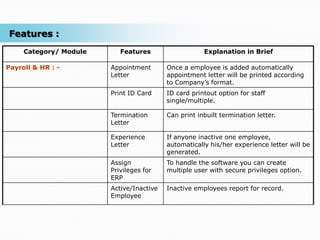
Payroll & HR : -        Appointment       Once a employee is added automatically
                        Letter            appointment letter will be printed according
                                          to Company’s format.
                        Print ID Card     ID card printout option for staff
                                          single/multiple.

                        Termination       Can print inbuilt termination letter.
                        Letter

                        Experience        If anyone inactive one employee,
                        Letter            automatically his/her experience letter will be
                                          generated.
                        Assign            To handle the software you can create
                        Privileges for    multiple user with secure privileges option.
                        ERP
                        Active/Inactive   Inactive employees report for record.
                        Employee
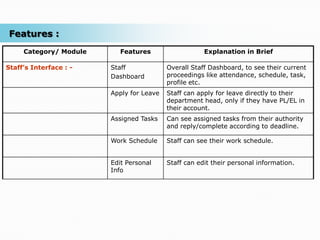
Features :
     Category/ Module      Features                   Explanation in Brief

Staff’s Interface : -   Staff             Overall Staff Dashboard, to see their current
                        Dashboard         proceedings like attendance, schedule, task,
                                          profile etc.
                        Apply for Leave   Staff can apply for leave directly to their
                                          department head, only if they have PL/EL in
                                          their account.
                        Assigned Tasks    Can see assigned tasks from their authority
                                          and reply/complete according to deadline.

                        Work Schedule     Staff can see their work schedule.


                        Edit Personal     Staff can edit their personal information.
                        Info
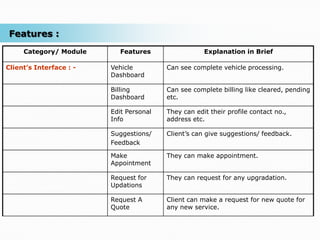
Features :
     Category/ Module       Features                 Explanation in Brief

Client’s Interface : -   Vehicle         Can see complete vehicle processing.
                         Dashboard

                         Billing         Can see complete billing like cleared, pending
                         Dashboard       etc.

                         Edit Personal   They can edit their profile contact no.,
                         Info            address etc.

                         Suggestions/    Client’s can give suggestions/ feedback.
                         Feedback

                         Make            They can make appointment.
                         Appointment

                         Request for     They can request for any upgradation.
                         Updations

                         Request A       Client can make a request for new quote for
                         Quote           any new service.
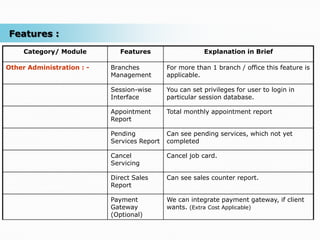
Features :
     Category/ Module         Features                   Explanation in Brief

Other Administration : -   Branches          For more than 1 branch / office this feature is
                           Management        applicable.

                           Session-wise      You can set privileges for user to login in
                           Interface         particular session database.

                           Appointment       Total monthly appointment report
                           Report

                           Pending           Can see pending services, which not yet
                           Services Report   completed

                           Cancel            Cancel job card.
                           Servicing

                           Direct Sales      Can see sales counter report.
                           Report

                           Payment           We can integrate payment gateway, if client
                           Gateway           wants. (Extra Cost Applicable)
                           (Optional)
Email: customercare@mplussoft.com,
  Call: +91 20 6400 1777, +91 90 2180 1777, +91 93 2674 1777
Reach Us: 55/3, Bhairav Nagar, Dhanori Road, Pune – 15 (MH), India

eGarage 2.3

  • 1.
  • 2.
    Agenda  Overview Chart of eGarage 2.3.  Overall Structure  Features in brief  Editions Overview for Different types of Organizations  Pricing  Support
  • 3.
    Overview Chart ofeGarage 2.3 eGarage Office Administration Accounts Payroll & HR Client’s Interface Job Card Client’s Billing Add Staff Vehicle Dashboard Vendor Details Vendor’s Billing Daily Attendance Billing Dashboard Supplier Details Contra Entry Monthly Attendance Edit Personal Info Client Details Voucher/Receipt Entry Pay Structure Suggestions/feedback Stock Maintenance Cheque’s Statuses Leave Management Make Appointment Purchase Order Taxation Bifurcation Salary Slip Request of Updations Challan Details Bank Statement Work Schedule Request a Quote New Appointment Profit & Loss Statement Professional Tax Form Other Administration Client’s Feedback Balance Sheet Appointment Letter Direct Sales Entry Assets Report Print ID Card Branches Management Vehicle / Department Liabilities Report Termination Letter Session-wise Interface SMS/Email Interface Expenses Report Experience Letter Appointment Report Notifications / Popups Outstanding Balance Assign Privileges for ERP Pending Services Report User Privileges Active/Inactive Employee Cancel Servicing Direct Sales Report Staff’s Interface Payment Gateway (Optional) Dashboard Apply for Leave Assigned Task WorkSchedule Edit Personal Info
  • 4.
    Features : Category/ Module Features Explanation in Brief Office Administration : - Job Card Complete Job Details entry with estimated cost / labour / spare parts etc. Vendor Details Complete vendor details with all its personal business and bank data. Supplier Details Complete supplier details with all its personal, business and bank data. Client Details Complete client details with all its personal, business and vehicle data. Stock All types of stock management with Maintenance notifications and popups. Purchase Order Entry of purchase order of any spare parts or assets. Challan Details After PO, challan entry according to that.
  • 5.
    Features : Category/ Module Features Explanation in Brief Office Administration : - New From your panel any corporate can apply for Appointment appointment. Client’s Client can give feedback. Feedback Direct Sales Direct Sales Counter Entry. Entry Vehicle / You can add Vehicle / Working Departments. Department Entry SMS / Email SMS / Email Interface for new enquiries, Interface booking, cab allocated, thank you, feedback. Notifications / Notifications for maintenance, expiring Popups insurance/puc dates, payment etc. User Privileges Can give privileges to user’s for add / update / delete.
  • 6.
    Features : Category/ Module Features Explanation in Brief Accounts : - Client’s Billing Complete billing section of client like cleared bill, pending bill etc. Vendor’s Billing Complete billing section of vendor like cleared bill, pending bill etc. Contra Entry Cash to Bank or Bank to Cash or Bank to Bank amount transfer option Voucher / Any voucher / receipt entry to maintain your Receipt Entry cash flow Cheque’s Your issued and client’s cheque status Statuses maintenance Taxation You can manage taxes. Bifurcation Bank Bank Statement Daily/Monthly/Yearly Statement Profit & Loss Profit & Loss Statement Daily/Monthy/Yearly Statement
  • 7.
    Features : Category/ Module Features Explanation in Brief Accounts : - Balance Sheet Overall balance sheet of complete transactions Assets Report Assets report with complete inflow and outflow Liabilities Liabilities report with all the details Report Expenses Expenses report with complete inflow and Report outflow Outstanding Outstanding balance report of client’s and Balance vendor’s
  • 8.
    Features : Category/ Module Features Explanation in Brief Payroll & HR : - Add Staff Add your employees with their personal and official details. Daily Daily attendance interface by ticking Attendance employee wise. Monthly Monthly attendance interface by ticking Attendance department wise. Pay Structure Salary pay structure for each employee. Leave Manages Paid Leave/Medical Leave and Management generate salary according to that. Salary Slip Salary slip generation with attendance Work Schedule You can see or manage labour work schedule. Professional Inbuilt Professional Tax Form to print. Tax Form
  • 9.
    Features : Category/ Module Features Explanation in Brief Payroll & HR : - Appointment Once a employee is added automatically Letter appointment letter will be printed according to Company’s format. Print ID Card ID card printout option for staff single/multiple. Termination Can print inbuilt termination letter. Letter Experience If anyone inactive one employee, Letter automatically his/her experience letter will be generated. Assign To handle the software you can create Privileges for multiple user with secure privileges option. ERP Active/Inactive Inactive employees report for record. Employee
  • 10.
    Features : Category/ Module Features Explanation in Brief Staff’s Interface : - Staff Overall Staff Dashboard, to see their current Dashboard proceedings like attendance, schedule, task, profile etc. Apply for Leave Staff can apply for leave directly to their department head, only if they have PL/EL in their account. Assigned Tasks Can see assigned tasks from their authority and reply/complete according to deadline. Work Schedule Staff can see their work schedule. Edit Personal Staff can edit their personal information. Info
  • 11.
    Features : Category/ Module Features Explanation in Brief Client’s Interface : - Vehicle Can see complete vehicle processing. Dashboard Billing Can see complete billing like cleared, pending Dashboard etc. Edit Personal They can edit their profile contact no., Info address etc. Suggestions/ Client’s can give suggestions/ feedback. Feedback Make They can make appointment. Appointment Request for They can request for any upgradation. Updations Request A Client can make a request for new quote for Quote any new service.
  • 12.
    Features : Category/ Module Features Explanation in Brief Other Administration : - Branches For more than 1 branch / office this feature is Management applicable. Session-wise You can set privileges for user to login in Interface particular session database. Appointment Total monthly appointment report Report Pending Can see pending services, which not yet Services Report completed Cancel Cancel job card. Servicing Direct Sales Can see sales counter report. Report Payment We can integrate payment gateway, if client Gateway wants. (Extra Cost Applicable) (Optional)
  • 13.
    Email: customercare@mplussoft.com, Call: +91 20 6400 1777, +91 90 2180 1777, +91 93 2674 1777 Reach Us: 55/3, Bhairav Nagar, Dhanori Road, Pune – 15 (MH), India