MUSIC
VIDEO
ASSIGNME
NT 2
Matthew Evans
GUIDANC
E
This template PowerPoint presentation
includes all the relevant elements you
need to cover in your Music Video
Assignment
It is suggested you save this PP in a
different name and share it with your
group so you always have a copy –
some sections require you to delete
the information on the slide and
replace with your own work
Add more pages to each section
where necessary [you should be doing
this!]
Add visuals as you see necessary
This document will be added to as you
progress through the pre-production
phase.
Delete this slide when complete
TASK 1
Idea
Generation and
Research
RESEARCH & IDEA
GENERATION
Select a song/track that you like [or don’t like!]
Generate three ideas for music videos
employing styles, techniques and conventions
that we have looked at in previous sessions.
Explore how you could interpret the song
differently using different methods
You can add any extra info you think is
relevant, images, mind maps, etc
For quick mind maps you could use bubbl.us
to generate these
3 IDEAS
•Different genres of music have different conventions and
typical techniques. For example, rock use fast paced music
videos to match the audio, Long hair, Leather Jackets, Boots,
sometimes Black and white music video, Fringe Jackets and
Motorbikes.
•Camerawork can also vary depending on the music genre.
Some video’s use a low angle to present the artist as an
important figure in the frame, kind of as if they’re looking
down upon you. Faster paced songs also use more camera
movement than slower paced songs a lot of the time.
•Finally, editing can be altered by the music genre as A lot of
modern music video use a fast cut montage where all the
footage is compiled together in order and then cut to the
music. This creates a simple music video that is easy for the
audience to follow, understand and enjoy. Some music
videos use very different types of editing styles where there
will be a high focus on the editing within the music video.
RESEARCH
Watch a selection of videos to get your ideas started,
make note of a minimum of 5 – add extra slides,
screenshot the video and in bullet point note down info
in terms of camera, editing, art design, performance, etc
and how this might link to your production
Hint!
You’ve already done this in
your case study, so you can
summarise that here where
relevant
IRON SKY – PAOLO NUTINI
(SHORT FILM)
The Iron Sky official music video short film uses a technique
of a narrative to connect viewers to the video. The narrative
is of people overcoming mental health issues and finally
being happy through dancing and expressing themselves to
music. At the start of the music video, we are provided with
context of what people experience and suffer from as a
result of previous traumas. We also see one of the
individuals take their own life as their trauma became too
much. However, towards the end of the video we see some
of the same people now happy and overcome of the
troubles they previously faced. We also see throughout this
music video that a lot of the people experiencing mental
heath issues use smoking as a relief method and a way of
escape from their traumas. Very slow/minimal camera
movement is used throughout this music video to fit the
tone and pacing of the song. The video has very minimal
editing and uses a genre convention and style of a fast cut
montage to allow the music video to be easy to watch and
follow to make sure Paolo's point get across to his audience.
SCREAM (FUNK MY LIFE UP) –
PAOLO NUTINI (MUSIC VIDEO)
Again, in this music video, Paolo follows the Genre
Convention of a fast cut montage to make the viewing
experience as easy as possible. This time though, there is
no distinctive narrative for the audience to follow along
with. It just seems to follow a group of dancers throughout
the city they're in. I like the camerawork in this music video,
the subjects are always framed nicely so the composition
just seems to work most of the time, generally the camera
movement is slow throughout the song and focused on
Paolo singing in a close up or focused on the group of
dancers. However, the camera movement also changes
during the chorus to be slightly more fast paced and
incorporates more movement to suit the increased pace of
the song. The editing style is very simple again making the
music video easy to watch and follow but it does make use
of a different colour pallet this time to suit the song better
as it opts for just a greyscale colour pallet. I believe this was
done to suit the time era the director was going for as all
the actors are wearing clothes from the late-mid 1900s.
This video is in the style of a choreographed dance making
it seem fun and enjoyable for viewers.
NEW SHOES – PAOLO NUTINI
(MUSIC VIDEO)
This video takes on a completely new style for Paolo’s
normal music videos as this one is much more heavily
edited than the vast majority of his music videos. At the
start, the music video is edited to be almost like a cartoon,
but then cuts back to normal once we encounter Paolo. This
incorporates a technique of a narrative to provide a story to
the music. This narrative follows Paolo as he feels unwell at
the start of the music video but then his luck is changed for
the better as he gets new shoes. After this, his day-to-day
life seems to become a lot happier and enjoyable. The
camerawork in this music video is really simple as it is
mostly just close ups and medium close ups following
Paolo, but it does work well with this style song as it
provides an easy to follow and enjoyable music video for the
audience and his fans. This video does somewhat follow
genre conventions as it is like a fast cut montage, but the
different style of editing makes this video stand out more
from those typical conventions.
LAST REQUEST – PAOLO
NUTINI (MUSIC VIDEO)
This music video follows Paolo’s usual style and the
typical genre conventions as he uses a fast cut montage
with minimal editing to show his story. The camerawork
in this music video is simple and works well as it has a
slow velocity and minimal movement on the dancing
sections but then, normal velocity and close ups of the
singing sections, focused on Paolo. This works well in my
opinion as it is easy to watch and follow but also flows
nicely and fits together well with the pacing and tone of
the music. This video does not appear to have a
narrative, it is just Paolo trying to get over a previous
relationship in some sort of club but consequently just
feels more alone as seen at the start whilst everyone
besides him is having a good time at the party/club.
Overall, I think that this video’s camerawork is done
really well and complements the song nicely.
POTENTIAL SONGS
List the songs you might want to do
More - K/DA
幸せのシャナナ – Bradio
Flyers – Bradio
POTENTIAL TECHNIQUES
Look at camera, editing and special effects (digital and
physical) techniques you could employ. Look at tutorials
online and on YouTube.
Green screens are often used to record footage for music
videos. This gives the editor of the music video complete
creative freedom as using a green screen allows for only
the subjects in front of the green screen to be seen in
the video. A lot of modern music videos make use of an
editing technique called fast cut montage which Is
basically just a compilation of all recorded footage in
chronological order cut to the beat of the music.
CONVENTIONS YOU PLAN TO
USE
What are the conventions of your musical genre? How
could you use them?
The typical conventions of kpop are lots of
choreographed dancing throughout the music video as
well as a lot of bright saturated colors. I also notice that
a lot the music videos have a large amount of editing and
special effects throughout the video.
MIND MAP OF IDEAS
[SUMMARY OF IDEAS]
Include the mind map you started last week
SUMMARY
5 opportunities of your ideas; what would it allow you to
do? Expand your skills? Refine something you already
know how to do?
•Using a green screen to record footage on can allow me to make the
music video more visually entertaining as I would be able to create a
scene in the background as well as add a variety of effects.
•Using a variety of camera shots means that I would be able to change
the focus between subjects and the scene as close-ups provide a focus
on the subject whereas wide shots provide a much broader view of the
subjects from far away, revealing the scene to the viewer.
•Doing animation for a section of the music video would allow me to
create footage I otherwise might not have been able to record in real
life.
•Using genre conventions of bright colours throughout the music video
could make the video more enjoyable to watch as well as fitting the
KPOP genre.
• Using a fast cut montage for the music video could make the viewing
experience more enjoyable and easier for the audience.
SUMMARY
5 restrictions to your ideas. Think about locations, cast
and personnel. Are any elements of your idea really
difficult? Do you have enough time?
•I don’t think choreographed dancing will be a viable idea for this
project as it would be very time consuming an could be expensive.
Finding people willing to dance in front of the camera could also be
challenging.
•Using a lot of camera movement to follow genre conventions could be
very difficult for me as I have not been using the DLSR cameras for very
long and I might find it difficult to keep the camera steady whilst
moving.
•Doing animation might also not work as it could be very time
consuming to get the desired result as it would be my first time
animating.
•Using a green screen might also not be viable as I would need to find
someone willing to act and dance in front of a camera which could be
challenging.
•Editing the video heavily to follow genre conventions also could be a
challenge as it would be very time consuming.
FINAL IDEA –
ARTIST/TITLE/INFO
Name of track / name of artist
Brief biographical background
Links to other artists
Genre info
FINAL IDEA
Name of Artist: K/DA
Name of Song: More
Links to other Artists:
•BTS
•Blackpink
•EXO
•Twice
•Red Velvet
FINAL IDEA
Bibliography: K/DA is a virtual KPOP-inspired girl group originally
created for video game; League of Legends. American singers Madison
Beer and Jaira Burns and (G)I-dle members Miyeon and Soyeon provide
the voices of Evelynn, Kai'Sa, Ahri, and Akali respectively. K/DA was
developed by Riot Games, the company behind League of Legends, and
unveiled at the 2018 League of Legends World Championship with
an augmented reality live performance of their first song, "Pop/Stars".
A music video of the song uploaded to YouTube subsequently went
viral, surpassing 100 million views in one month, and reaching 400
million views, as well as topping Billboard's World Digital Song Sales
chart. This would be followed up with the release of an EP in 2020,
entitled All Out which featured 5 new songs including the pre-released
single "The Baddest" and the lead single "More" which the later received
a music video with over 100 million views as of July 2021.
Genre Info: K-pop, short for Korean popular music, is a genre of
music originating in South Korea as part of South Korean culture. It is
influenced by styles and genres from around the world, such
as pop, experimental, rock, jazz, gospel, hip
hop, R&B, reggae, electronic dance, folk, country, and classical on top
of its traditional Korean music roots.
FINAL IDEA – TRACK
SUMMARY
Summary/analysis of track [consider meaning, content,
duration, pace and style of the song]
With the song being from the KPOP genre, it is a very upbeat song
meaning that it is also fast paced throughout the vast majority of the
song. This means I will be able to create an impactful music video due
to the continuous beats. The song itself is quite long being just under
4 minutes long (3 minutes and 51 seconds) but keeps its fast-paced
for most of the song. There is only really one slow paced part of the
song from 2:35 to 3:00.
FINAL IDEA – YOUR IDEA
Your creative concept/video synopsis [describe your
interpretation, use of imagery or narrative, genre
conventions, etc]
I would like to make my music video purely of animation. This means
that I will only be able to make around 20 seconds of the music video
in the time period we have for this project. Despite it being such a
short video, it will still require the same amount of work as anyone else
due to the animation taking much longer to create one shot than going
out into the real world and recording it yourself. I plan to use the bright
colours seen in most KPOP songs to follow the genre conventions and
make the video feel like it fits the music and genre.
TASK 2
Pre-production
Assessment
GUIDANC
E:
PRE-
PRODUCT
ION
ASSESSM
ENT
You need to assess the viability of your production and
investigate what is required to enable you to make your
music video
Much of this task is hypothetical, which means you will
need to investigate standard costings for such a
production and apply these to your planned production
considering which equipment you would need and
resources, etc
Resources to support this are in the Pre-production
assessment folder on Blackboard
Delete the questions on each slide and insert your
responses
TITLE OF
PRODUCTION/PRODUC
TION OUTLINE
Summary of intended production
Detail here what you are going to
make and the intended outcome
Detailed breakdown of the music
track chosen and your interpretation
of it [remember the questions in the
workbook, e.g.
pace/mood/tone/structure]
Specific outline your intended
technical/equipment requirements
Include any details that you think
[you could use material from your
pitch]
LOCATIONS
You need to identify locations and plan a recce.
What are the limitations and risks, eg distance, access,
cost, weather? How will you manage this?
I plan to go to an empty street to record footage down
the street, I will then put this footage into Ebsynth to
create a nice simple animation scene too put my
characters into. This will probably be the only real-life
footage I will gather meaning distance access and cos
should not be an issue for me. The only issue to this will
probably be trying to fin an empty street and going on a
clear day so that there is no rain to ruin the electrical
equipment I bring with me.
EQUIPMENT
What do you need? E.g. equipment, resources? Mostly
from college, but who do you need to speak to get this
kit? What is available? When?
Look at equipment hire places, etc
I will require a DSLR camera from college if I do end up
wanting to record a street although I could use my phone
as I doubt the camera quality difference will be viewable
after animation.
FACILITIES
Where will you edit your video? Do you need any other
specialist facilities…?
I will try to edit the majority of the video within school, I
will probably do all of the animation in college as the
software is available to me here. I might do some
composing and special effects at home in After Effects as
it will require a more powerful computer and some 3rd
party plug-ins that aren’t available to me whilst using
After Effects on the college’s Macs.
PERSONNEL
CREW: What is you team? Who is in it? What are each
team members strengths/weaknesses? When are they
available?
CAST: Do you need any external performers? When are
they available? Cost implications? Will you have to feed
them? Transport them?
Other personnel? Is anyone else helping you?
Only myself is involved in this project and I won't have a
crew. My tutors will be helping me learn the basics of
animation as I have never really animated before.
TASK 3.1
Visual Planning
PRE-PRODUCTION:
VISUAL PLANNING
This section is concerned with the visual planning of your
music video
You should use this section to develop the sequencing or your
video, establish the relationship between the visuals and the
track itself and create a structure for you to follow when
filming
It is important that you ‘pre-visualise’ the video before you
make it; it will make filming and production a more
streamlined process
The following tasks are part of your visual planning
 Pre-visualisation and concept boards
 Storyboarding
 Shot list
PRE-
VISUALISATION/CONC
EPT BOARDS
Tool for exploring the direction and visuals
Provides inspiration and information for the “look & feel”
Presents key moments in your video
A means to sketch/plan ideas
Information on colour/lighting
Defining the “mise-en-scene”
Include as much here as you like, but keep it relevant to the
production, the following slides have been left blank for you to
approach in your own way, add more as you need to
Extension suggestion: edit a short sequence of clips that have
inspired or influenced your video [similar to this:
http://io9.com/5941145/this-directors-video-pitch-for-hunger-
games-might-be-better-than-the-real-movie]
STRUCTU
RAL
BREAKDO
WN
Breakdown your track into it basic sections [e.g.
intro, verse, chorus, verse, etc] and apply broad
visual ideas to each section
You can use this as the master template for your
production, then add more shots to each section
when you develop your full visual plan
You should create a slide showing all the sections
of the song, then add a slide for each section with
timings, lyrics, what happens and details on
specific shots
You could storyboard and shot list each section
as you go, to break up the process.
STORYBOAR
DING
Your storyboard should bring your idea to
life
Provide an idea of the sequencing of you
video
Provides a basis for production
Suggested online storyboard creators are:
 https://www.storyboardthat.com
 http://www.pixton.com [very
complicated]
 http://www.storyjumper.com [allows you
to insert your own images]
Alternatively, hand draw or photograph
your storyboard and scan or copy to insert
it onto your slides
There are lots of tips collected together on
Blackboard!
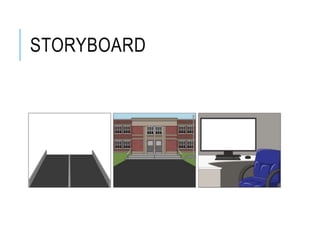
STORYBOARD
SHOT
LIST
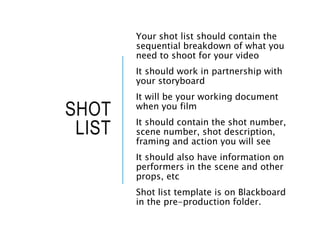
Your shot list should contain the
sequential breakdown of what you
need to shoot for your video
It should work in partnership with
your storyboard
It will be your working document
when you film
It should contain the shot number,
scene number, shot description,
framing and action you will see
It should also have information on
performers in the scene and other
props, etc
Shot list template is on Blackboard
in the pre-production folder.
SHOT LIST
Walking down a street in my local village and recording
the entire street to be the entire background image of
my music video for me then animate some characters to
place into the scene, using the animated footage I have
collected, to be dancers for the music video.
TASK 3.2
Organisational
Planning
PRODUCTION GROUP INFO
Include names, contact info, and defined roles at
difference stages of production, using a table is
suggested
Matt – Videographer, Director, Cinematographer, Editor,
Animator, Visual Effects Supervisor, Camera operator.
LOCATION
INFORMAT
ION
Information and images of your
location[s] for filming
You should have address details,
clearance/permissions for filming,
recce photos and floorplans
[including camera, equipment and
cast/crew layouts]
Where possible, have a plan B
fallback location option
Assess each location for any issues
and suggest solutions
LOCATIONS
Haxby, York
York College, York
RISK
ASSESSM
ENT
Risk Assess each separate filming
location using the table in the
camera H&S PP on Bb as a staring
point
Completing a generic filming
assessment would be a start, then
you can add specialist/site specific
risks as you progress your
production
Remember, a Risk Assessment is an
ongoing document, you should
evaluate if anything changes in
production and when you put
control measures in place
You should add the table to each
call sheet for each location
RISK ASSESSMENT
(Street Name), Haxby: Be careful of moving vehicles.
Don’t cause a hazard to yourself or others by being in
the middle of the road whilst a car is trying to pass,
make sure to move out of the road and restart recording
the footage in the unfortunate event that a car does
come down the street I will be recoding down.
CONTINGENCY
PLANNING
Things go wrong
Your contingency plan is there to give you a
backup or to minimize the effect on
production
You should consider the following areas:
Technical, Location, Personnel and
Organisational areas [about 5 potential issues
for each]
Use the form in pre-production folder on
Blackboard
CONTINGENCY PLAN
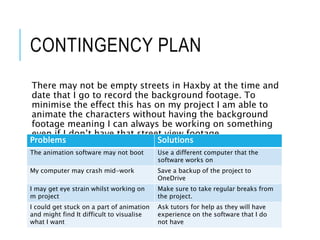
There may not be empty streets in Haxby at the time and
date that I go to record the background footage. To
minimise the effect this has on my project I am able to
animate the characters without having the background
footage meaning I can always be working on something
even if I don’t have that street view footage.
Problems Solutions
The animation software may not boot Use a different computer that the
software works on
My computer may crash mid-work Save a backup of the project to
OneDrive
I may get eye strain whilst working on
m project
Make sure to take regular breaks from
the project.
I could get stuck on a part of animation
and might find It difficult to visualise
what I want
Ask tutors for help as they will have
experience on the software that I do
not have
PRODUCTION SCHEDULE
Your schedule should budget a total of 10 hours for
production, that is for the filming and editing of your
project.
You should plan when you’re filming and how you intend
to use the in class days on your timetable/class schedule
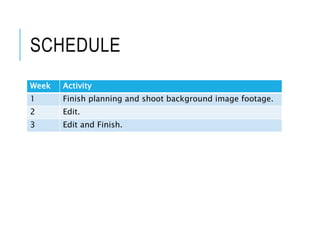
SCHEDULE
Week Activity
1 Finish planning and shoot background image footage.
2 Edit.
3 Edit and Finish.
CLEARANCE AND
PERMISSIONS
Any place you film and anyone you use in the
filming of your video must have a completed form
Blank forms are available for you to complete and
insert here, you can also create your own

Mv production assignment

  • 1.
  • 2.
    GUIDANC E This template PowerPointpresentation includes all the relevant elements you need to cover in your Music Video Assignment It is suggested you save this PP in a different name and share it with your group so you always have a copy – some sections require you to delete the information on the slide and replace with your own work Add more pages to each section where necessary [you should be doing this!] Add visuals as you see necessary This document will be added to as you progress through the pre-production phase. Delete this slide when complete
  • 3.
  • 4.
    RESEARCH & IDEA GENERATION Selecta song/track that you like [or don’t like!] Generate three ideas for music videos employing styles, techniques and conventions that we have looked at in previous sessions. Explore how you could interpret the song differently using different methods You can add any extra info you think is relevant, images, mind maps, etc For quick mind maps you could use bubbl.us to generate these
  • 5.
    3 IDEAS •Different genresof music have different conventions and typical techniques. For example, rock use fast paced music videos to match the audio, Long hair, Leather Jackets, Boots, sometimes Black and white music video, Fringe Jackets and Motorbikes. •Camerawork can also vary depending on the music genre. Some video’s use a low angle to present the artist as an important figure in the frame, kind of as if they’re looking down upon you. Faster paced songs also use more camera movement than slower paced songs a lot of the time. •Finally, editing can be altered by the music genre as A lot of modern music video use a fast cut montage where all the footage is compiled together in order and then cut to the music. This creates a simple music video that is easy for the audience to follow, understand and enjoy. Some music videos use very different types of editing styles where there will be a high focus on the editing within the music video.
  • 6.
    RESEARCH Watch a selectionof videos to get your ideas started, make note of a minimum of 5 – add extra slides, screenshot the video and in bullet point note down info in terms of camera, editing, art design, performance, etc and how this might link to your production Hint! You’ve already done this in your case study, so you can summarise that here where relevant
  • 7.
    IRON SKY –PAOLO NUTINI (SHORT FILM) The Iron Sky official music video short film uses a technique of a narrative to connect viewers to the video. The narrative is of people overcoming mental health issues and finally being happy through dancing and expressing themselves to music. At the start of the music video, we are provided with context of what people experience and suffer from as a result of previous traumas. We also see one of the individuals take their own life as their trauma became too much. However, towards the end of the video we see some of the same people now happy and overcome of the troubles they previously faced. We also see throughout this music video that a lot of the people experiencing mental heath issues use smoking as a relief method and a way of escape from their traumas. Very slow/minimal camera movement is used throughout this music video to fit the tone and pacing of the song. The video has very minimal editing and uses a genre convention and style of a fast cut montage to allow the music video to be easy to watch and follow to make sure Paolo's point get across to his audience.
  • 8.
    SCREAM (FUNK MYLIFE UP) – PAOLO NUTINI (MUSIC VIDEO) Again, in this music video, Paolo follows the Genre Convention of a fast cut montage to make the viewing experience as easy as possible. This time though, there is no distinctive narrative for the audience to follow along with. It just seems to follow a group of dancers throughout the city they're in. I like the camerawork in this music video, the subjects are always framed nicely so the composition just seems to work most of the time, generally the camera movement is slow throughout the song and focused on Paolo singing in a close up or focused on the group of dancers. However, the camera movement also changes during the chorus to be slightly more fast paced and incorporates more movement to suit the increased pace of the song. The editing style is very simple again making the music video easy to watch and follow but it does make use of a different colour pallet this time to suit the song better as it opts for just a greyscale colour pallet. I believe this was done to suit the time era the director was going for as all the actors are wearing clothes from the late-mid 1900s. This video is in the style of a choreographed dance making it seem fun and enjoyable for viewers.
  • 9.
    NEW SHOES –PAOLO NUTINI (MUSIC VIDEO) This video takes on a completely new style for Paolo’s normal music videos as this one is much more heavily edited than the vast majority of his music videos. At the start, the music video is edited to be almost like a cartoon, but then cuts back to normal once we encounter Paolo. This incorporates a technique of a narrative to provide a story to the music. This narrative follows Paolo as he feels unwell at the start of the music video but then his luck is changed for the better as he gets new shoes. After this, his day-to-day life seems to become a lot happier and enjoyable. The camerawork in this music video is really simple as it is mostly just close ups and medium close ups following Paolo, but it does work well with this style song as it provides an easy to follow and enjoyable music video for the audience and his fans. This video does somewhat follow genre conventions as it is like a fast cut montage, but the different style of editing makes this video stand out more from those typical conventions.
  • 10.
    LAST REQUEST –PAOLO NUTINI (MUSIC VIDEO) This music video follows Paolo’s usual style and the typical genre conventions as he uses a fast cut montage with minimal editing to show his story. The camerawork in this music video is simple and works well as it has a slow velocity and minimal movement on the dancing sections but then, normal velocity and close ups of the singing sections, focused on Paolo. This works well in my opinion as it is easy to watch and follow but also flows nicely and fits together well with the pacing and tone of the music. This video does not appear to have a narrative, it is just Paolo trying to get over a previous relationship in some sort of club but consequently just feels more alone as seen at the start whilst everyone besides him is having a good time at the party/club. Overall, I think that this video’s camerawork is done really well and complements the song nicely.
  • 11.
    POTENTIAL SONGS List thesongs you might want to do More - K/DA 幸せのシャナナ – Bradio Flyers – Bradio
  • 12.
    POTENTIAL TECHNIQUES Look atcamera, editing and special effects (digital and physical) techniques you could employ. Look at tutorials online and on YouTube. Green screens are often used to record footage for music videos. This gives the editor of the music video complete creative freedom as using a green screen allows for only the subjects in front of the green screen to be seen in the video. A lot of modern music videos make use of an editing technique called fast cut montage which Is basically just a compilation of all recorded footage in chronological order cut to the beat of the music.
  • 13.
    CONVENTIONS YOU PLANTO USE What are the conventions of your musical genre? How could you use them? The typical conventions of kpop are lots of choreographed dancing throughout the music video as well as a lot of bright saturated colors. I also notice that a lot the music videos have a large amount of editing and special effects throughout the video.
  • 14.
    MIND MAP OFIDEAS [SUMMARY OF IDEAS] Include the mind map you started last week
  • 15.
    SUMMARY 5 opportunities ofyour ideas; what would it allow you to do? Expand your skills? Refine something you already know how to do? •Using a green screen to record footage on can allow me to make the music video more visually entertaining as I would be able to create a scene in the background as well as add a variety of effects. •Using a variety of camera shots means that I would be able to change the focus between subjects and the scene as close-ups provide a focus on the subject whereas wide shots provide a much broader view of the subjects from far away, revealing the scene to the viewer. •Doing animation for a section of the music video would allow me to create footage I otherwise might not have been able to record in real life. •Using genre conventions of bright colours throughout the music video could make the video more enjoyable to watch as well as fitting the KPOP genre. • Using a fast cut montage for the music video could make the viewing experience more enjoyable and easier for the audience.
  • 16.
    SUMMARY 5 restrictions toyour ideas. Think about locations, cast and personnel. Are any elements of your idea really difficult? Do you have enough time? •I don’t think choreographed dancing will be a viable idea for this project as it would be very time consuming an could be expensive. Finding people willing to dance in front of the camera could also be challenging. •Using a lot of camera movement to follow genre conventions could be very difficult for me as I have not been using the DLSR cameras for very long and I might find it difficult to keep the camera steady whilst moving. •Doing animation might also not work as it could be very time consuming to get the desired result as it would be my first time animating. •Using a green screen might also not be viable as I would need to find someone willing to act and dance in front of a camera which could be challenging. •Editing the video heavily to follow genre conventions also could be a challenge as it would be very time consuming.
  • 17.
    FINAL IDEA – ARTIST/TITLE/INFO Nameof track / name of artist Brief biographical background Links to other artists Genre info
  • 18.
    FINAL IDEA Name ofArtist: K/DA Name of Song: More Links to other Artists: •BTS •Blackpink •EXO •Twice •Red Velvet
  • 19.
    FINAL IDEA Bibliography: K/DAis a virtual KPOP-inspired girl group originally created for video game; League of Legends. American singers Madison Beer and Jaira Burns and (G)I-dle members Miyeon and Soyeon provide the voices of Evelynn, Kai'Sa, Ahri, and Akali respectively. K/DA was developed by Riot Games, the company behind League of Legends, and unveiled at the 2018 League of Legends World Championship with an augmented reality live performance of their first song, "Pop/Stars". A music video of the song uploaded to YouTube subsequently went viral, surpassing 100 million views in one month, and reaching 400 million views, as well as topping Billboard's World Digital Song Sales chart. This would be followed up with the release of an EP in 2020, entitled All Out which featured 5 new songs including the pre-released single "The Baddest" and the lead single "More" which the later received a music video with over 100 million views as of July 2021. Genre Info: K-pop, short for Korean popular music, is a genre of music originating in South Korea as part of South Korean culture. It is influenced by styles and genres from around the world, such as pop, experimental, rock, jazz, gospel, hip hop, R&B, reggae, electronic dance, folk, country, and classical on top of its traditional Korean music roots.
  • 20.
    FINAL IDEA –TRACK SUMMARY Summary/analysis of track [consider meaning, content, duration, pace and style of the song] With the song being from the KPOP genre, it is a very upbeat song meaning that it is also fast paced throughout the vast majority of the song. This means I will be able to create an impactful music video due to the continuous beats. The song itself is quite long being just under 4 minutes long (3 minutes and 51 seconds) but keeps its fast-paced for most of the song. There is only really one slow paced part of the song from 2:35 to 3:00.
  • 21.
    FINAL IDEA –YOUR IDEA Your creative concept/video synopsis [describe your interpretation, use of imagery or narrative, genre conventions, etc] I would like to make my music video purely of animation. This means that I will only be able to make around 20 seconds of the music video in the time period we have for this project. Despite it being such a short video, it will still require the same amount of work as anyone else due to the animation taking much longer to create one shot than going out into the real world and recording it yourself. I plan to use the bright colours seen in most KPOP songs to follow the genre conventions and make the video feel like it fits the music and genre.
  • 22.
  • 23.
    GUIDANC E: PRE- PRODUCT ION ASSESSM ENT You need toassess the viability of your production and investigate what is required to enable you to make your music video Much of this task is hypothetical, which means you will need to investigate standard costings for such a production and apply these to your planned production considering which equipment you would need and resources, etc Resources to support this are in the Pre-production assessment folder on Blackboard Delete the questions on each slide and insert your responses
  • 24.
    TITLE OF PRODUCTION/PRODUC TION OUTLINE Summaryof intended production Detail here what you are going to make and the intended outcome Detailed breakdown of the music track chosen and your interpretation of it [remember the questions in the workbook, e.g. pace/mood/tone/structure] Specific outline your intended technical/equipment requirements Include any details that you think [you could use material from your pitch]
  • 25.
    LOCATIONS You need toidentify locations and plan a recce. What are the limitations and risks, eg distance, access, cost, weather? How will you manage this? I plan to go to an empty street to record footage down the street, I will then put this footage into Ebsynth to create a nice simple animation scene too put my characters into. This will probably be the only real-life footage I will gather meaning distance access and cos should not be an issue for me. The only issue to this will probably be trying to fin an empty street and going on a clear day so that there is no rain to ruin the electrical equipment I bring with me.
  • 26.
    EQUIPMENT What do youneed? E.g. equipment, resources? Mostly from college, but who do you need to speak to get this kit? What is available? When? Look at equipment hire places, etc I will require a DSLR camera from college if I do end up wanting to record a street although I could use my phone as I doubt the camera quality difference will be viewable after animation.
  • 27.
    FACILITIES Where will youedit your video? Do you need any other specialist facilities…? I will try to edit the majority of the video within school, I will probably do all of the animation in college as the software is available to me here. I might do some composing and special effects at home in After Effects as it will require a more powerful computer and some 3rd party plug-ins that aren’t available to me whilst using After Effects on the college’s Macs.
  • 28.
    PERSONNEL CREW: What isyou team? Who is in it? What are each team members strengths/weaknesses? When are they available? CAST: Do you need any external performers? When are they available? Cost implications? Will you have to feed them? Transport them? Other personnel? Is anyone else helping you? Only myself is involved in this project and I won't have a crew. My tutors will be helping me learn the basics of animation as I have never really animated before.
  • 29.
  • 30.
    PRE-PRODUCTION: VISUAL PLANNING This sectionis concerned with the visual planning of your music video You should use this section to develop the sequencing or your video, establish the relationship between the visuals and the track itself and create a structure for you to follow when filming It is important that you ‘pre-visualise’ the video before you make it; it will make filming and production a more streamlined process The following tasks are part of your visual planning  Pre-visualisation and concept boards  Storyboarding  Shot list
  • 31.
    PRE- VISUALISATION/CONC EPT BOARDS Tool forexploring the direction and visuals Provides inspiration and information for the “look & feel” Presents key moments in your video A means to sketch/plan ideas Information on colour/lighting Defining the “mise-en-scene” Include as much here as you like, but keep it relevant to the production, the following slides have been left blank for you to approach in your own way, add more as you need to Extension suggestion: edit a short sequence of clips that have inspired or influenced your video [similar to this: http://io9.com/5941145/this-directors-video-pitch-for-hunger- games-might-be-better-than-the-real-movie]
  • 32.
    STRUCTU RAL BREAKDO WN Breakdown your trackinto it basic sections [e.g. intro, verse, chorus, verse, etc] and apply broad visual ideas to each section You can use this as the master template for your production, then add more shots to each section when you develop your full visual plan You should create a slide showing all the sections of the song, then add a slide for each section with timings, lyrics, what happens and details on specific shots You could storyboard and shot list each section as you go, to break up the process.
  • 33.
    STORYBOAR DING Your storyboard shouldbring your idea to life Provide an idea of the sequencing of you video Provides a basis for production Suggested online storyboard creators are:  https://www.storyboardthat.com  http://www.pixton.com [very complicated]  http://www.storyjumper.com [allows you to insert your own images] Alternatively, hand draw or photograph your storyboard and scan or copy to insert it onto your slides There are lots of tips collected together on Blackboard!
  • 34.
  • 35.
    SHOT LIST Your shot listshould contain the sequential breakdown of what you need to shoot for your video It should work in partnership with your storyboard It will be your working document when you film It should contain the shot number, scene number, shot description, framing and action you will see It should also have information on performers in the scene and other props, etc Shot list template is on Blackboard in the pre-production folder.
  • 36.
    SHOT LIST Walking downa street in my local village and recording the entire street to be the entire background image of my music video for me then animate some characters to place into the scene, using the animated footage I have collected, to be dancers for the music video.
  • 37.
  • 38.
    PRODUCTION GROUP INFO Includenames, contact info, and defined roles at difference stages of production, using a table is suggested Matt – Videographer, Director, Cinematographer, Editor, Animator, Visual Effects Supervisor, Camera operator.
  • 39.
    LOCATION INFORMAT ION Information and imagesof your location[s] for filming You should have address details, clearance/permissions for filming, recce photos and floorplans [including camera, equipment and cast/crew layouts] Where possible, have a plan B fallback location option Assess each location for any issues and suggest solutions
  • 40.
  • 41.
    RISK ASSESSM ENT Risk Assess eachseparate filming location using the table in the camera H&S PP on Bb as a staring point Completing a generic filming assessment would be a start, then you can add specialist/site specific risks as you progress your production Remember, a Risk Assessment is an ongoing document, you should evaluate if anything changes in production and when you put control measures in place You should add the table to each call sheet for each location
  • 42.
    RISK ASSESSMENT (Street Name),Haxby: Be careful of moving vehicles. Don’t cause a hazard to yourself or others by being in the middle of the road whilst a car is trying to pass, make sure to move out of the road and restart recording the footage in the unfortunate event that a car does come down the street I will be recoding down.
  • 43.
    CONTINGENCY PLANNING Things go wrong Yourcontingency plan is there to give you a backup or to minimize the effect on production You should consider the following areas: Technical, Location, Personnel and Organisational areas [about 5 potential issues for each] Use the form in pre-production folder on Blackboard
  • 44.
    CONTINGENCY PLAN There maynot be empty streets in Haxby at the time and date that I go to record the background footage. To minimise the effect this has on my project I am able to animate the characters without having the background footage meaning I can always be working on something even if I don’t have that street view footage. Problems Solutions The animation software may not boot Use a different computer that the software works on My computer may crash mid-work Save a backup of the project to OneDrive I may get eye strain whilst working on m project Make sure to take regular breaks from the project. I could get stuck on a part of animation and might find It difficult to visualise what I want Ask tutors for help as they will have experience on the software that I do not have
  • 45.
    PRODUCTION SCHEDULE Your scheduleshould budget a total of 10 hours for production, that is for the filming and editing of your project. You should plan when you’re filming and how you intend to use the in class days on your timetable/class schedule
  • 46.
    SCHEDULE Week Activity 1 Finishplanning and shoot background image footage. 2 Edit. 3 Edit and Finish.
  • 47.
    CLEARANCE AND PERMISSIONS Any placeyou film and anyone you use in the filming of your video must have a completed form Blank forms are available for you to complete and insert here, you can also create your own