MULTIMODAL, MULTISENSORY
INTERACTION FOR MIXED
REALITY
Mark Billinghurst
September 20th 2018
Who am I?
1986 1990 1994
BCMS (Hons)
Waikato
MPhil.
Waikato
PhD (EE)
Univ. Washington
1992
HIT Lab (Univ. Wash)
Virtual Reality
2002
ARToolKit
MagicBook
SharedSpace
MIT Media Lab
BT Labs
Timeline
2013
ARToolWorks (CEO)
2016
Univ. South
Australia
Nokia
HUT
Google
Glass
Envisage AR (CEO)
SuperVentures
Director, HIT Lab NZ (NZ)
2002 20092005
AR Tennis
AR Advertising Empathic
Computing
AR Conf. CityViewAR
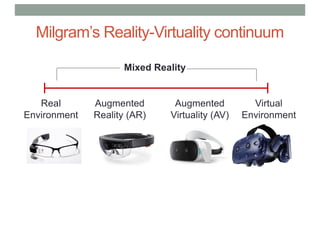
Milgram’s Reality-Virtuality continuum
Mixed Reality
Reality - Virtuality (RV) Continuum
Real
Environment
Augmented
Reality (AR)
Augmented
Virtuality (AV)
Virtual
Environment
"...anywhere between the extrema of the virtuality continuum."
P. Milgram and A. F. Kishino, Taxonomy of Mixed Reality Visual Displays
IEICE Transactions on Information and Systems, E77-D(12), pp. 1321-1329, 1994.
Mixed Reality
Real
Environment
Augmented
Reality (AR)
Augmented
Virtuality (AV)
Virtual
Environment
Milgram’s Reality-Virtuality continuum
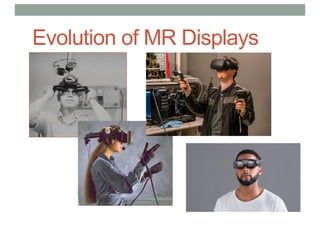
Evolution of MR Displays
Interaction
1968 2018
User Interaction with MR Displays
• Headworn
• Handheld controller
• Head pose, touch
• Gesture, speech
• Handheld
• Touch, stylus, button
• Device motion
Multisensory Input
Natural Interaction Modalities
• Speech
• Gesture
• Touch
• Gaze
• Body motion
• Autonomic
• Etc..
Natural Gesture
• Freehand gesture input
• Depth sensors for gesture capture
• Move beyond simple pointing
• Rich two handed gestures
• Eg Microsoft Research Hand Tracker
• 3D hand tracking, 30 fps, single sensor
• Commercial Systems
• Meta, MS Hololens, Occulus, Intel, etc
Sharp, T., Keskin, C., Robertson, D., Taylor, J., Shotton, J., Leichter, D. K. C. R. I., ... & Izadi, S.
(2015, April). Accurate, Robust, and Flexible Real-time Hand Tracking. In Proc. CHI (Vol. 8).
https://www.youtube.com/watch?v=QTz1zQAnMcU
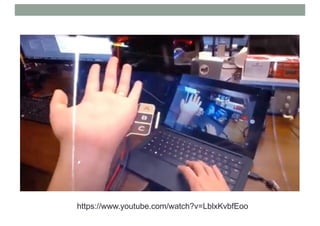
https://www.youtube.com/watch?v=LblxKvbfEoo
https://www.youtube.com/watch?v=635PVGicxng
Multi-Scale Gesture
• Combine different gesture types
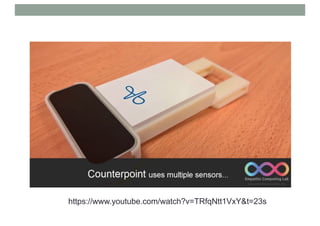
• In-air gestures – natural but imprecise
• Micro-gesture – fine scale gestures
• Gross motion + fine tuning interaction
Ens, B., Quigley, A., Yeo, H. S., Irani, P., Piumsomboon, T., & Billinghurst, M. (2018). Counterpoint: Exploring
Mixed-Scale Gesture Interaction for AR Applications. In Extended Abstracts of the 2018 CHI Conference on
Human Factors in Computing Systems (p. LBW120). ACM.
https://www.youtube.com/watch?v=TRfqNtt1VxY&t=23s
What Gesture Do People Want to Use?
• Limitations of Previous work in AR
• Limited range of gestures
• Gestures designed for optimal recognition
• Gestures studied as add-on to speech
• Solution – elicit desired gestures from users
• Eg. Gestures for surface computing [Wobbrock]
• Previous work in unistroke getsures, mobile
gestures
User Defined Gesture Study
• Use AR view
• HMD + AR tracking
• Present AR animations
• 40 tasks in six categories
• Editing, transforms, menu, etc.
• Ask users to produce
gestures causing animations
• Record gesture (video, depth)
Piumsomboon, T., Clark, A., Billinghurst, M., & Cockburn, A. (2013). User-defined gestures for
augmented reality. In CHI'13 Extended Abstracts on Human Factors in Computing Systems
Data Recorded
• 20 participants
• Gestures recorded (video, depth data)
• 800 gestures from 40 tasks
• Subjective rankings
• Likert ranking of goodness, ease of use
• Think aloud transcripts
Results
• Gestures grouped according to similarity (320)
• 44 consensus (62% all gestures), 11 poses seen
Lessons Learned
• AR animation can elicit desired gestures
• For some tasks there is a high degree of
similarity in user defined gestures
• Especially command gestures (eg Open), select
• Less agreement in manipulation gestures
• Move (40%), rotate (30%), grouping (10%)
• Small portion of two handed gestures (22%)
• Scaling, group selection
Multimodal Input
• Combine gesture and speech input
• Gesture good for qualitative input
• Speech good for quantitative input
• Support combined commands
• “Put that there” + pointing
• Eg HIT Lab NZ multimodal input
• 3D hand tracking, speech
• Multimodal fusion module
• Complete tasks faster with MMI, less errors
Billinghurst, M., Piumsomboon, T., & Bai, H. (2014). Hands in Space: Gesture Interaction with
Augmented-Reality Interfaces. IEEE computer graphics and applications, (1), 77-80.
Gaze Interaction
• Eye tracking in MR displays
• Commercially available
• Fast/robust
• What type of interaction?
• Conscious vs. unconscious interaction
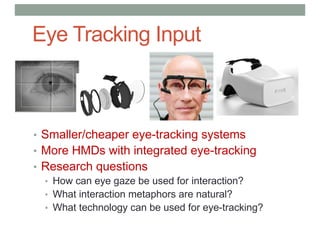
Eye Tracking Input
• Smaller/cheaper eye-tracking systems
• More HMDs with integrated eye-tracking
• Research questions
• How can eye gaze be used for interaction?
• What interaction metaphors are natural?
• What technology can be used for eye-tracking?
Eye Gaze Interaction Methods
• Gaze for interaction
• Implicit vs. explicit input
• Exploring different gaze interaction
• Duo reticles – use eye saccade input
• Radial pursuit – use smooth pursuit motion
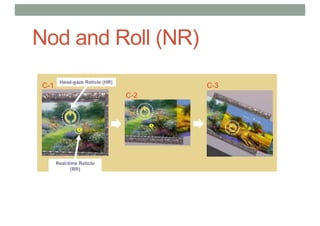
• Nod and roll – use the vestibular ocular reflex
• Hardware
• HTC Vive + Pupil Labs integrated eye-tracking
• User study to compare between methods for 3DUI
Piumsomboon, T., Lee, G., Lindeman, R. W., & Billinghurst, M. (2017, March).
Exploring natural eye-gaze-based interaction for immersive virtual reality. In 3D User
Interfaces (3DUI), 2017 IEEE Symposium on (pp. 36-39). IEEE.
Duo-Reticles (DR)
Inertial Reticle (IR)
Real-time Reticle (RR) or Eye-gaze Reticle (original
name)
A-1
As RR and IR are aligned,
alignment time counts
down
A-2 A-3
Selection completed
Radial Pursuit (RP)
B-1
Real-time Reticle
(RR)
B-2 B-3 B-4
𝑑"#$ = min 𝑑), 𝑑+, … , 𝑑- , 𝑑# =	∑ |𝑝(𝑖)5	 −	𝑝′5	 |$
5859:9;9<=
Nod and Roll (NR)
C-2
C-1
Head-gaze Reticle (HR)
Real-time Reticle
(RR)
C-3
https://www.youtube.com/watch?v=EpCGqxkmBKE
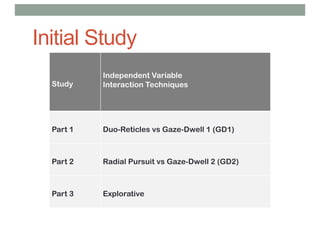
Initial Study
Study
Independent Variable
Interaction Techniques
Part 1 Duo-Reticles vs Gaze-Dwell 1 (GD1)
Part 2 Radial Pursuit vs Gaze-Dwell 2 (GD2)
Part 3 Explorative
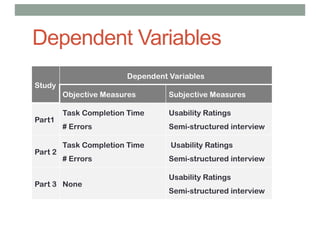
Dependent Variables
Study
Dependent Variables
Objective Measures Subjective Measures
Part1
Task Completion Time
# Errors
Usability Ratings
Semi-structured interview
Part 2
Task Completion Time
# Errors
Usability Ratings
Semi-structured interview
Part 3 None
Usability Ratings
Semi-structured interview
Usability Ratings
33
Cond Median p Cond Median p Cond Median
GD1 5 GD2 5
DR 5 RP 5
GD1 5 GD2 5
DR 4 RP 5
GD1 5 GD2 5
DR 5 RP 5
GD1 5 GD2 5
DR 5 RP 6
GD1 6 GD2 6
DR 6 RP 6
GD1 6 GD2 6
DR 6 RP 6
GD1 5 GD2 5
DR 6 RP 4
GD1 3 GD2 2
DR 2 RP 3
GD1 2 GD2 3
DR 6 RP 5
1 2 3 4 5 6 7
I prefered this technique 0.02 0.12
I felt tired using it 0.09 0.03 NR 4
It was frustrating to use 0.14 0.30 NR 3
It was fun to use 0.14 0.07 NR 6
I need to concentrate to use it 0.33 0.09 NR 5
It was easy for me to use 0.07 0.07 NR 5
I felt satisfied using it 0.14 0.03 NR 5
It felt natural to use 0.17 0.07 NR 4
I could interact precisely 0.23 0.17 NR 4
PART 1 PART 2 PART 3
Frequencies Frequencies Frequencies
• No performance difference (as expected)
• Most participants preferred Duo-Reticles over Gaze-Dwell 1
• Radial Pursuit was more satisfying and less fatigue than Gaze-Dwell 2
Gaze Summary
• Three novel eye-gaze-based interaction
techniques inspired by natural eye movements
• An initial study found positive results supporting
our approaches where our techniques had
similar performance with Gaze-Dwell, but
superior user experience
• Continue to apply the same principles to improve
user experience using eye gaze for immersive
VR.
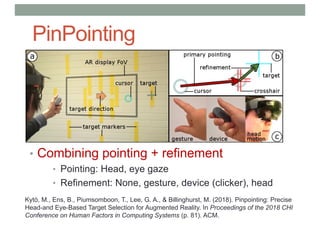
PinPointing
• Combining pointing + refinement
• Pointing: Head, eye gaze
• Refinement: None, gesture, device (clicker), head
Kytö, M., Ens, B., Piumsomboon, T., Lee, G. A., & Billinghurst, M. (2018). Pinpointing: Precise
Head-and Eye-Based Target Selection for Augmented Reality. In Proceedings of the 2018 CHI
Conference on Human Factors in Computing Systems (p. 81). ACM.
Multimodal Input Modes
https://www.youtube.com/watch?v=q9cbAfxKAPI
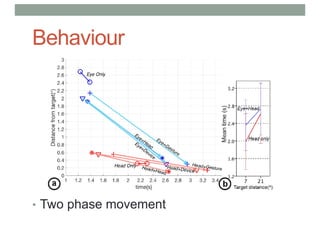
Behaviour
• Two phase movement
Results - time
Results - accuracy
Results - accuracy
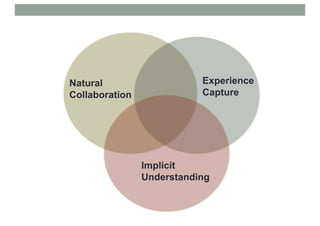
Natural
Collaboration
Implicit
Understanding
Experience
Capture
Natural
Collaboration
Implicit
Understanding
Experience
Capture
Empathic
Computing
Empathy
“Seeing with the Eyes of another,
Listening with the Ears of another,
and Feeling with the Heart of another..”
Alfred Adler
Lab Research Focus
Can we develop systems
that allow us to share what
we are seeing, hearing and
feeling with others?
Piumsomboon, T., Lee, Y., Lee, G. A., Dey, A., & Billinghurst, M. (2017). Empathic
Mixed Reality: Sharing What You Feel and Interacting with What You See. In Ubiquitous
Virtual Reality (ISUVR), 2017 International Symposium on (pp. 38-41). IEEE.
Using AR/VR/Wearables for Empathy
• Remove technology barriers
• Enhance communication
• Change perspective
• Share experiences
• Enhance interaction in real world
Example Projects
• Remote collaboration in Wearable AR
• Sharing of non-verbal cues (gaze, pointing, face expression)
• Shared Empathic VR experiences
• Use VR to put a viewer inside the players view
• Measuring emotion
• Detecting emotion from heart rate, GSR, eye gaze, etc.
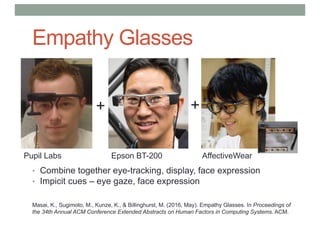
Empathy Glasses
• Combine together eye-tracking, display, face expression
• Impicit cues – eye gaze, face expression
++
Pupil Labs Epson BT-200 AffectiveWear
Masai, K., Sugimoto, M., Kunze, K., & Billinghurst, M. (2016, May). Empathy Glasses. In Proceedings of
the 34th Annual ACM Conference Extended Abstracts on Human Factors in Computing Systems. ACM.
Remote Collboration
• Eye gaze pointer and remote pointing
• Face expression display
• Implicit cues for remote collaboration
Demo Video
https://www.youtube.com/watch?v=CdgWVDbMwp4&t=6s
Task Performance
• Performance Time (seconds)
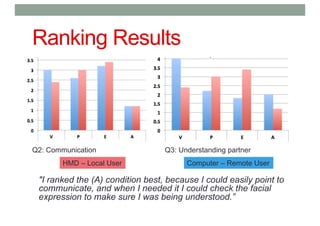
Ranking Results
"I ranked the (A) condition best, because I could easily point to
communicate, and when I needed it I could check the facial
expression to make sure I was being understood.”
Q2: Communication Q3: Understanding partner
HMD – Local User Computer – Remote User
Shared Sphere – 360 Video Sharing
Shared
Live 360 Video
Host User Guest User
Lee, G. A., Teo, T., Kim, S., & Billinghurst, M. (2017). Mixed reality collaboration
through sharing a live panorama. In SIGGRAPH Asia 2017 Mobile Graphics &
Interactive Applications (p. 14). ACM.
https://www.youtube.com/watch?v=q_giuLot76k
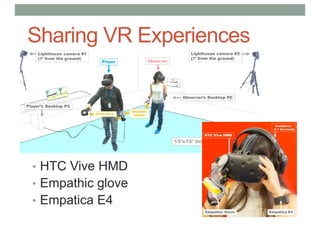
Sharing VR Experiences
• HTC Vive HMD
• Empathic glove
• Empatica E4
VR Environments
• Butterfly World: calm scene, collect butterflies
• Zombie Attack: scary scene, fighting zombies
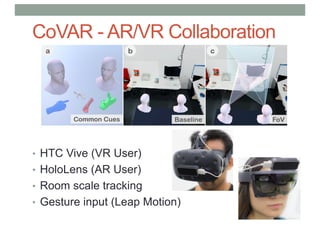
CoVAR - AR/VR Collaboration
• HTC Vive (VR User)
• HoloLens (AR User)
• Room scale tracking
• Gesture input (Leap Motion)
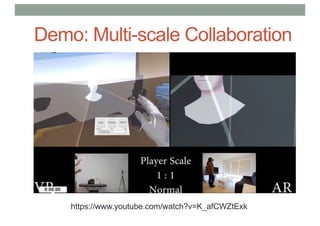
Demo: Multi-scale Collaboration
https://www.youtube.com/watch?v=K_afCWZtExk
AR and VR for Empathic Computing
• VR systems are ideal for trying experiences:
• Strong story telling medium
• Provide total immersion/3D experience
• Easy to change virtual body scale and representation
• AR systems are idea for live sharing:
• Allow overlay on real world view/can share viewpoints
• Support remote annotation/communication
• Enhance real world task
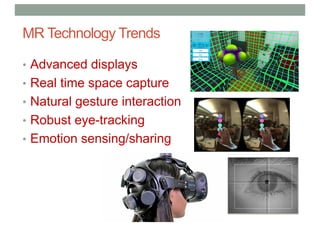
MR Technology Trends
• Advanced displays
• Real time space capture
• Natural gesture interaction
• Robust eye-tracking
• Emotion sensing/sharing
MR Technology Trends
• Advanced displays
• Real time space capture
• Natural gesture interaction
• Robust eye-tracking
• Emotion sensing/sharing
Empathic
Tele-Existence
Empathic Tele-Existence
• Move from Observer to Participant
• Explicit to Implicit communication
• Experiential collaboration – doing together
www.empathiccomputing.org
@marknb00
mark.billinghurst@auckland.ac.nz

Multimodal Multi-sensory Interaction for Mixed Reality

  • 1.
    MULTIMODAL, MULTISENSORY INTERACTION FORMIXED REALITY Mark Billinghurst September 20th 2018
  • 3.
    Who am I? 19861990 1994 BCMS (Hons) Waikato MPhil. Waikato PhD (EE) Univ. Washington 1992 HIT Lab (Univ. Wash) Virtual Reality 2002 ARToolKit MagicBook SharedSpace MIT Media Lab BT Labs
  • 4.
    Timeline 2013 ARToolWorks (CEO) 2016 Univ. South Australia Nokia HUT Google Glass EnvisageAR (CEO) SuperVentures Director, HIT Lab NZ (NZ) 2002 20092005 AR Tennis AR Advertising Empathic Computing AR Conf. CityViewAR
  • 5.
    Milgram’s Reality-Virtuality continuum MixedReality Reality - Virtuality (RV) Continuum Real Environment Augmented Reality (AR) Augmented Virtuality (AV) Virtual Environment "...anywhere between the extrema of the virtuality continuum." P. Milgram and A. F. Kishino, Taxonomy of Mixed Reality Visual Displays IEICE Transactions on Information and Systems, E77-D(12), pp. 1321-1329, 1994.
  • 6.
    Mixed Reality Real Environment Augmented Reality (AR) Augmented Virtuality(AV) Virtual Environment Milgram’s Reality-Virtuality continuum
  • 7.
  • 8.
  • 9.
    User Interaction withMR Displays • Headworn • Handheld controller • Head pose, touch • Gesture, speech • Handheld • Touch, stylus, button • Device motion
  • 10.
  • 11.
    Natural Interaction Modalities •Speech • Gesture • Touch • Gaze • Body motion • Autonomic • Etc..
  • 12.
    Natural Gesture • Freehandgesture input • Depth sensors for gesture capture • Move beyond simple pointing • Rich two handed gestures • Eg Microsoft Research Hand Tracker • 3D hand tracking, 30 fps, single sensor • Commercial Systems • Meta, MS Hololens, Occulus, Intel, etc Sharp, T., Keskin, C., Robertson, D., Taylor, J., Shotton, J., Leichter, D. K. C. R. I., ... & Izadi, S. (2015, April). Accurate, Robust, and Flexible Real-time Hand Tracking. In Proc. CHI (Vol. 8).
  • 13.
  • 14.
  • 15.
  • 16.
    Multi-Scale Gesture • Combinedifferent gesture types • In-air gestures – natural but imprecise • Micro-gesture – fine scale gestures • Gross motion + fine tuning interaction Ens, B., Quigley, A., Yeo, H. S., Irani, P., Piumsomboon, T., & Billinghurst, M. (2018). Counterpoint: Exploring Mixed-Scale Gesture Interaction for AR Applications. In Extended Abstracts of the 2018 CHI Conference on Human Factors in Computing Systems (p. LBW120). ACM.
  • 17.
  • 18.
    What Gesture DoPeople Want to Use? • Limitations of Previous work in AR • Limited range of gestures • Gestures designed for optimal recognition • Gestures studied as add-on to speech • Solution – elicit desired gestures from users • Eg. Gestures for surface computing [Wobbrock] • Previous work in unistroke getsures, mobile gestures
  • 19.
    User Defined GestureStudy • Use AR view • HMD + AR tracking • Present AR animations • 40 tasks in six categories • Editing, transforms, menu, etc. • Ask users to produce gestures causing animations • Record gesture (video, depth) Piumsomboon, T., Clark, A., Billinghurst, M., & Cockburn, A. (2013). User-defined gestures for augmented reality. In CHI'13 Extended Abstracts on Human Factors in Computing Systems
  • 20.
    Data Recorded • 20participants • Gestures recorded (video, depth data) • 800 gestures from 40 tasks • Subjective rankings • Likert ranking of goodness, ease of use • Think aloud transcripts
  • 21.
    Results • Gestures groupedaccording to similarity (320) • 44 consensus (62% all gestures), 11 poses seen
  • 22.
    Lessons Learned • ARanimation can elicit desired gestures • For some tasks there is a high degree of similarity in user defined gestures • Especially command gestures (eg Open), select • Less agreement in manipulation gestures • Move (40%), rotate (30%), grouping (10%) • Small portion of two handed gestures (22%) • Scaling, group selection
  • 23.
    Multimodal Input • Combinegesture and speech input • Gesture good for qualitative input • Speech good for quantitative input • Support combined commands • “Put that there” + pointing • Eg HIT Lab NZ multimodal input • 3D hand tracking, speech • Multimodal fusion module • Complete tasks faster with MMI, less errors Billinghurst, M., Piumsomboon, T., & Bai, H. (2014). Hands in Space: Gesture Interaction with Augmented-Reality Interfaces. IEEE computer graphics and applications, (1), 77-80.
  • 24.
    Gaze Interaction • Eyetracking in MR displays • Commercially available • Fast/robust • What type of interaction? • Conscious vs. unconscious interaction
  • 25.
    Eye Tracking Input •Smaller/cheaper eye-tracking systems • More HMDs with integrated eye-tracking • Research questions • How can eye gaze be used for interaction? • What interaction metaphors are natural? • What technology can be used for eye-tracking?
  • 26.
    Eye Gaze InteractionMethods • Gaze for interaction • Implicit vs. explicit input • Exploring different gaze interaction • Duo reticles – use eye saccade input • Radial pursuit – use smooth pursuit motion • Nod and roll – use the vestibular ocular reflex • Hardware • HTC Vive + Pupil Labs integrated eye-tracking • User study to compare between methods for 3DUI Piumsomboon, T., Lee, G., Lindeman, R. W., & Billinghurst, M. (2017, March). Exploring natural eye-gaze-based interaction for immersive virtual reality. In 3D User Interfaces (3DUI), 2017 IEEE Symposium on (pp. 36-39). IEEE.
  • 27.
    Duo-Reticles (DR) Inertial Reticle(IR) Real-time Reticle (RR) or Eye-gaze Reticle (original name) A-1 As RR and IR are aligned, alignment time counts down A-2 A-3 Selection completed
  • 28.
    Radial Pursuit (RP) B-1 Real-timeReticle (RR) B-2 B-3 B-4 𝑑"#$ = min 𝑑), 𝑑+, … , 𝑑- , 𝑑# = ∑ |𝑝(𝑖)5 − 𝑝′5 |$ 5859:9;9<=
  • 29.
    Nod and Roll(NR) C-2 C-1 Head-gaze Reticle (HR) Real-time Reticle (RR) C-3
  • 30.
  • 31.
    Initial Study Study Independent Variable InteractionTechniques Part 1 Duo-Reticles vs Gaze-Dwell 1 (GD1) Part 2 Radial Pursuit vs Gaze-Dwell 2 (GD2) Part 3 Explorative
  • 32.
    Dependent Variables Study Dependent Variables ObjectiveMeasures Subjective Measures Part1 Task Completion Time # Errors Usability Ratings Semi-structured interview Part 2 Task Completion Time # Errors Usability Ratings Semi-structured interview Part 3 None Usability Ratings Semi-structured interview
  • 33.
    Usability Ratings 33 Cond Medianp Cond Median p Cond Median GD1 5 GD2 5 DR 5 RP 5 GD1 5 GD2 5 DR 4 RP 5 GD1 5 GD2 5 DR 5 RP 5 GD1 5 GD2 5 DR 5 RP 6 GD1 6 GD2 6 DR 6 RP 6 GD1 6 GD2 6 DR 6 RP 6 GD1 5 GD2 5 DR 6 RP 4 GD1 3 GD2 2 DR 2 RP 3 GD1 2 GD2 3 DR 6 RP 5 1 2 3 4 5 6 7 I prefered this technique 0.02 0.12 I felt tired using it 0.09 0.03 NR 4 It was frustrating to use 0.14 0.30 NR 3 It was fun to use 0.14 0.07 NR 6 I need to concentrate to use it 0.33 0.09 NR 5 It was easy for me to use 0.07 0.07 NR 5 I felt satisfied using it 0.14 0.03 NR 5 It felt natural to use 0.17 0.07 NR 4 I could interact precisely 0.23 0.17 NR 4 PART 1 PART 2 PART 3 Frequencies Frequencies Frequencies • No performance difference (as expected) • Most participants preferred Duo-Reticles over Gaze-Dwell 1 • Radial Pursuit was more satisfying and less fatigue than Gaze-Dwell 2
  • 34.
    Gaze Summary • Threenovel eye-gaze-based interaction techniques inspired by natural eye movements • An initial study found positive results supporting our approaches where our techniques had similar performance with Gaze-Dwell, but superior user experience • Continue to apply the same principles to improve user experience using eye gaze for immersive VR.
  • 35.
    PinPointing • Combining pointing+ refinement • Pointing: Head, eye gaze • Refinement: None, gesture, device (clicker), head Kytö, M., Ens, B., Piumsomboon, T., Lee, G. A., & Billinghurst, M. (2018). Pinpointing: Precise Head-and Eye-Based Target Selection for Augmented Reality. In Proceedings of the 2018 CHI Conference on Human Factors in Computing Systems (p. 81). ACM.
  • 36.
  • 37.
  • 38.
  • 39.
  • 40.
  • 41.
  • 43.
  • 44.
  • 45.
    Empathy “Seeing with theEyes of another, Listening with the Ears of another, and Feeling with the Heart of another..” Alfred Adler
  • 46.
    Lab Research Focus Canwe develop systems that allow us to share what we are seeing, hearing and feeling with others? Piumsomboon, T., Lee, Y., Lee, G. A., Dey, A., & Billinghurst, M. (2017). Empathic Mixed Reality: Sharing What You Feel and Interacting with What You See. In Ubiquitous Virtual Reality (ISUVR), 2017 International Symposium on (pp. 38-41). IEEE.
  • 47.
    Using AR/VR/Wearables forEmpathy • Remove technology barriers • Enhance communication • Change perspective • Share experiences • Enhance interaction in real world
  • 48.
    Example Projects • Remotecollaboration in Wearable AR • Sharing of non-verbal cues (gaze, pointing, face expression) • Shared Empathic VR experiences • Use VR to put a viewer inside the players view • Measuring emotion • Detecting emotion from heart rate, GSR, eye gaze, etc.
  • 49.
    Empathy Glasses • Combinetogether eye-tracking, display, face expression • Impicit cues – eye gaze, face expression ++ Pupil Labs Epson BT-200 AffectiveWear Masai, K., Sugimoto, M., Kunze, K., & Billinghurst, M. (2016, May). Empathy Glasses. In Proceedings of the 34th Annual ACM Conference Extended Abstracts on Human Factors in Computing Systems. ACM.
  • 50.
    Remote Collboration • Eyegaze pointer and remote pointing • Face expression display • Implicit cues for remote collaboration
  • 51.
  • 52.
  • 53.
    Ranking Results "I rankedthe (A) condition best, because I could easily point to communicate, and when I needed it I could check the facial expression to make sure I was being understood.” Q2: Communication Q3: Understanding partner HMD – Local User Computer – Remote User
  • 54.
    Shared Sphere –360 Video Sharing Shared Live 360 Video Host User Guest User Lee, G. A., Teo, T., Kim, S., & Billinghurst, M. (2017). Mixed reality collaboration through sharing a live panorama. In SIGGRAPH Asia 2017 Mobile Graphics & Interactive Applications (p. 14). ACM.
  • 55.
  • 56.
    Sharing VR Experiences •HTC Vive HMD • Empathic glove • Empatica E4
  • 57.
    VR Environments • ButterflyWorld: calm scene, collect butterflies • Zombie Attack: scary scene, fighting zombies
  • 58.
    CoVAR - AR/VRCollaboration • HTC Vive (VR User) • HoloLens (AR User) • Room scale tracking • Gesture input (Leap Motion)
  • 59.
  • 60.
    AR and VRfor Empathic Computing • VR systems are ideal for trying experiences: • Strong story telling medium • Provide total immersion/3D experience • Easy to change virtual body scale and representation • AR systems are idea for live sharing: • Allow overlay on real world view/can share viewpoints • Support remote annotation/communication • Enhance real world task
  • 61.
    MR Technology Trends •Advanced displays • Real time space capture • Natural gesture interaction • Robust eye-tracking • Emotion sensing/sharing
  • 62.
    MR Technology Trends •Advanced displays • Real time space capture • Natural gesture interaction • Robust eye-tracking • Emotion sensing/sharing Empathic Tele-Existence
  • 63.
    Empathic Tele-Existence • Movefrom Observer to Participant • Explicit to Implicit communication • Experiential collaboration – doing together
  • 64.