LECTURE 3: VR TECHNOLOGY
COMP 4010 – Virtual Reality
Semester 5 - 2019
Bruce Thomas, Mark Billinghurst, Gun Lee
University of South Australia
August 13th 2019
• Presence
• Perception and VR
• Human Perception
• Sight, hearing, touch, smell, taste
• VR Technology
• Visual display
Recap – Lecture 2
Presence ..
“The subjective experience of being in one place or
environment even when physically situated in another”
Witmer, B. G., & Singer, M. J. (1998). Measuring presence in virtual environments: A presence
questionnaire. Presence: Teleoperators and virtual environments, 7(3), 225-240.
How do We Perceive Reality?
• We understand the world through
our senses:
• Sight, Hearing, Touch, Taste, Smell
(and others..)
• Two basic processes:
• Sensation – Gathering information
• Perception – Interpreting information
Simple Sensing/Perception Model
Creating the Illusion of Reality
• Fooling human perception by using
technology to generate artificial sensations
• Computer generated sights, sounds, smell, etc
Reality vs. Virtual Reality
• In a VR system there are input and output devices
between human perception and action
Using Technology to Stimulate Senses
• Simulate output
• E.g. simulate real scene
• Map output to devices
• Graphics to HMD
• Use devices to
stimulate the senses
• HMD stimulates eyes
Visual
Simulation
3D Graphics HMD Vision
System
Brain
Example: Visual Simulation
Human-Machine Interface
Creating an Immersive Experience
•Head Mounted Display
•Immerse the eyes
•Projection/Large Screen
•Immerse the head/body
•Future Technologies
•Neural implants
•Contact lens displays, etc
HMD Basic Principles
• Use display with optics to create illusion of virtual screen
Key Properties of HMDs
• Lens
• Focal length, Field of View
• Occularity, Interpupillary distance
• Eye relief, Eye box
• Display
• Resolution, contrast
• Power, brightness
• Refresh rate
• Ergonomics
• Size, weight
• Wearability
VR Display Taxonomy
TRACKING
Tracking in VR
• Need for Tracking
• User turns their head and the VR graphics scene changes
• User wants to walking through a virtual scene
• User reaches out and grab a virtual object
• The user wants to use a real prop in VR
• All of these require technology to track the user or object
• Continuously provide information about position and orientation
Head Tracking
Hand Tracking
• Degree of Freedom = independent movement about an axis
• 3 DoF Orientation = roll, pitch, yaw (rotation about x, y, or z axis)
• 3 DoF Translation = movement along x,y,z axis
• Different requirements
• User turns their head in VR -> needs 3 DoF orientation tracker
• Moving in VR -> needs a 6 DoF tracker (r,p,y) and (x, y, z)
Degrees of Freedom
Tracking and Rendering in VR
Tracking fits into the graphics pipeline for VR
Tracking Technologies
§ Active (device sends out signal)
• Mechanical, Magnetic, Ultrasonic
• GPS, Wifi, cell location
§ Passive (device senses world)
• Inertial sensors (compass, accelerometer, gyro)
• Computer Vision
• Marker based, Natural feature tracking
§ Hybrid Tracking
• Combined sensors (eg Vision + Inertial)
Tracking Types
Magnetic
Tracker
Inertial
Tracker
Ultrasonic
Tracker
Optical
Tracker
Marker-Based
Tracking
Markerless
Tracking
Specialized
Tracking
Edge-Based
Tracking
Template-Based
Tracking
Interest Point
Tracking
Mechanical
Tracker
MechanicalTracker (Active)
•Idea: mechanical arms with joint sensors
•++: high accuracy, haptic feedback
•-- : cumbersome, expensive
Microscribe Sutherland
MagneticTracker (Active)
• Idea: difference between a magnetic
transmitter and a receiver
• ++: 6DOF, robust
• -- : wired, sensible to metal, noisy, expensive
• -- : error increases with distance
Flock of Birds (Ascension)
Example: Razer Hydra
• Developed by Sixense
• Magnetic source + 2 wired controllers
• Short range (1-2 m)
• Precision of 1mm and 1o
• $600 USD
Razor Hydra Demo
• https://www.youtube.com/watch?v=jnqFdSa5p7w
InertialTracker (Passive)
• Idea: measuring linear and angular orientation rates
(accelerometer/gyroscope)
• ++: no transmitter, cheap, small, high frequency, wireless
• -- : drift, hysteris only 3DOF
IS300 (Intersense)
Wii Remote
OpticalTracker (Passive)
• Idea: Image Processing and ComputerVision
• Specialized
• Infrared, Retro-Reflective, Stereoscopic
• Monocular BasedVisionTracking
ART Hi-Ball
Outside-In vs.Inside-OutTracking
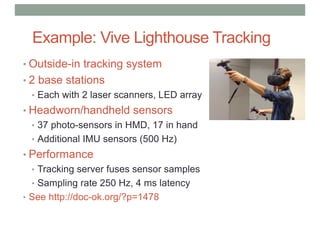
Example: Vive Lighthouse Tracking
• Outside-in tracking system
• 2 base stations
• Each with 2 laser scanners, LED array
• Headworn/handheld sensors
• 37 photo-sensors in HMD, 17 in hand
• Additional IMU sensors (500 Hz)
• Performance
• Tracking server fuses sensor samples
• Sampling rate 250 Hz, 4 ms latency
• See http://doc-ok.org/?p=1478
Lighthouse Components
Base station
- IR LED array
- 2 x scanned lasers
Head Mounted Display
- 37 photo sensors
- 9 axis IMU
Lighthouse Setup
Lighthouse Tracking
Base station scanning
https://www.youtube.com/watch?v=avBt_P0wg_Y
https://www.youtube.com/watch?v=oqPaaMR4kY4
Room tracking
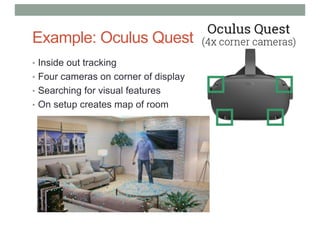
Example: Oculus Quest
• Inside out tracking
• Four cameras on corner of display
• Searching for visual features
• On setup creates map of room
Oculus Quest Tracking
• https://www.youtube.com/watch?v=2jY3B_F3GZk
Occipital Bridge Engine/Structure Core
• Inside out tracking
• Uses structured light
• Better than room scale tracking
• Integrated into bridge HMD
• https://structure.io/
https://www.youtube.com/watch?v=qbkwew3bfWU
Tracking Coordinate Frames
• There can be several coordinate frames to consider
• Head pose with respect to real world
• Coordinate fame of tracking system wrt HMD
• Position of hand in coordinate frame of hand tracker
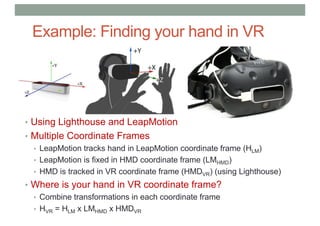
Example: Finding your hand in VR
• Using Lighthouse and LeapMotion
• Multiple Coordinate Frames
• LeapMotion tracks hand in LeapMotion coordinate frame (HLM)
• LeapMotion is fixed in HMD coordinate frame (LMHMD)
• HMD is tracked in VR coordinate frame (HMDVR) (using Lighthouse)
• Where is your hand in VR coordinate frame?
• Combine transformations in each coordinate frame
• HVR = HLM x LMHMD x HMDVR
HAPTIC/TACTILE DISPLAYS
Haptic Feedback
• Greatly improves realism
• Hands and wrist are most important
• High density of touch receptors
• Two kinds of feedback:
• Touch Feedback
• information on texture, temperature, etc.
• Does not resist user contact
• Force Feedback
• information on weight, and inertia.
• Actively resists contact motion
Active Haptics
• Actively resists motion
• Key properties
• Force resistance
• Frequency Response
• Degrees of Freedom
• Latency
Example: Phantom Omni
• Combined stylus input/haptic output
• 6 DOF haptic feedback
Phantom Omni Demo
• https://www.youtube.com/watch?v=REA97hRX0WQ
Haptic Glove
• Many examples of haptic gloves
• Typically use mechanical device to provide haptic feedback
Passive Haptics
• Not controlled by system
• Use real props (Styrofoam for walls)
• Pros
• Cheap
• Large scale
• Accurate
• Cons
• Not dynamic
• Limited use
UNC Being There Project
Passive Haptic Paddle
• Using physical props to provide haptic feedback
• http://www.cs.wpi.edu/~gogo/hive/
Tactile Feedback Interfaces
• Goal: Stimulate skin tactile receptors
• Using different technologies
• Air bellows
• Jets
• Actuators (commercial)
• Micropin arrays
• Electrical (research)
• Neuromuscular stimulations (research)
Vibrotactile Cueing Devices
• Vibrotactile feedback has been incorporated into many
devices
• Can we use this technology to provide scalable, wearable
touch cues?
Vibrotactile Feedback Projects
Navy TSAS Project
TactaBoard and
TactaVest
Example: HaptX Glove
• https://www.youtube.com/watch?v=4K-MLVqD1_A
Teslasuit
• Full body haptic feedback - https://teslasuit.io/
• Electrical muscle stimulation
• https://www.youtube.com/watch?v=74QvAfxHdQY
AUDIO DISPLAYS
Audio Displays
• Spatialization vs. Localization
• Spatialization is the processing of sound signals to make
them emanate from a point in space
• This is a technical topic
• Localization is the ability of people to identify the source
position of a sound
• This is a human topic, i.e., some people are better at it than others.
Audio Display Properties
Presentation Properties
• Number of channels
• Sound stage
• Localization
• Masking
• Amplification
Logistical Properties
• Noise pollution
• User mobility
• Interface with tracking
• Integration
• Portability
• Throughput
• Safety
• Cost
Audio Displays: Head-worn
Ear Buds On Ear Open
Back
Closed Bone
Conduction
Head-Related Transfer Functions (HRTFs)
• A set of functions that model how sound from a source at
a known location reaches the eardrum
Measuring HRTFs
• Putting microphones in Manikin or human ears
• Playing sound from fixed positions
• Record response
Capturing 3D Audio for Playback
• Binaural recording
• 3D Sound recording, from microphones in simulated ears
• Hear some examples (use headphones)
• http://binauralenthusiast.com/examples/
OSSIC 3D Audio Headphones
• https://www.ossic.com/3d-audio/
OSSIC Demo
• https://www.youtube.com/watch?v=WjvofhhzTik
VR INPUT DEVICES
VR Input Devices
• Physical devices that convey information into the application
and support interaction in the Virtual Environment
Mapping Between Input and Output
Input
Output
Motivation
• Mouse and keyboard are good for desktop UI tasks
• Text entry, selection, drag and drop, scrolling, rubber banding, …
• 2D mouse for 2D windows
• What devices are best for 3D input in VR?
• Use multiple 2D input devices?
• Use new types of devices?
vs.
Input Device Characteristics
• Size and shape, encumbrance
• Degrees of Freedom
• Integrated (mouse) vs. separable (Etch-a-sketch)
• Direct vs. indirect manipulation
• Relative vs. Absolute input
• Relative: measure difference between current and last input (mouse)
• Absolute: measure input relative to a constant point of reference (tablet)
• Rate control vs. position control
• Isometric vs. Isotonic
• Isometric: measure pressure or force with no actual movement
• Isotonic: measure deflection from a center point (e.g. mouse)
Hand Input Devices
• Devices that integrate hand input into VR
• World-Grounded input devices
• Devices fixed in real world (e.g. joystick)
• Non-Tracked handheld controllers
• Devices held in hand, but not tracked in 3D (e.g. xbox controller)
• Tracked handheld controllers
• Physical device with 6 DOF tracking inside (e.g. Vive controllers)
• Hand-Worn Devices
• Gloves, EMG bands, rings, or devices worn on hand/arm
• Bare Hand Input
• Using technology to recognize natural hand input
World Grounded Devices
• Devices constrained or fixed in real world
• Not ideal for VR
• Constrains user motion
• Good for VR vehicle metaphor
• Used in location based entertainment (e.g. Disney Aladdin ride)
Disney Aladdin Magic Carpet VR Ride
Non-Tracked Handheld Controllers
• Devices held in hand
• Buttons, joysticks, game controllers, etc.
• Traditional video game controllers
• Xbox controller
Tracked Handheld Controllers (3 or 6 DoF)
• Handheld controller with 6 DOF tracking
• Combines button/joystick input plus tracking
• One of the best options for VR applications
• Physical prop enhancing VR presence
• Providing proprioceptive, passive haptic touch cues
• Direct mapping to real hand motion
HTC Vive Controllers Oculus Touch Controllers
Example: Sixense STEM
• Wireless motion tracking + button input
• Electromagnetic tracking, 8 foot range, 5 tracked receivers
• http://sixense.com/wireless
Sixense Demo Video
• https://www.youtube.com/watch?v=2lY3XI0zDWw
Example: WMR Handheld Controllers
• Windows Mixed Reality Controllers
• Left and right hand
• Combine computer vision + IMU tracking
• Track both in and out of view
• Button input, Vibration feedback
https://www.youtube.com/watch?v=rkDpRllbLII
Cubic Mouse
• Plastic box
• Polhemus Fastrack inside (magnetic 6 DOF tracking)
• 3 translating rods, 6 buttons
• Two handed interface
• Supports object rotation, zooming, cutting plane, etc.
Fröhlich, B., & Plate, J. (2000). The cubic mouse: a new device for three-dimensional input.
In Proceedings of the SIGCHI conference on Human Factors in Computing Systems (pp. 526-
531). ACM.
Cubic Mouse Video
• https://www.youtube.com/watch?v=1WuH7ezv_Gs
Hand Worn Devices
• Devices worn on hands/arms
• Glove, EMG sensors, rings, etc.
• Advantages
• Natural input with potentially rich gesture interaction
• Hands can be held in comfortable positions – no line of sight issues
• Hands and fingers can fully interact with real objects
Myo Arm Band
• https://www.youtube.com/watch?v=1f_bAXHckUY
Data Gloves
• Bend sensing gloves
• Passive input device
• Detecting hand posture and gestures
• Continuous raw data from bend sensors
• Fiber optic, resistive ink, strain-gauge
• Large DOF output, natural hand output
• Pinch gloves
• Conductive material at fingertips
• Determine if fingertips touching
• Used for discrete input
• Object selection, mode switching, etc.
How Pinch Gloves Work
• Contact between conductive
fabric completes circuit
• Each finger receives voltage
in turn (T3 – T7)
• Look for output voltage at
different times
Example: Cyberglove
• Invented to support sign language
• Technology
• Thin electrical strain gauges over fingers
• Bending sensors changes resistence
• 18-22 sensors per glove, 120 Hz samples
• Sensor resolution 0.5o
• Very expensive
• >$10,000/glove
• http://www.cyberglovesystems.com
How CyberGlove Works
• Strain gauge at joints
• Connected to A/D converter
Demo Video
• https://www.youtube.com/watch?v=IUNx4FgQmas
StretchSense
• Wearable motion capture sensors
• Capacitive sensors
• Measure stretch, pressure, bend, shear
• Many applications
• Garments, gloves, etc.
• http://stretchsense.com/
StretchSense Glove Demo
• https://www.youtube.com/watch?v=wYsZS0p5uu8
Comparison of Glove Performance
From Burdea, Virtual Reality Technology, 2003
Bare Hands
• Using computer vision to track bare hand input
• Creates compelling sense of Presence, natural interaction
• Challenges need to be solved
• Not having sense of touch
• Line of sight required to sensor
• Fatigue from holding hands in front of sensor
Leap Motion
• IR based sensor for hand tracking ($50 USD)
• HMD + Leap Motion = Hand input in VR
• Technology
• 3 IR LEDS and 2 wide angle cameras
• The LEDS generate patternless IR light
• IR reflections picked up by cameras
• Software performs hand tracking
• Performance
• 1m range, 0.7 mm accuracy, 200Hz
• https://www.leapmotion.com/
Example: Leap Motion
• https://www.youtube.com/watch?v=QD4qQBL0X80
Non-Hand Input Devices
• Capturing input from other parts of the body
• Head Tracking
• Use head motion for input
• Eye Tracking
• Largely unexplored for VR
• Microphones
• Audio input, speech
• Full-Body tracking
• Motion capture, body movement
Eye Tracking
• Technology
• Shine IR light into eye and look for reflections
• Advantages
• Provides natural hands-free input
• Gaze provides cues as to user attention
• Can be combined with other input technologies
Example: FOVE VR Headset
• Eye tracker integrated into VR HMD
• Gaze driven user interface, foveated rendering
• https://www.youtube.com/watch?v=8dwdzPaqsDY
Pupil Labs VIVE/Oculus Add-ons
• Adds eye-tracking to HTC Vive/Oculus Rift HMDs
• Mono or stereo eye-tracking
• 120 Hz eye tracking, gaze accuracy of 0.6° with precision of 0.08°
• Open source software for eye-tracking
• https://pupil-labs.com/pupil/
HTC Vive Pro Eye
• HTC Vive Pro with integrated eye-tracking
• Tobii systems eye-tracker
• Easy calibration and set-up
• Auto-calibration software compensates for HMD motion
• https://www.youtube.com/watch?v=y_jdjjNrJyk
Full Body Tracking
• Adding full-body input into VR
• Creates illusion of self-embodiment
• Significantly enhances sense of Presence
• Technologies
• Motion capture suit, camera based systems
• Can track large number of significant feature points
Camera Based Motion Capture
• Use multiple cameras
• Reflective markers on body
• Eg – Opitrack (www.optitrack.com)
• 120 – 360 fps, < 10ms latency, < 1mm accuracy
Optitrack Demo
• https://www.youtube.com/watch?v=tBAvjU0ScuI
Wearable Motion Capture: PrioVR
• Wearable motion capture system
• 8 – 17 inertial sensors + wireless data transmission
• 30 – 40m range, 7.5 ms latency, 0.09o
precision
• Supports full range of motion, no occlusion
• www.priovr.com
PrioVR Demo
• https://www.youtube.com/watch?v=q72iErtvhNc
Pedestrian Devices
• Pedestrian input in VR
• Walking/running in VR
• Virtuix Omni
• Special shoes
• http://www.virtuix.com
• Cyberith Virtualizer
• Socks + slippery surface
• http://cyberith.com
Cyberith Virtualizer Demo
• https://www.youtube.com/watch?v=R8lmf3OFrms
Virtusphere
• Fully immersive sphere
• Support walking, running in VR
• Person inside trackball
• http://www.virtusphere.com
Virtusphere Demo
• https://www.youtube.com/watch?v=5PSFCnrk0GI
Omnidirectional Treadmills
• Infinadeck
• 2 axis treadmill, flexible material
• Tracks user to keep them in centre
• Limitless walking input in VR
• www.infinadeck.com
Infinadeck Demo
• https://www.youtube.com/watch?v=seML5CQBzP8
Comparison Between Devices
From Jerald (2015)
Comparing between hand
and non-hand input
Input Device Taxonomies
• Helps to determine:
• Which devices can be used for each other
• What devices to use for particular tasks
• Many different approaches
• Separate the input device from interaction technique (Foley 1974)
• Mapping basic interactive tasks to devices (Foley 1984)
• Basic tasks – select, position, orient, etc.
• Devices – mouse, joystick, touch panel, etc.
• Consider Degrees of Freedom and properties sensed (Buxton 1983)
• motion, position, pressure
• Distinguish bet. absolute/relative input, individual axes (Mackinlay 1990)
• separate translation, rotation axes instead of using DOF
Foley and Wallace Taxonomy (1974)
Separate device from
interaction technique
Buxton Input Device Taxonomy (Buxton 1983)
• Classified according to degrees of freedom and property sensed
• M = devise uses an intermediary between hand and sensing system
• T = touch sensitive
www.empathiccomputing.org
@marknb00
mark.billinghurst@unisa.edu.au

Lecture3 - VR Technology

  • 1.
    LECTURE 3: VRTECHNOLOGY COMP 4010 – Virtual Reality Semester 5 - 2019 Bruce Thomas, Mark Billinghurst, Gun Lee University of South Australia August 13th 2019
  • 2.
    • Presence • Perceptionand VR • Human Perception • Sight, hearing, touch, smell, taste • VR Technology • Visual display Recap – Lecture 2
  • 3.
    Presence .. “The subjectiveexperience of being in one place or environment even when physically situated in another” Witmer, B. G., & Singer, M. J. (1998). Measuring presence in virtual environments: A presence questionnaire. Presence: Teleoperators and virtual environments, 7(3), 225-240.
  • 4.
    How do WePerceive Reality? • We understand the world through our senses: • Sight, Hearing, Touch, Taste, Smell (and others..) • Two basic processes: • Sensation – Gathering information • Perception – Interpreting information
  • 5.
  • 6.
    Creating the Illusionof Reality • Fooling human perception by using technology to generate artificial sensations • Computer generated sights, sounds, smell, etc
  • 7.
    Reality vs. VirtualReality • In a VR system there are input and output devices between human perception and action
  • 8.
    Using Technology toStimulate Senses • Simulate output • E.g. simulate real scene • Map output to devices • Graphics to HMD • Use devices to stimulate the senses • HMD stimulates eyes Visual Simulation 3D Graphics HMD Vision System Brain Example: Visual Simulation Human-Machine Interface
  • 9.
    Creating an ImmersiveExperience •Head Mounted Display •Immerse the eyes •Projection/Large Screen •Immerse the head/body •Future Technologies •Neural implants •Contact lens displays, etc
  • 10.
    HMD Basic Principles •Use display with optics to create illusion of virtual screen
  • 11.
    Key Properties ofHMDs • Lens • Focal length, Field of View • Occularity, Interpupillary distance • Eye relief, Eye box • Display • Resolution, contrast • Power, brightness • Refresh rate • Ergonomics • Size, weight • Wearability
  • 12.
  • 13.
  • 14.
    Tracking in VR •Need for Tracking • User turns their head and the VR graphics scene changes • User wants to walking through a virtual scene • User reaches out and grab a virtual object • The user wants to use a real prop in VR • All of these require technology to track the user or object • Continuously provide information about position and orientation Head Tracking Hand Tracking
  • 15.
    • Degree ofFreedom = independent movement about an axis • 3 DoF Orientation = roll, pitch, yaw (rotation about x, y, or z axis) • 3 DoF Translation = movement along x,y,z axis • Different requirements • User turns their head in VR -> needs 3 DoF orientation tracker • Moving in VR -> needs a 6 DoF tracker (r,p,y) and (x, y, z) Degrees of Freedom
  • 16.
    Tracking and Renderingin VR Tracking fits into the graphics pipeline for VR
  • 17.
    Tracking Technologies § Active(device sends out signal) • Mechanical, Magnetic, Ultrasonic • GPS, Wifi, cell location § Passive (device senses world) • Inertial sensors (compass, accelerometer, gyro) • Computer Vision • Marker based, Natural feature tracking § Hybrid Tracking • Combined sensors (eg Vision + Inertial)
  • 18.
  • 19.
    MechanicalTracker (Active) •Idea: mechanicalarms with joint sensors •++: high accuracy, haptic feedback •-- : cumbersome, expensive Microscribe Sutherland
  • 20.
    MagneticTracker (Active) • Idea:difference between a magnetic transmitter and a receiver • ++: 6DOF, robust • -- : wired, sensible to metal, noisy, expensive • -- : error increases with distance Flock of Birds (Ascension)
  • 21.
    Example: Razer Hydra •Developed by Sixense • Magnetic source + 2 wired controllers • Short range (1-2 m) • Precision of 1mm and 1o • $600 USD
  • 22.
    Razor Hydra Demo •https://www.youtube.com/watch?v=jnqFdSa5p7w
  • 23.
    InertialTracker (Passive) • Idea:measuring linear and angular orientation rates (accelerometer/gyroscope) • ++: no transmitter, cheap, small, high frequency, wireless • -- : drift, hysteris only 3DOF IS300 (Intersense) Wii Remote
  • 24.
    OpticalTracker (Passive) • Idea:Image Processing and ComputerVision • Specialized • Infrared, Retro-Reflective, Stereoscopic • Monocular BasedVisionTracking ART Hi-Ball
  • 25.
  • 26.
    Example: Vive LighthouseTracking • Outside-in tracking system • 2 base stations • Each with 2 laser scanners, LED array • Headworn/handheld sensors • 37 photo-sensors in HMD, 17 in hand • Additional IMU sensors (500 Hz) • Performance • Tracking server fuses sensor samples • Sampling rate 250 Hz, 4 ms latency • See http://doc-ok.org/?p=1478
  • 27.
    Lighthouse Components Base station -IR LED array - 2 x scanned lasers Head Mounted Display - 37 photo sensors - 9 axis IMU
  • 28.
  • 29.
    Lighthouse Tracking Base stationscanning https://www.youtube.com/watch?v=avBt_P0wg_Y https://www.youtube.com/watch?v=oqPaaMR4kY4 Room tracking
  • 30.
    Example: Oculus Quest •Inside out tracking • Four cameras on corner of display • Searching for visual features • On setup creates map of room
  • 31.
    Oculus Quest Tracking •https://www.youtube.com/watch?v=2jY3B_F3GZk
  • 32.
    Occipital Bridge Engine/StructureCore • Inside out tracking • Uses structured light • Better than room scale tracking • Integrated into bridge HMD • https://structure.io/
  • 33.
  • 34.
    Tracking Coordinate Frames •There can be several coordinate frames to consider • Head pose with respect to real world • Coordinate fame of tracking system wrt HMD • Position of hand in coordinate frame of hand tracker
  • 35.
    Example: Finding yourhand in VR • Using Lighthouse and LeapMotion • Multiple Coordinate Frames • LeapMotion tracks hand in LeapMotion coordinate frame (HLM) • LeapMotion is fixed in HMD coordinate frame (LMHMD) • HMD is tracked in VR coordinate frame (HMDVR) (using Lighthouse) • Where is your hand in VR coordinate frame? • Combine transformations in each coordinate frame • HVR = HLM x LMHMD x HMDVR
  • 36.
  • 37.
    Haptic Feedback • Greatlyimproves realism • Hands and wrist are most important • High density of touch receptors • Two kinds of feedback: • Touch Feedback • information on texture, temperature, etc. • Does not resist user contact • Force Feedback • information on weight, and inertia. • Actively resists contact motion
  • 38.
    Active Haptics • Activelyresists motion • Key properties • Force resistance • Frequency Response • Degrees of Freedom • Latency
  • 39.
    Example: Phantom Omni •Combined stylus input/haptic output • 6 DOF haptic feedback
  • 40.
    Phantom Omni Demo •https://www.youtube.com/watch?v=REA97hRX0WQ
  • 41.
    Haptic Glove • Manyexamples of haptic gloves • Typically use mechanical device to provide haptic feedback
  • 42.
    Passive Haptics • Notcontrolled by system • Use real props (Styrofoam for walls) • Pros • Cheap • Large scale • Accurate • Cons • Not dynamic • Limited use
  • 43.
  • 44.
    Passive Haptic Paddle •Using physical props to provide haptic feedback • http://www.cs.wpi.edu/~gogo/hive/
  • 45.
    Tactile Feedback Interfaces •Goal: Stimulate skin tactile receptors • Using different technologies • Air bellows • Jets • Actuators (commercial) • Micropin arrays • Electrical (research) • Neuromuscular stimulations (research)
  • 46.
    Vibrotactile Cueing Devices •Vibrotactile feedback has been incorporated into many devices • Can we use this technology to provide scalable, wearable touch cues?
  • 47.
    Vibrotactile Feedback Projects NavyTSAS Project TactaBoard and TactaVest
  • 48.
    Example: HaptX Glove •https://www.youtube.com/watch?v=4K-MLVqD1_A
  • 49.
    Teslasuit • Full bodyhaptic feedback - https://teslasuit.io/ • Electrical muscle stimulation
  • 50.
  • 51.
  • 52.
    Audio Displays • Spatializationvs. Localization • Spatialization is the processing of sound signals to make them emanate from a point in space • This is a technical topic • Localization is the ability of people to identify the source position of a sound • This is a human topic, i.e., some people are better at it than others.
  • 53.
    Audio Display Properties PresentationProperties • Number of channels • Sound stage • Localization • Masking • Amplification Logistical Properties • Noise pollution • User mobility • Interface with tracking • Integration • Portability • Throughput • Safety • Cost
  • 54.
    Audio Displays: Head-worn EarBuds On Ear Open Back Closed Bone Conduction
  • 55.
    Head-Related Transfer Functions(HRTFs) • A set of functions that model how sound from a source at a known location reaches the eardrum
  • 56.
    Measuring HRTFs • Puttingmicrophones in Manikin or human ears • Playing sound from fixed positions • Record response
  • 57.
    Capturing 3D Audiofor Playback • Binaural recording • 3D Sound recording, from microphones in simulated ears • Hear some examples (use headphones) • http://binauralenthusiast.com/examples/
  • 58.
    OSSIC 3D AudioHeadphones • https://www.ossic.com/3d-audio/
  • 59.
  • 60.
  • 61.
    VR Input Devices •Physical devices that convey information into the application and support interaction in the Virtual Environment
  • 62.
    Mapping Between Inputand Output Input Output
  • 63.
    Motivation • Mouse andkeyboard are good for desktop UI tasks • Text entry, selection, drag and drop, scrolling, rubber banding, … • 2D mouse for 2D windows • What devices are best for 3D input in VR? • Use multiple 2D input devices? • Use new types of devices? vs.
  • 64.
    Input Device Characteristics •Size and shape, encumbrance • Degrees of Freedom • Integrated (mouse) vs. separable (Etch-a-sketch) • Direct vs. indirect manipulation • Relative vs. Absolute input • Relative: measure difference between current and last input (mouse) • Absolute: measure input relative to a constant point of reference (tablet) • Rate control vs. position control • Isometric vs. Isotonic • Isometric: measure pressure or force with no actual movement • Isotonic: measure deflection from a center point (e.g. mouse)
  • 65.
    Hand Input Devices •Devices that integrate hand input into VR • World-Grounded input devices • Devices fixed in real world (e.g. joystick) • Non-Tracked handheld controllers • Devices held in hand, but not tracked in 3D (e.g. xbox controller) • Tracked handheld controllers • Physical device with 6 DOF tracking inside (e.g. Vive controllers) • Hand-Worn Devices • Gloves, EMG bands, rings, or devices worn on hand/arm • Bare Hand Input • Using technology to recognize natural hand input
  • 66.
    World Grounded Devices •Devices constrained or fixed in real world • Not ideal for VR • Constrains user motion • Good for VR vehicle metaphor • Used in location based entertainment (e.g. Disney Aladdin ride) Disney Aladdin Magic Carpet VR Ride
  • 67.
    Non-Tracked Handheld Controllers •Devices held in hand • Buttons, joysticks, game controllers, etc. • Traditional video game controllers • Xbox controller
  • 68.
    Tracked Handheld Controllers(3 or 6 DoF) • Handheld controller with 6 DOF tracking • Combines button/joystick input plus tracking • One of the best options for VR applications • Physical prop enhancing VR presence • Providing proprioceptive, passive haptic touch cues • Direct mapping to real hand motion HTC Vive Controllers Oculus Touch Controllers
  • 69.
    Example: Sixense STEM •Wireless motion tracking + button input • Electromagnetic tracking, 8 foot range, 5 tracked receivers • http://sixense.com/wireless
  • 70.
    Sixense Demo Video •https://www.youtube.com/watch?v=2lY3XI0zDWw
  • 71.
    Example: WMR HandheldControllers • Windows Mixed Reality Controllers • Left and right hand • Combine computer vision + IMU tracking • Track both in and out of view • Button input, Vibration feedback
  • 72.
  • 73.
    Cubic Mouse • Plasticbox • Polhemus Fastrack inside (magnetic 6 DOF tracking) • 3 translating rods, 6 buttons • Two handed interface • Supports object rotation, zooming, cutting plane, etc. Fröhlich, B., & Plate, J. (2000). The cubic mouse: a new device for three-dimensional input. In Proceedings of the SIGCHI conference on Human Factors in Computing Systems (pp. 526- 531). ACM.
  • 74.
    Cubic Mouse Video •https://www.youtube.com/watch?v=1WuH7ezv_Gs
  • 75.
    Hand Worn Devices •Devices worn on hands/arms • Glove, EMG sensors, rings, etc. • Advantages • Natural input with potentially rich gesture interaction • Hands can be held in comfortable positions – no line of sight issues • Hands and fingers can fully interact with real objects
  • 76.
    Myo Arm Band •https://www.youtube.com/watch?v=1f_bAXHckUY
  • 77.
    Data Gloves • Bendsensing gloves • Passive input device • Detecting hand posture and gestures • Continuous raw data from bend sensors • Fiber optic, resistive ink, strain-gauge • Large DOF output, natural hand output • Pinch gloves • Conductive material at fingertips • Determine if fingertips touching • Used for discrete input • Object selection, mode switching, etc.
  • 78.
    How Pinch GlovesWork • Contact between conductive fabric completes circuit • Each finger receives voltage in turn (T3 – T7) • Look for output voltage at different times
  • 79.
    Example: Cyberglove • Inventedto support sign language • Technology • Thin electrical strain gauges over fingers • Bending sensors changes resistence • 18-22 sensors per glove, 120 Hz samples • Sensor resolution 0.5o • Very expensive • >$10,000/glove • http://www.cyberglovesystems.com
  • 80.
    How CyberGlove Works •Strain gauge at joints • Connected to A/D converter
  • 81.
  • 82.
    StretchSense • Wearable motioncapture sensors • Capacitive sensors • Measure stretch, pressure, bend, shear • Many applications • Garments, gloves, etc. • http://stretchsense.com/
  • 83.
    StretchSense Glove Demo •https://www.youtube.com/watch?v=wYsZS0p5uu8
  • 84.
    Comparison of GlovePerformance From Burdea, Virtual Reality Technology, 2003
  • 85.
    Bare Hands • Usingcomputer vision to track bare hand input • Creates compelling sense of Presence, natural interaction • Challenges need to be solved • Not having sense of touch • Line of sight required to sensor • Fatigue from holding hands in front of sensor
  • 86.
    Leap Motion • IRbased sensor for hand tracking ($50 USD) • HMD + Leap Motion = Hand input in VR • Technology • 3 IR LEDS and 2 wide angle cameras • The LEDS generate patternless IR light • IR reflections picked up by cameras • Software performs hand tracking • Performance • 1m range, 0.7 mm accuracy, 200Hz • https://www.leapmotion.com/
  • 87.
    Example: Leap Motion •https://www.youtube.com/watch?v=QD4qQBL0X80
  • 88.
    Non-Hand Input Devices •Capturing input from other parts of the body • Head Tracking • Use head motion for input • Eye Tracking • Largely unexplored for VR • Microphones • Audio input, speech • Full-Body tracking • Motion capture, body movement
  • 89.
    Eye Tracking • Technology •Shine IR light into eye and look for reflections • Advantages • Provides natural hands-free input • Gaze provides cues as to user attention • Can be combined with other input technologies
  • 90.
    Example: FOVE VRHeadset • Eye tracker integrated into VR HMD • Gaze driven user interface, foveated rendering • https://www.youtube.com/watch?v=8dwdzPaqsDY
  • 91.
    Pupil Labs VIVE/OculusAdd-ons • Adds eye-tracking to HTC Vive/Oculus Rift HMDs • Mono or stereo eye-tracking • 120 Hz eye tracking, gaze accuracy of 0.6° with precision of 0.08° • Open source software for eye-tracking • https://pupil-labs.com/pupil/
  • 92.
    HTC Vive ProEye • HTC Vive Pro with integrated eye-tracking • Tobii systems eye-tracker • Easy calibration and set-up • Auto-calibration software compensates for HMD motion
  • 93.
  • 94.
    Full Body Tracking •Adding full-body input into VR • Creates illusion of self-embodiment • Significantly enhances sense of Presence • Technologies • Motion capture suit, camera based systems • Can track large number of significant feature points
  • 95.
    Camera Based MotionCapture • Use multiple cameras • Reflective markers on body • Eg – Opitrack (www.optitrack.com) • 120 – 360 fps, < 10ms latency, < 1mm accuracy
  • 96.
  • 97.
    Wearable Motion Capture:PrioVR • Wearable motion capture system • 8 – 17 inertial sensors + wireless data transmission • 30 – 40m range, 7.5 ms latency, 0.09o precision • Supports full range of motion, no occlusion • www.priovr.com
  • 98.
  • 99.
    Pedestrian Devices • Pedestrianinput in VR • Walking/running in VR • Virtuix Omni • Special shoes • http://www.virtuix.com • Cyberith Virtualizer • Socks + slippery surface • http://cyberith.com
  • 100.
    Cyberith Virtualizer Demo •https://www.youtube.com/watch?v=R8lmf3OFrms
  • 101.
    Virtusphere • Fully immersivesphere • Support walking, running in VR • Person inside trackball • http://www.virtusphere.com
  • 102.
  • 103.
    Omnidirectional Treadmills • Infinadeck •2 axis treadmill, flexible material • Tracks user to keep them in centre • Limitless walking input in VR • www.infinadeck.com
  • 104.
  • 105.
    Comparison Between Devices FromJerald (2015) Comparing between hand and non-hand input
  • 106.
    Input Device Taxonomies •Helps to determine: • Which devices can be used for each other • What devices to use for particular tasks • Many different approaches • Separate the input device from interaction technique (Foley 1974) • Mapping basic interactive tasks to devices (Foley 1984) • Basic tasks – select, position, orient, etc. • Devices – mouse, joystick, touch panel, etc. • Consider Degrees of Freedom and properties sensed (Buxton 1983) • motion, position, pressure • Distinguish bet. absolute/relative input, individual axes (Mackinlay 1990) • separate translation, rotation axes instead of using DOF
  • 107.
    Foley and WallaceTaxonomy (1974) Separate device from interaction technique
  • 108.
    Buxton Input DeviceTaxonomy (Buxton 1983) • Classified according to degrees of freedom and property sensed • M = devise uses an intermediary between hand and sensing system • T = touch sensitive
  • 109.