RESEARCH DIRECTIONS IN
CROSS REALITY INTERFACES
Mark Billinghurst
mark.billinghurst@unisa.edu.au
Summer School on Cross Reality
July 2nd 2024
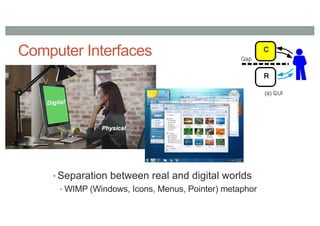
Computer Interfaces
• Separation between real and digital worlds
• WIMP (Windows, Icons, Menus, Pointer) metaphor
Rekimoto, J. and Nagao, K. 1995. The world through the computer: computer augmented interaction with real world environments.
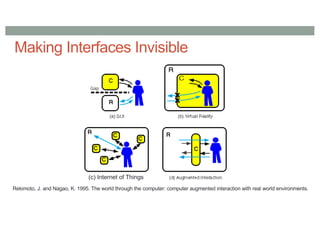
Making Interfaces Invisible
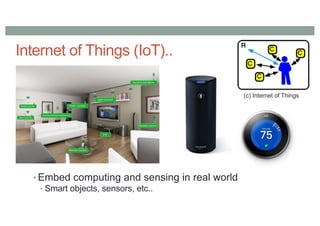
(c) Internet of Things
Internet of Things (IoT)..
• Embed computing and sensing in real world
• Smart objects, sensors, etc..
(c) Internet of Things
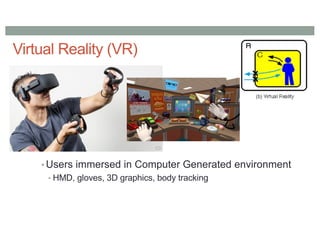
Virtual Reality (VR)
• Users immersed in Computer Generated environment
• HMD, gloves, 3D graphics, body tracking
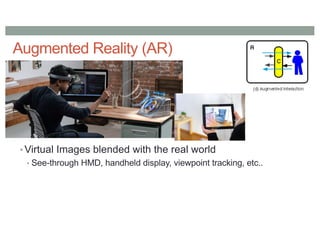
Augmented Reality (AR)
• Virtual Images blended with the real world
• See-through HMD, handheld display, viewpoint tracking, etc..
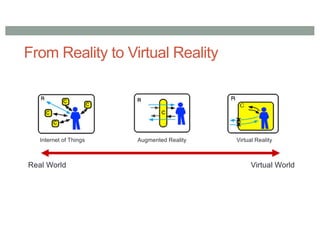
From Reality to Virtual Reality
Internet of Things Augmented Reality Virtual Reality
Real World Virtual World
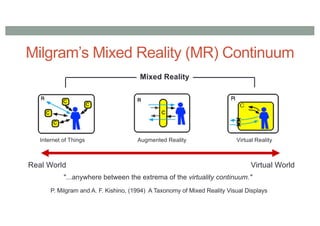
Milgram’s Mixed Reality (MR) Continuum
Augmented Reality Virtual Reality
Real World Virtual World
Mixed Reality
"...anywhere between the extrema of the virtuality continuum."
P. Milgram and A. F. Kishino, (1994) A Taxonomy of Mixed Reality Visual Displays
Internet of Things
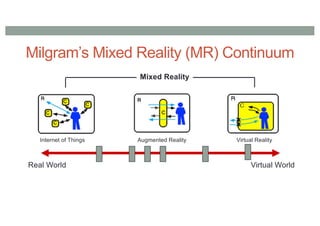
Milgram’s Mixed Reality (MR) Continuum
Augmented Reality Virtual Reality
Real World Virtual World
Mixed Reality
Internet of Things
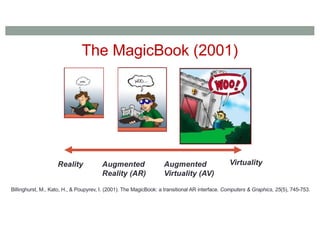
The MagicBook (2001)
Reality Virtuality
Augmented
Reality (AR)
Augmented
Virtuality (AV)
Billinghurst, M., Kato, H., & Poupyrev, I. (2001). The MagicBook: a transitional AR interface. Computers & Graphics, 25(5), 745-753.
MagicBook Demo
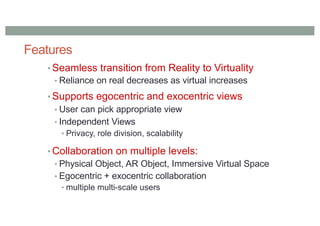
Features
• Seamless transition from Reality to Virtuality
• Reliance on real decreases as virtual increases
• Supports egocentric and exocentric views
• User can pick appropriate view
• Independent Views
• Privacy, role division, scalability
• Collaboration on multiple levels:
• Physical Object, AR Object, Immersive Virtual Space
• Egocentric + exocentric collaboration
• multiple multi-scale users
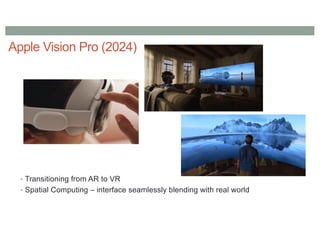
Apple Vision Pro (2024)
• Transitioning from AR to VR
• Spatial Computing – interface seamlessly blending with real world
Cross Reality (CR) Systems
•Systems that facilitate:
•a smooth transition between systems using
different degrees of virtuality or
•collaboration between users using different
systems with different degrees of virtuality
Simeone, Adalberto L., Mohamed Khamis, Augusto Esteves, Florian Daiber, Matjaž Kljun, Klen Čopič Pucihar,
Poika Isokoski, and Jan Gugenheimer. "International workshop on cross-reality (xr) interaction." In Companion
Proceedings of the 2020 Conference on Interactive Surfaces and Spaces, pp. 111-114. 2020.
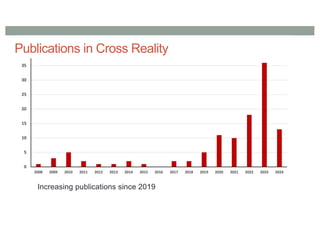
Publications in Cross Reality
Increasing publications since 2019
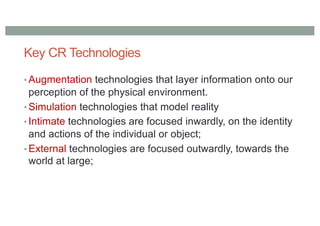
Key CR Technologies
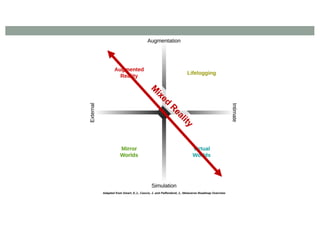
• Augmentation technologies that layer information onto our
perception of the physical environment.
• Simulation technologies that model reality
• Intimate technologies are focused inwardly, on the identity
and actions of the individual or object;
• External technologies are focused outwardly, towards the
world at large;
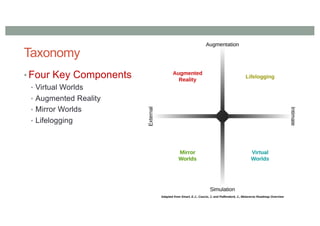
Taxonomy
• Four Key Components
• Virtual Worlds
• Augmented Reality
• Mirror Worlds
• Lifelogging
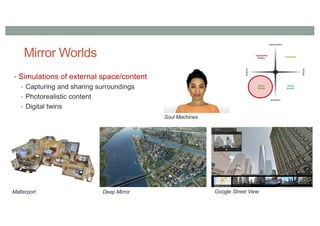
Mirror Worlds
• Simulations of external space/content
• Capturing and sharing surroundings
• Photorealistic content
• Digital twins
Matterport Deep Mirror Google Street View
Soul Machines
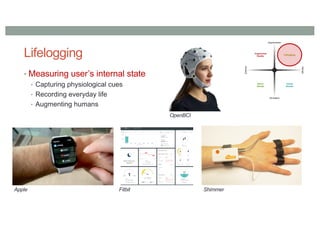
Lifelogging
• Measuring user’s internal state
• Capturing physiological cues
• Recording everyday life
• Augmenting humans
Apple Fitbit Shimmer
OpenBCI
M
ixed
R
eality
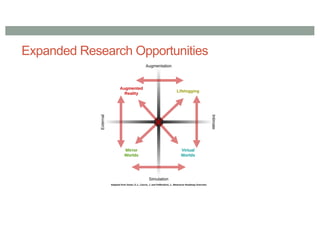
Expanded Research Opportunities
What is the Metaverse Research Landscape?
•Survey of Scopus papers (to June 2023)
• ~1900 papers found with Metaverse in abstract/keywords
•Further analysis
• Look for publications in AR, VR, MirrorWorlds (MW), LifeLogging (LL)
• Look for research across boundaries
•Application analysis
• Most popular application domains
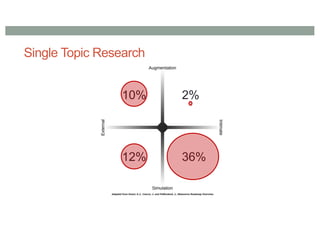
Single Topic Research
36%
10%
12%
2%
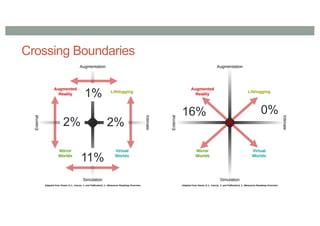
Crossing Boundaries
11%
1%
2%
2%
16% 0%
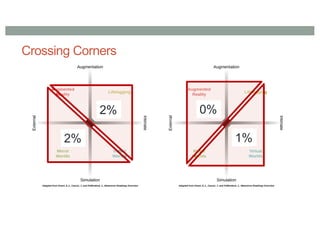
Crossing Corners
2%
2% 0%
1%
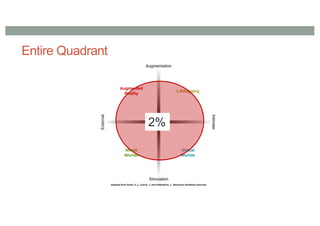
Entire Quadrant
2%
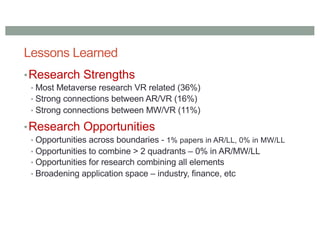
Lessons Learned
•Research Strengths
• Most Metaverse research VR related (36%)
• Strong connections between AR/VR (16%)
• Strong connections between MW/VR (11%)
•Research Opportunities
• Opportunities across boundaries - 1% papers in AR/LL, 0% in MW/LL
• Opportunities to combine > 2 quadrants – 0% in AR/MW/LL
• Opportunities for research combining all elements
• Broadening application space – industry, finance, etc
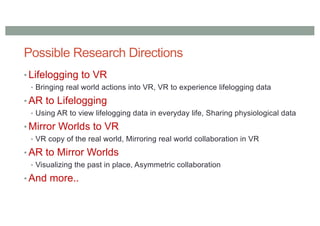
Possible Research Directions
• Lifelogging to VR
• Bringing real world actions into VR, VR to experience lifelogging data
• AR to Lifelogging
• Using AR to view lifelogging data in everyday life, Sharing physiological data
• Mirror Worlds to VR
• VR copy of the real world, Mirroring real world collaboration in VR
• AR to Mirror Worlds
• Visualizing the past in place, Asymmetric collaboration
• And more..
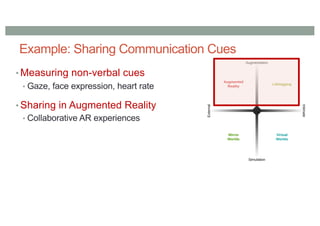
Example: Sharing Communication Cues
• Measuring non-verbal cues
• Gaze, face expression, heart rate
• Sharing in Augmented Reality
• Collaborative AR experiences
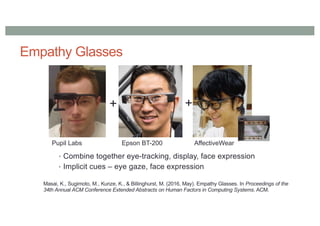
Empathy Glasses
• Combine together eye-tracking, display, face expression
• Implicit cues – eye gaze, face expression
+
+
Pupil Labs Epson BT-200 AffectiveWear
Masai, K., Sugimoto, M., Kunze, K., & Billinghurst, M. (2016, May). Empathy Glasses. In Proceedings of the
34th Annual ACM Conference Extended Abstracts on Human Factors in Computing Systems. ACM.
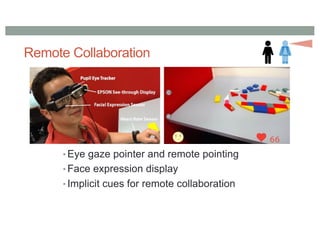
Remote Collaboration
• Eye gaze pointer and remote pointing
• Face expression display
• Implicit cues for remote collaboration
Research Directions
•Enhancing Communication Cues
•Avatar Representation
•AI Enhanced communication
•Scene Capture and Sharing
•Asynchronous CR systems
•Prototyping Tools
•Empathic Computing
ENHANCING COMMUNICATION CUES
Remote Communication
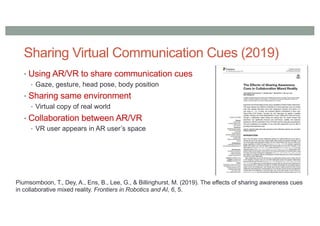
• Using AR/VR to share communication cues
• Gaze, gesture, head pose, body position
• Sharing same environment
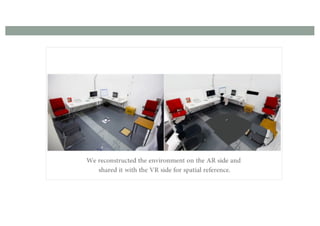
• Virtual copy of real world
• Collaboration between AR/VR
• VR user appears in AR user’s space
Piumsomboon, T., Dey, A., Ens, B., Lee, G., & Billinghurst, M. (2019). The effects of sharing awareness cues
in collaborative mixed reality. Frontiers in Robotics and AI, 6, 5.
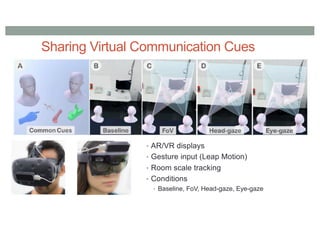
Sharing Virtual Communication Cues (2019)
Sharing Virtual Communication Cues
• AR/VR displays
• Gesture input (Leap Motion)
• Room scale tracking
• Conditions
• Baseline, FoV, Head-gaze, Eye-gaze
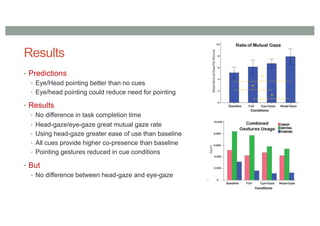
Results
• Predictions
• Eye/Head pointing better than no cues
• Eye/head pointing could reduce need for pointing
• Results
• No difference in task completion time
• Head-gaze/eye-gaze great mutual gaze rate
• Using head-gaze greater ease of use than baseline
• All cues provide higher co-presence than baseline
• Pointing gestures reduced in cue conditions
• But
• No difference between head-gaze and eye-gaze
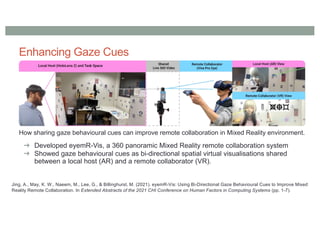
Enhancing Gaze Cues
How sharing gaze behavioural cues can improve remote collaboration in Mixed Reality environment.
➔ Developed eyemR-Vis, a 360 panoramic Mixed Reality remote collaboration system
➔ Showed gaze behavioural cues as bi-directional spatial virtual visualisations shared
between a local host (AR) and a remote collaborator (VR).
Jing, A., May, K. W., Naeem, M., Lee, G., & Billinghurst, M. (2021). eyemR-Vis: Using Bi-Directional Gaze Behavioural Cues to Improve Mixed
Reality Remote Collaboration. In Extended Abstracts of the 2021 CHI Conference on Human Factors in Computing Systems (pp. 1-7).
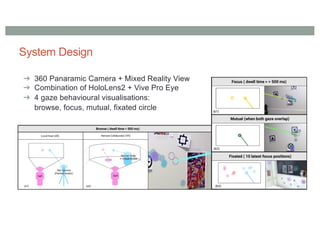
System Design
➔ 360 Panaramic Camera + Mixed Reality View
➔ Combination of HoloLens2 + Vive Pro Eye
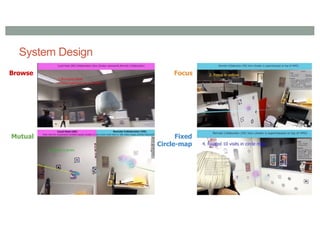
➔ 4 gaze behavioural visualisations:
browse, focus, mutual, fixated circle
System Design
Browse Focus
Mutual Fixed
Circle-map
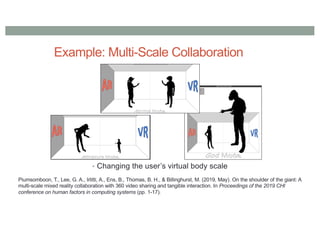
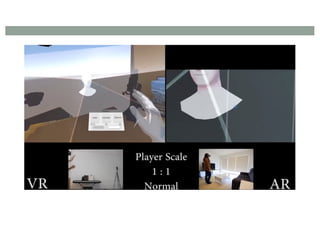
Example: Multi-Scale Collaboration
• Changing the user’s virtual body scale
Piumsomboon, T., Lee, G. A., Irlitti, A., Ens, B., Thomas, B. H., & Billinghurst, M. (2019, May). On the shoulder of the giant: A
multi-scale mixed reality collaboration with 360 video sharing and tangible interaction. In Proceedings of the 2019 CHI
conference on human factors in computing systems (pp. 1-17).
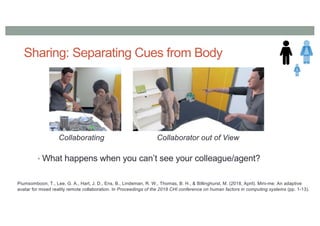
Sharing: Separating Cues from Body
• What happens when you can’t see your colleague/agent?
Piumsomboon, T., Lee, G. A., Hart, J. D., Ens, B., Lindeman, R. W., Thomas, B. H., & Billinghurst, M. (2018, April). Mini-me: An adaptive
avatar for mixed reality remote collaboration. In Proceedings of the 2018 CHI conference on human factors in computing systems (pp. 1-13).
Collaborating Collaborator out of View
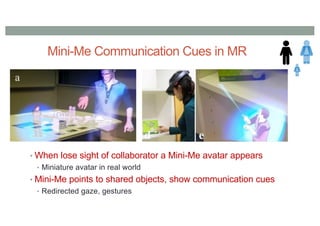
Mini-Me Communication Cues in MR
• When lose sight of collaborator a Mini-Me avatar appears
• Miniature avatar in real world
• Mini-Me points to shared objects, show communication cues
• Redirected gaze, gestures
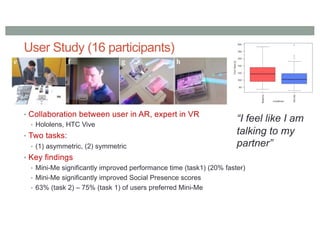
User Study (16 participants)
• Collaboration between user in AR, expert in VR
• Hololens, HTC Vive
• Two tasks:
• (1) asymmetric, (2) symmetric
• Key findings
• Mini-Me significantly improved performance time (task1) (20% faster)
• Mini-Me significantly improved Social Presence scores
• 63% (task 2) – 75% (task 1) of users preferred Mini-Me
“I feel like I am
talking to my
partner”
AVATAR REPRESENTATION
Avatar Representation for Social Presence
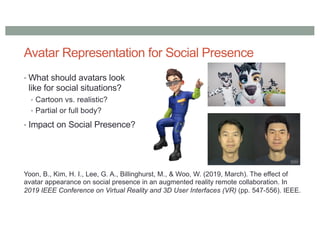
• What should avatars look
like for social situations?
• Cartoon vs. realistic?
• Partial or full body?
• Impact on Social Presence?
Yoon, B., Kim, H. I., Lee, G. A., Billinghurst, M., & Woo, W. (2019, March). The effect of
avatar appearance on social presence in an augmented reality remote collaboration. In
2019 IEEE Conference on Virtual Reality and 3D User Interfaces (VR) (pp. 547-556). IEEE.
Avatar Representations
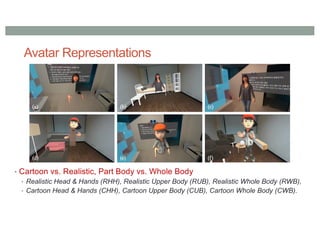
• Cartoon vs. Realistic, Part Body vs. Whole Body
• Realistic Head & Hands (RHH), Realistic Upper Body (RUB), Realistic Whole Body (RWB),
• Cartoon Head & Hands (CHH), Cartoon Upper Body (CUB), Cartoon Whole Body (CWB).
Experiment
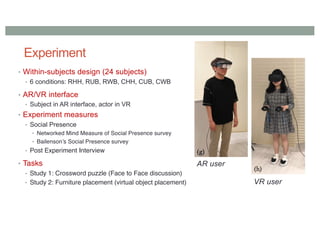
• Within-subjects design (24 subjects)
• 6 conditions: RHH, RUB, RWB, CHH, CUB, CWB
• AR/VR interface
• Subject in AR interface, actor in VR
• Experiment measures
• Social Presence
• Networked Mind Measure of Social Presence survey
• Bailenson’s Social Presence survey
• Post Experiment Interview
• Tasks
• Study 1: Crossword puzzle (Face to Face discussion)
• Study 2: Furniture placement (virtual object placement)
AR user
VR user
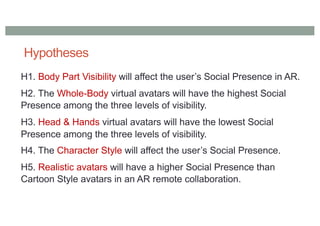
Hypotheses
H1. Body Part Visibility will affect the user’s Social Presence in AR.
H2. The Whole-Body virtual avatars will have the highest Social
Presence among the three levels of visibility.
H3. Head & Hands virtual avatars will have the lowest Social
Presence among the three levels of visibility.
H4. The Character Style will affect the user’s Social Presence.
H5. Realistic avatars will have a higher Social Presence than
Cartoon Style avatars in an AR remote collaboration.
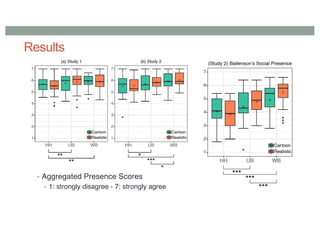
Results
• Aggregated Presence Scores
• 1: strongly disagree - 7: strongly agree
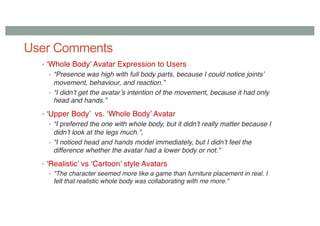
User Comments
• ‘Whole Body’ Avatar Expression to Users
• “Presence was high with full body parts, because I could notice joints’
movement, behaviour, and reaction.”
• “I didn’t get the avatar’s intention of the movement, because it had only
head and hands.”
• ‘Upper Body’ vs. ‘Whole Body’ Avatar
• “I preferred the one with whole body, but it didn’t really matter because I
didn’t look at the legs much.”,
• “I noticed head and hands model immediately, but I didn’t feel the
difference whether the avatar had a lower body or not.”
• ‘Realistic’ vs ‘Cartoon’ style Avatars
• "The character seemed more like a game than furniture placement in real. I
felt that realistic whole body was collaborating with me more.”
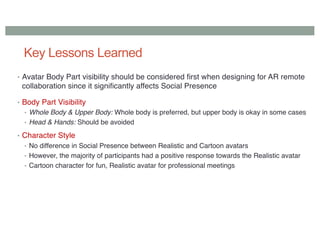
Key Lessons Learned
• Avatar Body Part visibility should be considered first when designing for AR remote
collaboration since it significantly affects Social Presence
• Body Part Visibility
• Whole Body & Upper Body: Whole body is preferred, but upper body is okay in some cases
• Head & Hands: Should be avoided
• Character Style
• No difference in Social Presence between Realistic and Cartoon avatars
• However, the majority of participants had a positive response towards the Realistic avatar
• Cartoon character for fun, Realistic avatar for professional meetings
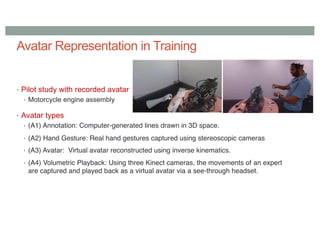
Avatar Representation in Training
• Pilot study with recorded avatar
• Motorcycle engine assembly
• Avatar types
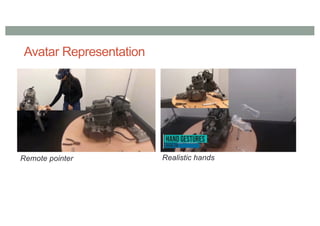
• (A1) Annotation: Computer-generated lines drawn in 3D space.
• (A2) Hand Gesture: Real hand gestures captured using stereoscopic cameras
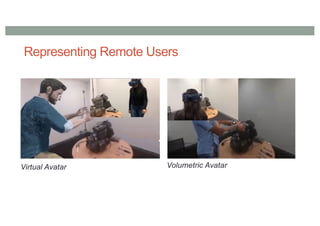
• (A3) Avatar: Virtual avatar reconstructed using inverse kinematics.
• (A4) Volumetric Playback: Using three Kinect cameras, the movements of an expert
are captured and played back as a virtual avatar via a see-through headset.
Avatar Representation
Remote pointer Realistic hands
Representing Remote Users
Virtual Avatar Volumetric Avatar
Experiment Design (30 participants)
Performing motorbike assembly task under guidance
- Easy, Medium, Hard task
Hypotheses
- H1. Volumetric playback would have a better sense of social
presence in a remote training system.
- H2. Volumetric playback would enable faster completion of
tasks in a remote training system
Measures
• NMM Social Presence Questionnaire, NASA TLX, SUS
Results
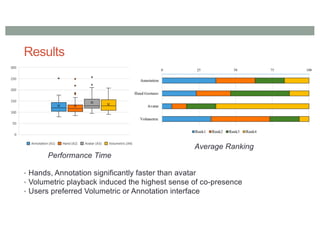
• Hands, Annotation significantly faster than avatar
• Volumetric playback induced the highest sense of co-presence
• Users preferred Volumetric or Annotation interface
Performance Time
Average Ranking
Results
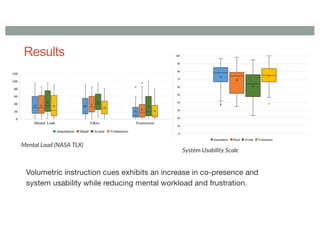
Volumetric instruction cues exhibits an increase in co-presence and
system usability while reducing mental workload and frustration.
Mental Load (NASA TLX)
System Usability Scale
User Feedback
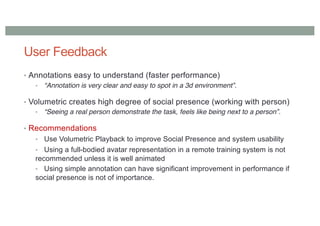
• Annotations easy to understand (faster performance)
• “Annotation is very clear and easy to spot in a 3d environment”.
• Volumetric creates high degree of social presence (working with person)
• “Seeing a real person demonstrate the task, feels like being next to a person”.
• Recommendations
• Use Volumetric Playback to improve Social Presence and system usability
• Using a full-bodied avatar representation in a remote training system is not
recommended unless it is well animated
• Using simple annotation can have significant improvement in performance if
social presence is not of importance.
AI ENHANCED COMMUNICATION
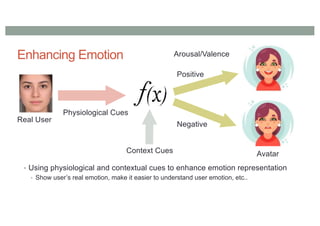
Enhancing Emotion
• Using physiological and contextual cues to enhance emotion representation
• Show user’s real emotion, make it easier to understand user emotion, etc..
Real User
Physiological Cues
Arousal/Valence
Positive
Negative
Avatar
Context Cues
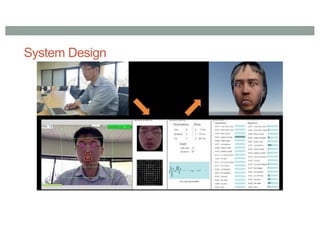
System Design
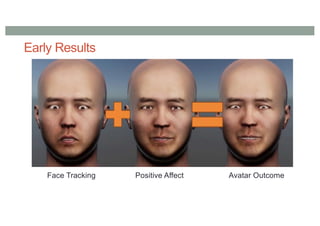
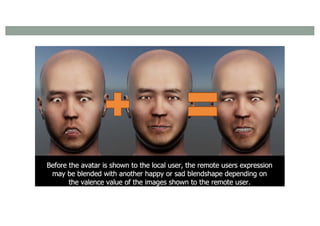
Early Results
Face Tracking Positive Affect Avatar Outcome
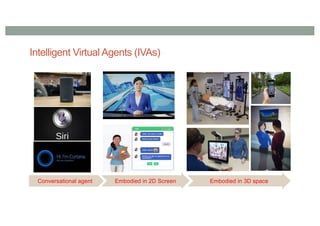
Conversational agent
Intelligent Virtual Agents (IVAs)
Embodied in 2D Screen Embodied in 3D space
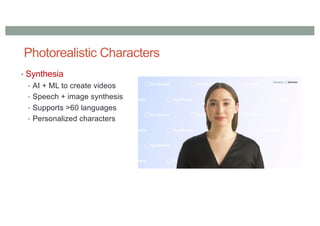
Photorealistic Characters
• Synthesia
• AI + ML to create videos
• Speech + image synthesis
• Supports >60 languages
• Personalized characters
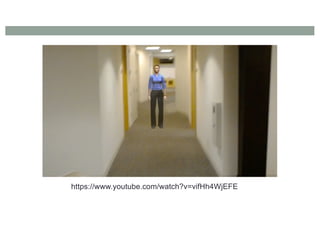
https://www.youtube.com/watch?v=vifHh4WjEFE
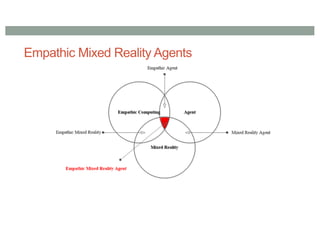
Empathic Mixed Reality Agents
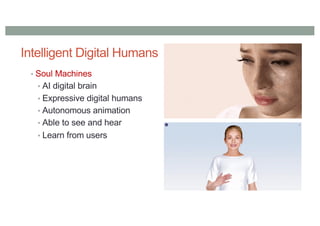
Intelligent Digital Humans
• Soul Machines
• AI digital brain
• Expressive digital humans
• Autonomous animation
• Able to see and hear
• Learn from users
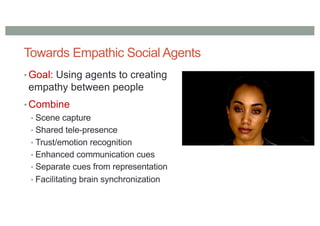
Towards Empathic Social Agents
• Goal: Using agents to creating
empathy between people
• Combine
• Scene capture
• Shared tele-presence
• Trust/emotion recognition
• Enhanced communication cues
• Separate cues from representation
• Facilitating brain synchronization
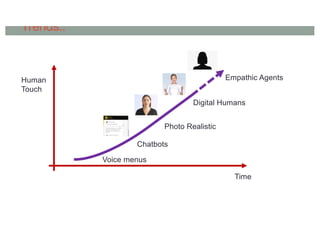
Trends..
Time
Human
Touch
Empathic Agents
Digital Humans
Photo Realistic
Chatbots
Voice menus
SCENE CAPTURE AND SHARING
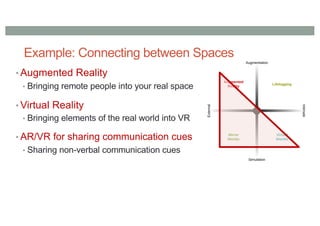
Example: Connecting between Spaces
• Augmented Reality
• Bringing remote people into your real space
• Virtual Reality
• Bringing elements of the real world into VR
• AR/VR for sharing communication cues
• Sharing non-verbal communication cues
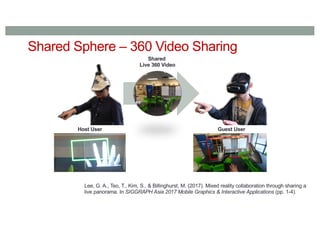
Shared Sphere – 360 Video Sharing
Shared
Live 360 Video
Host User Guest User
Lee, G. A., Teo, T., Kim, S., & Billinghurst, M. (2017). Mixed reality collaboration through sharing a
live panorama. In SIGGRAPH Asia 2017 Mobile Graphics & Interactive Applications (pp. 1-4).
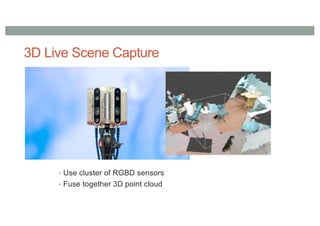
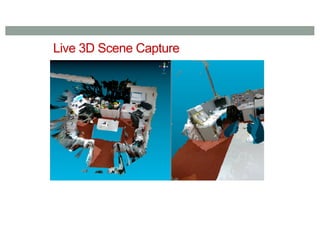
3D Live Scene Capture
• Use cluster of RGBD sensors
• Fuse together 3D point cloud
Live 3D Scene Capture
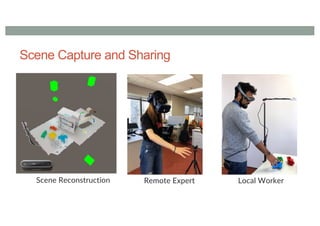
Scene Capture and Sharing
Scene Reconstruction Remote Expert Local Worker
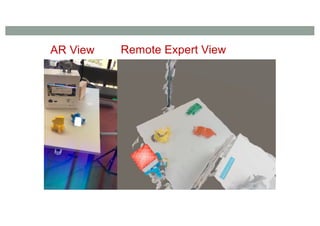
AR View Remote Expert View
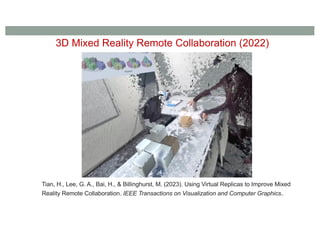
3D Mixed Reality Remote Collaboration (2022)
Tian, H., Lee, G. A., Bai, H., & Billinghurst, M. (2023). Using Virtual Replicas to Improve Mixed
Reality Remote Collaboration. IEEE Transactions on Visualization and Computer Graphics.
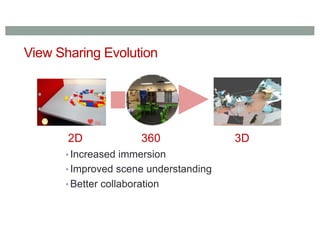
View Sharing Evolution
• Increased immersion
• Improved scene understanding
• Better collaboration
2D 360 3D
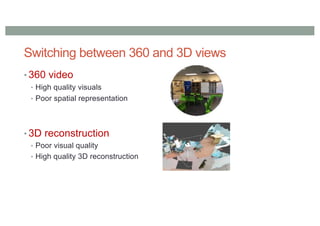
Switching between 360 and 3D views
• 360 video
• High quality visuals
• Poor spatial representation
• 3D reconstruction
• Poor visual quality
• High quality 3D reconstruction
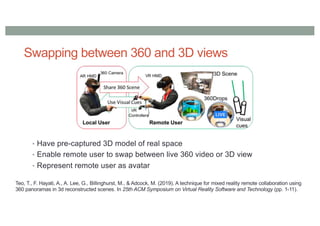
Swapping between 360 and 3D views
• Have pre-captured 3D model of real space
• Enable remote user to swap between live 360 video or 3D view
• Represent remote user as avatar
Teo, T., F. Hayati, A., A. Lee, G., Billinghurst, M., & Adcock, M. (2019). A technique for mixed reality remote collaboration using
360 panoramas in 3d reconstructed scenes. In 25th ACM Symposium on Virtual Reality Software and Technology (pp. 1-11).
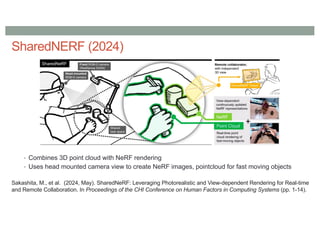
SharedNERF (2024)
• Combines 3D point cloud with NeRF rendering
• Uses head mounted camera view to create NeRF images, pointcloud for fast moving objects
Sakashita, M., et al. (2024, May). SharedNeRF: Leveraging Photorealistic and View-dependent Rendering for Real-time
and Remote Collaboration. In Proceedings of the CHI Conference on Human Factors in Computing Systems (pp. 1-14).
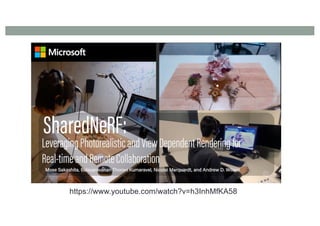
https://www.youtube.com/watch?v=h3InhMfKA58
ASYNCHRONOUS COMMUNICATION
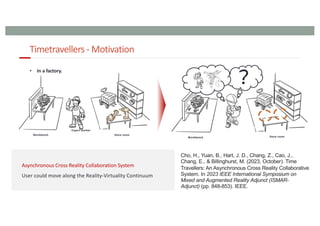
User could move along the Reality-Virtuality Continuum
Timetravellers - Motivation
Expert worker
Store room
Workbench
?
Store room
Workbench
• In a factory.
Cho, H., Yuan, B., Hart, J. D., Chang, Z., Cao, J.,
Chang, E., & Billinghurst, M. (2023, October). Time
Travellers: An Asynchronous Cross Reality Collaborative
System. In 2023 IEEE International Symposium on
Mixed and Augmented Reality Adjunct (ISMAR-
Adjunct) (pp. 848-853). IEEE.
Design Goals
96
AR
/ VR
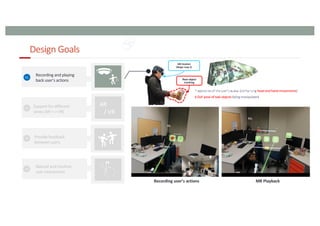
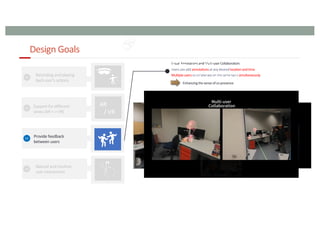
Recording user’s actions MR Playback
MR Headset
(Magic Leap 2)
Real object
tracking
Design Goals
97
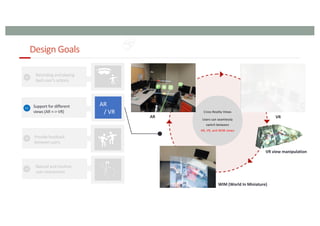
AR
/ VR
AR VR
WIM (World In Miniature)
VR view manipulation
Design Goals
98
AR
/ VR
Visual Annotation (AR mode) Visual Annotation (VR mode)
Design Goals
99
AR
/ VR
[ Seamless Transition ]
AR -> VR
VR -> AR
[ Avatar, Virtual Replica ]
“Time Travellers” Overview
100
Time
Step 1: Recording an expert’s
standard process
Step 2: Reviewing the recorded process through the
hybrid cross-reality playback system
2nd
User
1st
User MR Headset
(Magic Leap 2)
Real object
tracking
1st User’s view
Visual annotation
Avatar interaction
2nd User’s view
Timeline manipulation
Recording Data
[ 3D Work space ]
[ Avatar, Object ]
Spatial Data
1st User’s view Real object
tracking
AR mode VR mode
Cross reality asynchronous collaborative system
AR mode VR mode
Pilot User Evaluation -User studyDesign-
101
• The participants(6) performed a task of reviewing and annotating on recorded videos in both AR
and AR+VR (Cross Reality) conditions.
• Leaves a marker when the action begins, and an arrow when it ends.
[ AR condition ] [ AR+VR condition ]
Pilot User Evaluation -Measurements -
102
• Objective Measurements
[ Task Completion Time ] [ Moving Trajectory ]
[ Timeline Manipulation Time ]
• Subjective Measurements
• NASA TLX
• System sability questionnaire (SUS)
Pilot User Evaluation - Results and Lessons Learned -
103
• Objective Measurements
[ Task Completion Time ] [ Moving Trajectory ]
[ Timeline Manipulation Time ]
200
210
220
230
240
Completion time
(sec)
AR AR+VR
0
5
10
15
20
Timeline
manipulation (sec)
AR AR+VR
0
10
20
30
40
50
Moving trajectories (m)
AR AR+VR
Pilot User Evaluation - Results and Lessons Learned -
104
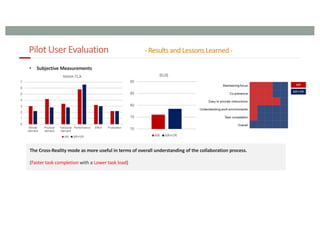
• Subjective Measurements
The Cross-Reality mode as more useful in terms of overall understanding of the collaboration process.
(Faster task completion with a Lower task load)
PROTOTYPING TOOLS
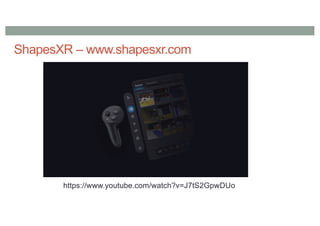
ShapesXR – www.shapesxr.com
https://www.youtube.com/watch?v=J7tS2GpwDUo
Challenges with Prototyping CR Systems
• Cross platform support
• Need for programming skills
• Building collaborative systems
• Need to build multiple different interfaces
• Connecting multiple devices/components
• Difficult to prototype hardware/display systems
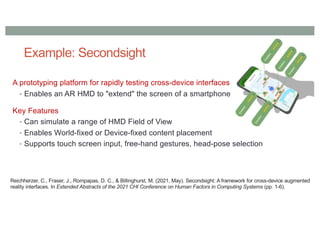
Example: Secondsight
A prototyping platform for rapidly testing cross-device interfaces
• Enables an AR HMD to "extend" the screen of a smartphone
Key Features
• Can simulate a range of HMD Field of View
• Enables World-fixed or Device-fixed content placement
• Supports touch screen input, free-hand gestures, head-pose selection
Reichherzer, C., Fraser, J., Rompapas, D. C., & Billinghurst, M. (2021, May). Secondsight: A framework for cross-device augmented
reality interfaces. In Extended Abstracts of the 2021 CHI Conference on Human Factors in Computing Systems (pp. 1-6).
Content Placement
© 2021 SIGGRAPH. All Rights Reserved.
Input
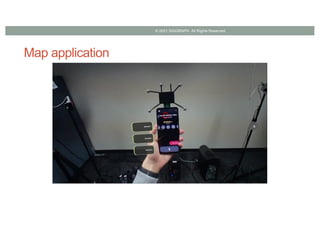
Map application
© 2021 SIGGRAPH. All Rights Reserved.
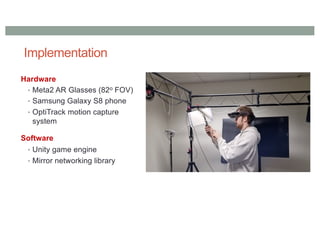
Implementation
Hardware
• Meta2 AR Glasses (82o FOV)
• Samsung Galaxy S8 phone
• OptiTrack motion capture
system
Software
• Unity game engine
• Mirror networking library
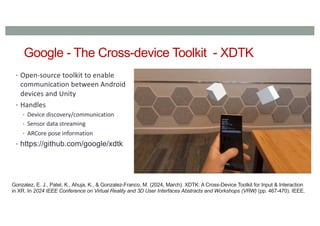
Google - The Cross-device Toolkit - XDTK
• Open-source toolkit to enable
communication between Android
devices and Unity
• Handles
• Device discovery/communication
• Sensor data streaming
• ARCore pose information
• https://github.com/google/xdtk
Gonzalez, E. J., Patel, K., Ahuja, K., & Gonzalez-Franco, M. (2024, March). XDTK: A Cross-Device Toolkit for Input & Interaction
in XR. In 2024 IEEE Conference on Virtual Reality and 3D User Interfaces Abstracts and Workshops (VRW) (pp. 467-470). IEEE.
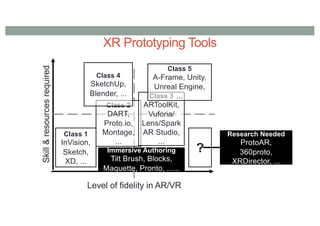
Skill
&
resources
required
Level of fidelity in AR/VR
Class 1
InVision,
Sketch,
XD, ...
Class 2
DART,
Proto.io,
Montage,
...
Class 3
ARToolKit,
Vuforia/
Lens/Spark
AR Studio,
...
Class 4
SketchUp,
Blender, ...
Class 5
A-Frame, Unity,
Unreal Engine,
...
Immersive Authoring
Tilt Brush, Blocks,
Maquette, Pronto, ......
?
Research Needed
ProtoAR,
360proto,
XRDirector, ...
XR Prototyping Tools
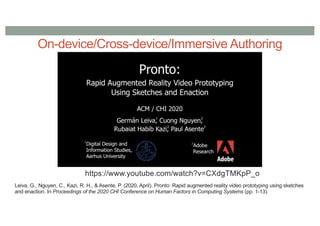
On-device/Cross-device/Immersive Authoring
https://www.youtube.com/watch?v=CXdgTMKpP_o
Leiva, G., Nguyen, C., Kazi, R. H., & Asente, P. (2020, April). Pronto: Rapid augmented reality video prototyping using sketches
and enaction. In Proceedings of the 2020 CHI Conference on Human Factors in Computing Systems (pp. 1-13).
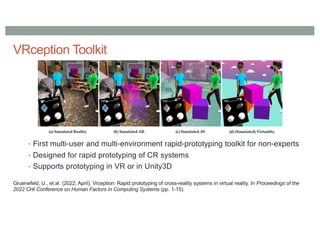
VRception Toolkit
• First multi-user and multi-environment rapid-prototyping toolkit for non-experts
• Designed for rapid prototyping of CR systems
• Supports prototyping in VR or in Unity3D
Gruenefeld, U., et al. (2022, April). Vrception: Rapid prototyping of cross-reality systems in virtual reality. In Proceedings of the
2022 CHI Conference on Human Factors in Computing Systems (pp. 1-15).
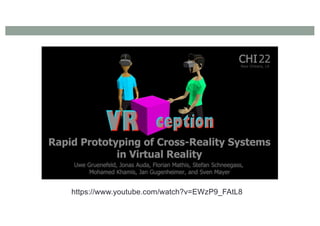
https://www.youtube.com/watch?v=EWzP9_FAtL8
EMPATHIC COMPUTING
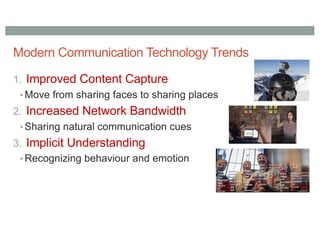
Modern Communication Technology Trends
1. Improved Content Capture
• Move from sharing faces to sharing places
2. Increased Network Bandwidth
• Sharing natural communication cues
3. Implicit Understanding
• Recognizing behaviour and emotion
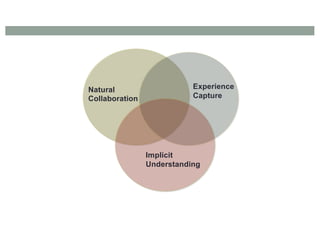
Natural
Collaboration
Implicit
Understanding
Experience
Capture
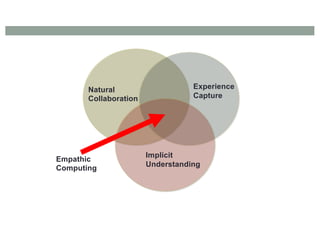
Natural
Collaboration
Implicit
Understanding
Experience
Capture
Empathic
Computing
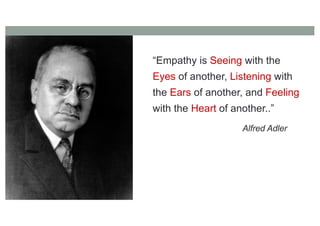
“Empathy is Seeing with the
Eyes of another, Listening with
the Ears of another, and Feeling
with the Heart of another..”
Alfred Adler
Empathic Computing Research Focus
Can we develop systems that allow
us to share what we are seeing,
hearing and feeling with others?
Key Elements of Empathic Systems
•Understanding
• Emotion Recognition, physiological sensors
•Experiencing
• Content/Environment capture, VR
•Sharing
• Communication cues, AR
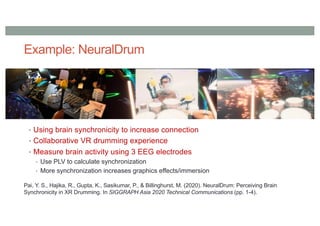
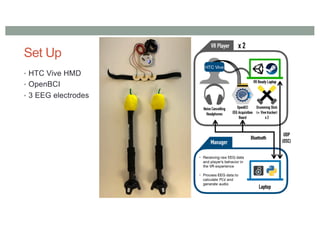
Example: NeuralDrum
• Using brain synchronicity to increase connection
• Collaborative VR drumming experience
• Measure brain activity using 3 EEG electrodes
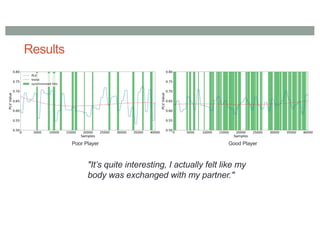
• Use PLV to calculate synchronization
• More synchronization increases graphics effects/immersion
Pai, Y. S., Hajika, R., Gupta, K., Sasikumar, P., & Billinghurst, M. (2020). NeuralDrum: Perceiving Brain
Synchronicity in XR Drumming. In SIGGRAPH Asia 2020 Technical Communications (pp. 1-4).
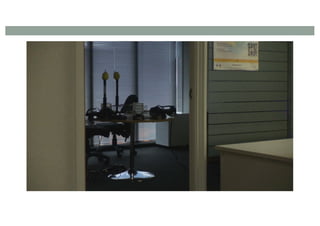
Set Up
• HTC Vive HMD
• OpenBCI
• 3 EEG electrodes
Results
"It’s quite interesting, I actually felt like my
body was exchanged with my partner."
Poor Player Good Player
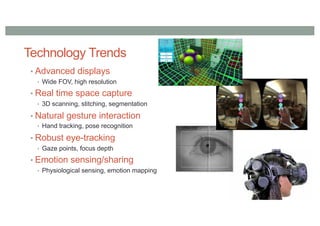
Technology Trends
• Advanced displays
• Wide FOV, high resolution
• Real time space capture
• 3D scanning, stitching, segmentation
• Natural gesture interaction
• Hand tracking, pose recognition
• Robust eye-tracking
• Gaze points, focus depth
• Emotion sensing/sharing
• Physiological sensing, emotion mapping
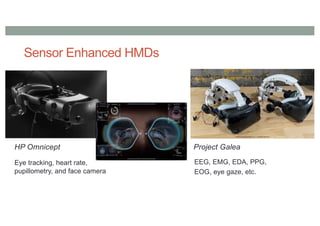
Sensor Enhanced HMDs
Eye tracking, heart rate,
pupillometry, and face camera
HP Omnicept Project Galea
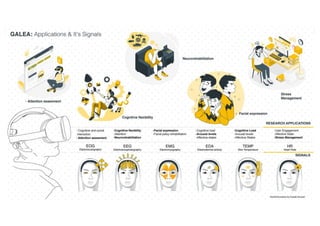
EEG, EMG, EDA, PPG,
EOG, eye gaze, etc.
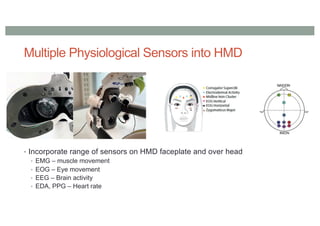
Multiple Physiological Sensors into HMD
• Incorporate range of sensors on HMD faceplate and over head
• EMG – muscle movement
• EOG – Eye movement
• EEG – Brain activity
• EDA, PPG – Heart rate
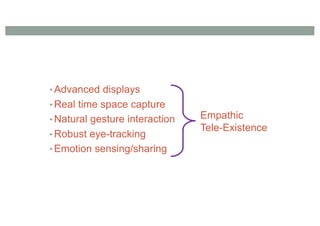
• Advanced displays
• Real time space capture
• Natural gesture interaction
• Robust eye-tracking
• Emotion sensing/sharing
Empathic
Tele-Existence
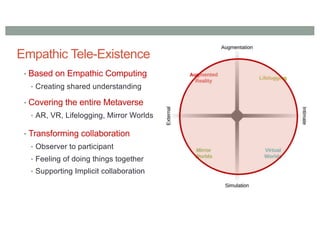
Empathic Tele-Existence
• Based on Empathic Computing
• Creating shared understanding
• Covering the entire Metaverse
• AR, VR, Lifelogging, Mirror Worlds
• Transforming collaboration
• Observer to participant
• Feeling of doing things together
• Supporting Implicit collaboration
CONCLUSIONS
Summary
• Cross Reality systems transition across boundaries
• Mixed Reality continuum, Metaverse taxonomy
• Important research areas
• Enhancing Communication Cues, Asynchronous CR
systems, Empathic Computing
• Scene Capture and Sharing, Avatar Representation, AI
Enhanced communication, Prototyping Tools
• New research opportunities available
• XR + AI + Sensing + ??
www.empathiccomputing.org
@marknb00
mark.billinghurst@unisa.ac.nz

Research Directions for Cross Reality Interfaces

  • 1.
    RESEARCH DIRECTIONS IN CROSSREALITY INTERFACES Mark Billinghurst mark.billinghurst@unisa.edu.au Summer School on Cross Reality July 2nd 2024
  • 5.
    Computer Interfaces • Separationbetween real and digital worlds • WIMP (Windows, Icons, Menus, Pointer) metaphor
  • 6.
    Rekimoto, J. andNagao, K. 1995. The world through the computer: computer augmented interaction with real world environments. Making Interfaces Invisible (c) Internet of Things
  • 7.
    Internet of Things(IoT).. • Embed computing and sensing in real world • Smart objects, sensors, etc.. (c) Internet of Things
  • 8.
    Virtual Reality (VR) •Users immersed in Computer Generated environment • HMD, gloves, 3D graphics, body tracking
  • 9.
    Augmented Reality (AR) •Virtual Images blended with the real world • See-through HMD, handheld display, viewpoint tracking, etc..
  • 10.
    From Reality toVirtual Reality Internet of Things Augmented Reality Virtual Reality Real World Virtual World
  • 11.
    Milgram’s Mixed Reality(MR) Continuum Augmented Reality Virtual Reality Real World Virtual World Mixed Reality "...anywhere between the extrema of the virtuality continuum." P. Milgram and A. F. Kishino, (1994) A Taxonomy of Mixed Reality Visual Displays Internet of Things
  • 12.
    Milgram’s Mixed Reality(MR) Continuum Augmented Reality Virtual Reality Real World Virtual World Mixed Reality Internet of Things
  • 13.
    The MagicBook (2001) RealityVirtuality Augmented Reality (AR) Augmented Virtuality (AV) Billinghurst, M., Kato, H., & Poupyrev, I. (2001). The MagicBook: a transitional AR interface. Computers & Graphics, 25(5), 745-753.
  • 14.
  • 15.
    Features • Seamless transitionfrom Reality to Virtuality • Reliance on real decreases as virtual increases • Supports egocentric and exocentric views • User can pick appropriate view • Independent Views • Privacy, role division, scalability • Collaboration on multiple levels: • Physical Object, AR Object, Immersive Virtual Space • Egocentric + exocentric collaboration • multiple multi-scale users
  • 16.
    Apple Vision Pro(2024) • Transitioning from AR to VR • Spatial Computing – interface seamlessly blending with real world
  • 17.
    Cross Reality (CR)Systems •Systems that facilitate: •a smooth transition between systems using different degrees of virtuality or •collaboration between users using different systems with different degrees of virtuality Simeone, Adalberto L., Mohamed Khamis, Augusto Esteves, Florian Daiber, Matjaž Kljun, Klen Čopič Pucihar, Poika Isokoski, and Jan Gugenheimer. "International workshop on cross-reality (xr) interaction." In Companion Proceedings of the 2020 Conference on Interactive Surfaces and Spaces, pp. 111-114. 2020.
  • 18.
    Publications in CrossReality Increasing publications since 2019
  • 19.
    Key CR Technologies •Augmentation technologies that layer information onto our perception of the physical environment. • Simulation technologies that model reality • Intimate technologies are focused inwardly, on the identity and actions of the individual or object; • External technologies are focused outwardly, towards the world at large;
  • 20.
    Taxonomy • Four KeyComponents • Virtual Worlds • Augmented Reality • Mirror Worlds • Lifelogging
  • 21.
    Mirror Worlds • Simulationsof external space/content • Capturing and sharing surroundings • Photorealistic content • Digital twins Matterport Deep Mirror Google Street View Soul Machines
  • 22.
    Lifelogging • Measuring user’sinternal state • Capturing physiological cues • Recording everyday life • Augmenting humans Apple Fitbit Shimmer OpenBCI
  • 23.
  • 24.
  • 25.
    What is theMetaverse Research Landscape? •Survey of Scopus papers (to June 2023) • ~1900 papers found with Metaverse in abstract/keywords •Further analysis • Look for publications in AR, VR, MirrorWorlds (MW), LifeLogging (LL) • Look for research across boundaries •Application analysis • Most popular application domains
  • 26.
  • 27.
  • 28.
  • 29.
  • 30.
    Lessons Learned •Research Strengths •Most Metaverse research VR related (36%) • Strong connections between AR/VR (16%) • Strong connections between MW/VR (11%) •Research Opportunities • Opportunities across boundaries - 1% papers in AR/LL, 0% in MW/LL • Opportunities to combine > 2 quadrants – 0% in AR/MW/LL • Opportunities for research combining all elements • Broadening application space – industry, finance, etc
  • 31.
    Possible Research Directions •Lifelogging to VR • Bringing real world actions into VR, VR to experience lifelogging data • AR to Lifelogging • Using AR to view lifelogging data in everyday life, Sharing physiological data • Mirror Worlds to VR • VR copy of the real world, Mirroring real world collaboration in VR • AR to Mirror Worlds • Visualizing the past in place, Asymmetric collaboration • And more..
  • 32.
    Example: Sharing CommunicationCues • Measuring non-verbal cues • Gaze, face expression, heart rate • Sharing in Augmented Reality • Collaborative AR experiences
  • 33.
    Empathy Glasses • Combinetogether eye-tracking, display, face expression • Implicit cues – eye gaze, face expression + + Pupil Labs Epson BT-200 AffectiveWear Masai, K., Sugimoto, M., Kunze, K., & Billinghurst, M. (2016, May). Empathy Glasses. In Proceedings of the 34th Annual ACM Conference Extended Abstracts on Human Factors in Computing Systems. ACM.
  • 34.
    Remote Collaboration • Eyegaze pointer and remote pointing • Face expression display • Implicit cues for remote collaboration
  • 36.
    Research Directions •Enhancing CommunicationCues •Avatar Representation •AI Enhanced communication •Scene Capture and Sharing •Asynchronous CR systems •Prototyping Tools •Empathic Computing
  • 37.
  • 38.
  • 39.
    • Using AR/VRto share communication cues • Gaze, gesture, head pose, body position • Sharing same environment • Virtual copy of real world • Collaboration between AR/VR • VR user appears in AR user’s space Piumsomboon, T., Dey, A., Ens, B., Lee, G., & Billinghurst, M. (2019). The effects of sharing awareness cues in collaborative mixed reality. Frontiers in Robotics and AI, 6, 5. Sharing Virtual Communication Cues (2019)
  • 40.
    Sharing Virtual CommunicationCues • AR/VR displays • Gesture input (Leap Motion) • Room scale tracking • Conditions • Baseline, FoV, Head-gaze, Eye-gaze
  • 42.
    Results • Predictions • Eye/Headpointing better than no cues • Eye/head pointing could reduce need for pointing • Results • No difference in task completion time • Head-gaze/eye-gaze great mutual gaze rate • Using head-gaze greater ease of use than baseline • All cues provide higher co-presence than baseline • Pointing gestures reduced in cue conditions • But • No difference between head-gaze and eye-gaze
  • 43.
    Enhancing Gaze Cues Howsharing gaze behavioural cues can improve remote collaboration in Mixed Reality environment. ➔ Developed eyemR-Vis, a 360 panoramic Mixed Reality remote collaboration system ➔ Showed gaze behavioural cues as bi-directional spatial virtual visualisations shared between a local host (AR) and a remote collaborator (VR). Jing, A., May, K. W., Naeem, M., Lee, G., & Billinghurst, M. (2021). eyemR-Vis: Using Bi-Directional Gaze Behavioural Cues to Improve Mixed Reality Remote Collaboration. In Extended Abstracts of the 2021 CHI Conference on Human Factors in Computing Systems (pp. 1-7).
  • 44.
    System Design ➔ 360Panaramic Camera + Mixed Reality View ➔ Combination of HoloLens2 + Vive Pro Eye ➔ 4 gaze behavioural visualisations: browse, focus, mutual, fixated circle
  • 45.
  • 46.
    Example: Multi-Scale Collaboration •Changing the user’s virtual body scale Piumsomboon, T., Lee, G. A., Irlitti, A., Ens, B., Thomas, B. H., & Billinghurst, M. (2019, May). On the shoulder of the giant: A multi-scale mixed reality collaboration with 360 video sharing and tangible interaction. In Proceedings of the 2019 CHI conference on human factors in computing systems (pp. 1-17).
  • 48.
    Sharing: Separating Cuesfrom Body • What happens when you can’t see your colleague/agent? Piumsomboon, T., Lee, G. A., Hart, J. D., Ens, B., Lindeman, R. W., Thomas, B. H., & Billinghurst, M. (2018, April). Mini-me: An adaptive avatar for mixed reality remote collaboration. In Proceedings of the 2018 CHI conference on human factors in computing systems (pp. 1-13). Collaborating Collaborator out of View
  • 49.
    Mini-Me Communication Cuesin MR • When lose sight of collaborator a Mini-Me avatar appears • Miniature avatar in real world • Mini-Me points to shared objects, show communication cues • Redirected gaze, gestures
  • 51.
    User Study (16participants) • Collaboration between user in AR, expert in VR • Hololens, HTC Vive • Two tasks: • (1) asymmetric, (2) symmetric • Key findings • Mini-Me significantly improved performance time (task1) (20% faster) • Mini-Me significantly improved Social Presence scores • 63% (task 2) – 75% (task 1) of users preferred Mini-Me “I feel like I am talking to my partner”
  • 52.
  • 53.
    Avatar Representation forSocial Presence • What should avatars look like for social situations? • Cartoon vs. realistic? • Partial or full body? • Impact on Social Presence? Yoon, B., Kim, H. I., Lee, G. A., Billinghurst, M., & Woo, W. (2019, March). The effect of avatar appearance on social presence in an augmented reality remote collaboration. In 2019 IEEE Conference on Virtual Reality and 3D User Interfaces (VR) (pp. 547-556). IEEE.
  • 54.
    Avatar Representations • Cartoonvs. Realistic, Part Body vs. Whole Body • Realistic Head & Hands (RHH), Realistic Upper Body (RUB), Realistic Whole Body (RWB), • Cartoon Head & Hands (CHH), Cartoon Upper Body (CUB), Cartoon Whole Body (CWB).
  • 55.
    Experiment • Within-subjects design(24 subjects) • 6 conditions: RHH, RUB, RWB, CHH, CUB, CWB • AR/VR interface • Subject in AR interface, actor in VR • Experiment measures • Social Presence • Networked Mind Measure of Social Presence survey • Bailenson’s Social Presence survey • Post Experiment Interview • Tasks • Study 1: Crossword puzzle (Face to Face discussion) • Study 2: Furniture placement (virtual object placement) AR user VR user
  • 56.
    Hypotheses H1. Body PartVisibility will affect the user’s Social Presence in AR. H2. The Whole-Body virtual avatars will have the highest Social Presence among the three levels of visibility. H3. Head & Hands virtual avatars will have the lowest Social Presence among the three levels of visibility. H4. The Character Style will affect the user’s Social Presence. H5. Realistic avatars will have a higher Social Presence than Cartoon Style avatars in an AR remote collaboration.
  • 57.
    Results • Aggregated PresenceScores • 1: strongly disagree - 7: strongly agree
  • 58.
    User Comments • ‘WholeBody’ Avatar Expression to Users • “Presence was high with full body parts, because I could notice joints’ movement, behaviour, and reaction.” • “I didn’t get the avatar’s intention of the movement, because it had only head and hands.” • ‘Upper Body’ vs. ‘Whole Body’ Avatar • “I preferred the one with whole body, but it didn’t really matter because I didn’t look at the legs much.”, • “I noticed head and hands model immediately, but I didn’t feel the difference whether the avatar had a lower body or not.” • ‘Realistic’ vs ‘Cartoon’ style Avatars • "The character seemed more like a game than furniture placement in real. I felt that realistic whole body was collaborating with me more.”
  • 59.
    Key Lessons Learned •Avatar Body Part visibility should be considered first when designing for AR remote collaboration since it significantly affects Social Presence • Body Part Visibility • Whole Body & Upper Body: Whole body is preferred, but upper body is okay in some cases • Head & Hands: Should be avoided • Character Style • No difference in Social Presence between Realistic and Cartoon avatars • However, the majority of participants had a positive response towards the Realistic avatar • Cartoon character for fun, Realistic avatar for professional meetings
  • 60.
    Avatar Representation inTraining • Pilot study with recorded avatar • Motorcycle engine assembly • Avatar types • (A1) Annotation: Computer-generated lines drawn in 3D space. • (A2) Hand Gesture: Real hand gestures captured using stereoscopic cameras • (A3) Avatar: Virtual avatar reconstructed using inverse kinematics. • (A4) Volumetric Playback: Using three Kinect cameras, the movements of an expert are captured and played back as a virtual avatar via a see-through headset.
  • 61.
  • 62.
    Representing Remote Users VirtualAvatar Volumetric Avatar
  • 63.
    Experiment Design (30participants) Performing motorbike assembly task under guidance - Easy, Medium, Hard task Hypotheses - H1. Volumetric playback would have a better sense of social presence in a remote training system. - H2. Volumetric playback would enable faster completion of tasks in a remote training system Measures • NMM Social Presence Questionnaire, NASA TLX, SUS
  • 64.
    Results • Hands, Annotationsignificantly faster than avatar • Volumetric playback induced the highest sense of co-presence • Users preferred Volumetric or Annotation interface Performance Time Average Ranking
  • 65.
    Results Volumetric instruction cuesexhibits an increase in co-presence and system usability while reducing mental workload and frustration. Mental Load (NASA TLX) System Usability Scale
  • 66.
    User Feedback • Annotationseasy to understand (faster performance) • “Annotation is very clear and easy to spot in a 3d environment”. • Volumetric creates high degree of social presence (working with person) • “Seeing a real person demonstrate the task, feels like being next to a person”. • Recommendations • Use Volumetric Playback to improve Social Presence and system usability • Using a full-bodied avatar representation in a remote training system is not recommended unless it is well animated • Using simple annotation can have significant improvement in performance if social presence is not of importance.
  • 67.
  • 68.
    Enhancing Emotion • Usingphysiological and contextual cues to enhance emotion representation • Show user’s real emotion, make it easier to understand user emotion, etc.. Real User Physiological Cues Arousal/Valence Positive Negative Avatar Context Cues
  • 69.
  • 70.
    Early Results Face TrackingPositive Affect Avatar Outcome
  • 72.
    Conversational agent Intelligent VirtualAgents (IVAs) Embodied in 2D Screen Embodied in 3D space
  • 73.
    Photorealistic Characters • Synthesia •AI + ML to create videos • Speech + image synthesis • Supports >60 languages • Personalized characters
  • 74.
  • 75.
  • 76.
    Intelligent Digital Humans •Soul Machines • AI digital brain • Expressive digital humans • Autonomous animation • Able to see and hear • Learn from users
  • 77.
    Towards Empathic SocialAgents • Goal: Using agents to creating empathy between people • Combine • Scene capture • Shared tele-presence • Trust/emotion recognition • Enhanced communication cues • Separate cues from representation • Facilitating brain synchronization
  • 78.
  • 79.
  • 80.
    Example: Connecting betweenSpaces • Augmented Reality • Bringing remote people into your real space • Virtual Reality • Bringing elements of the real world into VR • AR/VR for sharing communication cues • Sharing non-verbal communication cues
  • 81.
    Shared Sphere –360 Video Sharing Shared Live 360 Video Host User Guest User Lee, G. A., Teo, T., Kim, S., & Billinghurst, M. (2017). Mixed reality collaboration through sharing a live panorama. In SIGGRAPH Asia 2017 Mobile Graphics & Interactive Applications (pp. 1-4).
  • 83.
    3D Live SceneCapture • Use cluster of RGBD sensors • Fuse together 3D point cloud
  • 84.
  • 85.
    Scene Capture andSharing Scene Reconstruction Remote Expert Local Worker
  • 86.
    AR View RemoteExpert View
  • 87.
    3D Mixed RealityRemote Collaboration (2022) Tian, H., Lee, G. A., Bai, H., & Billinghurst, M. (2023). Using Virtual Replicas to Improve Mixed Reality Remote Collaboration. IEEE Transactions on Visualization and Computer Graphics.
  • 88.
    View Sharing Evolution •Increased immersion • Improved scene understanding • Better collaboration 2D 360 3D
  • 89.
    Switching between 360and 3D views • 360 video • High quality visuals • Poor spatial representation • 3D reconstruction • Poor visual quality • High quality 3D reconstruction
  • 90.
    Swapping between 360and 3D views • Have pre-captured 3D model of real space • Enable remote user to swap between live 360 video or 3D view • Represent remote user as avatar Teo, T., F. Hayati, A., A. Lee, G., Billinghurst, M., & Adcock, M. (2019). A technique for mixed reality remote collaboration using 360 panoramas in 3d reconstructed scenes. In 25th ACM Symposium on Virtual Reality Software and Technology (pp. 1-11).
  • 92.
    SharedNERF (2024) • Combines3D point cloud with NeRF rendering • Uses head mounted camera view to create NeRF images, pointcloud for fast moving objects Sakashita, M., et al. (2024, May). SharedNeRF: Leveraging Photorealistic and View-dependent Rendering for Real-time and Remote Collaboration. In Proceedings of the CHI Conference on Human Factors in Computing Systems (pp. 1-14).
  • 93.
  • 94.
  • 95.
    User could movealong the Reality-Virtuality Continuum Timetravellers - Motivation Expert worker Store room Workbench ? Store room Workbench • In a factory. Cho, H., Yuan, B., Hart, J. D., Chang, Z., Cao, J., Chang, E., & Billinghurst, M. (2023, October). Time Travellers: An Asynchronous Cross Reality Collaborative System. In 2023 IEEE International Symposium on Mixed and Augmented Reality Adjunct (ISMAR- Adjunct) (pp. 848-853). IEEE.
  • 96.
    Design Goals 96 AR / VR Recordinguser’s actions MR Playback MR Headset (Magic Leap 2) Real object tracking
  • 97.
    Design Goals 97 AR / VR ARVR WIM (World In Miniature) VR view manipulation
  • 98.
    Design Goals 98 AR / VR VisualAnnotation (AR mode) Visual Annotation (VR mode)
  • 99.
    Design Goals 99 AR / VR [Seamless Transition ] AR -> VR VR -> AR [ Avatar, Virtual Replica ]
  • 100.
    “Time Travellers” Overview 100 Time Step1: Recording an expert’s standard process Step 2: Reviewing the recorded process through the hybrid cross-reality playback system 2nd User 1st User MR Headset (Magic Leap 2) Real object tracking 1st User’s view Visual annotation Avatar interaction 2nd User’s view Timeline manipulation Recording Data [ 3D Work space ] [ Avatar, Object ] Spatial Data 1st User’s view Real object tracking AR mode VR mode Cross reality asynchronous collaborative system AR mode VR mode
  • 101.
    Pilot User Evaluation-User studyDesign- 101 • The participants(6) performed a task of reviewing and annotating on recorded videos in both AR and AR+VR (Cross Reality) conditions. • Leaves a marker when the action begins, and an arrow when it ends. [ AR condition ] [ AR+VR condition ]
  • 102.
    Pilot User Evaluation-Measurements - 102 • Objective Measurements [ Task Completion Time ] [ Moving Trajectory ] [ Timeline Manipulation Time ] • Subjective Measurements • NASA TLX • System sability questionnaire (SUS)
  • 103.
    Pilot User Evaluation- Results and Lessons Learned - 103 • Objective Measurements [ Task Completion Time ] [ Moving Trajectory ] [ Timeline Manipulation Time ] 200 210 220 230 240 Completion time (sec) AR AR+VR 0 5 10 15 20 Timeline manipulation (sec) AR AR+VR 0 10 20 30 40 50 Moving trajectories (m) AR AR+VR
  • 104.
    Pilot User Evaluation- Results and Lessons Learned - 104 • Subjective Measurements The Cross-Reality mode as more useful in terms of overall understanding of the collaboration process. (Faster task completion with a Lower task load)
  • 105.
  • 106.
  • 107.
    Challenges with PrototypingCR Systems • Cross platform support • Need for programming skills • Building collaborative systems • Need to build multiple different interfaces • Connecting multiple devices/components • Difficult to prototype hardware/display systems
  • 108.
    Example: Secondsight A prototypingplatform for rapidly testing cross-device interfaces • Enables an AR HMD to "extend" the screen of a smartphone Key Features • Can simulate a range of HMD Field of View • Enables World-fixed or Device-fixed content placement • Supports touch screen input, free-hand gestures, head-pose selection Reichherzer, C., Fraser, J., Rompapas, D. C., & Billinghurst, M. (2021, May). Secondsight: A framework for cross-device augmented reality interfaces. In Extended Abstracts of the 2021 CHI Conference on Human Factors in Computing Systems (pp. 1-6).
  • 109.
    Content Placement © 2021SIGGRAPH. All Rights Reserved.
  • 110.
  • 111.
    Map application © 2021SIGGRAPH. All Rights Reserved.
  • 112.
    Implementation Hardware • Meta2 ARGlasses (82o FOV) • Samsung Galaxy S8 phone • OptiTrack motion capture system Software • Unity game engine • Mirror networking library
  • 113.
    Google - TheCross-device Toolkit - XDTK • Open-source toolkit to enable communication between Android devices and Unity • Handles • Device discovery/communication • Sensor data streaming • ARCore pose information • https://github.com/google/xdtk Gonzalez, E. J., Patel, K., Ahuja, K., & Gonzalez-Franco, M. (2024, March). XDTK: A Cross-Device Toolkit for Input & Interaction in XR. In 2024 IEEE Conference on Virtual Reality and 3D User Interfaces Abstracts and Workshops (VRW) (pp. 467-470). IEEE.
  • 114.
    Skill & resources required Level of fidelityin AR/VR Class 1 InVision, Sketch, XD, ... Class 2 DART, Proto.io, Montage, ... Class 3 ARToolKit, Vuforia/ Lens/Spark AR Studio, ... Class 4 SketchUp, Blender, ... Class 5 A-Frame, Unity, Unreal Engine, ... Immersive Authoring Tilt Brush, Blocks, Maquette, Pronto, ...... ? Research Needed ProtoAR, 360proto, XRDirector, ... XR Prototyping Tools
  • 115.
    On-device/Cross-device/Immersive Authoring https://www.youtube.com/watch?v=CXdgTMKpP_o Leiva, G.,Nguyen, C., Kazi, R. H., & Asente, P. (2020, April). Pronto: Rapid augmented reality video prototyping using sketches and enaction. In Proceedings of the 2020 CHI Conference on Human Factors in Computing Systems (pp. 1-13).
  • 116.
    VRception Toolkit • Firstmulti-user and multi-environment rapid-prototyping toolkit for non-experts • Designed for rapid prototyping of CR systems • Supports prototyping in VR or in Unity3D Gruenefeld, U., et al. (2022, April). Vrception: Rapid prototyping of cross-reality systems in virtual reality. In Proceedings of the 2022 CHI Conference on Human Factors in Computing Systems (pp. 1-15).
  • 117.
  • 118.
  • 119.
    Modern Communication TechnologyTrends 1. Improved Content Capture • Move from sharing faces to sharing places 2. Increased Network Bandwidth • Sharing natural communication cues 3. Implicit Understanding • Recognizing behaviour and emotion
  • 120.
  • 121.
  • 122.
    “Empathy is Seeingwith the Eyes of another, Listening with the Ears of another, and Feeling with the Heart of another..” Alfred Adler
  • 123.
    Empathic Computing ResearchFocus Can we develop systems that allow us to share what we are seeing, hearing and feeling with others?
  • 124.
    Key Elements ofEmpathic Systems •Understanding • Emotion Recognition, physiological sensors •Experiencing • Content/Environment capture, VR •Sharing • Communication cues, AR
  • 125.
    Example: NeuralDrum • Usingbrain synchronicity to increase connection • Collaborative VR drumming experience • Measure brain activity using 3 EEG electrodes • Use PLV to calculate synchronization • More synchronization increases graphics effects/immersion Pai, Y. S., Hajika, R., Gupta, K., Sasikumar, P., & Billinghurst, M. (2020). NeuralDrum: Perceiving Brain Synchronicity in XR Drumming. In SIGGRAPH Asia 2020 Technical Communications (pp. 1-4).
  • 126.
    Set Up • HTCVive HMD • OpenBCI • 3 EEG electrodes
  • 128.
    Results "It’s quite interesting,I actually felt like my body was exchanged with my partner." Poor Player Good Player
  • 129.
    Technology Trends • Advanceddisplays • Wide FOV, high resolution • Real time space capture • 3D scanning, stitching, segmentation • Natural gesture interaction • Hand tracking, pose recognition • Robust eye-tracking • Gaze points, focus depth • Emotion sensing/sharing • Physiological sensing, emotion mapping
  • 130.
    Sensor Enhanced HMDs Eyetracking, heart rate, pupillometry, and face camera HP Omnicept Project Galea EEG, EMG, EDA, PPG, EOG, eye gaze, etc.
  • 131.
    Multiple Physiological Sensorsinto HMD • Incorporate range of sensors on HMD faceplate and over head • EMG – muscle movement • EOG – Eye movement • EEG – Brain activity • EDA, PPG – Heart rate
  • 133.
    • Advanced displays •Real time space capture • Natural gesture interaction • Robust eye-tracking • Emotion sensing/sharing Empathic Tele-Existence
  • 134.
    Empathic Tele-Existence • Basedon Empathic Computing • Creating shared understanding • Covering the entire Metaverse • AR, VR, Lifelogging, Mirror Worlds • Transforming collaboration • Observer to participant • Feeling of doing things together • Supporting Implicit collaboration
  • 135.
  • 136.
    Summary • Cross Realitysystems transition across boundaries • Mixed Reality continuum, Metaverse taxonomy • Important research areas • Enhancing Communication Cues, Asynchronous CR systems, Empathic Computing • Scene Capture and Sharing, Avatar Representation, AI Enhanced communication, Prototyping Tools • New research opportunities available • XR + AI + Sensing + ??
  • 138.