

1
Disaster Recovery Plans
for Apache Kafka
Scale and Availability of Apache Kafka in Multiple Data Centers
@gwenshap
2
3
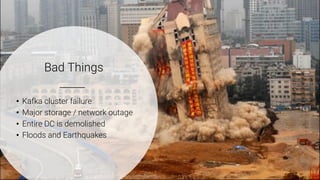
Bad Things
• Kafka cluster failure
• Major storage / network outage
• Entire DC is demolished
• Floods and Earthquakes
4
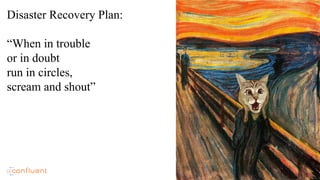
Disaster Recovery Plan:
“When in trouble
or in doubt
run in circles,
scream and shout”
5
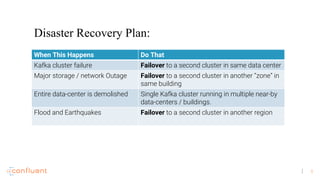
Disaster Recovery Plan:
When This Happens Do That
Kafka cluster failure Failover to a second cluster in same data center
Major storage / network Outage Failover to a second cluster in another “zone” in
same building
Entire data-center is demolished Single Kafka cluster running in multiple near-by
data-centers / buildings.
Flood and Earthquakes Failover to a second cluster in another region
6
There is no such thing
as a free lunch
Anyone who tells you differently
is selling something
7
Reality:
The same event will not appear
in two DCs at the exact same
time.
8
Things to ask:
• What are the guarantees in an event of unplanned failover?
• What are the guarantees in an event of planned failover?
• What is the process for failing back?
• How many data-centers are required?
• How does the solution impact my production performance?
• What are the bandwidth requirements between the data-centers?
9
Every solution needs to balance
these trade offs
Kafka takes DIY approach
10
The inherent complexity of multi data-center replication
There is a diversity of approaches
And diversity of problems
Kafka gives you the flexibility and tools to work
And we’ll give you an example and inspire you to build your own
List tradeoffs here
Here are things to watch out for:
How to do your homework
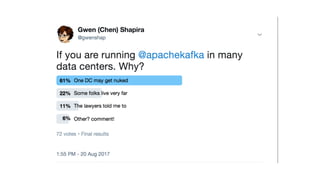
Tweet me J
11
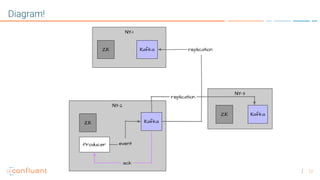
Stretch Cluster
The easy way
• Take 3 nearby data centers.
• Single digit ms latency is good
• Install at least 1 Zookeeper in each
• Install at least one Kafka broker in each
• Configure each DC as a “rack”
• Configure acks=all, min.isr=2
• Enjoy
12
Diagram!
13
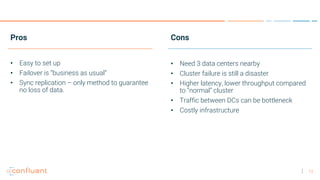
Pros
• Easy to set up
• Failover is “business as usual”
• Sync replication – only method to guarantee
no loss of data.
Cons
• Need 3 data centers nearby
• Cluster failure is still a disaster
• Higher latency, lower throughput compared
to “normal” cluster
• Traffic between DCs can be bottleneck
• Costly infrastructure
14
Want sync replication but only two
data centers?
15
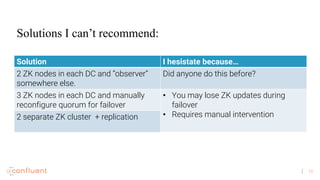
Solution I hesistate because…
2 ZK nodes in each DC and “observer”
somewhere else.
Did anyone do this before?
3 ZK nodes in each DC and manually
reconfigure quorum for failover
• You may lose ZK updates during
failover
• Requires manual intervention2 separate ZK cluster + replication
Solutions I can’t recommend:
16
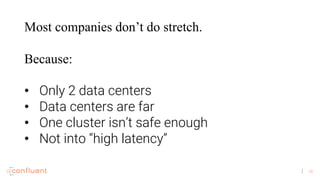
Most companies don’t do stretch.
Because:
• Only 2 data centers
• Data centers are far
• One cluster isn’t safe enough
• Not into “high latency”
17
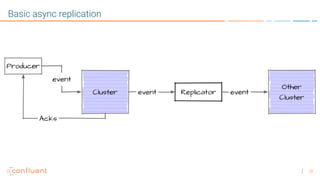
So you want to run
2 Kafka clusters
And replicate events
between them?
18
Basic async replication
19
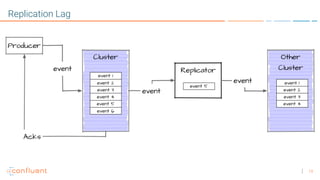
Replication Lag
20
Demo #1
Monitoring Replication Lag
21
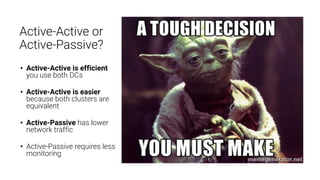
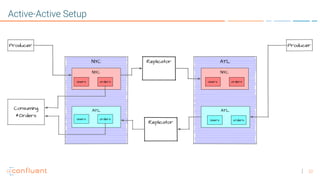
Active-Active or
Active-Passive?
• Active-Active is efficient
you use both DCs
• Active-Active is easier
because both clusters are
equivalent
• Active-Passive has lower
network traffic
• Active-Passive requires less
monitoring
22
Active-Active Setup
23
Disaster Strikes
24
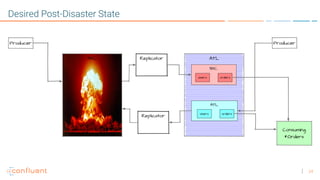
Desired Post-Disaster State
25
Only one question left:
What does it consume next?
26
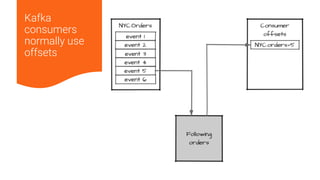
Kafka
consumers
normally use
offsets
27
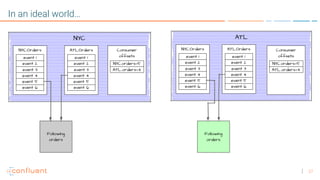
In an ideal world…
28
Unfortunately, this is not that simple
1. There is no guarantee that offsets are identical in the two data centers.
Event with offset 26 in NYC can be offset 6 or offset 30 in ATL.
2. Replication of each topic and partition is independent. So..
1. Offset metadata may arrive ahead of events themselves
2. Offset metadata may arrive late
Nothing prevents you from replicating offsets topic and using it. Just be realistic
about the guarantees.
29
If accuracy is no big-deal…
1. If duplicates are cool – start from the beginning.
Use Cases:
• Writing to a DB
• Anything idempotent
• Sending emails or alerts to people inside the company
2. If lost events are cool – jump to the latest event.
Use Cases:
• Clickstream analytics
• Log analytics
• “Big data” and analytics use-cases
30
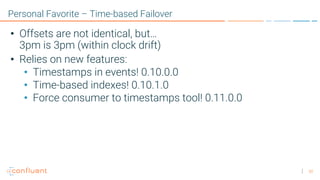
Personal Favorite – Time-based Failover
• Offsets are not identical, but…
3pm is 3pm (within clock drift)
• Relies on new features:
• Timestamps in events! 0.10.0.0
• Time-based indexes! 0.10.1.0
• Force consumer to timestamps tool! 0.11.0.0
31
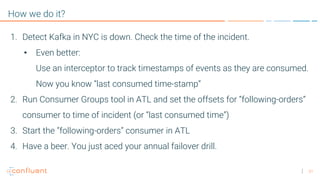
How we do it?
1. Detect Kafka in NYC is down. Check the time of the incident.
• Even better:
Use an interceptor to track timestamps of events as they are consumed.
Now you know “last consumed time-stamp”
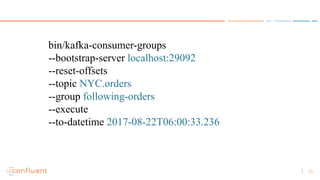
2. Run Consumer Groups tool in ATL and set the offsets for “following-orders”
consumer to time of incident (or “last consumed time”)
3. Start the ”following-orders” consumer in ATL
4. Have a beer. You just aced your annual failover drill.
32
bin/kafka-consumer-groups
--bootstrap-server localhost:29092
--reset-offsets
--topic NYC.orders
--group following-orders
--execute
--to-datetime 2017-08-22T06:00:33.236
33
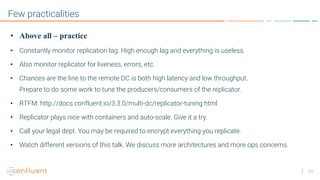
Few practicalities
• Above all – practice
• Constantly monitor replication lag. High enough lag and everything is useless.
• Also monitor replicator for liveness, errors, etc.
• Chances are the line to the remote DC is both high latency and low throughput.
Prepare to do some work to tune the producers/consumers of the replicator.
• RTFM: http://docs.confluent.io/3.3.0/multi-dc/replicator-tuning.html
• Replicator plays nice with containers and auto-scale. Give it a try.
• Call your legal dept. You may be required to encrypt everything you replicate.
• Watch different versions of this talk. We discuss more architectures and more ops concerns.
34
Thank You!

Disaster Recovery Plans for Apache Kafka

  • 1.
    1 Disaster Recovery Plans forApache Kafka Scale and Availability of Apache Kafka in Multiple Data Centers @gwenshap
  • 2.
  • 3.
    3 Bad Things • Kafkacluster failure • Major storage / network outage • Entire DC is demolished • Floods and Earthquakes
  • 4.
    4 Disaster Recovery Plan: “Whenin trouble or in doubt run in circles, scream and shout”
  • 5.
    5 Disaster Recovery Plan: WhenThis Happens Do That Kafka cluster failure Failover to a second cluster in same data center Major storage / network Outage Failover to a second cluster in another “zone” in same building Entire data-center is demolished Single Kafka cluster running in multiple near-by data-centers / buildings. Flood and Earthquakes Failover to a second cluster in another region
  • 6.
    6 There is nosuch thing as a free lunch Anyone who tells you differently is selling something
  • 7.
    7 Reality: The same eventwill not appear in two DCs at the exact same time.
  • 8.
    8 Things to ask: •What are the guarantees in an event of unplanned failover? • What are the guarantees in an event of planned failover? • What is the process for failing back? • How many data-centers are required? • How does the solution impact my production performance? • What are the bandwidth requirements between the data-centers?
  • 9.
    9 Every solution needsto balance these trade offs Kafka takes DIY approach
  • 10.
    10 The inherent complexityof multi data-center replication There is a diversity of approaches And diversity of problems Kafka gives you the flexibility and tools to work And we’ll give you an example and inspire you to build your own List tradeoffs here Here are things to watch out for: How to do your homework Tweet me J
  • 11.
    11 Stretch Cluster The easyway • Take 3 nearby data centers. • Single digit ms latency is good • Install at least 1 Zookeeper in each • Install at least one Kafka broker in each • Configure each DC as a “rack” • Configure acks=all, min.isr=2 • Enjoy
  • 12.
  • 13.
    13 Pros • Easy toset up • Failover is “business as usual” • Sync replication – only method to guarantee no loss of data. Cons • Need 3 data centers nearby • Cluster failure is still a disaster • Higher latency, lower throughput compared to “normal” cluster • Traffic between DCs can be bottleneck • Costly infrastructure
  • 14.
    14 Want sync replicationbut only two data centers?
  • 15.
    15 Solution I hesistatebecause… 2 ZK nodes in each DC and “observer” somewhere else. Did anyone do this before? 3 ZK nodes in each DC and manually reconfigure quorum for failover • You may lose ZK updates during failover • Requires manual intervention2 separate ZK cluster + replication Solutions I can’t recommend:
  • 16.
    16 Most companies don’tdo stretch. Because: • Only 2 data centers • Data centers are far • One cluster isn’t safe enough • Not into “high latency”
  • 17.
    17 So you wantto run 2 Kafka clusters And replicate events between them?
  • 18.
  • 19.
  • 20.
  • 21.
    21 Active-Active or Active-Passive? • Active-Activeis efficient you use both DCs • Active-Active is easier because both clusters are equivalent • Active-Passive has lower network traffic • Active-Passive requires less monitoring
  • 22.
  • 23.
  • 24.
  • 25.
    25 Only one questionleft: What does it consume next?
  • 26.
  • 27.
  • 28.
    28 Unfortunately, this isnot that simple 1. There is no guarantee that offsets are identical in the two data centers. Event with offset 26 in NYC can be offset 6 or offset 30 in ATL. 2. Replication of each topic and partition is independent. So.. 1. Offset metadata may arrive ahead of events themselves 2. Offset metadata may arrive late Nothing prevents you from replicating offsets topic and using it. Just be realistic about the guarantees.
  • 29.
    29 If accuracy isno big-deal… 1. If duplicates are cool – start from the beginning. Use Cases: • Writing to a DB • Anything idempotent • Sending emails or alerts to people inside the company 2. If lost events are cool – jump to the latest event. Use Cases: • Clickstream analytics • Log analytics • “Big data” and analytics use-cases
  • 30.
    30 Personal Favorite –Time-based Failover • Offsets are not identical, but… 3pm is 3pm (within clock drift) • Relies on new features: • Timestamps in events! 0.10.0.0 • Time-based indexes! 0.10.1.0 • Force consumer to timestamps tool! 0.11.0.0
  • 31.
    31 How we doit? 1. Detect Kafka in NYC is down. Check the time of the incident. • Even better: Use an interceptor to track timestamps of events as they are consumed. Now you know “last consumed time-stamp” 2. Run Consumer Groups tool in ATL and set the offsets for “following-orders” consumer to time of incident (or “last consumed time”) 3. Start the ”following-orders” consumer in ATL 4. Have a beer. You just aced your annual failover drill.
  • 32.
  • 33.
    33 Few practicalities • Aboveall – practice • Constantly monitor replication lag. High enough lag and everything is useless. • Also monitor replicator for liveness, errors, etc. • Chances are the line to the remote DC is both high latency and low throughput. Prepare to do some work to tune the producers/consumers of the replicator. • RTFM: http://docs.confluent.io/3.3.0/multi-dc/replicator-tuning.html • Replicator plays nice with containers and auto-scale. Give it a try. • Call your legal dept. You may be required to encrypt everything you replicate. • Watch different versions of this talk. We discuss more architectures and more ops concerns.
  • 34.