Multi-Protocol Label Switching
(MPLS)
Prepared By: Ripan Kumar Ray
Email: riponroy79@gmail.com
FB: www.facebook.com/nillakash34
LinkedIn: www.linkedin.com/in/riponroy79
Contents
• Introduction
• Characteristics
• How does it work
• MPLS Header
• Label Switched Routers (LSRs) & Label Edge Routers (LERs)
• Configuration
• Verifying MPLS Interfaces
Introduction
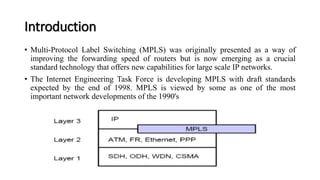
• Multi-Protocol Label Switching (MPLS) was originally presented as a way of
improving the forwarding speed of routers but is now emerging as a crucial
standard technology that offers new capabilities for large scale IP networks.
• The Internet Engineering Task Force is developing MPLS with draft standards
expected by the end of 1998. MPLS is viewed by some as one of the most
important network developments of the 1990's
Characteristics
• Mechanisms to manage traffic flows of various granularities (Flow Management)
• It independent of Layer-2 and Layer-3 protocols.
• Maps IP-addresses to fixed length labels.
• Supports ATM, Frame-Relay and Ethernet
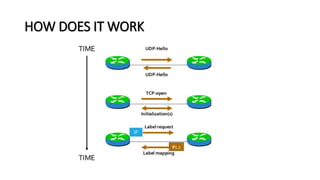
HOW DOES IT WORK
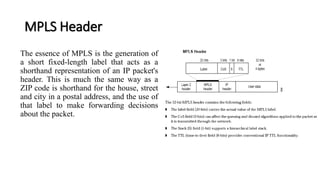
MPLS Header
The essence of MPLS is the generation of
a short fixed-length label that acts as a
shorthand representation of an IP packet's
header. This is much the same way as a
ZIP code is shorthand for the house, street
and city in a postal address, and the use of
that label to make forwarding decisions
about the packet.
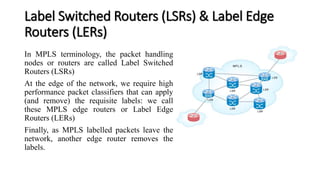
Label Switched Routers (LSRs) & Label Edge
Routers (LERs)
In MPLS terminology, the packet handling
nodes or routers are called Label Switched
Routers (LSRs)
At the edge of the network, we require high
performance packet classifiers that can apply
(and remove) the requisite labels: we call
these MPLS edge routers or Label Edge
Routers (LERs)
Finally, as MPLS labelled packets leave the
network, another edge router removes the
labels.
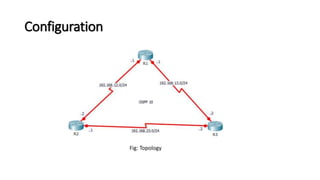
Configuration
Fig: Topology
Configuration
R1
!
interface Serial2/0
ip address 192.168.12.1 255.255.255.0
no shut
!
interface Serial3/0
ip address 192.168.13.1 255.255.255.0
no shut
!
router ospf 1
network 192.168.12.0 255.255.255.0 area 0
network 192.168.13.0 255.255.255.0 area 0
R2
!
interface Serial2/0
ip address 192.168.12.2 255.255.255.0
no shut
!
interface Serial3/0
ip address 192.168.23.1 255.255.255.0
no shut
!
router ospf 1
network 192.168.12.0 255.255.255.0 area 0
network 192.168.23.0 255.255.255.0 area 0
R3
!
interface Serial2/0
ip address 192.168.13.2 255.255.255.0
no shut
!
interface Serial3/0
ip address 192.168.23.2 255.255.255.0
no shut
!
router ospf 1
network 192.168.13.0 255.255.255.0 area 0
network 192.168.23.0 255.255.255.0 area 0
Enabling MPLS
Once you have done this the OSPF adjacencies should be up and running.
Now what we need to do is apply the necessary MPLS command to enable MPLS on network.
R1(config)#int se2/0 R2(config)#int se2/0 R3(config)#int se2/0
R1(config-if)#mpls ip R2(config-if)#mpls ip R3(config-if)#mpls ip
R1(config-if)#int se3/0 R2(config-if)#int se3/0 R3(config-if)#int se3/0
R1(config-if)#mpls ip R2(config-if)#mpls ip R3(config-if)#mpls ip
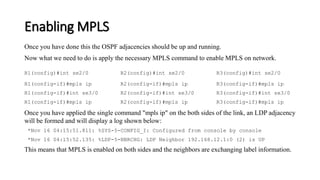
Once you have applied the single command "mpls ip" on the both sides of the link, an LDP adjacency
will be formed and will display a log shown below:
*Nov 16 04:15:51.811: %SYS-5-CONFIG_I: Configured from console by console
*Nov 16 04:15:52.135: %LDP-5-NBRCHG: LDP Neighbor 192.168.12.1:0 (2) is UP
This means that MPLS is enabled on both sides and the neighbors are exchanging label information.
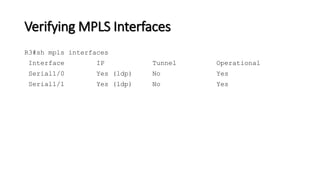
Verifying MPLS Interfaces
R3#sh mpls interfaces
Interface IP Tunnel Operational
Serial1/0 Yes (ldp) No Yes
Serial1/1 Yes (ldp) No Yes
Thank You

Multi protocol label switching (mpls)

  • 1.
    Multi-Protocol Label Switching (MPLS) PreparedBy: Ripan Kumar Ray Email: riponroy79@gmail.com FB: www.facebook.com/nillakash34 LinkedIn: www.linkedin.com/in/riponroy79
  • 2.
    Contents • Introduction • Characteristics •How does it work • MPLS Header • Label Switched Routers (LSRs) & Label Edge Routers (LERs) • Configuration • Verifying MPLS Interfaces
  • 3.
    Introduction • Multi-Protocol LabelSwitching (MPLS) was originally presented as a way of improving the forwarding speed of routers but is now emerging as a crucial standard technology that offers new capabilities for large scale IP networks. • The Internet Engineering Task Force is developing MPLS with draft standards expected by the end of 1998. MPLS is viewed by some as one of the most important network developments of the 1990's
  • 4.
    Characteristics • Mechanisms tomanage traffic flows of various granularities (Flow Management) • It independent of Layer-2 and Layer-3 protocols. • Maps IP-addresses to fixed length labels. • Supports ATM, Frame-Relay and Ethernet
  • 5.
  • 6.
    MPLS Header The essenceof MPLS is the generation of a short fixed-length label that acts as a shorthand representation of an IP packet's header. This is much the same way as a ZIP code is shorthand for the house, street and city in a postal address, and the use of that label to make forwarding decisions about the packet.
  • 7.
    Label Switched Routers(LSRs) & Label Edge Routers (LERs) In MPLS terminology, the packet handling nodes or routers are called Label Switched Routers (LSRs) At the edge of the network, we require high performance packet classifiers that can apply (and remove) the requisite labels: we call these MPLS edge routers or Label Edge Routers (LERs) Finally, as MPLS labelled packets leave the network, another edge router removes the labels.
  • 8.
  • 9.
    Configuration R1 ! interface Serial2/0 ip address192.168.12.1 255.255.255.0 no shut ! interface Serial3/0 ip address 192.168.13.1 255.255.255.0 no shut ! router ospf 1 network 192.168.12.0 255.255.255.0 area 0 network 192.168.13.0 255.255.255.0 area 0 R2 ! interface Serial2/0 ip address 192.168.12.2 255.255.255.0 no shut ! interface Serial3/0 ip address 192.168.23.1 255.255.255.0 no shut ! router ospf 1 network 192.168.12.0 255.255.255.0 area 0 network 192.168.23.0 255.255.255.0 area 0 R3 ! interface Serial2/0 ip address 192.168.13.2 255.255.255.0 no shut ! interface Serial3/0 ip address 192.168.23.2 255.255.255.0 no shut ! router ospf 1 network 192.168.13.0 255.255.255.0 area 0 network 192.168.23.0 255.255.255.0 area 0
  • 10.
    Enabling MPLS Once youhave done this the OSPF adjacencies should be up and running. Now what we need to do is apply the necessary MPLS command to enable MPLS on network. R1(config)#int se2/0 R2(config)#int se2/0 R3(config)#int se2/0 R1(config-if)#mpls ip R2(config-if)#mpls ip R3(config-if)#mpls ip R1(config-if)#int se3/0 R2(config-if)#int se3/0 R3(config-if)#int se3/0 R1(config-if)#mpls ip R2(config-if)#mpls ip R3(config-if)#mpls ip Once you have applied the single command "mpls ip" on the both sides of the link, an LDP adjacency will be formed and will display a log shown below: *Nov 16 04:15:51.811: %SYS-5-CONFIG_I: Configured from console by console *Nov 16 04:15:52.135: %LDP-5-NBRCHG: LDP Neighbor 192.168.12.1:0 (2) is UP This means that MPLS is enabled on both sides and the neighbors are exchanging label information.
  • 11.
    Verifying MPLS Interfaces R3#shmpls interfaces Interface IP Tunnel Operational Serial1/0 Yes (ldp) No Yes Serial1/1 Yes (ldp) No Yes
  • 12.