MULE SAP CONNECTOR
OVERVIEW
- As one of the most widely used enterprise resource planning solutions on the market, SAP
plays a central role in the most critical business processes for many companies. In order to
fully automate and optimize these business processes, companies need to integrate SAP
with other applications within their organization. This article discusses SAP integration with
other applications like Salesforce, e-POS, e-Commerce SharePoint etc. including uses and
benefits, challenges, and new approaches.
- An alternative approach to point-to-point quick fixes and expensive SOA stacks is
integrate SAP using an (Enterprise Service Bus).
- Mule’s SAP Enterprise Connector provides bidirectional communication and works with
existing SAP technologies such as:
 Intermediate Documents (IDocs)
 Business Application Programming Interfaces (BAPIs)
 SAP Java Connector (JCo)
2
MULE ESB SAP CONNECTOR
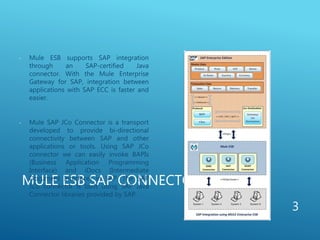
- Mule ESB supports SAP integration
through an SAP-certified Java
connector. With the Mule Enterprise
Gateway for SAP, integration between
applications with SAP ECC is faster and
easier.
- Mule SAP JCo Connector is a transport
developed to provide bi-directional
connectivity between SAP and other
applications or tools. Using SAP JCo
connector we can easily invoke BAPIs
(Business Application Programming
Interface) and iDocs (Intermediate
Document Interface) in SAP. The SAP
JCo connector is built using SAP Java
Connector libraries provided by SAP.
3
MULE ESB SAP CONNECTOR
(CONT ...)
The connector leverages the SAP Java Connector (JCo) libraries, which enable Mule
applications to:
 Send and receive iDocs over tRFC and qRFC
 Transform all SAP objects (JCoFunction & IDocs) both to and from XML
 Execute Business Application Programming Interface (BAPI) functions using all of the
following types of Remote Function Calls (RFC) like sRFC (synchronous RFC), tRFC
(transactional RFC) and qRFC (queued RFC)
 Act as a JCo Server to be called as a BAPI over the following protocols like sRFC, tRFC,
qRFC
The SAP connector establishes connection to SAP system using JCO libraries (provided by SAP).
The Connector supports the option to configure SAP connection details, connection
pooling and max limit of active connections. If the connector is used for outbound data
from SAP, then ESB registers the current Mule ESB instance as JCO destination/Gateway
Server.
4
INTEGRATION FOR SAP BAPI
FUNCTION
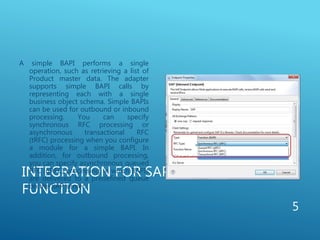
A simple BAPI performs a single
operation, such as retrieving a list of
Product master data. The adapter
supports simple BAPI calls by
representing each with a single
business object schema. Simple BAPIs
can be used for outbound or inbound
processing. You can specify
synchronous RFC processing or
asynchronous transactional RFC
(tRFC) processing when you configure
a module for a simple BAPI. In
addition, for outbound processing,
you can specify asynchronous queued
RFC (qRFC) processing, in which BAPIs
are delivered to a predefined queue
on the SAP server.
5
INTEGRATION FOR SAP BAPI
FUNCTION (CONT ...)
 In synchronous RFC processing, the SAP server and the adapter must be
available during processing.
 In outbound processing, the message flow sends a request, then waits for a
response from the SAP server.
 In inbound processing, the SAP server sends a request through the adapter to an
endpoint and waits for a response from the adapter.
 In asynchronous tRFC outbound processing, the adapter associates a transaction
ID with the function call to the SAP server. The adapter does not wait for a
response from the SAP server. If the delivery is unsuccessful, the message flow
can use the SAP transaction ID (TID) to make the request again. The TID is a field
in your message.
6
INTEGRATION FOR SAP BAPI
FUNCTION (CONT ...)
 In asynchronous tRFC inbound processing, the adapter does not have to be
available when the SAP server runs the function call. The function call is placed
on a list of functions to be invoked, and the call is attempted until it is
successful. To send function calls from a user-defined outbound queue on the
SAP server, you also specify asynchronous tRFC inbound processing.
 In asynchronous qRFC outbound processing, the process is similar to
asynchronous tRFC outbound processing. A TID is associated with the function
call, and the adapter does not wait for a response from the SAP server. In
addition, the BAPIs are delivered to a predefined queue on the SAP server. By
sending BAPIs to the predefined queue, you can ensure the order in which they
are delivered.
7
INTEGRATION FOR SAP IDOCS
DOCUMENTS
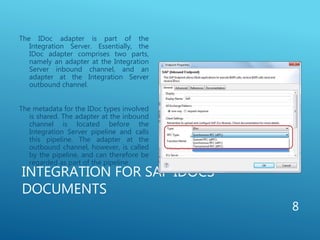
The IDoc adapter is part of the
Integration Server. Essentially, the
IDoc adapter comprises two parts,
namely an adapter at the Integration
Server inbound channel, and an
adapter at the Integration Server
outbound channel.
The metadata for the IDoc types involved
is shared. The adapter at the inbound
channel is located before the
Integration Server pipeline and calls
this pipeline. The adapter at the
outbound channel, however, is called
by the pipeline, and can therefore be
regarded as part of the pipeline.
8
INTEGRATION FOR SAP IDOCS DOCUMENTS
(CONT ...)
As part of ESB flow definition, a SAP inbound endpoint was used to receive iDocs from SAP. A
new destination (Program ID) was created in SAP, the iDocs created in SAP were also
published to the new destination.
There are two processes in IDOC processing one is INBOUND PROCESS (IDOC coming to the
system and its handling at various stages) and the other is OUTBOUND PROCESS (IDOC is
send to other system. Outbound data from SAP, in case of Price/VAT data from SAP, ESB
receives iDocs as JCO iDocDocumentList elements. Each iDocDocument contains iDoc
metadata and Segments which internally had the Segment data (Price or VAT information).
ESB can receive multiple iDocs at any time.
Inbound data to SAP, in case of Sales/Return Order from other application to SAP, Mule ESB
converted payload to iDoc XML format using XML-to-iDoc transformer and posted the
request to SAP.
9
BENEFITS
When SAP is properly integrated with other applications, companies are able to
streamline and fully automate their business processes. Companies further
benefit from SAP integration in the following ways:
 Increased Business Alignment: The ability to create an integrated agile
software infrastructure for changing business needs
 Better Business Efficiency: The ability to streamline, automate, and enable a
better tracking and visibility to business processes
 Improved Business Visibility: Ability to integrate systems and to aggregate
data for a consistent and accurate view of business as a whole
 Significant cost savings by using low cost Mule ESB Enterprise
10
BENEFITS (CONT ...) Support for functional and non-functional requirements
 Ability to generate reports in SAP based on regions and evaluate the sale across the world
 Improved customer interactions by automating direct communications
 Elimination of the need for dual data entry, saving time and money
 Fewer data redundancies and errors caused by manual data entry
 Enhanced agility to act on new information quickly
11

Mule sap connector

  • 1.
  • 2.
    OVERVIEW - As oneof the most widely used enterprise resource planning solutions on the market, SAP plays a central role in the most critical business processes for many companies. In order to fully automate and optimize these business processes, companies need to integrate SAP with other applications within their organization. This article discusses SAP integration with other applications like Salesforce, e-POS, e-Commerce SharePoint etc. including uses and benefits, challenges, and new approaches. - An alternative approach to point-to-point quick fixes and expensive SOA stacks is integrate SAP using an (Enterprise Service Bus). - Mule’s SAP Enterprise Connector provides bidirectional communication and works with existing SAP technologies such as:  Intermediate Documents (IDocs)  Business Application Programming Interfaces (BAPIs)  SAP Java Connector (JCo) 2
  • 3.
    MULE ESB SAPCONNECTOR - Mule ESB supports SAP integration through an SAP-certified Java connector. With the Mule Enterprise Gateway for SAP, integration between applications with SAP ECC is faster and easier. - Mule SAP JCo Connector is a transport developed to provide bi-directional connectivity between SAP and other applications or tools. Using SAP JCo connector we can easily invoke BAPIs (Business Application Programming Interface) and iDocs (Intermediate Document Interface) in SAP. The SAP JCo connector is built using SAP Java Connector libraries provided by SAP. 3
  • 4.
    MULE ESB SAPCONNECTOR (CONT ...) The connector leverages the SAP Java Connector (JCo) libraries, which enable Mule applications to:  Send and receive iDocs over tRFC and qRFC  Transform all SAP objects (JCoFunction & IDocs) both to and from XML  Execute Business Application Programming Interface (BAPI) functions using all of the following types of Remote Function Calls (RFC) like sRFC (synchronous RFC), tRFC (transactional RFC) and qRFC (queued RFC)  Act as a JCo Server to be called as a BAPI over the following protocols like sRFC, tRFC, qRFC The SAP connector establishes connection to SAP system using JCO libraries (provided by SAP). The Connector supports the option to configure SAP connection details, connection pooling and max limit of active connections. If the connector is used for outbound data from SAP, then ESB registers the current Mule ESB instance as JCO destination/Gateway Server. 4
  • 5.
    INTEGRATION FOR SAPBAPI FUNCTION A simple BAPI performs a single operation, such as retrieving a list of Product master data. The adapter supports simple BAPI calls by representing each with a single business object schema. Simple BAPIs can be used for outbound or inbound processing. You can specify synchronous RFC processing or asynchronous transactional RFC (tRFC) processing when you configure a module for a simple BAPI. In addition, for outbound processing, you can specify asynchronous queued RFC (qRFC) processing, in which BAPIs are delivered to a predefined queue on the SAP server. 5
  • 6.
    INTEGRATION FOR SAPBAPI FUNCTION (CONT ...)  In synchronous RFC processing, the SAP server and the adapter must be available during processing.  In outbound processing, the message flow sends a request, then waits for a response from the SAP server.  In inbound processing, the SAP server sends a request through the adapter to an endpoint and waits for a response from the adapter.  In asynchronous tRFC outbound processing, the adapter associates a transaction ID with the function call to the SAP server. The adapter does not wait for a response from the SAP server. If the delivery is unsuccessful, the message flow can use the SAP transaction ID (TID) to make the request again. The TID is a field in your message. 6
  • 7.
    INTEGRATION FOR SAPBAPI FUNCTION (CONT ...)  In asynchronous tRFC inbound processing, the adapter does not have to be available when the SAP server runs the function call. The function call is placed on a list of functions to be invoked, and the call is attempted until it is successful. To send function calls from a user-defined outbound queue on the SAP server, you also specify asynchronous tRFC inbound processing.  In asynchronous qRFC outbound processing, the process is similar to asynchronous tRFC outbound processing. A TID is associated with the function call, and the adapter does not wait for a response from the SAP server. In addition, the BAPIs are delivered to a predefined queue on the SAP server. By sending BAPIs to the predefined queue, you can ensure the order in which they are delivered. 7
  • 8.
    INTEGRATION FOR SAPIDOCS DOCUMENTS The IDoc adapter is part of the Integration Server. Essentially, the IDoc adapter comprises two parts, namely an adapter at the Integration Server inbound channel, and an adapter at the Integration Server outbound channel. The metadata for the IDoc types involved is shared. The adapter at the inbound channel is located before the Integration Server pipeline and calls this pipeline. The adapter at the outbound channel, however, is called by the pipeline, and can therefore be regarded as part of the pipeline. 8
  • 9.
    INTEGRATION FOR SAPIDOCS DOCUMENTS (CONT ...) As part of ESB flow definition, a SAP inbound endpoint was used to receive iDocs from SAP. A new destination (Program ID) was created in SAP, the iDocs created in SAP were also published to the new destination. There are two processes in IDOC processing one is INBOUND PROCESS (IDOC coming to the system and its handling at various stages) and the other is OUTBOUND PROCESS (IDOC is send to other system. Outbound data from SAP, in case of Price/VAT data from SAP, ESB receives iDocs as JCO iDocDocumentList elements. Each iDocDocument contains iDoc metadata and Segments which internally had the Segment data (Price or VAT information). ESB can receive multiple iDocs at any time. Inbound data to SAP, in case of Sales/Return Order from other application to SAP, Mule ESB converted payload to iDoc XML format using XML-to-iDoc transformer and posted the request to SAP. 9
  • 10.
    BENEFITS When SAP isproperly integrated with other applications, companies are able to streamline and fully automate their business processes. Companies further benefit from SAP integration in the following ways:  Increased Business Alignment: The ability to create an integrated agile software infrastructure for changing business needs  Better Business Efficiency: The ability to streamline, automate, and enable a better tracking and visibility to business processes  Improved Business Visibility: Ability to integrate systems and to aggregate data for a consistent and accurate view of business as a whole  Significant cost savings by using low cost Mule ESB Enterprise 10
  • 11.
    BENEFITS (CONT ...)Support for functional and non-functional requirements  Ability to generate reports in SAP based on regions and evaluate the sale across the world  Improved customer interactions by automating direct communications  Elimination of the need for dual data entry, saving time and money  Fewer data redundancies and errors caused by manual data entry  Enhanced agility to act on new information quickly 11

Editor's Notes

  • #6 Follow Do's and Do Not'sCommon Profile PicFollow Company and Geography:HydAdd followers from peers and WW, MuleSoftHave a Note about yourselfAsk Questions in live BrightTalk Webinars using #tweetsTweet/Retweet Articles on Mule. WW blog, G+ and Forum Links Follow WW and Mulesoft....
  • #7 Follow Do's and Do Not'sCommon Profile PicFollow Company and Geography:HydAdd followers from peers and WW, MuleSoftHave a Note about yourselfAsk Questions in live BrightTalk Webinars using #tweetsTweet/Retweet Articles on Mule. WW blog, G+ and Forum Links Follow WW and Mulesoft....
  • #8 Follow Do's and Do Not'sCommon Profile PicFollow Company and Geography:HydAdd followers from peers and WW, MuleSoftHave a Note about yourselfAsk Questions in live BrightTalk Webinars using #tweetsTweet/Retweet Articles on Mule. WW blog, G+ and Forum Links Follow WW and Mulesoft....